Solved Computer won't boot after deleting linux partition

Blue67impala

New member
Local time
4:43 PM
Messages
27
I had linux mint on my 500gb hitachi hdd and windows 7 64bit on my primary 1tb WD hdd. I used easybcd to create a dual boot bcd screen. Now i royally screwed up my linux mint install while trying to get the wireless functionality to work, don't ask me how though. So i decided to try ubuntu, maybe i would have better luck. So i went into disk management and started deleting linux partitions (i set up multiple for certain directories). I rebooted and then my computer wouldn't even get past the initial boot/BIOS screen. I tried unplugging my secondary hard drive and then i could boot to my primary and into windows. If i try to plug my secondary hard drive after i boot into windows then my hard drive doesn't show up in disk management. If i try to boot into a ubuntu live cd and i plug in my secondary while its booting i get stuck on the ubuntu boot logo. Same if i try to plug in the hdd while i'm booting into a recovery disk. I tried swapping sata ports too which did nothing to help me. So my secondary hdd is basically rendered unusable. Please help!!!!
 

My Computer

Computer type
PC/Desktop
Computer Manufacturer/Model Number
Custom build
OS
Windows 7
CPU
Intel I7
Motherboard
VelocityMicro
Memory
8gb
Graphics Card(s)
EVGA nvidia gtx 560
Hard Drives
Hitachi 1tb Primary
Hitachi 500 gb Secondary
Antivirus
Advanced system care
Browser
Chrome
UPDATE: tried scanning for the hard drive in the device manager by right clicking my computer name and clciking scan for hardware changes and the scan is stuck on scanning plug and play devices.
 

My Computer

Computer type
PC/Desktop
Computer Manufacturer/Model Number
Custom build
OS
Windows 7
CPU
Intel I7
Motherboard
VelocityMicro
Memory
8gb
Graphics Card(s)
EVGA nvidia gtx 560
Hard Drives
Hitachi 1tb Primary
Hitachi 500 gb Secondary
Antivirus
Advanced system care
Browser
Chrome
You have to fix the BCD on your primary hard drive. Read this tutorial starting with step 3.
 

My Computer

Computer Manufacturer/Model Number
HP, Dell, Gateway, Toshiba - 4 laptops and 2 desktops
OS
Vista, Windows7, Mint Mate, Zorin, Windows 8
CPU
from 1.6GHz Duo to i7
Monitor(s) Displays
2x HP w2207
Hard Drives
5x HDD, 7x SSD, 12x Externals
Keyboard
with trackball - no mices
Mouse
Trackball mice
Internet Speed
DSL 6000
Okay, i followed the steps and rebooted but my computer still isn't booting past the bios boot logo while my secondary hard drive is still plugged in.
 

My Computer

Computer type
PC/Desktop
Computer Manufacturer/Model Number
Custom build
OS
Windows 7
CPU
Intel I7
Motherboard
VelocityMicro
Memory
8gb
Graphics Card(s)
EVGA nvidia gtx 560
Hard Drives
Hitachi 1tb Primary
Hitachi 500 gb Secondary
Antivirus
Advanced system care
Browser
Chrome
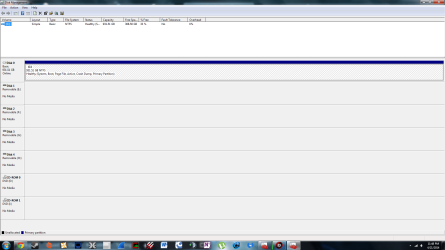
Can you post a picture of your Disk Management without the secondary drive (obviously, LOL).
 

My Computer

Computer Manufacturer/Model Number
HP, Dell, Gateway, Toshiba - 4 laptops and 2 desktops
OS
Vista, Windows7, Mint Mate, Zorin, Windows 8
CPU
from 1.6GHz Duo to i7
Monitor(s) Displays
2x HP w2207
Hard Drives
5x HDD, 7x SSD, 12x Externals
Keyboard
with trackball - no mices
Mouse
Trackball mice
Internet Speed
DSL 6000
Sure
 

Attachments

  • disk management.png
    disk management.png
    50.9 KB · Views: 5

My Computer

Computer type
PC/Desktop
Computer Manufacturer/Model Number
Custom build
OS
Windows 7
CPU
Intel I7
Motherboard
VelocityMicro
Memory
8gb
Graphics Card(s)
EVGA nvidia gtx 560
Hard Drives
Hitachi 1tb Primary
Hitachi 500 gb Secondary
Antivirus
Advanced system care
Browser
Chrome
Also device manager is still stuck on search for plug and play devices when I scan for new hardware
 

Attachments

  • device manager.jpg
    device manager.jpg
    182.8 KB · Views: 2

My Computer

Computer type
PC/Desktop
Computer Manufacturer/Model Number
Custom build
OS
Windows 7
CPU
Intel I7
Motherboard
VelocityMicro
Memory
8gb
Graphics Card(s)
EVGA nvidia gtx 560
Hard Drives
Hitachi 1tb Primary
Hitachi 500 gb Secondary
Antivirus
Advanced system care
Browser
Chrome
Hmm, that's too bad. I was hoping you had a seperate 100MB system partition.

Something is screwed up in your bootmgr. If it were in an independent system partition, we would have scrapped that and put a new one into C. But the way your disk is configured, that is not possible.

Since you now have EasyBCD, check once what your default boot entry is.

https://neosmart.net/wiki/easybcd/basics/changing-default-entry/
 

My Computer

Computer Manufacturer/Model Number
HP, Dell, Gateway, Toshiba - 4 laptops and 2 desktops
OS
Vista, Windows7, Mint Mate, Zorin, Windows 8
CPU
from 1.6GHz Duo to i7
Monitor(s) Displays
2x HP w2207
Hard Drives
5x HDD, 7x SSD, 12x Externals
Keyboard
with trackball - no mices
Mouse
Trackball mice
Internet Speed
DSL 6000
windows 7 is the only entry in easybcd and its default because i erased the linux mint entry a while ago.
 

My Computer

Computer type
PC/Desktop
Computer Manufacturer/Model Number
Custom build
OS
Windows 7
CPU
Intel I7
Motherboard
VelocityMicro
Memory
8gb
Graphics Card(s)
EVGA nvidia gtx 560
Hard Drives
Hitachi 1tb Primary
Hitachi 500 gb Secondary
Antivirus
Advanced system care
Browser
Chrome
And I can assume that the other disk is not in front of the Windows disk in the BIOS boot sequence. Right.

I am slowly running out of ideas, LOL.
 

My Computer

Computer Manufacturer/Model Number
HP, Dell, Gateway, Toshiba - 4 laptops and 2 desktops
OS
Vista, Windows7, Mint Mate, Zorin, Windows 8
CPU
from 1.6GHz Duo to i7
Monitor(s) Displays
2x HP w2207
Hard Drives
5x HDD, 7x SSD, 12x Externals
Keyboard
with trackball - no mices
Mouse
Trackball mice
Internet Speed
DSL 6000
Yes, the primary hard drive is the only one listed in the bios because I can't get into the bios at all if I have the secondary hard drive plugged in. If I have it plugged in my computer stays at the manufacturer boot logo and none of the F2, F10, F11, keys will work. My only option is to press the button to power down and unplug the secondary sata drive then restart. Man I really screwed up.
 

My Computer

Computer type
PC/Desktop
Computer Manufacturer/Model Number
Custom build
OS
Windows 7
CPU
Intel I7
Motherboard
VelocityMicro
Memory
8gb
Graphics Card(s)
EVGA nvidia gtx 560
Hard Drives
Hitachi 1tb Primary
Hitachi 500 gb Secondary
Antivirus
Advanced system care
Browser
Chrome
It is obviously trying to boot from the other disk. And the only 2 ways it can get there is via the BIOS or the bootmgr.
 

My Computer

Computer Manufacturer/Model Number
HP, Dell, Gateway, Toshiba - 4 laptops and 2 desktops
OS
Vista, Windows7, Mint Mate, Zorin, Windows 8
CPU
from 1.6GHz Duo to i7
Monitor(s) Displays
2x HP w2207
Hard Drives
5x HDD, 7x SSD, 12x Externals
Keyboard
with trackball - no mices
Mouse
Trackball mice
Internet Speed
DSL 6000
Do you have anothe system where you could attach that other drive.
 

My Computer

Computer Manufacturer/Model Number
HP, Dell, Gateway, Toshiba - 4 laptops and 2 desktops
OS
Vista, Windows7, Mint Mate, Zorin, Windows 8
CPU
from 1.6GHz Duo to i7
Monitor(s) Displays
2x HP w2207
Hard Drives
5x HDD, 7x SSD, 12x Externals
Keyboard
with trackball - no mices
Mouse
Trackball mice
Internet Speed
DSL 6000
One completely different possibility is that this drive is defective. The BIOS checks all devices before it starts the boot process. It could get hung up on that disk. That's why it would be interesting to see whether that also happens on another system.
 

My Computer

Computer Manufacturer/Model Number
HP, Dell, Gateway, Toshiba - 4 laptops and 2 desktops
OS
Vista, Windows7, Mint Mate, Zorin, Windows 8
CPU
from 1.6GHz Duo to i7
Monitor(s) Displays
2x HP w2207
Hard Drives
5x HDD, 7x SSD, 12x Externals
Keyboard
with trackball - no mices
Mouse
Trackball mice
Internet Speed
DSL 6000
I would need a usb to sata adapter or something like that which I don't have right now. I sincerely doubt that there is anything wrong with the drive though, it was working fine until I deleted the root partition of linux through windows disk management, but the other partitions are still on there, could that have something to do with it?
 

My Computer

Computer type
PC/Desktop
Computer Manufacturer/Model Number
Custom build
OS
Windows 7
CPU
Intel I7
Motherboard
VelocityMicro
Memory
8gb
Graphics Card(s)
EVGA nvidia gtx 560
Hard Drives
Hitachi 1tb Primary
Hitachi 500 gb Secondary
Antivirus
Advanced system care
Browser
Chrome
Can you check it out on another PC.
 

My Computer

Computer Manufacturer/Model Number
HP, Dell, Gateway, Toshiba - 4 laptops and 2 desktops
OS
Vista, Windows7, Mint Mate, Zorin, Windows 8
CPU
from 1.6GHz Duo to i7
Monitor(s) Displays
2x HP w2207
Hard Drives
5x HDD, 7x SSD, 12x Externals
Keyboard
with trackball - no mices
Mouse
Trackball mice
Internet Speed
DSL 6000
I may be able to buy one of those adapter tomorrow, if I get a chance to test it I will let you know
 

My Computer

Computer type
PC/Desktop
Computer Manufacturer/Model Number
Custom build
OS
Windows 7
CPU
Intel I7
Motherboard
VelocityMicro
Memory
8gb
Graphics Card(s)
EVGA nvidia gtx 560
Hard Drives
Hitachi 1tb Primary
Hitachi 500 gb Secondary
Antivirus
Advanced system care
Browser
Chrome
OK. I'll have to head East now (my bedroom), LOL. It's after midnight in my neck of the woods. Let's continue tomorrow.
 

My Computer

Computer Manufacturer/Model Number
HP, Dell, Gateway, Toshiba - 4 laptops and 2 desktops
OS
Vista, Windows7, Mint Mate, Zorin, Windows 8
CPU
from 1.6GHz Duo to i7
Monitor(s) Displays
2x HP w2207
Hard Drives
5x HDD, 7x SSD, 12x Externals
Keyboard
with trackball - no mices
Mouse
Trackball mice
Internet Speed
DSL 6000
Okay thank you
 

My Computer

Computer type
PC/Desktop
Computer Manufacturer/Model Number
Custom build
OS
Windows 7
CPU
Intel I7
Motherboard
VelocityMicro
Memory
8gb
Graphics Card(s)
EVGA nvidia gtx 560
Hard Drives
Hitachi 1tb Primary
Hitachi 500 gb Secondary
Antivirus
Advanced system care
Browser
Chrome
Ok so i went into the bios without the hard drive plugged in, i set the hard drive transfer mode from ide to ahci and rebooted. This enabled me to plug in my secondary and boot without stopping at the bios boot logo. But now i freeze at the windows boot sequnce. I need a way to safely format the entire second hard drive and delete all of the linux partitions leftover on it. Any ideas?
 

My Computer

Computer type
PC/Desktop
Computer Manufacturer/Model Number
Custom build
OS
Windows 7
CPU
Intel I7
Motherboard
VelocityMicro
Memory
8gb
Graphics Card(s)
EVGA nvidia gtx 560
Hard Drives
Hitachi 1tb Primary
Hitachi 500 gb Secondary
Antivirus
Advanced system care
Browser
Chrome
Back
Top