Solved Computer won't boot up need help ASAP

Laith

Otaku Pride
Guru
Gold Member
VIP
Local time
6:52 PM
Messages
2,751
So i installed a new cooling fan for my friend and reassembled the motherboard but the computer won't boot up, everything is running but the monitor doesn't show up.
 

My Computer

Computer type
PC/Desktop
Computer Manufacturer/Model Number
me!
OS
Windows 10 Pro x64
CPU
AMD Ryzen 5 1600 @ [email protected]
Motherboard
ASUS B350 PRIME-PLUS
Memory
G.Skill Flare X 16GB (2x8GB) DDR4-2400 @ 2666MHz
Graphics Card(s)
Sapphire Radeon Vega 56 NITRO+
Sound Card
None
Monitor(s) Displays
ASUS VG248QZ
Screen Resolution
1920x1080
Hard Drives
Samsung 850 EVO 250GB*, 1TB Seagate Constellation ES, 2x Samsung 840 250GB in RAID0*

*Thanks ICIT2LOL for supplying me with all of these drives!
PSU
Corsair VS550
Case
Corsair Crystal 460X
Cooling
AMD Wraith Spire
Keyboard
Ducky Shine 6 w/ MX Browns and PBT keycaps
Mouse
Xtrfy M1-Ice
Internet Speed
100MBit/s down, 20MBit/s up
Antivirus
Bitdefender
Browser
Google Chrome
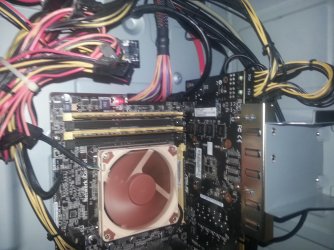
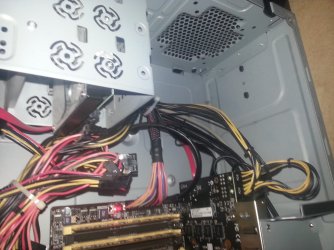
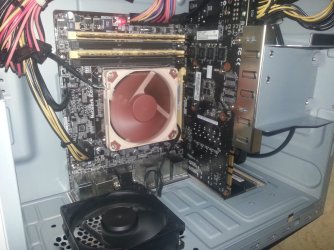
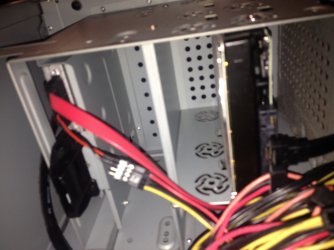
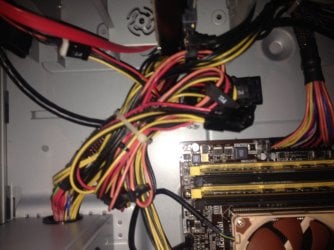
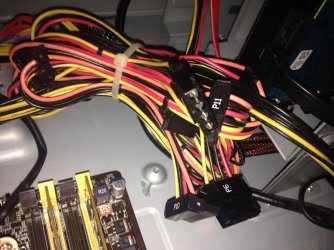
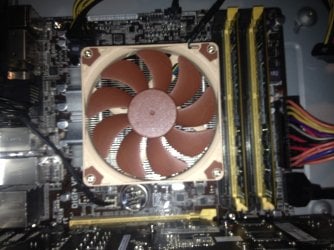
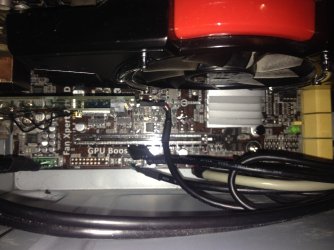
Here's some pictures
 

Attachments

  • 20150830_165109.jpg
    20150830_165109.jpg
    794.1 KB · Views: 2
  • 20150830_165123.jpg
    20150830_165123.jpg
    602.1 KB · Views: 1
  • 20150830_165127.jpg
    20150830_165127.jpg
    520.9 KB · Views: 1
  • 20150830_165125.jpg
    20150830_165125.jpg
    572.3 KB · Views: 1

My Computer

Computer type
PC/Desktop
Computer Manufacturer/Model Number
me!
OS
Windows 10 Pro x64
CPU
AMD Ryzen 5 1600 @ [email protected]
Motherboard
ASUS B350 PRIME-PLUS
Memory
G.Skill Flare X 16GB (2x8GB) DDR4-2400 @ 2666MHz
Graphics Card(s)
Sapphire Radeon Vega 56 NITRO+
Sound Card
None
Monitor(s) Displays
ASUS VG248QZ
Screen Resolution
1920x1080
Hard Drives
Samsung 850 EVO 250GB*, 1TB Seagate Constellation ES, 2x Samsung 840 250GB in RAID0*

*Thanks ICIT2LOL for supplying me with all of these drives!
PSU
Corsair VS550
Case
Corsair Crystal 460X
Cooling
AMD Wraith Spire
Keyboard
Ducky Shine 6 w/ MX Browns and PBT keycaps
Mouse
Xtrfy M1-Ice
Internet Speed
100MBit/s down, 20MBit/s up
Antivirus
Bitdefender
Browser
Google Chrome
I see both green lights for power to the video card are on, that's good.

I'm not sure what you mean when you say.
reassembled the motherboard
I presume their is a cpu cooler under that Noctua cooling fan. Is that correct?
What kind of cpu cooler is used.

Have you tried reseating the video card?
Do you have speakers you can hear Windows boot with it's little tune?
 

My Computer

Computer type
PC/Desktop
Computer Manufacturer/Model Number
Home made Desktop
OS
Windows 10 Pro. 64/ version 1709 Windows 7 Pro/64
CPU
Intel i7-6800K @ 4.3
Motherboard
ASUS X-99 Deluxe II
Memory
Corsair Platinum 16 gig @2400
Graphics Card(s)
EVGA GTX 1070 OC
Monitor(s) Displays
Asus 27" LED LCD/VE278Q
Screen Resolution
1920-1080 or 1280-720 HDMI
Hard Drives
INTEL SSD 730-240 Gb Sata 3.0/
PSU
EVGA Platium 1200W
Case
Phanteks Luxe Tempered Glass 8 fans/ one radiator
Cooling
XSPC/ Water Cooled CPU
Keyboard
Das 4 Professional
Mouse
Logitech M705/MX Anywhere 2-S
Internet Speed
100 mbits
Antivirus
Microsoft Security Essentials/ Malwarebytes Premium 3.0/ SAS
Browser
I.E. 11 default/Firefox/ ISP Time Warner Cable/Spectrum
Other Info
LG BluRay Burner/
Sound system-KLipsch-THX/
Icy Dock ssd Hot Swap bays.
I disassembled the motherboard because I needed space to install the cooler, I installed the cooler and reassembled the motherboard.
 

My Computer

Computer type
PC/Desktop
Computer Manufacturer/Model Number
me!
OS
Windows 10 Pro x64
CPU
AMD Ryzen 5 1600 @ [email protected]
Motherboard
ASUS B350 PRIME-PLUS
Memory
G.Skill Flare X 16GB (2x8GB) DDR4-2400 @ 2666MHz
Graphics Card(s)
Sapphire Radeon Vega 56 NITRO+
Sound Card
None
Monitor(s) Displays
ASUS VG248QZ
Screen Resolution
1920x1080
Hard Drives
Samsung 850 EVO 250GB*, 1TB Seagate Constellation ES, 2x Samsung 840 250GB in RAID0*

*Thanks ICIT2LOL for supplying me with all of these drives!
PSU
Corsair VS550
Case
Corsair Crystal 460X
Cooling
AMD Wraith Spire
Keyboard
Ducky Shine 6 w/ MX Browns and PBT keycaps
Mouse
Xtrfy M1-Ice
Internet Speed
100MBit/s down, 20MBit/s up
Antivirus
Bitdefender
Browser
Google Chrome
With that I mean taking all the cables out etc.
 

My Computer

Computer type
PC/Desktop
Computer Manufacturer/Model Number
me!
OS
Windows 10 Pro x64
CPU
AMD Ryzen 5 1600 @ [email protected]
Motherboard
ASUS B350 PRIME-PLUS
Memory
G.Skill Flare X 16GB (2x8GB) DDR4-2400 @ 2666MHz
Graphics Card(s)
Sapphire Radeon Vega 56 NITRO+
Sound Card
None
Monitor(s) Displays
ASUS VG248QZ
Screen Resolution
1920x1080
Hard Drives
Samsung 850 EVO 250GB*, 1TB Seagate Constellation ES, 2x Samsung 840 250GB in RAID0*

*Thanks ICIT2LOL for supplying me with all of these drives!
PSU
Corsair VS550
Case
Corsair Crystal 460X
Cooling
AMD Wraith Spire
Keyboard
Ducky Shine 6 w/ MX Browns and PBT keycaps
Mouse
Xtrfy M1-Ice
Internet Speed
100MBit/s down, 20MBit/s up
Antivirus
Bitdefender
Browser
Google Chrome
It's a Noctua cooler. I can try to.
 

My Computer

Computer type
PC/Desktop
Computer Manufacturer/Model Number
me!
OS
Windows 10 Pro x64
CPU
AMD Ryzen 5 1600 @ [email protected]
Motherboard
ASUS B350 PRIME-PLUS
Memory
G.Skill Flare X 16GB (2x8GB) DDR4-2400 @ 2666MHz
Graphics Card(s)
Sapphire Radeon Vega 56 NITRO+
Sound Card
None
Monitor(s) Displays
ASUS VG248QZ
Screen Resolution
1920x1080
Hard Drives
Samsung 850 EVO 250GB*, 1TB Seagate Constellation ES, 2x Samsung 840 250GB in RAID0*

*Thanks ICIT2LOL for supplying me with all of these drives!
PSU
Corsair VS550
Case
Corsair Crystal 460X
Cooling
AMD Wraith Spire
Keyboard
Ducky Shine 6 w/ MX Browns and PBT keycaps
Mouse
Xtrfy M1-Ice
Internet Speed
100MBit/s down, 20MBit/s up
Antivirus
Bitdefender
Browser
Google Chrome
It didn't work...
 

My Computer

Computer type
PC/Desktop
Computer Manufacturer/Model Number
me!
OS
Windows 10 Pro x64
CPU
AMD Ryzen 5 1600 @ [email protected]
Motherboard
ASUS B350 PRIME-PLUS
Memory
G.Skill Flare X 16GB (2x8GB) DDR4-2400 @ 2666MHz
Graphics Card(s)
Sapphire Radeon Vega 56 NITRO+
Sound Card
None
Monitor(s) Displays
ASUS VG248QZ
Screen Resolution
1920x1080
Hard Drives
Samsung 850 EVO 250GB*, 1TB Seagate Constellation ES, 2x Samsung 840 250GB in RAID0*

*Thanks ICIT2LOL for supplying me with all of these drives!
PSU
Corsair VS550
Case
Corsair Crystal 460X
Cooling
AMD Wraith Spire
Keyboard
Ducky Shine 6 w/ MX Browns and PBT keycaps
Mouse
Xtrfy M1-Ice
Internet Speed
100MBit/s down, 20MBit/s up
Antivirus
Bitdefender
Browser
Google Chrome
I'm not in her house anymore, i'm going there tomorrow though.
Here's alot of picture of the mobo to see if any cables are wrongly placed.
 

Attachments

  • IMG_1380.JPG
    IMG_1380.JPG
    456.5 KB · Views: 0
  • IMG_1379.JPG
    IMG_1379.JPG
    498.8 KB · Views: 0
  • IMG_1381.JPG
    IMG_1381.JPG
    388.6 KB · Views: 0
  • IMG_1378.JPG
    IMG_1378.JPG
    613.5 KB · Views: 1
  • IMG_1377.JPG
    IMG_1377.JPG
    522.1 KB · Views: 0

My Computer

Computer type
PC/Desktop
Computer Manufacturer/Model Number
me!
OS
Windows 10 Pro x64
CPU
AMD Ryzen 5 1600 @ [email protected]
Motherboard
ASUS B350 PRIME-PLUS
Memory
G.Skill Flare X 16GB (2x8GB) DDR4-2400 @ 2666MHz
Graphics Card(s)
Sapphire Radeon Vega 56 NITRO+
Sound Card
None
Monitor(s) Displays
ASUS VG248QZ
Screen Resolution
1920x1080
Hard Drives
Samsung 850 EVO 250GB*, 1TB Seagate Constellation ES, 2x Samsung 840 250GB in RAID0*

*Thanks ICIT2LOL for supplying me with all of these drives!
PSU
Corsair VS550
Case
Corsair Crystal 460X
Cooling
AMD Wraith Spire
Keyboard
Ducky Shine 6 w/ MX Browns and PBT keycaps
Mouse
Xtrfy M1-Ice
Internet Speed
100MBit/s down, 20MBit/s up
Antivirus
Bitdefender
Browser
Google Chrome
Round 2 of images
 

Attachments

  • IMG_1382.jpg
    IMG_1382.jpg
    667.2 KB · Views: 0
  • IMG_1383.JPG
    IMG_1383.JPG
    493.7 KB · Views: 0
  • IMG_1384.JPG
    IMG_1384.JPG
    501.4 KB · Views: 0

My Computer

Computer type
PC/Desktop
Computer Manufacturer/Model Number
me!
OS
Windows 10 Pro x64
CPU
AMD Ryzen 5 1600 @ [email protected]
Motherboard
ASUS B350 PRIME-PLUS
Memory
G.Skill Flare X 16GB (2x8GB) DDR4-2400 @ 2666MHz
Graphics Card(s)
Sapphire Radeon Vega 56 NITRO+
Sound Card
None
Monitor(s) Displays
ASUS VG248QZ
Screen Resolution
1920x1080
Hard Drives
Samsung 850 EVO 250GB*, 1TB Seagate Constellation ES, 2x Samsung 840 250GB in RAID0*

*Thanks ICIT2LOL for supplying me with all of these drives!
PSU
Corsair VS550
Case
Corsair Crystal 460X
Cooling
AMD Wraith Spire
Keyboard
Ducky Shine 6 w/ MX Browns and PBT keycaps
Mouse
Xtrfy M1-Ice
Internet Speed
100MBit/s down, 20MBit/s up
Antivirus
Bitdefender
Browser
Google Chrome
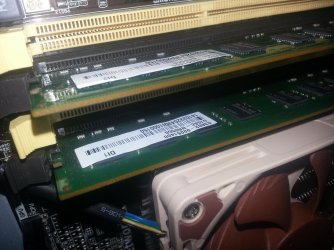
Is it just my eyes or the angle of the picture, but the RAM in the yellow slots doesn't look fully clipped in on one side?

Probably just my eyes...
 

My Computer

Computer type
PC/Desktop
Computer Manufacturer/Model Number
Mellon Labs (custom build)
OS
Win 7 Pro x64/Win 10 Pro x64 dual boot
CPU
AMD FX 8350 Vishera @ 4200
Motherboard
ASUS M5A97 R2.0
Memory
16 GB Mushkin Blackline DDR3-2400 @ 1866 (9-10-10-10-31)
Graphics Card(s)
XFX Radeon R9 280 Double D Black Edition
Sound Card
Realtek HD Audio on MB. Sounds great.
Monitor(s) Displays
Acer 24", Acer 22"
Screen Resolution
3840 x 1080
Hard Drives
1 x Mushkin Chronos 120 GB SSD (Win 10)
1 x Samsung 850 EVO 250 GB SSD (Win 7)
1 x WD 1TB SATA Blue
1 x WD 1TB SATA Green
PSU
Corsair TX-750
Case
CoolerMaster HAF 912+
Cooling
Coolermaster Seidon 240M Liquid AIO. 6 case fans
Keyboard
Logitech G710+
Mouse
Logitech G500s
Internet Speed
Much better since I got fiber, but still way overpriced.
Antivirus
MSE, Malware Bytes for scanning
Browser
Firefox
Other Info
Corsair VOID USB headphones.

A Mellon Labs X-1 - LCD Smartie driven system status display.

Brought to you by the letter E
So i installed a new cooling fan for my friend and reassembled the motherboard but the computer won't boot up, everything is running but the monitor doesn't show up.
Did you try one of those obvious things like changing cables to the monitor?
 

My Computer

Computer type
PC/Desktop
Computer Manufacturer/Model Number
Custom build
OS
Windows 7 Home Premium
CPU
i5-3570k
Motherboard
ASUS Sabertooth z77
Memory
16 GB DDR3 G Skill Sniper
Graphics Card(s)
GIGABYTE GeForce GTX 970 GV-N970WF3OC-4GD
Monitor(s) Displays
ASUS ROG PG278Q
Screen Resolution
2560x1440@60Hz/120Hz/144Hz
Hard Drives
56GB KINGSTON SVP200S37A60G
512GB Crucial MX100
1863GB Seagate ST2000DM001-1CH164
2795GB Seagate ST3000DM001-9YN166
PSU
Corsair GS800
Case
Storm Trooper Stryker White
Keyboard
Logitech G910 Orion Spark
Mouse
Logitech G502
Antivirus
MSE
Browser
Firefox/Chrome
Other Info
Logitech G633
Logitech Mouse Matt
Laith if we know when trying to boot if you hear the Windows startup music.

That would tell us the system was booting and Windows is running, you just can't see it on the monitor.

Verify the video cable hook up, to video card or motherboard. Which ever one used before.

I understand now. You installed a new cpu cooler not just a fan like stated in post #1.

Let us know when you got your hands on the computer.
 

My Computer

Computer type
PC/Desktop
Computer Manufacturer/Model Number
Home made Desktop
OS
Windows 10 Pro. 64/ version 1709 Windows 7 Pro/64
CPU
Intel i7-6800K @ 4.3
Motherboard
ASUS X-99 Deluxe II
Memory
Corsair Platinum 16 gig @2400
Graphics Card(s)
EVGA GTX 1070 OC
Monitor(s) Displays
Asus 27" LED LCD/VE278Q
Screen Resolution
1920-1080 or 1280-720 HDMI
Hard Drives
INTEL SSD 730-240 Gb Sata 3.0/
PSU
EVGA Platium 1200W
Case
Phanteks Luxe Tempered Glass 8 fans/ one radiator
Cooling
XSPC/ Water Cooled CPU
Keyboard
Das 4 Professional
Mouse
Logitech M705/MX Anywhere 2-S
Internet Speed
100 mbits
Antivirus
Microsoft Security Essentials/ Malwarebytes Premium 3.0/ SAS
Browser
I.E. 11 default/Firefox/ ISP Time Warner Cable/Spectrum
Other Info
LG BluRay Burner/
Sound system-KLipsch-THX/
Icy Dock ssd Hot Swap bays.
Now that you say that, i didn't hear 2 clicks when popping down the RAM, i only hear one, that goes for both sticks. I'll try to reseat the RAM.

EDIT: @BorisTheAnimal I think that shouldn't be problem as it worked with the monitor before.

@Layback Bear Exactly, i couldn't type properly at my friends house as i was using a phone and i hate typing in those. Well i tried the sound method but it didn't work either. My guess is what Mellon Head said.

I'm still open for many suggestions. I saw a red light next to the PSU cable(the giant connector), what could that mean?
 

My Computer

Computer type
PC/Desktop
Computer Manufacturer/Model Number
me!
OS
Windows 10 Pro x64
CPU
AMD Ryzen 5 1600 @ [email protected]
Motherboard
ASUS B350 PRIME-PLUS
Memory
G.Skill Flare X 16GB (2x8GB) DDR4-2400 @ 2666MHz
Graphics Card(s)
Sapphire Radeon Vega 56 NITRO+
Sound Card
None
Monitor(s) Displays
ASUS VG248QZ
Screen Resolution
1920x1080
Hard Drives
Samsung 850 EVO 250GB*, 1TB Seagate Constellation ES, 2x Samsung 840 250GB in RAID0*

*Thanks ICIT2LOL for supplying me with all of these drives!
PSU
Corsair VS550
Case
Corsair Crystal 460X
Cooling
AMD Wraith Spire
Keyboard
Ducky Shine 6 w/ MX Browns and PBT keycaps
Mouse
Xtrfy M1-Ice
Internet Speed
100MBit/s down, 20MBit/s up
Antivirus
Bitdefender
Browser
Google Chrome
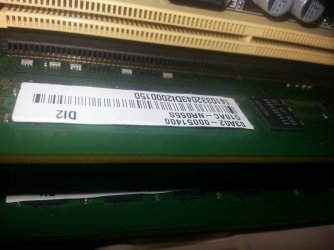
Ok from what I see not only do they look not to be clipped in securely - difficult to see from the above shot a sideways one would better, especially if you did not get two definite clicks.

One more thing usually RAM sticks are first installed in slots 1 & 3 ie the first being closer to the CPU unless that board manufacturer states otherwise. I sort of found this out building the Ivy Bridge and that Asus board starts from slots 2 & 4 so try 1 & 3 slots for the RAM and make sure the clicks are heard at both ends - simultaneously is preferable because jamming one end in at a time is not a health thing to do;)

You might even try this first

SLOT CLEANING

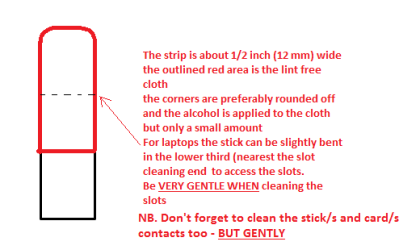
Now as for the slots to clean them use a strip of old credit card about1/2 inch wide nip the corners off one end - preferably round them off hold a piece of thin lint free cloth over the end dab on some form ofalcohol - isopropyl alcohol (if you want to be pedantic) but any ethanol basedalcohol even methylated spirits (called rubbing alcohol in the US) are good and GENTLYswipe along the slots.

This can also be done for the GPU slot/s and also the contacts of thesticks or cards - not the stick but some lint free cloth of course. See my picfor the sick but please be very gentle doing it if you are in any doubt -please ask before doing it but I use this all the time and have yet to damageanything. Plus make sure the card/sticks contacts are clean too but begentle
 

Attachments

  • STICK CLEANER.PNG
    STICK CLEANER.PNG
    6.1 KB · Views: 28

My Computer

Computer type
PC/Desktop
Computer Manufacturer/Model Number
Own build (new) Desk1 / Asus ROG Win 7 / Desk2 1st build
OS
Desk1 7 Home Prem / Desk2 10 Pro / Main lap Asus ROG 10 Pro 2 laptop Toshiba 7 Pro Asus P2520 7 & 10
CPU
Desk1 i5 3750K / Laptop i7 GTX 860M / Desk2 i5 2500
Motherboard
Desk1 Asus P877-V / Desk2 Gigabyte H67 UD3H / Laptop ?
Memory
Desk1 8GB (1866) / Desk2 16GB (1333) / Laptop 8Gb DDR3
Graphics Card(s)
Desk 1& 2NVidia GTX 650 & Laptops on board Intel
Sound Card
Desk 1 & 2 -XONAR DG Realtek High Def audio Laptop
Monitor(s) Displays
Desk 1 Benq HD 2450 / Desk2 Philips 24" / Laptop 17.5"
Screen Resolution
1920x1080 D1 & D2 & Laptop 1
Hard Drives
Desk1 Samsung 120GB 830 SSD
Asus ROG 256GB 850 Pro SSD
Desk2 Samsung 840 256 SSD
Toshiba 120GB EVO
PSU
Desk 1 Corsair HX 1050/ Laptop ? / Desk 2 Corsair HX 650
Case
Desk 1 Cooler HAF XM ? Toshiba laptop / Desk2 Coolermaster
Cooling
Fans on all Desk1 -2 Desk2 - all Coolermasters 5 Laptop ?
Keyboard
Desk 1 MS Sidewinder X6 Desk 2 MS Sidewinder X 4
Mouse
Desk 1&2 - Gigabyte MS 900 gamer - laptop - Logitec wireless
Internet Speed
ADSL2+
Other Info
One other Desktop (tester) and spare Toshba laptop both with SSD's
Running Kaspersky 2016 ISS on all machines config'd identically
Logitec audio stereo systems on each machine (x3)
Canon MG5250MFC
Router/modem TP-Link running WPA2SK
Laith I'm lucky.
I have never typed on a phone. But with those little buttons it's got to be difficult.

Here is a basic rule of the thumb I use when build or doing major repair work on a computer.

Take your time and go over everything that was done.
Check ever connection again. Re-seat the ram and video card.
Look for any cables or wires that might be hiding that need connected.
Normally it's something very simple when you do find the problem.
 

My Computer

Computer type
PC/Desktop
Computer Manufacturer/Model Number
Home made Desktop
OS
Windows 10 Pro. 64/ version 1709 Windows 7 Pro/64
CPU
Intel i7-6800K @ 4.3
Motherboard
ASUS X-99 Deluxe II
Memory
Corsair Platinum 16 gig @2400
Graphics Card(s)
EVGA GTX 1070 OC
Monitor(s) Displays
Asus 27" LED LCD/VE278Q
Screen Resolution
1920-1080 or 1280-720 HDMI
Hard Drives
INTEL SSD 730-240 Gb Sata 3.0/
PSU
EVGA Platium 1200W
Case
Phanteks Luxe Tempered Glass 8 fans/ one radiator
Cooling
XSPC/ Water Cooled CPU
Keyboard
Das 4 Professional
Mouse
Logitech M705/MX Anywhere 2-S
Internet Speed
100 mbits
Antivirus
Microsoft Security Essentials/ Malwarebytes Premium 3.0/ SAS
Browser
I.E. 11 default/Firefox/ ISP Time Warner Cable/Spectrum
Other Info
LG BluRay Burner/
Sound system-KLipsch-THX/
Icy Dock ssd Hot Swap bays.
Well reseating the RAM didn't work at all nor did reseating the Video card work.
 

Attachments

  • 1441025318926.jpg
    1441025318926.jpg
    591.2 KB · Views: 1
  • 1441025373243.jpg
    1441025373243.jpg
    395.7 KB · Views: 1

My Computer

Computer type
PC/Desktop
Computer Manufacturer/Model Number
me!
OS
Windows 10 Pro x64
CPU
AMD Ryzen 5 1600 @ [email protected]
Motherboard
ASUS B350 PRIME-PLUS
Memory
G.Skill Flare X 16GB (2x8GB) DDR4-2400 @ 2666MHz
Graphics Card(s)
Sapphire Radeon Vega 56 NITRO+
Sound Card
None
Monitor(s) Displays
ASUS VG248QZ
Screen Resolution
1920x1080
Hard Drives
Samsung 850 EVO 250GB*, 1TB Seagate Constellation ES, 2x Samsung 840 250GB in RAID0*

*Thanks ICIT2LOL for supplying me with all of these drives!
PSU
Corsair VS550
Case
Corsair Crystal 460X
Cooling
AMD Wraith Spire
Keyboard
Ducky Shine 6 w/ MX Browns and PBT keycaps
Mouse
Xtrfy M1-Ice
Internet Speed
100MBit/s down, 20MBit/s up
Antivirus
Bitdefender
Browser
Google Chrome
Laith did you try slot 1 & 3 the white ones? the top picture I am guessing is that just before you inserted the sticks? am asking because that end clip should fully engaged in that stick end notch.

Oops no I meant the black slots not the white ones as the black one nearest the CPU is #1 slot and like I said earlier most machines use that slot as the first one to have a stick in and number 3 slot for the next stick then slot 2 as the next and so on. So in effect you are filling the slots away from the CPU sequentially.
 

My Computer

Computer type
PC/Desktop
Computer Manufacturer/Model Number
Own build (new) Desk1 / Asus ROG Win 7 / Desk2 1st build
OS
Desk1 7 Home Prem / Desk2 10 Pro / Main lap Asus ROG 10 Pro 2 laptop Toshiba 7 Pro Asus P2520 7 & 10
CPU
Desk1 i5 3750K / Laptop i7 GTX 860M / Desk2 i5 2500
Motherboard
Desk1 Asus P877-V / Desk2 Gigabyte H67 UD3H / Laptop ?
Memory
Desk1 8GB (1866) / Desk2 16GB (1333) / Laptop 8Gb DDR3
Graphics Card(s)
Desk 1& 2NVidia GTX 650 & Laptops on board Intel
Sound Card
Desk 1 & 2 -XONAR DG Realtek High Def audio Laptop
Monitor(s) Displays
Desk 1 Benq HD 2450 / Desk2 Philips 24" / Laptop 17.5"
Screen Resolution
1920x1080 D1 & D2 & Laptop 1
Hard Drives
Desk1 Samsung 120GB 830 SSD
Asus ROG 256GB 850 Pro SSD
Desk2 Samsung 840 256 SSD
Toshiba 120GB EVO
PSU
Desk 1 Corsair HX 1050/ Laptop ? / Desk 2 Corsair HX 650
Case
Desk 1 Cooler HAF XM ? Toshiba laptop / Desk2 Coolermaster
Cooling
Fans on all Desk1 -2 Desk2 - all Coolermasters 5 Laptop ?
Keyboard
Desk 1 MS Sidewinder X6 Desk 2 MS Sidewinder X 4
Mouse
Desk 1&2 - Gigabyte MS 900 gamer - laptop - Logitec wireless
Internet Speed
ADSL2+
Other Info
One other Desktop (tester) and spare Toshba laptop both with SSD's
Running Kaspersky 2016 ISS on all machines config'd identically
Logitec audio stereo systems on each machine (x3)
Canon MG5250MFC
Router/modem TP-Link running WPA2SK
Been thinking (and looking) can you tell me just what make / model that motherboard is please??
 

My Computer

Computer type
PC/Desktop
Computer Manufacturer/Model Number
Own build (new) Desk1 / Asus ROG Win 7 / Desk2 1st build
OS
Desk1 7 Home Prem / Desk2 10 Pro / Main lap Asus ROG 10 Pro 2 laptop Toshiba 7 Pro Asus P2520 7 & 10
CPU
Desk1 i5 3750K / Laptop i7 GTX 860M / Desk2 i5 2500
Motherboard
Desk1 Asus P877-V / Desk2 Gigabyte H67 UD3H / Laptop ?
Memory
Desk1 8GB (1866) / Desk2 16GB (1333) / Laptop 8Gb DDR3
Graphics Card(s)
Desk 1& 2NVidia GTX 650 & Laptops on board Intel
Sound Card
Desk 1 & 2 -XONAR DG Realtek High Def audio Laptop
Monitor(s) Displays
Desk 1 Benq HD 2450 / Desk2 Philips 24" / Laptop 17.5"
Screen Resolution
1920x1080 D1 & D2 & Laptop 1
Hard Drives
Desk1 Samsung 120GB 830 SSD
Asus ROG 256GB 850 Pro SSD
Desk2 Samsung 840 256 SSD
Toshiba 120GB EVO
PSU
Desk 1 Corsair HX 1050/ Laptop ? / Desk 2 Corsair HX 650
Case
Desk 1 Cooler HAF XM ? Toshiba laptop / Desk2 Coolermaster
Cooling
Fans on all Desk1 -2 Desk2 - all Coolermasters 5 Laptop ?
Keyboard
Desk 1 MS Sidewinder X6 Desk 2 MS Sidewinder X 4
Mouse
Desk 1&2 - Gigabyte MS 900 gamer - laptop - Logitec wireless
Internet Speed
ADSL2+
Other Info
One other Desktop (tester) and spare Toshba laptop both with SSD's
Running Kaspersky 2016 ISS on all machines config'd identically
Logitec audio stereo systems on each machine (x3)
Canon MG5250MFC
Router/modem TP-Link running WPA2SK
It looks to me also that the ram is not installed and latched properly. That is critical.

If you can't find out what motherboard you got a 50/50 chance. Two yellow or two black ram slots.
You could also try booting with just one stick of ram. How ever you try it the ram module must be install properly where both clips lock the ram in place. You also want to install the ram straight down. No side to side movement. Side to side movement can widen the slot and the ram will not be able to make good contact with the motherboard.

These seem like simple little methods but they are critical.
 

My Computer

Computer type
PC/Desktop
Computer Manufacturer/Model Number
Home made Desktop
OS
Windows 10 Pro. 64/ version 1709 Windows 7 Pro/64
CPU
Intel i7-6800K @ 4.3
Motherboard
ASUS X-99 Deluxe II
Memory
Corsair Platinum 16 gig @2400
Graphics Card(s)
EVGA GTX 1070 OC
Monitor(s) Displays
Asus 27" LED LCD/VE278Q
Screen Resolution
1920-1080 or 1280-720 HDMI
Hard Drives
INTEL SSD 730-240 Gb Sata 3.0/
PSU
EVGA Platium 1200W
Case
Phanteks Luxe Tempered Glass 8 fans/ one radiator
Cooling
XSPC/ Water Cooled CPU
Keyboard
Das 4 Professional
Mouse
Logitech M705/MX Anywhere 2-S
Internet Speed
100 mbits
Antivirus
Microsoft Security Essentials/ Malwarebytes Premium 3.0/ SAS
Browser
I.E. 11 default/Firefox/ ISP Time Warner Cable/Spectrum
Other Info
LG BluRay Burner/
Sound system-KLipsch-THX/
Icy Dock ssd Hot Swap bays.
You could also try booting with just one stick of ram. How ever you try it the ram module must be install properly where both clips lock the ram in place. You also want to install the ram straight down. No side to side movement. Side to side movement can widen the slot and the ram will not be able to make good contact with the motherboard.
Yep like I said before Jack but what I want to know is that motherboard make and model to look up the "slot installation order" preference as my Asus P8Z77-V did start with slots 2 & 4 as opposed to any other si have built which start with the slot nearest the CPU.
It does in some articles if my memory (nice punLOL!!) serves me right state that the slots are configured to operate in a sequence because of the channel/s set up.
These are two links that simplify what I mean How to install dual channel? - Dual Channel - Memory & this very good article Everything You Need to Know About the Dual-, Triple-, and Quad-Channel Memory Architectures - Enabling Dual Channel (Intel and AMD Socket AM3+) of 10 - Hardware Secrets but like I said the Asus board I have at my place in the manual stated to install contra to what is normally accepted as - first slot nearest the CPU first.
 

My Computer

Computer type
PC/Desktop
Computer Manufacturer/Model Number
Own build (new) Desk1 / Asus ROG Win 7 / Desk2 1st build
OS
Desk1 7 Home Prem / Desk2 10 Pro / Main lap Asus ROG 10 Pro 2 laptop Toshiba 7 Pro Asus P2520 7 & 10
CPU
Desk1 i5 3750K / Laptop i7 GTX 860M / Desk2 i5 2500
Motherboard
Desk1 Asus P877-V / Desk2 Gigabyte H67 UD3H / Laptop ?
Memory
Desk1 8GB (1866) / Desk2 16GB (1333) / Laptop 8Gb DDR3
Graphics Card(s)
Desk 1& 2NVidia GTX 650 & Laptops on board Intel
Sound Card
Desk 1 & 2 -XONAR DG Realtek High Def audio Laptop
Monitor(s) Displays
Desk 1 Benq HD 2450 / Desk2 Philips 24" / Laptop 17.5"
Screen Resolution
1920x1080 D1 & D2 & Laptop 1
Hard Drives
Desk1 Samsung 120GB 830 SSD
Asus ROG 256GB 850 Pro SSD
Desk2 Samsung 840 256 SSD
Toshiba 120GB EVO
PSU
Desk 1 Corsair HX 1050/ Laptop ? / Desk 2 Corsair HX 650
Case
Desk 1 Cooler HAF XM ? Toshiba laptop / Desk2 Coolermaster
Cooling
Fans on all Desk1 -2 Desk2 - all Coolermasters 5 Laptop ?
Keyboard
Desk 1 MS Sidewinder X6 Desk 2 MS Sidewinder X 4
Mouse
Desk 1&2 - Gigabyte MS 900 gamer - laptop - Logitec wireless
Internet Speed
ADSL2+
Other Info
One other Desktop (tester) and spare Toshba laptop both with SSD's
Running Kaspersky 2016 ISS on all machines config'd identically
Logitec audio stereo systems on each machine (x3)
Canon MG5250MFC
Router/modem TP-Link running WPA2SK
Back
Top