JavaScript is disabled. For a better experience, please enable JavaScript in your browser before proceeding.
You are using an out of date browser. It may not display this or other websites correctly.
You should upgrade or use an
alternative browser .
Solved Computer won't boot up need help ASAP
3 Brain Cells
Guru
Gold Member
VIP
Without a motherboard manual system and specs their is always a degree of guessing.
Computer type PC/Desktop Computer Manufacturer/Model Number Home made Desktop OS Windows 10 Pro. 64/ version 1709 Windows 7 Pro/64 CPU Intel i7-6800K @ 4.3 Motherboard ASUS X-99 Deluxe II Memory Corsair Platinum 16 gig @2400 Graphics Card(s) EVGA GTX 1070 OC Monitor(s) Displays Asus 27" LED LCD/VE278Q Screen Resolution 1920-1080 or 1280-720 HDMI Hard Drives INTEL SSD 730-240 Gb Sata 3.0/ PSU EVGA Platium 1200W Case Phanteks Luxe Tempered Glass 8 fans/ one radiator Cooling XSPC/ Water Cooled CPU Keyboard Das 4 Professional Mouse Logitech M705/MX Anywhere 2-S Internet Speed 100 mbits Antivirus Microsoft Security Essentials/ Malwarebytes Premium 3.0/ SAS Browser I.E. 11 default/Firefox/ ISP Time Warner Cable/Spectrum Other Info LG BluRay Burner/
Confusion Therapist
Guru
Gold Member
VIP
Yep mate I think your idea of one stick is a good lateral thought actually as it would only provide one channel anyway eh?
Computer type PC/Desktop Computer Manufacturer/Model Number Own build (new) Desk1 / Asus ROG Win 7 / Desk2 1st build OS Desk1 7 Home Prem / Desk2 10 Pro / Main lap Asus ROG 10 Pro 2 laptop Toshiba 7 Pro Asus P2520 7 & 10 CPU Desk1 i5 3750K / Laptop i7 GTX 860M / Desk2 i5 2500 Motherboard Desk1 Asus P877-V / Desk2 Gigabyte H67 UD3H / Laptop ? Memory Desk1 8GB (1866) / Desk2 16GB (1333) / Laptop 8Gb DDR3 Graphics Card(s) Desk 1& 2NVidia GTX 650 & Laptops on board Intel Sound Card Desk 1 & 2 -XONAR DG Realtek High Def audio Laptop Monitor(s) Displays Desk 1 Benq HD 2450 / Desk2 Philips 24" / Laptop 17.5" Screen Resolution 1920x1080 D1 & D2 & Laptop 1 Hard Drives Desk1 Samsung 120GB 830 SSD PSU Desk 1 Corsair HX 1050/ Laptop ? / Desk 2 Corsair HX 650 Case Desk 1 Cooler HAF XM ? Toshiba laptop / Desk2 Coolermaster Cooling Fans on all Desk1 -2 Desk2 - all Coolermasters 5 Laptop ? Keyboard Desk 1 MS Sidewinder X6 Desk 2 MS Sidewinder X 4 Mouse Desk 1&2 - Gigabyte MS 900 gamer - laptop - Logitec wireless Internet Speed ADSL2+ Other Info One other Desktop (tester) and spare Toshba laptop both with SSD's
Otaku Pride
Guru
Gold Member
VIP
Thread Starter
Hmm, i'll try it when i get back to her. I did slotcleaning, didn't work. It isn't old at all, it's better than both of my computers combined
It's an ASUS type motherboard, i know that for sure.
Computer type PC/Desktop Computer Manufacturer/Model Number me! OS Windows 10 Pro x64 CPU AMD Ryzen 5 1600 @ [email protected] Motherboard ASUS B350 PRIME-PLUS Memory G.Skill Flare X 16GB (2x8GB) DDR4-2400 @ 2666MHz Graphics Card(s) Sapphire Radeon Vega 56 NITRO+ Sound Card None Monitor(s) Displays ASUS VG248QZ Screen Resolution 1920x1080 Hard Drives Samsung 850 EVO 250GB*, 1TB Seagate Constellation ES, 2x Samsung 840 250GB in RAID0* PSU Corsair VS550 Case Corsair Crystal 460X Cooling AMD Wraith Spire Keyboard Ducky Shine 6 w/ MX Browns and PBT keycaps Mouse Xtrfy M1-Ice Internet Speed 100MBit/s down, 20MBit/s up Antivirus Bitdefender Browser Google Chrome
Confusion Therapist
Guru
Gold Member
VIP
Ok Laith mate on the board there will be a model number / name see pic for typicalplace to find it and you may need a very bright light to see it
MB.PNG
100.5 KB
· Views: 25
Computer type PC/Desktop Computer Manufacturer/Model Number Own build (new) Desk1 / Asus ROG Win 7 / Desk2 1st build OS Desk1 7 Home Prem / Desk2 10 Pro / Main lap Asus ROG 10 Pro 2 laptop Toshiba 7 Pro Asus P2520 7 & 10 CPU Desk1 i5 3750K / Laptop i7 GTX 860M / Desk2 i5 2500 Motherboard Desk1 Asus P877-V / Desk2 Gigabyte H67 UD3H / Laptop ? Memory Desk1 8GB (1866) / Desk2 16GB (1333) / Laptop 8Gb DDR3 Graphics Card(s) Desk 1& 2NVidia GTX 650 & Laptops on board Intel Sound Card Desk 1 & 2 -XONAR DG Realtek High Def audio Laptop Monitor(s) Displays Desk 1 Benq HD 2450 / Desk2 Philips 24" / Laptop 17.5" Screen Resolution 1920x1080 D1 & D2 & Laptop 1 Hard Drives Desk1 Samsung 120GB 830 SSD PSU Desk 1 Corsair HX 1050/ Laptop ? / Desk 2 Corsair HX 650 Case Desk 1 Cooler HAF XM ? Toshiba laptop / Desk2 Coolermaster Cooling Fans on all Desk1 -2 Desk2 - all Coolermasters 5 Laptop ? Keyboard Desk 1 MS Sidewinder X6 Desk 2 MS Sidewinder X 4 Mouse Desk 1&2 - Gigabyte MS 900 gamer - laptop - Logitec wireless Internet Speed ADSL2+ Other Info One other Desktop (tester) and spare Toshba laptop both with SSD's
Otaku Pride
Guru
Gold Member
VIP
Thread Starter
Well, i said that she should take it to the computer repair shop because i can't go to her everyday(obviously). So i'll mark this as solved.
Computer type PC/Desktop Computer Manufacturer/Model Number me! OS Windows 10 Pro x64 CPU AMD Ryzen 5 1600 @ [email protected] Motherboard ASUS B350 PRIME-PLUS Memory G.Skill Flare X 16GB (2x8GB) DDR4-2400 @ 2666MHz Graphics Card(s) Sapphire Radeon Vega 56 NITRO+ Sound Card None Monitor(s) Displays ASUS VG248QZ Screen Resolution 1920x1080 Hard Drives Samsung 850 EVO 250GB*, 1TB Seagate Constellation ES, 2x Samsung 840 250GB in RAID0* PSU Corsair VS550 Case Corsair Crystal 460X Cooling AMD Wraith Spire Keyboard Ducky Shine 6 w/ MX Browns and PBT keycaps Mouse Xtrfy M1-Ice Internet Speed 100MBit/s down, 20MBit/s up Antivirus Bitdefender Browser Google Chrome
An error has occured
Guru
Gold Member
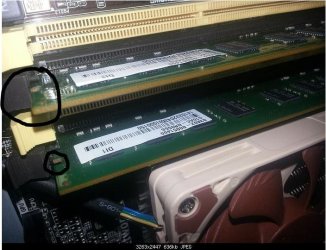
The ram does not look like it is installed properly, when pushed fully home the end clips will move inwards and sit level with the clips on the empty slots (which are fully in)
Looks to me that the ram is merely resting in the slots
When in the yellow slots the clips are out then when you show it in the black slots the clips are out and not fully engaged in the groove on the ram stick as circled below
Computer type PC/Desktop Computer Manufacturer/Model Number Pauly Special OS Win7 Ultimate X64 CPU Intel i5 3570K Motherboard Gigabyte Z77X-DS3H Memory 8GB DDR3 1600 Graphics Card(s) Onboard Sound Card Onboard Screen Resolution 1280x1024 Hard Drives Samsung 840 Evo SSD (OS) PSU 800W Arctic Case Cooler Master Cooling 3x120mm Fans Keyboard MS Wireless Mouse MS Wireless Internet Speed 20M
Otaku Pride
Guru
Gold Member
VIP
Thread Starter
Pauly, i pushed it in as gentle but as hard i could and it still didn't clip in. I heard only 1 click.
Computer type PC/Desktop Computer Manufacturer/Model Number me! OS Windows 10 Pro x64 CPU AMD Ryzen 5 1600 @ [email protected] Motherboard ASUS B350 PRIME-PLUS Memory G.Skill Flare X 16GB (2x8GB) DDR4-2400 @ 2666MHz Graphics Card(s) Sapphire Radeon Vega 56 NITRO+ Sound Card None Monitor(s) Displays ASUS VG248QZ Screen Resolution 1920x1080 Hard Drives Samsung 850 EVO 250GB*, 1TB Seagate Constellation ES, 2x Samsung 840 250GB in RAID0* PSU Corsair VS550 Case Corsair Crystal 460X Cooling AMD Wraith Spire Keyboard Ducky Shine 6 w/ MX Browns and PBT keycaps Mouse Xtrfy M1-Ice Internet Speed 100MBit/s down, 20MBit/s up Antivirus Bitdefender Browser Google Chrome
An error has occured
Guru
Gold Member
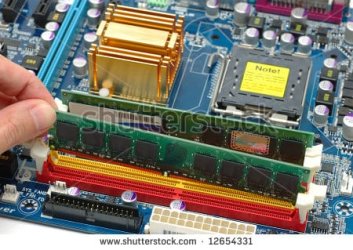
Have a look at this picture, the rear is fully inserted and the tabs are fully engaged compared to the front stick which is obviously not in place yet
After making sure the ram is the right way around (bottom dent is in line with motherboard notch) its usually just a case of giving it a firm push down
Computer type PC/Desktop Computer Manufacturer/Model Number Pauly Special OS Win7 Ultimate X64 CPU Intel i5 3570K Motherboard Gigabyte Z77X-DS3H Memory 8GB DDR3 1600 Graphics Card(s) Onboard Sound Card Onboard Screen Resolution 1280x1024 Hard Drives Samsung 840 Evo SSD (OS) PSU 800W Arctic Case Cooler Master Cooling 3x120mm Fans Keyboard MS Wireless Mouse MS Wireless Internet Speed 20M
Otaku Pride
Guru
Gold Member
VIP
Thread Starter
I did that, but the right button that you drag down to insert the RAM dosen't drag down, only the first one does.
Computer type PC/Desktop Computer Manufacturer/Model Number me! OS Windows 10 Pro x64 CPU AMD Ryzen 5 1600 @ [email protected] Motherboard ASUS B350 PRIME-PLUS Memory G.Skill Flare X 16GB (2x8GB) DDR4-2400 @ 2666MHz Graphics Card(s) Sapphire Radeon Vega 56 NITRO+ Sound Card None Monitor(s) Displays ASUS VG248QZ Screen Resolution 1920x1080 Hard Drives Samsung 850 EVO 250GB*, 1TB Seagate Constellation ES, 2x Samsung 840 250GB in RAID0* PSU Corsair VS550 Case Corsair Crystal 460X Cooling AMD Wraith Spire Keyboard Ducky Shine 6 w/ MX Browns and PBT keycaps Mouse Xtrfy M1-Ice Internet Speed 100MBit/s down, 20MBit/s up Antivirus Bitdefender Browser Google Chrome
An error has occured
Guru
Gold Member
I generally insert it squarely so both ends go it at the same time, did you ensure the ram was the correct way around ? if the bottom notch is out only one end will locate and ram stick will seesaw on the motherboard notch under the ram stick
Computer type PC/Desktop Computer Manufacturer/Model Number Pauly Special OS Win7 Ultimate X64 CPU Intel i5 3570K Motherboard Gigabyte Z77X-DS3H Memory 8GB DDR3 1600 Graphics Card(s) Onboard Sound Card Onboard Screen Resolution 1280x1024 Hard Drives Samsung 840 Evo SSD (OS) PSU 800W Arctic Case Cooler Master Cooling 3x120mm Fans Keyboard MS Wireless Mouse MS Wireless Internet Speed 20M
Otaku Pride
Guru
Gold Member
VIP
Thread Starter
Computer type PC/Desktop Computer Manufacturer/Model Number me! OS Windows 10 Pro x64 CPU AMD Ryzen 5 1600 @ [email protected] Motherboard ASUS B350 PRIME-PLUS Memory G.Skill Flare X 16GB (2x8GB) DDR4-2400 @ 2666MHz Graphics Card(s) Sapphire Radeon Vega 56 NITRO+ Sound Card None Monitor(s) Displays ASUS VG248QZ Screen Resolution 1920x1080 Hard Drives Samsung 850 EVO 250GB*, 1TB Seagate Constellation ES, 2x Samsung 840 250GB in RAID0* PSU Corsair VS550 Case Corsair Crystal 460X Cooling AMD Wraith Spire Keyboard Ducky Shine 6 w/ MX Browns and PBT keycaps Mouse Xtrfy M1-Ice Internet Speed 100MBit/s down, 20MBit/s up Antivirus Bitdefender Browser Google Chrome
Confusion Therapist
Guru
Gold Member
VIP
Laith I know you are probably finished with this one now but I was rather wondering what the board was and what brand and details were on the RAM sticks ie are the right type??
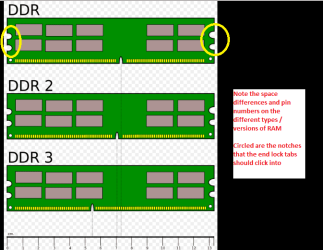
As Pauly said I usually hold them horizontally level above the slot making sure the notch is over the lug in the slot that it goes over and then push down at both ends until I feel and see the end lock tabs snap into place. It can take some force sometimes and in your pic too mate the sticks were in different colour slots which might make things "complicated".
This is a reasonably simple article on RAM
https://en.wikipedia.org/wiki/DDR3_SDRAM
RAM SLOTS.PNG
16.9 KB
· Views: 19
Computer type PC/Desktop Computer Manufacturer/Model Number Own build (new) Desk1 / Asus ROG Win 7 / Desk2 1st build OS Desk1 7 Home Prem / Desk2 10 Pro / Main lap Asus ROG 10 Pro 2 laptop Toshiba 7 Pro Asus P2520 7 & 10 CPU Desk1 i5 3750K / Laptop i7 GTX 860M / Desk2 i5 2500 Motherboard Desk1 Asus P877-V / Desk2 Gigabyte H67 UD3H / Laptop ? Memory Desk1 8GB (1866) / Desk2 16GB (1333) / Laptop 8Gb DDR3 Graphics Card(s) Desk 1& 2NVidia GTX 650 & Laptops on board Intel Sound Card Desk 1 & 2 -XONAR DG Realtek High Def audio Laptop Monitor(s) Displays Desk 1 Benq HD 2450 / Desk2 Philips 24" / Laptop 17.5" Screen Resolution 1920x1080 D1 & D2 & Laptop 1 Hard Drives Desk1 Samsung 120GB 830 SSD PSU Desk 1 Corsair HX 1050/ Laptop ? / Desk 2 Corsair HX 650 Case Desk 1 Cooler HAF XM ? Toshiba laptop / Desk2 Coolermaster Cooling Fans on all Desk1 -2 Desk2 - all Coolermasters 5 Laptop ? Keyboard Desk 1 MS Sidewinder X6 Desk 2 MS Sidewinder X 4 Mouse Desk 1&2 - Gigabyte MS 900 gamer - laptop - Logitec wireless Internet Speed ADSL2+ Other Info One other Desktop (tester) and spare Toshba laptop both with SSD's
3 Brain Cells
Guru
Gold Member
VIP
John the pictures are a great idea. I just assumed and you know how much trouble that can be.
Computer type PC/Desktop Computer Manufacturer/Model Number Home made Desktop OS Windows 10 Pro. 64/ version 1709 Windows 7 Pro/64 CPU Intel i7-6800K @ 4.3 Motherboard ASUS X-99 Deluxe II Memory Corsair Platinum 16 gig @2400 Graphics Card(s) EVGA GTX 1070 OC Monitor(s) Displays Asus 27" LED LCD/VE278Q Screen Resolution 1920-1080 or 1280-720 HDMI Hard Drives INTEL SSD 730-240 Gb Sata 3.0/ PSU EVGA Platium 1200W Case Phanteks Luxe Tempered Glass 8 fans/ one radiator Cooling XSPC/ Water Cooled CPU Keyboard Das 4 Professional Mouse Logitech M705/MX Anywhere 2-S Internet Speed 100 mbits Antivirus Microsoft Security Essentials/ Malwarebytes Premium 3.0/ SAS Browser I.E. 11 default/Firefox/ ISP Time Warner Cable/Spectrum Other Info LG BluRay Burner/
Confusion Therapist
Guru
Gold Member
VIP
John the pictures are a great idea. I just assumed and you know how much trouble that can be.
Yes Jack well in hindsight and I got to thinking afterwards it did look a tad cramped in that case and I know from some old machines I have worked on space is at a real premium
Computer type PC/Desktop Computer Manufacturer/Model Number Own build (new) Desk1 / Asus ROG Win 7 / Desk2 1st build OS Desk1 7 Home Prem / Desk2 10 Pro / Main lap Asus ROG 10 Pro 2 laptop Toshiba 7 Pro Asus P2520 7 & 10 CPU Desk1 i5 3750K / Laptop i7 GTX 860M / Desk2 i5 2500 Motherboard Desk1 Asus P877-V / Desk2 Gigabyte H67 UD3H / Laptop ? Memory Desk1 8GB (1866) / Desk2 16GB (1333) / Laptop 8Gb DDR3 Graphics Card(s) Desk 1& 2NVidia GTX 650 & Laptops on board Intel Sound Card Desk 1 & 2 -XONAR DG Realtek High Def audio Laptop Monitor(s) Displays Desk 1 Benq HD 2450 / Desk2 Philips 24" / Laptop 17.5" Screen Resolution 1920x1080 D1 & D2 & Laptop 1 Hard Drives Desk1 Samsung 120GB 830 SSD PSU Desk 1 Corsair HX 1050/ Laptop ? / Desk 2 Corsair HX 650 Case Desk 1 Cooler HAF XM ? Toshiba laptop / Desk2 Coolermaster Cooling Fans on all Desk1 -2 Desk2 - all Coolermasters 5 Laptop ? Keyboard Desk 1 MS Sidewinder X6 Desk 2 MS Sidewinder X 4 Mouse Desk 1&2 - Gigabyte MS 900 gamer - laptop - Logitec wireless Internet Speed ADSL2+ Other Info One other Desktop (tester) and spare Toshba laptop both with SSD's
Otaku Pride
Guru
Gold Member
VIP
Thread Starter
My memory is a bit fuzzy. It's an ASUS motherboard, i've confirmed that. The sticks i think where (2x8GB) Samsung sticks...
Computer type PC/Desktop Computer Manufacturer/Model Number me! OS Windows 10 Pro x64 CPU AMD Ryzen 5 1600 @ [email protected] Motherboard ASUS B350 PRIME-PLUS Memory G.Skill Flare X 16GB (2x8GB) DDR4-2400 @ 2666MHz Graphics Card(s) Sapphire Radeon Vega 56 NITRO+ Sound Card None Monitor(s) Displays ASUS VG248QZ Screen Resolution 1920x1080 Hard Drives Samsung 850 EVO 250GB*, 1TB Seagate Constellation ES, 2x Samsung 840 250GB in RAID0* PSU Corsair VS550 Case Corsair Crystal 460X Cooling AMD Wraith Spire Keyboard Ducky Shine 6 w/ MX Browns and PBT keycaps Mouse Xtrfy M1-Ice Internet Speed 100MBit/s down, 20MBit/s up Antivirus Bitdefender Browser Google Chrome
3 Brain Cells
Guru
Gold Member
VIP
Some where on the motherboard should be some numbers indicating what motherboard it is.
Computer type PC/Desktop Computer Manufacturer/Model Number Home made Desktop OS Windows 10 Pro. 64/ version 1709 Windows 7 Pro/64 CPU Intel i7-6800K @ 4.3 Motherboard ASUS X-99 Deluxe II Memory Corsair Platinum 16 gig @2400 Graphics Card(s) EVGA GTX 1070 OC Monitor(s) Displays Asus 27" LED LCD/VE278Q Screen Resolution 1920-1080 or 1280-720 HDMI Hard Drives INTEL SSD 730-240 Gb Sata 3.0/ PSU EVGA Platium 1200W Case Phanteks Luxe Tempered Glass 8 fans/ one radiator Cooling XSPC/ Water Cooled CPU Keyboard Das 4 Professional Mouse Logitech M705/MX Anywhere 2-S Internet Speed 100 mbits Antivirus Microsoft Security Essentials/ Malwarebytes Premium 3.0/ SAS Browser I.E. 11 default/Firefox/ ISP Time Warner Cable/Spectrum Other Info LG BluRay Burner/
Otaku Pride
Guru
Gold Member
VIP
Thread Starter
Yup, i'll see if i can go to her today.
Computer type PC/Desktop Computer Manufacturer/Model Number me! OS Windows 10 Pro x64 CPU AMD Ryzen 5 1600 @ [email protected] Motherboard ASUS B350 PRIME-PLUS Memory G.Skill Flare X 16GB (2x8GB) DDR4-2400 @ 2666MHz Graphics Card(s) Sapphire Radeon Vega 56 NITRO+ Sound Card None Monitor(s) Displays ASUS VG248QZ Screen Resolution 1920x1080 Hard Drives Samsung 850 EVO 250GB*, 1TB Seagate Constellation ES, 2x Samsung 840 250GB in RAID0* PSU Corsair VS550 Case Corsair Crystal 460X Cooling AMD Wraith Spire Keyboard Ducky Shine 6 w/ MX Browns and PBT keycaps Mouse Xtrfy M1-Ice Internet Speed 100MBit/s down, 20MBit/s up Antivirus Bitdefender Browser Google Chrome
Confusion Therapist
Guru
Gold Member
VIP
Yup, i'll see if i can go to her today.
Ok mate just take a look at the pic I sent re what you should be looking for on the board they are not always that clear and you may need a very strong light to see it.
MB.PNG
100.5 KB
· Views: 14
Computer type PC/Desktop Computer Manufacturer/Model Number Own build (new) Desk1 / Asus ROG Win 7 / Desk2 1st build OS Desk1 7 Home Prem / Desk2 10 Pro / Main lap Asus ROG 10 Pro 2 laptop Toshiba 7 Pro Asus P2520 7 & 10 CPU Desk1 i5 3750K / Laptop i7 GTX 860M / Desk2 i5 2500 Motherboard Desk1 Asus P877-V / Desk2 Gigabyte H67 UD3H / Laptop ? Memory Desk1 8GB (1866) / Desk2 16GB (1333) / Laptop 8Gb DDR3 Graphics Card(s) Desk 1& 2NVidia GTX 650 & Laptops on board Intel Sound Card Desk 1 & 2 -XONAR DG Realtek High Def audio Laptop Monitor(s) Displays Desk 1 Benq HD 2450 / Desk2 Philips 24" / Laptop 17.5" Screen Resolution 1920x1080 D1 & D2 & Laptop 1 Hard Drives Desk1 Samsung 120GB 830 SSD PSU Desk 1 Corsair HX 1050/ Laptop ? / Desk 2 Corsair HX 650 Case Desk 1 Cooler HAF XM ? Toshiba laptop / Desk2 Coolermaster Cooling Fans on all Desk1 -2 Desk2 - all Coolermasters 5 Laptop ? Keyboard Desk 1 MS Sidewinder X6 Desk 2 MS Sidewinder X 4 Mouse Desk 1&2 - Gigabyte MS 900 gamer - laptop - Logitec wireless Internet Speed ADSL2+ Other Info One other Desktop (tester) and spare Toshba laptop both with SSD's
Otaku Pride
Guru
Gold Member
VIP
Thread Starter
Okay, i'll make sure to remember that.
Computer type PC/Desktop Computer Manufacturer/Model Number me! OS Windows 10 Pro x64 CPU AMD Ryzen 5 1600 @ [email protected] Motherboard ASUS B350 PRIME-PLUS Memory G.Skill Flare X 16GB (2x8GB) DDR4-2400 @ 2666MHz Graphics Card(s) Sapphire Radeon Vega 56 NITRO+ Sound Card None Monitor(s) Displays ASUS VG248QZ Screen Resolution 1920x1080 Hard Drives Samsung 850 EVO 250GB*, 1TB Seagate Constellation ES, 2x Samsung 840 250GB in RAID0* PSU Corsair VS550 Case Corsair Crystal 460X Cooling AMD Wraith Spire Keyboard Ducky Shine 6 w/ MX Browns and PBT keycaps Mouse Xtrfy M1-Ice Internet Speed 100MBit/s down, 20MBit/s up Antivirus Bitdefender Browser Google Chrome
This is probably a dumb thing to say but are you sure the parts are getting enough power? Also did anything get knocked while you were taking it apart? I accidentally broke a GPU once by knocking it slightly while doing whatever it was. <_<
Computer type PC/Desktop OS Windows 7 64 bit