
Solved computers networking is not working

I've followed the instructions and here is the WGA Report. Also, since this is about the networking problem, when I try to run the Windows Network Diagnostics, I get the message "Diagnostics Policy Service is not running". When I try to start it, as an administrator, it says "Error 5: Access is Denied". The permission problems continue.
 

Attachments

My Computer My Computer

Computer type
PC/Desktop
Computer Manufacturer/Model Number
Dell
OS
Windows 7 Home Premium 64bit
CPU
I5
Hard Drives
Crucial 512gb
Antivirus
deleted while fixing will replace with Bitdefender
The latest MGADiag report is clear of errors - you should no longer be seeing a non-genuine notification, or problems with Windows Update.

Please reboot TWICE, then see if the problems with the Diagnostics have also gone.
 

My Computer My Computer

Computer type
Laptop
Computer Manufacturer/Model Number
Asus K52F or Lenovo B51-80
OS
Win 7 x64 Home Premium (and x86 VirtualBox VM)/Win10
CPU
i3 370M/i7 6500U
Motherboard
Asus/Lenovo
Memory
8GB - finally :)/8GB
Graphics Card(s)
it's an i3, dude!/dual Intel&nVidia
Sound Card
onboard
Monitor(s) Displays
15.6" built-in
Screen Resolution
1366x768/1920x1080
Hard Drives
750GB Seagate internal
Sundry external drives attached to other computers on the local network
1TB SSD on the Lenovo
PSU
n/a
Internet Speed
as much as I can get - usually on a dongle/phone, so <1MB/s
Antivirus
MSE/Defender
Browser
IE11/12/Edge/Chrome/FF(if I must)
I tried the network diag again and received "The Diagnostics Policy Service is not running". Then when I go to services as an admin, it get, "Error 5: Access is Denied". I also get the denied error with, Base Filtering Engine (which prevents the Firewall Service from working), and of course DHCP as mentioned earlier.

I have attached several fresh diagnostic logs.

Thanks!
 

Attachments

My Computer My Computer

Computer type
PC/Desktop
Computer Manufacturer/Model Number
Dell
OS
Windows 7 Home Premium 64bit
CPU
I5
Hard Drives
Crucial 512gb
Antivirus
deleted while fixing will replace with Bitdefender
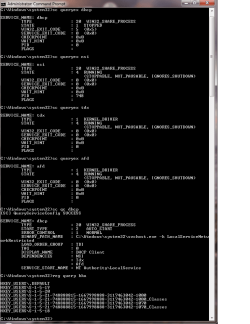
The BFE service is a very basic one - and could be causing the problems with the others.
Please open an Elevated Command Prompt, and run the following commands

REG QUERY HKEY_LOCAL_MACHINE\SYSTEM\CurrentControlSet\services\BFE
REG QUERY HKEY_LOCAL_MACHINE\SYSTEM\CurrentControlSet\services\BFE\Parameters
REG QUERY HKEY_LOCAL_MACHINE\SYSTEM\CurrentControlSet\services\BFE\Parameters\Policy

post the results.


Here are some instructions to make life easier :)
1) To open an Elevated Command Prompt Window (the ECP window), click on Start, All Programs, Accessories – then right-click on Command Prompt, and select Run as Administrator. Accept the UAC prompt.
2) To run the commands easier, highlight the block of commands, and right-click on the highlight – select Copy. In the CP Window, click on the black/white icon at top left – select Paste. The commands will run but may not complete the last command, so hit the Enter Key once.
3) To copy the results... click on the Black/White icon in the top left, and select Edit... 'Select All', and hit the Enter key - then use Ctrl+V or r-click+Paste to paste it into your response.
 

My Computer My Computer

Computer type
Laptop
Computer Manufacturer/Model Number
Asus K52F or Lenovo B51-80
OS
Win 7 x64 Home Premium (and x86 VirtualBox VM)/Win10
CPU
i3 370M/i7 6500U
Motherboard
Asus/Lenovo
Memory
8GB - finally :)/8GB
Graphics Card(s)
it's an i3, dude!/dual Intel&nVidia
Sound Card
onboard
Monitor(s) Displays
15.6" built-in
Screen Resolution
1366x768/1920x1080
Hard Drives
750GB Seagate internal
Sundry external drives attached to other computers on the local network
1TB SSD on the Lenovo
PSU
n/a
Internet Speed
as much as I can get - usually on a dongle/phone, so <1MB/s
Antivirus
MSE/Defender
Browser
IE11/12/Edge/Chrome/FF(if I must)
Here's the report.
 

Attachments

My Computer My Computer

Computer type
PC/Desktop
Computer Manufacturer/Model Number
Dell
OS
Windows 7 Home Premium 64bit
CPU
I5
Hard Drives
Crucial 512gb
Antivirus
deleted while fixing will replace with Bitdefender
That all looks normal enough - please run the following commands in an Elevated Command Prompt, and post the results

SC QC BFE
SC START BFE
SC QUERYEX BFE

Post the results

What AV and other security software are you using?
 

My Computer My Computer

Computer type
Laptop
Computer Manufacturer/Model Number
Asus K52F or Lenovo B51-80
OS
Win 7 x64 Home Premium (and x86 VirtualBox VM)/Win10
CPU
i3 370M/i7 6500U
Motherboard
Asus/Lenovo
Memory
8GB - finally :)/8GB
Graphics Card(s)
it's an i3, dude!/dual Intel&nVidia
Sound Card
onboard
Monitor(s) Displays
15.6" built-in
Screen Resolution
1366x768/1920x1080
Hard Drives
750GB Seagate internal
Sundry external drives attached to other computers on the local network
1TB SSD on the Lenovo
PSU
n/a
Internet Speed
as much as I can get - usually on a dongle/phone, so <1MB/s
Antivirus
MSE/Defender
Browser
IE11/12/Edge/Chrome/FF(if I must)
As for AV, I'm just running a copy of Emsisoft, that I got from BleepingComputer. I ran several AV tools, the other day, just in case.

While running HijackThis, it reported several missing files. At least one of those may have a major impact on the problem. It is, lsass.exe which controls security and I am denied permission to run certain services. See logical.

Also missing,
wmpnetwk.exe
wmiapsrv.exe
wbengine.exe
WatAdminSvc.exe
vssvc.exe
vds.exe
UI0Detect.exe
sppsvc.exe
spoolsvc.exe
snmptrap.exe
locator.exe
nvvsvc.exe
msdtc.exe
ieetwcollector.exe
fxssvc.exe
alg.exe

Remember this all started with a disk failure.
 

Attachments

My Computer My Computer

Computer type
PC/Desktop
Computer Manufacturer/Model Number
Dell
OS
Windows 7 Home Premium 64bit
CPU
I5
Hard Drives
Crucial 512gb
Antivirus
deleted while fixing will replace with Bitdefender
HJT Doesn't understand x64 structures and should be ignored.
 

My Computer My Computer

Computer type
Laptop
Computer Manufacturer/Model Number
Asus K52F or Lenovo B51-80
OS
Win 7 x64 Home Premium (and x86 VirtualBox VM)/Win10
CPU
i3 370M/i7 6500U
Motherboard
Asus/Lenovo
Memory
8GB - finally :)/8GB
Graphics Card(s)
it's an i3, dude!/dual Intel&nVidia
Sound Card
onboard
Monitor(s) Displays
15.6" built-in
Screen Resolution
1366x768/1920x1080
Hard Drives
750GB Seagate internal
Sundry external drives attached to other computers on the local network
1TB SSD on the Lenovo
PSU
n/a
Internet Speed
as much as I can get - usually on a dongle/phone, so <1MB/s
Antivirus
MSE/Defender
Browser
IE11/12/Edge/Chrome/FF(if I must)
The error for the BFE start is '0x5 - Access Denied'
It's possible that permissions on the driver have gotten screwed.

Open an Elevated Command Prompt, and run the following commands

ICACLS C:\Windows\System32\Drivers\*.* /save %userprofile%\desktop\aclfile /T
ICACLS C:\Windows\System32\bfe*.* /save %userprofile%\desktop\aclfile /T

This will put a file 'aclfile' on your desktop - please compress it and upload it to your reply
 

My Computer My Computer

Computer type
Laptop
Computer Manufacturer/Model Number
Asus K52F or Lenovo B51-80
OS
Win 7 x64 Home Premium (and x86 VirtualBox VM)/Win10
CPU
i3 370M/i7 6500U
Motherboard
Asus/Lenovo
Memory
8GB - finally :)/8GB
Graphics Card(s)
it's an i3, dude!/dual Intel&nVidia
Sound Card
onboard
Monitor(s) Displays
15.6" built-in
Screen Resolution
1366x768/1920x1080
Hard Drives
750GB Seagate internal
Sundry external drives attached to other computers on the local network
1TB SSD on the Lenovo
PSU
n/a
Internet Speed
as much as I can get - usually on a dongle/phone, so <1MB/s
Antivirus
MSE/Defender
Browser
IE11/12/Edge/Chrome/FF(if I must)
Hmm - that didn't do what I wanted :(

Try these two commands instead, and compress both files aclfile and aclfile2 - and upload them

ICACLS C:\Windows\System32\Drivers\*.* /save %userprofile%\desktop\aclfile /T
ICACLS C:\Windows\System32\bfe*.* /save %userprofile%\desktop\aclfile2 /T
 

My Computer My Computer

Computer type
Laptop
Computer Manufacturer/Model Number
Asus K52F or Lenovo B51-80
OS
Win 7 x64 Home Premium (and x86 VirtualBox VM)/Win10
CPU
i3 370M/i7 6500U
Motherboard
Asus/Lenovo
Memory
8GB - finally :)/8GB
Graphics Card(s)
it's an i3, dude!/dual Intel&nVidia
Sound Card
onboard
Monitor(s) Displays
15.6" built-in
Screen Resolution
1366x768/1920x1080
Hard Drives
750GB Seagate internal
Sundry external drives attached to other computers on the local network
1TB SSD on the Lenovo
PSU
n/a
Internet Speed
as much as I can get - usually on a dongle/phone, so <1MB/s
Antivirus
MSE/Defender
Browser
IE11/12/Edge/Chrome/FF(if I must)
Invalid Parameter word\desktop\aclfile and aclfile2..
 

My Computer My Computer

Computer type
PC/Desktop
Computer Manufacturer/Model Number
Dell
OS
Windows 7 Home Premium 64bit
CPU
I5
Hard Drives
Crucial 512gb
Antivirus
deleted while fixing will replace with Bitdefender
Sorry, I get "Invalid Parameter Word\desktop\aclfile and aclfile2"
 

My Computer My Computer

Computer type
PC/Desktop
Computer Manufacturer/Model Number
Dell
OS
Windows 7 Home Premium 64bit
CPU
I5
Hard Drives
Crucial 512gb
Antivirus
deleted while fixing will replace with Bitdefender
Very strange - I did test that, and it worked without problems here.
It sounds like your %userprofile% variable is corrupted somehow - which could lead to all sorts of problems


Open an Elevated Command Prompt, and run the following command

REG QUERY "HKCU\Volatile Environment" /S

Post the results.
 

My Computer My Computer

Computer type
Laptop
Computer Manufacturer/Model Number
Asus K52F or Lenovo B51-80
OS
Win 7 x64 Home Premium (and x86 VirtualBox VM)/Win10
CPU
i3 370M/i7 6500U
Motherboard
Asus/Lenovo
Memory
8GB - finally :)/8GB
Graphics Card(s)
it's an i3, dude!/dual Intel&nVidia
Sound Card
onboard
Monitor(s) Displays
15.6" built-in
Screen Resolution
1366x768/1920x1080
Hard Drives
750GB Seagate internal
Sundry external drives attached to other computers on the local network
1TB SSD on the Lenovo
PSU
n/a
Internet Speed
as much as I can get - usually on a dongle/phone, so <1MB/s
Antivirus
MSE/Defender
Browser
IE11/12/Edge/Chrome/FF(if I must)
Here it is.
 

Attachments

My Computer My Computer

Computer type
PC/Desktop
Computer Manufacturer/Model Number
Dell
OS
Windows 7 Home Premium 64bit
CPU
I5
Hard Drives
Crucial 512gb
Antivirus
deleted while fixing will replace with Bitdefender
Ah - I see what it is... the command-line is confused because you have a space in your username.
Simple get-around ;)

ICACLS C:\Windows\System32\Drivers\*.* /save "%userprofile%\desktop\aclfile" /T
ICACLS C:\Windows\System32\bfe*.* /save "%userprofile%\desktop\aclfile2" /T

should work
 

My Computer My Computer

Computer type
Laptop
Computer Manufacturer/Model Number
Asus K52F or Lenovo B51-80
OS
Win 7 x64 Home Premium (and x86 VirtualBox VM)/Win10
CPU
i3 370M/i7 6500U
Motherboard
Asus/Lenovo
Memory
8GB - finally :)/8GB
Graphics Card(s)
it's an i3, dude!/dual Intel&nVidia
Sound Card
onboard
Monitor(s) Displays
15.6" built-in
Screen Resolution
1366x768/1920x1080
Hard Drives
750GB Seagate internal
Sundry external drives attached to other computers on the local network
1TB SSD on the Lenovo
PSU
n/a
Internet Speed
as much as I can get - usually on a dongle/phone, so <1MB/s
Antivirus
MSE/Defender
Browser
IE11/12/Edge/Chrome/FF(if I must)
I zipped the results, since the uploader didn't like the file type.

Also, only one file did not process, at the command prompt.

C:\Windows\System32\LogFiles\WMI\RtBackup\bfe*.*: Access is denied.
 

Attachments

My Computer My Computer

Computer type
PC/Desktop
Computer Manufacturer/Model Number
Dell
OS
Windows 7 Home Premium 64bit
CPU
I5
Hard Drives
Crucial 512gb
Antivirus
deleted while fixing will replace with Bitdefender
That's normal (the access denied) - it happens here as well.
The ACLs for the BFE files are OK, and as far as I can tell the rest of the ACLs for the drivers sys files are OK as well.

I'm wondering if the registry is the problem.

If that's the case, then a repair install could be necessary to fix it
Let's take a deeper look at the BFE registry tree...
(I tried to avoid look at this earlier! )

REG QUERY HKLM\SYSTEM\CurrentControlSet\services\BFE /s >>"%userprofile%\desktop\bfereg.txt"

that'll put 'bfereg.txt' on your desktop - which should be directly uploadable
 

My Computer My Computer

Computer type
Laptop
Computer Manufacturer/Model Number
Asus K52F or Lenovo B51-80
OS
Win 7 x64 Home Premium (and x86 VirtualBox VM)/Win10
CPU
i3 370M/i7 6500U
Motherboard
Asus/Lenovo
Memory
8GB - finally :)/8GB
Graphics Card(s)
it's an i3, dude!/dual Intel&nVidia
Sound Card
onboard
Monitor(s) Displays
15.6" built-in
Screen Resolution
1366x768/1920x1080
Hard Drives
750GB Seagate internal
Sundry external drives attached to other computers on the local network
1TB SSD on the Lenovo
PSU
n/a
Internet Speed
as much as I can get - usually on a dongle/phone, so <1MB/s
Antivirus
MSE/Defender
Browser
IE11/12/Edge/Chrome/FF(if I must)
See Attached

I'm on a schedule and will try a repair install of Windows. I would like to know, what has it messed up, but this is a production computer. I appreciate all of the help/assistance/sweat/learning experience. I wish I could sit down and study your thought processes.

Thanks!!!

P.S. I'll close the case once I'm sure I've re-installed correctly.
 

Attachments

Last edited:

My Computer My Computer

Computer type
PC/Desktop
Computer Manufacturer/Model Number
Dell
OS
Windows 7 Home Premium 64bit
CPU
I5
Hard Drives
Crucial 512gb
Antivirus
deleted while fixing will replace with Bitdefender
Back
Top