Hi,
I wonder if someone could help clarify an issue for me please.
Yesterday, I installed a new SSD (OCZ Vertex 2) as my C:. I also installed 2 x Samsung F3 Spinpoints as my E: in RAID0.
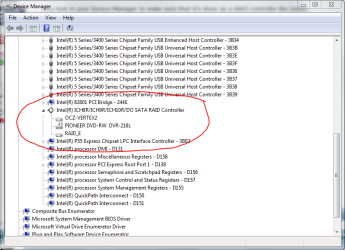
In order to install the 2 x Samsungs in a RAID0 configuration, in my BIOS (Award) I set the PCH SATA Contol Mode to RAID. I then configured the RAID in the BIOS RAID Configuration Utility and went ahead with installation of OS etc. Everything works beautifully, but I noticed at reboot in the POST screen that both the SSD and the Samsungs are controlled by the RAID driver.
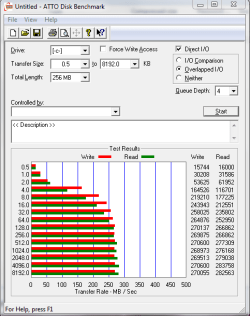
I ran HHD Tune on the SSD and noticed that the average transfer rate was about 143MB/s. After doing some reading up, I rebooted, and in the BIOS changed the PCH SATA Control Mode to IDE. After rebooting, the RAID0 (the E drive) is no longer visible - the 2 Samsung disks are of course still available, but require reformating to use and no longer appear to be in a RAID configuration (they appear as two separate Samsung disks).
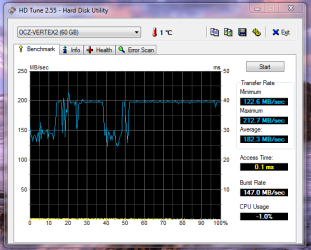
If I run HDD Tune on the SSD, now under IDE mode, I average 183MB/s (see attachement) implying for better performance, the SSD is better under IDE. The problem is the RAID0 is unavailable?
So, the question is:
In the BIOS, what settings do I need to change, in order for the SSD to be IDE, and the 2 x Samsungs to be in a RAID0? I seem to have missed something altogether.
Can anyone help me with this?
Thanks,
Golden
I wonder if someone could help clarify an issue for me please.
Yesterday, I installed a new SSD (OCZ Vertex 2) as my C:. I also installed 2 x Samsung F3 Spinpoints as my E: in RAID0.
In order to install the 2 x Samsungs in a RAID0 configuration, in my BIOS (Award) I set the PCH SATA Contol Mode to RAID. I then configured the RAID in the BIOS RAID Configuration Utility and went ahead with installation of OS etc. Everything works beautifully, but I noticed at reboot in the POST screen that both the SSD and the Samsungs are controlled by the RAID driver.
I ran HHD Tune on the SSD and noticed that the average transfer rate was about 143MB/s. After doing some reading up, I rebooted, and in the BIOS changed the PCH SATA Control Mode to IDE. After rebooting, the RAID0 (the E drive) is no longer visible - the 2 Samsung disks are of course still available, but require reformating to use and no longer appear to be in a RAID configuration (they appear as two separate Samsung disks).
If I run HDD Tune on the SSD, now under IDE mode, I average 183MB/s (see attachement) implying for better performance, the SSD is better under IDE. The problem is the RAID0 is unavailable?
So, the question is:
In the BIOS, what settings do I need to change, in order for the SSD to be IDE, and the 2 x Samsungs to be in a RAID0? I seem to have missed something altogether.
Can anyone help me with this?
Thanks,
Golden
Attachments
Last edited:
My Computer
- Computer type
- PC/Desktop
- Computer Manufacturer/Model Number
- Golden Mk. I.4
- OS
- Windows 10 Pro x64 ; Xubuntu x64
- CPU
- Intel i7 860 @ 2.80 GHz O/C'ed to 4.0GHz
- Motherboard
- Gigabyte P55A-UD3R Rev.1. Award BIOS F13
- Memory
- 16GB Corsair Vengance DDR3 @ 661 MHz Dual Channel (9-9-9-24)
- Graphics Card(s)
- EVGA NVidia GTX 560 1024MB
- Sound Card
- Realtek Integrated
- Monitor(s) Displays
- Dual Samsung SyncMaster 2494HS
- Screen Resolution
- 1920*1080 and 1920*1080
- Hard Drives
- 1*Samsung 840 EVO 120GB SSD;
1*OCZ Vertex 2 60GB SSD;
2*Samsung F3 SpinPoint 1TB in RAID0;
1*Samsung F1 SpinPoint 1TB;
2*Western Digital 1TB External USB 3.0
1*Western Digital 500GB External USB 3.0
1*Seagate 500GB External USB 2.0
- PSU
- Thermaltake ToughPower QFan 750W
- Case
- Thermaltake Element S VK60001W2Z
- Cooling
- Corsair H60 Water Cooling, 2*230mm and 2*80mm case fans
- Keyboard
- Logitech G110
- Mouse
- Logitech MX518