Connot configure my sound to 5.1 in windows 7

Have you set the Realtek as the default playback device? As long as the Logitech headset (USB no doubt, which if it is doesn't use the onboard audio at all) is set as the default you won't be able to use or configure your speakers.

When I use the speakers I generally unplug my headset so there is never a conflict.
 

My Computer My Computer

At a glance

Windows 7 Home Premium 64 BitCore 2 Due E45004gbAsus EN GTS250
Computer Manufacturer/Model Number
Home Build
OS
Windows 7 Home Premium 64 Bit
CPU
Core 2 Due E4500
Motherboard
Number on board GA-T671MG
Memory
4gb
Graphics Card(s)
Asus EN GTS250
Sound Card
Motherboard
Monitor(s) Displays
Samsung Syncmaster T220
Screen Resolution
1680 by 1050 32bit
Hard Drives
1 WDC WD10EARS-22Y5B! ATA (to install Win 7 HP)
2nd WD with XP Pro, Does not boot
PSU
Cooler master 520W Moduler
Case
Antec 1200
Cooling
Std with Imedia System and Antec 1200
Keyboard
Wireless microsoft 3000 v2.0
Mouse
wireless laser mouse 5000
Internet Speed
8500kb +
Other Info
Trying to build myself a decent system bit by bit. (Only motherboard and chip need to be replaced now.) Upgraded to overclocked i5.
Have you set the Realtek as the default playback device? As long as the Logitech headset (USB no doubt, which if it is doesn't use the onboard audio at all) is set as the default you won't be able to use or configure your speakers.

When I use the speakers I generally unplug my headset so there is never a conflict.

Hi Bling

Stormy's proposed the correct solution. :thumbsup:
Try setting the realtek as default>configure the setup to check if it works i.e. 5.1
Plugging the headset in with the realtek as default should cause no issues.

Keep us posted and regards
 

My Computer My Computer

At a glance

Win7 HP (x64)/Win7 Ultimate (x64)Core i7 9206 x 2GB Corsair XMS3CF HD4890
Computer Manufacturer/Model Number
Custom
OS
Win7 HP (x64)/Win7 Ultimate (x64)
CPU
Core i7 920
Motherboard
Intel X58
Memory
6 x 2GB Corsair XMS3
Graphics Card(s)
CF HD4890
Sound Card
Asus Xonar
Monitor(s) Displays
Dell 2408WFP
Screen Resolution
1920 x 1200
Hard Drives
2 x 150GB WDC Velociraptors (Raid 0)
1 x 1TB Seagate
1 x 1.5TB Seagate
PSU
Corsair HX1000W
Case
Antec 1200
Keyboard
Razer Lycosa/N52te
Mouse
Razer Lachesis
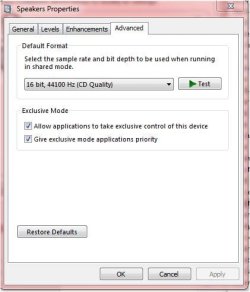
Sound Fixed.JPG

Setting the Speakers as default didn't work, but when I checked(ticked) the "Give exclusive mode applications priority" the sound is crystal clear but only on 16bit, 44100 Hz (CD Quality).

Thank you for all of your help everyone.

I feel like I am getting somewhere with all of the problems, sorting them one by one, but with a lot of help from people like yourselves, the real experts...
Thanks again.
 

My Computer My Computer

At a glance

Windows 7 Home Premium 64 BitCore 2 Due E45004gbAsus EN GTS250
Computer Manufacturer/Model Number
Home Build
OS
Windows 7 Home Premium 64 Bit
CPU
Core 2 Due E4500
Motherboard
Number on board GA-T671MG
Memory
4gb
Graphics Card(s)
Asus EN GTS250
Sound Card
Motherboard
Monitor(s) Displays
Samsung Syncmaster T220
Screen Resolution
1680 by 1050 32bit
Hard Drives
1 WDC WD10EARS-22Y5B! ATA (to install Win 7 HP)
2nd WD with XP Pro, Does not boot
PSU
Cooler master 520W Moduler
Case
Antec 1200
Cooling
Std with Imedia System and Antec 1200
Keyboard
Wireless microsoft 3000 v2.0
Mouse
wireless laser mouse 5000
Internet Speed
8500kb +
Other Info
Trying to build myself a decent system bit by bit. (Only motherboard and chip need to be replaced now.) Upgraded to overclocked i5.
Back
Top