Constant BOOT Errors!!!

danger47

New member
Local time
6:07 PM
Messages
8
Hello all
I'm fairly new to this site and did a lot of reading to see if this has already been posted but I couldn't find it, so here goes...

Every time I boot lately (last 2 -3 weeks) I get error messages, the first one said missing "NLTDR", and now the newest one is missing "BOOTMGR". I have tried system restore, repair my computer, tried using cmd for "chkdsk /r" and no luck.

My computer will boot but only if I leave in either the repair disc created by windows itself, or my win 7 home upgrade dvd. And even then I have to chose which operating system to use and it has windows seven showing 3 times in a row.

I really don't want to have to format and start all over again because it's about 2 days work for me because of Mcafee installation is compllicated (just trust me on this one) and all my ISP info has to be done with a tech.

How can I fix any boot up problems please????
 

My Computer

Computer Manufacturer/Model Number
home built
OS
windows 7 home premium 32 bit
CPU
intel 775
Motherboard
asus p5nsli
Memory
4 gigs
Graphics Card(s)
nvidia 6800
Sound Card
onboard
Monitor(s) Displays
19 inch nec
Hard Drives
wd 1 ter.
maxtor 750 gigs
seagate barracuda 750 gigs
PSU
450 watt
Case
custom
Cooling
standard
Hello danger47, welcome to Seven Forums!


Post a snip first then have a look at this tutorial at the link below to get some info for starters and be sure to post back with any further questions you may have and to keep us informed.


   Note

Before we make any specific recommendations will you please post a snip/screen-shot of the entire Windows disk management drive map with a full description as to which drive/partition is which, so we can see what you have going on as there may be a fairly simple way to resolve the situation.

In the Windows start menu right click computer and click manage, in the left pane of the "Computer Management" window that opens click disk management and post a maximized snip of that.


My Computer

Computer Manufacturer/Model Number
* BFK Customs *
OS
W 7 64-bit Ultimate
CPU
Intel Q9550 Yorkfield
Motherboard
ASUS P5Q Pro
Memory
8GB Dominator 8500C5D
Graphics Card(s)
ATI : XFX 5870
Sound Card
Realtek HD Audio 7-1
Monitor(s) Displays
1x 47" LCD HDMI & 3x 26" LCD HDMI
Screen Resolution
1920x1080P & 1920x1200
Hard Drives
1x 80GB Intel X25-M G2 SSD : 1x 500GB & 1x 640GB WD Caviar Black(s)
PSU
Corsair 620HX
Case
Cooler Master RC-690
Cooling
Tuniq Tower 120, 2x 140mm and 3x 120mm case fans
Keyboard
Microsoft 500
Mouse
Razer Diamondback 3G
Internet Speed
14 Mb/s
Other Info
1x Koutech 3Gb/s SATA HDD Hot Swap Rack
Capture.PNGThanx for the quick response. I hope I do this properly, it's my first time doing this!!

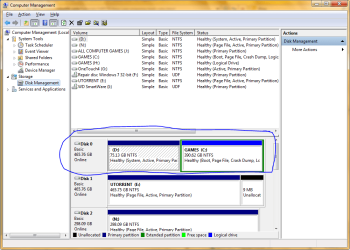
This is drive C: and D: is a partition although I have no idea when I made this partition??? Doesn't make sense that I would partition so small. Therefore I don't know if I should just delete this partition and see what happens? But I'll wait until I hear from you guys.
 

My Computer

Computer Manufacturer/Model Number
home built
OS
windows 7 home premium 32 bit
CPU
intel 775
Motherboard
asus p5nsli
Memory
4 gigs
Graphics Card(s)
nvidia 6800
Sound Card
onboard
Monitor(s) Displays
19 inch nec
Hard Drives
wd 1 ter.
maxtor 750 gigs
seagate barracuda 750 gigs
PSU
450 watt
Case
custom
Cooling
standard
first thing i would do is convert c to a primary drive then set c to active. then try to boot normally. d shouuld not be the active partition.
 
Last edited:

My Computer

OS
Windows 7 Ultimate
CPU
Core2Duo E8400
Motherboard
Asus Rampage Formula Rev. 1
Memory
5 Gigs
Graphics Card(s)
Asus Nvidia 9500 Gt
Sound Card
Creative X-Fi Extreme Audio
Monitor(s) Displays
18 Inch LCD
Screen Resolution
1366x768
Hard Drives
c: wd 300 gig velociaptor, wd 1tb, wd 500 gig, wd 320 gig, and 2 wd 40 gig ide drives
PSU
600 watts
The C: partition cannot be marked as active as it an Extended partition / Logical drive and Windows can't boot independently from an Extended partition, the Windows System boot files must be stored on t Primary to function correctly.


C: is the partition that the OS is currently running from, not D:

Is there an Operating System on D: and if so what is it?
 

My Computer

Computer Manufacturer/Model Number
* BFK Customs *
OS
W 7 64-bit Ultimate
CPU
Intel Q9550 Yorkfield
Motherboard
ASUS P5Q Pro
Memory
8GB Dominator 8500C5D
Graphics Card(s)
ATI : XFX 5870
Sound Card
Realtek HD Audio 7-1
Monitor(s) Displays
1x 47" LCD HDMI & 3x 26" LCD HDMI
Screen Resolution
1920x1080P & 1920x1200
Hard Drives
1x 80GB Intel X25-M G2 SSD : 1x 500GB & 1x 640GB WD Caviar Black(s)
PSU
Corsair 620HX
Case
Cooler Master RC-690
Cooling
Tuniq Tower 120, 2x 140mm and 3x 120mm case fans
Keyboard
Microsoft 500
Mouse
Razer Diamondback 3G
Internet Speed
14 Mb/s
Other Info
1x Koutech 3Gb/s SATA HDD Hot Swap Rack
first thing i would do is set c to active. then try to boot normally. d shouuld not be the active partition. i also noticed that c is a logical partition it should be a primary partition.

If OP are not dual booting the only ACTIVE partition should be D:
 

My Computer

OS
ME/XP/Vista/Win7
The best first step would be to convert the C: Logical to a Primary partition so it can independently host the System boot files; have a look at Option One of this tutorial linked below for the process; when that's done post back with another snip and we'll go on from there.


Be sure to post back with any further questions you may have and to keep us informed.


As good and reliable a program as Partition Wizard is, I would not trust the installed version for the operation you need, use the boot CD as suggested.

First download the Partition Wizard Bootable Disk (PWBD) ISO file to the desktop, be sure to get the PWBD and not the installed version; scroll down to see the download link for the Bootable CD ISO file at this link below.
Then use ImgBurn to burn the ISO to a CD, at no greater than 4x speed with a verify; it was designed for use and works best from a CD rather than a DVD; then boot the created CD to make the changes, it doesn't take any input from the user to setup, just relax and let it load.
 

My Computer

Computer Manufacturer/Model Number
* BFK Customs *
OS
W 7 64-bit Ultimate
CPU
Intel Q9550 Yorkfield
Motherboard
ASUS P5Q Pro
Memory
8GB Dominator 8500C5D
Graphics Card(s)
ATI : XFX 5870
Sound Card
Realtek HD Audio 7-1
Monitor(s) Displays
1x 47" LCD HDMI & 3x 26" LCD HDMI
Screen Resolution
1920x1080P & 1920x1200
Hard Drives
1x 80GB Intel X25-M G2 SSD : 1x 500GB & 1x 640GB WD Caviar Black(s)
PSU
Corsair 620HX
Case
Cooler Master RC-690
Cooling
Tuniq Tower 120, 2x 140mm and 3x 120mm case fans
Keyboard
Microsoft 500
Mouse
Razer Diamondback 3G
Internet Speed
14 Mb/s
Other Info
1x Koutech 3Gb/s SATA HDD Hot Swap Rack
We can't see the size on disk of any of the partitions since you cut off the listings columns on the far right.

But we can see enough to know it is a hot mess, with almost every partition marked Active when only the OS partition should be, Win7 installed to a Logical partition which cannot be marked Active so it is booting off of D.

You'd be better off to move the data off of DISK0, unplug all other HD's and peripherals, boot the Win7 installer to clean reinstall. Do a Custom install, use Drive Options to delete both partitions, create New as you wish, then format before install. Illustrated steps given here: Clean Install Windows 7

When you plug back in the other HD's, boot the into Win7 DVD Repair console to open a Command Prompt to mark all the other HD's partitions Inactive if they don't contain an OS: Partition - Mark as Active (Method Two)

If you decide to reinstall look over these tips to get a perfect reinstall - use the ones which apply: Reinstalling Windows 7
 
as stated before get a copy of the partition wizard 5.0 iso, and then use imgburn to burn the cd. pw 6.0 on some systems does not like to boot from the cd.
 

My Computer

OS
Windows 7 Ultimate
CPU
Core2Duo E8400
Motherboard
Asus Rampage Formula Rev. 1
Memory
5 Gigs
Graphics Card(s)
Asus Nvidia 9500 Gt
Sound Card
Creative X-Fi Extreme Audio
Monitor(s) Displays
18 Inch LCD
Screen Resolution
1366x768
Hard Drives
c: wd 300 gig velociaptor, wd 1tb, wd 500 gig, wd 320 gig, and 2 wd 40 gig ide drives
PSU
600 watts
Well now, who do I follow instructions from? Gregrocker or Bare Foot Kid????

As Stated, I'd really rather not format if I don't absolutely have to. But I will follow the advice of people who know what they're talking about.

I've downloaded said partition manager and will make an iso. What should I do after this please?
 

My Computer

Computer Manufacturer/Model Number
home built
OS
windows 7 home premium 32 bit
CPU
intel 775
Motherboard
asus p5nsli
Memory
4 gigs
Graphics Card(s)
nvidia 6800
Sound Card
onboard
Monitor(s) Displays
19 inch nec
Hard Drives
wd 1 ter.
maxtor 750 gigs
seagate barracuda 750 gigs
PSU
450 watt
Case
custom
Cooling
standard
The C: partition cannot be marked as active as it an Extended partition / Logical drive and Windows can't boot independently from an Extended partition, the Windows System boot files must be stored on t Primary to function correctly.


C: is the partition that the OS is currently running from, not D:

Is there an Operating System on D: and if so what is it?

BFK asked, Is there an Operating System on D:
Which is still unknown.
 

My Computer

OS
ME/XP/Vista/Win7
You don't have to start over unless you want to, if you convert C: to a Primary partition then make it Active, System using the method outlined in this tutorial linked below.


My Computer

Computer Manufacturer/Model Number
* BFK Customs *
OS
W 7 64-bit Ultimate
CPU
Intel Q9550 Yorkfield
Motherboard
ASUS P5Q Pro
Memory
8GB Dominator 8500C5D
Graphics Card(s)
ATI : XFX 5870
Sound Card
Realtek HD Audio 7-1
Monitor(s) Displays
1x 47" LCD HDMI & 3x 26" LCD HDMI
Screen Resolution
1920x1080P & 1920x1200
Hard Drives
1x 80GB Intel X25-M G2 SSD : 1x 500GB & 1x 640GB WD Caviar Black(s)
PSU
Corsair 620HX
Case
Cooler Master RC-690
Cooling
Tuniq Tower 120, 2x 140mm and 3x 120mm case fans
Keyboard
Microsoft 500
Mouse
Razer Diamondback 3G
Internet Speed
14 Mb/s
Other Info
1x Koutech 3Gb/s SATA HDD Hot Swap Rack
I got disk management opened and tried to select either C:\ or D:\ and change one to active drive but I don't have that option showing at all. Here's the optionsI get: Open, Explore, Change drive letter and paths, Shrink Volume, Properties, and Help.
 

My Computer

Computer Manufacturer/Model Number
home built
OS
windows 7 home premium 32 bit
CPU
intel 775
Motherboard
asus p5nsli
Memory
4 gigs
Graphics Card(s)
nvidia 6800
Sound Card
onboard
Monitor(s) Displays
19 inch nec
Hard Drives
wd 1 ter.
maxtor 750 gigs
seagate barracuda 750 gigs
PSU
450 watt
Case
custom
Cooling
standard
Yes thank you indeed. My sister just phoned me and wants to come and get me to stay at her place up north for a week to 10 days to help clear my head a bit about my health news and so I think I will go and resume this topic when I get back OK? I hope I'll be able to think much more clearer when I return. I'm trying to follow all the instructions but my mind is racing a million miles an hour right now. Please don't be offended if I don't continue right away, I really really do appreciate all the help!!!!!:)
 

My Computer

Computer Manufacturer/Model Number
home built
OS
windows 7 home premium 32 bit
CPU
intel 775
Motherboard
asus p5nsli
Memory
4 gigs
Graphics Card(s)
nvidia 6800
Sound Card
onboard
Monitor(s) Displays
19 inch nec
Hard Drives
wd 1 ter.
maxtor 750 gigs
seagate barracuda 750 gigs
PSU
450 watt
Case
custom
Cooling
standard
Hello again.


No problem mate, it has been our pleasure; take all the time you need and just post back to this same thread you started and we'll pick it up right there when you're able.
 

My Computer

Computer Manufacturer/Model Number
* BFK Customs *
OS
W 7 64-bit Ultimate
CPU
Intel Q9550 Yorkfield
Motherboard
ASUS P5Q Pro
Memory
8GB Dominator 8500C5D
Graphics Card(s)
ATI : XFX 5870
Sound Card
Realtek HD Audio 7-1
Monitor(s) Displays
1x 47" LCD HDMI & 3x 26" LCD HDMI
Screen Resolution
1920x1080P & 1920x1200
Hard Drives
1x 80GB Intel X25-M G2 SSD : 1x 500GB & 1x 640GB WD Caviar Black(s)
PSU
Corsair 620HX
Case
Cooler Master RC-690
Cooling
Tuniq Tower 120, 2x 140mm and 3x 120mm case fans
Keyboard
Microsoft 500
Mouse
Razer Diamondback 3G
Internet Speed
14 Mb/s
Other Info
1x Koutech 3Gb/s SATA HDD Hot Swap Rack
Reading back over the thread, the key clue is that it will boot if Repair CD or WIn7 DVD is in drive. This means that Startup Repair run from the DVD Repair console or REpair CD with the WIn7 partition itself marked Active should fix this. As stated you'll have to use PW CD to Modify>Convert to Primary the WIn7 partition first, then Modify>Set it to Active, Apply all steps.

Because you mention MucAfee it should also be mentioned that this is widely regarded here as one of the worst infections a computer can have. At the minimum uninstall it using it's special uninstall tool from it's website, then install free lightweight MS Security Essentials or Avast 6. But I would clean reinstall to make sure none of its Muck is left.
 
Back
Top