Control Panel - Add or Remove from Navigation Pane

How to Add or Remove Control Panel from Navigation Pane in Windows 7


   Information
This will show you how to add or remove Control Panel in the Windows Explorer Navigation Pane in Windows 7.

   Warning

  • You can only do this tutorial while logged into an administrator account.
  • This will affect all user accounts on the computer.
  • This will also add or remove the default Control Panel desktop icon as well.
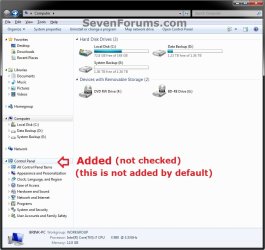
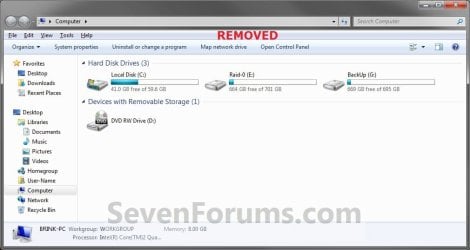
EXAMPLE: Control Panel in Navigation Pane
NOTE: This is the Control Panel added (default) (left screenshot below) and removed (right screenshot below) from the Navigation Pane when you have the Show all folders option checked or not checked.
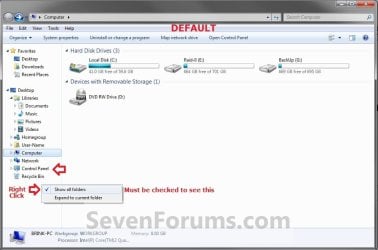
Default.jpg

Added-2.jpg

Removed.jpg
Here's How:
1. Open the Start Menu and type regedit.exe in the search line, then press enter.

2. If prompted by UAC, then click on Yes.

3. In Regedit, go to the location below: (See screenshot below step 4)
Code:
HKEY_CLASSES_ROOT\CLSID\{26EE0668-A00A-44D7-9371-BEB064C98683}\ShellFolder
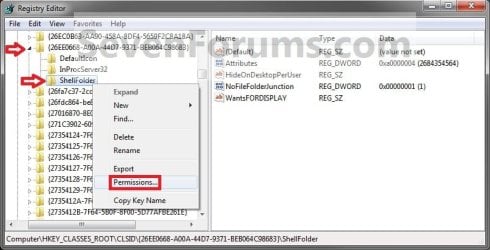
4. In the left pane of regedit, right click on the ShellFolder key and click on Permissions. (See screenshot below)
Step1.jpg
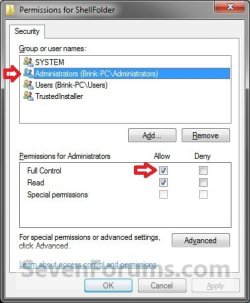
5. At the top, select the Administrators group. At the bottom, check the Allow box to the right of Full Control and click on OK. (See screenshot below)
Step2.jpg
6. Do either step 7 or 8 to add or remove your user profile folder from the navigation pane.

7. To Add Control Panel to the Navigation Pane
NOTE: This is the default setting.
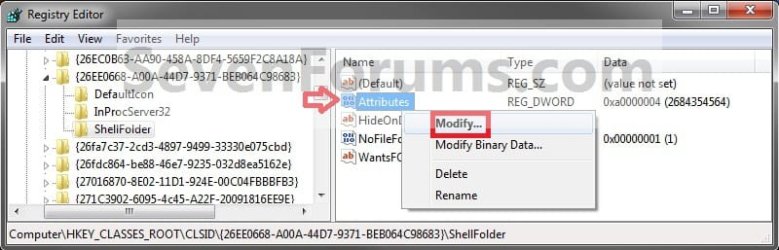
A) In the right pane of regedit, right click on Attributes, click on Modify, type in a0000004 and click on OK. (see screenshots below)
NOTE: This is to have the Control Panel display under Desktop when you have Show all folders checked.
Step3.jpg

Step4.jpg
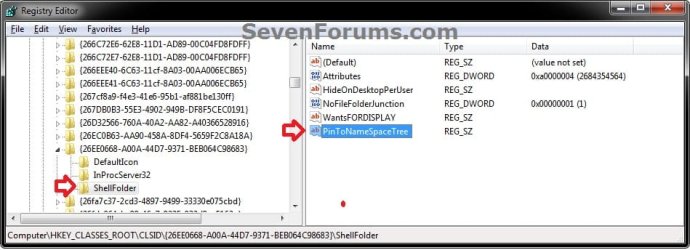
B) In the right pane of ShellFolder, right click on a empty space, click on New and String Value, copy and paste the name below, and press Enter. (see screenshot below)
NOTE: This is to have Control Panel display as a separate group in the navigation pane when you do not have Show all folders checked.
PinToNameSpaceTree

Reg-Add.jpg
C) Go to step 9.
8. To Remove Control Panel from the Navigation Pane
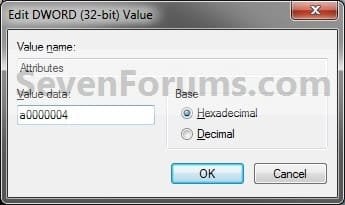
A) In the right pane of regedit, right click on Attributes, click on Modify, type in a0900004 and click on OK. (see screenshot below)
NOTE: This is to not have the Control Panel display under Desktop when you have Show all folders checked.
Step3.jpg

Step5.jpg
B) In the right pane of ShellFolder, right click on PinToNameSpaceTree (if there), and click on Delete. (see screenshot below)
NOTE: This is to not have the Control Panel display as a separate group in the navigation pane when you do not have Show all folders checked.
Reg-Add.jpg
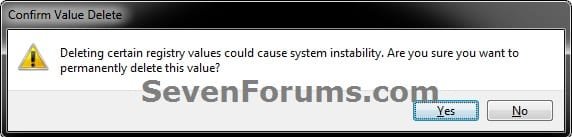
C) Click on Yes to confirm deletion. (see screenshot below)
Delete.jpg
D) Continue on to step 9.
9. If you have 64-bit Windows 7 Installed

   Note
To also add or remove Control Panel from the "Open" and "Save as" type windows as well in 64-bit Windows 7, you will also need to do this step.

If you have a 32-bit Windows 7 installed, then skip this step since doing steps 1 to 7/8 will add or remove Control Panel from the "Open" and "Save as" type windows as well.

A) In Regedit, go to the location below:
Code:
HKEY_LOCAL_MACHINE\SOFTWARE\Wow6432Node\Classes\CLSID\{26EE0668-A00A-44D7-9371-BEB064C98683}\ShellFolder
B) Repeat steps 4 to 7/8 above.
10. Close regedit.

11. Restart the computer to fully apply.
That's it,
Shawn


Last edited:
Recycle Bin appeared

Yep, that's what it was. The entry below in your REG file is what added it. The CLSID key {21EC2020-3AEA-1069-A2DD-08002B30309D} in it is for the "All Control Panel Items". The MyComputer key indicates the CLSID being placed in the Computer window.

Code:
HKEY_LOCAL_MACHINE\SOFTWARE\Microsoft\Windows\CurrentVersion\Explorer\[B]MyComputer[/B]\NameSpace\[B]{21EC2020-3AEA-1069-A2DD-08002B30309D}[/B]
The REG file below will remove it for you. :)

This is exactly what I wanted (to add All Control Panel Item, not to remove it)! But under Desktop, not under MyComputer. So I just tried to add this key :

Code:
HKEY_LOCAL_MACHINE\SOFTWARE\Microsoft\Windows\CurrentVersion\Explorer\[B]Desktop[/B]\NameSpace\[B]{21EC2020-3AEA-1069-A2DD-08002B30309D}[/B]

And it worked!... But it also add a control panel icon to my desktop. So I just deleted the new key, and for a reason I don't understand, I now have the Recycle Bin in my Navigation pane under Desktop.

I tried to remove it (again) with this tuto :

http://www.sevenforums.com/tutorials/178464-recycle-bin-add-remove-navigation-pane.html

But it doesn't work. Does anyone have a solution?

Thanks!
 

My Computer

OS
Windows 7 Home 64 bits (Fr)

My Computer

Computer type
PC/Desktop
Computer Manufacturer/Model Number
Self built custom
OS
64-bit Windows 11 Pro for Workstations
CPU
Intel i7-8700K OC'd to 5 GHz
Motherboard
ASUS ROG Maximus XI Formula Z390
Memory
64 GB (4x16GB) G.SKILL TridentZ RGB DDR4 3600 MHz
Graphics Card(s)
ASUS ROG-STRIX-GTX1080TI-O11G-GAMING
Sound Card
Integrated
Monitor(s) Displays
2 x Samsung Odyssey G7 27"
Screen Resolution
2560x1440
Hard Drives
1TB Samsung 990 PRO M.2,
4TB Samsung 990 PRO PRO M.2,
TerraMaster F8 SSD Plus NAS
PSU
Seasonic Prime Titanium 850W
Case
Thermaltake Core P3
Cooling
Corsair Hydro H115i
Keyboard
Logitech wireless K800
Mouse
Logitech MX Master 4
Internet Speed
2 Gb/s Download and 100 Mb/s Upload
Antivirus
Malwarebyte Anti-Malware Premium
Browser
Google Chrome
Other Info
Logitech Z625 speaker system,
Logitech BRIO 4K Pro webcam,
HP Color LaserJet Pro MFP M477fdn,
APC SMART-UPS RT 1000 XL - SURT1000XLI,
Galaxy S23 Plus phone
Hello Brink,

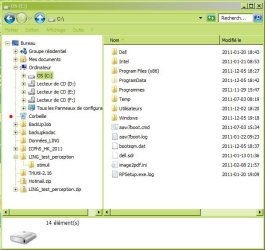
Thanks for your quick answer. This is a screenshot of my Windows Explorer :

Capture.JPG

The red dot marks the Recycle Bin I would like to remove. Like I said, I tried this tuto :

http://www.sevenforums.com/tutorials/178464-recycle-bin-add-remove-navigation-pane.html

With no result. I even restored my system and it's still there. I recently updated Classic Shell. But I don't see any option that could have cause the recycle bin to appear.
 

My Computer

OS
Windows 7 Home 64 bits (Fr)
I'm not sure if the theme you are using may have an effect on this or not, but could you export and upload the registry keys below for the Recylcle Bin in explorer? I'll take a look at it to see if something may be there as a cause.

Code:
HKEY_CLASSES_ROOT\CLSID\{645FF040-5081-101B-9F08-00AA002F954E}\[B]ShellFolder[/B]
 
 
HKEY_LOCAL_MACHINE\SOFTWARE\Wow6432Node\Classes\CLSID\{645FF040-5081-101B-9F08-00AA002F954E}\[B]ShellFolder[/B]
 

My Computer

Computer type
PC/Desktop
Computer Manufacturer/Model Number
Self built custom
OS
64-bit Windows 11 Pro for Workstations
CPU
Intel i7-8700K OC'd to 5 GHz
Motherboard
ASUS ROG Maximus XI Formula Z390
Memory
64 GB (4x16GB) G.SKILL TridentZ RGB DDR4 3600 MHz
Graphics Card(s)
ASUS ROG-STRIX-GTX1080TI-O11G-GAMING
Sound Card
Integrated
Monitor(s) Displays
2 x Samsung Odyssey G7 27"
Screen Resolution
2560x1440
Hard Drives
1TB Samsung 990 PRO M.2,
4TB Samsung 990 PRO PRO M.2,
TerraMaster F8 SSD Plus NAS
PSU
Seasonic Prime Titanium 850W
Case
Thermaltake Core P3
Cooling
Corsair Hydro H115i
Keyboard
Logitech wireless K800
Mouse
Logitech MX Master 4
Internet Speed
2 Gb/s Download and 100 Mb/s Upload
Antivirus
Malwarebyte Anti-Malware Premium
Browser
Google Chrome
Other Info
Logitech Z625 speaker system,
Logitech BRIO 4K Pro webcam,
HP Color LaserJet Pro MFP M477fdn,
APC SMART-UPS RT 1000 XL - SURT1000XLI,
Galaxy S23 Plus phone
Even with Aero theme, after rebooting explorer.exe, the Recycle Bin is still there. I also looked for the two keys you just indicated, and I already had them. And there is no PinToNameSpaceTree key in.

Thank you for your support.
 

My Computer

OS
Windows 7 Home 64 bits (Fr)
Yes, but could you export and upload those keys so that I could look to see if there may be anything else in those entries that should not be there?
 

My Computer

Computer type
PC/Desktop
Computer Manufacturer/Model Number
Self built custom
OS
64-bit Windows 11 Pro for Workstations
CPU
Intel i7-8700K OC'd to 5 GHz
Motherboard
ASUS ROG Maximus XI Formula Z390
Memory
64 GB (4x16GB) G.SKILL TridentZ RGB DDR4 3600 MHz
Graphics Card(s)
ASUS ROG-STRIX-GTX1080TI-O11G-GAMING
Sound Card
Integrated
Monitor(s) Displays
2 x Samsung Odyssey G7 27"
Screen Resolution
2560x1440
Hard Drives
1TB Samsung 990 PRO M.2,
4TB Samsung 990 PRO PRO M.2,
TerraMaster F8 SSD Plus NAS
PSU
Seasonic Prime Titanium 850W
Case
Thermaltake Core P3
Cooling
Corsair Hydro H115i
Keyboard
Logitech wireless K800
Mouse
Logitech MX Master 4
Internet Speed
2 Gb/s Download and 100 Mb/s Upload
Antivirus
Malwarebyte Anti-Malware Premium
Browser
Google Chrome
Other Info
Logitech Z625 speaker system,
Logitech BRIO 4K Pro webcam,
HP Color LaserJet Pro MFP M477fdn,
APC SMART-UPS RT 1000 XL - SURT1000XLI,
Galaxy S23 Plus phone
LOL, no problem. :)

Well, they have the same default entries that I have on my system, so that's not the problem area.

I must admit that I'm not sure what the cause of the Recycle Bin sticking there is. :(
 

My Computer

Computer type
PC/Desktop
Computer Manufacturer/Model Number
Self built custom
OS
64-bit Windows 11 Pro for Workstations
CPU
Intel i7-8700K OC'd to 5 GHz
Motherboard
ASUS ROG Maximus XI Formula Z390
Memory
64 GB (4x16GB) G.SKILL TridentZ RGB DDR4 3600 MHz
Graphics Card(s)
ASUS ROG-STRIX-GTX1080TI-O11G-GAMING
Sound Card
Integrated
Monitor(s) Displays
2 x Samsung Odyssey G7 27"
Screen Resolution
2560x1440
Hard Drives
1TB Samsung 990 PRO M.2,
4TB Samsung 990 PRO PRO M.2,
TerraMaster F8 SSD Plus NAS
PSU
Seasonic Prime Titanium 850W
Case
Thermaltake Core P3
Cooling
Corsair Hydro H115i
Keyboard
Logitech wireless K800
Mouse
Logitech MX Master 4
Internet Speed
2 Gb/s Download and 100 Mb/s Upload
Antivirus
Malwarebyte Anti-Malware Premium
Browser
Google Chrome
Other Info
Logitech Z625 speaker system,
Logitech BRIO 4K Pro webcam,
HP Color LaserJet Pro MFP M477fdn,
APC SMART-UPS RT 1000 XL - SURT1000XLI,
Galaxy S23 Plus phone
Well... thank you for having tried. I also checked my hard disk drive for error... nothing. I'll be back if I find something.
Thanks again for your help and all your great tuto.
 

My Computer

OS
Windows 7 Home 64 bits (Fr)
You're most welcome. Thank you. I wish that I could have helped more on that. :)
 

My Computer

Computer type
PC/Desktop
Computer Manufacturer/Model Number
Self built custom
OS
64-bit Windows 11 Pro for Workstations
CPU
Intel i7-8700K OC'd to 5 GHz
Motherboard
ASUS ROG Maximus XI Formula Z390
Memory
64 GB (4x16GB) G.SKILL TridentZ RGB DDR4 3600 MHz
Graphics Card(s)
ASUS ROG-STRIX-GTX1080TI-O11G-GAMING
Sound Card
Integrated
Monitor(s) Displays
2 x Samsung Odyssey G7 27"
Screen Resolution
2560x1440
Hard Drives
1TB Samsung 990 PRO M.2,
4TB Samsung 990 PRO PRO M.2,
TerraMaster F8 SSD Plus NAS
PSU
Seasonic Prime Titanium 850W
Case
Thermaltake Core P3
Cooling
Corsair Hydro H115i
Keyboard
Logitech wireless K800
Mouse
Logitech MX Master 4
Internet Speed
2 Gb/s Download and 100 Mb/s Upload
Antivirus
Malwarebyte Anti-Malware Premium
Browser
Google Chrome
Other Info
Logitech Z625 speaker system,
Logitech BRIO 4K Pro webcam,
HP Color LaserJet Pro MFP M477fdn,
APC SMART-UPS RT 1000 XL - SURT1000XLI,
Galaxy S23 Plus phone
I'm having issues with this.

At first I thought that the tweak only applies when "show all folders" is unchecked...

Then I read

To Remove Control Panel from the Navigation Pane
A) In the right pane of regedit, right click on Attributes, click on Modify, type in a0900004 and click on OK. (see screenshot below)
NOTE: This is to not have the Control Panel display under Desktop when you have Show all folders checked.


Mine is still showing (unless 'show all' is unchecked).

Got (shellfolder) permission, first tried with nav pane changer.exe (which provides permission by adding full user control directly).

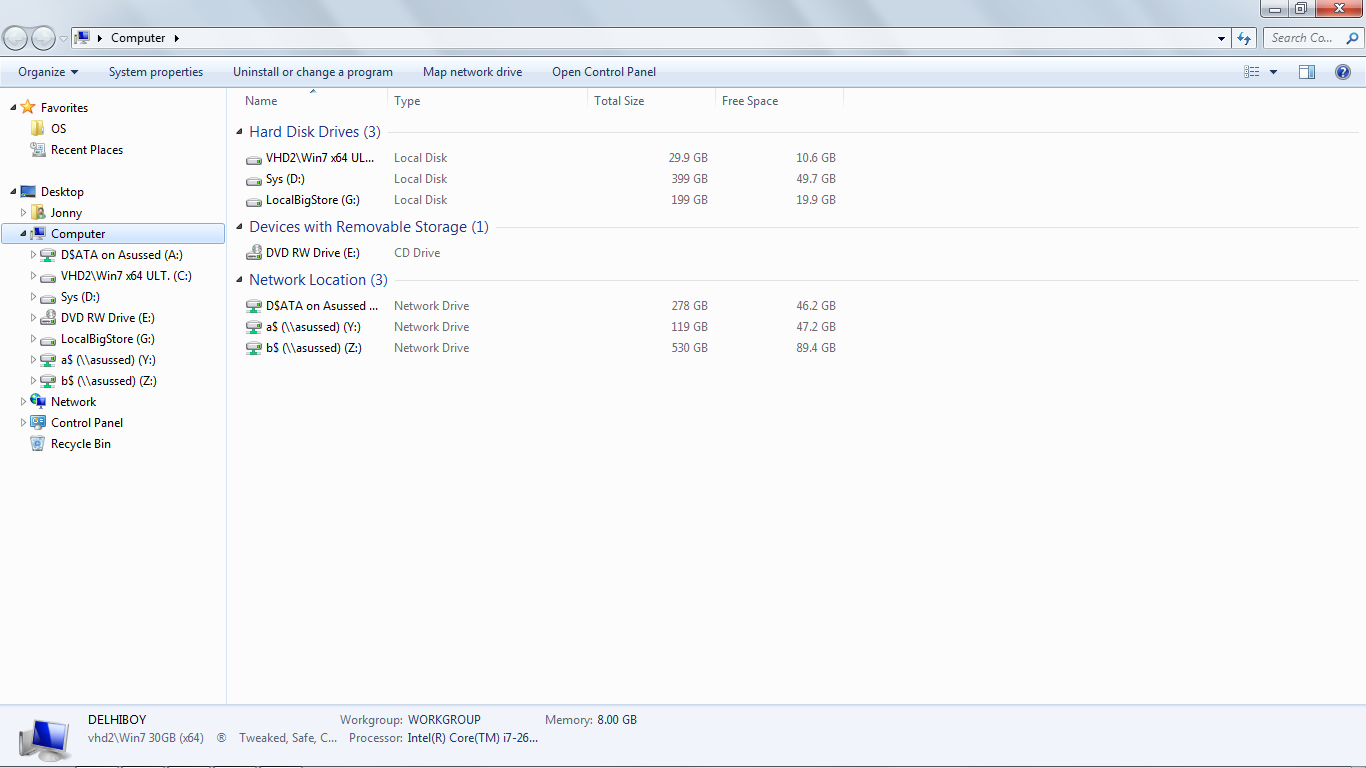
show all shows
S5fLWIL.png


Can I remove control panel and trash (and maybe have libraries only in 'show all')?!

Thanks
 

My Computer

Computer type
Laptop
Computer Manufacturer/Model Number
Dell
OS
Windows 7 Ultimate 64bit
CPU
2.2
Memory
8Gb
Graphics Card(s)
NVIDIA
Screen Resolution
1280/762
Mouse
built in pad || iphone || MS wireless
Internet Speed
100MB
Antivirus
Avast
Browser
Chrome, Chrome portable
Hello Jonny,

Double check through all of the steps to see if you may have made a mistake or missed something anywhere.

Since you have 64-bit Windows, did you also do step 9?

Did you restart the computer afterwards to fully apply?

The tutorial below can help show you how to remove the Recycle Bin from the navigation pane.

http://www.sevenforums.com/tutorials/178464-recycle-bin-add-remove-navigation-pane.html

Hope this helps for now, :)
Shawn
 

My Computer

Computer type
PC/Desktop
Computer Manufacturer/Model Number
Self built custom
OS
64-bit Windows 11 Pro for Workstations
CPU
Intel i7-8700K OC'd to 5 GHz
Motherboard
ASUS ROG Maximus XI Formula Z390
Memory
64 GB (4x16GB) G.SKILL TridentZ RGB DDR4 3600 MHz
Graphics Card(s)
ASUS ROG-STRIX-GTX1080TI-O11G-GAMING
Sound Card
Integrated
Monitor(s) Displays
2 x Samsung Odyssey G7 27"
Screen Resolution
2560x1440
Hard Drives
1TB Samsung 990 PRO M.2,
4TB Samsung 990 PRO PRO M.2,
TerraMaster F8 SSD Plus NAS
PSU
Seasonic Prime Titanium 850W
Case
Thermaltake Core P3
Cooling
Corsair Hydro H115i
Keyboard
Logitech wireless K800
Mouse
Logitech MX Master 4
Internet Speed
2 Gb/s Download and 100 Mb/s Upload
Antivirus
Malwarebyte Anti-Malware Premium
Browser
Google Chrome
Other Info
Logitech Z625 speaker system,
Logitech BRIO 4K Pro webcam,
HP Color LaserJet Pro MFP M477fdn,
APC SMART-UPS RT 1000 XL - SURT1000XLI,
Galaxy S23 Plus phone
I'll tell you what's weird. Tried on my bro's Asus (also win7x64Ult), pow! one reg key change (attributes) successfully hides unwanted entries (control panel, etc), whilst "show all" on mine (win 7 test.vhd) was not hiding items.

I checked, and discovered that the registry change was being undone.

I loaded my "clean" VHD (drivers only, no apps), made the change, no problems...

I tried on another build, and had the problem... until I used Advanced Uninstaller Pro's (built-in) Services {Profile} editor to restore [to default] the system services, and their startup states.

This worked.

Trying again now. Will try and document...
 

My Computer

Computer type
Laptop
Computer Manufacturer/Model Number
Dell
OS
Windows 7 Ultimate 64bit
CPU
2.2
Memory
8Gb
Graphics Card(s)
NVIDIA
Screen Resolution
1280/762
Mouse
built in pad || iphone || MS wireless
Internet Speed
100MB
Antivirus
Avast
Browser
Chrome, Chrome portable
Well, first time it didn't work. Then I restarted after restoring (default) sc config, ie net start | clip

These Windows services are started:

Andrea RT Filters Service
Application Experience
Background Intelligent Transfer Service
Base Filtering Engine
CNG Key Isolation
COM+ Event System
Computer Browser
Cryptographic Services
DCOM Server Process Launcher
Desktop Window Manager Session Manager
DHCP Client
Diagnostic Policy Service
Diagnostic Service Host
Distributed Link Tracking Client
DNS Client
Extensible Authentication Protocol
Function Discovery Resource Publication
Group Policy Client
IKE and AuthIP IPsec Keying Modules
Intel(R) Integrated Clock Controller Service - Intel(R) ICCS
Intel(R) Management and Security Application Local Management Service
Intel(R) Management and Security Application User Notification Service
Intel(R) PROSet/Wireless Event Log
Intel(R) PROSet/Wireless Registry Service
Intel(R) PROSet/Wireless Zero Configuration Service
IP Helper
IPsec Policy Agent
KtmRm for Distributed Transaction Coordinator
Microsoft Software Shadow Copy Provider
Multimedia Class Scheduler
Network Connections
Network List Service
Network Location Awareness
Network Store Interface Service
Offline Files
Plug and Play
Portable Device Enumerator Service
Power
Print Spooler
Program Compatibility Assistant Service
Remote Procedure Call (RPC)
RPC Endpoint Mapper
Secondary Logon
Security Accounts Manager
Security Center
Server
Shell Hardware Detection
Software Protection
SPP Notification Service
SSDP Discovery
Superfetch
System Event Notification Service
Tablet PC Input Service
Task Scheduler
TCP/IP NetBIOS Helper
Themes
UPnP Device Host
User Profile Service
VHD Attach
Volume Shadow Copy
WebClient
Windows Audio
Windows Audio Endpoint Builder
Windows Defender
Windows Driver Foundation - User-mode Driver Framework
Windows Error Reporting Service
Windows Event Log
Windows Firewall
Windows Font Cache Service
Windows Image Acquisition (WIA)
Windows Management Instrumentation
Windows Media Player Network Sharing Service
Windows Search
Windows Update
WLAN AutoConfig
Workstation

I ran regown to get ownership, it wouldn't let me (I, the user 'Jonny', was the owner).

Retried, everything's fixed.

One thing I wanted to check: are you supposed to be able to have no recycle bin, even when 'show all' is checked?
 

My Computer

Computer type
Laptop
Computer Manufacturer/Model Number
Dell
OS
Windows 7 Ultimate 64bit
CPU
2.2
Memory
8Gb
Graphics Card(s)
NVIDIA
Screen Resolution
1280/762
Mouse
built in pad || iphone || MS wireless
Internet Speed
100MB
Antivirus
Avast
Browser
Chrome, Chrome portable
Great news.

Yep, you should be able to not have the Recycle Bin show even with "show all" checked.
 

My Computer

Computer type
PC/Desktop
Computer Manufacturer/Model Number
Self built custom
OS
64-bit Windows 11 Pro for Workstations
CPU
Intel i7-8700K OC'd to 5 GHz
Motherboard
ASUS ROG Maximus XI Formula Z390
Memory
64 GB (4x16GB) G.SKILL TridentZ RGB DDR4 3600 MHz
Graphics Card(s)
ASUS ROG-STRIX-GTX1080TI-O11G-GAMING
Sound Card
Integrated
Monitor(s) Displays
2 x Samsung Odyssey G7 27"
Screen Resolution
2560x1440
Hard Drives
1TB Samsung 990 PRO M.2,
4TB Samsung 990 PRO PRO M.2,
TerraMaster F8 SSD Plus NAS
PSU
Seasonic Prime Titanium 850W
Case
Thermaltake Core P3
Cooling
Corsair Hydro H115i
Keyboard
Logitech wireless K800
Mouse
Logitech MX Master 4
Internet Speed
2 Gb/s Download and 100 Mb/s Upload
Antivirus
Malwarebyte Anti-Malware Premium
Browser
Google Chrome
Other Info
Logitech Z625 speaker system,
Logitech BRIO 4K Pro webcam,
HP Color LaserJet Pro MFP M477fdn,
APC SMART-UPS RT 1000 XL - SURT1000XLI,
Galaxy S23 Plus phone
To Remove the Recycle Bin from the Navigation PaneA) In the right pane of ShellFolder, right click on PinToNameSpaceTree (if there), and click on Delete. (see screenshot below)
NOTE: This is to not have the Recycle Bin display separately in the navigation pane when you do not have Show all folders checkedIt doesn't say on here how to not display When 'show all' is checked. The attributes format is different (binary not hex!)
 

My Computer

Computer type
Laptop
Computer Manufacturer/Model Number
Dell
OS
Windows 7 Ultimate 64bit
CPU
2.2
Memory
8Gb
Graphics Card(s)
NVIDIA
Screen Resolution
1280/762
Mouse
built in pad || iphone || MS wireless
Internet Speed
100MB
Antivirus
Avast
Browser
Chrome, Chrome portable
Oops. Sorry about that. I misread it myself. It looks like the Recycle Bin will show if you have "Show all" checked. :(
 

My Computer

Computer type
PC/Desktop
Computer Manufacturer/Model Number
Self built custom
OS
64-bit Windows 11 Pro for Workstations
CPU
Intel i7-8700K OC'd to 5 GHz
Motherboard
ASUS ROG Maximus XI Formula Z390
Memory
64 GB (4x16GB) G.SKILL TridentZ RGB DDR4 3600 MHz
Graphics Card(s)
ASUS ROG-STRIX-GTX1080TI-O11G-GAMING
Sound Card
Integrated
Monitor(s) Displays
2 x Samsung Odyssey G7 27"
Screen Resolution
2560x1440
Hard Drives
1TB Samsung 990 PRO M.2,
4TB Samsung 990 PRO PRO M.2,
TerraMaster F8 SSD Plus NAS
PSU
Seasonic Prime Titanium 850W
Case
Thermaltake Core P3
Cooling
Corsair Hydro H115i
Keyboard
Logitech wireless K800
Mouse
Logitech MX Master 4
Internet Speed
2 Gb/s Download and 100 Mb/s Upload
Antivirus
Malwarebyte Anti-Malware Premium
Browser
Google Chrome
Other Info
Logitech Z625 speaker system,
Logitech BRIO 4K Pro webcam,
HP Color LaserJet Pro MFP M477fdn,
APC SMART-UPS RT 1000 XL - SURT1000XLI,
Galaxy S23 Plus phone
how do I show only the All Control Panel Items in the Navigation Pane?
 

My Computer

Computer type
PC/Desktop
OS
Windows 7 Professional 64bit.
Hello Humberto. and welcome to Seven Forums.

The Control Panel will open the same way as it was last closed, so this will open the same way. :)
 

My Computer

Computer type
PC/Desktop
Computer Manufacturer/Model Number
Self built custom
OS
64-bit Windows 11 Pro for Workstations
CPU
Intel i7-8700K OC'd to 5 GHz
Motherboard
ASUS ROG Maximus XI Formula Z390
Memory
64 GB (4x16GB) G.SKILL TridentZ RGB DDR4 3600 MHz
Graphics Card(s)
ASUS ROG-STRIX-GTX1080TI-O11G-GAMING
Sound Card
Integrated
Monitor(s) Displays
2 x Samsung Odyssey G7 27"
Screen Resolution
2560x1440
Hard Drives
1TB Samsung 990 PRO M.2,
4TB Samsung 990 PRO PRO M.2,
TerraMaster F8 SSD Plus NAS
PSU
Seasonic Prime Titanium 850W
Case
Thermaltake Core P3
Cooling
Corsair Hydro H115i
Keyboard
Logitech wireless K800
Mouse
Logitech MX Master 4
Internet Speed
2 Gb/s Download and 100 Mb/s Upload
Antivirus
Malwarebyte Anti-Malware Premium
Browser
Google Chrome
Other Info
Logitech Z625 speaker system,
Logitech BRIO 4K Pro webcam,
HP Color LaserJet Pro MFP M477fdn,
APC SMART-UPS RT 1000 XL - SURT1000XLI,
Galaxy S23 Plus phone
Here by default I use the option q shows all the items and when I click this new "shortcut" it opens the control panel for categories...
 

My Computer

Computer type
PC/Desktop
OS
Windows 7 Professional 64bit.
Back
Top