Converting a UEFI motherboard from GPT to MBR?

wpr21

New member
Local time
9:32 AM
Messages
4
Hello,

Would I have to disable Secure Boot as well?

Thank you.
 

My Computer My Computer

At a glance

Windows 7 Home Premium 64 bit SP 1Intel Core i5-2500 CPU @ 3.30GHZCrucial 8GB Dual-Channel DDR3 @665MHzSA300/SA350 on Intel HD Graphics
Computer type
PC/Desktop
Computer Manufacturer/Model Number
Custom Build
OS
Windows 7 Home Premium 64 bit SP 1
CPU
Intel Core i5-2500 CPU @ 3.30GHZ
Motherboard
Gigabyte H67MA-D2H-B3 (Socket 1155)
Memory
Crucial 8GB Dual-Channel DDR3 @665MHz
Graphics Card(s)
SA300/SA350 on Intel HD Graphics
Monitor(s) Displays
Samsung 27 inch
Screen Resolution
1920 x 1080 HD
Hard Drives
Samsung SSD 840 Pro series ATA device
Case
Gigabyte chassis
Keyboard
Microsoft Natural Wireless Ergonomic Keyboard 5000
Mouse
Microsoft Natural Wireless Laser Mouse 5000
Antivirus
Emsisoft
Browser
Internet Explorer 10
Not necessarily, you`d have to test.
 

My Computer My Computer

At a glance

Windows 10 Pro x64Intel Core i7 6700KGSkill TridentZ RGB 16GB 3600 16-16-16-36EVGA GTX 980 Ti SC x2
Computer type
PC/Desktop
Computer Manufacturer/Model Number
Skylake Special #666
OS
Windows 10 Pro x64
CPU
Intel Core i7 6700K
Motherboard
Asus Sabertooth Z170 Mark 1
Memory
GSkill TridentZ RGB 16GB 3600 16-16-16-36
Graphics Card(s)
EVGA GTX 980 Ti SC x2
Sound Card
Realtek High Definition
Monitor(s) Displays
AOC G2460PG
Screen Resolution
1920 x 1080 144Hz
Hard Drives
Samsung 860 Pro 256GB, Seagate Barracuda 4TB x2
PSU
EVGA 1000 P2, EVGA White Custom Braided Cables
Case
Corsair Vengeance C70 Gunmetal Black
Cooling
Corsair H100i v2, Corsair ML120 x2, Thermal Grizzly Kryonaut
Keyboard
Logitech G910 Orion Spectrum
Mouse
Logitech G700s
Internet Speed
Verizon Fios Quantum Gateway 75/75
Antivirus
Windows Defender, Malwarebytes Free 3.8.3
Browser
Chrome
Other Info
Corsair SP120 x4, LG Blu-ray Drive, Durabrand HT-395 100 Watt Dolby Digital Amp, Corsair H2100 Wireless 7.1 Headset
Thank you.
 

My Computer My Computer

At a glance

Windows 7 Home Premium 64 bit SP 1Intel Core i5-2500 CPU @ 3.30GHZCrucial 8GB Dual-Channel DDR3 @665MHzSA300/SA350 on Intel HD Graphics
Computer type
PC/Desktop
Computer Manufacturer/Model Number
Custom Build
OS
Windows 7 Home Premium 64 bit SP 1
CPU
Intel Core i5-2500 CPU @ 3.30GHZ
Motherboard
Gigabyte H67MA-D2H-B3 (Socket 1155)
Memory
Crucial 8GB Dual-Channel DDR3 @665MHz
Graphics Card(s)
SA300/SA350 on Intel HD Graphics
Monitor(s) Displays
Samsung 27 inch
Screen Resolution
1920 x 1080 HD
Hard Drives
Samsung SSD 840 Pro series ATA device
Case
Gigabyte chassis
Keyboard
Microsoft Natural Wireless Ergonomic Keyboard 5000
Mouse
Microsoft Natural Wireless Laser Mouse 5000
Antivirus
Emsisoft
Browser
Internet Explorer 10
By the way, your thread title is totally inaccurate, you don`t convert a motherboard, you convert a hard drive from GPT to MBR etc.

But I`m sure you knew that :)
 

My Computer My Computer

At a glance

Windows 10 Pro x64Intel Core i7 6700KGSkill TridentZ RGB 16GB 3600 16-16-16-36EVGA GTX 980 Ti SC x2
Computer type
PC/Desktop
Computer Manufacturer/Model Number
Skylake Special #666
OS
Windows 10 Pro x64
CPU
Intel Core i7 6700K
Motherboard
Asus Sabertooth Z170 Mark 1
Memory
GSkill TridentZ RGB 16GB 3600 16-16-16-36
Graphics Card(s)
EVGA GTX 980 Ti SC x2
Sound Card
Realtek High Definition
Monitor(s) Displays
AOC G2460PG
Screen Resolution
1920 x 1080 144Hz
Hard Drives
Samsung 860 Pro 256GB, Seagate Barracuda 4TB x2
PSU
EVGA 1000 P2, EVGA White Custom Braided Cables
Case
Corsair Vengeance C70 Gunmetal Black
Cooling
Corsair H100i v2, Corsair ML120 x2, Thermal Grizzly Kryonaut
Keyboard
Logitech G910 Orion Spectrum
Mouse
Logitech G700s
Internet Speed
Verizon Fios Quantum Gateway 75/75
Antivirus
Windows Defender, Malwarebytes Free 3.8.3
Browser
Chrome
Other Info
Corsair SP120 x4, LG Blu-ray Drive, Durabrand HT-395 100 Watt Dolby Digital Amp, Corsair H2100 Wireless 7.1 Headset
The agreement between the firmware and the hard disk partition scheme is essential for locating the boot loader for the Operating System and hence, is the first step in the installation process of windows on a computer system. By default, recent hardware boot using UEFI mode. if one tries to use an old hard disk (MBR) with an updated UEFI-based system, the message “Windows Cannot be Installed On this device” pops up. This is because old hard drives maintain partitions using MBR scheme which is not supported in UEFI-based systems. Therefore, for windows installation, it is important to configure the system to boot with the legacy BIOS-compatibility mode if you want to convert GPT to MBR disk.

By the way, you can use a freeware AOMEI Partition Assistant to convert disk between MBR and GPT without data loss.
 

My Computer My Computer

At a glance

Windows 10 32bit
Computer type
PC/Desktop
OS
Windows 10 32bit
By the way, you can use a freeware AOMEI Partition Assistant to convert disk between MBR and GPT without data loss.

SOURCE: Convert GPT to MBR or convert MBR to GPT without data lose

Note: AOMEI Partition Assistant only supports to convert non-system disk (data disk) from MBR to GPT or GPT to MBR without losing data, does not support for converting system disk between MBR and GPT.

The agreement between the firmware and the hard disk partition scheme is essential for locating the boot loader for the Operating System and hence, is the first step in the installation process of windows on a computer system. By default, recent hardware boot using UEFI mode. if one tries to use an old hard disk (MBR) with an updated UEFI-based system, the message “Windows Cannot be Installed On this device” pops up. This is because old hard drives maintain partitions using MBR scheme which is not supported in UEFI-based systems. Therefore, for windows installation, it is important to configure the system to boot with the legacy BIOS-compatibility mode if you want to convert GPT to MBR disk.

Here is more info:

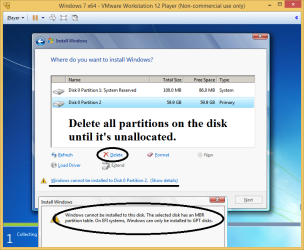
How to convert disk from MBR to GPT or GPT to MBR if you do not want to keep the existing partition style.

Convert MBR to GPT:
1. Boot from the Windows 7/8/10 USB/DVD in UEFI mode.
2. Delete all partitions on the disk until it's unallocated.

Convert disk from MBR to GPT or GPT to MBR 1.png

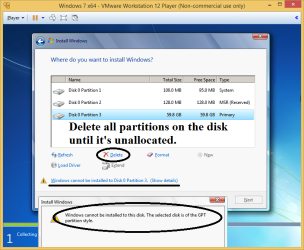
Convert GPT to MBR:
1. Boot from the Windows 7/8/10 USB/DVD in Legacy BIOS mode.
2. Delete all partitions on the disk until it's unallocated.

Convert disk from MBR to GPT or GPT to MBR 2.png

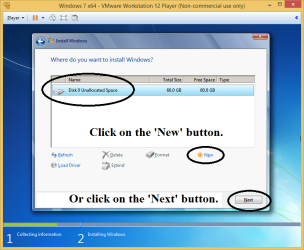
Installing to the unallocated space and letting Windows create the partition table and partitions works with either Legacy BIOS or UEFI boot mode.

On an MBR disk, Windows 7/8/10 setup will create a System Reserved partition and a primary Windows partition.

On a GPT disk, Windows 7/8/10 setup will create a Recovery partition (not in Windows 7), an EFI System partition, a Microsoft Reserved partition (won't show in Disk Management), and a primary Windows partition.

Convert disk from MBR to GPT or GPT to MBR 3.png
 
Last edited:

My Computer My Computer

At a glance

Windows 7/8/10 UEFI/GPT system
Computer type
PC/Desktop
OS
Windows 7/8/10 UEFI/GPT system
Back
Top