Convince me !

I don't use the built in compression features (besides NTFS compression) if I can help it, because the performance and lack of features is horrific. I've already found that out by messing around with archives. I immediately installed 7-zip and WinRAR and now much happier. So, I think my test is valid (no doubt most people will be using these same tools).

LOL, neither do I. I use WinZip 11.2.

I just feel that an accurate benchmark comparing Windows XP to Windows 7 should be performed using the built-in tools and features, as far as can be done.

The one area that cannot be tested using built-in features is video encodiing to DivX, as Windows XP does not support DivX at all without the aid of 3rd-party codecs, and Windows 7 only supports DivX playback OOB.

I don't have any accurate benchmark results to give, and I have no intention of tarnishing my rig by installing XP on it for the sake of a benchmark test.

But since you appear to have both XP and Windows 7 on your machine, try this: Download and install Handbrake to both XP and Windows 7, then convert the same video file to xVid using the same settings. Chances are high that the conversion on Windows 7 will go much quicker. My record so far is a 02:15:00 movie converting in 00:57:00, using 2-pass encoding. I haven't used XP on any of my own machines for nearly 3 years, so the best I can do is say that I remember doing similar tasks in about 8 hours!
 

My Computer

Computer type
PC/Desktop
Computer Manufacturer/Model Number
Virtual Machine
OS
Windows 7 Professional 32-bit SP1
CPU
AMD A4/A6
Motherboard
Intel Corporation 440BX Desktop Reference Platform
Memory
3.00GB EDO
Graphics Card(s)
VMware SVGA 3D
Sound Card
High Definition Audio Device
Monitor(s) Displays
Generic Non-PnP Monitor on VMware SVGA 3D
Screen Resolution
1440x900
Hard Drives
1 x 60GB VMware Virtual SATA Hard Drive ATA Device
Antivirus
Kaspersky Total Security
I will try it.

Is this program multicore aware and does it use its own built-in codecs? I hope it tells how long it took once finished.
 

My Computer

Computer Manufacturer/Model Number
Too many to list.
OS
XP, Seven, 2008R2
CPU
AMD, Intel, VIA
Motherboard
Various
Memory
Corsair, Kingston, etc.
Graphics Card(s)
ATI, NVIDIA
Monitor(s) Displays
Samsung
Hard Drives
Maxtor, Western Digital
Keyboard
qwerty
Internet Speed
22 Mb/s @ home, 1 Gb/s @ server
Other Info
All of my systems still run fastest on XP 32-bit for the most part. Win7 is fun to play with, but I still prefer XP for raw speed, security, and functionality.
I will try it.

Is this program multicore aware and does it use its own built-in codecs? I hope it tells how long it took once finished.

I usually look at the ETA times, but it doesn't log it output. And yes: It IS multicore aware :D
 

My Computer

Computer type
PC/Desktop
Computer Manufacturer/Model Number
Virtual Machine
OS
Windows 7 Professional 32-bit SP1
CPU
AMD A4/A6
Motherboard
Intel Corporation 440BX Desktop Reference Platform
Memory
3.00GB EDO
Graphics Card(s)
VMware SVGA 3D
Sound Card
High Definition Audio Device
Monitor(s) Displays
Generic Non-PnP Monitor on VMware SVGA 3D
Screen Resolution
1440x900
Hard Drives
1 x 60GB VMware Virtual SATA Hard Drive ATA Device
Antivirus
Kaspersky Total Security
but it doesn't log it output.

Shoot, then I don't think I can expect to get any reliable results. The ETA started at like 47 minutes, but then it goes up and down (it depends on the framerate). And I didn't start my stopwatch when I started encoding 20 minutes ago.

EDIT - scratch that. I can go by the file creation and last modified dates to see how long each one took. Will report back when it's done :)
 

My Computer

Computer Manufacturer/Model Number
Too many to list.
OS
XP, Seven, 2008R2
CPU
AMD, Intel, VIA
Motherboard
Various
Memory
Corsair, Kingston, etc.
Graphics Card(s)
ATI, NVIDIA
Monitor(s) Displays
Samsung
Hard Drives
Maxtor, Western Digital
Keyboard
qwerty
Internet Speed
22 Mb/s @ home, 1 Gb/s @ server
Other Info
All of my systems still run fastest on XP 32-bit for the most part. Win7 is fun to play with, but I still prefer XP for raw speed, security, and functionality.
EDIT - scratch that. I can go by the file creation and last modified dates to see how long each one took. Will report back when it's done :)
That's how I time my image backups :).

BTW, what are your system specs, so we can reference them vs. benchmarks?
 

My Computer

Computer Manufacturer/Model Number
Custom workstation /// Lenovo X61t tablet notebook
OS
Windows 7 RTM x64
CPU
Core i7 980X @ 4.04GHz OC /// Core Duo L7500 @ 1.6GHz
Motherboard
Asus P6T6 WS Revolution ///
Memory
12GB G. Skill @ DDR-1600 OC /// 4GB
Graphics Card(s)
Saphire HD4870 Toxic 1GB /// Intel Mobile GMA X3100
Monitor(s) Displays
Dual Eizo 24" SX2461W /// 12"
Screen Resolution
1920x1200 /// 1400x1050
Hard Drives
Workstation:
5x 750GB Barracuda-11 on Areca ARC-1220;
4x 1.5TB Barracuda-11 on Intel ICH10R;
Volumes:
300GB RAID 0, 2.7TB RAID 10 on Intel;
100GB RAID 0, 1.4TB RAID 10 on Areca ///
Notebook: G.Skill Titan 256GB SSD
PSU
Tagan ITZ 1100
Case
GHS-1500 ///
Cooling
Thermalright IFX-14 + a slew of stealth fans ///
Keyboard
Logitech Edge ///
Mouse
Logitech Wireless Optical Trackball
Internet Speed
5Mbps down / 820Kbps up
Other Info
Main use: photography;
DVD Drive: L.G GGW-H20L Blu-Ray / DVD;
OC: QPI/DRAM @ 1.33v, CPU @ 1.293v, DRAM Bus @ 1.65v, CPU PLL @ 1.88v, CPU mult = 25x, BCLK = 160, DDR3-1604 @ 7-8-7-24
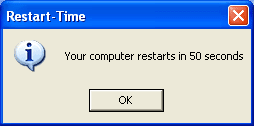
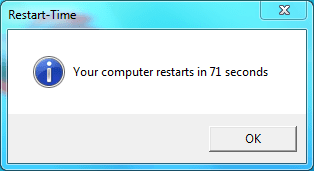
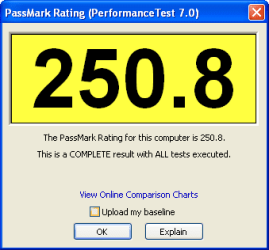
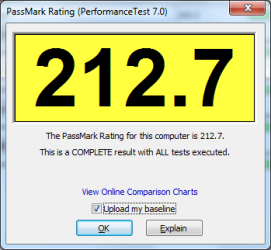
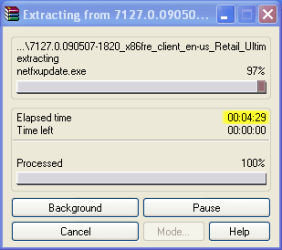
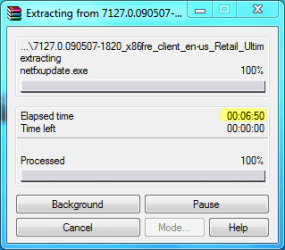
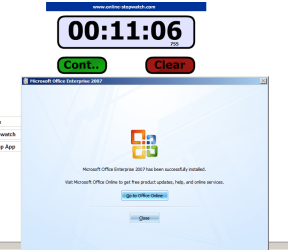
I've done some benchmarks of my own. I'll let the images speak for themselves.

restartXP.png restartW7.png

passmarkratingXP.png passmarkratingw7.png

unrarxp.png unrarw7.PNG

Microsoft Office 2007 full install
XP............................................................Windows 7
XPofficeinstall.png 7officeinstall.png
 

My Computer

Computer Manufacturer/Model Number
Haha! You peeked. Why so nosey?
OS
XP / Windows 7 Pro RTM
I did a DVD to AVI conversion on a HP Pentium dual core laptop with 1GB RAM and a 120GB hard drive.

It took 57 minutes on both XP and Win7.

These results do not surprise me, as a video conversion is a CPU test after all. If CPU was slower in Win7 operating system, I would be very worried.

However my test does illustrate that there are virtually no multicore improvements for Win7 in this case.

OK, enough benchmarks for me today ;)
 

My Computer

Computer Manufacturer/Model Number
Too many to list.
OS
XP, Seven, 2008R2
CPU
AMD, Intel, VIA
Motherboard
Various
Memory
Corsair, Kingston, etc.
Graphics Card(s)
ATI, NVIDIA
Monitor(s) Displays
Samsung
Hard Drives
Maxtor, Western Digital
Keyboard
qwerty
Internet Speed
22 Mb/s @ home, 1 Gb/s @ server
Other Info
All of my systems still run fastest on XP 32-bit for the most part. Win7 is fun to play with, but I still prefer XP for raw speed, security, and functionality.
sup3rsprt, thanks for the info!

I will say that in your experiences with 32 vs. 64 bit, your results make sense because you only have 1GB of memory. I would actually expect 64-bit to be a bit slower. But with 4GB or more memory you will encounter very different results.

As always, one needs to tailor things to one's specific situation. Everybody's digital metabolism is different! There are no absolutes in this business, other than absolute crazyness as in my case :D ...

DJ
 

My Computer

Computer Manufacturer/Model Number
Custom workstation /// Lenovo X61t tablet notebook
OS
Windows 7 RTM x64
CPU
Core i7 980X @ 4.04GHz OC /// Core Duo L7500 @ 1.6GHz
Motherboard
Asus P6T6 WS Revolution ///
Memory
12GB G. Skill @ DDR-1600 OC /// 4GB
Graphics Card(s)
Saphire HD4870 Toxic 1GB /// Intel Mobile GMA X3100
Monitor(s) Displays
Dual Eizo 24" SX2461W /// 12"
Screen Resolution
1920x1200 /// 1400x1050
Hard Drives
Workstation:
5x 750GB Barracuda-11 on Areca ARC-1220;
4x 1.5TB Barracuda-11 on Intel ICH10R;
Volumes:
300GB RAID 0, 2.7TB RAID 10 on Intel;
100GB RAID 0, 1.4TB RAID 10 on Areca ///
Notebook: G.Skill Titan 256GB SSD
PSU
Tagan ITZ 1100
Case
GHS-1500 ///
Cooling
Thermalright IFX-14 + a slew of stealth fans ///
Keyboard
Logitech Edge ///
Mouse
Logitech Wireless Optical Trackball
Internet Speed
5Mbps down / 820Kbps up
Other Info
Main use: photography;
DVD Drive: L.G GGW-H20L Blu-Ray / DVD;
OC: QPI/DRAM @ 1.33v, CPU @ 1.293v, DRAM Bus @ 1.65v, CPU PLL @ 1.88v, CPU mult = 25x, BCLK = 160, DDR3-1604 @ 7-8-7-24
Hi everyone, and let's not waste any time, I'm an avid & Fanatical Win XP 4 Life dude !
Vista home,pren,ultimate,hack,slash,jedi was all fail.
they gave us a huge RAM sucker with a candy skin and a few pre-available widgets and other obnoxious gadgets separated over a dozen packages.

And now we have a new challenger, Win Seven ! but i'm also specktical.

I'm gonna get a new HP G60t soon (P8900 2.4Ghz,4GO Ram), and the first thing i might do if i'm not tempted to test win 7 is to kill vista for a good ol' clean xp that works with everything and eats only a little ram
So tell me guys, how would this win 7 Beat a 64 Bit XP !?:huh:

Shouldn't be a matter of convincing, Windows seven is the future XP is the past. Vista was not a bad OS it's the second most used os in the world and had good sales = not a failure it improved on XP in a lot of ways. Seven is a better and a safer OS than XP already to work on and its only in escrow now. If you feel your happy with what u got then stay with it, but if you wanna sample Seven i guarrante u wont be dissapointed.
 
Last edited:

My Computer

Computer Manufacturer/Model Number
Intel
OS
Windows 7 Ultimate SP1 RC X64
CPU
Core Two Duo 2.88 ghz
Motherboard
Intel DQ series
Memory
DDR2 4.0 Gbs
Graphics Card(s)
Nvidia
Monitor(s) Displays
Acer 24' & Acer 19'
Hard Drives
1tb (Internal) & WD 500gb (External)
Case
Intel Tower Case
Keyboard
Apple Wired Keyboard
Mouse
Microsoft Wheel Optical Laser
Shouldn't be a matter of convincing, Windows seven is the future XP is the past. Vista was not a bad OS and had good sales = not a failure it improved on XP in a lot of ways. Seven is a better and a safer OS than XP already to work and its only in escrow now. If you feel your happy with what u got then stay with it, but if you wanna sample Seven i guarrante u wont be dissapointed.
+1
I migrated from XP x64 to the Windows 7 beta and have not looked back, other than to grin. I still have my XP image from February and it's in my external backup set, but I can't even think about going back.
 

My Computer

Computer Manufacturer/Model Number
Custom workstation /// Lenovo X61t tablet notebook
OS
Windows 7 RTM x64
CPU
Core i7 980X @ 4.04GHz OC /// Core Duo L7500 @ 1.6GHz
Motherboard
Asus P6T6 WS Revolution ///
Memory
12GB G. Skill @ DDR-1600 OC /// 4GB
Graphics Card(s)
Saphire HD4870 Toxic 1GB /// Intel Mobile GMA X3100
Monitor(s) Displays
Dual Eizo 24" SX2461W /// 12"
Screen Resolution
1920x1200 /// 1400x1050
Hard Drives
Workstation:
5x 750GB Barracuda-11 on Areca ARC-1220;
4x 1.5TB Barracuda-11 on Intel ICH10R;
Volumes:
300GB RAID 0, 2.7TB RAID 10 on Intel;
100GB RAID 0, 1.4TB RAID 10 on Areca ///
Notebook: G.Skill Titan 256GB SSD
PSU
Tagan ITZ 1100
Case
GHS-1500 ///
Cooling
Thermalright IFX-14 + a slew of stealth fans ///
Keyboard
Logitech Edge ///
Mouse
Logitech Wireless Optical Trackball
Internet Speed
5Mbps down / 820Kbps up
Other Info
Main use: photography;
DVD Drive: L.G GGW-H20L Blu-Ray / DVD;
OC: QPI/DRAM @ 1.33v, CPU @ 1.293v, DRAM Bus @ 1.65v, CPU PLL @ 1.88v, CPU mult = 25x, BCLK = 160, DDR3-1604 @ 7-8-7-24
Then could you please explain to me why Cinebench R10 CPU benchmark finishes 4 seconds faster in Windows XP? (btw, my laptop is Pentium dual core and the power options are set to High Performance).

Where are the multicore improvements, because I don't see it.

Look, I'm sick and tired of seeing you say "WinXP is faster than Win7". XP needs to DIE in a long and painful death.

Also, a Pentium Dual-core is like... I'm pretty sure you could finish that sentence. Get a decent Core 2 Duo with added 1GB of RAM and you shall see the light.

---
Back on topic.
For myself, I haven't been able to spot exact real sped up between Vista and Seven (YES I am a Vista fanboy and a growing XP hater). I love both Vista and Seven.

But I can see that the boot is faster than Vistas. I can't say about XP coz I happily ditched it last year (still have the licence though).

I like the Aero Snap feature. Very useful. Library can be very useful (depends how you setup your stuff).
 

My Computer

Computer type
PC/Desktop
Computer Manufacturer/Model Number
Custom build
OS
Windows 10 Professional 64-bit
CPU
Ryzen 9 5900X
Motherboard
Gigabyte X570 Aorus Master
Memory
G.Skill 3600Mhz CL16 16GB × 4
Graphics Card(s)
EVGA GeForce RTX 3070 Ti FTW3 Ultra Gaming
Sound Card
On-board
Monitor(s) Displays
Dell Alienware AW3418DW
Screen Resolution
3440x1440
Hard Drives
1×Sabrent Rocket 4 Plus 2TB nvme SSD (System, internal)
2x4TB Western Digital Blue (Internal)
1x4TB HDST 7200RPM (Internal)
PSU
Seasonic Focus Plus 850W Platinum
Case
Corsair 680X
Cooling
Stock fans + 3× Corsair QL120, Corsair H100i Platinum
Keyboard
Logitech K350
Mouse
Logitech M510
Internet Speed
120Mbits dl - 20Mbits up
Antivirus
ESET NOD32 Antivirus
Browser
Firefox (latest version)
Other Info
Headphones : Audio-Technica ATH-M50x
Scanner : Canon Canoscan LiDE 220 + Plustek OptiBook 4800
Look, I'm sick and tired of seeing you say "WinXP is faster than Win7". XP needs to DIE in a long and painful death.

Also, a Pentium Dual-core is like... I'm pretty sure you could finish that sentence. Get a decent Core 2 Duo with added 1GB of RAM and you shall see the light.

---
Back on topic.
For myself, I haven't been able to spot exact real sped up between Vista and Seven (YES I am a Vista fanboy and a growing XP hater). I love both Vista and Seven.

But I can see that the boot is faster than Vistas. I can't say about XP coz I happily ditched it last year (still have the licence though).

I like the Aero Snap feature. Very useful. Library can be very useful (depends how you setup your stuff).

Well, XP is already on the way to EOL. It will receive security updates until 2014, but SP3 was it for any useful system up grades. As far as XP being faster, given today's hardware, that's probably true. Heck, I've run Windows 3.11 in a VM, and it was faster than anything I remember back in the day, but the more important issues are in regards to interaction with newer hardware, support and especially security.

XP is is nowhere as secure as Vista/Win 7. This is a fact. Vista/Win 7 have finally started the process of modernizing Window's graphical API. GDI/GDI+ are one ther way out and soon Windows will use the modern GPU properly. Vista was a good start and Win 7 is cleaning that up. With the MinWin process, the kernel is becoming far more efficient, which means that is can perform better with less memory resources.

The GUI is becoming more modern. XP's Luna was fine for its release, but it's now long in the tooth and time to go. Vendors are going to stop supporting XP. That is a fact. It may take a year or two, but new hardware will not come with an XP driver. Writing drivers cost money and vendors are trying to cut costs.

To the OP, I can't convince you. You've made your mind up already. Vista and Win 7 will not likely be faster than XP for many jobs. Just like Win 2000 was faster than XP for many things, but the march of progress is not going to stop for you. At one point you are going to upgrade, it may not even be a MS OS that you move to, but XP is dead.

PhreePhly
 

My Computer

Computer Manufacturer/Model Number
MPC Transport T2500 Laptop
OS
Windows 7 x64 (RTM via MSDN)
CPU
Intel Core 2 Duo T9300 (2.5 GHz)
Motherboard
MPC
Memory
4 GB SODIMMS (System Max)
Graphics Card(s)
nVidia 8600M GS 256MB
Sound Card
Realtek On-Board
Monitor(s) Displays
15.4" LCD with a Dell 2005FPW 20" attached
Screen Resolution
1680x1050 (15.4") and 1680x1050 (20")
Hard Drives
Toshiba 2.5" 320 GB 7200 RPM
Look, I'm sick and tired of seeing you say "WinXP is faster than Win7".
I would get used to people saying that.

XP needs to DIE in a long and painful death.
It's just software folks. No need to get that worked up over it.

Get a decent Core 2 Duo with added 1GB of RAM and you shall see the light.
So basically, upgrade your hardware so you can get the same performance you are getting now.
:geek:
 

My Computer

Computer Manufacturer/Model Number
Haha! You peeked. Why so nosey?
OS
XP / Windows 7 Pro RTM
Just one thing to add when considering benchmarking between XP and Windows 7.


  • XP is a mature OS in release form with mature hardware drivers which have been tweaked and tuned over several years.

  • Windows 7 is still pre-release software with the majority of drivers available being first generation, the only true test will be when the release version of window 7 is available, (with all debug code removed), and with more advanced drivers
Microsoft themselves have warned against running comparative benchmarks until the OS is fully released, So I am expecting an improvement on release, and of course as we are approaching the final release each interim build is being reported as showing speed increases
 

My Computers

System One System Two

  • Computer type
    PC/Desktop
    Computer Manufacturer/Model Number
    ChillBlast - Custom to my design
    OS
    Windows 11 Pro x64 [Latest Release and Release Preview]
    CPU
    Ryzen 9 5950X, 3.8 - 5.2 MHz
    Motherboard
    Asus Prime X570-Pro
    Memory
    64GB [2 x 32GB] DDR4 3200MHz
    Graphics Card(s)
    4GB NVIDIA GEFORCE GTX 1650 Ti
    Sound Card
    On-board SPDIF to 5.1 System + HDMI [5.1 system]
    Monitor(s) Displays
    32" UHD 32 Bit HDR Monitor + 43" UHD 4K 32Bit HDR TV
    Screen Resolution
    2 x 3840 x 2160 @60Hz
    Hard Drives
    1TB M2 SSD OS, 500GB Fast Access SSD, 2 x 8TB Data + Various Externals from 1TB to 4TB, 10TB NAS
    PSU
    NZXT C750 80 PLUS Gold 750W Modular PSU
    Case
    Workstation Case [Matt Black]
    Cooling
    NZXT Kraken X63 280mm CPU Cooler +2x Quiet Case fans
    Keyboard
    Logitech Wireless MX Keys & K400 + others
    Mouse
    Logitech Wireless MX Master 3S
    Internet Speed
    920 MB Down 50 MB Up
    Antivirus
    BitDefender Total Security Pro
    Browser
    Chrome (always run latest Non-Beta)
    Other Info
    Also run ...
    Laptop - Quad 8GB - Windows 10 Pro x64
    Nexus 7 Android tablet x2
    Samsung 10.2" tablet
    Blackview TAB 8 4G Android Tablet c/w Keyboard
    Wacom Intuos Pro Medium Pen Pad
    Wacom Intuos Pro Small Pen Pad
    Wacom Expresskeys Remote
    Loopdeck+ Graphics Controller
    Shuttle Pro v2 Control
  • Computer type
    Laptop
    System Manufacturer/Model Number
    Dell XPS 17 10750H
    OS
    Windows 11 Pro x64 Latest RP
    CPU
    Intel I7 10750H 5.0GHz
    Motherboard
    Dell XPS
    Memory
    32GB [2x16GB] DDR4 2933 MHz
    Graphics Card(s)
    nVidia GTX1650Ti 4 GB GDDR6
    Sound Card
    Stock [Realtek] 4 Speaker
    Monitor(s) Displays
    17" IPS UHD+ Infinity Edge Touchscreen
    Screen Resolution
    3840 x 2400
    Hard Drives
    2TB M2 NVMe, 4TB External + various 500GB & 1TB External NVMe (also have access to spinner HDD from
    PSU
    Stock
    Case
    Stock XPS Aluminium & Carbon Fibre
    Cooling
    Stock - Active Fan Control
    Keyboard
    Backlit + Various Logitech
    Mouse
    Stock Track Pad + Logitech MX Trackball
    Internet Speed
    72 MB Down 18MB Up
    Browser
    Chrome
    Other Info
    Also run ...
    Laptop - Quad 8GB - Windows 10 Pro x64
    Nexus 7 Android tablet x2
    10.2" tablet
    Sony Z3 Android Smartphone
    Wacom Intuos Pro Medium Pen Pad
    Wacom Intuos Pro Small Pen Pad
    Wacom Expresskeys Remote
    Loopdeck+ Graphics Controller
    Shuttle Pro v2 Control Pad
    10TB NAS
Just one thing to add when considering benchmarking between XP and Windows 7.


  • XP is a mature OS in release form with mature hardware drivers which have been tweaked and tuned over several years.

  • Windows 7 is still pre-release software with the majority of drivers available being first generation, the only true test will be when the release version of window 7 is available, (with all debug code removed), and with more advanced drivers
Microsoft themselves have warned against running comparative benchmarks until the OS is fully released, So I am expecting an improvement on release, and of course as we are approaching the final release each interim build is being reported as showing speed increases

+1

Here we compare Windows XP SP3 (8 Years ongoing development since released)

vs

Windows 7 (not even released)

:sick:
 
Also Imagine it having almost every feature in vista yet. its almost same as xp in terms of speed. :P

If you try to put E.G windows search or vista start menu on XP and ect. it will be slow as first vista release lol.
 

My Computer

OS
Windows 7 32bit RTM
We're all fans of XP,

lol, are we? :p

It's all a moot point really. XP has had it's day and it's now time to let it go.

I'm more than happy to trade a few seconds here and a little more resources there in exchange for a vast amount of increased functionality across the board.
 

My Computer

Computer type
PC/Desktop
Computer Manufacturer/Model Number
Systems by SmartEyeball
OS
8 Pro x64
CPU
i7 3770K 4.6GHz
Motherboard
ASUS P8Z77 WS
Memory
16GB G.Skill Trident X 2666mhz
Graphics Card(s)
x2 EVGA 780 Ti Superclocked SLI
Sound Card
SB X-FI Surround 5.1 PRO USB / ATH-AD900 Headphones
Monitor(s) Displays
x3 Dell U2410 / 58" Samsung
Screen Resolution
5760*1200/ 1920*1200
Hard Drives
2x Intel 520 240GB (RAID 0) * 2x WD Caviar Blacks 2TB (RAID 0) * 2TB WD Caviar Black * Sony Optirac DVD
PSU
Silverstone Strider Evolution 1200W
Case
Thermaltake Level 10 GT Snow Edition
Cooling
Noctua NH-D14
Keyboard
Topre Realforce // Ducky Shine MX Black // Filco Ninja TKL
Mouse
Thermaltake Theron (Highly Recommended) + Razer Imperator
Antivirus
MSE
Browser
IE, FF, WaterFox
Other Info
GT Extreme V2 Sim Racing Cockpit + 40" LCD and K/B Mouse stand ▼
Fanatec CSR Elite Wheel + Clubsport V1 Pedals + CSR shifter/7G-H ▼Saitek X52 Pro ▼ TrackIR 5 Pro
Buttkicker v2 Seat Rumbler with Dedicated 5.1 and Sub Woofer attached to frame ▼
=
Bloody Big Grin
Did anyone notice he's comparing XP x64 to Win7 x64? I call troll. Anyone who says XP x64 is anything other than A. Dui Pyle is just flat out lying.
 

My Computer

OS
Windows 7
None of the benchmarks and results people have posted in this thread are valid. All of them are missing necessary detailing of settings, drivers used, etc. One guy mentioned he uses NTFS compression. Did he use this in XP as well? What effect does XP versus 7's NTFS compression have if any even? Also what build of 7 was being used? Beta? RC? 7200? I would expect the latest builds to outperform the beta version. I would not consider a benchmark of the RC to even be worthwhile considering how old it is now.

If you want to say X is faster than Y, then you need to detail all of it.
 

My Computer

Computer Manufacturer/Model Number
Custom
OS
Windows 7
CPU
Pentium D 2.66
Motherboard
Asus P5ND2-SLi
Memory
4 gigs DDR2
Graphics Card(s)
BFG nVidia 8600 GT OC
Sound Card
nForce 4 (realtek)
Monitor(s) Displays
Samsung 204B
Screen Resolution
1600x1200
Hard Drives
Western Digital Raptor 150
Western Digital 320 (both SATA)
PSU
BFG 600 watt
Cooling
fan
Keyboard
MS Natural
Mouse
MS Sidewinder
Internet Speed
10 mb
Did anyone notice he's comparing XP x64 to Win7 x64? I call troll. Anyone who says XP x64 is anything other than A. Dui Pyle is just flat out lying.
I noticed He didn't comment on the various Video links I posted for him two days ago that answered all his questions :huh:

And your right, anyone who has used XP X64 for awhile knows it absolutely sucks, everyone at my company hates it with the same passion for hating WinME ;)

I'm inclined to close the thread before it starts attracting more birds of the same feather that somehow flock together :sarc:
 
Back
Top