Solved Copy of Windows not genuine, Build 7601

OK, let's just forget about that tool then.

Try this tool just so we get an idea,

Download CrystalDiskInfo - MajorGeeks

You'll get a screen like this if it's good,
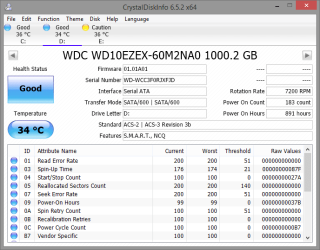
2015-07-05_18h28_36.png

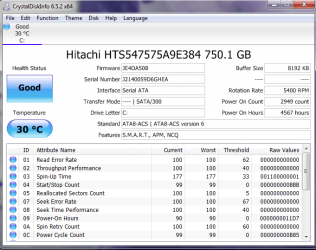
Or one like this, on my Hitachi,

2015-07-05_18h28_55.png

Which ever it is, post back a screenshot.

If it is like my Hitachi you can reset the sectors back to good health but it may be time to get a new drive.
 

My Computer My Computer

At a glance

Win 10 Pro x64Intel I5-2500K @3.3GHz16GB G.Skill Ripjaws X (4x4GB)EVGA GeForce 750 Ti SC 2GB
Computer type
PC/Desktop
Computer Manufacturer/Model Number
Self Built
OS
Win 10 Pro x64
CPU
Intel I5-2500K @3.3GHz
Motherboard
Asrock P67 Extreme4
Memory
16GB G.Skill Ripjaws X (4x4GB)
Graphics Card(s)
EVGA GeForce 750 Ti SC 2GB
Sound Card
ASUS Xonar DG 5.1 Channels 24-bit 96KHz PCI Interface Sound
Monitor(s) Displays
auria eq2367
Screen Resolution
1920 x 1080
Hard Drives
250GB Samsung 850 EVO SSD
1TB WD Blue
1TB Hitachi
PSU
SeaSonic X 650W 80 Plus Gold
Case
Corsair Obsidian 750D
Cooling
Corsair H60, Three 140mm case fans
Keyboard
Logitech Wireless Keyboard K520
Mouse
Logitech Wireless Mouse M310
Internet Speed
Wave Broadband ~ 100 dn 5 up
Antivirus
Windows Defender, Malwarebytes Premium
Browser
Edge, IE11, Chrome
Other Info
Laptop specs: HP g7-1365dx /
CPU: AMD A6-3420M APU with Radeon(tm) HD Graphics /
RAM: Crucial 8Gb (2x4Gb) /
SSD: Crucial M4-CT128M4SSD2 ATA Device/ FW 000F /
GFX: AMD Radeon HD 6520G /
OS: Windows 10 Pro x64
Also, you don't have any dump files in your uploads.

Can you make sure it is set for small memory dumps,

164421d1310371661-dump-files-configure-windows-create-bsod-minidump.jpg


http://www.sevenforums.com/tutorials/174459-dump-files-configure-windows-create-bsod.html

It will help if you get another one.
 

My Computer My Computer

At a glance

Win 10 Pro x64Intel I5-2500K @3.3GHz16GB G.Skill Ripjaws X (4x4GB)EVGA GeForce 750 Ti SC 2GB
Computer type
PC/Desktop
Computer Manufacturer/Model Number
Self Built
OS
Win 10 Pro x64
CPU
Intel I5-2500K @3.3GHz
Motherboard
Asrock P67 Extreme4
Memory
16GB G.Skill Ripjaws X (4x4GB)
Graphics Card(s)
EVGA GeForce 750 Ti SC 2GB
Sound Card
ASUS Xonar DG 5.1 Channels 24-bit 96KHz PCI Interface Sound
Monitor(s) Displays
auria eq2367
Screen Resolution
1920 x 1080
Hard Drives
250GB Samsung 850 EVO SSD
1TB WD Blue
1TB Hitachi
PSU
SeaSonic X 650W 80 Plus Gold
Case
Corsair Obsidian 750D
Cooling
Corsair H60, Three 140mm case fans
Keyboard
Logitech Wireless Keyboard K520
Mouse
Logitech Wireless Mouse M310
Internet Speed
Wave Broadband ~ 100 dn 5 up
Antivirus
Windows Defender, Malwarebytes Premium
Browser
Edge, IE11, Chrome
Other Info
Laptop specs: HP g7-1365dx /
CPU: AMD A6-3420M APU with Radeon(tm) HD Graphics /
RAM: Crucial 8Gb (2x4Gb) /
SSD: Crucial M4-CT128M4SSD2 ATA Device/ FW 000F /
GFX: AMD Radeon HD 6520G /
OS: Windows 10 Pro x64
Derekimo,
OK, that tool worked and I have changed the startup and recovery for small dump files. So now I have no idea what to think -- I could probably try to force a BSOD since it tends to happen whenever I move the computer (could there be a loose connection somewhere internally?). I am even more confused than I was before all of this -- earlier today it crashed repeatedly in normal and safe modes reorting the disk read error messages and it would not let me logon with my password.
 

Attachments

  • Capture of kevin's Hitachi Drive.PNG
    Capture of kevin's Hitachi Drive.PNG
    33.5 KB · Views: 44

My Computer My Computer

At a glance

Windows 7, 64 bit Home Premium.Intel 2.5Ghz6Gb Ram
Computer type
Laptop
Computer Manufacturer/Model Number
Sony Vaio
OS
Windows 7, 64 bit Home Premium.
CPU
Intel 2.5Ghz
Memory
6Gb Ram
Hard Drives
750 Gb
Antivirus
Webroot
Browser
Internet Explorer
OK, at least we have some idea on your drive now. It's possible there's a loose connection but it's more likely some corruption or conflicts with drivers.

Forcing a crash won't do any good in troubleshooting, we want the actual cause to show.

I don't remember if you ran this already,

http://www.sevenforums.com/tutorials/1538-sfc-scannow-command-system-file-checker.html

You said disk check came back fine so it's worth checking for file corruption.
 

My Computer My Computer

At a glance

Win 10 Pro x64Intel I5-2500K @3.3GHz16GB G.Skill Ripjaws X (4x4GB)EVGA GeForce 750 Ti SC 2GB
Computer type
PC/Desktop
Computer Manufacturer/Model Number
Self Built
OS
Win 10 Pro x64
CPU
Intel I5-2500K @3.3GHz
Motherboard
Asrock P67 Extreme4
Memory
16GB G.Skill Ripjaws X (4x4GB)
Graphics Card(s)
EVGA GeForce 750 Ti SC 2GB
Sound Card
ASUS Xonar DG 5.1 Channels 24-bit 96KHz PCI Interface Sound
Monitor(s) Displays
auria eq2367
Screen Resolution
1920 x 1080
Hard Drives
250GB Samsung 850 EVO SSD
1TB WD Blue
1TB Hitachi
PSU
SeaSonic X 650W 80 Plus Gold
Case
Corsair Obsidian 750D
Cooling
Corsair H60, Three 140mm case fans
Keyboard
Logitech Wireless Keyboard K520
Mouse
Logitech Wireless Mouse M310
Internet Speed
Wave Broadband ~ 100 dn 5 up
Antivirus
Windows Defender, Malwarebytes Premium
Browser
Edge, IE11, Chrome
Other Info
Laptop specs: HP g7-1365dx /
CPU: AMD A6-3420M APU with Radeon(tm) HD Graphics /
RAM: Crucial 8Gb (2x4Gb) /
SSD: Crucial M4-CT128M4SSD2 ATA Device/ FW 000F /
GFX: AMD Radeon HD 6520G /
OS: Windows 10 Pro x64

My Computer My Computer

At a glance

Desk1 7 Home Prem / Desk2 10 Pro / Main lap A...Desk1 i5 3750K / Laptop i7 GTX 860M / Desk2 i...Desk1 8GB (1866) / Desk2 16GB (1333) / Laptop...Desk 1& 2NVidia GTX 650 & Laptops on board Intel
Computer type
PC/Desktop
Computer Manufacturer/Model Number
Own build (new) Desk1 / Asus ROG Win 7 / Desk2 1st build
OS
Desk1 7 Home Prem / Desk2 10 Pro / Main lap Asus ROG 10 Pro 2 laptop Toshiba 7 Pro Asus P2520 7 & 10
CPU
Desk1 i5 3750K / Laptop i7 GTX 860M / Desk2 i5 2500
Motherboard
Desk1 Asus P877-V / Desk2 Gigabyte H67 UD3H / Laptop ?
Memory
Desk1 8GB (1866) / Desk2 16GB (1333) / Laptop 8Gb DDR3
Graphics Card(s)
Desk 1& 2NVidia GTX 650 & Laptops on board Intel
Sound Card
Desk 1 & 2 -XONAR DG Realtek High Def audio Laptop
Monitor(s) Displays
Desk 1 Benq HD 2450 / Desk2 Philips 24" / Laptop 17.5"
Screen Resolution
1920x1080 D1 & D2 & Laptop 1
Hard Drives
Desk1 Samsung 120GB 830 SSD
Asus ROG 256GB 850 Pro SSD
Desk2 Samsung 840 256 SSD
Toshiba 120GB EVO
PSU
Desk 1 Corsair HX 1050/ Laptop ? / Desk 2 Corsair HX 650
Case
Desk 1 Cooler HAF XM ? Toshiba laptop / Desk2 Coolermaster
Cooling
Fans on all Desk1 -2 Desk2 - all Coolermasters 5 Laptop ?
Keyboard
Desk 1 MS Sidewinder X6 Desk 2 MS Sidewinder X 4
Mouse
Desk 1&2 - Gigabyte MS 900 gamer - laptop - Logitec wireless
Internet Speed
ADSL2+
Other Info
One other Desktop (tester) and spare Toshba laptop both with SSD's
Running Kaspersky 2016 ISS on all machines config'd identically
Logitec audio stereo systems on each machine (x3)
Canon MG5250MFC
Router/modem TP-Link running WPA2SK

My Computer My Computer

At a glance

Win 10 Pro x64Intel I5-2500K @3.3GHz16GB G.Skill Ripjaws X (4x4GB)EVGA GeForce 750 Ti SC 2GB
Computer type
PC/Desktop
Computer Manufacturer/Model Number
Self Built
OS
Win 10 Pro x64
CPU
Intel I5-2500K @3.3GHz
Motherboard
Asrock P67 Extreme4
Memory
16GB G.Skill Ripjaws X (4x4GB)
Graphics Card(s)
EVGA GeForce 750 Ti SC 2GB
Sound Card
ASUS Xonar DG 5.1 Channels 24-bit 96KHz PCI Interface Sound
Monitor(s) Displays
auria eq2367
Screen Resolution
1920 x 1080
Hard Drives
250GB Samsung 850 EVO SSD
1TB WD Blue
1TB Hitachi
PSU
SeaSonic X 650W 80 Plus Gold
Case
Corsair Obsidian 750D
Cooling
Corsair H60, Three 140mm case fans
Keyboard
Logitech Wireless Keyboard K520
Mouse
Logitech Wireless Mouse M310
Internet Speed
Wave Broadband ~ 100 dn 5 up
Antivirus
Windows Defender, Malwarebytes Premium
Browser
Edge, IE11, Chrome
Other Info
Laptop specs: HP g7-1365dx /
CPU: AMD A6-3420M APU with Radeon(tm) HD Graphics /
RAM: Crucial 8Gb (2x4Gb) /
SSD: Crucial M4-CT128M4SSD2 ATA Device/ FW 000F /
GFX: AMD Radeon HD 6520G /
OS: Windows 10 Pro x64
Derekimo,
I ran the SFC twice just to make sure -- nothing found.
 

Attachments

My Computer My Computer

At a glance

Windows 7, 64 bit Home Premium.Intel 2.5Ghz6Gb Ram
Computer type
Laptop
Computer Manufacturer/Model Number
Sony Vaio
OS
Windows 7, 64 bit Home Premium.
CPU
Intel 2.5Ghz
Memory
6Gb Ram
Hard Drives
750 Gb
Antivirus
Webroot
Browser
Internet Explorer
OK, at this point I think we just wait and see if it BSOD's.
 

My Computer My Computer

At a glance

Win 10 Pro x64Intel I5-2500K @3.3GHz16GB G.Skill Ripjaws X (4x4GB)EVGA GeForce 750 Ti SC 2GB
Computer type
PC/Desktop
Computer Manufacturer/Model Number
Self Built
OS
Win 10 Pro x64
CPU
Intel I5-2500K @3.3GHz
Motherboard
Asrock P67 Extreme4
Memory
16GB G.Skill Ripjaws X (4x4GB)
Graphics Card(s)
EVGA GeForce 750 Ti SC 2GB
Sound Card
ASUS Xonar DG 5.1 Channels 24-bit 96KHz PCI Interface Sound
Monitor(s) Displays
auria eq2367
Screen Resolution
1920 x 1080
Hard Drives
250GB Samsung 850 EVO SSD
1TB WD Blue
1TB Hitachi
PSU
SeaSonic X 650W 80 Plus Gold
Case
Corsair Obsidian 750D
Cooling
Corsair H60, Three 140mm case fans
Keyboard
Logitech Wireless Keyboard K520
Mouse
Logitech Wireless Mouse M310
Internet Speed
Wave Broadband ~ 100 dn 5 up
Antivirus
Windows Defender, Malwarebytes Premium
Browser
Edge, IE11, Chrome
Other Info
Laptop specs: HP g7-1365dx /
CPU: AMD A6-3420M APU with Radeon(tm) HD Graphics /
RAM: Crucial 8Gb (2x4Gb) /
SSD: Crucial M4-CT128M4SSD2 ATA Device/ FW 000F /
GFX: AMD Radeon HD 6520G /
OS: Windows 10 Pro x64

Attachments

  • MSINFO.PNG
    MSINFO.PNG
    19.3 KB · Views: 6
  • MSINFO 2.PNG
    MSINFO 2.PNG
    12 KB · Views: 3

My Computer My Computer

At a glance

Desk1 7 Home Prem / Desk2 10 Pro / Main lap A...Desk1 i5 3750K / Laptop i7 GTX 860M / Desk2 i...Desk1 8GB (1866) / Desk2 16GB (1333) / Laptop...Desk 1& 2NVidia GTX 650 & Laptops on board Intel
Computer type
PC/Desktop
Computer Manufacturer/Model Number
Own build (new) Desk1 / Asus ROG Win 7 / Desk2 1st build
OS
Desk1 7 Home Prem / Desk2 10 Pro / Main lap Asus ROG 10 Pro 2 laptop Toshiba 7 Pro Asus P2520 7 & 10
CPU
Desk1 i5 3750K / Laptop i7 GTX 860M / Desk2 i5 2500
Motherboard
Desk1 Asus P877-V / Desk2 Gigabyte H67 UD3H / Laptop ?
Memory
Desk1 8GB (1866) / Desk2 16GB (1333) / Laptop 8Gb DDR3
Graphics Card(s)
Desk 1& 2NVidia GTX 650 & Laptops on board Intel
Sound Card
Desk 1 & 2 -XONAR DG Realtek High Def audio Laptop
Monitor(s) Displays
Desk 1 Benq HD 2450 / Desk2 Philips 24" / Laptop 17.5"
Screen Resolution
1920x1080 D1 & D2 & Laptop 1
Hard Drives
Desk1 Samsung 120GB 830 SSD
Asus ROG 256GB 850 Pro SSD
Desk2 Samsung 840 256 SSD
Toshiba 120GB EVO
PSU
Desk 1 Corsair HX 1050/ Laptop ? / Desk 2 Corsair HX 650
Case
Desk 1 Cooler HAF XM ? Toshiba laptop / Desk2 Coolermaster
Cooling
Fans on all Desk1 -2 Desk2 - all Coolermasters 5 Laptop ?
Keyboard
Desk 1 MS Sidewinder X6 Desk 2 MS Sidewinder X 4
Mouse
Desk 1&2 - Gigabyte MS 900 gamer - laptop - Logitec wireless
Internet Speed
ADSL2+
Other Info
One other Desktop (tester) and spare Toshba laptop both with SSD's
Running Kaspersky 2016 ISS on all machines config'd identically
Logitec audio stereo systems on each machine (x3)
Canon MG5250MFC
Router/modem TP-Link running WPA2SK
OK, he did a recovery (Post #24) since that log was posted, that's why it isn't in the other two.

Thanks for the screenshots.
 

My Computer My Computer

At a glance

Win 10 Pro x64Intel I5-2500K @3.3GHz16GB G.Skill Ripjaws X (4x4GB)EVGA GeForce 750 Ti SC 2GB
Computer type
PC/Desktop
Computer Manufacturer/Model Number
Self Built
OS
Win 10 Pro x64
CPU
Intel I5-2500K @3.3GHz
Motherboard
Asrock P67 Extreme4
Memory
16GB G.Skill Ripjaws X (4x4GB)
Graphics Card(s)
EVGA GeForce 750 Ti SC 2GB
Sound Card
ASUS Xonar DG 5.1 Channels 24-bit 96KHz PCI Interface Sound
Monitor(s) Displays
auria eq2367
Screen Resolution
1920 x 1080
Hard Drives
250GB Samsung 850 EVO SSD
1TB WD Blue
1TB Hitachi
PSU
SeaSonic X 650W 80 Plus Gold
Case
Corsair Obsidian 750D
Cooling
Corsair H60, Three 140mm case fans
Keyboard
Logitech Wireless Keyboard K520
Mouse
Logitech Wireless Mouse M310
Internet Speed
Wave Broadband ~ 100 dn 5 up
Antivirus
Windows Defender, Malwarebytes Premium
Browser
Edge, IE11, Chrome
Other Info
Laptop specs: HP g7-1365dx /
CPU: AMD A6-3420M APU with Radeon(tm) HD Graphics /
RAM: Crucial 8Gb (2x4Gb) /
SSD: Crucial M4-CT128M4SSD2 ATA Device/ FW 000F /
GFX: AMD Radeon HD 6520G /
OS: Windows 10 Pro x64
Derekimo,
Just BSOD' twice -- the second time it crashed immediately after restarting -- before I was able to open IE. Both IE and WE crashed the second time and had to restart them. I cancelled the disk check that was starting so I could get the BSOD file sent to you.
 

Attachments

My Computer My Computer

At a glance

Windows 7, 64 bit Home Premium.Intel 2.5Ghz6Gb Ram
Computer type
Laptop
Computer Manufacturer/Model Number
Sony Vaio
OS
Windows 7, 64 bit Home Premium.
CPU
Intel 2.5Ghz
Memory
6Gb Ram
Hard Drives
750 Gb
Antivirus
Webroot
Browser
Internet Explorer
OK, there still aren't any dump files but there are a string of these,

Code:
The device, \Device\Harddisk0\DR0, is not ready for access yet.

Followed by this,

Code:
The device, \Device\Ide\iaStor0, did not respond within the timeout period.

Which is the storage driver.

Let's try this,

Remove Intel Rapid Storage Technology applications.

1. Uninstall it from Control Panel > Programs and Features.

2. Uninstall the driver from device manager:
- Right click on "my computer" icon and click "manage" on the context menu.
- In the "Computer Management" window that opens:
- Select "Device Manager" in the left pane, It will list all the existing devices.
- Expand "IDE ATA/ATAPI controllers" by clicking on the triangle in front of it.
- Select one Intel device item under it, right click, then uninstall.
- Repeat the process for all Intel items under "IDE ATA/ATAPI controllers"

3. Now restart the computer.

4. Once booted, Windows will auto configure the appropriate native system driver.
 

My Computer My Computer

At a glance

Win 10 Pro x64Intel I5-2500K @3.3GHz16GB G.Skill Ripjaws X (4x4GB)EVGA GeForce 750 Ti SC 2GB
Computer type
PC/Desktop
Computer Manufacturer/Model Number
Self Built
OS
Win 10 Pro x64
CPU
Intel I5-2500K @3.3GHz
Motherboard
Asrock P67 Extreme4
Memory
16GB G.Skill Ripjaws X (4x4GB)
Graphics Card(s)
EVGA GeForce 750 Ti SC 2GB
Sound Card
ASUS Xonar DG 5.1 Channels 24-bit 96KHz PCI Interface Sound
Monitor(s) Displays
auria eq2367
Screen Resolution
1920 x 1080
Hard Drives
250GB Samsung 850 EVO SSD
1TB WD Blue
1TB Hitachi
PSU
SeaSonic X 650W 80 Plus Gold
Case
Corsair Obsidian 750D
Cooling
Corsair H60, Three 140mm case fans
Keyboard
Logitech Wireless Keyboard K520
Mouse
Logitech Wireless Mouse M310
Internet Speed
Wave Broadband ~ 100 dn 5 up
Antivirus
Windows Defender, Malwarebytes Premium
Browser
Edge, IE11, Chrome
Other Info
Laptop specs: HP g7-1365dx /
CPU: AMD A6-3420M APU with Radeon(tm) HD Graphics /
RAM: Crucial 8Gb (2x4Gb) /
SSD: Crucial M4-CT128M4SSD2 ATA Device/ FW 000F /
GFX: AMD Radeon HD 6520G /
OS: Windows 10 Pro x64
Derekimo,
Done. This time I let the disk check run at startup and there were messages of items it had to repair and it did not takes hours as it has been to run the check. Now that you told me to do that I remember that I had to reconfigure my internet drivers after MCC worked on it the first time but I used services.msc to uninstall the WLAN, then let windows update/reconfigure from there. Perhaps, I may need to let windows update/reconfigure all of my drivers at some point to make sure they are configured correctly?
 

My Computer My Computer

At a glance

Windows 7, 64 bit Home Premium.Intel 2.5Ghz6Gb Ram
Computer type
Laptop
Computer Manufacturer/Model Number
Sony Vaio
OS
Windows 7, 64 bit Home Premium.
CPU
Intel 2.5Ghz
Memory
6Gb Ram
Hard Drives
750 Gb
Antivirus
Webroot
Browser
Internet Explorer
Do you think I should change the Startup and Recover so BSOD does a complete dump instead of a small dump?
 

My Computer My Computer

At a glance

Windows 7, 64 bit Home Premium.Intel 2.5Ghz6Gb Ram
Computer type
Laptop
Computer Manufacturer/Model Number
Sony Vaio
OS
Windows 7, 64 bit Home Premium.
CPU
Intel 2.5Ghz
Memory
6Gb Ram
Hard Drives
750 Gb
Antivirus
Webroot
Browser
Internet Explorer
Derekimo,
Done. This time I let the disk check run at startup and there were messages of items it had to repair and it did not takes hours as it has been to run the check. Now that you told me to do that I remember that I had to reconfigure my internet drivers after MCC worked on it the first time but I used services.msc to uninstall the WLAN, then let windows update/reconfigure from there. Perhaps, I may need to let windows update/reconfigure all of my drivers at some point to make sure they are configured correctly?

Let's not do anything else right now. There is no reason to start messing with any other drivers at this point.

Do you think I should change the Startup and Recover so BSOD does a complete dump instead of a small dump?

It's possible you already have a folder for those if you haven't been cleaning your computer.

Changing it back will just mean you have to upload those files to something like OneDrive because they are too large to upload here, and the DMlog collector doesn't look for those.

For the time being just leave it at small memory dumps.

You can look to see if there are any folders related to dumps in the C:\Windows folder. (MemoryDump, MiniDump, Etc.)
 

My Computer My Computer

At a glance

Win 10 Pro x64Intel I5-2500K @3.3GHz16GB G.Skill Ripjaws X (4x4GB)EVGA GeForce 750 Ti SC 2GB
Computer type
PC/Desktop
Computer Manufacturer/Model Number
Self Built
OS
Win 10 Pro x64
CPU
Intel I5-2500K @3.3GHz
Motherboard
Asrock P67 Extreme4
Memory
16GB G.Skill Ripjaws X (4x4GB)
Graphics Card(s)
EVGA GeForce 750 Ti SC 2GB
Sound Card
ASUS Xonar DG 5.1 Channels 24-bit 96KHz PCI Interface Sound
Monitor(s) Displays
auria eq2367
Screen Resolution
1920 x 1080
Hard Drives
250GB Samsung 850 EVO SSD
1TB WD Blue
1TB Hitachi
PSU
SeaSonic X 650W 80 Plus Gold
Case
Corsair Obsidian 750D
Cooling
Corsair H60, Three 140mm case fans
Keyboard
Logitech Wireless Keyboard K520
Mouse
Logitech Wireless Mouse M310
Internet Speed
Wave Broadband ~ 100 dn 5 up
Antivirus
Windows Defender, Malwarebytes Premium
Browser
Edge, IE11, Chrome
Other Info
Laptop specs: HP g7-1365dx /
CPU: AMD A6-3420M APU with Radeon(tm) HD Graphics /
RAM: Crucial 8Gb (2x4Gb) /
SSD: Crucial M4-CT128M4SSD2 ATA Device/ FW 000F /
GFX: AMD Radeon HD 6520G /
OS: Windows 10 Pro x64
OK. I will leave as is. So far the computer speed is much better -- I was waiting a long time on internet windows to load and that has gotten back to normal.
 

My Computer My Computer

At a glance

Windows 7, 64 bit Home Premium.Intel 2.5Ghz6Gb Ram
Computer type
Laptop
Computer Manufacturer/Model Number
Sony Vaio
OS
Windows 7, 64 bit Home Premium.
CPU
Intel 2.5Ghz
Memory
6Gb Ram
Hard Drives
750 Gb
Antivirus
Webroot
Browser
Internet Explorer
Ok no probs:)
 

My Computer My Computer

At a glance

Desk1 7 Home Prem / Desk2 10 Pro / Main lap A...Desk1 i5 3750K / Laptop i7 GTX 860M / Desk2 i...Desk1 8GB (1866) / Desk2 16GB (1333) / Laptop...Desk 1& 2NVidia GTX 650 & Laptops on board Intel
Computer type
PC/Desktop
Computer Manufacturer/Model Number
Own build (new) Desk1 / Asus ROG Win 7 / Desk2 1st build
OS
Desk1 7 Home Prem / Desk2 10 Pro / Main lap Asus ROG 10 Pro 2 laptop Toshiba 7 Pro Asus P2520 7 & 10
CPU
Desk1 i5 3750K / Laptop i7 GTX 860M / Desk2 i5 2500
Motherboard
Desk1 Asus P877-V / Desk2 Gigabyte H67 UD3H / Laptop ?
Memory
Desk1 8GB (1866) / Desk2 16GB (1333) / Laptop 8Gb DDR3
Graphics Card(s)
Desk 1& 2NVidia GTX 650 & Laptops on board Intel
Sound Card
Desk 1 & 2 -XONAR DG Realtek High Def audio Laptop
Monitor(s) Displays
Desk 1 Benq HD 2450 / Desk2 Philips 24" / Laptop 17.5"
Screen Resolution
1920x1080 D1 & D2 & Laptop 1
Hard Drives
Desk1 Samsung 120GB 830 SSD
Asus ROG 256GB 850 Pro SSD
Desk2 Samsung 840 256 SSD
Toshiba 120GB EVO
PSU
Desk 1 Corsair HX 1050/ Laptop ? / Desk 2 Corsair HX 650
Case
Desk 1 Cooler HAF XM ? Toshiba laptop / Desk2 Coolermaster
Cooling
Fans on all Desk1 -2 Desk2 - all Coolermasters 5 Laptop ?
Keyboard
Desk 1 MS Sidewinder X6 Desk 2 MS Sidewinder X 4
Mouse
Desk 1&2 - Gigabyte MS 900 gamer - laptop - Logitec wireless
Internet Speed
ADSL2+
Other Info
One other Desktop (tester) and spare Toshba laptop both with SSD's
Running Kaspersky 2016 ISS on all machines config'd identically
Logitec audio stereo systems on each machine (x3)
Canon MG5250MFC
Router/modem TP-Link running WPA2SK
Derekimo,
Another BSOD but I am sure there is nothing in the file because this time I saw the message that the dumped failed just before it restarted -- still I ran the file collector just in case.
 

Attachments

My Computer My Computer

At a glance

Windows 7, 64 bit Home Premium.Intel 2.5Ghz6Gb Ram
Computer type
Laptop
Computer Manufacturer/Model Number
Sony Vaio
OS
Windows 7, 64 bit Home Premium.
CPU
Intel 2.5Ghz
Memory
6Gb Ram
Hard Drives
750 Gb
Antivirus
Webroot
Browser
Internet Explorer
Well the first thing I can see is it is still using the driver we intended to get rid of.

Can you follow these instructions again.

Remove Intel Rapid Storage Technology applications.

1. Uninstall it from Control Panel > Programs and Features.

2. Uninstall the driver from device manager:
- Right click on "my computer" icon and click "manage" on the context menu.
- In the "Computer Management" window that opens:
- Select "Device Manager" in the left pane, It will list all the existing devices.
- Expand "IDE ATA/ATAPI controllers" by clicking on the triangle in front of it.
- Select one Intel device item under it, right click, then uninstall.
- Repeat the process for all Intel items under "IDE ATA/ATAPI controllers"

3. Now restart the computer.

4. Once booted, Windows will auto configure the appropriate native system driver.


Do not reboot until you have done both step 1 and 2.

After it reboots and installs the driver, run the log collector again so we can see if it installed the correct Microsoft driver.
 

My Computer My Computer

At a glance

Win 10 Pro x64Intel I5-2500K @3.3GHz16GB G.Skill Ripjaws X (4x4GB)EVGA GeForce 750 Ti SC 2GB
Computer type
PC/Desktop
Computer Manufacturer/Model Number
Self Built
OS
Win 10 Pro x64
CPU
Intel I5-2500K @3.3GHz
Motherboard
Asrock P67 Extreme4
Memory
16GB G.Skill Ripjaws X (4x4GB)
Graphics Card(s)
EVGA GeForce 750 Ti SC 2GB
Sound Card
ASUS Xonar DG 5.1 Channels 24-bit 96KHz PCI Interface Sound
Monitor(s) Displays
auria eq2367
Screen Resolution
1920 x 1080
Hard Drives
250GB Samsung 850 EVO SSD
1TB WD Blue
1TB Hitachi
PSU
SeaSonic X 650W 80 Plus Gold
Case
Corsair Obsidian 750D
Cooling
Corsair H60, Three 140mm case fans
Keyboard
Logitech Wireless Keyboard K520
Mouse
Logitech Wireless Mouse M310
Internet Speed
Wave Broadband ~ 100 dn 5 up
Antivirus
Windows Defender, Malwarebytes Premium
Browser
Edge, IE11, Chrome
Other Info
Laptop specs: HP g7-1365dx /
CPU: AMD A6-3420M APU with Radeon(tm) HD Graphics /
RAM: Crucial 8Gb (2x4Gb) /
SSD: Crucial M4-CT128M4SSD2 ATA Device/ FW 000F /
GFX: AMD Radeon HD 6520G /
OS: Windows 10 Pro x64
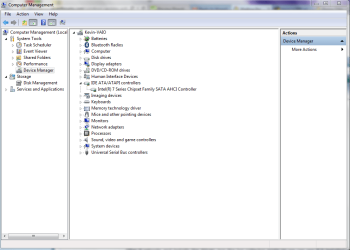
Derekimo,
I did exactly that the 1st time but there is only one Intel Chip set under IDE, so I am attaching a capture of all of the controllers under the Device Manager. You will notice that most of the Intel Controllers are listed under the System Devices not DM.
 

Attachments

  • Capture of IDE ATA.ATAPI.PNG
    Capture of IDE ATA.ATAPI.PNG
    33.1 KB · Views: 0
  • Capture of all Intel Chips under DM.PNG
    Capture of all Intel Chips under DM.PNG
    39.2 KB · Views: 0

My Computer My Computer

At a glance

Windows 7, 64 bit Home Premium.Intel 2.5Ghz6Gb Ram
Computer type
Laptop
Computer Manufacturer/Model Number
Sony Vaio
OS
Windows 7, 64 bit Home Premium.
CPU
Intel 2.5Ghz
Memory
6Gb Ram
Hard Drives
750 Gb
Antivirus
Webroot
Browser
Internet Explorer
Back
Top