copy XP Outlook Express files to Win 7 XP Mode ?

Murray5

New member
Local time
7:15 AM
Messages
53
Hi Everyone,

I sure hope someone can help me out here. A while ago my motherboard stopped working, after 14 months in my new XP Pro machine. With less and less XP support these days, I had installed Win 7 on a new hard drive, prior to this incident, so I could get used to it and slowly transfer across.

My computer has all the drives removable even C drive, so I was able to use either Win 7, or XP Pro as my operating system and even Win 7 with the XP hard drive as a slave or D drive.

Taking too long to fix, I bought a new motherboard, but could not get the same one I had before, so with a different motherboard I installed Win 7 as operating system. Then found out the XP drive would not boot as a C drive anymore. Unfortunately I had not transferred much across to the Win 7 drive.

Now I am unable to run Outlook Express to export my files or Address Book, but still have all the information on this XP drive, which I also have a backup copy of. I was unable to restore the recent Windows backup, made on the XP Pro drive, perhaps because it is confronted with a different motherboard.

I have just been through an arduous process to get my Virtual Machine XP Mode and Win 7 host set up and recognizing each other. The XP Mode has XP Pro SP3 with Outlook Express 6 already installed. I need to transfer my Address Book and all the folders and files into this OE6 from my old XP drive OE6.

My BIG Question is:
As I cannot export the old files & folders, can I simply copy them and paste them into the empty XP Mode Outlook Express folders - their counterparts ??
Would the OE6 program then view those folders and Address Book as it's own data ?

The next step would be to then export all the files in the new OE6 and import them into my Outlook 2010.
I would appreciate any help in completing this data transfer.

Thanks, Murray
 

My Computer My Computer

At a glance

Windows 7 Professional 64bit
OS
Windows 7 Professional 64bit
Hi Murray, so we meet again ;)

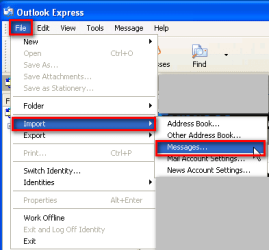
Here's how to import OE6 messages from that old XP HD of yours:

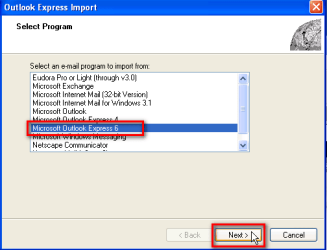
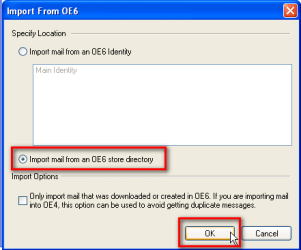
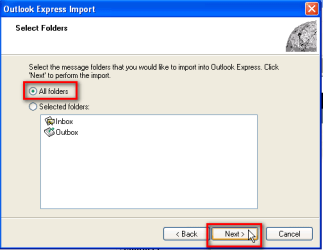
Run OE6 in XP Mode (your old XP HD attached to host machine and available). Open OE 6's Import wizard, found in File menu, browse to that old XP HD which should be found when you have XP Mode and host networking.

You can find OE6 messages (.dbx files) in folder:
DriveLetter:\Documents and Settings\Your_Old_Username\Local Settings\Application Data\Identities\{Very_Long_Alphanumerical_String}\Microsoft\Outlook Express.

Please notice that Local Settings and Application Data are hidden folderds, so you have to enable Show hidden folders from Folder Properties in XP Mode.

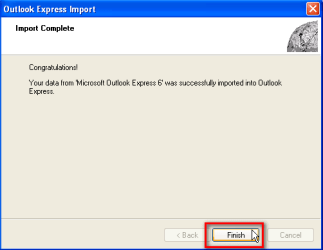
Step 1:
OE_Import_1.png

Step 2:
OE_Import_2.png

Step 3:
OE_Import_3.png

Step 4:
OE_Import_4.png

Step 5:
OE_Import_5.png

Step 6:
OE_Import_6.png

Kari
 

My Computer My Computer

At a glance

Windows 10 Pro x64 EN-GB1.6 GHz Intel Core i7-720QM Processor6 GBATI Mobility Radeon HD 5850 Graphics
Computer type
Laptop
Computer Manufacturer/Model Number
HP ENVY 17-1150eg
OS
Windows 10 Pro x64 EN-GB
CPU
1.6 GHz Intel Core i7-720QM Processor
Memory
6 GB
Graphics Card(s)
ATI Mobility Radeon HD 5850 Graphics
Sound Card
Beats sound system with integrated subwoofer
Monitor(s) Displays
17" laptop display, 22" LED and 32" Full HD TV through HDMI
Screen Resolution
1600*900 (1), 1920*1080 (2&3)
Hard Drives
Internal: 2 x 500 GB SATA Hard Disk Drive 7200 rpm
External: 2TB for backups, 3TB USB3 network drive for media
Cooling
As Envy runs a bit warm, I have it on a Cooler Master pad
Keyboard
Logitech diNovo Media Desktop Laser (bluetooth)
Mouse
Logitech Performance Mouse MX
Internet Speed
50/10 Mbps VDSL
Antivirus
Windows Defender 4.3.9431.0
Browser
Maxthon 3.5.2., IE11
Thanks Kari,
Ha Ha I just copied that post to you in the Visualization section of this forum.

Please ignore,.. Better yet I will edit it and erase, as there is no need now that you have come to my rescue yet again. Thanks
 

My Computer My Computer

At a glance

Windows 7 Professional 64bit
OS
Windows 7 Professional 64bit
OK Kari,
My thousands of emails and many folders are importing right now.

How do I do the same for my Address Book and its many folders please ?
I do not know where to look exactly.
 

My Computer My Computer

At a glance

Windows 7 Professional 64bit
OS
Windows 7 Professional 64bit
Back to screenshots in my last post, step 1. Just choose Address Book instead of Messages and follow instructions given on screen.

Kari
 

My Computer My Computer

At a glance

Windows 10 Pro x64 EN-GB1.6 GHz Intel Core i7-720QM Processor6 GBATI Mobility Radeon HD 5850 Graphics
Computer type
Laptop
Computer Manufacturer/Model Number
HP ENVY 17-1150eg
OS
Windows 10 Pro x64 EN-GB
CPU
1.6 GHz Intel Core i7-720QM Processor
Memory
6 GB
Graphics Card(s)
ATI Mobility Radeon HD 5850 Graphics
Sound Card
Beats sound system with integrated subwoofer
Monitor(s) Displays
17" laptop display, 22" LED and 32" Full HD TV through HDMI
Screen Resolution
1600*900 (1), 1920*1080 (2&3)
Hard Drives
Internal: 2 x 500 GB SATA Hard Disk Drive 7200 rpm
External: 2TB for backups, 3TB USB3 network drive for media
Cooling
As Envy runs a bit warm, I have it on a Cooler Master pad
Keyboard
Logitech diNovo Media Desktop Laser (bluetooth)
Mouse
Logitech Performance Mouse MX
Internet Speed
50/10 Mbps VDSL
Antivirus
Windows Defender 4.3.9431.0
Browser
Maxthon 3.5.2., IE11
I suppose I should have asked the question, whether All this could be imported straight into Outlook 2010 in a similar way, without importing to Outlook Express first. It is my understanding that Outlook 2010 needed a working Outlook Express to export all the files first, before it could import them into Outlook 2010.
Is this correct please Kari ?
 

My Computer My Computer

At a glance

Windows 7 Professional 64bit
OS
Windows 7 Professional 64bit

My Computer My Computer

At a glance

Windows 10 Pro x64 EN-GB1.6 GHz Intel Core i7-720QM Processor6 GBATI Mobility Radeon HD 5850 Graphics
Computer type
Laptop
Computer Manufacturer/Model Number
HP ENVY 17-1150eg
OS
Windows 10 Pro x64 EN-GB
CPU
1.6 GHz Intel Core i7-720QM Processor
Memory
6 GB
Graphics Card(s)
ATI Mobility Radeon HD 5850 Graphics
Sound Card
Beats sound system with integrated subwoofer
Monitor(s) Displays
17" laptop display, 22" LED and 32" Full HD TV through HDMI
Screen Resolution
1600*900 (1), 1920*1080 (2&3)
Hard Drives
Internal: 2 x 500 GB SATA Hard Disk Drive 7200 rpm
External: 2TB for backups, 3TB USB3 network drive for media
Cooling
As Envy runs a bit warm, I have it on a Cooler Master pad
Keyboard
Logitech diNovo Media Desktop Laser (bluetooth)
Mouse
Logitech Performance Mouse MX
Internet Speed
50/10 Mbps VDSL
Antivirus
Windows Defender 4.3.9431.0
Browser
Maxthon 3.5.2., IE11

My Computer My Computer

At a glance

Windows 7 Professional 64bit
OS
Windows 7 Professional 64bit
That link seems to be for a situation where OE6 and Outlook are installed on same computer. I fail to find a solution, have tried now different scenarios for instance exporting messages first from OE6 to Windows Live Mail, but nothing seems to work.

A bit complicated way around this could be to install Office 2010 in XP Mode, to have both OE6 and Outlook 2010 installed on the same machine, then import OE6 messages and address book to Outlook in XP Mode, and further copy the Outlook pst-files from XP Mode to host.

Complicated, as I said. If you decide to try, you can use for instance free Ofiice 2010 60-day trial. Remember to choose right edition of Office 2010 trial to install (Home and Student does not include Outlook). Office trials can be downloaded here: Try Office 2010 - Microsoft Office

Kari
 

My Computer My Computer

At a glance

Windows 10 Pro x64 EN-GB1.6 GHz Intel Core i7-720QM Processor6 GBATI Mobility Radeon HD 5850 Graphics
Computer type
Laptop
Computer Manufacturer/Model Number
HP ENVY 17-1150eg
OS
Windows 10 Pro x64 EN-GB
CPU
1.6 GHz Intel Core i7-720QM Processor
Memory
6 GB
Graphics Card(s)
ATI Mobility Radeon HD 5850 Graphics
Sound Card
Beats sound system with integrated subwoofer
Monitor(s) Displays
17" laptop display, 22" LED and 32" Full HD TV through HDMI
Screen Resolution
1600*900 (1), 1920*1080 (2&3)
Hard Drives
Internal: 2 x 500 GB SATA Hard Disk Drive 7200 rpm
External: 2TB for backups, 3TB USB3 network drive for media
Cooling
As Envy runs a bit warm, I have it on a Cooler Master pad
Keyboard
Logitech diNovo Media Desktop Laser (bluetooth)
Mouse
Logitech Performance Mouse MX
Internet Speed
50/10 Mbps VDSL
Antivirus
Windows Defender 4.3.9431.0
Browser
Maxthon 3.5.2., IE11
Hi Kari,

I am astounded that Microsoft would leave this glaring problem, of not having a Browse function, on their new Windows Outlook 2010 program.
Why would they not have a browse function to find the files on an old drive or another computer especially with virtualization here and XP Mode as another machine ?

I just got off the phone to a friend of mine in the computer industry, who had a remote look around inside my computer. He suggests that I copy my Outlook Express folder with all the dbx files to my Win 7 machine and then use an after market program like "dbx to pst Converter" to convert and import them into Outlook 2010.

Have you heard of this program or any others that would do the same job efficiently and effectively ?
 

My Computer My Computer

At a glance

Windows 7 Professional 64bit
OS
Windows 7 Professional 64bit
I have no experience of those converters. If you make a backup of those .dbx files, you should be OK even if converting does not work. Could be worth to try?

Kari
 

My Computer My Computer

At a glance

Windows 10 Pro x64 EN-GB1.6 GHz Intel Core i7-720QM Processor6 GBATI Mobility Radeon HD 5850 Graphics
Computer type
Laptop
Computer Manufacturer/Model Number
HP ENVY 17-1150eg
OS
Windows 10 Pro x64 EN-GB
CPU
1.6 GHz Intel Core i7-720QM Processor
Memory
6 GB
Graphics Card(s)
ATI Mobility Radeon HD 5850 Graphics
Sound Card
Beats sound system with integrated subwoofer
Monitor(s) Displays
17" laptop display, 22" LED and 32" Full HD TV through HDMI
Screen Resolution
1600*900 (1), 1920*1080 (2&3)
Hard Drives
Internal: 2 x 500 GB SATA Hard Disk Drive 7200 rpm
External: 2TB for backups, 3TB USB3 network drive for media
Cooling
As Envy runs a bit warm, I have it on a Cooler Master pad
Keyboard
Logitech diNovo Media Desktop Laser (bluetooth)
Mouse
Logitech Performance Mouse MX
Internet Speed
50/10 Mbps VDSL
Antivirus
Windows Defender 4.3.9431.0
Browser
Maxthon 3.5.2., IE11
G'Day Kari,

Hope you had a great Christmas and are somehow online again today to reply.

If I import my Outlook Express Messages and Address Book to Outlook 2007, thus converting them to .pst files in XP Mode, can these .pst files be copied across to Outlook 2010 running on Windows 7 Pro 64 bit ?

They are now pst files, but will Outlook 2010 accept them and how should I transfer or copy the files over ?

Thanks,
Murray
 

My Computer My Computer

At a glance

Windows 7 Professional 64bit
OS
Windows 7 Professional 64bit
P.S. Does it matter that XP Mode may be running in 32 bit, when Win 7 is a 64 bit system.
I just compared both systems and although I have 2 GB of RAM installed, the XP Mode is running with only 256 KB installed. The XP Mode system folder does not say whether it is a 32 or 64 bit system.

Do you know why I would only have minimal RAM in XP Mode ?

Thanks.
 

My Computer My Computer

At a glance

Windows 7 Professional 64bit
OS
Windows 7 Professional 64bit
Hi Murray. Thanks, Christmas was great as told here.

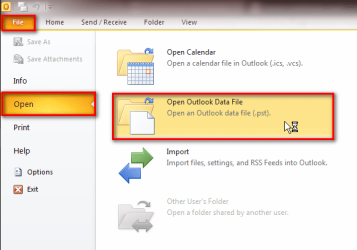
Outlook 2010 can import all older PST's, inclusive Outlook 2007. Just open the PST you want to import:

Outlook_import_PST.png

Virtual PC can run only 32-bit guest operating systems i.e. XP Mode and all other possible vm's in Virtual PC are always, without an exception, 32-bit. Importing a PST data file from an x86 to an x64 system is not a problem, not even when the old Outlook was x86 and new is x64. It's just a data file, it has nothing to do with core functions of application itself, or the operating system in which applications runs.

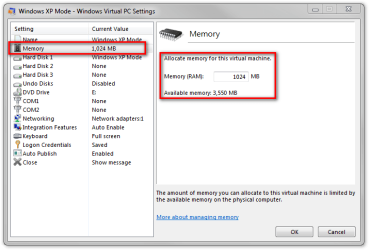
Virtual PC memory allocation to vm is done in settings. Open XP Mode settings, select Memory from the left pane, adjust the amount in right. Two things worth to notice: first, memory allocation can only be made when XP Mode is shut down, not when its only hibernated. Second, maximum amount RAM you can allocate to a vm in Virtual PC is the amount of RAM on your host minus 512 MB. For instance, if you have 2 GB of RAM on your host, the max you can assign to XP Mode is 1.5 GB.

Windows XP Mode - Windows Virtual PC Settings.png

Kari
 

My Computer My Computer

At a glance

Windows 10 Pro x64 EN-GB1.6 GHz Intel Core i7-720QM Processor6 GBATI Mobility Radeon HD 5850 Graphics
Computer type
Laptop
Computer Manufacturer/Model Number
HP ENVY 17-1150eg
OS
Windows 10 Pro x64 EN-GB
CPU
1.6 GHz Intel Core i7-720QM Processor
Memory
6 GB
Graphics Card(s)
ATI Mobility Radeon HD 5850 Graphics
Sound Card
Beats sound system with integrated subwoofer
Monitor(s) Displays
17" laptop display, 22" LED and 32" Full HD TV through HDMI
Screen Resolution
1600*900 (1), 1920*1080 (2&3)
Hard Drives
Internal: 2 x 500 GB SATA Hard Disk Drive 7200 rpm
External: 2TB for backups, 3TB USB3 network drive for media
Cooling
As Envy runs a bit warm, I have it on a Cooler Master pad
Keyboard
Logitech diNovo Media Desktop Laser (bluetooth)
Mouse
Logitech Performance Mouse MX
Internet Speed
50/10 Mbps VDSL
Antivirus
Windows Defender 4.3.9431.0
Browser
Maxthon 3.5.2., IE11
Virtual PC memory allocation to vm is done in settings. Open XP Mode settings, select Memory from the left pane, adjust the amount in right. Two things worth to notice: first, memory allocation can only be made when XP Mode is shut down, not when its only hibernated.

I am sorry I am not following you with the above instruction Kari. If XP Mode (which includes Virtual machine) has to be shut down to make any memory allocation change, How can you open XP Mode Settings ?
I have shut down XP Mode and looked under Control Panel for Win 7 and can find no Settings for XP Mode in the list. What am I missing ?
Would you please explain further how to do this for this newbie ? Thanks
 

My Computer My Computer

At a glance

Windows 7 Professional 64bit
OS
Windows 7 Professional 64bit
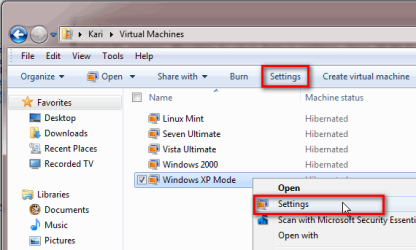
Open the subfolder Virtual Machines, located in your user folder. To open settings for a virtual machine, for instance XP Mode, select it and then either click the Settings button in toolbar, or right click vm and select Settings from context menu.

Kari

VPC_Settings.png
 

My Computer My Computer

At a glance

Windows 10 Pro x64 EN-GB1.6 GHz Intel Core i7-720QM Processor6 GBATI Mobility Radeon HD 5850 Graphics
Computer type
Laptop
Computer Manufacturer/Model Number
HP ENVY 17-1150eg
OS
Windows 10 Pro x64 EN-GB
CPU
1.6 GHz Intel Core i7-720QM Processor
Memory
6 GB
Graphics Card(s)
ATI Mobility Radeon HD 5850 Graphics
Sound Card
Beats sound system with integrated subwoofer
Monitor(s) Displays
17" laptop display, 22" LED and 32" Full HD TV through HDMI
Screen Resolution
1600*900 (1), 1920*1080 (2&3)
Hard Drives
Internal: 2 x 500 GB SATA Hard Disk Drive 7200 rpm
External: 2TB for backups, 3TB USB3 network drive for media
Cooling
As Envy runs a bit warm, I have it on a Cooler Master pad
Keyboard
Logitech diNovo Media Desktop Laser (bluetooth)
Mouse
Logitech Performance Mouse MX
Internet Speed
50/10 Mbps VDSL
Antivirus
Windows Defender 4.3.9431.0
Browser
Maxthon 3.5.2., IE11
Thanks Kari that is done. I think I will need more memory in XP Mode when Outlook 2007 is digesting all the OE6 data, converting them to pst files.
Once it is all imported into Outlook 2007, which I now have installed in XP Mode, I can change the memory balance back, for when Outlook 2010 has to import or copy? all the data over.

Where are all the .pst message files and Address Book for Outlook 2007 kept ? (String please)
I will need to hopefully browse to them to import them into Win 7 Outlook 2010.

Will Win 7 Outlook 2010 on the Host computer, import Outlook 2007.pst from XP Mode, another machine ?
I ask his because I had difficulty in importing with Outlook 2010 from another machine before.
 

My Computer My Computer

At a glance

Windows 7 Professional 64bit
OS
Windows 7 Professional 64bit
Outlook 2007 PST files are in XP located in C:\Documents and Settings\Your_Username\Local Settings\Application Data\Microsoft\Outlook. Notice that Local Settings is a hidden folder.

I forgot to mention in my last post that opening a PST file in Outlook 2010 does not move it, it just opens it. This means that it's better first to move it to same folder in your host where you have other PST files, default location in Windows 7 is C:\Users\Your_Username\Documents\Outlook Files. If opening it from a network location, this location must always be available when using Outlook.

For XP Mode, 256 MB is terrible little RAM. I would give it at least 512 MB.

Kari
 

My Computer My Computer

At a glance

Windows 10 Pro x64 EN-GB1.6 GHz Intel Core i7-720QM Processor6 GBATI Mobility Radeon HD 5850 Graphics
Computer type
Laptop
Computer Manufacturer/Model Number
HP ENVY 17-1150eg
OS
Windows 10 Pro x64 EN-GB
CPU
1.6 GHz Intel Core i7-720QM Processor
Memory
6 GB
Graphics Card(s)
ATI Mobility Radeon HD 5850 Graphics
Sound Card
Beats sound system with integrated subwoofer
Monitor(s) Displays
17" laptop display, 22" LED and 32" Full HD TV through HDMI
Screen Resolution
1600*900 (1), 1920*1080 (2&3)
Hard Drives
Internal: 2 x 500 GB SATA Hard Disk Drive 7200 rpm
External: 2TB for backups, 3TB USB3 network drive for media
Cooling
As Envy runs a bit warm, I have it on a Cooler Master pad
Keyboard
Logitech diNovo Media Desktop Laser (bluetooth)
Mouse
Logitech Performance Mouse MX
Internet Speed
50/10 Mbps VDSL
Antivirus
Windows Defender 4.3.9431.0
Browser
Maxthon 3.5.2., IE11
Yeah! Thanks Kari,
I had a lot to churn through so I gave it 1024MB and it still took around 2 hrs I think. Seems to have copied over to outlook 2007 OK. I will check again in morning, as I need some sleep now.

I am still unsure whether to just copy the pst files from the XP Mode location to the Outlook 2010 on Win 7 or to use the Outlook 2010 Import Wizard, which I have not tried yet, to move all the content over including Address Book etc.

I forgot to mention in my last post that opening a PST file in Outlook 2010 does not move it, it just opens it. This means that it's better first to move it to same folder in your host where you have other PST files, default location in Windows 7 is C:\Users\Your_Username\Documents\Outlook Files.

Would you please confirm which way I should do it Kari ?
Does the above mean just copy the pst folders across to Outlook 2010, where it's pst files are ?

Many Thanks again Kari.
 

My Computer My Computer

At a glance

Windows 7 Professional 64bit
OS
Windows 7 Professional 64bit
Yes. Copy the Outlook 2007 PST file(s) to folder Outlook Files in Seven. Then open it (them) with Seven's Outlook 2010.

Kari
 

My Computer My Computer

At a glance

Windows 10 Pro x64 EN-GB1.6 GHz Intel Core i7-720QM Processor6 GBATI Mobility Radeon HD 5850 Graphics
Computer type
Laptop
Computer Manufacturer/Model Number
HP ENVY 17-1150eg
OS
Windows 10 Pro x64 EN-GB
CPU
1.6 GHz Intel Core i7-720QM Processor
Memory
6 GB
Graphics Card(s)
ATI Mobility Radeon HD 5850 Graphics
Sound Card
Beats sound system with integrated subwoofer
Monitor(s) Displays
17" laptop display, 22" LED and 32" Full HD TV through HDMI
Screen Resolution
1600*900 (1), 1920*1080 (2&3)
Hard Drives
Internal: 2 x 500 GB SATA Hard Disk Drive 7200 rpm
External: 2TB for backups, 3TB USB3 network drive for media
Cooling
As Envy runs a bit warm, I have it on a Cooler Master pad
Keyboard
Logitech diNovo Media Desktop Laser (bluetooth)
Mouse
Logitech Performance Mouse MX
Internet Speed
50/10 Mbps VDSL
Antivirus
Windows Defender 4.3.9431.0
Browser
Maxthon 3.5.2., IE11
Back
Top