Solved core unparking

emmett82

New member
Member
VIP
Local time
8:53 PM
Messages
131
Location
washington
how do you unpark cpu cores of a i7 4770k
 

My Computer

Computer type
PC/Desktop
Computer Manufacturer/Model Number
CUSTOM BUILD
OS
Microsoft Windows 7 Home Premium 64-bit 7601 Multiprocessor Free Service Pack 1
CPU
Intel(R) Core(TM) i7-4770K CPU @ 3.50GHz
Motherboard
ASUSTeK COMPUTER INC. MAXIMUS VI HERO
Memory
16.00 GB
Graphics Card(s)
Intel(R) HD Graphics 4600
Sound Card
sound blaster x-fi titanium hd
Monitor(s) Displays
acer G246HL
Screen Resolution
1920 x 1080 x 32 bits (4294967296 colors) @ 60 Hz
Hard Drives
(1) 119GB SAMSUNG SSD PM830 2. SCSI Disk Device (2) SanDisk SDSSDRC032G SCSI Disk Device -recovery method 1 (3) SanDisk Cruzer USB Device -recovery method 2
PSU
450 watt antec strictly power psu
Case
rosewill challanger
Cooling
3 case one cpu fan
Keyboard
hp multimedia keyboard to be changed
Mouse
LOGITECH G500
Internet Speed
35mbps down 3 mbps up
Antivirus
kaspersky complete
Browser
CHROME canary x64 dev
i7 cores will un-park automatically as the cpu load increases, unless you've already messed with the registry.

there are a number of utils that turn off parking, but it is not recommended.

google 'core unparking utility' if you must.
 

My Computer

Computer type
PC/Desktop
Computer Manufacturer/Model Number
Custom build Nanu by 3SX
OS
Win 7 ultimate x64 sp1
CPU
Intel i7 4 core 3770k ivy bridge o/c to 4.2ghz
Motherboard
Asus p8z77-i Deluxe
Memory
16 GB
Graphics Card(s)
Nvidia geforce GTX650
Sound Card
Realtek on mb
Monitor(s) Displays
24in. lcd/led
Screen Resolution
1920x1080
Hard Drives
128GB Kingston SSD
500GB seagate maximus xt hybrid
500GB hitachi HD
500GB external WD Passport usb3
PSU
Silverstone 450 watt
Case
Silverstone FT03 Black Fortress
Cooling
Water cooler
Keyboard
Logitech wireless kbd/mouse mk300
Mouse
Logitech wireless kbd/mouse mk300
Internet Speed
8mb adsl (actuall speed is around 6mb)
Other Info
Asus DSL-N55U wireless router
SONY BC-5850H 6X BLURAY writer
OUTPOST Security Suite

My Computer

Computer type
PC/Desktop
Computer Manufacturer/Model Number
Custom Build
OS
Windows 7 Professional SP1 - x64 [Non-UEFI Boot]
CPU
Ivy Bridge Core i5 3570K (Delidded)
Motherboard
Asus P8Z77-V LE PLUS
Memory
G.Skill "Ares" DDR3 PC3-12800 - 1600MHz (16Gb)
Graphics Card(s)
Asus Dual-RX480-O4G
Sound Card
Creative Sound Blaster Z w/5.1 sound system
Monitor(s) Displays
Asus IPS 23"
Screen Resolution
16/9
Hard Drives
Internal:
500Go Sata 6Gb/s (x2)
500Go Sata 3Gb/s (x2)
SSD 60Go Sata 6Gb/s
PSU
In Win C 900W Series 80+ Platinum
Case
Thermaltake Chaser A71
Cooling
Custom Water Cooling Loop
Keyboard
Cooler Master QuickFire XTi
Mouse
Razer Imperator 2012 (4G)
Antivirus
MSE
Browser
IE 11.0.xxx Rtm
Other Info
"Raid0" with Intel Smart Response Technology (HDD/SSD)

My Computer

Computer type
PC/Desktop
Computer Manufacturer/Model Number
Home made Desktop
OS
Windows 10 Pro. 64/ version 1709 Windows 7 Pro/64
CPU
Intel i7-6800K @ 4.3
Motherboard
ASUS X-99 Deluxe II
Memory
Corsair Platinum 16 gig @2400
Graphics Card(s)
EVGA GTX 1070 OC
Monitor(s) Displays
Asus 27" LED LCD/VE278Q
Screen Resolution
1920-1080 or 1280-720 HDMI
Hard Drives
INTEL SSD 730-240 Gb Sata 3.0/
PSU
EVGA Platium 1200W
Case
Phanteks Luxe Tempered Glass 8 fans/ one radiator
Cooling
XSPC/ Water Cooled CPU
Keyboard
Das 4 Professional
Mouse
Logitech M705/MX Anywhere 2-S
Internet Speed
100 mbits
Antivirus
Microsoft Security Essentials/ Malwarebytes Premium 3.0/ SAS
Browser
I.E. 11 default/Firefox/ ISP Time Warner Cable/Spectrum
Other Info
LG BluRay Burner/
Sound system-KLipsch-THX/
Icy Dock ssd Hot Swap bays.
i7 cores will un-park automatically as the cpu load increases, unless you've already messed with the registry.

there are a number of utils that turn off parking, but it is not recommended.

google 'core unparking utility' if you must.

the thing that gets me is you would figure within cpuz and other programs like twmonitor it would show up but with no activity
 

My Computer

Computer type
PC/Desktop
Computer Manufacturer/Model Number
CUSTOM BUILD
OS
Microsoft Windows 7 Home Premium 64-bit 7601 Multiprocessor Free Service Pack 1
CPU
Intel(R) Core(TM) i7-4770K CPU @ 3.50GHz
Motherboard
ASUSTeK COMPUTER INC. MAXIMUS VI HERO
Memory
16.00 GB
Graphics Card(s)
Intel(R) HD Graphics 4600
Sound Card
sound blaster x-fi titanium hd
Monitor(s) Displays
acer G246HL
Screen Resolution
1920 x 1080 x 32 bits (4294967296 colors) @ 60 Hz
Hard Drives
(1) 119GB SAMSUNG SSD PM830 2. SCSI Disk Device (2) SanDisk SDSSDRC032G SCSI Disk Device -recovery method 1 (3) SanDisk Cruzer USB Device -recovery method 2
PSU
450 watt antec strictly power psu
Case
rosewill challanger
Cooling
3 case one cpu fan
Keyboard
hp multimedia keyboard to be changed
Mouse
LOGITECH G500
Internet Speed
35mbps down 3 mbps up
Antivirus
kaspersky complete
Browser
CHROME canary x64 dev
i7 cores will un-park automatically as the cpu load increases, unless you've already messed with the registry.

there are a number of utils that turn off parking, but it is not recommended.

google 'core unparking utility' if you must.

the thing that gets me is you would figure within cpuz and other programs like twmonitor it would show up but with no activity
A Guide to Disable Core Parking, to gain performance in games! - bit-tech.net Forums
Posted at your other thread too.

You may have your C States enabled in your BIOS, consult the ASUS Maximum VI Hero manual, disable all except the C1 state.
 

My Computer

Computer type
PC/Desktop
Computer Manufacturer/Model Number
Home Built Desktop By DataTech
OS
Windows 7 Ultimate X64 SP1
CPU
Intel i5-2550K, Differing ~4.4-4.8GHz No built in GPU
Motherboard
ASUS P8Z68-V PRO/GEN3
Memory
16GB G.Skill Sniper 1866MHz @ 2133MHz 2x8GB
Graphics Card(s)
ASUS GTX650TIB-DC2OC-2GD5, (650TI Boost)
Sound Card
Onboard Realtek 5-1
Monitor(s) Displays
Samsung P2570HD
Screen Resolution
1920x1080
Hard Drives
Samsung 840 Pro 256GB SSD for OS, 500GB Seagate Constellation (Enterprise drive) for Data
PSU
Corsair HX650W
Case
Inwin Dragon Rider
Cooling
Hyper 212 EVO w/two Noctua fans, push-pull, @1300 RPM
Keyboard
E-Z Eyes, bright yellow keys with large characters
Mouse
steelseries SENSEI Laser Pro Gaming
Internet Speed
48-51Mbs Mbs down, 11 Mbs up Xfinity Cable
Antivirus
Norton Internet Security 2013
Browser
IE 10, Opera, Pale Moon if needed
Other Info
4 case fans, LG BluRay-RE, ASUS DVD-RW, Mr. Fusion power supply, 1.21 gigawatts.
i7 cores will un-park automatically as the cpu load increases, unless you've already messed with the registry.

there are a number of utils that turn off parking, but it is not recommended.

google 'core unparking utility' if you must.

the thing that gets me is you would figure within cpuz and other programs like twmonitor it would show up but with no activity
A Guide to Disable Core Parking, to gain performance in games! - bit-tech.net Forums
Posted at your other thread too.

You may have your C States enabled in your BIOS, consult the ASUS Maximum VI Hero manual, disable all except the C1 state.
what if it just say c states and not c 1 state
 

My Computer

Computer type
PC/Desktop
Computer Manufacturer/Model Number
CUSTOM BUILD
OS
Microsoft Windows 7 Home Premium 64-bit 7601 Multiprocessor Free Service Pack 1
CPU
Intel(R) Core(TM) i7-4770K CPU @ 3.50GHz
Motherboard
ASUSTeK COMPUTER INC. MAXIMUS VI HERO
Memory
16.00 GB
Graphics Card(s)
Intel(R) HD Graphics 4600
Sound Card
sound blaster x-fi titanium hd
Monitor(s) Displays
acer G246HL
Screen Resolution
1920 x 1080 x 32 bits (4294967296 colors) @ 60 Hz
Hard Drives
(1) 119GB SAMSUNG SSD PM830 2. SCSI Disk Device (2) SanDisk SDSSDRC032G SCSI Disk Device -recovery method 1 (3) SanDisk Cruzer USB Device -recovery method 2
PSU
450 watt antec strictly power psu
Case
rosewill challanger
Cooling
3 case one cpu fan
Keyboard
hp multimedia keyboard to be changed
Mouse
LOGITECH G500
Internet Speed
35mbps down 3 mbps up
Antivirus
kaspersky complete
Browser
CHROME canary x64 dev
the thing that gets me is you would figure within cpuz and other programs like twmonitor it would show up but with no activity
A Guide to Disable Core Parking, to gain performance in games! - bit-tech.net Forums
Posted at your other thread too.

You may have your C States enabled in your BIOS, consult the ASUS Maximum VI Hero manual, disable all except the C1 state.
what if it just say c states and not c 1 state
It is there, I have an ASUS board. Hold on I'll find it if you don't have your manual.

EDIT, I found it for you, your BIOS should be very similar.
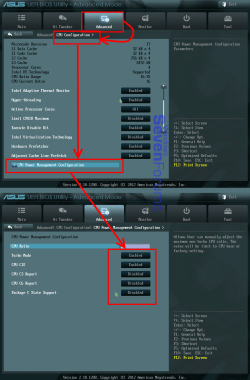
Advanced tab>CPU Configuration>CPU Power Management Configuration, See the snip. Set your like I have mine.

BIOS.png
 

My Computer

Computer type
PC/Desktop
Computer Manufacturer/Model Number
Home Built Desktop By DataTech
OS
Windows 7 Ultimate X64 SP1
CPU
Intel i5-2550K, Differing ~4.4-4.8GHz No built in GPU
Motherboard
ASUS P8Z68-V PRO/GEN3
Memory
16GB G.Skill Sniper 1866MHz @ 2133MHz 2x8GB
Graphics Card(s)
ASUS GTX650TIB-DC2OC-2GD5, (650TI Boost)
Sound Card
Onboard Realtek 5-1
Monitor(s) Displays
Samsung P2570HD
Screen Resolution
1920x1080
Hard Drives
Samsung 840 Pro 256GB SSD for OS, 500GB Seagate Constellation (Enterprise drive) for Data
PSU
Corsair HX650W
Case
Inwin Dragon Rider
Cooling
Hyper 212 EVO w/two Noctua fans, push-pull, @1300 RPM
Keyboard
E-Z Eyes, bright yellow keys with large characters
Mouse
steelseries SENSEI Laser Pro Gaming
Internet Speed
48-51Mbs Mbs down, 11 Mbs up Xfinity Cable
Antivirus
Norton Internet Security 2013
Browser
IE 10, Opera, Pale Moon if needed
Other Info
4 case fans, LG BluRay-RE, ASUS DVD-RW, Mr. Fusion power supply, 1.21 gigawatts.
i7 cores will un-park automatically as the cpu load increases, unless you've already messed with the registry.

there are a number of utils that turn off parking, but it is not recommended.

google 'core unparking utility' if you must.

the thing that gets me is you would figure within cpuz and other programs like twmonitor it would show up but with no activity
A Guide to Disable Core Parking, to gain performance in games! - bit-tech.net Forums
Posted at your other thread too.

You may have your C States enabled in your BIOS, consult the ASUS Maximum VI Hero manual, disable all except the C1 state.

Thought C States disabled in Bios setting that's gave me placebo effect if Core Parking was applied in registry settings. Might be for Hyper-Threading Cores. Wasn't totally sure about that though!:)

EDIT:
That was this main update for some AMD Cores that have given a lot of discuss at its time:

An update that selectively disables the Core Parking feature in Windows 7 or in Windows Server 2008 R2 is available
http://support.microsoft.com/kb/2646060/EN-US

This couldn't be reverted after applying this upate.
 

My Computer

Computer type
PC/Desktop
Computer Manufacturer/Model Number
Custom Build
OS
Windows 7 Professional SP1 - x64 [Non-UEFI Boot]
CPU
Ivy Bridge Core i5 3570K (Delidded)
Motherboard
Asus P8Z77-V LE PLUS
Memory
G.Skill "Ares" DDR3 PC3-12800 - 1600MHz (16Gb)
Graphics Card(s)
Asus Dual-RX480-O4G
Sound Card
Creative Sound Blaster Z w/5.1 sound system
Monitor(s) Displays
Asus IPS 23"
Screen Resolution
16/9
Hard Drives
Internal:
500Go Sata 6Gb/s (x2)
500Go Sata 3Gb/s (x2)
SSD 60Go Sata 6Gb/s
PSU
In Win C 900W Series 80+ Platinum
Case
Thermaltake Chaser A71
Cooling
Custom Water Cooling Loop
Keyboard
Cooler Master QuickFire XTi
Mouse
Razer Imperator 2012 (4G)
Antivirus
MSE
Browser
IE 11.0.xxx Rtm
Other Info
"Raid0" with Intel Smart Response Technology (HDD/SSD)

My Computer

Computer type
PC/Desktop
Computer Manufacturer/Model Number
CUSTOM BUILD
OS
Microsoft Windows 7 Home Premium 64-bit 7601 Multiprocessor Free Service Pack 1
CPU
Intel(R) Core(TM) i7-4770K CPU @ 3.50GHz
Motherboard
ASUSTeK COMPUTER INC. MAXIMUS VI HERO
Memory
16.00 GB
Graphics Card(s)
Intel(R) HD Graphics 4600
Sound Card
sound blaster x-fi titanium hd
Monitor(s) Displays
acer G246HL
Screen Resolution
1920 x 1080 x 32 bits (4294967296 colors) @ 60 Hz
Hard Drives
(1) 119GB SAMSUNG SSD PM830 2. SCSI Disk Device (2) SanDisk SDSSDRC032G SCSI Disk Device -recovery method 1 (3) SanDisk Cruzer USB Device -recovery method 2
PSU
450 watt antec strictly power psu
Case
rosewill challanger
Cooling
3 case one cpu fan
Keyboard
hp multimedia keyboard to be changed
Mouse
LOGITECH G500
Internet Speed
35mbps down 3 mbps up
Antivirus
kaspersky complete
Browser
CHROME canary x64 dev
i still have the park issue but all my cores n threads are being seen
 

My Computer

Computer type
PC/Desktop
Computer Manufacturer/Model Number
CUSTOM BUILD
OS
Microsoft Windows 7 Home Premium 64-bit 7601 Multiprocessor Free Service Pack 1
CPU
Intel(R) Core(TM) i7-4770K CPU @ 3.50GHz
Motherboard
ASUSTeK COMPUTER INC. MAXIMUS VI HERO
Memory
16.00 GB
Graphics Card(s)
Intel(R) HD Graphics 4600
Sound Card
sound blaster x-fi titanium hd
Monitor(s) Displays
acer G246HL
Screen Resolution
1920 x 1080 x 32 bits (4294967296 colors) @ 60 Hz
Hard Drives
(1) 119GB SAMSUNG SSD PM830 2. SCSI Disk Device (2) SanDisk SDSSDRC032G SCSI Disk Device -recovery method 1 (3) SanDisk Cruzer USB Device -recovery method 2
PSU
450 watt antec strictly power psu
Case
rosewill challanger
Cooling
3 case one cpu fan
Keyboard
hp multimedia keyboard to be changed
Mouse
LOGITECH G500
Internet Speed
35mbps down 3 mbps up
Antivirus
kaspersky complete
Browser
CHROME canary x64 dev
Back
Top