Solved Correct programme & local disk (C) file sizes ?

Arcadian

New member
Member
VIP
Local time
3:56 PM
Messages
199
Whilst definitely not a techie I've just noticed that the size on disk is 1.66 gb and on programme files is 1.65 gb which doesn't sound right at all. Or am I missing something ?

Thanks for any advice..
 

My Computer

Computer type
Laptop
Computer Manufacturer/Model Number
HP Presario CQ 56
OS
Windows 7 Home Premium 64bit
Antivirus
Zone Alarm
Browser
Firefox
Hello mate I am not really sure of what you are asking? Are you talking about a file on the drive being 1.66GB and the same file in Programs and Features is 1.65GB? If so is this causing any issues??
 

My Computer

Computer type
PC/Desktop
Computer Manufacturer/Model Number
Own build (new) Desk1 / Asus ROG Win 7 / Desk2 1st build
OS
Desk1 7 Home Prem / Desk2 10 Pro / Main lap Asus ROG 10 Pro 2 laptop Toshiba 7 Pro Asus P2520 7 & 10
CPU
Desk1 i5 3750K / Laptop i7 GTX 860M / Desk2 i5 2500
Motherboard
Desk1 Asus P877-V / Desk2 Gigabyte H67 UD3H / Laptop ?
Memory
Desk1 8GB (1866) / Desk2 16GB (1333) / Laptop 8Gb DDR3
Graphics Card(s)
Desk 1& 2NVidia GTX 650 & Laptops on board Intel
Sound Card
Desk 1 & 2 -XONAR DG Realtek High Def audio Laptop
Monitor(s) Displays
Desk 1 Benq HD 2450 / Desk2 Philips 24" / Laptop 17.5"
Screen Resolution
1920x1080 D1 & D2 & Laptop 1
Hard Drives
Desk1 Samsung 120GB 830 SSD
Asus ROG 256GB 850 Pro SSD
Desk2 Samsung 840 256 SSD
Toshiba 120GB EVO
PSU
Desk 1 Corsair HX 1050/ Laptop ? / Desk 2 Corsair HX 650
Case
Desk 1 Cooler HAF XM ? Toshiba laptop / Desk2 Coolermaster
Cooling
Fans on all Desk1 -2 Desk2 - all Coolermasters 5 Laptop ?
Keyboard
Desk 1 MS Sidewinder X6 Desk 2 MS Sidewinder X 4
Mouse
Desk 1&2 - Gigabyte MS 900 gamer - laptop - Logitec wireless
Internet Speed
ADSL2+
Other Info
One other Desktop (tester) and spare Toshba laptop both with SSD's
Running Kaspersky 2016 ISS on all machines config'd identically
Logitec audio stereo systems on each machine (x3)
Canon MG5250MFC
Router/modem TP-Link running WPA2SK
Hi thanks. Main problem originally was FFox was running very slowly, occasionally freezing/ crashing etc. Tried everything did all the possibles refresh/ disabled add ons/ safe mode/ plug-ins/ watered the plants finally reinstalling FF completely but it's still the same, so when I saw the 1.65 and 1.66 gb grasping at straws thought that that might have something to do with it running slowly....?
 

My Computer

Computer type
Laptop
Computer Manufacturer/Model Number
HP Presario CQ 56
OS
Windows 7 Home Premium 64bit
Antivirus
Zone Alarm
Browser
Firefox
Wrong straw. Nothing wrong with the small difference.
 

My Computer

Computer Manufacturer/Model Number
HP, Dell, Gateway, Toshiba - 4 laptops and 2 desktops
OS
Vista, Windows7, Mint Mate, Zorin, Windows 8
CPU
from 1.6GHz Duo to i7
Monitor(s) Displays
2x HP w2207
Hard Drives
5x HDD, 7x SSD, 12x Externals
Keyboard
with trackball - no mices
Mouse
Trackball mice
Internet Speed
DSL 6000
Due to file system overhead the Size on Disk of a folder will usually be larger than the the sum of the files it contains. But if there are compressed files it could be less. This is far more complex than you imagine.
 

My Computer

Computer type
PC/Desktop
Computer Manufacturer/Model Number
HP
OS
Windows 7 Pro 64 bit
CPU
Xeon W3520
Memory
8 GB
Graphics Card(s)
Nvidia Geforce 210
Hi thanks. Main problem originally was FFox was running very slowly, occasionally freezing/ crashing etc. Tried everything did all the possibles refresh/ disabled add ons/ safe mode/ plug-ins/ watered the plants finally reinstalling FF completely but it's still the same, so when I saw the 1.65 and 1.66 gb grasping at straws thought that that might have something to do with it running slowly....?

Did you actually fully remove Firefox? Runnin the uninstaller will not fully remove it.

See: https://support.mozilla.org/en-US/kb/uninstall-firefox-from-your-computer

To remove other files and folders that may not be removed by the uninstall, you must manually delete the Firefox installation folder, which is located in one of these locations by default:
C:\Program Files\Mozilla Firefox
C:\Program Files (x86)\Mozilla Firefox

The uninstaller does not remove any user data such as history or bookmarks. If you wish to completely remove this data, you must manually delete the Firefox folder containing your user profile:
Click the Start button or press the Windows key to open the Start Menu.
Type %APPDATA% in the search field and press enter to open the hidden Roaming folder.
Open the Mozilla folder.
Delete the Firefox folder.
Alternatively, you can press the Windows key +R to open a Run dialog, type in %APPDATA%\Mozilla\ and click OK to open the Mozilla folder, then delete the Firefox folder.

Suggest backing up bookmarks and extensions first:

MozBackup - Backup tool for Firefox and Thunderbird

More info: http://www.sevenforums.com/browsers...-last-three-days-post2773171.html#post2773171
 

My Computer

Computer type
Laptop
Computer Manufacturer/Model Number
ASUS
OS
Microsoft Windows 7 Home Premium 64-bit 7601 Multiprocessor Free Service Pack 1
CPU
AMD C-60 APU with Radeon(tm) HD Graphics
Motherboard
ASUSTeK COMPUTER INC. X501U
Memory
4.00 GB
Graphics Card(s)
AMD Radeon HD 6290 Graphics
Sound Card
(1) AMD High Definition Audio Device (2) Realtek High Defi
Screen Resolution
1366 x 768 x 32 bits (4294967296 colors) @ 60 Hz
Hard Drives
Hitachi HTS545050A7E380 SATA Disk Device
Antivirus
Comodo CIS & FW, SecureAplus App Whitelisting, Threatfire
Browser
Cyberfox 64bit, Opera 64bit, Airfox
Other Info
Spy-The-Spy, HitmanPro.Alert, Norton Connect Safe, MJRegWatcher, BitDefender TrafficLight, Voodoo Shield, Zemana AntiMalware
Hi thanks. Main problem originally was FFox was running very slowly, occasionally freezing/ crashing etc. Tried everything did all the possibles refresh/ disabled add ons/ safe mode/ plug-ins/ watered the plants finally reinstalling FF completely but it's still the same, so when I saw the 1.65 and 1.66 gb grasping at straws thought that that might have something to do with it running slowly....?

Did you actually fully remove Firefox? Runnin the uninstaller will not fully remove it.

See: https://support.mozilla.org/en-US/kb/uninstall-firefox-from-your-computer

To remove other files and folders that may not be removed by the uninstall, you must manually delete the Firefox installation folder, which is located in one of these locations by default:
C:\Program Files\Mozilla Firefox
C:\Program Files (x86)\Mozilla Firefox
The uninstaller does not remove any user data such as history or bookmarks. If you wish to completely remove this data, you must manually delete the Firefox folder containing your user profile:
Click the Start button or press the Windows key to open the Start Menu.
Type %APPDATA% in the search field and press enter to open the hidden Roaming folder.
Open the Mozilla folder.
Delete the Firefox folder.
Alternatively, you can press the Windows key +R to open a Run dialog, type in %APPDATA%\Mozilla\ and click OK to open the Mozilla folder, then delete the Firefox folder.
Suggest backing up bookmarks and extensions first:

MozBackup - Backup tool for Firefox and Thunderbird

More info: http://www.sevenforums.com/browsers...-last-three-days-post2773171.html#post2773171

As far as I know but you might be right, but a friend suggested to try updating the graphics driver which solved the problem so it's now back up to speed again.

Thanks all for the help :)
 

My Computer

Computer type
Laptop
Computer Manufacturer/Model Number
HP Presario CQ 56
OS
Windows 7 Home Premium 64bit
Antivirus
Zone Alarm
Browser
Firefox
Whilst definitely not a techie I've just noticed that the size on disk is 1.66 gb and on programme files is 1.65 gb which doesn't sound right at all. Or am I missing something ?

Thanks for any advice..

Not advice per se, just something I think is important to understand.

A hard disk partition contains so called allocation units, also known as clusters. The default NT File System (NTFS) allocation unit is 4,096 bytes, 4 KB. One allocation unit can only contain data from one file, using it all. If the file is smaller than 4,096 bytes it uses one allocation unit, a file between 4,097 and 8,192 bytes uses two allocation units, and so on.

An example:

2016-04-07_21h55_17.png

In screenshot properties of two files. File A is 14,221 bytes. Dividing that with the size of an allocation unit 4,096 bytes shows it needs 3.47 allocation units, which will be rounded to 4 allocation units, therefore the size of the file on disk is 4 times 4,096 = 16,384 bytes.

File B the same: it's just a bit bigger than one allocation unit, therefore it occupies two allocation units.

When formatting a hard disk partition you can of course select the allocation unit size:
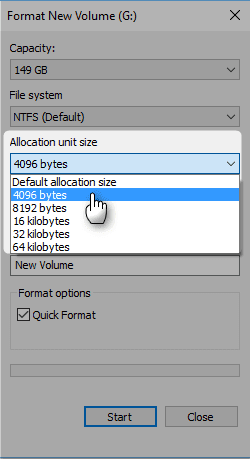
2016-04-07_22h07_14.png

However, there should be no reason to select any other unit size than the default.

This just to explain why there will always be a small difference with the de facto file size and the space it occupies on disk.

Kari

 

My Computer

Computer type
Laptop
Computer Manufacturer/Model Number
HP ENVY 17-1150eg
OS
Windows 10 Pro x64 EN-GB
CPU
1.6 GHz Intel Core i7-720QM Processor
Memory
6 GB
Graphics Card(s)
ATI Mobility Radeon HD 5850 Graphics
Sound Card
Beats sound system with integrated subwoofer
Monitor(s) Displays
17" laptop display, 22" LED and 32" Full HD TV through HDMI
Screen Resolution
1600*900 (1), 1920*1080 (2&3)
Hard Drives
Internal: 2 x 500 GB SATA Hard Disk Drive 7200 rpm
External: 2TB for backups, 3TB USB3 network drive for media
Cooling
As Envy runs a bit warm, I have it on a Cooler Master pad
Keyboard
Logitech diNovo Media Desktop Laser (bluetooth)
Mouse
Logitech Performance Mouse MX
Internet Speed
50/10 Mbps VDSL
Antivirus
Windows Defender 4.3.9431.0
Browser
Maxthon 3.5.2., IE11
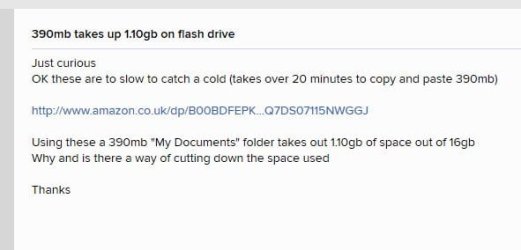
@ kari re : cluster size affecting size on disk. In extreme situations eg a large number of v small files, the difference between filesize and size on disk can be massive.

There was an interesting thread on DigitalSpy recently where some dude copied a folder to a usb flash drive, with unexpected results. See pic

size_on_disk.jpg

cluster size . . .
 

My Computer

Computer type
PC/Desktop
Computer Manufacturer/Model Number
self build
OS
W10 Pro x64, W7 Pro x64 in VMware
CPU
i7 2600K @ 4.4GHz
Motherboard
MSI Z68A-GD80
Memory
8GB Mushkin @ 1600MHz
Graphics Card(s)
Nvidia GTX 750 Ti
Monitor(s) Displays
27" Benq + 27" LG
Screen Resolution
1080p
Hard Drives
500GB 850 Evo SSD + 3 * 2TB Seagate
PSU
EVGA 650 GS modular
Case
Antec 300
Cooling
Seidon 120V v2
Internet Speed
62/18 Mbps
Antivirus
Defender (W10) + MSE (W7)
Browser
Firefox
Back
Top