Corrupt Language Pack

You really need to speak s-l-o-w-l-y and clearly, because right now I eminently qualify as a Dolt!

The results that I get on my many, many scans are that "some files cannot be repaired".

In my effort to be an ongoing PITA, I have attached a copy of the CBS file. I did my best to truncate it.
 

Attachments

My Computer

OS
Win 7-64
I will check that report, will be back shortly. I will also ask some senior geeks to have a look of this issue of yours.
 

My Computer

Computer type
Laptop
Computer Manufacturer/Model Number
HP ENVY 17-1150eg
OS
Windows 10 Pro x64 EN-GB
CPU
1.6 GHz Intel Core i7-720QM Processor
Memory
6 GB
Graphics Card(s)
ATI Mobility Radeon HD 5850 Graphics
Sound Card
Beats sound system with integrated subwoofer
Monitor(s) Displays
17" laptop display, 22" LED and 32" Full HD TV through HDMI
Screen Resolution
1600*900 (1), 1920*1080 (2&3)
Hard Drives
Internal: 2 x 500 GB SATA Hard Disk Drive 7200 rpm
External: 2TB for backups, 3TB USB3 network drive for media
Cooling
As Envy runs a bit warm, I have it on a Cooler Master pad
Keyboard
Logitech diNovo Media Desktop Laser (bluetooth)
Mouse
Logitech Performance Mouse MX
Internet Speed
50/10 Mbps VDSL
Antivirus
Windows Defender 4.3.9431.0
Browser
Maxthon 3.5.2., IE11
The next step with irreparable System files is a Repair Install which is an in-place upgrade over itself which reinstalls the OS while saving all Programs, Files and Settings.

However it can only screen a certain amount of corruption when replacing the setttings so it may not solve all problems involving corruption of the OS.

One very bad source of corruption is preinstalled Win7 with all the sponsored bloatware and duplicate factory utilties which throttle Win7. In that case it would be best to do what most tech enthusiasts do which is skip to Clean Reinstall - Factory OEM Windows 7. It might actually save time, and always ends up with an install better than a new PC given the source.
 
Greg is right, repair install could work for you but I think a clean install as he suggested would be the best.

Thanks Greg for input.
 

My Computer

Computer type
Laptop
Computer Manufacturer/Model Number
HP ENVY 17-1150eg
OS
Windows 10 Pro x64 EN-GB
CPU
1.6 GHz Intel Core i7-720QM Processor
Memory
6 GB
Graphics Card(s)
ATI Mobility Radeon HD 5850 Graphics
Sound Card
Beats sound system with integrated subwoofer
Monitor(s) Displays
17" laptop display, 22" LED and 32" Full HD TV through HDMI
Screen Resolution
1600*900 (1), 1920*1080 (2&3)
Hard Drives
Internal: 2 x 500 GB SATA Hard Disk Drive 7200 rpm
External: 2TB for backups, 3TB USB3 network drive for media
Cooling
As Envy runs a bit warm, I have it on a Cooler Master pad
Keyboard
Logitech diNovo Media Desktop Laser (bluetooth)
Mouse
Logitech Performance Mouse MX
Internet Speed
50/10 Mbps VDSL
Antivirus
Windows Defender 4.3.9431.0
Browser
Maxthon 3.5.2., IE11
GregRocker, I took your advice:
The next step with irreparable System files is a Repair Install which is an in-place upgrade over itself which reinstalls the OS while saving all Programs, Files and Settings.
I haven't checked all the programs but everything seems to be working well after just having done so.

Ran sfc /scannow

"Windows Resource Protection did not find any integrity violations"

That makes me so happy I'd like to go out and get seriously sloshed - but then I quit drinking years ago. Bummer! :huh:

So GregRocker's suggestion seems to have saved me all the work of a "clean install".

Now please understand that this problem has given me quite a lot of emotional trauma and a well-earned inferiority complex. Now being quite the cowardly boy-wonder, I do not wish to screw things up and am also a bit superstitious that pushing the wrong button will again yield a Language Bar with icons that flicker - but never actually open.

Step by step: what should I do next so I can Input either Romanized Japanese or the phonetic systems and Output Japanese (I do know how to use the Language Bar once I have one that actually works.)

Btw, all of you guys who concluded that I was a Complete Idiot, I would like to advise you that you were only half right. If you will recall, I did say that the problem was a corrupted Language Bar. :p

In conclusion, I sure hope I am welcome to be a regular participant in this forum. You guys have worked so very hard to help me with this that I am literally without words or a way to thank you.

Especially, Kari. You are one heckuva fine person. Thank you for not giving up on me! :thumbsup:
 
Last edited:

My Computer

OS
Win 7-64
Kari has already given you the language steps so I'd just start over with them.

Otherwise he'll be on sometime tomorrow from Germany.
 
Kari has already given you the language steps so I'd just start over with them.
Yeh, I know the steps of course. Been using Japanese input for years. Just feeling kind of chicken at the moment and not willing to confront any more problems.

Will do so tomorrow.

Btw, your pics make me nostalgic. The happiest time of my life was when I laid on the beach and did a lot of ocean swimming in Sri Lanka, Thailand and Bali many years ago. Swam so far out all we could see was the tops of the coconut trees. As you know, you really can't drown in a calm ocean unless you panic.

Anyone who says that's "just being lazy" can take a hike as far as I'm concerned.

Thanks for all.
 

My Computer

OS
Win 7-64
If the Language Bar continues its odd behavior after repair install, I do not know what else to try except the clean install as Greg suggested.

I have continued testing but can not reproduce your issue. Japanese IME works well on all systems, as do the language bar and ALT/SHIFT switching.

Any chance you could record a video showing your desktop with language bar and you trying to use it? We have tried everything possible and I was just thinking it might help if we could see "the issue in action".

Kari
 

My Computer

Computer type
Laptop
Computer Manufacturer/Model Number
HP ENVY 17-1150eg
OS
Windows 10 Pro x64 EN-GB
CPU
1.6 GHz Intel Core i7-720QM Processor
Memory
6 GB
Graphics Card(s)
ATI Mobility Radeon HD 5850 Graphics
Sound Card
Beats sound system with integrated subwoofer
Monitor(s) Displays
17" laptop display, 22" LED and 32" Full HD TV through HDMI
Screen Resolution
1600*900 (1), 1920*1080 (2&3)
Hard Drives
Internal: 2 x 500 GB SATA Hard Disk Drive 7200 rpm
External: 2TB for backups, 3TB USB3 network drive for media
Cooling
As Envy runs a bit warm, I have it on a Cooler Master pad
Keyboard
Logitech diNovo Media Desktop Laser (bluetooth)
Mouse
Logitech Performance Mouse MX
Internet Speed
50/10 Mbps VDSL
Antivirus
Windows Defender 4.3.9431.0
Browser
Maxthon 3.5.2., IE11
Kari, you have been really kind and super patient. Thanks much.

Although I ran sfc /scannow and got "Windows Resource Protection did not find any integrity violations", I am still being ultra-cautious.

To that end, I don't wish to enable the Language Bar until all the updates are "approved" and I can therefore be assured that not one of them is messing with the Language Bar.

Btw, I do know all about the infamous KB971033, so that one won't be a problem.

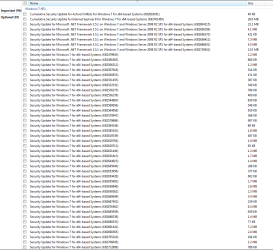
I attached snippets of all the newly available updates since I restored my OS to its "virginhood".

Btw, if you think (and rightly so) that I have a bad case of OCD, I would like to make it clear that I have had two very bad influences in my life: a strict German father and many years living in Japan where the people are very "Hegelian".

"Son, if you make a mistake once, you are only human. If you make the same mistake twice, you are either stupid or lazy.
Now, which one are you?"


Attachments

  • New Updates #1.PNG
    New Updates #1.PNG
    19.3 KB · Views: 1
  • New Updates #2.PNG
    New Updates #2.PNG
    23 KB · Views: 1
  • Optional Updates #1.PNG
    Optional Updates #1.PNG
    20.3 KB · Views: 1

My Computer

OS
Win 7-64
What's the install situation now? Did you do a repair install, or complete new clean install?
 

My Computer

Computer type
Laptop
Computer Manufacturer/Model Number
HP ENVY 17-1150eg
OS
Windows 10 Pro x64 EN-GB
CPU
1.6 GHz Intel Core i7-720QM Processor
Memory
6 GB
Graphics Card(s)
ATI Mobility Radeon HD 5850 Graphics
Sound Card
Beats sound system with integrated subwoofer
Monitor(s) Displays
17" laptop display, 22" LED and 32" Full HD TV through HDMI
Screen Resolution
1600*900 (1), 1920*1080 (2&3)
Hard Drives
Internal: 2 x 500 GB SATA Hard Disk Drive 7200 rpm
External: 2TB for backups, 3TB USB3 network drive for media
Cooling
As Envy runs a bit warm, I have it on a Cooler Master pad
Keyboard
Logitech diNovo Media Desktop Laser (bluetooth)
Mouse
Logitech Performance Mouse MX
Internet Speed
50/10 Mbps VDSL
Antivirus
Windows Defender 4.3.9431.0
Browser
Maxthon 3.5.2., IE11
Did a "New Install", which saves all programs and settings. Result: Only one program, and one which I don't need (CyberLink suite) and therefore uninstalled, failed to work properly - so far. The only other difference was all the New Updates (sent you the list) which had been installed in the past, though as I recall some of them failed to install properly.

To assure that updates install properly, would it not be better to install them piecemeal - just a few at a time?

When I selected All Required Updates in the past, my system and updates occasionally hung (failed to shut down completely).


I ran sfc /scannow and got "Windows Resource Protection did not find any integrity violations"
 

My Computer

OS
Win 7-64
Please could you tell the content of C:\Windows\IME and C:\Windows\System32\IME folders now, before any updates? You can also take screenshots of both folders if you'd prefer it:

IME.png

Also tell the date modified for each subfolder on these folders, or take the screenshots so that dates are visible as in the example screenshot above.

Kari
 

My Computer

Computer type
Laptop
Computer Manufacturer/Model Number
HP ENVY 17-1150eg
OS
Windows 10 Pro x64 EN-GB
CPU
1.6 GHz Intel Core i7-720QM Processor
Memory
6 GB
Graphics Card(s)
ATI Mobility Radeon HD 5850 Graphics
Sound Card
Beats sound system with integrated subwoofer
Monitor(s) Displays
17" laptop display, 22" LED and 32" Full HD TV through HDMI
Screen Resolution
1600*900 (1), 1920*1080 (2&3)
Hard Drives
Internal: 2 x 500 GB SATA Hard Disk Drive 7200 rpm
External: 2TB for backups, 3TB USB3 network drive for media
Cooling
As Envy runs a bit warm, I have it on a Cooler Master pad
Keyboard
Logitech diNovo Media Desktop Laser (bluetooth)
Mouse
Logitech Performance Mouse MX
Internet Speed
50/10 Mbps VDSL
Antivirus
Windows Defender 4.3.9431.0
Browser
Maxthon 3.5.2., IE11
Forget my previous post, seems that although all non-IME layout files and folders have the actual date they have been created, the IME layout folders show the original creation date July 2009, so we can not check what I had on my mind.

I think it's time to "explore strange new worlds, to seek out new IME and Input Languages, to boldly go where no man has gone before" ;). Enable Japanese & Japanese IME keyboard layouts, open WordPad, try to type in Japanese.

Kari
 

My Computer

Computer type
Laptop
Computer Manufacturer/Model Number
HP ENVY 17-1150eg
OS
Windows 10 Pro x64 EN-GB
CPU
1.6 GHz Intel Core i7-720QM Processor
Memory
6 GB
Graphics Card(s)
ATI Mobility Radeon HD 5850 Graphics
Sound Card
Beats sound system with integrated subwoofer
Monitor(s) Displays
17" laptop display, 22" LED and 32" Full HD TV through HDMI
Screen Resolution
1600*900 (1), 1920*1080 (2&3)
Hard Drives
Internal: 2 x 500 GB SATA Hard Disk Drive 7200 rpm
External: 2TB for backups, 3TB USB3 network drive for media
Cooling
As Envy runs a bit warm, I have it on a Cooler Master pad
Keyboard
Logitech diNovo Media Desktop Laser (bluetooth)
Mouse
Logitech Performance Mouse MX
Internet Speed
50/10 Mbps VDSL
Antivirus
Windows Defender 4.3.9431.0
Browser
Maxthon 3.5.2., IE11
Enable Japanese & Japanese IME keyboard layouts, open WordPad, try to type in Japanese.
Did so. Only one remaining question: Does hemlock really work? If so, know where I can buy some cheap?

Translation: Everything same as before. Language bar icons "shudder" when clicked upon - but never open to reveal menus.

Ran sfc /scannow and same as before: "Windows Resource Protection did not find any integrity violations"

Please don't forget about the hemlock. :(

++++++++++++++++++++
12/19/12 @22:40

I need to back off from this problem. Tomorrow I will try again on my 2nd computer that is set up for AV work. If that fails, I have a 3rd computer that has a new install of Win 7 64 bit - and never been used.

If all those fail, well then there is something seriously wrong with Win 7, in which case I'll just install Win XP 64 bit in my #3 computer. I know the Japanese IME works with XP.


Last edited:

My Computer

OS
Win 7-64
It also works with Seven.

Your issue is very strange, something I have never seen or heard of. I have now been testing in several real and virtual machines. can't reproduce your issue, typing Japanese goes smoothly on every rig.

I am interested to hear about your tests on that never used Seven X64. Keep us updated.

I will continue my tests, will be searching for possible culprits and solutions.

Kari
 

My Computer

Computer type
Laptop
Computer Manufacturer/Model Number
HP ENVY 17-1150eg
OS
Windows 10 Pro x64 EN-GB
CPU
1.6 GHz Intel Core i7-720QM Processor
Memory
6 GB
Graphics Card(s)
ATI Mobility Radeon HD 5850 Graphics
Sound Card
Beats sound system with integrated subwoofer
Monitor(s) Displays
17" laptop display, 22" LED and 32" Full HD TV through HDMI
Screen Resolution
1600*900 (1), 1920*1080 (2&3)
Hard Drives
Internal: 2 x 500 GB SATA Hard Disk Drive 7200 rpm
External: 2TB for backups, 3TB USB3 network drive for media
Cooling
As Envy runs a bit warm, I have it on a Cooler Master pad
Keyboard
Logitech diNovo Media Desktop Laser (bluetooth)
Mouse
Logitech Performance Mouse MX
Internet Speed
50/10 Mbps VDSL
Antivirus
Windows Defender 4.3.9431.0
Browser
Maxthon 3.5.2., IE11
I am interested to hear about your tests on that never used Seven X64. Keep us updated.
To my knowledge I have never queried a group that responded and not given feedback. I think that shows complete disrespect and lack of gratitude.

And I am indeed sincerely grateful to all of you! :)

In this case, there is good news and there is bad news. The good news is for you (JPN IME works perfectly on the other computer) and the bad news for me (The JPN IME still does not work on this computer; and this is the computer where I need it most. Ugh!)

Both computers are identical in hardware. In addition, I have done a reinstall on both (keeping program settings) computers and ran sfc /scannow on both computers. I tried to do everything the same on each computer to reduce the number of variables (impossible with computers I know) that need to be considered as causes of the problem on this one computer.

Right now I am going to go :cry: :cry:
 

My Computer

OS
Win 7-64
I am interested to hear about your tests on that never used Seven X64. Keep us updated.
Actually, I cleaned up quite a bit by doing so. Many of the updates had failed to install correctly. All that is now fixed by virtue of my "reinstall" of the OS.

I do see your point, though, about programs and settings. Problem is I'm not willing to trash this setup with a complete reinstall. Although I have documented and saved all program installation disks in a separate partition so that a complete reinstallation of Win 7 would be much "easier", I really don't want to wee away that much time and effort.

++++ even if I do a complete reinstall, how would I know which program I had reinstalled was causing a problem with the Language Bar, assuming it might be related to a certain program.

Final note: When it comes to computers, browsers, etc., I am a "minimalist". Over at the FF forum, for example, I have had so-called "experts" outright tell me in forum that I am a complete idiot because I keep my FF add-ons to a minimum. I do keep them to an absolute minimum for all the reasons that should be obvious.

Same with programs. I install only programs that I know I will be using. Ever had programs installed and then forgotten what they're for? I have. And that's one reason I don't install every program I lay my hands on that might, might actually be useful some day.

I only add that info so you guys who have tried so hard to help me know that I am "sensible" with my computer setup. One final point: After every session, I check my computer with Avast, Spybot, rKill, and Ccleaner. Also, I use Comodo for firewall. Whenever I remove a program, I also do manual cleans of the Registry (have never fouled it up). I never have viruses or malware, because I am super careful.

I just wanted you to know that I have done everything possible NOT to have this Language Bar problem.

 

My Computer

OS
Win 7-64
If you were to do a meaningful reinstall following the Best Practices in Clean Reinstall - Factory OEM Windows 7 after install you would do all of your Important and Optional Updates including the latest drivers provided, then install your Language Bar and watch its function carefully as you install the Programs over time, with time between each to determine what effect each might have. This is actually in the tutorial.

A Reinstall is nothing to fear and is better than getting a new PC considering the bloatware that comes preinstalled on them.
 
A Reinstall is nothing to fear and is better than getting a new PC considering the bloatware that comes preinstalled on them.
I tend to be understated, because I really hate people who brag about what they know and then turn out to know very little.

Please understand, then, that I do not fear a reinstall of Win 7. In fact I have been installing OS and programs since around 1990, bordering on 1,000 times. I have not bought an off-the-shelf computer since my first one in 1990. Since then I have designed and built my own computers and have something of a well fought for reputation of actually being quite good with hardware problems. I was active over at OCN on several threads, but right now have too much work to do to be a worthy participant.

then install your Language Bar and watch its function carefully as you install the Programs over time, with time between each to determine what effect each might have.
You are quite right and that is quite good advice. Again, I prefer to be understated in these forums lest I inadvertently come across as a "know it all". It seems that every time I tell people who I am or what I have done in my life I end up being misunderstood. I know logical procedure, in fact actually taught symbolic logic for years - Copi, Boolean, Frege, etc.

What I must desensitize myself to is that I will again be like Sisyphus and push excrement uphill (paraphrased) in doing a complete reinstall of the OS and programs. I might very well end up doing so - but please permit me to shudder at the thought. :(
 

My Computer

OS
Win 7-64
Back
Top