
I've just run a Microsoft Fix-it to sort out a folder and icon problem, and it keeps telling me that my Recycle Bin is corrupted. The bin is currently empty, so I'm not sure why this error message has come up, but I'd like to sort it out regardless.
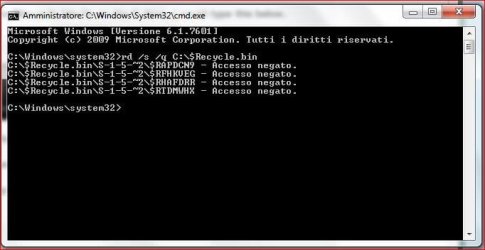
I've tried to fix the 'problem' by using a command prompt, but I'm told that access is denied (see attached screen shot).
I've also tried to follow instructions found elsewhere on sevenforums (http://www.sevenforums.com/general-discussion/206803-solved-7-pro-x64-recycle-bin-corrupt.html), but even though all my files and folders are not hidden, I cannot find C:\ $Recycle.Bin., and so cannot rename it and delete it. I have run chksdk and there are no errors.
Can anyone offer some advice?
Florio
I've tried to fix the 'problem' by using a command prompt, but I'm told that access is denied (see attached screen shot).
I've also tried to follow instructions found elsewhere on sevenforums (http://www.sevenforums.com/general-discussion/206803-solved-7-pro-x64-recycle-bin-corrupt.html), but even though all my files and folders are not hidden, I cannot find C:\ $Recycle.Bin., and so cannot rename it and delete it. I have run chksdk and there are no errors.
Can anyone offer some advice?
Florio
Attachments
My Computer
- OS
- Windows 7 Home Premium 64bit


