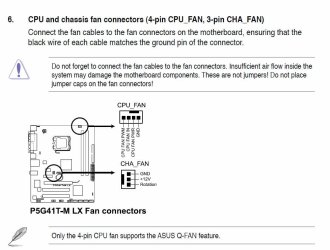
CPU fan not spinning

SkinyJim

New member
Local time
6:51 AM
Messages
25
Location
New Zealand
I've recently purchased an Asus P5G41T-M LX motherboard. I got an intel E6500 CPU for it. When i got it all set up, and turned it on, the BIOS alerted me with a CPU fan error. I opened the case and saw that while the chassis fan was working at full speed, the cpu fan was not so much as twitching. All the connections seem secure. Does anyone know how I can fix this?
 

My Computer

Computer Manufacturer/Model Number
Original HP M7199a, being refurbished
OS
Windows 7 Ultimate x64 Build 7600
CPU
Intel Pentium Dual Core E6500 (2.93Ghz)
Motherboard
Asus P5G41T-M LX
Memory
4GB Kingston DDR3 1333MHz
Graphics Card(s)
Onboard Intel something
Sound Card
-
Hard Drives
200Gb SATA
PSU
400W (stock)
Case
HP M7199a Chassis
Cooling
Stock
Keyboard
N/A
Mouse
Logitech MX 1000
Internet Speed
Slow
Simple...If the CPU fan isn't working, double check the connections, or replace it. DO NOT RUN THE PC WITHOUT THE CPU FAN WORKING!!!

Sorry for the caps, but you need to know this is dangerous to your CPU's life.

Bottom line... replace the fan/CPU cooler if it's not working.

Good luck.
 

My Computer

Computer type
PC/Desktop
Computer Manufacturer/Model Number
Custom built by me.
OS
Windows 10 Pro
CPU
Intel Core i7-4770K (3.5Ghz)
Motherboard
Gigabyte G1 Sniper 5 (F10 Bios)
Memory
32 gig Corsair Dominator Platinum (4x8Gig)
Graphics Card(s)
Sapphire Tri-X R9 Fury
Sound Card
Soundblaster ZXR
Monitor(s) Displays
NEC PA242W 24" LCD Monitor
Screen Resolution
1920 x 1200
Hard Drives
Primary - Samsung 850 Pro (512gig), Samsung 840 Pro (256gig), 2TB WD Caviar Black.
PSU
EVGA Supernova 1000 G2
Case
Cooler Master HAF X
Cooling
Corsair H100i with Corsair Air Series SP120 Quiet Fans
Keyboard
Logitech Wireless Wave
Mouse
Logitech Performance MX
Internet Speed
High Speed Cable
Antivirus
Norton Security
Browser
IE11
Other Info
Memory Timings - 1866MHz @ 9-9-9-27-1T @ 1.5 volts
Thanks, and I understand where you're coming from. However I did manage to run speedfan on it, and it said the CPU was at 38 degrees celcius! This was when it was clocked at 1.6GHz. The fan does come with a respectable heatsink, and speedfan clocked the chassis fan at 2700rpm i think. I didn't have any intention of using the pc much until I got a hold of the graphics card I'm eyeing up, and I was planning on getting a bigger and better fan and heatsink anyway.
 

My Computer

Computer Manufacturer/Model Number
Original HP M7199a, being refurbished
OS
Windows 7 Ultimate x64 Build 7600
CPU
Intel Pentium Dual Core E6500 (2.93Ghz)
Motherboard
Asus P5G41T-M LX
Memory
4GB Kingston DDR3 1333MHz
Graphics Card(s)
Onboard Intel something
Sound Card
-
Hard Drives
200Gb SATA
PSU
400W (stock)
Case
HP M7199a Chassis
Cooling
Stock
Keyboard
N/A
Mouse
Logitech MX 1000
Internet Speed
Slow
So the fan works right now? If so let us know so we can close this case.

Thanks
 

My Computer

Computer type
PC/Desktop
Computer Manufacturer/Model Number
Custom built by me.
OS
Windows 10 Pro
CPU
Intel Core i7-4770K (3.5Ghz)
Motherboard
Gigabyte G1 Sniper 5 (F10 Bios)
Memory
32 gig Corsair Dominator Platinum (4x8Gig)
Graphics Card(s)
Sapphire Tri-X R9 Fury
Sound Card
Soundblaster ZXR
Monitor(s) Displays
NEC PA242W 24" LCD Monitor
Screen Resolution
1920 x 1200
Hard Drives
Primary - Samsung 850 Pro (512gig), Samsung 840 Pro (256gig), 2TB WD Caviar Black.
PSU
EVGA Supernova 1000 G2
Case
Cooler Master HAF X
Cooling
Corsair H100i with Corsair Air Series SP120 Quiet Fans
Keyboard
Logitech Wireless Wave
Mouse
Logitech Performance MX
Internet Speed
High Speed Cable
Antivirus
Norton Security
Browser
IE11
Other Info
Memory Timings - 1866MHz @ 9-9-9-27-1T @ 1.5 volts
No, the fan still doesn't work, though it seems strangely safe without it. However I think I will end up replacing it, so sure close the case
 

My Computer

Computer Manufacturer/Model Number
Original HP M7199a, being refurbished
OS
Windows 7 Ultimate x64 Build 7600
CPU
Intel Pentium Dual Core E6500 (2.93Ghz)
Motherboard
Asus P5G41T-M LX
Memory
4GB Kingston DDR3 1333MHz
Graphics Card(s)
Onboard Intel something
Sound Card
-
Hard Drives
200Gb SATA
PSU
400W (stock)
Case
HP M7199a Chassis
Cooling
Stock
Keyboard
N/A
Mouse
Logitech MX 1000
Internet Speed
Slow
I can't close it, either you or a mod can.

At any rate If you still have the issue then this thread needs to stay open. I was just confused by your last post when you said...

However I did manage to run speedfan on it, and it said the CPU was at 38 degrees celcius!
That says the fan is running since there's no way you're going to get that type of temp without the CPU fan running. You might get 138 degrees celsius reading!!! :D

In fact I'm still confused because you wouldn't be able to boot into windows because the CPU would overheat before that without a "working" CPU fan.

So the fact that you got into Windows AND ran Speedfan says the CPU fan IS working!

Please clearify :confused:

Thanks.
 

My Computer

Computer type
PC/Desktop
Computer Manufacturer/Model Number
Custom built by me.
OS
Windows 10 Pro
CPU
Intel Core i7-4770K (3.5Ghz)
Motherboard
Gigabyte G1 Sniper 5 (F10 Bios)
Memory
32 gig Corsair Dominator Platinum (4x8Gig)
Graphics Card(s)
Sapphire Tri-X R9 Fury
Sound Card
Soundblaster ZXR
Monitor(s) Displays
NEC PA242W 24" LCD Monitor
Screen Resolution
1920 x 1200
Hard Drives
Primary - Samsung 850 Pro (512gig), Samsung 840 Pro (256gig), 2TB WD Caviar Black.
PSU
EVGA Supernova 1000 G2
Case
Cooler Master HAF X
Cooling
Corsair H100i with Corsair Air Series SP120 Quiet Fans
Keyboard
Logitech Wireless Wave
Mouse
Logitech Performance MX
Internet Speed
High Speed Cable
Antivirus
Norton Security
Browser
IE11
Other Info
Memory Timings - 1866MHz @ 9-9-9-27-1T @ 1.5 volts
I can't close it, either you or a mod can.

At any rate If you still have the issue then this thread needs to stay open. I was just confused by your last post when you said...

However I did manage to run speedfan on it, and it said the CPU was at 38 degrees celcius!
That says the fan is running since there's no way you're going to get that type of temp without the CPU fan running. You might get 138 degrees celsius reading!!! :D

In fact I'm still confused because you wouldn't be able to boot into windows because the CPU would overheat before that without a "working" CPU fan.

So the fact that you got into Windows AND ran Speedfan says the CPU fan IS working!

Please clearify :confused:

Thanks.

Speedfan is a temperature monitoring software.
 

My Computer

Computer Manufacturer/Model Number
Custom Built/ Built by me, CR-48
OS
Windows 7 Ultimate x64
CPU
INTEL CORE I5 750 180x20 all powersaving 1.168v
Motherboard
MSI P55-GD55
Memory
OCZ 4GB DDR3 PC3-10666 (7-7-7-20-2t) @1.651v
Graphics Card(s)
ASUS 9800GT GLACIATOR FANSINK
Sound Card
ONBOARD REALTEK ALC889
Monitor(s) Displays
VIEWSONIC VX924, VIZIO VS420LF1A
Screen Resolution
VX924: 1280x1024 75hz, VS420LF1A: 1920x1080 60hz(1080p)
Hard Drives
HITACHI Deskstar HD31000 IDK/7K 1TB 7200RPM 32MB CACHE SATA II
PSU
OCZ MODXSTREAM PRO 700 WATT SEMI-MODULAR
Case
ANTEC 900
Cooling
CoolerMaster Hyper 212+
Keyboard
Logitech K520
Mouse
LOGITECH M310
Internet Speed
CHARTER PIPELINE 15MB DOWN/ 3MB UP
Other Info
ROUTER: DLINK DIR-655, Netgear WNR3500L (SamKnows)
MODEM: MOTOROLA SB6120
HTPC: AMD Athlon II x2 255 C3, Pegatron M2N78-LA (Violet 3.02) , Galaxy NVidia Geforce 210, HP OEM 300WATT PSU, Zalman Z7 Plus, SAMSUNG 3GB PC2-5300, SEAGATE 80GB SATA, Hauppauge WinTV-HVR-1800
I can't close it, either you or a mod can.

At any rate If you still have the issue then this thread needs to stay open. I was just confused by your last post when you said...

However I did manage to run speedfan on it, and it said the CPU was at 38 degrees celcius!
That says the fan is running since there's no way you're going to get that type of temp without the CPU fan running. You might get 138 degrees celsius reading!!! :D

In fact I'm still confused because you wouldn't be able to boot into windows because the CPU would overheat before that without a "working" CPU fan.

So the fact that you got into Windows AND ran Speedfan says the CPU fan IS working!

Please clearify :confused:

Thanks.

Speedfan is a temperature monitoring software.
:what:you don't say?
 

My Computer

OS
7 Ultimate x64
CPU
i5-2500k
Motherboard
Asus P8P67 Pro
Memory
8GB G.Skill Ripjaws X F3-12800CL7D-8GBXH 1866MHz 8-9-8-24
Graphics Card(s)
EVGA GTX 570 SC
Sound Card
X-Fi Titanium Fatality
Monitor(s) Displays
Samsung S27A550H 27" LED
Screen Resolution
1920x1080
Hard Drives
OCZ Vertex 3 120GB.
1TB Samsung F3.
2TB Samsung F4.
PSU
PC Power & Cooling Silencer 760
Case
Lian Li Lancool K62
Cooling
Thermalright Venomous X Black/Scythe S-Flex/Shin-Etsu X23
Keyboard
MS Natural Elite 4000 Ergonomic
Mouse
Logitech G500
Internet Speed
6MB/768
Other Info
Logitech Z-5500 505 watts.
D-Link DGL-4500.
Tripp-Lite Smart Pro 1500.
So the fact that you got into Windows AND ran Speedfan says the CPU fan IS working!

I would have thought that too. But I opened the chassis and looked (no touching, don't panic) at the cpu fan and it was not moving a bit.
 

My Computer

Computer Manufacturer/Model Number
Original HP M7199a, being refurbished
OS
Windows 7 Ultimate x64 Build 7600
CPU
Intel Pentium Dual Core E6500 (2.93Ghz)
Motherboard
Asus P5G41T-M LX
Memory
4GB Kingston DDR3 1333MHz
Graphics Card(s)
Onboard Intel something
Sound Card
-
Hard Drives
200Gb SATA
PSU
400W (stock)
Case
HP M7199a Chassis
Cooling
Stock
Keyboard
N/A
Mouse
Logitech MX 1000
Internet Speed
Slow
Either the fan is bad, or the cpu fan connector on the board is bad. You sure you've got it on right? I would triple check it. If that fails, there's another 3 pin connector just to the left of the northbridge on your board. If the wire from your fan can stretch that far, try that one out; this will let you know if it's the fan or the board.
 

My Computer

OS
7 Ultimate x64
CPU
i5-2500k
Motherboard
Asus P8P67 Pro
Memory
8GB G.Skill Ripjaws X F3-12800CL7D-8GBXH 1866MHz 8-9-8-24
Graphics Card(s)
EVGA GTX 570 SC
Sound Card
X-Fi Titanium Fatality
Monitor(s) Displays
Samsung S27A550H 27" LED
Screen Resolution
1920x1080
Hard Drives
OCZ Vertex 3 120GB.
1TB Samsung F3.
2TB Samsung F4.
PSU
PC Power & Cooling Silencer 760
Case
Lian Li Lancool K62
Cooling
Thermalright Venomous X Black/Scythe S-Flex/Shin-Etsu X23
Keyboard
MS Natural Elite 4000 Ergonomic
Mouse
Logitech G500
Internet Speed
6MB/768
Other Info
Logitech Z-5500 505 watts.
D-Link DGL-4500.
Tripp-Lite Smart Pro 1500.
The 3 pin connecter that powers my chassis fan? Hmm looks like it will fit on there. That wont cause any damage if I attatch it on? I wont be able to test it out for another week and a half. I'm sorta missing a monitor and keyboard :confused: I borrowed a friends to try it out today.
 

My Computer

Computer Manufacturer/Model Number
Original HP M7199a, being refurbished
OS
Windows 7 Ultimate x64 Build 7600
CPU
Intel Pentium Dual Core E6500 (2.93Ghz)
Motherboard
Asus P5G41T-M LX
Memory
4GB Kingston DDR3 1333MHz
Graphics Card(s)
Onboard Intel something
Sound Card
-
Hard Drives
200Gb SATA
PSU
400W (stock)
Case
HP M7199a Chassis
Cooling
Stock
Keyboard
N/A
Mouse
Logitech MX 1000
Internet Speed
Slow
Of course it will fit; it's just another 3 pin connector, usually there are several on a board. No, it won't cause any damage, lasting or otherwise. In using another 3 pin connector your cpu won't recognize that a fan is installed; however, that's besides the point. Right now, the "lasting damage" you're causing is by burning up your cpu, which is considerably more expensive than a fan... and that we've got to nail down first.

This simple test will let you know whether the fan works or not. If it spins up, you need to RMA the board and get a new one. If it doesn't work, and that's what you're hoping for, you need a new fan. You really don't even need a keyboard or monitor for this test. Plug it in and turn the machine on. See whether it's working or not, then cut the power from the PSU. This will all be instantaneous and happen during the POST, before your OS loads, so you don't have to worry about corrupting the OS, not that you would, machine get their power cut all the time, most of the time all that happens is you lose data you were currently working on.
 

My Computer

OS
7 Ultimate x64
CPU
i5-2500k
Motherboard
Asus P8P67 Pro
Memory
8GB G.Skill Ripjaws X F3-12800CL7D-8GBXH 1866MHz 8-9-8-24
Graphics Card(s)
EVGA GTX 570 SC
Sound Card
X-Fi Titanium Fatality
Monitor(s) Displays
Samsung S27A550H 27" LED
Screen Resolution
1920x1080
Hard Drives
OCZ Vertex 3 120GB.
1TB Samsung F3.
2TB Samsung F4.
PSU
PC Power & Cooling Silencer 760
Case
Lian Li Lancool K62
Cooling
Thermalright Venomous X Black/Scythe S-Flex/Shin-Etsu X23
Keyboard
MS Natural Elite 4000 Ergonomic
Mouse
Logitech G500
Internet Speed
6MB/768
Other Info
Logitech Z-5500 505 watts.
D-Link DGL-4500.
Tripp-Lite Smart Pro 1500.
I was just concerned because my CPU fan is 4 pin. And I still can't do it right now :confused: I don't even have a power cord for the computer. I had to borrow that too lol. I have to be a bit frugal with my finances, so I can't afford new components (or cords) until next pay day. But I can test it out in a couple weeks time.

If you haven't assumed this already, I'm posting off a laptop.
 

My Computer

Computer Manufacturer/Model Number
Original HP M7199a, being refurbished
OS
Windows 7 Ultimate x64 Build 7600
CPU
Intel Pentium Dual Core E6500 (2.93Ghz)
Motherboard
Asus P5G41T-M LX
Memory
4GB Kingston DDR3 1333MHz
Graphics Card(s)
Onboard Intel something
Sound Card
-
Hard Drives
200Gb SATA
PSU
400W (stock)
Case
HP M7199a Chassis
Cooling
Stock
Keyboard
N/A
Mouse
Logitech MX 1000
Internet Speed
Slow
I can't close it, either you or a mod can.

At any rate If you still have the issue then this thread needs to stay open. I was just confused by your last post when you said...


That says the fan is running since there's no way you're going to get that type of temp without the CPU fan running. You might get 138 degrees celsius reading!!! :D

In fact I'm still confused because you wouldn't be able to boot into windows because the CPU would overheat before that without a "working" CPU fan.

So the fact that you got into Windows AND ran Speedfan says the CPU fan IS working!

Please clearify :confused:

Thanks.

Speedfan is a temperature monitoring software.
:what:you don't say?

:D

Hmmm... perhaps this was missed "You might get 138 degrees celsius reading!!!" :)

Back to the issue at hand...

I still say that fan was/did run, otherwise you can't get a reading of 38 degrees celsius and the system wouldn't post. Remember he first stated...

When i got it all set up, and turned it on, the BIOS alerted me with a CPU fan error....
...the cpu fan was not so much as twitching.

It's been my as well as others experience that if the CPU fan isn't working, the system isn't posting, and it's certainly not giving a speedfan reading of 38 degrees celsius.

Could the fan be intermittent, yes but there would still be warning signs in the way of BSOD's as the overheating CPU would shutdown.

My two cents.
 

My Computer

Computer type
PC/Desktop
Computer Manufacturer/Model Number
Custom built by me.
OS
Windows 10 Pro
CPU
Intel Core i7-4770K (3.5Ghz)
Motherboard
Gigabyte G1 Sniper 5 (F10 Bios)
Memory
32 gig Corsair Dominator Platinum (4x8Gig)
Graphics Card(s)
Sapphire Tri-X R9 Fury
Sound Card
Soundblaster ZXR
Monitor(s) Displays
NEC PA242W 24" LCD Monitor
Screen Resolution
1920 x 1200
Hard Drives
Primary - Samsung 850 Pro (512gig), Samsung 840 Pro (256gig), 2TB WD Caviar Black.
PSU
EVGA Supernova 1000 G2
Case
Cooler Master HAF X
Cooling
Corsair H100i with Corsair Air Series SP120 Quiet Fans
Keyboard
Logitech Wireless Wave
Mouse
Logitech Performance MX
Internet Speed
High Speed Cable
Antivirus
Norton Security
Browser
IE11
Other Info
Memory Timings - 1866MHz @ 9-9-9-27-1T @ 1.5 volts
I was just concerned because my CPU fan is 4 pin.
That's not a cpu fan, it's a case fan. Yes, they're usually interchangeable, but not in your case: the cpu fan connector is a 3 pin connector.
 

My Computer

OS
7 Ultimate x64
CPU
i5-2500k
Motherboard
Asus P8P67 Pro
Memory
8GB G.Skill Ripjaws X F3-12800CL7D-8GBXH 1866MHz 8-9-8-24
Graphics Card(s)
EVGA GTX 570 SC
Sound Card
X-Fi Titanium Fatality
Monitor(s) Displays
Samsung S27A550H 27" LED
Screen Resolution
1920x1080
Hard Drives
OCZ Vertex 3 120GB.
1TB Samsung F3.
2TB Samsung F4.
PSU
PC Power & Cooling Silencer 760
Case
Lian Li Lancool K62
Cooling
Thermalright Venomous X Black/Scythe S-Flex/Shin-Etsu X23
Keyboard
MS Natural Elite 4000 Ergonomic
Mouse
Logitech G500
Internet Speed
6MB/768
Other Info
Logitech Z-5500 505 watts.
D-Link DGL-4500.
Tripp-Lite Smart Pro 1500.
but not in your case: the cpu fan connector is a 3 pin connector.

Uhhh... where did I miss that bit of info?

Most modern day Intel motherboards have 4-pin CPU connectors, and all of Intel's CPU coolers come with 4-pin fans.

Yes you can connect a 3 pin connector to a 4-pin header as its designed to allow the 3-pin connector to only fit one way/position.
 

My Computer

Computer type
PC/Desktop
Computer Manufacturer/Model Number
Custom built by me.
OS
Windows 10 Pro
CPU
Intel Core i7-4770K (3.5Ghz)
Motherboard
Gigabyte G1 Sniper 5 (F10 Bios)
Memory
32 gig Corsair Dominator Platinum (4x8Gig)
Graphics Card(s)
Sapphire Tri-X R9 Fury
Sound Card
Soundblaster ZXR
Monitor(s) Displays
NEC PA242W 24" LCD Monitor
Screen Resolution
1920 x 1200
Hard Drives
Primary - Samsung 850 Pro (512gig), Samsung 840 Pro (256gig), 2TB WD Caviar Black.
PSU
EVGA Supernova 1000 G2
Case
Cooler Master HAF X
Cooling
Corsair H100i with Corsair Air Series SP120 Quiet Fans
Keyboard
Logitech Wireless Wave
Mouse
Logitech Performance MX
Internet Speed
High Speed Cable
Antivirus
Norton Security
Browser
IE11
Other Info
Memory Timings - 1866MHz @ 9-9-9-27-1T @ 1.5 volts
I could have sworn the pic I saw of his board showed a 3 pin connector? Could be wrong... probably am...
 

My Computer

OS
7 Ultimate x64
CPU
i5-2500k
Motherboard
Asus P8P67 Pro
Memory
8GB G.Skill Ripjaws X F3-12800CL7D-8GBXH 1866MHz 8-9-8-24
Graphics Card(s)
EVGA GTX 570 SC
Sound Card
X-Fi Titanium Fatality
Monitor(s) Displays
Samsung S27A550H 27" LED
Screen Resolution
1920x1080
Hard Drives
OCZ Vertex 3 120GB.
1TB Samsung F3.
2TB Samsung F4.
PSU
PC Power & Cooling Silencer 760
Case
Lian Li Lancool K62
Cooling
Thermalright Venomous X Black/Scythe S-Flex/Shin-Etsu X23
Keyboard
MS Natural Elite 4000 Ergonomic
Mouse
Logitech G500
Internet Speed
6MB/768
Other Info
Logitech Z-5500 505 watts.
D-Link DGL-4500.
Tripp-Lite Smart Pro 1500.

My Computer

Computer type
PC/Desktop
Computer Manufacturer/Model Number
Custom built by me.
OS
Windows 10 Pro
CPU
Intel Core i7-4770K (3.5Ghz)
Motherboard
Gigabyte G1 Sniper 5 (F10 Bios)
Memory
32 gig Corsair Dominator Platinum (4x8Gig)
Graphics Card(s)
Sapphire Tri-X R9 Fury
Sound Card
Soundblaster ZXR
Monitor(s) Displays
NEC PA242W 24" LCD Monitor
Screen Resolution
1920 x 1200
Hard Drives
Primary - Samsung 850 Pro (512gig), Samsung 840 Pro (256gig), 2TB WD Caviar Black.
PSU
EVGA Supernova 1000 G2
Case
Cooler Master HAF X
Cooling
Corsair H100i with Corsair Air Series SP120 Quiet Fans
Keyboard
Logitech Wireless Wave
Mouse
Logitech Performance MX
Internet Speed
High Speed Cable
Antivirus
Norton Security
Browser
IE11
Other Info
Memory Timings - 1866MHz @ 9-9-9-27-1T @ 1.5 volts
...
 

My Computer

Computer Manufacturer/Model Number
Scratch built
OS
Windows 7 x64 Ultimate
CPU
i7 960
Motherboard
Asus P6X58D
Memory
12 Gig Corsair Dominator
Graphics Card(s)
Nvidia 480
Sound Card
Maudio Delta 44 + breakout box
Monitor(s) Displays
Dell UltraSharp U2410 24in and Samsung 21 dual monitors
Screen Resolution
1920x1200 and 1280x1024
Hard Drives
Primary: Intel X-25M G2 160G SSD
Secondary: Segate baracuda 1.0 TB
HDs in AHCI mode.
PSU
Corasair TX850
Case
Cooler Master HAF
Cooling
Corsair H50
Keyboard
Logitech G15 + N52 game pad
Mouse
Logitech MX518
Internet Speed
15kbs down 4.5kbps up
Other Info
WEI 7.6
CPU & RAM 7.6
Graphics 7.9
Hard disk 7.7
Like I said, could be wrong... probably am.
 

My Computer

OS
7 Ultimate x64
CPU
i5-2500k
Motherboard
Asus P8P67 Pro
Memory
8GB G.Skill Ripjaws X F3-12800CL7D-8GBXH 1866MHz 8-9-8-24
Graphics Card(s)
EVGA GTX 570 SC
Sound Card
X-Fi Titanium Fatality
Monitor(s) Displays
Samsung S27A550H 27" LED
Screen Resolution
1920x1080
Hard Drives
OCZ Vertex 3 120GB.
1TB Samsung F3.
2TB Samsung F4.
PSU
PC Power & Cooling Silencer 760
Case
Lian Li Lancool K62
Cooling
Thermalright Venomous X Black/Scythe S-Flex/Shin-Etsu X23
Keyboard
MS Natural Elite 4000 Ergonomic
Mouse
Logitech G500
Internet Speed
6MB/768
Other Info
Logitech Z-5500 505 watts.
D-Link DGL-4500.
Tripp-Lite Smart Pro 1500.
Back
Top