
Cpu temp emergency!!!

If you are handy with mini screw drivers, simply removing the so called "thermal tape" (more like white duct tape) and replacing it with some quality termal paste, you can decrease temps by up to 10C (not guarenteed, only going by what I have experienced)
 

My Computer

Computer Manufacturer/Model Number
I'll Fix IT Computers
OS
Windows 7 Ultimate 64 Bit
CPU
Intel Core 2 Quad 9400 2.66Ghz @ 3.20
Motherboard
Asus P5QL-E
Memory
4Gb (2x2g) Kingston HyperX 1066Mhz Dual Channel @ 2.3v
Graphics Card(s)
Gigabyte HD5670 1Gig no o/c
Sound Card
On board
Monitor(s) Displays
Screen1 = Samsung 953BW Screen 2 = Samsung 943BW
Screen Resolution
Screen 1 @ 1440x900 Screen 2 @ 1440x900
Hard Drives
Seagate SataII 500Gb 7200 Rpm
PSU
Coolermaster 550w
Case
Coolermaster RC-332
Cooling
Front 120mm, Rear 120mm, side (VGA card vent) 80mm
Keyboard
Logitech G15
Mouse
Logitech G9 Gaming Mouse
Internet Speed
Bigpond Wireless Broadband (variable speeds up to 7Mbps)
Other Info
Thermaltake Max Orb II CPU Fan @ 2000rpm
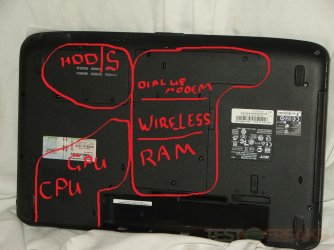
Boredom got the best of me. While I could not find any "guts" pics of your laptop (very bloody piece of hardware you have there by the way) You should be able to see little symbols around the covers on the base depicting what lies beneath them
An educated gestimate would be as follows......

edit: that would have been so much easier if I had a touchscreen -.-
 

Attachments

  • aspire537810.jpg
    aspire537810.jpg
    95.9 KB · Views: 12

My Computer

Computer Manufacturer/Model Number
I'll Fix IT Computers
OS
Windows 7 Ultimate 64 Bit
CPU
Intel Core 2 Quad 9400 2.66Ghz @ 3.20
Motherboard
Asus P5QL-E
Memory
4Gb (2x2g) Kingston HyperX 1066Mhz Dual Channel @ 2.3v
Graphics Card(s)
Gigabyte HD5670 1Gig no o/c
Sound Card
On board
Monitor(s) Displays
Screen1 = Samsung 953BW Screen 2 = Samsung 943BW
Screen Resolution
Screen 1 @ 1440x900 Screen 2 @ 1440x900
Hard Drives
Seagate SataII 500Gb 7200 Rpm
PSU
Coolermaster 550w
Case
Coolermaster RC-332
Cooling
Front 120mm, Rear 120mm, side (VGA card vent) 80mm
Keyboard
Logitech G15
Mouse
Logitech G9 Gaming Mouse
Internet Speed
Bigpond Wireless Broadband (variable speeds up to 7Mbps)
Other Info
Thermaltake Max Orb II CPU Fan @ 2000rpm
That will have to wait until early next year, I can't void the warranty in case something blew up between now and then but I'll definitely consider it, if I can do that without having to totally gut this thing. The CPU temperatures are pretty stable though and aren't the cause of the termination of the game.

Bloody as in bad? Compared to what I was on before, an old Dimension 3000, this is a definite 10 steps up LOL. But thank you, based on the locations of the side connections and what the very vague manual says, the HDD is in that "L" shaped space in the middle (no idea what the bottom of that "L" houses), the RAM is to the bottom left with the 6 slit vents, and I would imagine that the CPU is directly above that with the significantly larger square air vent above the RAM. The graphics card is to the left in the middle (because that's where the VGA out is, could be mistaken), the mutli-ROM bay to the right of that, and I'm guessing that the hot spot is either the WiFi card or another similar box of some kind without native cooling, or else one of the motherboard's heat sink pipes (the copper things) that's been put there on purpose to take all the heat away from the crucial hardware to get as hot as it wants without causing problems (or so I'd assume).

Whatever it is, I don't think it's a critical issue. I hear that, specifically in the cases of Notebooks, when you start smelling an acrid "burning plastic" or "burning metallic" smell that's when it's cause for worry (I smelled that coming off of my PS2 three years ago before it died, and am smelling it coming off of my dad's PS3 now). But I'm not smelling anything like that going on here so I'm going to assume it's OK for now.

I was able to play the game yesterday for almost 3 hours straight without it freezing up and kicking me out (which is due to heat, I'm certain of that) and the CPU temperature's high was listed at about the 71C mark. Still fairly below the 90C TJunction Max. :)
 

My Computer

Computer Manufacturer/Model Number
Acer Aspire 5738PG-6306
OS
7 Ultimate x64 SP1
CPU
Core 2 Duo T6600 @ 2.20GHz
Motherboard
Acer JV50 | Intel PM45 Chipset | BIOS Phoenix v1.21
Memory
4GB SDRAM DDR2 667
Graphics Card(s)
ATI Mobility Radeon 4570HD 512MB VDDR3 (2.25GB HyperMemory)
Sound Card
Integrated Dolby Home Theater HD Audio Support
Monitor(s) Displays
15.6" LED backlight HD/WS CineCrystal w/ Multi-Touch
Screen Resolution
Notebook: 1366x768 | Syncmaster P2370HD: 1920x1080
Hard Drives
Primary internal: 320GB WD3200BEVT-22ZCT0 @ 5400 RPM | Secondary external 1: 2TB Cavalry CAXB3702T0 @7200 RPM (USB 2.0) | Secondary external 2: 500GB Calvary CAUM @7200 RPM (USB 2.0).
PSU
AC Adapter
Case
Blue Clam shell
Cooling
OEM Bult-in.
Keyboard
Microsoft Wireless 3000 (USB)
Mouse
Logitech V220 (USB)
Internet Speed
31Mbps DL/25Mbps UL - Verizon fiOs/Netgear WNDR37AV
Other Info
EXTERNAL DISPLAY: 23" Samsung Syncmaster P2370HD | EXTERNAL SOUND: 300 Watt MX-KB30 JVC Stereo (AUX) | ROUTER: Netgear WNDR37AV 802.11a/b/g/n Dual-Band Gigabit | Satechi 12-Port USB 2.0 Hub | GAME PAD: SteelSeries 3GC USB 2.0 (JoyToKey Mapping) | DETAILED SYSTEM SPECIFICATIONS: http://www.tigerdirect.com/applications/SearchTools/item-details.asp?EdpNo=5265887&CatId=4938
A good way of keeping a laptop cool, as stupid as this sounds, is to balance it on an ashtray, that keeps the vents clear, and of course an ashtray won't burn.
 

My Computer

Computer type
PC/Desktop
Computer Manufacturer/Model Number
Medion Erazer (note to self: insert model number) - with custom additions
OS
Windows 10 Pro x64
CPU
Intel Core i5 7400 @ 3.00GHz
Motherboard
OEM supllied with PC
Memory
8GB 2133Mhz DDR4 (OEM supplied)
Graphics Card(s)
Gygabyte Windforce GTX 1050Ti (Factory Overclocked)
Sound Card
Realtek
Monitor(s) Displays
Acer Al1980 + HKC
Screen Resolution
1360*768(HKC) / 1280*1024(Acer)
Hard Drives
1TB Toshiba
1TB WD Caviar Green
120GB Samsung Evo 840
PSU
OEM supplied (no power rating on case)
Case
OEM Supplied
Cooling
Stock
Keyboard
Logitech Wireless
Mouse
Logitect Wireless
Internet Speed
40Mb/s Down 10Mb/s Up
Antivirus
Defender
Browser
Firefox
(very bloody piece of hardware you have there by the way)
"Bloody" as in a good thing. eg. "Bloody oath she's a good'n - She's a nice piece of hardware"
Sorry for the slang, I'm an Aussie afterall :-)
 

My Computer

Computer Manufacturer/Model Number
I'll Fix IT Computers
OS
Windows 7 Ultimate 64 Bit
CPU
Intel Core 2 Quad 9400 2.66Ghz @ 3.20
Motherboard
Asus P5QL-E
Memory
4Gb (2x2g) Kingston HyperX 1066Mhz Dual Channel @ 2.3v
Graphics Card(s)
Gigabyte HD5670 1Gig no o/c
Sound Card
On board
Monitor(s) Displays
Screen1 = Samsung 953BW Screen 2 = Samsung 943BW
Screen Resolution
Screen 1 @ 1440x900 Screen 2 @ 1440x900
Hard Drives
Seagate SataII 500Gb 7200 Rpm
PSU
Coolermaster 550w
Case
Coolermaster RC-332
Cooling
Front 120mm, Rear 120mm, side (VGA card vent) 80mm
Keyboard
Logitech G15
Mouse
Logitech G9 Gaming Mouse
Internet Speed
Bigpond Wireless Broadband (variable speeds up to 7Mbps)
Other Info
Thermaltake Max Orb II CPU Fan @ 2000rpm
A good way of keeping a laptop cool, as stupid as this sounds, is to balance it on an ashtray, that keeps the vents clear, and of course an ashtray won't burn.
Oh I got that covered, propped it up on the styrofoam blocks it shipped with. I make sure to keep both vents wide open and clear, especially the one at the back. It really does help - wonder if the manufacturers will ever catch on and just integrate better stilts onto these things!!! :p

(very bloody piece of hardware you have there by the way)
"Bloody" as in a good thing. eg. "Bloody oath she's a good'n - She's a nice piece of hardware"
Sorry for the slang, I'm an Aussie afterall :-)
Ah gotcha, thanks. I was thinking bloody meant bad... but I suppose it's kind of like our American thing here where "fat" means "cool" or "bad" means "rad" lol. Sorry haha.
 

My Computer

Computer Manufacturer/Model Number
Acer Aspire 5738PG-6306
OS
7 Ultimate x64 SP1
CPU
Core 2 Duo T6600 @ 2.20GHz
Motherboard
Acer JV50 | Intel PM45 Chipset | BIOS Phoenix v1.21
Memory
4GB SDRAM DDR2 667
Graphics Card(s)
ATI Mobility Radeon 4570HD 512MB VDDR3 (2.25GB HyperMemory)
Sound Card
Integrated Dolby Home Theater HD Audio Support
Monitor(s) Displays
15.6" LED backlight HD/WS CineCrystal w/ Multi-Touch
Screen Resolution
Notebook: 1366x768 | Syncmaster P2370HD: 1920x1080
Hard Drives
Primary internal: 320GB WD3200BEVT-22ZCT0 @ 5400 RPM | Secondary external 1: 2TB Cavalry CAXB3702T0 @7200 RPM (USB 2.0) | Secondary external 2: 500GB Calvary CAUM @7200 RPM (USB 2.0).
PSU
AC Adapter
Case
Blue Clam shell
Cooling
OEM Bult-in.
Keyboard
Microsoft Wireless 3000 (USB)
Mouse
Logitech V220 (USB)
Internet Speed
31Mbps DL/25Mbps UL - Verizon fiOs/Netgear WNDR37AV
Other Info
EXTERNAL DISPLAY: 23" Samsung Syncmaster P2370HD | EXTERNAL SOUND: 300 Watt MX-KB30 JVC Stereo (AUX) | ROUTER: Netgear WNDR37AV 802.11a/b/g/n Dual-Band Gigabit | Satechi 12-Port USB 2.0 Hub | GAME PAD: SteelSeries 3GC USB 2.0 (JoyToKey Mapping) | DETAILED SYSTEM SPECIFICATIONS: http://www.tigerdirect.com/applications/SearchTools/item-details.asp?EdpNo=5265887&CatId=4938
wonder if the manufacturers will ever catch on and just integrate better stilts onto these things!!!
No,, if you notice,, most sellers refer to them as Notebooks and not Laptops. The words now have become somewhat synonymous with each other in todays marketing but.....

They once were referred to as Laptops because you could use them on your lap..

Then, they started pushing so much power through them they started referring to them as Notebooks, meaning, not to be used on your lap, but on a desk/table, because they got so hot they were/do burning/burn peoples legs.

Now they are referred as either, but, they still don't want you using them on your lap because they get so hot.

They won't lift the legs/stilts/whatever on them as it is another piece that can break easily or it won't fit in a bag properly.

You main alternative is to find a well made laptop cooling pad and use it.
There are other ways, but a well made cooling pad is the optimal solution.
 

My Computer

Computer Manufacturer/Model Number
Self Built
OS
Win 7 Ultimate 32bit
CPU
C2D E6600 2.4Ghz
Motherboard
Intel D965WH
Memory
4G Kingston KHX5400D2
Graphics Card(s)
EVGA GTX 570 HD SC (012-P3-1573-KR)
Sound Card
On-Board
Monitor(s) Displays
Samsung 226BW
Screen Resolution
1680 x 1050
Hard Drives
2 x 250 Seagate Barracuda
2 x 500 Seagate Barracuda (Raid1)
PSU
Corsair TX750W
Case
In-Win C589
Cooling
Stock Intel Cooling
Then, they started pushing so much power through them they started referring to them as Notebooks, meaning, not to be used on your lap, but on a desk/table, because they got so hot they were/do burning/burn peoples legs.

I know it's off topic, but it actually surprises me when people talk about laptops burning their legs, as I've never had that problem except for with one laptop. My high school issued laptops to everyone and my freshman you I have given an older Dell (which stopped functioning before the end of the school year) that ran hot all the time. Both laptops I've actually owned has stayed pretty cool, including the one I have now, which I've read hundreds of complaints about being way to hot. Too be fair, I balance mine on one leg, leaving the fans completely uncovered. I'm guessing the issue with using most on your lap is that the fans get blocked. Am I about on my money, or do most peoples laptops get really hot regardless of where they keep them?
 

My Computer

Computer type
Laptop
Computer Manufacturer/Model Number
Toshiba P775-S7100
OS
Windows 7 Professional SP1 64-bit
CPU
Intel Core i5-2450M @2.5 GHz
Memory
6 GB DDR3 1333MHz
Graphics Card(s)
Intel HD 3000
Monitor(s) Displays
Built-in 17.3" LED; 22" Insignia NS-L22Q-10A
Screen Resolution
1600x900; 1360x768
Hard Drives
750 GB Hitachi
1TB Seagate FreeAgent External
Internet Speed
Verizon DSL Speed(Down/Up): 3360 Kbps / 800 Kbps
Antivirus
MSE and MBAM Pro
Browser
IE10
Actually,, on a lot of laptops,, leave it running on a table, Mostly high end laptops,, then lift it and place your hand over where the CPU heatsink is. Trust me it gets very hot on a majority of laptops/notebooks.
 

My Computer

Computer Manufacturer/Model Number
Self Built
OS
Win 7 Ultimate 32bit
CPU
C2D E6600 2.4Ghz
Motherboard
Intel D965WH
Memory
4G Kingston KHX5400D2
Graphics Card(s)
EVGA GTX 570 HD SC (012-P3-1573-KR)
Sound Card
On-Board
Monitor(s) Displays
Samsung 226BW
Screen Resolution
1680 x 1050
Hard Drives
2 x 250 Seagate Barracuda
2 x 500 Seagate Barracuda (Raid1)
PSU
Corsair TX750W
Case
In-Win C589
Cooling
Stock Intel Cooling
I guess I'm just lucky. I've had my computer running while sitting on my desk for a few hours now. Been playing the Sims 2, which is the most demanding game I have on here. The bottom feels maybe 5-10 degree (F) higher than than room temp at the most. To be fair I do clean all the dust and dirt every six months, which I think would be a factor. I actually just did it a week ago. I've never had a heat problem with this computer.
 

My Computer

Computer type
Laptop
Computer Manufacturer/Model Number
Toshiba P775-S7100
OS
Windows 7 Professional SP1 64-bit
CPU
Intel Core i5-2450M @2.5 GHz
Memory
6 GB DDR3 1333MHz
Graphics Card(s)
Intel HD 3000
Monitor(s) Displays
Built-in 17.3" LED; 22" Insignia NS-L22Q-10A
Screen Resolution
1600x900; 1360x768
Hard Drives
750 GB Hitachi
1TB Seagate FreeAgent External
Internet Speed
Verizon DSL Speed(Down/Up): 3360 Kbps / 800 Kbps
Antivirus
MSE and MBAM Pro
Browser
IE10
Well, not trying to argue, but point out that...

Even on clean Notebook/Laptops, I have felt them be very hot, but within tolerance of functionality.
The heat issue is not an issue of actually overheating, it's just no way to insulate that area and keep the laptop cooler.

Not every system suffers this, but the majority of them do.
If you do have one that does not get that hot, then yes, you are lucky.
But the heat is a normal function.

I have a Dell 8200 that gets very hot and after a while, will leave a red mark on your leg.
 

My Computer

Computer Manufacturer/Model Number
Self Built
OS
Win 7 Ultimate 32bit
CPU
C2D E6600 2.4Ghz
Motherboard
Intel D965WH
Memory
4G Kingston KHX5400D2
Graphics Card(s)
EVGA GTX 570 HD SC (012-P3-1573-KR)
Sound Card
On-Board
Monitor(s) Displays
Samsung 226BW
Screen Resolution
1680 x 1050
Hard Drives
2 x 250 Seagate Barracuda
2 x 500 Seagate Barracuda (Raid1)
PSU
Corsair TX750W
Case
In-Win C589
Cooling
Stock Intel Cooling
go into your bios and change your fan speed
 

My Computer

OS
Windows 7 Ultimate (Build 7600)
Back
Top