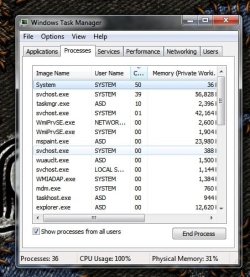
CPU usage = 100%

TheIceman6

New member
Member
Local time
3:39 AM
Messages
88
Hello,

I've realized that my laptop is going for 100% for CPU usage, I am not using anything only Firefox.

I am using a cooling for my laptop but it doesn't seem to be working because my laptop is very hot right now.

what's the cause of this problem?

Thanks
 

My Computer

Computer Manufacturer/Model Number
Toshiba Satelitte P205 - S8810
OS
Windows 7 - Ultimate
CPU
Intel core 2 Duo 1.66GHz
Memory
2GB
Sound Card
HD Audio Device
Monitor(s) Displays
1440 * 900
Hard Drives
251GB
Internet Speed
Don't ask :P

My Computer

Computer Manufacturer/Model Number
Custom
OS
Windows 7 Professional x64
CPU
Intel i7 2600K OC'd @ 4620 MHz
Motherboard
Asus P8Z68-V Pro
Memory
16GB GSkill Sniper 2133 Mhz (4x4GB)
Graphics Card(s)
EVGA GeForce GTX 480 SuperClocked+
Sound Card
Realtek High Definition Audio
Monitor(s) Displays
2x Acer S273HLbmii 27"
Screen Resolution
2 x 1920x1080
Hard Drives
64GB Crucial M4 SSD

Storage: Hitachi 1TB 5400RPM, Samsung 1.5TB 5400RPM
PSU
Corsair HW Series 750w (modular)
Case
Cooler Master HAF 932 Advanced Blue Edition
Cooling
CM Hyper 212+ CPU cooler, 3x 230mm + 1x 140mm case fans
Keyboard
Logitech MK320 (wireless)
Mouse
Logitech MK320 (wireless)
Internet Speed
30 Mb/s : 2 Mb/s
Before you take the Task Manager picture, make sure you click "Show processes of all users" on the bottom left.
 

My Computer

Computer Manufacturer/Model Number
HP, Dell, Gateway, Toshiba - 4 laptops and 2 desktops
OS
Vista, Windows7, Mint Mate, Zorin, Windows 8
CPU
from 1.6GHz Duo to i7
Monitor(s) Displays
2x HP w2207
Hard Drives
5x HDD, 7x SSD, 12x Externals
Keyboard
with trackball - no mices
Mouse
Trackball mice
Internet Speed
DSL 6000
Hi,

Now my CPU seems working again without any problem, the sound is back to normal.

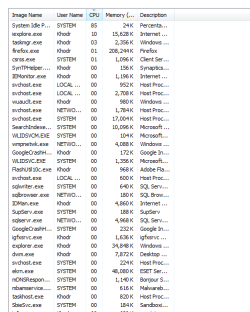
But I posted a Pic for it, is that what you needed?

Thanks :)
 

Attachments

  • Untitled.png
    Untitled.png
    15.5 KB · Views: 167

My Computer

Computer Manufacturer/Model Number
Toshiba Satelitte P205 - S8810
OS
Windows 7 - Ultimate
CPU
Intel core 2 Duo 1.66GHz
Memory
2GB
Sound Card
HD Audio Device
Monitor(s) Displays
1440 * 900
Hard Drives
251GB
Internet Speed
Don't ask :P
yeah, that's the right picture. But there you are very normal - no problems. 85% of the time your CPU idles.
 

My Computer

Computer Manufacturer/Model Number
HP, Dell, Gateway, Toshiba - 4 laptops and 2 desktops
OS
Vista, Windows7, Mint Mate, Zorin, Windows 8
CPU
from 1.6GHz Duo to i7
Monitor(s) Displays
2x HP w2207
Hard Drives
5x HDD, 7x SSD, 12x Externals
Keyboard
with trackball - no mices
Mouse
Trackball mice
Internet Speed
DSL 6000
Next time your machine acts up, could you post a screenshot? Like Wolfgang said above, everything looks fine there.
 

My Computer

Computer Manufacturer/Model Number
Custom
OS
Windows 7 Professional x64
CPU
Intel i7 2600K OC'd @ 4620 MHz
Motherboard
Asus P8Z68-V Pro
Memory
16GB GSkill Sniper 2133 Mhz (4x4GB)
Graphics Card(s)
EVGA GeForce GTX 480 SuperClocked+
Sound Card
Realtek High Definition Audio
Monitor(s) Displays
2x Acer S273HLbmii 27"
Screen Resolution
2 x 1920x1080
Hard Drives
64GB Crucial M4 SSD

Storage: Hitachi 1TB 5400RPM, Samsung 1.5TB 5400RPM
PSU
Corsair HW Series 750w (modular)
Case
Cooler Master HAF 932 Advanced Blue Edition
Cooling
CM Hyper 212+ CPU cooler, 3x 230mm + 1x 140mm case fans
Keyboard
Logitech MK320 (wireless)
Mouse
Logitech MK320 (wireless)
Internet Speed
30 Mb/s : 2 Mb/s
firefox is pretty high... 208K... wow!
svchost seems to be searching, downloading or installing updates
SearchIndex doesnt need to be installed unless you need or use it.

GoogleCrash... really???? lol

ekrn.exe has a history of high CPU usage.. ask mr. google. But i think that is part of your Nod32 a/v...

Wildsvc.exe is not needed but uses little memory.. something to do with Bing or Windows Live...

--------------------

You may want to check your firefox install or version number.... i never get that high with my version of firefox.
 

My Computer

Computer Manufacturer/Model Number
Sony Vaio VGN-FW520F
OS
Windows 7 Ultimate x64, Windows XP Pro, Ubuntu 9.1
CPU
Intel Centrino 2 P7450
Memory
4GB
Graphics Card(s)
Radeon 4650 HD
Sound Card
USB Creative X-Fi Sound Card
Monitor(s) Displays
1600 x 900 16:9 HD 720p
Hard Drives
500GB Hitachi (Internal)
500GB Western Digital (External)
250GB Seagate (External)
Cooling
Zalman Laptop Cooler ZM-NC1500W
hi
after resuming from sleep CPU usage goes to 100% until rebooting!
help me! thanks
i use dell inspiron1545
 

My Computer

OS
7 ultimate 32bit
Hello,

A few things to try:

1) Flashing the latest BIOS, which is here: Drivers and Downloads

2) Disabling 3rd-party services and startup items. In MSCONFIG (enter in the start menu), uncheck everything in the Startup tab. In the Services tab, first tick "Hide all Microsoft services", and then disable everything that remains.
 

My Computer

Computer Manufacturer/Model Number
Custom
OS
Windows 7 Professional x64
CPU
Intel i7 2600K OC'd @ 4620 MHz
Motherboard
Asus P8Z68-V Pro
Memory
16GB GSkill Sniper 2133 Mhz (4x4GB)
Graphics Card(s)
EVGA GeForce GTX 480 SuperClocked+
Sound Card
Realtek High Definition Audio
Monitor(s) Displays
2x Acer S273HLbmii 27"
Screen Resolution
2 x 1920x1080
Hard Drives
64GB Crucial M4 SSD

Storage: Hitachi 1TB 5400RPM, Samsung 1.5TB 5400RPM
PSU
Corsair HW Series 750w (modular)
Case
Cooler Master HAF 932 Advanced Blue Edition
Cooling
CM Hyper 212+ CPU cooler, 3x 230mm + 1x 140mm case fans
Keyboard
Logitech MK320 (wireless)
Mouse
Logitech MK320 (wireless)
Internet Speed
30 Mb/s : 2 Mb/s
Run a malware scan also with malwarebytes antimalware free.
 

My Computer

Computer Manufacturer/Model Number
Too many to describe...
OS
Windows 7 x64 pro/ Windows 7 x86 Pro/ XP SP3 x86
Hello,

A few things to try:

1) Flashing the latest BIOS, which is here: Drivers and Downloads

2) Disabling 3rd-party services and startup items. In MSCONFIG (enter in the start menu), uncheck everything in the Startup tab. In the Services tab, first tick "Hide all Microsoft services", and then disable everything that remains.

tanx, but both of those ways didnt solve my problem, and i forgot to mention that my problem happend since i updated my windows 7 to SP1 !!
now look at this screenshot taken after resuming sleep!
Untitled.jpg
 
Last edited:

My Computer

OS
7 ultimate 32bit

My Computer

Computer Manufacturer/Model Number
Custom
OS
Windows 7 Professional x64
CPU
Intel i7 2600K OC'd @ 4620 MHz
Motherboard
Asus P8Z68-V Pro
Memory
16GB GSkill Sniper 2133 Mhz (4x4GB)
Graphics Card(s)
EVGA GeForce GTX 480 SuperClocked+
Sound Card
Realtek High Definition Audio
Monitor(s) Displays
2x Acer S273HLbmii 27"
Screen Resolution
2 x 1920x1080
Hard Drives
64GB Crucial M4 SSD

Storage: Hitachi 1TB 5400RPM, Samsung 1.5TB 5400RPM
PSU
Corsair HW Series 750w (modular)
Case
Cooler Master HAF 932 Advanced Blue Edition
Cooling
CM Hyper 212+ CPU cooler, 3x 230mm + 1x 140mm case fans
Keyboard
Logitech MK320 (wireless)
Mouse
Logitech MK320 (wireless)
Internet Speed
30 Mb/s : 2 Mb/s
cpu 100%

Hello,

I've realized that my laptop is going for 100% for CPU usage, I am not using anything only Firefox.

I am using a cooling for my laptop but it doesn't seem to be working because my laptop is very hot right now.

what's the cause of this problem?
 

Attachments

  • b.png
    b.png
    39.4 KB · Views: 13

My Computer

OS
Windows 7 Home Premium 32bit
Hello,

I've realized that my laptop is going for 100% for CPU usage, I am not using anything only Firefox.

I am using a cooling for my laptop but it doesn't seem to be working because my laptop is very hot right now.

what's the cause of this problem?
I don't know, you have to scroll up and take a snapshot of what is bearing all the cpu load, as I cannot see it in your post.

I have this that might help you out some, if you care to go through the many tutorials: Optimize Windows 7.
 

My Computer

Computer type
PC/Desktop
Computer Manufacturer/Model Number
Custom Asus Build
OS
Microsoft Windows 8.1 Pro 64-bit
CPU
Intel(R) Core(TM) i3-4130 CPU @ 3.40GHz
Motherboard
B85M-E
Memory
8.00 GB
Graphics Card(s)
None
Sound Card
Realtek High Definition Audio
Monitor(s) Displays
Asus 23.6" Monitor
Screen Resolution
1920 x 1080 x 32 bits (4294967296 colors) @ 60 Hz
Hard Drives
INTEL SSDSC2BW180A4
Samsung SSD 840 PRO Series
PSU
Seasonic S12II-380Bronze
Case
Lian Li
Cooling
Fan, Passive
Keyboard
Logitech K120
Mouse
Microsoft Touch Mouse
Internet Speed
4ms Ping, 19.0 Mbps Download, 19.0 Mbps Upload
Antivirus
Eset Endpoint
Browser
Internet Explorer, Chrome
Your TM snip says nothing because it is not ordered by CPU usage. Click on "CPU" until the high users show on top.
 

My Computer

Computer Manufacturer/Model Number
HP, Dell, Gateway, Toshiba - 4 laptops and 2 desktops
OS
Vista, Windows7, Mint Mate, Zorin, Windows 8
CPU
from 1.6GHz Duo to i7
Monitor(s) Displays
2x HP w2207
Hard Drives
5x HDD, 7x SSD, 12x Externals
Keyboard
with trackball - no mices
Mouse
Trackball mice
Internet Speed
DSL 6000
Back
Top