
You are using an out of date browser. It may not display this or other websites correctly.
You should upgrade or use an alternative browser.
You should upgrade or use an alternative browser.
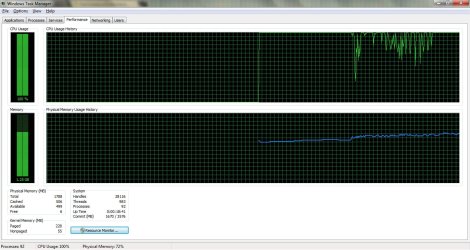
cpu usage stock at 100% system slowing HELP!!!
- Thread starter noob1114
- Start date

- Local time
- 9:56 PM
- Messages
- 5,053
Bring up task manager, then click on processes tab, then CPU tab till the items are arranged in descending order of cpu usage. Post a snipshot.
My Computer
- Computer Manufacturer/Model Number
- Too many to describe...
- OS
- Windows 7 x64 pro/ Windows 7 x86 Pro/ XP SP3 x86
- Local time
- 9:56 PM
- Messages
- 5,053
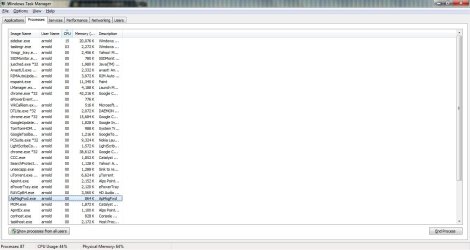
Did you click on Show processes from all users? Because, the sidebar is consuming 15% and the task manager 3% while total usage is 44%, so there are some more processes involved. Let us see those.
For the sidebar issue, you'll need to trim down your gadgets lineup.
For the sidebar issue, you'll need to trim down your gadgets lineup.
My Computer
- Computer Manufacturer/Model Number
- Too many to describe...
- OS
- Windows 7 x64 pro/ Windows 7 x86 Pro/ XP SP3 x86
- Local time
- 9:56 PM
- Messages
- 5,053
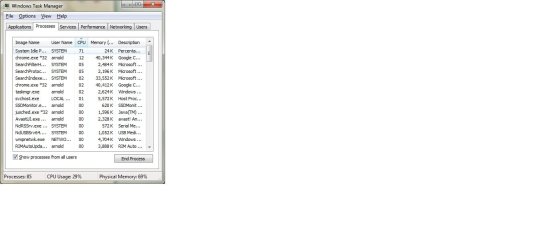
The main culprits are windows search indexing and chrome apart from sidebar. Try disabling "Windows search" in services. Heres a walkthrough.
Disable Search Indexing In Windows 7
For sidebar, as I already said you need to trim windows gadgets, if you dont actively use them and they are just there by default, you can either trim them or disable it in the startup tab of msconfig.
For chrome, try tinkering with addons, or uninstall and reinstall, or heck try a different browser. Also check in chrome forums for excessive cpu use issues.
Disable Search Indexing In Windows 7
For sidebar, as I already said you need to trim windows gadgets, if you dont actively use them and they are just there by default, you can either trim them or disable it in the startup tab of msconfig.
For chrome, try tinkering with addons, or uninstall and reinstall, or heck try a different browser. Also check in chrome forums for excessive cpu use issues.
My Computer
- Computer Manufacturer/Model Number
- Too many to describe...
- OS
- Windows 7 x64 pro/ Windows 7 x86 Pro/ XP SP3 x86
 )
)
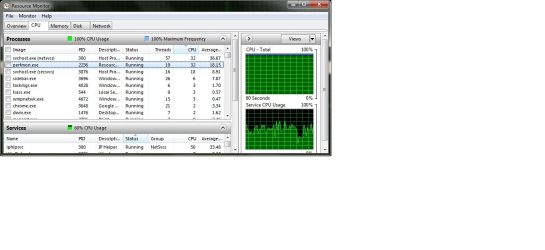
It is not Windows Search and it is not Chrome or the Sidebar. If you look closely at "Services" Iphlpsvc is using 50% of the CPU. I assume, since you don't have it listed, that you have a dual core process. In these cases 50% would be one core fully utilized.
Last edited:
My Computer
- Computer type
- PC/Desktop
- Computer Manufacturer/Model Number
- Alienware Aurora ALX R4
- OS
- Windows 10 Pro (x64)
- CPU
- Intel Core i7-3930K (3.2GHz - 4.5GHz)
- Motherboard
- Alienware Aurora-R4 x79
- Memory
- 4x Samsung 4GB PC3-12800 DDR3 (16GB 1600MHz)
- Graphics Card(s)
- Nvidia Geforce GTX 690
- Sound Card
- SteelSeries Siberia Elite
- Monitor(s) Displays
- Dell UltraSharp U3011
- Screen Resolution
- 2560x1600
- Hard Drives
- Samsung 850 Pro 256 GB, Seagate 1TB Desktop Hybrid HDD, 2x Western Digital 4TB Green HDD
- PSU
- 875W Some Dell PSU <.<
- Case
- Alienware Aurora ALX
- Cooling
- Custom Liquid Cooling (EK CPU & GPU blocks) dual EK 480RAD
- Keyboard
- Logitech G710+ Mechanical
- Mouse
- Logitech G700s
- Internet Speed
- Verizon Fios (50 mbps average)
- Other Info
- Server: Intel NUC D54250WYK: i5-4250U, 16GB, 256 GB mSATA, Windows Server 2012 R2

My Computer
- Computer Manufacturer/Model Number
- emachines/emachines E627
- OS
- window 7 ultimate x64
- Memory
- 2gb

It would be beneficial, at this point, to download and run Process Explorer from sysinternals. This will give you far more information, although I think this still could be search indexing. Get Process Explorer running, and when you have an instance of high CPU, sort by CPU and see what shows up. Also, do file > save as, and save the file out as a .txt file and upload it here along with the screenshot.
My Computer
- Computer type
- PC/Desktop
- Computer Manufacturer/Model Number
- Custom
- OS
- Windows 10 Pro x64
- CPU
- Intel Core i7 4790K @ 4.5GHz
- Motherboard
- Asus Maximus Hero VII
- Memory
- 32GB DDR3
- Graphics Card(s)
- Nvidia GeForce GTX970
- Sound Card
- Realtek HD Audio
- Screen Resolution
- 1920x1200
- Hard Drives
- 1x Samsung 250GB SSD
4x WD RE 2TB (RAIDZ)
- PSU
- Corsair AX760i
- Case
- Fractal Design Define R4
- Cooling
- Noctua NH-D15
It is not Search Indexing *sigh...*
My Computer
- Computer type
- PC/Desktop
- Computer Manufacturer/Model Number
- Alienware Aurora ALX R4
- OS
- Windows 10 Pro (x64)
- CPU
- Intel Core i7-3930K (3.2GHz - 4.5GHz)
- Motherboard
- Alienware Aurora-R4 x79
- Memory
- 4x Samsung 4GB PC3-12800 DDR3 (16GB 1600MHz)
- Graphics Card(s)
- Nvidia Geforce GTX 690
- Sound Card
- SteelSeries Siberia Elite
- Monitor(s) Displays
- Dell UltraSharp U3011
- Screen Resolution
- 2560x1600
- Hard Drives
- Samsung 850 Pro 256 GB, Seagate 1TB Desktop Hybrid HDD, 2x Western Digital 4TB Green HDD
- PSU
- 875W Some Dell PSU <.<
- Case
- Alienware Aurora ALX
- Cooling
- Custom Liquid Cooling (EK CPU & GPU blocks) dual EK 480RAD
- Keyboard
- Logitech G710+ Mechanical
- Mouse
- Logitech G700s
- Internet Speed
- Verizon Fios (50 mbps average)
- Other Info
- Server: Intel NUC D54250WYK: i5-4250U, 16GB, 256 GB mSATA, Windows Server 2012 R2
Ah, I missed iphlpsvc. On a client, it doesn't make as much sense as it would on a server, but getting a log of the service doesn't seem too hard.
IP Helper Service – IpHlpSvc Consume more than expected %CPU « IT Core Blog
IP Helper Service – IpHlpSvc Consume more than expected %CPU « IT Core Blog
My Computer
- Computer type
- PC/Desktop
- Computer Manufacturer/Model Number
- Custom
- OS
- Windows 10 Pro x64
- CPU
- Intel Core i7 4790K @ 4.5GHz
- Motherboard
- Asus Maximus Hero VII
- Memory
- 32GB DDR3
- Graphics Card(s)
- Nvidia GeForce GTX970
- Sound Card
- Realtek HD Audio
- Screen Resolution
- 1920x1200
- Hard Drives
- 1x Samsung 250GB SSD
4x WD RE 2TB (RAIDZ)
- PSU
- Corsair AX760i
- Case
- Fractal Design Define R4
- Cooling
- Noctua NH-D15
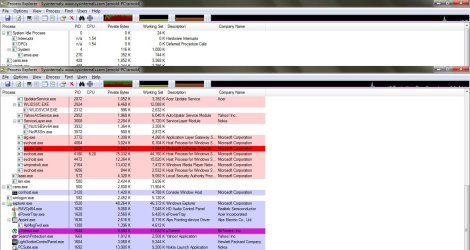
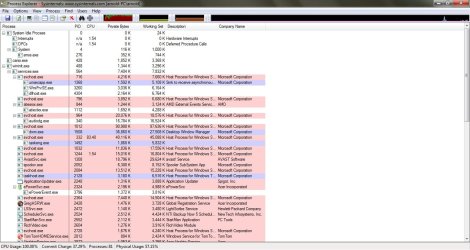
My Computer
- Computer Manufacturer/Model Number
- emachines/emachines E627
- OS
- window 7 ultimate x64
- Memory
- 2gb
So, an svchost.exe process, probably iphlpsvc (with a child of taskeng.exe...? What scheduled task, I wonder?) and Google Chrome are taking up almost all of the CPU time you see. So, next question - what are you doing in Chrome at the time?
My Computer
- Computer type
- PC/Desktop
- Computer Manufacturer/Model Number
- Custom
- OS
- Windows 10 Pro x64
- CPU
- Intel Core i7 4790K @ 4.5GHz
- Motherboard
- Asus Maximus Hero VII
- Memory
- 32GB DDR3
- Graphics Card(s)
- Nvidia GeForce GTX970
- Sound Card
- Realtek HD Audio
- Screen Resolution
- 1920x1200
- Hard Drives
- 1x Samsung 250GB SSD
4x WD RE 2TB (RAIDZ)
- PSU
- Corsair AX760i
- Case
- Fractal Design Define R4
- Cooling
- Noctua NH-D15
dthomas101
New member
- Local time
- 8:56 PM
- Messages
- 8
dthomas101
New member
- Local time
- 8:56 PM
- Messages
- 8
you know i am not as technical as some of these people and this is just a sugestion but i fixed my neighbors computer that was doing this and it was just a simple thing of the printer was spooling there was a document that didnt print. if you have any printers connected you might want to see if there are any documents waiting to print and delete them. again this may have nothing what so ever to do with it but then again.
My Computer
- OS
- windows 7 pro 32bit
Similar threads
- Replies
- 15
- Views
- 5K

- Replies
- 4
- Views
- 996
- Replies
- 0
- Views
- 274
- Replies
- 7
- Views
- 4K

