CPU Usge 25% svchost.exe

Adammm

New member
Local time
10:10 AM
Messages
7
As soon as i log in the CPU usage goes to 25% I've got quad core processor so it is taking up an entire core. Task manager is telling me svchost.exe is constantly running at 25%, with further inspection from Process Manager it is showing nvtray.exe and dwm.exe are using a lot of memory. Can someone please help me resolve this because whenever i try and install the drivers for my Netgear wireless USB it will then use 25% and get stuck detecting device.


zvo9wy.png
 

My Computer My Computer

OS
Windows 7 Enterprise x64
CPU
AMD A10-5800K
Memory
4.00 GB
Graphics Card(s)
GeForce GTX 560 SE
 

My Computer My Computer

Computer type
PC/Desktop
Computer Manufacturer/Model Number
Custom Built
OS
Windows 10 Pro x64 (UPGRADED - 10/20/2016)
CPU
AMD FX 8350 (OC: 4.48GHz)
Motherboard
ASUS Crosshair V Formula-Z AM3+
Memory
14GB DDR3 Corsair Vengeance
Graphics Card(s)
Asus AMD Radeon R9 280X 3GB
Sound Card
N/A
Monitor(s) Displays
BenQ G2420HD
Screen Resolution
1920x1080
Hard Drives
Internal: 1x 500GB WD Blue SSD | 1TB WD Caviar Black | 3x 500GB WD Caviar Green
External: 500GB Seagate
PSU
Corsair AX1200i
Case
CoolerMaster HAF X
Cooling
Corsair Hydro H90 Water Cooling
Keyboard
Microsoft SideWinder X6 Keyboard
Mouse
Microsoft SideWinder X8 Mouse
Antivirus
MSE / Malwarebytes Anti-Malware
Browser
Mozilla Firefox + Google Chrome


Yes, i recently re-installed my graphics card drivers due to Windows Black screening. Now I've got this problem and i have actually been to all of those links prior to posting this none so far have helped

These are the services being ran by svchost

any reason iphlpsvc is the only with capital letters lol?

2hoiamh.png
 
Last edited:

My Computer My Computer

OS
Windows 7 Enterprise x64
CPU
AMD A10-5800K
Memory
4.00 GB
Graphics Card(s)
GeForce GTX 560 SE

My Computer My Computer

Computer type
PC/Desktop
Computer Manufacturer/Model Number
Custom Built
OS
Windows 10 Pro x64 (UPGRADED - 10/20/2016)
CPU
AMD FX 8350 (OC: 4.48GHz)
Motherboard
ASUS Crosshair V Formula-Z AM3+
Memory
14GB DDR3 Corsair Vengeance
Graphics Card(s)
Asus AMD Radeon R9 280X 3GB
Sound Card
N/A
Monitor(s) Displays
BenQ G2420HD
Screen Resolution
1920x1080
Hard Drives
Internal: 1x 500GB WD Blue SSD | 1TB WD Caviar Black | 3x 500GB WD Caviar Green
External: 500GB Seagate
PSU
Corsair AX1200i
Case
CoolerMaster HAF X
Cooling
Corsair Hydro H90 Water Cooling
Keyboard
Microsoft SideWinder X6 Keyboard
Mouse
Microsoft SideWinder X8 Mouse
Antivirus
MSE / Malwarebytes Anti-Malware
Browser
Mozilla Firefox + Google Chrome
I don't have any Nvidia display driver service enabled, I have them all set on manual and don't use the nvtray at all. I have the nvidia update service disabled. If I want to go into the nvidia I just go through the control panel and access it from there, you don't need it to run in the notification area.
Also updating your drivers isn't always a good thing cause sometimes its the new driver that screws things up. I had to revert back to a old nvidia driver for my video since the newer one I updated with was either buggy or just plain crappy and still using that old driver in my comp.
Sometimes lessons learned in if its not broke then don't fix it.:)
 

My Computer My Computer

Computer Manufacturer/Model Number
Custom Build
OS
Microsoft Windows 7 Ultimate 64-bit
CPU
Intel(R) Pentium(R) CPU G2030 @ 3.00GHz
Motherboard
ASUSTeK COMPUTER INC. P8H77-V LE
Memory
12.00 GB Kingston DIMM 3x4 gig sticks
Graphics Card(s)
AMD Radeon HD 5450
Sound Card
AMD High Definition Audio Device
Monitor(s) Displays
Dual displays
Screen Resolution
1280 x 1024 x 4294967296 colors
Hard Drives
ST3500320AS 465.76 GB
WDC WD10EZEX-00BN5A0 931.51 GB
WDC WD10 EARS-00MVWB0 USB Device 931.51 GB
PSU
XION SuperNova 600 watt
Keyboard
Razer Tarantula Gaming Keyboard
Mouse
Razer Imperator Gaming Mouse
Internet Speed
DSL 6 down & 1 up with Netgear R6300 Wireless router

My Computer My Computer

OS
Windows 7 Ultimate x64
CPU
core i7.
Generally AVG (in my experience) has slowed my system down considerably making it freeze up and hang which is why I don't use it. Most companies use it such as schools, colleges, work places, libraries etc. Personally I'd recommend Bitdefender as I've had no problem with it at all, though for some it can be a big issue!
 

My Computer My Computer

Computer type
PC/Desktop
Computer Manufacturer/Model Number
Custom Built
OS
Windows 10 Pro x64 (UPGRADED - 10/20/2016)
CPU
AMD FX 8350 (OC: 4.48GHz)
Motherboard
ASUS Crosshair V Formula-Z AM3+
Memory
14GB DDR3 Corsair Vengeance
Graphics Card(s)
Asus AMD Radeon R9 280X 3GB
Sound Card
N/A
Monitor(s) Displays
BenQ G2420HD
Screen Resolution
1920x1080
Hard Drives
Internal: 1x 500GB WD Blue SSD | 1TB WD Caviar Black | 3x 500GB WD Caviar Green
External: 500GB Seagate
PSU
Corsair AX1200i
Case
CoolerMaster HAF X
Cooling
Corsair Hydro H90 Water Cooling
Keyboard
Microsoft SideWinder X6 Keyboard
Mouse
Microsoft SideWinder X8 Mouse
Antivirus
MSE / Malwarebytes Anti-Malware
Browser
Mozilla Firefox + Google Chrome
That should not make any difference at this point. Download Driver Sweeper and uninstall your graphics drivers, reboot your system and try installing the drivers again.

Download CCleaner and do a registry scan to remove the invalid registry entries before re-attempting your NVIDIA drivers installation.


Guru3D - Driver Sweeper

CCleaner - PC Optimization and Cleaning - Free Download


Ran CCleaner ( again ) restarted computer, Then did the analyze and clean on Driver sweeper. svchost is still running at 25%. I've been putting it off due to losing over 500gb of music/tv/movies but i'm just going to re-install windows
 

My Computer My Computer

OS
Windows 7 Enterprise x64
CPU
AMD A10-5800K
Memory
4.00 GB
Graphics Card(s)
GeForce GTX 560 SE
You are picking on the wrong svchost.exe. The one that's using the 25% CPU is further down on your Process Explorer snip (under dvm.exe). Hover over it or go to Properties to see which processes are hiding behind that one.
 

My Computer My Computer

Computer Manufacturer/Model Number
HP, Dell, Gateway, Toshiba - 4 laptops and 2 desktops
OS
Vista, Windows7, Mint Mate, Zorin, Windows 8
CPU
from 1.6GHz Duo to i7
Monitor(s) Displays
2x HP w2207
Hard Drives
5x HDD, 7x SSD, 12x Externals
Keyboard
with trackball - no mices
Mouse
Trackball mice
Internet Speed
DSL 6000
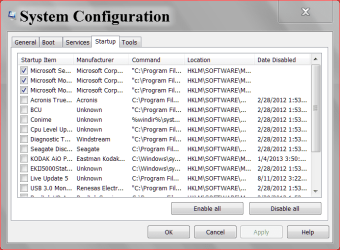
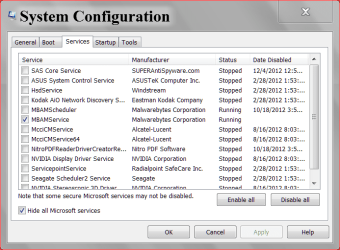
Use msconfig and show us these.
Capture.today 2 1 11.PNG

today 1 11.PNG
 

My Computer My Computer

Computer type
PC/Desktop
Computer Manufacturer/Model Number
Home made Desktop
OS
Windows 10 Pro. 64/ version 1709 Windows 7 Pro/64
CPU
Intel i7-6800K @ 4.3
Motherboard
ASUS X-99 Deluxe II
Memory
Corsair Platinum 16 gig @2400
Graphics Card(s)
EVGA GTX 1070 OC
Monitor(s) Displays
Asus 27" LED LCD/VE278Q
Screen Resolution
1920-1080 or 1280-720 HDMI
Hard Drives
INTEL SSD 730-240 Gb Sata 3.0/
PSU
EVGA Platium 1200W
Case
Phanteks Luxe Tempered Glass 8 fans/ one radiator
Cooling
XSPC/ Water Cooled CPU
Keyboard
Das 4 Professional
Mouse
Logitech M705/MX Anywhere 2-S
Internet Speed
100 mbits
Antivirus
Microsoft Security Essentials/ Malwarebytes Premium 3.0/ SAS
Browser
I.E. 11 default/Firefox/ ISP Time Warner Cable/Spectrum
Other Info
LG BluRay Burner/
Sound system-KLipsch-THX/
Icy Dock ssd Hot Swap bays.
Is there a superfetch inside that 25% svchost if you look to what its running?
I disabled my superfetch in services and removed all the prefetch entries in C:\Windows and knocked a svchost I had from 100,000+K to just a few thousand K and have had no issues with disabling the superfetch.
Just a shot in the dark to a high runnning svchost.
 

My Computer My Computer

Computer Manufacturer/Model Number
Custom Build
OS
Microsoft Windows 7 Ultimate 64-bit
CPU
Intel(R) Pentium(R) CPU G2030 @ 3.00GHz
Motherboard
ASUSTeK COMPUTER INC. P8H77-V LE
Memory
12.00 GB Kingston DIMM 3x4 gig sticks
Graphics Card(s)
AMD Radeon HD 5450
Sound Card
AMD High Definition Audio Device
Monitor(s) Displays
Dual displays
Screen Resolution
1280 x 1024 x 4294967296 colors
Hard Drives
ST3500320AS 465.76 GB
WDC WD10EZEX-00BN5A0 931.51 GB
WDC WD10 EARS-00MVWB0 USB Device 931.51 GB
PSU
XION SuperNova 600 watt
Keyboard
Razer Tarantula Gaming Keyboard
Mouse
Razer Imperator Gaming Mouse
Internet Speed
DSL 6 down & 1 up with Netgear R6300 Wireless router
Disabling Superfetch makes your system slower.
 

My Computer My Computer

Computer Manufacturer/Model Number
HP, Dell, Gateway, Toshiba - 4 laptops and 2 desktops
OS
Vista, Windows7, Mint Mate, Zorin, Windows 8
CPU
from 1.6GHz Duo to i7
Monitor(s) Displays
2x HP w2207
Hard Drives
5x HDD, 7x SSD, 12x Externals
Keyboard
with trackball - no mices
Mouse
Trackball mice
Internet Speed
DSL 6000
I haven't noticed my system slow down since I disabled the superfetch but I don't have all the bells and whistles some of the new systems have either.
My system is pretty basic and like a old 67 chevy thats easy to fix.;)
 

My Computer My Computer

Computer Manufacturer/Model Number
Custom Build
OS
Microsoft Windows 7 Ultimate 64-bit
CPU
Intel(R) Pentium(R) CPU G2030 @ 3.00GHz
Motherboard
ASUSTeK COMPUTER INC. P8H77-V LE
Memory
12.00 GB Kingston DIMM 3x4 gig sticks
Graphics Card(s)
AMD Radeon HD 5450
Sound Card
AMD High Definition Audio Device
Monitor(s) Displays
Dual displays
Screen Resolution
1280 x 1024 x 4294967296 colors
Hard Drives
ST3500320AS 465.76 GB
WDC WD10EZEX-00BN5A0 931.51 GB
WDC WD10 EARS-00MVWB0 USB Device 931.51 GB
PSU
XION SuperNova 600 watt
Keyboard
Razer Tarantula Gaming Keyboard
Mouse
Razer Imperator Gaming Mouse
Internet Speed
DSL 6 down & 1 up with Netgear R6300 Wireless router
I reinstalled the OS and it is working beautifully now, I do appreciate the help and suggestions thanks everyone
 

My Computer My Computer

OS
Windows 7 Enterprise x64
CPU
AMD A10-5800K
Memory
4.00 GB
Graphics Card(s)
GeForce GTX 560 SE
Back
Top