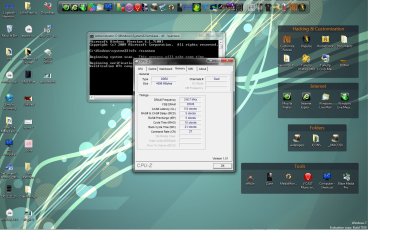
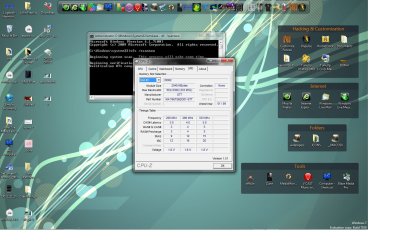
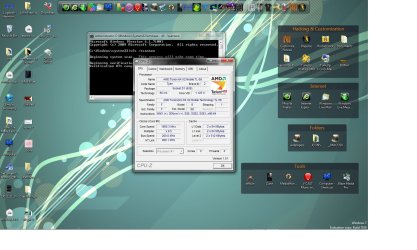
CPU-Z result screens

studiorat

New member
Member
VIP
Local time
11:25 AM
Messages
57
I recently read the post on performance and the cpu z posts
mine is bare bones stock, what info is relevant on this result?
I need help understanding why it is important and what reccomendations u guys have to help acheive the best performance i can get from my box w/o having to do to much so if anyone can help it would be appreciated I am a noob when it comes to this performance stuff but I am a tweakhead
i love tweaking things so any help is cool thanx
 

Attachments
  • cpuz results.jpg
    cpuz results.jpg
    180.7 KB · Views: 286
  • 2.jpg
    2.jpg
    171.5 KB · Views: 140
  • 3.jpg
    3.jpg
    177.7 KB · Views: 139

My Computer

Computer Manufacturer/Model Number
hp Dv9000 craptop
OS
windows 7 build 7600 RTM
CPU
AMD Turion(tm) 64 X2 Mobile Technology TL-58, 1900
Motherboard
Quanda 30D1
Memory
4gb
Graphics Card(s)
NVIDIA GeForce 7150M / nForce 630M
Sound Card
Conexant High Definition SmartAudio HD2
Monitor(s) Displays
On Board
Screen Resolution
Resolution 1440 x 900 x 59 hertz
Hard Drives
1} Model FUJITSU MHV2120BH PL ATA Device 120 gb
2} Model WDC WD3200BEKT-00F3T0 ATA Device 320 gb
Keyboard
Standard 101/102-Key or Microsoft Natural PS/2 K
Mouse
Synaptics PS/2 Port TouchPad
Other Info
HDA CX20549 Soft Modem
I recently read the post on performance and the cpu z posts
mine is bare bones stock, what info is relevant on this result?
I need help understanding why it is important and what reccomendations u guys have to help acheive the best performance i can get from my box w/o having to do to much so if anyone can help it would be appreciated I am a noob when it comes to this performance stuff but I am a tweakhead
i love tweaking things so any help is cool thanx

I'm not sure what you are getting at here. :sarc:
What exactly are you trying to do?
This looks to be a laptop so I doubt there's really anything hardware related that can be changed such as overclocking or tightening the memory timings.
The most you could do is all the "Normal" tweaks such as disabling indexing, keeping the hard drive(s) defragged, having the latest drivers, disabling unneeded services, etc. ;)
 

My Computer

Computer Manufacturer/Model Number
ABS Tech Ultimate X9
OS
Windows® 7 Ultimate x64 SP1
CPU
Intel Core 2 Duo E8400 (E0) @ 4.0GHz
Motherboard
ASUS P5Q Pro Turbo / 1780 FSB
Memory
G.SKILL-F2-8500CL5D-4GBPK (2x2Gbs) (5-5-5-15) @ 1067Mhz
Graphics Card(s)
EVGA GTX 470 SC (845/1690/2000) 160Gbs
Sound Card
VIA HD Audio / Boston Acoustics
Monitor(s) Displays
Acer X222W HD 22" LCD 2500:1 / 5ms
Screen Resolution
1680x1050
Hard Drives
Seagate Barracuda SATAII 2 x 320GB
Seagate Barracuda SATAII 1Tb
Intel® Rapid Storage Technology v10.1.0.1008
AHCI-NCQ Enabled
PSU
Silent Pro GOLD 80 PLUS 800w /95% efficiency / SLI-Crossfire
Case
ABS Stealth Black-Custom
Cooling
CoolerMaster V6GT 6 Heatpipe 200w CPU Cooler
Keyboard
Logitech G15 Gaming Keyboard (Old Style Blue!)
Mouse
Logitech MX518 Gaming Mouse
Internet Speed
1Mbs-up/ 6Mbs-down
I'm not sure what you are getting at here. :sarc:
What exactly are you trying to do?
This looks to be a laptop so I doubt there's really anything hardware related that can be changed such as overclocking or tightening the memory timings.
The most you could do is all the "Normal" tweaks such as disabling indexing, keeping the hard drive(s) defragged, having the latest drivers, disabling unneeded services, etc. ;)
thats what I was wondering, I am new to this forum and was just curious as to what it all meant, I just want better performance, my puter lags a bit, online especially,but slow program start up as well i am however replacing my hdd with a faster 7200 that should help with my data acess at least, Dumb question how long should the sfc /scannow take estimated, mine has been up for about 2 hours and no chanege from 87% on the verifying stage is this norm or should i end it
 

My Computer

Computer Manufacturer/Model Number
hp Dv9000 craptop
OS
windows 7 build 7600 RTM
CPU
AMD Turion(tm) 64 X2 Mobile Technology TL-58, 1900
Motherboard
Quanda 30D1
Memory
4gb
Graphics Card(s)
NVIDIA GeForce 7150M / nForce 630M
Sound Card
Conexant High Definition SmartAudio HD2
Monitor(s) Displays
On Board
Screen Resolution
Resolution 1440 x 900 x 59 hertz
Hard Drives
1} Model FUJITSU MHV2120BH PL ATA Device 120 gb
2} Model WDC WD3200BEKT-00F3T0 ATA Device 320 gb
Keyboard
Standard 101/102-Key or Microsoft Natural PS/2 K
Mouse
Synaptics PS/2 Port TouchPad
Other Info
HDA CX20549 Soft Modem
thats what I was wondering, I am new to this forum and was just curious as to what it all meant, I just want better performance, my puter lags a bit, online especially,but slow program start up as well i am however replacing my hdd with a faster 7200 that should help with my data acess at least, Dumb question how long should the sfc /scannow take estimated, mine has been up for about 2 hours and no chanege from 87% on the verifying stage is this norm or should i end it

I don't think that 2 hours for sfc /scannow to only be at 87% is normal at all for any system!
This took my system 4 minutes to complete. :sarc:
So there's something wrong there.
Just a guess but it sounds like system file corruption.
Sounds like it's "stuck" & not making any further progress.
 

My Computer

Computer Manufacturer/Model Number
ABS Tech Ultimate X9
OS
Windows® 7 Ultimate x64 SP1
CPU
Intel Core 2 Duo E8400 (E0) @ 4.0GHz
Motherboard
ASUS P5Q Pro Turbo / 1780 FSB
Memory
G.SKILL-F2-8500CL5D-4GBPK (2x2Gbs) (5-5-5-15) @ 1067Mhz
Graphics Card(s)
EVGA GTX 470 SC (845/1690/2000) 160Gbs
Sound Card
VIA HD Audio / Boston Acoustics
Monitor(s) Displays
Acer X222W HD 22" LCD 2500:1 / 5ms
Screen Resolution
1680x1050
Hard Drives
Seagate Barracuda SATAII 2 x 320GB
Seagate Barracuda SATAII 1Tb
Intel® Rapid Storage Technology v10.1.0.1008
AHCI-NCQ Enabled
PSU
Silent Pro GOLD 80 PLUS 800w /95% efficiency / SLI-Crossfire
Case
ABS Stealth Black-Custom
Cooling
CoolerMaster V6GT 6 Heatpipe 200w CPU Cooler
Keyboard
Logitech G15 Gaming Keyboard (Old Style Blue!)
Mouse
Logitech MX518 Gaming Mouse
Internet Speed
1Mbs-up/ 6Mbs-down
I don't think that 2 hours for sfc /scannow to only be at 87% is normal at all for any system!
This took my system 4 minutes to complete. :sarc:
So there's something wrong there.
Just a guess but it sounds like system file corruption.
Sounds like it's "stuck" & not making any further progress.
thanx i reinstalled 7 and a new 320gb/7200 hopefully that should end all my issues
 

My Computer

Computer Manufacturer/Model Number
hp Dv9000 craptop
OS
windows 7 build 7600 RTM
CPU
AMD Turion(tm) 64 X2 Mobile Technology TL-58, 1900
Motherboard
Quanda 30D1
Memory
4gb
Graphics Card(s)
NVIDIA GeForce 7150M / nForce 630M
Sound Card
Conexant High Definition SmartAudio HD2
Monitor(s) Displays
On Board
Screen Resolution
Resolution 1440 x 900 x 59 hertz
Hard Drives
1} Model FUJITSU MHV2120BH PL ATA Device 120 gb
2} Model WDC WD3200BEKT-00F3T0 ATA Device 320 gb
Keyboard
Standard 101/102-Key or Microsoft Natural PS/2 K
Mouse
Synaptics PS/2 Port TouchPad
Other Info
HDA CX20549 Soft Modem
Back
Top