Creating system image questions.

I keep the images for 5 home computers on an external, in a folder named for each computer along with it's latest data backup.

In order to keep more than one backup in a folder I sometimes rename extension to .earlier, .older, .baseline, etc.

When time comes to use one of the renamed Images, I rename it to WindowsImageBackup and place it alone in the root of the external. This has worked about a dozen times or so.
 
Last edited:
By default the recovery while booted live will be looking for the assigned name. The renaming simply allows you to store more then one image in case you want to revert back to an earlier one.

When having two separate locations with both seeing the default name on different drives the recovery went to the drive with the lowest number in the order of drives installed first. The second newer was on Drive #1 while the first was on the Sata III on the channel #4 Sata III primary port but seen as Drive #0 by the tool showing it as the recommended image.
 

My Computers

System One System Two

  • Computer type
    PC/Desktop
    Computer Manufacturer/Model Number
    Custom builds = 2
    OS
    W7 Ultimate x64/W10 Pro x64/W11 Pro Triple Boot - Main PC W7 Remote PC Micro ATX W7 Pro x64/W11 Pro
    CPU
    AMD Phenom II X4 975 Deneb 3.6ghz - 965 2nd remote pc
    Motherboard
    Gigabyte GA-790XTA-UD4-Gigabyte GA-880GM-D2H remote pc
    Memory
    Kingston Hyper X DDR3 1600 1.5v 16gb - Hyper X Fury 8gb 2nd
    Graphics Card(s)
    MSI HD Radeon 5750 1gb - MSI HD Radeon 6450 on mini tower
    Sound Card
    Creative Labs X-Fi Xtreme Audio P - Realtek onooard 2nd case
    Monitor(s) Displays
    ASUS VW199T-P 19" HP 2082a Main-HP 2082a 20" remote pc
    Screen Resolution
    Asus 1440x900 - HP 1600x900
    Hard Drives
    WD Black 1TB HD per OS W7, W10, and pending W11 presently on 500gb OS Drive - Pending Triple 1TB HDs for Spanned Storage/backup volume
    Single 2TB external USB enclosure, single 1TB System 7 Host/Boot drive, Pending 8TB external HD for system image b
    PSU
    Corsair 750TX - primary / Corsair CX600 - second
    Case
    Antec 900-2 - SSD compatible / NZXT Vulcan mini tower
    Cooling
    Zalman CNPS9900A
    Keyboard
    AZIO L70 Backlit Letters Gaming - ONN Cordless/USB
    Mouse
    MSI DS200 Programmable, Logitech Cordless
    Internet Speed
    30mbps upgrade - primary hard wired - mini tower usb WiFi
    Antivirus
    GFI VIPRE Internet Security 2014 on W7 2016 beta on W10,
    Browser
    Cyberfox, WaterFox 64bit FF variants, FireFox x64, Pale Moon
    Other Info
    Accomdata fan cooled usb 2.0 PIDE/Sata II, III external enclosure.
    Sambient usb/eSata PATA/Sata II, III external enclosure.
  • Computer type
    PC/Desktop
    System Manufacturer/Model Number
    CUSTOM ASSEMBLY
    OS
    W7 Pro x64/W11 Pro
    CPU
    AMD Deneb 3.6ghz - 965
    Motherboard
    Gigabyte GA-880GM-D2H remote pc
    Memory
    Kingston Hyper X Fury 8gb
    Graphics Card(s)
    MSI HD Radeon 6450 DVI Output
    Sound Card
    Realtek onooard Creative or Other separate PENDING
    Monitor(s) Displays
    VIZIO 32" LCD TV Separate LCD Pending
    Screen Resolution
    1600x1080
    Hard Drives
    WD 500GB OS Host/Boot WD Green 1TB Storage/Backup
    PSU
    Corsair 600W - THERMALTAKE 600W spare case
    Case
    NZXT Vulcan mini tower
    Cooling
    Twin 120mm Top Fans - 240mm Side Cover
    Keyboard
    ONN Cordless/USB Logitech Cordless
    Mouse
    ONN USB/Cordless - Logitech Cordless
    Internet Speed
    DSL 5G
    Browser
    MS Edge, FireFox, WaterFox x64, FireFox Nightly
    Other Info
    OS Testing-Remote Access to Main TeamViewer
I usually install my OS, windows update and activate and make 1 vanilla image right there. Then, about once per month I take another image of the drive. I usually only keep that vanilla image and the latest month. I don't see myself ever wanting or needed to go back to some point in the middle.

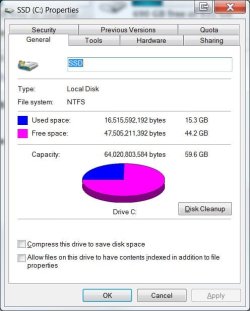
My Windows 7 install took 8.6G by the time I got rid of the PageFile, Hiberfil and some other garbage. Everything I want including Office 2010 fits right now in about 16 G. That means Acronis can back it up in less than 60 seconds. That means I do backups. Every day. My wife's machine has 64G on her C drive and it takes 47 minutes across a USB link. I'm lucky if I do a backup on her machine once a month. My first PC was an 8086 and even then I did backups on 360K floppies. Backups have saved my bacon on more occasions than I care to remember.


The best backup is the one you make. And it's only as good as the last one!
 

Attachments

  • C_Drive.jpg
    C_Drive.jpg
    38.6 KB · Views: 3

My Computer

OS
Windows 7 Ultimate
CPU
I7-920
Motherboard
TBGM01
Memory
12 GB DDR3-1333
Graphics Card(s)
nVidia GTX 260
Sound Card
none
Monitor(s) Displays
2xGateway FHX2300
Hard Drives
OCZ Vertex 2
Kingston SNV425S2/64GB SSD
ST31000528AS Seagate
WDC WD1001FALS x 2 Western Digital
PSU
750w
Cooling
Air
Internet Speed
30M down, 1.8M up
Other Info
Router DGL-400
What do you mean by "...place it alone in the root of the HD"? If I have an image on an external drive, and my OD drive craps out... I buy a new drive. How do I move the image to "its root"? I assume I boot of the recovery disk, and I should see both the new drive and my external. I assume the recovery disk leads you through the recovery process.

Or... if I have a 250 gb partition on my other internal (1T) drive that a copy of the image is backed up to, can I just make that my OS? Hopefully will never have the need to know... but want to be sure I have back-ups in the right place.


I keep the images for 5 home computers on an external, in a folder named for each computer along with it's latest data backup.

In order to keep more than one backup in a folder I sometimes rename extension to .earlier, .older, .baseline, etc.

When time comes to use one of the renamed Images, I rename it to WindowsImageBackup and place it alone in the root of the HD. This has worked about a dozen times or so.
 

My Computer

Computer Manufacturer/Model Number
Dell XPS 8100
OS
Windows 7 64 bit
CPU
i5-750
Memory
6gb
Graphics Card(s)
GTS 240
Monitor(s) Displays
Dell U2311
Screen Resolution
1920 x 1080
Hard Drives
Seagate ST3250318AS
Samsung HD103SJ 1T
Sorry, typo. Yes, place WindowsImageBackup in root of external where it can be detected easily by the Repair Disk or DVD Repair console "Recover Using a System Image" utility.

When I have it in a folder, it isn't detected.
 
I usually install my OS, windows update and activate and make 1 vanilla image right there. Then, about once per month I take another image of the drive. I usually only keep that vanilla image and the latest month. I don't see myself ever wanting or needed to go back to some point in the middle.

My Windows 7 install took 8.6G by the time I got rid of the PageFile, Hiberfil and some other garbage. Everything I want including Office 2010 fits right now in about 16 G. That means Acronis can back it up in less than 60 seconds. That means I do backups. Every day. My wife's machine has 64G on her C drive and it takes 47 minutes across a USB link. I'm lucky if I do a backup on her machine once a month. My first PC was an 8086 and even then I did backups on 360K floppies. Backups have saved my bacon on more occasions than I care to remember.


The best backup is the one you make. And it's only as good as the last one!

Welcome to the Seven Forums! usbhubman My first came out back in 1982 being a notebook using microcassette tapes where you backed up programs you wrote with a second tape recorder.

The first desktop here was an IBM 386 model with Dos/3.1 and nothing but those old 5.25s to work with! :D Try backing up a 200mb hard drive on how many of those?!

The ideal best image nowadays is when you have what you need on and everything is working as it should for a clean install first image to be followed by updated images when you quite a bit more added on the main drive. But that first clean install image besides extra files added later will get you back running again.

In addition to images other forms of backups are also a good idea to keep in mind since the drive the image is stored on could fail or the image could be corrupted in some way. Multiple images on more then one drive as well removable media for personal files can really get you out of situation!
 

My Computers

System One System Two

  • Computer type
    PC/Desktop
    Computer Manufacturer/Model Number
    Custom builds = 2
    OS
    W7 Ultimate x64/W10 Pro x64/W11 Pro Triple Boot - Main PC W7 Remote PC Micro ATX W7 Pro x64/W11 Pro
    CPU
    AMD Phenom II X4 975 Deneb 3.6ghz - 965 2nd remote pc
    Motherboard
    Gigabyte GA-790XTA-UD4-Gigabyte GA-880GM-D2H remote pc
    Memory
    Kingston Hyper X DDR3 1600 1.5v 16gb - Hyper X Fury 8gb 2nd
    Graphics Card(s)
    MSI HD Radeon 5750 1gb - MSI HD Radeon 6450 on mini tower
    Sound Card
    Creative Labs X-Fi Xtreme Audio P - Realtek onooard 2nd case
    Monitor(s) Displays
    ASUS VW199T-P 19" HP 2082a Main-HP 2082a 20" remote pc
    Screen Resolution
    Asus 1440x900 - HP 1600x900
    Hard Drives
    WD Black 1TB HD per OS W7, W10, and pending W11 presently on 500gb OS Drive - Pending Triple 1TB HDs for Spanned Storage/backup volume
    Single 2TB external USB enclosure, single 1TB System 7 Host/Boot drive, Pending 8TB external HD for system image b
    PSU
    Corsair 750TX - primary / Corsair CX600 - second
    Case
    Antec 900-2 - SSD compatible / NZXT Vulcan mini tower
    Cooling
    Zalman CNPS9900A
    Keyboard
    AZIO L70 Backlit Letters Gaming - ONN Cordless/USB
    Mouse
    MSI DS200 Programmable, Logitech Cordless
    Internet Speed
    30mbps upgrade - primary hard wired - mini tower usb WiFi
    Antivirus
    GFI VIPRE Internet Security 2014 on W7 2016 beta on W10,
    Browser
    Cyberfox, WaterFox 64bit FF variants, FireFox x64, Pale Moon
    Other Info
    Accomdata fan cooled usb 2.0 PIDE/Sata II, III external enclosure.
    Sambient usb/eSata PATA/Sata II, III external enclosure.
  • Computer type
    PC/Desktop
    System Manufacturer/Model Number
    CUSTOM ASSEMBLY
    OS
    W7 Pro x64/W11 Pro
    CPU
    AMD Deneb 3.6ghz - 965
    Motherboard
    Gigabyte GA-880GM-D2H remote pc
    Memory
    Kingston Hyper X Fury 8gb
    Graphics Card(s)
    MSI HD Radeon 6450 DVI Output
    Sound Card
    Realtek onooard Creative or Other separate PENDING
    Monitor(s) Displays
    VIZIO 32" LCD TV Separate LCD Pending
    Screen Resolution
    1600x1080
    Hard Drives
    WD 500GB OS Host/Boot WD Green 1TB Storage/Backup
    PSU
    Corsair 600W - THERMALTAKE 600W spare case
    Case
    NZXT Vulcan mini tower
    Cooling
    Twin 120mm Top Fans - 240mm Side Cover
    Keyboard
    ONN Cordless/USB Logitech Cordless
    Mouse
    ONN USB/Cordless - Logitech Cordless
    Internet Speed
    DSL 5G
    Browser
    MS Edge, FireFox, WaterFox x64, FireFox Nightly
    Other Info
    OS Testing-Remote Access to Main TeamViewer
Back
Top