Crystal Disk Info Errors

kufr

New member
Member
Local time
3:55 AM
Messages
42
Hello all,

I used Crystal Disk Info for the very first time. Thing is I was shocked to see this.
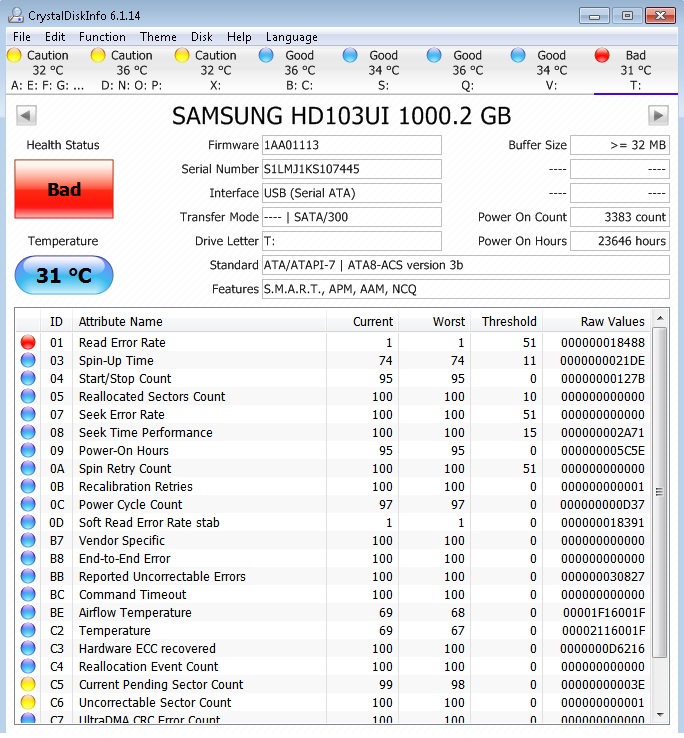
BRnKVPg.jpg


For Drive T I did the chkdsk /f but the most weird thing was it shows no bad sectors on the drive what so ever see screenshot below
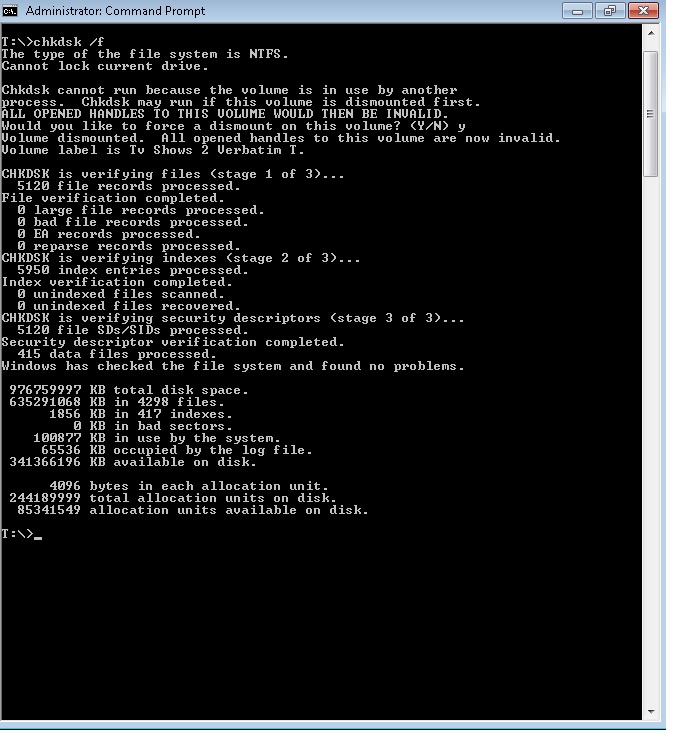
ZzkaTRU.jpg


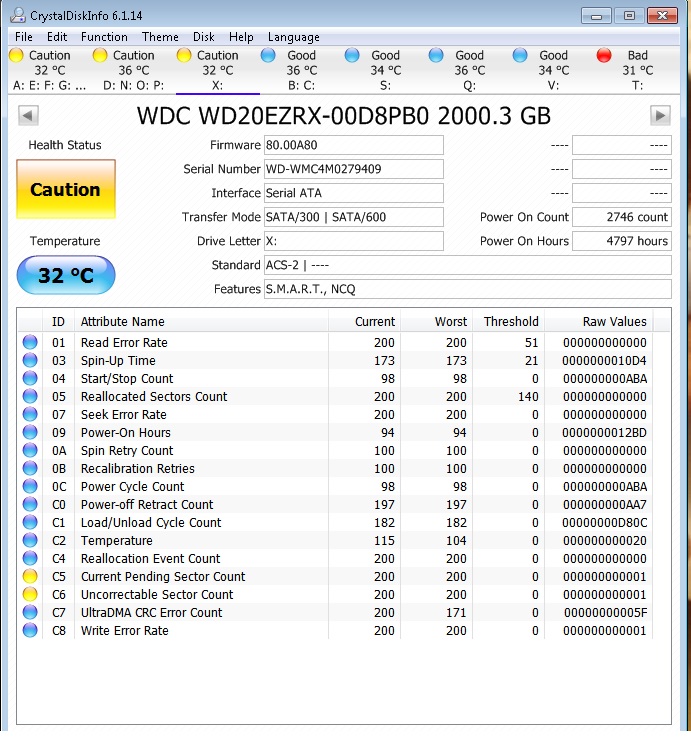
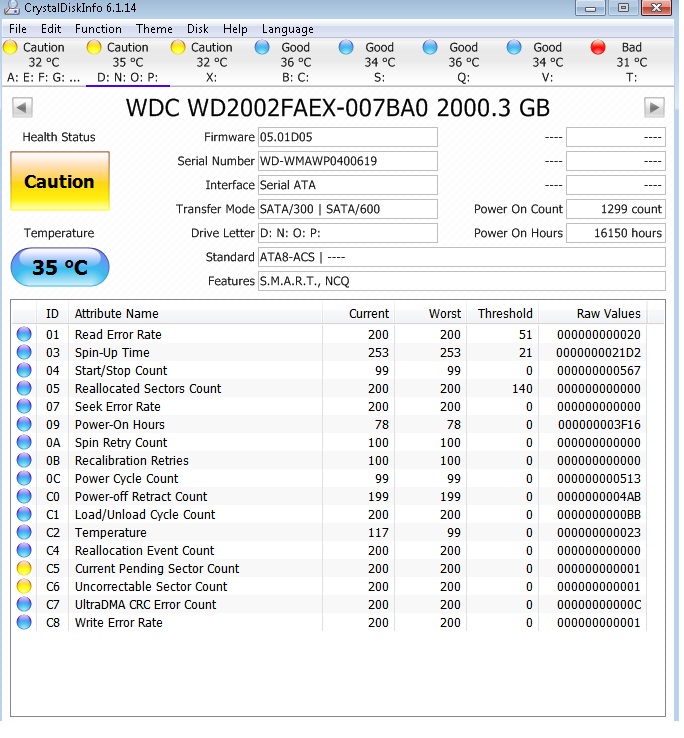
The rest of the drives marked as caution show this

1eiGFbP.jpg


aHgYXwV.jpg


lmXShmY.jpg


Now can someone be kind enough please to explain these to me. I am a noob at this so I need simple English as what to do and how to do it please. I would really appreciate all your help.

In the meantime I have started to make a backup of my Drive T as I am writing this to you. Please help.
 

My Computer

Computer type
PC/Desktop
Computer Manufacturer/Model Number
HP
OS
Windows 7 Ultimate x64
CPU
Intel(R) Xeon(R) E5450 (Quad Core @ 3.00GHZ)
Motherboard
HP - Chipset Intel 0A98h Model No 5400B (XU1 PROCESSOR)
Memory
FB-DDR2 Total: 16 Gb
Graphics Card(s)
1) ATI Radeon HD 2400 2) Nvidia GeForce GT 420
Sound Card
Creative X-Fi Audio Processor (WDM)
Monitor(s) Displays
Acer Monitor
Screen Resolution
1024x768@29Hz
Hard Drives
1 X 931GB SATA
1 X 148GB Device ATA
1 x 3725GB USB Device SATA
2 X 1863GB SATA
6 X 2794GB USB Device SATA
PSU
800 Watt Power Supply
Case
Hewlett-Packard HP XW8600 Workstation Case
Cooling
2 fans at back, 1 on top of memory, CPU & PSU Fans
Keyboard
Logitech Illuminated Keyboard K740
Mouse
Logitech Trackman Marble
Internet Speed
30 Mbps
Antivirus
Emsisoft Anti-Malware, Eset Smart Security, MSE
Browser
Chrome
I will answer in simple terms. The drive marked bad must be backed up. You may lose your stuff at any time
The drives that show caution are not quite as bad, but again it may fail. Backup your stuff now. I would think about buying a new hard drive. The hard drive may fail at any time. It will cost a few dollars now, but will save you a lot of pain and more dollars down the road.
 

My Computer

Computer type
PC/Desktop
Computer Manufacturer/Model Number
Dell XPS 420
OS
Windows 10, Home Clean Install
CPU
Intel Core2 processsor Q8200(2.33Ghz 1333FSB) Quad Core Tech
Motherboard
Dell
Memory
6 gb
Graphics Card(s)
ATI Radeon 256MB HD3650
Sound Card
Intergrated 7.1 Channel Audio
Monitor(s) Displays
Dell SP2009W 20"
Hard Drives
640 GB Serial ATA Hard drive
Cooling
Fan
Keyboard
Dell USB Keyboard
Mouse
Dell Premium Optical USB
Internet Speed
DSL 2.85
I will answer in simple terms. The drive marked bad must be backed up. You may lose your stuff at any time
The drives that show caution are not quite as bad, but again it may fail. Backup your stuff now. I would think about buying a new hard drive. The hard drive may fail at any time. It will cost a few dollars now, but will save you a lot of pain and more dollars down the road.

I want to know can these be fixed somehow ???
 

My Computer

Computer type
PC/Desktop
Computer Manufacturer/Model Number
HP
OS
Windows 7 Ultimate x64
CPU
Intel(R) Xeon(R) E5450 (Quad Core @ 3.00GHZ)
Motherboard
HP - Chipset Intel 0A98h Model No 5400B (XU1 PROCESSOR)
Memory
FB-DDR2 Total: 16 Gb
Graphics Card(s)
1) ATI Radeon HD 2400 2) Nvidia GeForce GT 420
Sound Card
Creative X-Fi Audio Processor (WDM)
Monitor(s) Displays
Acer Monitor
Screen Resolution
1024x768@29Hz
Hard Drives
1 X 931GB SATA
1 X 148GB Device ATA
1 x 3725GB USB Device SATA
2 X 1863GB SATA
6 X 2794GB USB Device SATA
PSU
800 Watt Power Supply
Case
Hewlett-Packard HP XW8600 Workstation Case
Cooling
2 fans at back, 1 on top of memory, CPU & PSU Fans
Keyboard
Logitech Illuminated Keyboard K740
Mouse
Logitech Trackman Marble
Internet Speed
30 Mbps
Antivirus
Emsisoft Anti-Malware, Eset Smart Security, MSE
Browser
Chrome
Once you get a bad rating, there is nothing that can be done, except hope that you back up before the hard drive dies. Once you get backed up you can make a check disk
In step 4 be sure to check both boxes
http://www.sevenforums.com/tutorials/433-disk-check.html
Once you get a bad rating, the fix may only buy a little time. In fact, trying to fix that type of damage, may cause the hard drive to die sooner.
I would bring the computer into a shop. Have the pros check it and if they agree buy a new hard drive.
 

My Computer

Computer type
PC/Desktop
Computer Manufacturer/Model Number
Dell XPS 420
OS
Windows 10, Home Clean Install
CPU
Intel Core2 processsor Q8200(2.33Ghz 1333FSB) Quad Core Tech
Motherboard
Dell
Memory
6 gb
Graphics Card(s)
ATI Radeon 256MB HD3650
Sound Card
Intergrated 7.1 Channel Audio
Monitor(s) Displays
Dell SP2009W 20"
Hard Drives
640 GB Serial ATA Hard drive
Cooling
Fan
Keyboard
Dell USB Keyboard
Mouse
Dell Premium Optical USB
Internet Speed
DSL 2.85
Once you get a bad rating, there is nothing that can be done, except hope that you back up before the hard drive dies. Once you get backed up you can make a check disk
In step 4 be sure to check both boxes
http://www.sevenforums.com/tutorials/433-disk-check.html
Once you get a bad rating, the fix may only buy a little time. In fact, trying to fix that type of damage, may cause the hard drive to die sooner.
I would bring the computer into a shop. Have the pros check it and if they agree buy a new hard drive.

Like I posted before that disc marked as bad was already check vis chkdsk /f option and I have already posted the screenshot of it

ZzkaTRU.jpg


There are no bad sectors on the disc as seen in the above screenshot (posted again) ???
 

My Computer

Computer type
PC/Desktop
Computer Manufacturer/Model Number
HP
OS
Windows 7 Ultimate x64
CPU
Intel(R) Xeon(R) E5450 (Quad Core @ 3.00GHZ)
Motherboard
HP - Chipset Intel 0A98h Model No 5400B (XU1 PROCESSOR)
Memory
FB-DDR2 Total: 16 Gb
Graphics Card(s)
1) ATI Radeon HD 2400 2) Nvidia GeForce GT 420
Sound Card
Creative X-Fi Audio Processor (WDM)
Monitor(s) Displays
Acer Monitor
Screen Resolution
1024x768@29Hz
Hard Drives
1 X 931GB SATA
1 X 148GB Device ATA
1 x 3725GB USB Device SATA
2 X 1863GB SATA
6 X 2794GB USB Device SATA
PSU
800 Watt Power Supply
Case
Hewlett-Packard HP XW8600 Workstation Case
Cooling
2 fans at back, 1 on top of memory, CPU & PSU Fans
Keyboard
Logitech Illuminated Keyboard K740
Mouse
Logitech Trackman Marble
Internet Speed
30 Mbps
Antivirus
Emsisoft Anti-Malware, Eset Smart Security, MSE
Browser
Chrome
Then Crystal is picking up errors not picked up by chkdsk. Chkdsk looks for only certain errors.
 

My Computer

Computer type
PC/Desktop
Computer Manufacturer/Model Number
Dell XPS 420
OS
Windows 10, Home Clean Install
CPU
Intel Core2 processsor Q8200(2.33Ghz 1333FSB) Quad Core Tech
Motherboard
Dell
Memory
6 gb
Graphics Card(s)
ATI Radeon 256MB HD3650
Sound Card
Intergrated 7.1 Channel Audio
Monitor(s) Displays
Dell SP2009W 20"
Hard Drives
640 GB Serial ATA Hard drive
Cooling
Fan
Keyboard
Dell USB Keyboard
Mouse
Dell Premium Optical USB
Internet Speed
DSL 2.85
Back
Top