Custom Windows 7 Wallpapers [continued]

Status
Not open for further replies.
Afternoon everyone I have been trying to create myself a toy story wallpaper but i just cant get on with photoshop, i was wondering if someone could help me out, im just trying to get all the main characters in a fun looking backround

hope someone can help

Many thanks

Can you post what you have already and what you want included?
Someone will be able to finish your wallpaper for you if you do the above.
 

My Computer

Computer Manufacturer/Model Number
HP M9077c
OS
Windows 7 Home Premium 64bit
CPU
Intel(R)Core(TM)2 quad [email protected] 2.39GHz
Motherboard
ASUSeK
Memory
6GB DDR2 6400
Graphics Card(s)
GeForce 8500/512MB
Sound Card
Realtek High Def Audio
Monitor(s) Displays
HP w2408 LCD 24" widescreen
Screen Resolution
1920x1200
Cooling
6 pack of Bud
Keyboard
MS wireless Inteli
Mouse
MS wireless Inteli

My Computer

Computer type
PC/Desktop
Computer Manufacturer/Model Number
Self Built
OS
Win 10 Pro x64
CPU
Intel I5-2500K @3.3GHz
Motherboard
Asrock P67 Extreme4
Memory
16GB G.Skill Ripjaws X (4x4GB)
Graphics Card(s)
EVGA GeForce 750 Ti SC 2GB
Sound Card
ASUS Xonar DG 5.1 Channels 24-bit 96KHz PCI Interface Sound
Monitor(s) Displays
auria eq2367
Screen Resolution
1920 x 1080
Hard Drives
250GB Samsung 850 EVO SSD
1TB WD Blue
1TB Hitachi
PSU
SeaSonic X 650W 80 Plus Gold
Case
Corsair Obsidian 750D
Cooling
Corsair H60, Three 140mm case fans
Keyboard
Logitech Wireless Keyboard K520
Mouse
Logitech Wireless Mouse M310
Internet Speed
Wave Broadband ~ 100 dn 5 up
Antivirus
Windows Defender, Malwarebytes Premium
Browser
Edge, IE11, Chrome
Other Info
Laptop specs: HP g7-1365dx /
CPU: AMD A6-3420M APU with Radeon(tm) HD Graphics /
RAM: Crucial 8Gb (2x4Gb) /
SSD: Crucial M4-CT128M4SSD2 ATA Device/ FW 000F /
GFX: AMD Radeon HD 6520G /
OS: Windows 10 Pro x64

My Computer

Computer Manufacturer/Model Number
HP M9077c
OS
Windows 7 Home Premium 64bit
CPU
Intel(R)Core(TM)2 quad [email protected] 2.39GHz
Motherboard
ASUSeK
Memory
6GB DDR2 6400
Graphics Card(s)
GeForce 8500/512MB
Sound Card
Realtek High Def Audio
Monitor(s) Displays
HP w2408 LCD 24" widescreen
Screen Resolution
1920x1200
Cooling
6 pack of Bud
Keyboard
MS wireless Inteli
Mouse
MS wireless Inteli

My Computer

Computer type
PC/Desktop
Computer Manufacturer/Model Number
Self Built
OS
Win 10 Pro x64
CPU
Intel I5-2500K @3.3GHz
Motherboard
Asrock P67 Extreme4
Memory
16GB G.Skill Ripjaws X (4x4GB)
Graphics Card(s)
EVGA GeForce 750 Ti SC 2GB
Sound Card
ASUS Xonar DG 5.1 Channels 24-bit 96KHz PCI Interface Sound
Monitor(s) Displays
auria eq2367
Screen Resolution
1920 x 1080
Hard Drives
250GB Samsung 850 EVO SSD
1TB WD Blue
1TB Hitachi
PSU
SeaSonic X 650W 80 Plus Gold
Case
Corsair Obsidian 750D
Cooling
Corsair H60, Three 140mm case fans
Keyboard
Logitech Wireless Keyboard K520
Mouse
Logitech Wireless Mouse M310
Internet Speed
Wave Broadband ~ 100 dn 5 up
Antivirus
Windows Defender, Malwarebytes Premium
Browser
Edge, IE11, Chrome
Other Info
Laptop specs: HP g7-1365dx /
CPU: AMD A6-3420M APU with Radeon(tm) HD Graphics /
RAM: Crucial 8Gb (2x4Gb) /
SSD: Crucial M4-CT128M4SSD2 ATA Device/ FW 000F /
GFX: AMD Radeon HD 6520G /
OS: Windows 10 Pro x64
Thanks so much everyone for the links, the background picture at the end of the top line of images is just what i am looking for seems to have all the characters! i will download it and see how it looks.

Dennis what would be the best way to create a collage and use it as a wallpaper?

Thanks so much again
 

My Computer

OS
Windows 7 64bit
CPU
Phenom IIx4 955 Black Edition
Memory
4GB Kingston 1066mhz DDR2
Graphics Card(s)
Gigabyte 260GTX
Monitor(s) Displays
Samsung syncmaster 2033
Hard Drives
500GB Samsung ATA
500GB Segate ATA
PSU
Antec True blue 750W Modular
Case
Antec 1200
Cooling
Prolimatech Megahalems Performance CPU Cooler/2x Apache Fan
Thanks so much everyone for the links, the background picture at the end of the top line of images is just what i am looking for seems to have all the characters! i will download it and see how it looks

Thanks so much again

You're welcome! :)
 

My Computer

Computer type
PC/Desktop
Computer Manufacturer/Model Number
Self Built
OS
Win 10 Pro x64
CPU
Intel I5-2500K @3.3GHz
Motherboard
Asrock P67 Extreme4
Memory
16GB G.Skill Ripjaws X (4x4GB)
Graphics Card(s)
EVGA GeForce 750 Ti SC 2GB
Sound Card
ASUS Xonar DG 5.1 Channels 24-bit 96KHz PCI Interface Sound
Monitor(s) Displays
auria eq2367
Screen Resolution
1920 x 1080
Hard Drives
250GB Samsung 850 EVO SSD
1TB WD Blue
1TB Hitachi
PSU
SeaSonic X 650W 80 Plus Gold
Case
Corsair Obsidian 750D
Cooling
Corsair H60, Three 140mm case fans
Keyboard
Logitech Wireless Keyboard K520
Mouse
Logitech Wireless Mouse M310
Internet Speed
Wave Broadband ~ 100 dn 5 up
Antivirus
Windows Defender, Malwarebytes Premium
Browser
Edge, IE11, Chrome
Other Info
Laptop specs: HP g7-1365dx /
CPU: AMD A6-3420M APU with Radeon(tm) HD Graphics /
RAM: Crucial 8Gb (2x4Gb) /
SSD: Crucial M4-CT128M4SSD2 ATA Device/ FW 000F /
GFX: AMD Radeon HD 6520G /
OS: Windows 10 Pro x64
Thanks so much everyone for the links, the background picture at the end of the top line of images is just what i am looking for seems to have all the characters! i will download it and see how it looks.

Dennis what would be the best way to create a collage and use it as a wallpaper?

Thanks so much again

In Windows 7 Forum homepage there is a "Software" title.
Go to free giveaways ....

Giveaway of the Day - free licensed software daily – Picture Collage Maker

Here it is. Have fun and if you need help we are here for you.
 

My Computer

Computer Manufacturer/Model Number
HP M9077c
OS
Windows 7 Home Premium 64bit
CPU
Intel(R)Core(TM)2 quad [email protected] 2.39GHz
Motherboard
ASUSeK
Memory
6GB DDR2 6400
Graphics Card(s)
GeForce 8500/512MB
Sound Card
Realtek High Def Audio
Monitor(s) Displays
HP w2408 LCD 24" widescreen
Screen Resolution
1920x1200
Cooling
6 pack of Bud
Keyboard
MS wireless Inteli
Mouse
MS wireless Inteli
Thanks so much i fancy having a play around with a new app,UPDATE, THE COLLAGE APP IS NO LONGER AVAILABLE THATS A SHAME :(, just installed the theme was nice and easy a simple double click! I love the sound did make me laugh, one last thing i am using rocket dock would you know if its possible to create a toy story dock and if so the best way of doing it?

Thanks so much again
 

My Computer

OS
Windows 7 64bit
CPU
Phenom IIx4 955 Black Edition
Memory
4GB Kingston 1066mhz DDR2
Graphics Card(s)
Gigabyte 260GTX
Monitor(s) Displays
Samsung syncmaster 2033
Hard Drives
500GB Samsung ATA
500GB Segate ATA
PSU
Antec True blue 750W Modular
Case
Antec 1200
Cooling
Prolimatech Megahalems Performance CPU Cooler/2x Apache Fan
If you right click on one of them, look into properties, you will see that you can change image.
That's where you can put any picture you want there.
At least in stardock I can.
 

My Computer

Computer Manufacturer/Model Number
HP M9077c
OS
Windows 7 Home Premium 64bit
CPU
Intel(R)Core(TM)2 quad [email protected] 2.39GHz
Motherboard
ASUSeK
Memory
6GB DDR2 6400
Graphics Card(s)
GeForce 8500/512MB
Sound Card
Realtek High Def Audio
Monitor(s) Displays
HP w2408 LCD 24" widescreen
Screen Resolution
1920x1200
Cooling
6 pack of Bud
Keyboard
MS wireless Inteli
Mouse
MS wireless Inteli

My Computer

Computer type
PC/Desktop
Computer Manufacturer/Model Number
Self Assembled
OS
Microsoft Windows 10 Pro Insider Preview 64-bit
CPU
Intel(R) Core(TM) i3-4130 CPU @ 3.40GHz
Motherboard
Gigabyte Technology Co., Ltd. B85M-D3H
Memory
Corsair Vengence 4GB x2 (8.00GB Dual-Channel DDR3 @ 798MHz)
Graphics Card(s)
2047MB GeForce GTS 450 (ZOTAC International)
Sound Card
Onboard (Realtek High Definition Audio)
Monitor(s) Displays
LG Flatron E2040T
Screen Resolution
1600x900
Hard Drives
Western Digital 1 TB
Seagate 500 GB
PSU
Corsair VS550
Case
Cooler Master K380
Cooling
Cooler Master Seidon 120V Plus
Keyboard
Logitech MK260r
Mouse
Logitech MK260r
Internet Speed
PMPL Broadband
Antivirus
Windows Defender + MBAM
Browser
Firefox
Other Info
Dell Studio 15" Laptop
Thanks so much for that arc!!!
 

My Computer

OS
Windows 7 64bit
CPU
Phenom IIx4 955 Black Edition
Memory
4GB Kingston 1066mhz DDR2
Graphics Card(s)
Gigabyte 260GTX
Monitor(s) Displays
Samsung syncmaster 2033
Hard Drives
500GB Samsung ATA
500GB Segate ATA
PSU
Antec True blue 750W Modular
Case
Antec 1200
Cooling
Prolimatech Megahalems Performance CPU Cooler/2x Apache Fan

My Computer

Computer type
PC/Desktop
Computer Manufacturer/Model Number
Self Assembled
OS
Microsoft Windows 10 Pro Insider Preview 64-bit
CPU
Intel(R) Core(TM) i3-4130 CPU @ 3.40GHz
Motherboard
Gigabyte Technology Co., Ltd. B85M-D3H
Memory
Corsair Vengence 4GB x2 (8.00GB Dual-Channel DDR3 @ 798MHz)
Graphics Card(s)
2047MB GeForce GTS 450 (ZOTAC International)
Sound Card
Onboard (Realtek High Definition Audio)
Monitor(s) Displays
LG Flatron E2040T
Screen Resolution
1600x900
Hard Drives
Western Digital 1 TB
Seagate 500 GB
PSU
Corsair VS550
Case
Cooler Master K380
Cooling
Cooler Master Seidon 120V Plus
Keyboard
Logitech MK260r
Mouse
Logitech MK260r
Internet Speed
PMPL Broadband
Antivirus
Windows Defender + MBAM
Browser
Firefox
Other Info
Dell Studio 15" Laptop
We prefer PNG as it maintains the transparency and best compression. GIF also maintains transparency and mainly used for animation.

BTW, nice work you got there :)

Thanks Dreams, I appreciate the compliment.

I understand (at least from what I've read), and would agree that PNG is a vast improvement over GIF, particularly for web based images. Considering the speed of most ISPs (and CPUs/Processor speed) these days it allows for some pretty creative web designs. However, as a lossy compression it is double the size of a comparable JPEG/JP2 (nary a perceptible difference to this naked eye). When transparency is not an issue, wouldn't one rather go with JPEG for the sake of portability? Without much experience with PNG I have ask too if there is any of the "artifact" inherent with the "other" compressions? After all... if one is taking an image that is originally JPEG (for example, that is, not generated digitally and saved as PNG) what is the advantage of saving to PNG after any edits...

All my best :)
 

My Computer

OS
Windows 7 Ultimate x64
Well as promised here's the tutorial.

<snipped>

Thanks PooMan, excellent tutorial. Much appreciation for the time and effort. I have to admit that I mistakenly took the basis of this side thread to mean "convert" a raster image to vector (now the would be an interesting process, is that even possible??). The techniques and methods you've demonstrated are essentially the same I ofter use to produce line art copies from a bitmap source (the recent Harley-Davidson medallion knock-off for example). The bulk of that base image was generated from the original (example of which I also uploaded). I typically just make a vector line drawing then bring it into Photoshop/Photo-Paint for the color work. I know that vector tracing can also be done in PS but it's a very awkward and cumbersome process (tho certainly helpful if one doesn't have access to a vector based proggy).

A couple of comments though... I miss the occasional audio prompt (if there are any, they are muted on my system). I do have a certain familiarity with Corel, so it's fairly easy for me to follow along. I'm guessing that for the neophyte it might be a bit more difficult. I have Corel Suite X5 so there are some minor differences with the interface but I still got the gist. Short of a running commentary, a few more sticky notes may be helpful to guide the viewer along (Corel can do that for you if leave the hovering hints active). Indecently, X5 has a pretty slick "trace" feature that automates a lot of the simple stuff, I don't recall if X3 had that capability.

At the very beginning of the process you drew a rectangle. I recognize most of the icons in your customized toolbar, but I am curious about the one you used (or process rather) to hide the rectangle after moving it behind logo layer??? Also, what is the need for it (the rectangle that is)?

Thanks again for sharing ;)
 

My Computer

OS
Windows 7 Ultimate x64
Forgot to give finishing touch :( Not saved as psd, need to be blurred around the hand...

LetitbeseenbyAbhishek.jpg


Jpeg CYMK file is here
 

My Computer

Computer Manufacturer/Model Number
COMPAQ Presario Laptop
OS
Windows 7 Ultimate 64 bit, Mac OS X 10.6
CPU
Intel Pentium Dual Core @2.0GHz
Motherboard
Compaq Generic
Memory
12GB
Graphics Card(s)
NVIDIA Graphics For Mobile 512MB VRAM
Sound Card
IDT High definition Audio
Monitor(s) Displays
Laptop LCD Display
Screen Resolution
1280*800 Bright View Widescreen
Hard Drives
500 GB Primary Master@7200rpm + 1 TB External HDD
Cooling
Direct ; generic fan
Keyboard
Generic Laptop Keyboard
Mouse
Touch Pad
Internet Speed
3.1 Mbps wireless Broadband
Other Info
Generic Dock
Soz pal

I don't do audio, my welsh accent is a bit strong and some may struggle to understand :p

Although I use x5 unfortunately my screen recording software was on my other PC that only has x3 installed (I've since updated this box so if I do any future vids this should be ok) I do have hovering hints on but I find that they can be a pain sometimes. Although your right I should wack up some more notes explaining some of the actions.
The "trace feature" which is available in x3 through x5 is is pretty rubbish and I rarely use it. Hence the reason for doing it manually. :)
That rectangle I drew and sent to the back was just to show the white block that surrounds the bitmap, so I could emphasise the fact that once it's converted to vector you no longer have these constraints ;)

But if you have any further questions please feel free to ask and I'm sure I'll be able to help where I can :thumbsup:
 
Last edited:

My Computer

Computer type
PC/Desktop
Computer Manufacturer/Model Number
Self Built
OS
Windows 7 Ultimate 64bit
CPU
AMD Phenom Quad core 9950 black edition
Motherboard
Gigabyte
Memory
16Gb
Graphics Card(s)
2x XFX Radeon 5850
Sound Card
PCI Express X-Fi Titanium / Logitech G35
Monitor(s) Displays
2x HP 2410i
Screen Resolution
1920x1080
Hard Drives
2x 500Gb Seagate
1x 300Gb Seagate
1x 1Tb Seagate
2x 1Tb Hitatchi
PSU
Jean Tech Storm 700W
Case
Cooler Master COSMOS S
Cooling
Akasa Evo Blue Pro
Keyboard
Logitech G15
Mouse
Mad Catz M.M.O. 7
Internet Speed
12mb
Soz pal

I don't do audio, my welsh accent is a bit strong and some may struggle to understand :p

Perfectly understandable, since this is the "world" wide web we all have to take the varied dialects into consideration.


Although I use x5 unfortunately my screen recording software was on my other PC that only has x3 installed (I've since updated this box so if I do any future vids this should be ok) I do have hovering hints on but I find that they can be a pain sometimes. Although your right I should wack up some more notes explaining some of the actions.
The hovering hints can be a nuisance at times but they do come in handy when the old brain starts to get frazzled. I only mention it as a possible aid in the tutorial as they can give a visual hint to the viewer (fewer sticky notes to deal with - ??).


The "trace feature" which is available in x3 through x5 is is pretty rubbish and I rarely use it. Hence the reason for doing it manually. :)
I agree in essence but I do find it does a fairly decent job if certain steps are taken to help find the edges I'm after. You are correct though, sometimes it's just as easy/fast to do it by connecting-the-dots.

That rectangle I drew and sent to the back was just to show the white block that surrounds the bitmap, so I could emphasise the fact that once it's converted to vector you no longer have these constraints ;)
I had a feeling that's what you where up to. I am still curious though... what was the icon you clicked to make it disappear?

But if you have any further questions please feel free to ask and I'm sure I'll be able to help where I can :thumbsup:
Good to know, thanks for all your help!

Oh, and BTW I just noticed at the bottom of your posts is the Superman wall. Is that one of yours - it's one of my favorites (it gets heavy rotation on HTPC desktop) ;)
 

My Computer

OS
Windows 7 Ultimate x64
Although it got some fairly mixed reviews, and generally dismissed by the bulk of the BSG die-hards, I really enjoyed Caprica and looking forward to its return (when it gets picked up <hope, hope, hope>. In the mean time... here's looking at you Zoe :)

Then again... there's a new season of Warehouse 13 starting up next week to fill the void :D.


All my best to everyone ;)
 

Attachments

  • Caprica-Seven.jpg
    Caprica-Seven.jpg
    104.3 KB · Views: 48
Last edited:

My Computer

OS
Windows 7 Ultimate x64
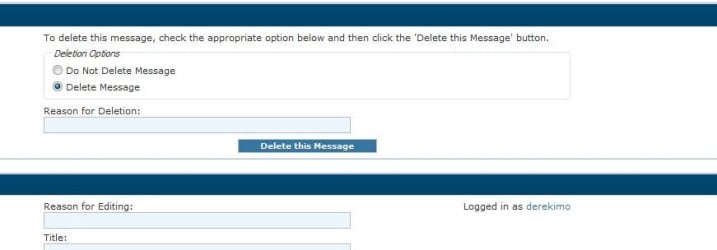
You can just delete your post Kirsch, click on the edit button, go advanced, choose delete this post.
 

Attachments

  • delete.JPG
    delete.JPG
    27.2 KB · Views: 4

My Computer

Computer type
PC/Desktop
Computer Manufacturer/Model Number
Self Built
OS
Win 10 Pro x64
CPU
Intel I5-2500K @3.3GHz
Motherboard
Asrock P67 Extreme4
Memory
16GB G.Skill Ripjaws X (4x4GB)
Graphics Card(s)
EVGA GeForce 750 Ti SC 2GB
Sound Card
ASUS Xonar DG 5.1 Channels 24-bit 96KHz PCI Interface Sound
Monitor(s) Displays
auria eq2367
Screen Resolution
1920 x 1080
Hard Drives
250GB Samsung 850 EVO SSD
1TB WD Blue
1TB Hitachi
PSU
SeaSonic X 650W 80 Plus Gold
Case
Corsair Obsidian 750D
Cooling
Corsair H60, Three 140mm case fans
Keyboard
Logitech Wireless Keyboard K520
Mouse
Logitech Wireless Mouse M310
Internet Speed
Wave Broadband ~ 100 dn 5 up
Antivirus
Windows Defender, Malwarebytes Premium
Browser
Edge, IE11, Chrome
Other Info
Laptop specs: HP g7-1365dx /
CPU: AMD A6-3420M APU with Radeon(tm) HD Graphics /
RAM: Crucial 8Gb (2x4Gb) /
SSD: Crucial M4-CT128M4SSD2 ATA Device/ FW 000F /
GFX: AMD Radeon HD 6520G /
OS: Windows 10 Pro x64
I am still curious though... what was the icon you clicked to make it disappear?

No icon pal, just pressed delete on the keyboard

Oh, and BTW I just noticed at the bottom of your posts is the Superman wall. Is that one of yours - it's one of my favorites (it gets heavy rotation on HTPC desktop) ;)

Yeah that was one I made a while back ... glad you liked it ;)
 

My Computer

Computer type
PC/Desktop
Computer Manufacturer/Model Number
Self Built
OS
Windows 7 Ultimate 64bit
CPU
AMD Phenom Quad core 9950 black edition
Motherboard
Gigabyte
Memory
16Gb
Graphics Card(s)
2x XFX Radeon 5850
Sound Card
PCI Express X-Fi Titanium / Logitech G35
Monitor(s) Displays
2x HP 2410i
Screen Resolution
1920x1080
Hard Drives
2x 500Gb Seagate
1x 300Gb Seagate
1x 1Tb Seagate
2x 1Tb Hitatchi
PSU
Jean Tech Storm 700W
Case
Cooler Master COSMOS S
Cooling
Akasa Evo Blue Pro
Keyboard
Logitech G15
Mouse
Mad Catz M.M.O. 7
Internet Speed
12mb
Status
Not open for further replies.
Back
Top