
Customize Word 2010 "Open"

gogreen

New member
Power User
VIP
Local time
3:48 PM
Messages
544
Location
Florida
Is there a way to customize what appears when I click "Open" (or "File" - "Open") in Word 2010? I used to like the My Places Bar in the previous version I used because I need to open only a few folders in one directory--I don't need all the other stuff that appears on "Open." Thanks.
 

My Computer My Computer

At a glance

Windows 10 Home, 64 bitIntel Core i7 860 @ 2.8 GHz8.0 GB Dual Channel DDR3 @ 664 MHz (9-9-9-24)nVidia GeForce GTS 240
Computer type
PC/Desktop
Computer Manufacturer/Model Number
Dell Studio XPS 8100, Dell XPS 15 laptop
OS
Windows 10 Home, 64 bit
CPU
Intel Core i7 860 @ 2.8 GHz
Motherboard
Dell 0T568R (CPU1)
Memory
8.0 GB Dual Channel DDR3 @ 664 MHz (9-9-9-24)
Graphics Card(s)
nVidia GeForce GTS 240
Sound Card
M-Audio Delta Audiophile 2496
Monitor(s) Displays
Dell 2407WFP
Screen Resolution
1920x1200
Hard Drives
977 GB Western Digital WDC WD1001FAES-75W7A0 (SCSI)
Antivirus
Windows Defender, MalwareBytes Anti-Malware, AdwCleaner
Browser
Firefox, occasionally IE and Edge
Other Info
Mozilla Firefox, Mozilla Thunderbird. Western Digital Passport 250 GB external HD, two Mushkin Enhanced Mulholland 32GB USB flash drives, AKG K240 Studio headphones, Asus AC-1900 dual band wireless router.
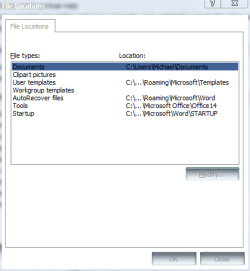
There are a few steps you can do to customize that window. Open the Open dialog, then click layout. You can add or remove panes as you see fit, to customize how it looks. Then in the Options dialog (from the "backstage" as Microsoft calls the File menu), you can modify your document location using the File Locations button on the Advanced tab to point it to where your files are if they're not in your Documents folder..

Here's the dialog you want to make that change in...
 

Attachments

  • Word options.PNG
    Word options.PNG
    8.9 KB · Views: 25

My Computer My Computer

At a glance

Windows 7 Home Premium x64Phenom II X4 955 BE8 GB OCZ BE 1667EVGA GeForce GTX470 SC
Computer Manufacturer/Model Number
Home built
OS
Windows 7 Home Premium x64
CPU
Phenom II X4 955 BE
Motherboard
Asus Sabertooth 990FX
Memory
8 GB OCZ BE 1667
Graphics Card(s)
EVGA GeForce GTX470 SC
Monitor(s) Displays
BenQ 19"
Screen Resolution
1280x1024
Hard Drives
256 GB OCZ Vertex 3 SSD
2x WD 1 TB
1x WD 2 TB
PSU
Thermaltake 850W
Case
Coolermaster Cosmos 1000
Cooling
Air
Keyboard
Logitech
Mouse
Cyborg R.A.T 7
Internet Speed
Standard RR
Thanks, Mlevy. I'll give your suggestions a try.
 

My Computer My Computer

At a glance

Windows 10 Home, 64 bitIntel Core i7 860 @ 2.8 GHz8.0 GB Dual Channel DDR3 @ 664 MHz (9-9-9-24)nVidia GeForce GTS 240
Computer type
PC/Desktop
Computer Manufacturer/Model Number
Dell Studio XPS 8100, Dell XPS 15 laptop
OS
Windows 10 Home, 64 bit
CPU
Intel Core i7 860 @ 2.8 GHz
Motherboard
Dell 0T568R (CPU1)
Memory
8.0 GB Dual Channel DDR3 @ 664 MHz (9-9-9-24)
Graphics Card(s)
nVidia GeForce GTS 240
Sound Card
M-Audio Delta Audiophile 2496
Monitor(s) Displays
Dell 2407WFP
Screen Resolution
1920x1200
Hard Drives
977 GB Western Digital WDC WD1001FAES-75W7A0 (SCSI)
Antivirus
Windows Defender, MalwareBytes Anti-Malware, AdwCleaner
Browser
Firefox, occasionally IE and Edge
Other Info
Mozilla Firefox, Mozilla Thunderbird. Western Digital Passport 250 GB external HD, two Mushkin Enhanced Mulholland 32GB USB flash drives, AKG K240 Studio headphones, Asus AC-1900 dual band wireless router.
Well, changing the file locations was the trick. I see now why the My Place Bar was removed. I had grown quite accustomed to that! You can customize file locations so that you don't the My Places Bar.
 

My Computer My Computer

At a glance

Windows 10 Home, 64 bitIntel Core i7 860 @ 2.8 GHz8.0 GB Dual Channel DDR3 @ 664 MHz (9-9-9-24)nVidia GeForce GTS 240
Computer type
PC/Desktop
Computer Manufacturer/Model Number
Dell Studio XPS 8100, Dell XPS 15 laptop
OS
Windows 10 Home, 64 bit
CPU
Intel Core i7 860 @ 2.8 GHz
Motherboard
Dell 0T568R (CPU1)
Memory
8.0 GB Dual Channel DDR3 @ 664 MHz (9-9-9-24)
Graphics Card(s)
nVidia GeForce GTS 240
Sound Card
M-Audio Delta Audiophile 2496
Monitor(s) Displays
Dell 2407WFP
Screen Resolution
1920x1200
Hard Drives
977 GB Western Digital WDC WD1001FAES-75W7A0 (SCSI)
Antivirus
Windows Defender, MalwareBytes Anti-Malware, AdwCleaner
Browser
Firefox, occasionally IE and Edge
Other Info
Mozilla Firefox, Mozilla Thunderbird. Western Digital Passport 250 GB external HD, two Mushkin Enhanced Mulholland 32GB USB flash drives, AKG K240 Studio headphones, Asus AC-1900 dual band wireless router.
Happy to help.
 

My Computer My Computer

At a glance

Windows 7 Home Premium x64Phenom II X4 955 BE8 GB OCZ BE 1667EVGA GeForce GTX470 SC
Computer Manufacturer/Model Number
Home built
OS
Windows 7 Home Premium x64
CPU
Phenom II X4 955 BE
Motherboard
Asus Sabertooth 990FX
Memory
8 GB OCZ BE 1667
Graphics Card(s)
EVGA GeForce GTX470 SC
Monitor(s) Displays
BenQ 19"
Screen Resolution
1280x1024
Hard Drives
256 GB OCZ Vertex 3 SSD
2x WD 1 TB
1x WD 2 TB
PSU
Thermaltake 850W
Case
Coolermaster Cosmos 1000
Cooling
Air
Keyboard
Logitech
Mouse
Cyborg R.A.T 7
Internet Speed
Standard RR
Back
Top