- Local time
- 6:46 PM
- Messages
- 98
I've searched the tutorials about file and folder settings but I couldn't find this:
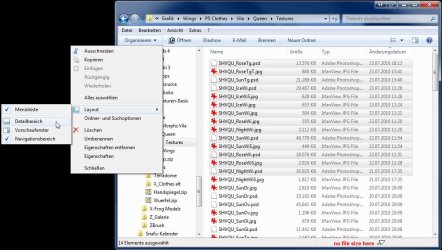
The windows explorer has a kind of status bar that can show details about my files. But how can I configure what details I want to see?
E.g. when I have a jpg file, Win seems to think it's a photo and it shows me the date when I took the photo, it shows ratings etc. But I don't want that, not all my jpgs are photos and I certainly don't need ratings.
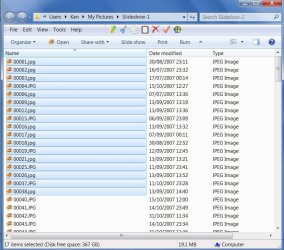
And when I've selected multiple items, it doesn't show me the file size of the bunch, I have to do an extra click on "Show details" to see how big they are all together.
Any chance of customizing this?
The windows explorer has a kind of status bar that can show details about my files. But how can I configure what details I want to see?
E.g. when I have a jpg file, Win seems to think it's a photo and it shows me the date when I took the photo, it shows ratings etc. But I don't want that, not all my jpgs are photos and I certainly don't need ratings.
And when I've selected multiple items, it doesn't show me the file size of the bunch, I have to do an extra click on "Show details" to see how big they are all together.
Any chance of customizing this?
My Computer
At a glance
Win 7 Professional 64bitIntel i7-3930K @ 3.2GHz16 GBNVIDIA GeForce GTX 650
- OS
- Win 7 Professional 64bit
- CPU
- Intel i7-3930K @ 3.2GHz
- Memory
- 16 GB
- Graphics Card(s)
- NVIDIA GeForce GTX 650
- Monitor(s) Displays
- 1 CRT, 1 LCD
- Hard Drives
- 3 hard drives