D Recovery Drive full

moz-screenshot.png
moz-screenshot-1.png
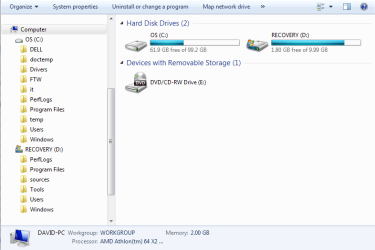
File attached with picture of C and D drives. Is this what you want to see?
 

Attachments

  • C_and_D_drives.PNG
    C_and_D_drives.PNG
    18.6 KB · Views: 63

My Computer My Computer

Computer Manufacturer/Model Number
Dell Inspiron 1521
OS
Windows 7
CPU
AMD
This is not Disk Management but Computer. But anyhow, it is strange that your D is designated as the boot partition. Your MBR must have made it to D - who knows how. That is at least very unusual. Do you have an explanation for that??

PS: I will send a PM to Greg, he knows how to fix that.
 

My Computer My Computer

Computer Manufacturer/Model Number
HP, Dell, Gateway, Toshiba - 4 laptops and 2 desktops
OS
Vista, Windows7, Mint Mate, Zorin, Windows 8
CPU
from 1.6GHz Duo to i7
Monitor(s) Displays
2x HP w2207
Hard Drives
5x HDD, 7x SSD, 12x Externals
Keyboard
with trackball - no mices
Mouse
Trackball mice
Internet Speed
DSL 6000
germmcke,
Follow GregRocker's advice.
 

My Computer My Computer

Computer Manufacturer/Model Number
Toshiba Satellite S875D-S7239 laptop
OS
MS Windows 7 Ultimate SP1 64-bit
CPU
AMD A10-4600M
Motherboard
AMD Pumori (Socket FT1)
Memory
6.00 GB Dual-Channel DDR3 @ 798MHz (11-11-12-28)
Graphics Card(s)
AMD Radeon HD 7660G
Sound Card
High Definition Audio Device
Monitor(s) Displays
Generic PnP Monitor (1600x900@60Hz)
Screen Resolution
1600x900@60Hz
Hard Drives
SSD 119GB Corsair CSSD-V128GB2 ATA Device
Keyboard
Standard PS/2 Keyboard
Mouse
HP Wireless Optical Mobile Mouse Model FHA-3410
Internet Speed
What the local pub, local coffee shop offers.
Other Info
Optical Drive:MATSHITA BD-CMB UJ160B ATA Device


Also have an Asus ha1002xp netbook with Win 7 Ultimate installed.
Type Disk Management in to Start search box and click on result. Post back a screenshot of your full Disk Mgmt drive map and the listings above it without leaving anything out., Use Snipping Tool in Start Menu, attach file using paper clip in Reply Box.
 
Suggest you follow Greg's advice and post a screenie of Disk Mgmt window.

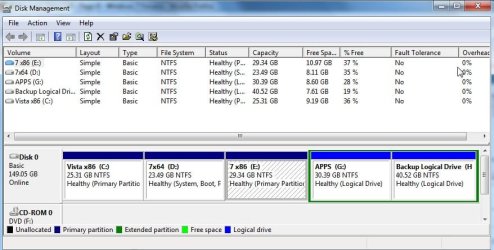
It looks like you ran 7 setup from within Vista and pointed it at the the 10gb ( recovery) partition.

I would go to folder options and make sure Hidden files are showing - also untick "Hide extensions for known filetypes", Apply, OK.

Take a look in the DELL folder on C and search D also.

See if there is a large .iso or .wim file anywhere.

If so, post a screenie of it. You should be able to use that to make reinstall media for Vista - you may want it in the future - you paid for the license already.

Back up any data you may want to keep from C partition.

When you have done all that , the best way forward is to install 7 clean by booting the dvd , on the screen showing partitions during install, select Drive Options (Advanced).

Partition as you wish and point the 7 installer at the partition of your choice.
 

My Computers My Computers

System One System Two

  • Computer type
    PC/Desktop
    OS
    7 X64
    CPU
    i5 8400
    Motherboard
    gigabyte b365m ds3h
    Memory
    2x8gb 3200mhz
    Hard Drives
    various
    PSU
    pure power 11 400w cm
    Case
    Coolermaster
    Cooling
    cryorig m9i
  • Computer type
    PC/Desktop
    OS
    7x64
    CPU
    g5400
    Motherboard
    ga b365m ds3h
    Memory
    8gb ddr4 2400
    PSU
    xfx pro 450w
Disk Management picture posted.

I did install from within Vista. I thought I was getting an "upgrade", but Win7 told me I couldn't do that, so had to do a "custom" complete installation. I didn't change any of the defaults, and this is what I got -- both Vista and Win7. It's a pain -- I moved Firefox over to C:, but now I can't download Adobe or get any .pdf files to open. At least I can print to my network printer from Win7, which Vista won't allow.

If this is the type of thing that's going to continue, I'll go back to Vista, as much as I dislike it.

 

My Computer My Computer

Computer Manufacturer/Model Number
Dell Inspiron 1521
OS
Windows 7
CPU
AMD
Dengen,
Did you have an opportunity to send us a snapshot of the output of DISKMGMT.MSC
 

My Computer My Computer

Computer Manufacturer/Model Number
Toshiba Satellite S875D-S7239 laptop
OS
MS Windows 7 Ultimate SP1 64-bit
CPU
AMD A10-4600M
Motherboard
AMD Pumori (Socket FT1)
Memory
6.00 GB Dual-Channel DDR3 @ 798MHz (11-11-12-28)
Graphics Card(s)
AMD Radeon HD 7660G
Sound Card
High Definition Audio Device
Monitor(s) Displays
Generic PnP Monitor (1600x900@60Hz)
Screen Resolution
1600x900@60Hz
Hard Drives
SSD 119GB Corsair CSSD-V128GB2 ATA Device
Keyboard
Standard PS/2 Keyboard
Mouse
HP Wireless Optical Mobile Mouse Model FHA-3410
Internet Speed
What the local pub, local coffee shop offers.
Other Info
Optical Drive:MATSHITA BD-CMB UJ160B ATA Device


Also have an Asus ha1002xp netbook with Win 7 Ultimate installed.
Hi,

I don't need to see it , but just for Karl , post a screenie of Disk Mgmt window.

In the start search box, type:

partition

when "create and format hard disk partitions" pops up, click it. Maximize the window, take a pic and post it up - looks a bit like this:

diskmgmt_2010-04-07_014933.jpg

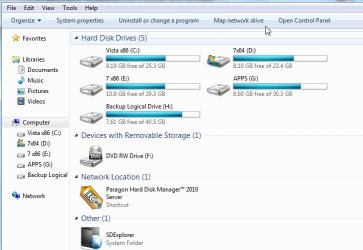
That's not the same as this:

COMPUTER WINDOW-2010-04-07_015404.jpg
 

My Computers My Computers

System One System Two

  • Computer type
    PC/Desktop
    OS
    7 X64
    CPU
    i5 8400
    Motherboard
    gigabyte b365m ds3h
    Memory
    2x8gb 3200mhz
    Hard Drives
    various
    PSU
    pure power 11 400w cm
    Case
    Coolermaster
    Cooling
    cryorig m9i
  • Computer type
    PC/Desktop
    OS
    7x64
    CPU
    g5400
    Motherboard
    ga b365m ds3h
    Memory
    8gb ddr4 2400
    PSU
    xfx pro 450w
Back
Top