
Solved Dead Partition: Need Help Restoring or Deleting

For the portion to the right of C, after you have deleted D.

Go to Disk Management.

Click on C partition.

go to Action menu.

choose All tasks.

choose Extend Volume

Thanks. I will post back if I have any problems.
 

My Computer My Computer

At a glance

Windows 10 Home 64-bitAMD E-350 Zacate 40nm Technology4 GB DDR3 Memory1909MB ATI AMD Radeon HD
Computer type
Laptop
Computer Manufacturer/Model Number
Acer 5250-0450
OS
Windows 10 Home 64-bit
CPU
AMD E-350 Zacate 40nm Technology
Motherboard
Acer HMA51-BZ (Socket FT1)
Memory
4 GB DDR3 Memory
Graphics Card(s)
1909MB ATI AMD Radeon HD
Sound Card
Conexant High Definition Audio
Monitor(s) Displays
Generic PnP Monitor (1366x768@60Hz)
Hard Drives
320 GB HDD
Mouse
ONN Wireless Mouse
Antivirus
Norton Internet Security Online
Browser
Microsoft Edge, Internet Explorer 11, and Google Chrome
Other Info
Other Computers:

Laptop: Acer Aspire 5749 Series

Desktop: Acer Aspire XC603G Series
Okay. This is where I am at now. What do I do now?
 

Attachments

  • Extend Volume Wizard.png
    Extend Volume Wizard.png
    59.9 KB · Views: 4

My Computer My Computer

At a glance

Windows 10 Home 64-bitAMD E-350 Zacate 40nm Technology4 GB DDR3 Memory1909MB ATI AMD Radeon HD
Computer type
Laptop
Computer Manufacturer/Model Number
Acer 5250-0450
OS
Windows 10 Home 64-bit
CPU
AMD E-350 Zacate 40nm Technology
Motherboard
Acer HMA51-BZ (Socket FT1)
Memory
4 GB DDR3 Memory
Graphics Card(s)
1909MB ATI AMD Radeon HD
Sound Card
Conexant High Definition Audio
Monitor(s) Displays
Generic PnP Monitor (1366x768@60Hz)
Hard Drives
320 GB HDD
Mouse
ONN Wireless Mouse
Antivirus
Norton Internet Security Online
Browser
Microsoft Edge, Internet Explorer 11, and Google Chrome
Other Info
Other Computers:

Laptop: Acer Aspire 5749 Series

Desktop: Acer Aspire XC603G Series
Click next.
 

My Computer My Computer

At a glance

Windows 7 Home Premium SP1, 64-bitIntel Skylake i5-6600K, not overclocked8 GB HyperX DDR4-2666 (2 x 4 GB)none; graphics are integrated on CPU
Computer type
PC/Desktop
Computer Manufacturer/Model Number
Ignatz Special; 4 speed manual gearbox; factory air conditioning; one of one
OS
Windows 7 Home Premium SP1, 64-bit
CPU
Intel Skylake i5-6600K, not overclocked
Motherboard
AsRock Z170M Extreme 4, micro ATX
Memory
8 GB HyperX DDR4-2666 (2 x 4 GB)
Graphics Card(s)
none; graphics are integrated on CPU
Sound Card
onboard: Realtek ALC1150; external: USB Behringer UF0-202
Monitor(s) Displays
Dell S2340M 23 inch IPS
Screen Resolution
1600 x 900
Hard Drives
System: Crucial MX100 series SSD, 128 GB;
Data: Samsung Spinpoint 103SJ, 1 TB;
Backup: WD Caviar Green WD30EZRX-00D8PB0, 3 TB
PSU
Rosewill SilentNight 500 watt fanless, semi-modular
Case
Antec Solo II
Cooling
Noctua NH-U12S; Noctua F12 intake, Noctua S12A exhaust
Keyboard
Microsoft 200 6JH-00001 USB
Mouse
Dell or Microsoft optical wired; USB
Antivirus
Microsoft Security Essentials and Malwarebytes Premium
Browser
Pale Moon
Other Info
All fans PWM; speeds at idle: CPU circa 500 rpm; intake circa 600 rpm; exhaust circa 600 rpm; CPU temps 27 idle and 47 C load in a warm room (27 C/81 F) when running Intel Extreme Tuning Utility stress test.
Okay....and just leave the unallocated space (black) alone?
 

My Computer My Computer

At a glance

Windows 10 Home 64-bitAMD E-350 Zacate 40nm Technology4 GB DDR3 Memory1909MB ATI AMD Radeon HD
Computer type
Laptop
Computer Manufacturer/Model Number
Acer 5250-0450
OS
Windows 10 Home 64-bit
CPU
AMD E-350 Zacate 40nm Technology
Motherboard
Acer HMA51-BZ (Socket FT1)
Memory
4 GB DDR3 Memory
Graphics Card(s)
1909MB ATI AMD Radeon HD
Sound Card
Conexant High Definition Audio
Monitor(s) Displays
Generic PnP Monitor (1366x768@60Hz)
Hard Drives
320 GB HDD
Mouse
ONN Wireless Mouse
Antivirus
Norton Internet Security Online
Browser
Microsoft Edge, Internet Explorer 11, and Google Chrome
Other Info
Other Computers:

Laptop: Acer Aspire 5749 Series

Desktop: Acer Aspire XC603G Series
Okay....and just leave the unallocated space (black) alone?

If you want to leave the unallocated space alone, why are you doing anything? Don't click next. Don't use Disk Management.

My replies have been on the assumption you wanted to do something with the unallocated space. Namely, add it to C.

Apparently I'm wrong about that.

So do nothing if you don't want to add unallocated space to C.

I don't know how to be clearer.
 

My Computer My Computer

At a glance

Windows 7 Home Premium SP1, 64-bitIntel Skylake i5-6600K, not overclocked8 GB HyperX DDR4-2666 (2 x 4 GB)none; graphics are integrated on CPU
Computer type
PC/Desktop
Computer Manufacturer/Model Number
Ignatz Special; 4 speed manual gearbox; factory air conditioning; one of one
OS
Windows 7 Home Premium SP1, 64-bit
CPU
Intel Skylake i5-6600K, not overclocked
Motherboard
AsRock Z170M Extreme 4, micro ATX
Memory
8 GB HyperX DDR4-2666 (2 x 4 GB)
Graphics Card(s)
none; graphics are integrated on CPU
Sound Card
onboard: Realtek ALC1150; external: USB Behringer UF0-202
Monitor(s) Displays
Dell S2340M 23 inch IPS
Screen Resolution
1600 x 900
Hard Drives
System: Crucial MX100 series SSD, 128 GB;
Data: Samsung Spinpoint 103SJ, 1 TB;
Backup: WD Caviar Green WD30EZRX-00D8PB0, 3 TB
PSU
Rosewill SilentNight 500 watt fanless, semi-modular
Case
Antec Solo II
Cooling
Noctua NH-U12S; Noctua F12 intake, Noctua S12A exhaust
Keyboard
Microsoft 200 6JH-00001 USB
Mouse
Dell or Microsoft optical wired; USB
Antivirus
Microsoft Security Essentials and Malwarebytes Premium
Browser
Pale Moon
Other Info
All fans PWM; speeds at idle: CPU circa 500 rpm; intake circa 600 rpm; exhaust circa 600 rpm; CPU temps 27 idle and 47 C load in a warm room (27 C/81 F) when running Intel Extreme Tuning Utility stress test.
I will send a screenshot.
 

My Computer My Computer

At a glance

Windows 10 Home 64-bitAMD E-350 Zacate 40nm Technology4 GB DDR3 Memory1909MB ATI AMD Radeon HD
Computer type
Laptop
Computer Manufacturer/Model Number
Acer 5250-0450
OS
Windows 10 Home 64-bit
CPU
AMD E-350 Zacate 40nm Technology
Motherboard
Acer HMA51-BZ (Socket FT1)
Memory
4 GB DDR3 Memory
Graphics Card(s)
1909MB ATI AMD Radeon HD
Sound Card
Conexant High Definition Audio
Monitor(s) Displays
Generic PnP Monitor (1366x768@60Hz)
Hard Drives
320 GB HDD
Mouse
ONN Wireless Mouse
Antivirus
Norton Internet Security Online
Browser
Microsoft Edge, Internet Explorer 11, and Google Chrome
Other Info
Other Computers:

Laptop: Acer Aspire 5749 Series

Desktop: Acer Aspire XC603G Series
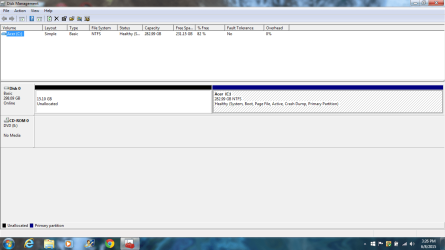
The Unallocated space that I put into C was from the Windows 10 partition. I have another Unallocated partition that I need to know what to do with. Below is the screenshot of it.
 

Attachments

  • disk management.png
    disk management.png
    42.6 KB · Views: 2

My Computer My Computer

At a glance

Windows 10 Home 64-bitAMD E-350 Zacate 40nm Technology4 GB DDR3 Memory1909MB ATI AMD Radeon HD
Computer type
Laptop
Computer Manufacturer/Model Number
Acer 5250-0450
OS
Windows 10 Home 64-bit
CPU
AMD E-350 Zacate 40nm Technology
Motherboard
Acer HMA51-BZ (Socket FT1)
Memory
4 GB DDR3 Memory
Graphics Card(s)
1909MB ATI AMD Radeon HD
Sound Card
Conexant High Definition Audio
Monitor(s) Displays
Generic PnP Monitor (1366x768@60Hz)
Hard Drives
320 GB HDD
Mouse
ONN Wireless Mouse
Antivirus
Norton Internet Security Online
Browser
Microsoft Edge, Internet Explorer 11, and Google Chrome
Other Info
Other Computers:

Laptop: Acer Aspire 5749 Series

Desktop: Acer Aspire XC603G Series
As I said an hour ago in post 16:

For the unallocated space to the LEFT of C, you cannot use Disk Management.

You must use another tool, such as Partition Wizard.

The easiest thing for you to do is nothing. The unallocated space hurts nothing. You have plenty of free space on C.
 

My Computer My Computer

At a glance

Windows 7 Home Premium SP1, 64-bitIntel Skylake i5-6600K, not overclocked8 GB HyperX DDR4-2666 (2 x 4 GB)none; graphics are integrated on CPU
Computer type
PC/Desktop
Computer Manufacturer/Model Number
Ignatz Special; 4 speed manual gearbox; factory air conditioning; one of one
OS
Windows 7 Home Premium SP1, 64-bit
CPU
Intel Skylake i5-6600K, not overclocked
Motherboard
AsRock Z170M Extreme 4, micro ATX
Memory
8 GB HyperX DDR4-2666 (2 x 4 GB)
Graphics Card(s)
none; graphics are integrated on CPU
Sound Card
onboard: Realtek ALC1150; external: USB Behringer UF0-202
Monitor(s) Displays
Dell S2340M 23 inch IPS
Screen Resolution
1600 x 900
Hard Drives
System: Crucial MX100 series SSD, 128 GB;
Data: Samsung Spinpoint 103SJ, 1 TB;
Backup: WD Caviar Green WD30EZRX-00D8PB0, 3 TB
PSU
Rosewill SilentNight 500 watt fanless, semi-modular
Case
Antec Solo II
Cooling
Noctua NH-U12S; Noctua F12 intake, Noctua S12A exhaust
Keyboard
Microsoft 200 6JH-00001 USB
Mouse
Dell or Microsoft optical wired; USB
Antivirus
Microsoft Security Essentials and Malwarebytes Premium
Browser
Pale Moon
Other Info
All fans PWM; speeds at idle: CPU circa 500 rpm; intake circa 600 rpm; exhaust circa 600 rpm; CPU temps 27 idle and 47 C load in a warm room (27 C/81 F) when running Intel Extreme Tuning Utility stress test.
Okay...thanks for your help. Now, under computer, it says I have 230 GB free of 282 GB. How do I lower the disk usage? I had it done one time over at tenforums.com.
 

My Computer My Computer

At a glance

Windows 10 Home 64-bitAMD E-350 Zacate 40nm Technology4 GB DDR3 Memory1909MB ATI AMD Radeon HD
Computer type
Laptop
Computer Manufacturer/Model Number
Acer 5250-0450
OS
Windows 10 Home 64-bit
CPU
AMD E-350 Zacate 40nm Technology
Motherboard
Acer HMA51-BZ (Socket FT1)
Memory
4 GB DDR3 Memory
Graphics Card(s)
1909MB ATI AMD Radeon HD
Sound Card
Conexant High Definition Audio
Monitor(s) Displays
Generic PnP Monitor (1366x768@60Hz)
Hard Drives
320 GB HDD
Mouse
ONN Wireless Mouse
Antivirus
Norton Internet Security Online
Browser
Microsoft Edge, Internet Explorer 11, and Google Chrome
Other Info
Other Computers:

Laptop: Acer Aspire 5749 Series

Desktop: Acer Aspire XC603G Series
Okay...thanks for your help. Now, under computer, it says I have 230 GB free of 282 GB. How do I lower the disk usage? I had it done one time over at tenforums.com.

The C partition is 282. You are using about 52 of that.

Why are you interested in reducing the 52? You've got acres of free space.

If you were crowded and using 250 of the 282, you could uninstall certain applications, run Disk Cleanup, run CCleaner, reduce the size of the page file, eliminate your hibernation file, move data to some other drive, etc.

But you aren't crowded. So I don't understand your motive.

What am I not understanding?
 

My Computer My Computer

At a glance

Windows 7 Home Premium SP1, 64-bitIntel Skylake i5-6600K, not overclocked8 GB HyperX DDR4-2666 (2 x 4 GB)none; graphics are integrated on CPU
Computer type
PC/Desktop
Computer Manufacturer/Model Number
Ignatz Special; 4 speed manual gearbox; factory air conditioning; one of one
OS
Windows 7 Home Premium SP1, 64-bit
CPU
Intel Skylake i5-6600K, not overclocked
Motherboard
AsRock Z170M Extreme 4, micro ATX
Memory
8 GB HyperX DDR4-2666 (2 x 4 GB)
Graphics Card(s)
none; graphics are integrated on CPU
Sound Card
onboard: Realtek ALC1150; external: USB Behringer UF0-202
Monitor(s) Displays
Dell S2340M 23 inch IPS
Screen Resolution
1600 x 900
Hard Drives
System: Crucial MX100 series SSD, 128 GB;
Data: Samsung Spinpoint 103SJ, 1 TB;
Backup: WD Caviar Green WD30EZRX-00D8PB0, 3 TB
PSU
Rosewill SilentNight 500 watt fanless, semi-modular
Case
Antec Solo II
Cooling
Noctua NH-U12S; Noctua F12 intake, Noctua S12A exhaust
Keyboard
Microsoft 200 6JH-00001 USB
Mouse
Dell or Microsoft optical wired; USB
Antivirus
Microsoft Security Essentials and Malwarebytes Premium
Browser
Pale Moon
Other Info
All fans PWM; speeds at idle: CPU circa 500 rpm; intake circa 600 rpm; exhaust circa 600 rpm; CPU temps 27 idle and 47 C load in a warm room (27 C/81 F) when running Intel Extreme Tuning Utility stress test.
As I told you in another thread earlier this year, there is no reason to extend to the left into the 15gb space until you start getting short of space and you're still loaded with free space.

You accomplished extending into the substantial space to the right just fine. Good work all.
 
Okay. Thank you all for your help. I will now mark this thread as solved.
 

My Computer My Computer

At a glance

Windows 10 Home 64-bitAMD E-350 Zacate 40nm Technology4 GB DDR3 Memory1909MB ATI AMD Radeon HD
Computer type
Laptop
Computer Manufacturer/Model Number
Acer 5250-0450
OS
Windows 10 Home 64-bit
CPU
AMD E-350 Zacate 40nm Technology
Motherboard
Acer HMA51-BZ (Socket FT1)
Memory
4 GB DDR3 Memory
Graphics Card(s)
1909MB ATI AMD Radeon HD
Sound Card
Conexant High Definition Audio
Monitor(s) Displays
Generic PnP Monitor (1366x768@60Hz)
Hard Drives
320 GB HDD
Mouse
ONN Wireless Mouse
Antivirus
Norton Internet Security Online
Browser
Microsoft Edge, Internet Explorer 11, and Google Chrome
Other Info
Other Computers:

Laptop: Acer Aspire 5749 Series

Desktop: Acer Aspire XC603G Series
Back
Top