Decreased Space

barsim

New member
Member
Local time
11:43 AM
Messages
50
After installing one program (installation file size 60.06 MB) the HD remaining space decreased from 144 GB to 141 GB, which is understandable.
Then uninstalling the same program the remaining free space further decreased from 141 to 138 GB.
What's the possible cause(s)?
Thank you
 

My Computer

Computer type
PC/Desktop
Computer Manufacturer/Model Number
HP Compaq dc5800
OS
Microsoft Windows 7 Professional 64-bit 7601 Multiprocessor Free Service Pack 1
CPU
Intel(R) Core(TM)2 Duo CPU E8400 @ 3.00GHz
Motherboard
Hewlett-Packard 2820h
Memory
6.00 GB, usable: 5.92 GB
Graphics Card(s)
ATI Radeon HD 3400 Series
Sound Card
(1) High Definition Audio Device (2) HD Webcam C270
Monitor(s) Displays
HP
Screen Resolution
1920 x 1080 x 60 hertz
Hard Drives
ST3500418AS ATA Device
Fixed hard disk media
Partitions: 2
Size: 465.76 GB
Other Info
BIOS: Hewlett-Packard
Default System BIOS
Version: 786F2 v01.51
Release Date: 8/1/2008
I'm wondering if Windows or some 3rd party uninstaller is keeping phantom files just in case you want to reinstall; I'm just straw-grabbing; let's see what the regulars here have to say :) And, unless you're using something similar to, or using, Revo Uninstaller Pro -- uninstalls too often leave lots of undeleted & abandoned stuff around.
 

My Computer

Computer type
PC/Desktop
Computer Manufacturer/Model Number
Antec desktop; Acer Aspire laptops
OS
Windows 7 Professional 64-bit
CPU
Desktop i5; Acers i5 & i7
Memory
desktop 16GB; 1 Acer 8GB & 1 Acer 16GB
Hard Drives
1TB split into 2 equal partitions [OS and data] usable by RJS
Internet Speed
AT&T DSL
Browser
FF, GChrome, msIE
Other Info
Windows 7 Firewall, Emsisoft AM/AV, MSE [scan-only], SpywareBlaster, Ruiware/BillP combine
Sounds like System Restore points are being created when you install or uninstall a program which is normal. 3GB is pretty large for a restore point though.

Use CCleaner, Tools, System Restore to see what restore points are there and when they were created. You could delete some of the older ones to free up space as well as run CCleaner to cleanup a lot of the accumulated junk on your hard drive.

If you install CCleaner, get the Free version and make sure you uncheck the two Google check boxes during the install process.
 

My Computer

Computer type
PC/Desktop
Computer Manufacturer/Model Number
Lenovo IdeaCenter 450
OS
Windows 10 Pro X64
CPU
Intel Quad Core i7-4770 @ 3.4Ghz
Memory
16.0GB PC3-12800 DDR3 SDRAM 1600 MHz
Graphics Card(s)
Intel Integrated HD Graphics
Sound Card
Realtek HD Audio
Monitor(s) Displays
HP 22" LCD
Screen Resolution
1680 x 1050
Hard Drives
250GB Samsung EVO SATA-3 SSD
2TB Seagate ST2000DM001 SATA-2
1.5TB Seagate ST3150041AS SATA
Keyboard
Dell USB
Mouse
Lenovo USB
Internet Speed
Cable via Road Runner 3MB Upload, 30MB Download
Antivirus
Windows Defender, MBAM Pro, MBAE
Browser
Seamonkey
Other Info
UEFI/GPT
PLDS DVD-RW DH16AERSH
It could well be that a bunch of restore points have disappeared. A restore point is between 500MB and 1GB. Run this command to check the situation:

vssadmin list shadowstorage
 

My Computer

Computer Manufacturer/Model Number
HP, Dell, Gateway, Toshiba - 4 laptops and 2 desktops
OS
Vista, Windows7, Mint Mate, Zorin, Windows 8
CPU
from 1.6GHz Duo to i7
Monitor(s) Displays
2x HP w2207
Hard Drives
5x HDD, 7x SSD, 12x Externals
Keyboard
with trackball - no mices
Mouse
Trackball mice
Internet Speed
DSL 6000
Sounds like System Restore points are being created when you install or uninstall a program which is normal. 3GB is pretty large for a restore point though.

Use CCleaner, Tools, System Restore to see what restore points are there and when they were created. You could delete some of the older ones to free up space as well as run CCleaner to cleanup a lot of the accumulated junk on your hard drive.

If you install CCleaner, get the Free version and make sure you uncheck the two Google check boxes during the install process.

Dear Ztruker,

I think I found the answer to my quandary.
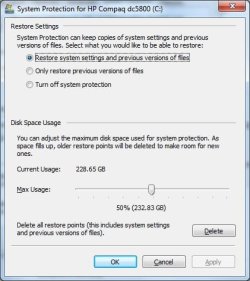
I got this machine as is and the System Protection settings is the cause making computer use too much room for this purpose: See the attachment.
Also I found that the recommended setting is about 10%.
Can I safely delete all the RP-s?
Thank you
 

Attachments

  • System Protection.jpg
    System Protection.jpg
    30.5 KB · Views: 14

My Computer

Computer type
PC/Desktop
Computer Manufacturer/Model Number
HP Compaq dc5800
OS
Microsoft Windows 7 Professional 64-bit 7601 Multiprocessor Free Service Pack 1
CPU
Intel(R) Core(TM)2 Duo CPU E8400 @ 3.00GHz
Motherboard
Hewlett-Packard 2820h
Memory
6.00 GB, usable: 5.92 GB
Graphics Card(s)
ATI Radeon HD 3400 Series
Sound Card
(1) High Definition Audio Device (2) HD Webcam C270
Monitor(s) Displays
HP
Screen Resolution
1920 x 1080 x 60 hertz
Hard Drives
ST3500418AS ATA Device
Fixed hard disk media
Partitions: 2
Size: 465.76 GB
Other Info
BIOS: Hewlett-Packard
Default System BIOS
Version: 786F2 v01.51
Release Date: 8/1/2008
If you use Avast, that may happen again. Restore points can be deleted any time either by moving the slider and APPLY or with this command

vssadmin delete shadows /for=C: -quiet
 

My Computer

Computer Manufacturer/Model Number
HP, Dell, Gateway, Toshiba - 4 laptops and 2 desktops
OS
Vista, Windows7, Mint Mate, Zorin, Windows 8
CPU
from 1.6GHz Duo to i7
Monitor(s) Displays
2x HP w2207
Hard Drives
5x HDD, 7x SSD, 12x Externals
Keyboard
with trackball - no mices
Mouse
Trackball mice
Internet Speed
DSL 6000
Yep it smells like the Avast problem people are have with restore points.

Check out the Avast forum. They should have a fix by now.

https://forum.avast.com/index.php
 

My Computer

Computer type
PC/Desktop
Computer Manufacturer/Model Number
Home made Desktop
OS
Windows 10 Pro. 64/ version 1709 Windows 7 Pro/64
CPU
Intel i7-6800K @ 4.3
Motherboard
ASUS X-99 Deluxe II
Memory
Corsair Platinum 16 gig @2400
Graphics Card(s)
EVGA GTX 1070 OC
Monitor(s) Displays
Asus 27" LED LCD/VE278Q
Screen Resolution
1920-1080 or 1280-720 HDMI
Hard Drives
INTEL SSD 730-240 Gb Sata 3.0/
PSU
EVGA Platium 1200W
Case
Phanteks Luxe Tempered Glass 8 fans/ one radiator
Cooling
XSPC/ Water Cooled CPU
Keyboard
Das 4 Professional
Mouse
Logitech M705/MX Anywhere 2-S
Internet Speed
100 mbits
Antivirus
Microsoft Security Essentials/ Malwarebytes Premium 3.0/ SAS
Browser
I.E. 11 default/Firefox/ ISP Time Warner Cable/Spectrum
Other Info
LG BluRay Burner/
Sound system-KLipsch-THX/
Icy Dock ssd Hot Swap bays.

My Computer

Computer type
PC/Desktop
Computer Manufacturer/Model Number
home built
OS
Multi-Boot W7_Pro_x64 W8.1_Pro_x64 W10_Pro_x64 +Linux_VMs +Chromium_VM
CPU
AMD Athlon II x4 620
Motherboard
Gigabyte GA-MA785G-UD3H
Memory
6GB GSkill DDR2 800
Graphics Card(s)
AMD 4670 GPU + AMD 4200 IGP
Sound Card
on board Realtek ALC889A
Monitor(s) Displays
RCA 40" LCD TV, Insignia 32" LCD TV, HP 15" LCD monitor
Screen Resolution
1680 x 1050
Hard Drives
OCZ Vertex 3 120GB,
Samsung F3 1TB (3),
Several others - WD, Seagate, Hitachi, ...
PSU
Corsair 500 W
Case
Rosewill mid tower
Cooling
CM 90mm rifle
Keyboard
Gyration wireless, Logitech wireless, Dell USB wired
Mouse
Gyration wireless, Logitech wireless, V7 USB wired
Internet Speed
Spectrum - 100Mbps D / 10Mbps U
Antivirus
Avast, MBAM3, EMET, WinPatrol
Browser
Pale Moon, Firefox, IE
Other Info
2 multi-boot PC's
Mainly HTPC/Office/Gen purpose (no gaming).
Trendnet USB KVM.
LG DVD burner/Blue Ray Player.
Tray system for removable SATA backup drives.

Not currently OCd, under-volted.
I use Hybrid sleep, rarely re-boot or shutdown.

Hauppauge HD-PVR, Avermedia PCIe TV Tuner, Hauppauge PCI TV Tuner.
Back
Top