Default Installation Drive Change?

Zen00

New member
Guru
VIP
Local time
7:38 PM
Messages
1,360
Location
Utah
I just reinstalled Windows 7, and I was wondering, is it possible to change the default drive that programs install to from C to D?
 

My Computer

Computer Manufacturer/Model Number
Zen Productions
OS
Windows 7 Ultimate x64
CPU
Intel i7-860
Motherboard
Gigabyte GA-P55A-UD4P
Memory
Corsair Dominator 1600Mhz, 8-8-8-24 1.65v 2x2GB
Graphics Card(s)
ATI Radeon 5770 HD
Sound Card
Intel High Definition Sound
Monitor(s) Displays
Samsung P2570HD
Screen Resolution
1920x1080
Hard Drives
Western Digital Caviar Black 500gb
PSU
Corsair CMPSU-750HX 750W
Case
Antec p183
Cooling
Corsair H50 Water Cooler
Keyboard
Logitech G110
Mouse
Logitech MX Revolution
Internet Speed
768 mb/s
Hope nobody minds me bumping this post? I have my OS installed on a 120GB SSD, (Drive C: ) but I want my default installation drive to be my 1TB HDD (Drive F: )
 

My Computer

OS
Windows 7 Home Premium x64
CPU
Intel Core i5-2500k CPU @ 3.30GHz (4 CPUs)
Motherboard
ASUS P8H67-M Pro
Memory
8GB Corsair Vengeance
Graphics Card(s)
AMD Radeon HD 6950
Monitor(s) Displays
22" HP w2207h
Screen Resolution
1680x1050
Hard Drives
120GB Corsair SSD
1TB WD Blue HDD
Case
Antec Nine Hundred
Keyboard
Razer Lycosa
Mouse
Razer Deathadder
Blayed,
Your problem is sufficently different that a separate post is in order, plus makes our life simpler as we explain the ins and outs.

Thanks,
karl
 

My Computer

Computer Manufacturer/Model Number
Toshiba Satellite S875D-S7239 laptop
OS
MS Windows 7 Ultimate SP1 64-bit
CPU
AMD A10-4600M
Motherboard
AMD Pumori (Socket FT1)
Memory
6.00 GB Dual-Channel DDR3 @ 798MHz (11-11-12-28)
Graphics Card(s)
AMD Radeon HD 7660G
Sound Card
High Definition Audio Device
Monitor(s) Displays
Generic PnP Monitor (1600x900@60Hz)
Screen Resolution
1600x900@60Hz
Hard Drives
SSD 119GB Corsair CSSD-V128GB2 ATA Device
Keyboard
Standard PS/2 Keyboard
Mouse
HP Wireless Optical Mobile Mouse Model FHA-3410
Internet Speed
What the local pub, local coffee shop offers.
Other Info
Optical Drive:MATSHITA BD-CMB UJ160B ATA Device


Also have an Asus ha1002xp netbook with Win 7 Ultimate installed.
I just reinstalled Windows 7, and I was wondering, is it possible to change the default drive that programs install to from C to D?

Possible but I certainly do not recommend. You will end up will all kinds of problems and some of them coming from Microsoft software.

Better is to change the location of the profile folders to another drive.

In other words, you put your documents, music, pictures, videos on another drive.

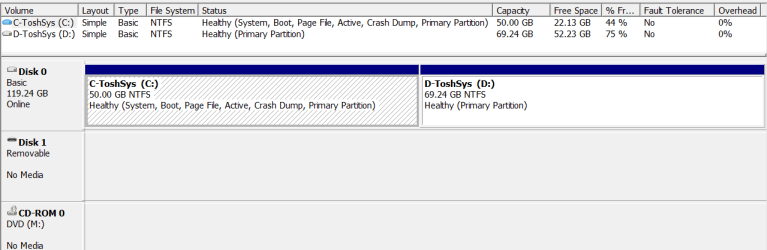
Presently I have programs and the documents folder on C and everything else on D.

Here's my disk management pic:
diskmgmt.PNG
 

My Computer

Computer Manufacturer/Model Number
Toshiba Satellite S875D-S7239 laptop
OS
MS Windows 7 Ultimate SP1 64-bit
CPU
AMD A10-4600M
Motherboard
AMD Pumori (Socket FT1)
Memory
6.00 GB Dual-Channel DDR3 @ 798MHz (11-11-12-28)
Graphics Card(s)
AMD Radeon HD 7660G
Sound Card
High Definition Audio Device
Monitor(s) Displays
Generic PnP Monitor (1600x900@60Hz)
Screen Resolution
1600x900@60Hz
Hard Drives
SSD 119GB Corsair CSSD-V128GB2 ATA Device
Keyboard
Standard PS/2 Keyboard
Mouse
HP Wireless Optical Mobile Mouse Model FHA-3410
Internet Speed
What the local pub, local coffee shop offers.
Other Info
Optical Drive:MATSHITA BD-CMB UJ160B ATA Device


Also have an Asus ha1002xp netbook with Win 7 Ultimate installed.
Back
Top