Default Operating System - Change Default Boot OS

How to Change the Default Operating System to Start in Windows 7 and Vista

   Information
If you dual boot with one or more operating systems installed other than Windows 7 or Vista, then this will show you how to change the default operating system to start in the Windows Boot Manager.

You must be logged in as an administrator to be able to do the steps in this tutorial.


EXAMPLE: Windows Boot Manager
NOTE: This is the boot screen where you select what operating system that you would like to start. By default, you have 30 seconds to choose another operating system before the default operating system will start automatically.
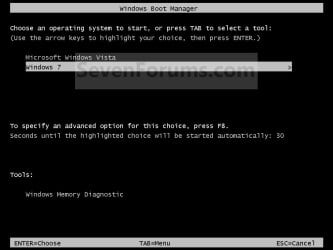
Boot_Manager.jpg


OPTION ONE

Through Startup and Recovery


1. Open the Start Menu.
A) Right click on the Computer button on the dark right side and click on Properties.

B) Go to step 3.
OR

2. Open the Control Panel (icons view) and click on the System icon.

3. In the left blue pane, click on the Advanced system settings link. (See screenshot below)
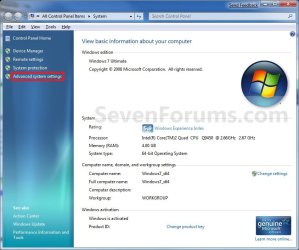
System.jpg
4. Close the System window. (See screenshot above)

5. Under the Advanced tab, click on the Settings button under Startup and Recovery. (See screenshot below)
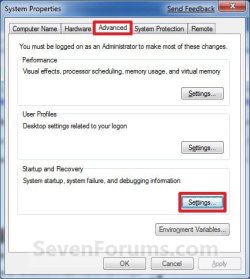
System_Properties.jpg
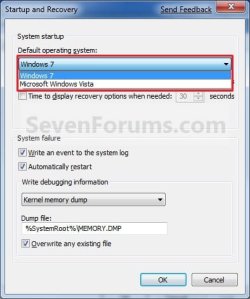
6. Under System Startup, select a operating system from the drop down menu to be the new default operating system, then click on OK. (See screenshots below)
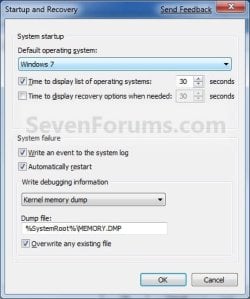
Startup.jpgStartup2.jpg
7. Click on OK. (See screenshot below step 5)


OPTION TWO

Through System Configuration


1. Open the Start Menu, type msconfig in the search line, and press Enter.

2. Click on the Boot tab. (see screenshot below)
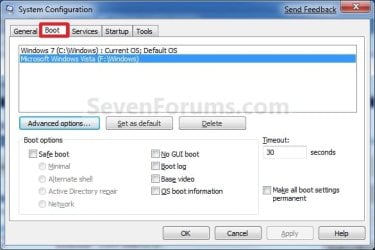
Boot.jpg
3. Select a listed operating system that is not already set as the Default OS, and click on the Set as default button to make the selected OS the new default instead. (see screenshot above)

4. Click on OK. (see screenshot below step 2)

5. Click on the Restart button. (see screenshot below)
WARNING: This will restart the computer immediately. Make sure you save and close anything open that you do not want to lose first.
Restart.jpg


OPTION THREE

Using the bcdedit Command


1. Open a elevated command prompt or a command prompt at boot.
NOTE: If you have a RAID setup or a PCI-E SSD as your boot drive and want to open a command prompt at boot, then you may need to use the Load Drivers option in the System Recovery Options screen to load it's drivers first before Windows will see the boot drive to be able to use the bcdedit command on it.

2. In the elevated command prompt, type bcdedit and press enter. (see screenshot below)
NOTE: This will let you see what OS is the default to start under the Windows Boot Manager section, and to see the description (name) and identifier of the operating system(s) listed in Windows Boot Manager under the Windows Boot Loader section(s). For example, Microsoft Windows Vista (description) as {730ab458-b062-11e0-84f1-fa307df851c2} (identifier).
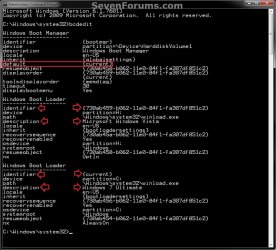
CMD-1.jpg
3. In the elevated command prompt, type the command below for a listed OS that you want to be the default OS to start, and press Enter. (see screenshot below)
bcdedit /default {identifier}

For example: If I wanted to change the default OS to start from Windows 7 Ultimate (description) as {current} (identifier) to Microsoft Windows Vista (description) as {730ab458-b062-11e0-84f1-fa307df851c2} (identifier), I would type this below and press Enter.

bcdedit /default {730ab459-b062-11e0-84f1-fa307df851c2}
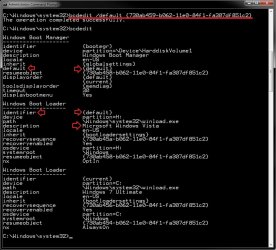
CMD-2.jpg
4. In the elevated command prompt, type bcdedit and press enter. (see screenshot below step 3)
NOTE: This will let you see and verify the new default OS identifier to start under the Windows Boot Manager section. For example, {default} identifier for Microsoft Windows Vista (description) now.

5. When finished, close the elevated command prompt.


OPTION FOUR

Using the "EasyBCD" Program


1. If you have not already, download and install a free version of the EasyBCD program, then run it.
NOTE: The free version download is at the bottom under "Download free for limited, non-commercial use". Registration is not required to download.

2. Click on the Edit Boot Menu button, then check the box for the OS that you want to be the default OS to start in the Windows Boot Manager. (see screenshot below)
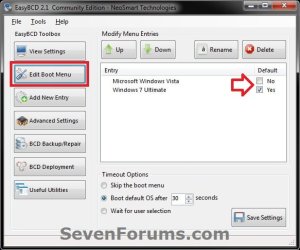
EasyBCD.jpg
3. When finished, close EasyBCD.
That's it,
Shawn


Last edited:
Is there a way for when ya dual Booting the same OS to change the name of one so ya can tell em apart,like for instance mine come's up with
Windows 7
Windows 7

one is 32 and the other is 64 is there a way i can add say (32)and(64)to the appropriate ones?
 

My Computer

Computer Manufacturer/Model Number
Handy manny
OS
Windows 7 (x64)
CPU
i7 870
Motherboard
Evga P55 FTW
Memory
G.Skill Trident (F3-17066CL9D-4GBTDS 2x2GB) - 2133MHz
Graphics Card(s)
Evga GTX 460 EE 1GB
Sound Card
On Board
Monitor(s) Displays
Samsung P2350
Screen Resolution
1920x1080
Hard Drives
1 x 64GB G-Skill Falcon SSD
1 x 60GB Corsair Force Series SSD
1 x 1TB WD Caviar Black
2 x 640GB WD Caviar Black
1 x 1TB Samsung Spinpoint F3
PSU
Corsair 620w
Case
Corsair 800D
Cooling
Corsair H50
Keyboard
Logitech MX5500 Revolution
Mouse
Logitech MX5500 Revolution
Internet Speed
http://www.speedtest.net/result/939062765.png
Other Info
http://www.sevenforums.com/overclocking-case-mods/104136-show-us-your-rig-2-a-4.html#post937213

My Computer

Computer type
PC/Desktop
Computer Manufacturer/Model Number
Self built custom
OS
64-bit Windows 11 Pro for Workstations
CPU
Intel i7-8700K OC'd to 5 GHz
Motherboard
ASUS ROG Maximus XI Formula Z390
Memory
64 GB (4x16GB) G.SKILL TridentZ RGB DDR4 3600 MHz
Graphics Card(s)
ASUS ROG-STRIX-GTX1080TI-O11G-GAMING
Sound Card
Integrated
Monitor(s) Displays
2 x Samsung Odyssey G7 27"
Screen Resolution
2560x1440
Hard Drives
1TB Samsung 990 PRO M.2,
4TB Samsung 990 PRO PRO M.2,
TerraMaster F8 SSD Plus NAS
PSU
Seasonic Prime Titanium 850W
Case
Thermaltake Core P3
Cooling
Corsair Hydro H115i
Keyboard
Logitech wireless K800
Mouse
Logitech MX Master 4
Internet Speed
2 Gb/s Download and 100 Mb/s Upload
Antivirus
Malwarebyte Anti-Malware Premium
Browser
Google Chrome
Other Info
Logitech Z625 speaker system,
Logitech BRIO 4K Pro webcam,
HP Color LaserJet Pro MFP M477fdn,
APC SMART-UPS RT 1000 XL - SURT1000XLI,
Galaxy S23 Plus phone

My Computer

Computer Manufacturer/Model Number
Handy manny
OS
Windows 7 (x64)
CPU
i7 870
Motherboard
Evga P55 FTW
Memory
G.Skill Trident (F3-17066CL9D-4GBTDS 2x2GB) - 2133MHz
Graphics Card(s)
Evga GTX 460 EE 1GB
Sound Card
On Board
Monitor(s) Displays
Samsung P2350
Screen Resolution
1920x1080
Hard Drives
1 x 64GB G-Skill Falcon SSD
1 x 60GB Corsair Force Series SSD
1 x 1TB WD Caviar Black
2 x 640GB WD Caviar Black
1 x 1TB Samsung Spinpoint F3
PSU
Corsair 620w
Case
Corsair 800D
Cooling
Corsair H50
Keyboard
Logitech MX5500 Revolution
Mouse
Logitech MX5500 Revolution
Internet Speed
http://www.speedtest.net/result/939062765.png
Other Info
http://www.sevenforums.com/overclocking-case-mods/104136-show-us-your-rig-2-a-4.html#post937213
You're welcome. :)
 

My Computer

Computer type
PC/Desktop
Computer Manufacturer/Model Number
Self built custom
OS
64-bit Windows 11 Pro for Workstations
CPU
Intel i7-8700K OC'd to 5 GHz
Motherboard
ASUS ROG Maximus XI Formula Z390
Memory
64 GB (4x16GB) G.SKILL TridentZ RGB DDR4 3600 MHz
Graphics Card(s)
ASUS ROG-STRIX-GTX1080TI-O11G-GAMING
Sound Card
Integrated
Monitor(s) Displays
2 x Samsung Odyssey G7 27"
Screen Resolution
2560x1440
Hard Drives
1TB Samsung 990 PRO M.2,
4TB Samsung 990 PRO PRO M.2,
TerraMaster F8 SSD Plus NAS
PSU
Seasonic Prime Titanium 850W
Case
Thermaltake Core P3
Cooling
Corsair Hydro H115i
Keyboard
Logitech wireless K800
Mouse
Logitech MX Master 4
Internet Speed
2 Gb/s Download and 100 Mb/s Upload
Antivirus
Malwarebyte Anti-Malware Premium
Browser
Google Chrome
Other Info
Logitech Z625 speaker system,
Logitech BRIO 4K Pro webcam,
HP Color LaserJet Pro MFP M477fdn,
APC SMART-UPS RT 1000 XL - SURT1000XLI,
Galaxy S23 Plus phone
Saved my life! Great tutorial! Thanks a lot!!!
 

My Computer

Computer type
PC/Desktop
Computer Manufacturer/Model Number
Multirama PC Expert [Bulgaria]
OS
Windows 7 Home Premium [64-Bit]
CPU
Intel Core 2 Quad CPU Q8200 @ 2.33 GHz
Motherboard
GIGABYTE GA-G31M-S2C
Memory
4094 MB DDR2
Graphics Card(s)
SAPPHIRE Radeon HD 6970 (2 GB VRAM)
Sound Card
Realtek ALC883 @ Intel 82801GB ICH7 - High Definition Audio
Monitor(s) Displays
Samsung SyncMaster BX2235 [21.5" LCD with LED Backlight]
Screen Resolution
1920x1080
Hard Drives
Hitachi HDT721075SLA360 - 750 GB
PSU
Cooler Master GX750 - 750W
Case
Multirama (Black / 2010 Revision)
Cooling
Stock + Cooler Master
Keyboard
Logitech G510 (Gaming Keyboard)
Mouse
Razer Lachesis (4000 DPI, Blue Version)
Internet Speed
Vivacom Optical [100 Mbps]
Browser
Chrome [Windows]
You're most welcome Stefan. :)
 

My Computer

Computer type
PC/Desktop
Computer Manufacturer/Model Number
Self built custom
OS
64-bit Windows 11 Pro for Workstations
CPU
Intel i7-8700K OC'd to 5 GHz
Motherboard
ASUS ROG Maximus XI Formula Z390
Memory
64 GB (4x16GB) G.SKILL TridentZ RGB DDR4 3600 MHz
Graphics Card(s)
ASUS ROG-STRIX-GTX1080TI-O11G-GAMING
Sound Card
Integrated
Monitor(s) Displays
2 x Samsung Odyssey G7 27"
Screen Resolution
2560x1440
Hard Drives
1TB Samsung 990 PRO M.2,
4TB Samsung 990 PRO PRO M.2,
TerraMaster F8 SSD Plus NAS
PSU
Seasonic Prime Titanium 850W
Case
Thermaltake Core P3
Cooling
Corsair Hydro H115i
Keyboard
Logitech wireless K800
Mouse
Logitech MX Master 4
Internet Speed
2 Gb/s Download and 100 Mb/s Upload
Antivirus
Malwarebyte Anti-Malware Premium
Browser
Google Chrome
Other Info
Logitech Z625 speaker system,
Logitech BRIO 4K Pro webcam,
HP Color LaserJet Pro MFP M477fdn,
APC SMART-UPS RT 1000 XL - SURT1000XLI,
Galaxy S23 Plus phone
Lost Bootmanager

I installed Windows 7 on a SATA drive within an XP system, it made a nice boot choice menu. I had some issues with an XP install on C:, and reformatted... lost that nice boot menu, now I don't have access to that independent G: drive or anything windows 7 other than to see the files. It's not considered a bootable drive in Bios as it needs the sata drivers to be loaded first and short of re-installing is there any help? A simple boot loader program pointing to the drive doesn't seem to work.. but perhaps I'm not pointing correctly? A Win 7 repair tells me boot manager is missing bu there is no repair. Would EasyBCD for XP do the trick?
 

My Computer

Computer Manufacturer/Model Number
no name
OS
Win7
CPU
Barton
Motherboard
Asus A7N8X Deluxe
Memory
1.5 giggles
Graphics Card(s)
Sahphire 3650 AGP 512K
Sound Card
Nvidia on the MB
Monitor(s) Displays
Sam24 & LG 37
Hard Drives
8 or so at last count, some SATA
PSU
Enermax
Case
LiLin
Cooling
air conditioning
Helllo Ah802,

Yes, you should be able to use EasyBCD to repair the boot file by adding Windows 7 to it. :)
 

My Computer

Computer type
PC/Desktop
Computer Manufacturer/Model Number
Self built custom
OS
64-bit Windows 11 Pro for Workstations
CPU
Intel i7-8700K OC'd to 5 GHz
Motherboard
ASUS ROG Maximus XI Formula Z390
Memory
64 GB (4x16GB) G.SKILL TridentZ RGB DDR4 3600 MHz
Graphics Card(s)
ASUS ROG-STRIX-GTX1080TI-O11G-GAMING
Sound Card
Integrated
Monitor(s) Displays
2 x Samsung Odyssey G7 27"
Screen Resolution
2560x1440
Hard Drives
1TB Samsung 990 PRO M.2,
4TB Samsung 990 PRO PRO M.2,
TerraMaster F8 SSD Plus NAS
PSU
Seasonic Prime Titanium 850W
Case
Thermaltake Core P3
Cooling
Corsair Hydro H115i
Keyboard
Logitech wireless K800
Mouse
Logitech MX Master 4
Internet Speed
2 Gb/s Download and 100 Mb/s Upload
Antivirus
Malwarebyte Anti-Malware Premium
Browser
Google Chrome
Other Info
Logitech Z625 speaker system,
Logitech BRIO 4K Pro webcam,
HP Color LaserJet Pro MFP M477fdn,
APC SMART-UPS RT 1000 XL - SURT1000XLI,
Galaxy S23 Plus phone
Looks like Vista is what it wants.

There are a total of 2 entries listed in the Vista Bootloader.
Bootloader Timeout: 5 seconds.
Default OS: Windows XP

Entry #1

Name: Windows XP
BCD ID: {default}
Drive: C:\
Bootloader Path: \NTLDR

Entry #2

Name: Windows 7
BCD ID: {b62341f0-ec0d-11de-933a-0026540b8e54}
Drive: F:\
Bootloader Path: \Windows\system32\winload.exe
Windows Directory: \Windows

but in the root of c: I find

[boot loader]
timeout=30
default=multi(0)disk(0)rdisk(0)partition(1)\WINDOWS
[operating systems]
multi(0)disk(0)rdisk(0)partition(1)\WINDOWS="Microsoft Windows XP Professional" /noexecute=optin /fastdetect

and no boot loader on boot., so can I simply add this with notepad?

multi(0)disk(2)rdisk(2)partition(1)\WINDOWS="Windows 7" /noexecute=optin /fastdetect
 

My Computer

Computer Manufacturer/Model Number
no name
OS
Win7
CPU
Barton
Motherboard
Asus A7N8X Deluxe
Memory
1.5 giggles
Graphics Card(s)
Sahphire 3650 AGP 512K
Sound Card
Nvidia on the MB
Monitor(s) Displays
Sam24 & LG 37
Hard Drives
8 or so at last count, some SATA
PSU
Enermax
Case
LiLin
Cooling
air conditioning
Vista??

I see XP and Windows 7 listed. Are you triple booting? :confused:
 

My Computer

Computer type
PC/Desktop
Computer Manufacturer/Model Number
Self built custom
OS
64-bit Windows 11 Pro for Workstations
CPU
Intel i7-8700K OC'd to 5 GHz
Motherboard
ASUS ROG Maximus XI Formula Z390
Memory
64 GB (4x16GB) G.SKILL TridentZ RGB DDR4 3600 MHz
Graphics Card(s)
ASUS ROG-STRIX-GTX1080TI-O11G-GAMING
Sound Card
Integrated
Monitor(s) Displays
2 x Samsung Odyssey G7 27"
Screen Resolution
2560x1440
Hard Drives
1TB Samsung 990 PRO M.2,
4TB Samsung 990 PRO PRO M.2,
TerraMaster F8 SSD Plus NAS
PSU
Seasonic Prime Titanium 850W
Case
Thermaltake Core P3
Cooling
Corsair Hydro H115i
Keyboard
Logitech wireless K800
Mouse
Logitech MX Master 4
Internet Speed
2 Gb/s Download and 100 Mb/s Upload
Antivirus
Malwarebyte Anti-Malware Premium
Browser
Google Chrome
Other Info
Logitech Z625 speaker system,
Logitech BRIO 4K Pro webcam,
HP Color LaserJet Pro MFP M477fdn,
APC SMART-UPS RT 1000 XL - SURT1000XLI,
Galaxy S23 Plus phone
No just XP & Win7, I tried to miss to miss Vista... but I do triple boot with linux with a removable drive. Looks like I'll reformat, I'm not so far along into this O/S that a total re-install is out of order. It was a bit of a pain setting up the AGP video driver.. but now I know the trick it shouldn't be too long.
 

My Computer

Computer Manufacturer/Model Number
no name
OS
Win7
CPU
Barton
Motherboard
Asus A7N8X Deluxe
Memory
1.5 giggles
Graphics Card(s)
Sahphire 3650 AGP 512K
Sound Card
Nvidia on the MB
Monitor(s) Displays
Sam24 & LG 37
Hard Drives
8 or so at last count, some SATA
PSU
Enermax
Case
LiLin
Cooling
air conditioning
I hope it goes smoother for you this time around.
 

My Computer

Computer type
PC/Desktop
Computer Manufacturer/Model Number
Self built custom
OS
64-bit Windows 11 Pro for Workstations
CPU
Intel i7-8700K OC'd to 5 GHz
Motherboard
ASUS ROG Maximus XI Formula Z390
Memory
64 GB (4x16GB) G.SKILL TridentZ RGB DDR4 3600 MHz
Graphics Card(s)
ASUS ROG-STRIX-GTX1080TI-O11G-GAMING
Sound Card
Integrated
Monitor(s) Displays
2 x Samsung Odyssey G7 27"
Screen Resolution
2560x1440
Hard Drives
1TB Samsung 990 PRO M.2,
4TB Samsung 990 PRO PRO M.2,
TerraMaster F8 SSD Plus NAS
PSU
Seasonic Prime Titanium 850W
Case
Thermaltake Core P3
Cooling
Corsair Hydro H115i
Keyboard
Logitech wireless K800
Mouse
Logitech MX Master 4
Internet Speed
2 Gb/s Download and 100 Mb/s Upload
Antivirus
Malwarebyte Anti-Malware Premium
Browser
Google Chrome
Other Info
Logitech Z625 speaker system,
Logitech BRIO 4K Pro webcam,
HP Color LaserJet Pro MFP M477fdn,
APC SMART-UPS RT 1000 XL - SURT1000XLI,
Galaxy S23 Plus phone
Thanks for this tutorial!
 

My Computer

Computer Manufacturer/Model Number
TOSHIBA EQUIUM A200 (X86-based PC AT/AT COMPATIBLE)
OS
Windows 7 Ultimate x86
CPU
Intel(R) Pentium(R) Dual CPU T2310 @ 1.46GHz
Motherboard
Intel Corporation SANTA ROSA CRB
Memory
2GB
Graphics Card(s)
Mobile Intel(R) 965 Express Chipset Family
Screen Resolution
1280 * 800 Pixels
Hard Drives
ST9120822AS ATA Device (IDE)
You're most welcome BAZ. :)
 

My Computer

Computer type
PC/Desktop
Computer Manufacturer/Model Number
Self built custom
OS
64-bit Windows 11 Pro for Workstations
CPU
Intel i7-8700K OC'd to 5 GHz
Motherboard
ASUS ROG Maximus XI Formula Z390
Memory
64 GB (4x16GB) G.SKILL TridentZ RGB DDR4 3600 MHz
Graphics Card(s)
ASUS ROG-STRIX-GTX1080TI-O11G-GAMING
Sound Card
Integrated
Monitor(s) Displays
2 x Samsung Odyssey G7 27"
Screen Resolution
2560x1440
Hard Drives
1TB Samsung 990 PRO M.2,
4TB Samsung 990 PRO PRO M.2,
TerraMaster F8 SSD Plus NAS
PSU
Seasonic Prime Titanium 850W
Case
Thermaltake Core P3
Cooling
Corsair Hydro H115i
Keyboard
Logitech wireless K800
Mouse
Logitech MX Master 4
Internet Speed
2 Gb/s Download and 100 Mb/s Upload
Antivirus
Malwarebyte Anti-Malware Premium
Browser
Google Chrome
Other Info
Logitech Z625 speaker system,
Logitech BRIO 4K Pro webcam,
HP Color LaserJet Pro MFP M477fdn,
APC SMART-UPS RT 1000 XL - SURT1000XLI,
Galaxy S23 Plus phone
This is a really cool piece of work - so easy even I can understand it and I AM NOT a 'computer knowledge centre' - many thanks:D
 

My Computer

Computer Manufacturer/Model Number
Custom Built
OS
Windows 7 Pro 64-Bit
CPU
INTEL Pentium D950 (2x3.4GHZ) 800mhz FSB/2 x 2MB Cache
Motherboard
ASUS P5WD2 Premuim: Dual Core DDR2, 16VGA - 3 PCI/2 PCI-EX
Memory
4GB DDR2-533 PC4200
Graphics Card(s)
ATI Radeon HD3800 Series
Sound Card
Realtek ALC882D 8 Channel
Monitor(s) Displays
No1 = ACER P223w / No2 = ACER A1751
Hard Drives
Main 250GB Weston Digital 5400rpm (XP sp3)
Back-Up 750GB Weston Digital 'Caviar Green' 7400rpm
Windows7 64Bit on a separate 750mb Weston Digital
PSU
Silent 500 Watts + 120mm Fan
Cooling
2x120mm case fans, 100mm CPU fan
Keyboard
Logitec LX710
Mouse
Logitec Laser
Internet Speed
4.8Mbps
You're most welcome Topspin. Thank you. :)
 

My Computer

Computer type
PC/Desktop
Computer Manufacturer/Model Number
Self built custom
OS
64-bit Windows 11 Pro for Workstations
CPU
Intel i7-8700K OC'd to 5 GHz
Motherboard
ASUS ROG Maximus XI Formula Z390
Memory
64 GB (4x16GB) G.SKILL TridentZ RGB DDR4 3600 MHz
Graphics Card(s)
ASUS ROG-STRIX-GTX1080TI-O11G-GAMING
Sound Card
Integrated
Monitor(s) Displays
2 x Samsung Odyssey G7 27"
Screen Resolution
2560x1440
Hard Drives
1TB Samsung 990 PRO M.2,
4TB Samsung 990 PRO PRO M.2,
TerraMaster F8 SSD Plus NAS
PSU
Seasonic Prime Titanium 850W
Case
Thermaltake Core P3
Cooling
Corsair Hydro H115i
Keyboard
Logitech wireless K800
Mouse
Logitech MX Master 4
Internet Speed
2 Gb/s Download and 100 Mb/s Upload
Antivirus
Malwarebyte Anti-Malware Premium
Browser
Google Chrome
Other Info
Logitech Z625 speaker system,
Logitech BRIO 4K Pro webcam,
HP Color LaserJet Pro MFP M477fdn,
APC SMART-UPS RT 1000 XL - SURT1000XLI,
Galaxy S23 Plus phone
Would the same apply to XP Home instead of Vista?

I intend to install W7 on a separate drive leaving XP as C:\ on drive 0. Then install W7 64 as Z:\ on drive 1 labeled as Windows 7. I would prefer the auto dual boot to be applied to W7 not XP, I can then either leave XP as a backup system or later delete it altogether.

Will the same change default boot OS work with XP instead of Vista?

I have dwonloaded and printed the tutorials relating to dual booting, clean install, W7 ahead of XP and reserved partition which I am slowly getting to grips with.

Thanks for any help.
 

My Computer

Computer type
PC/Desktop
Computer Manufacturer/Model Number
Home Build
OS
Windows 7 Professional 64bit
CPU
i5-2500K 3.30Hz 6MB Cache
Motherboard
ASUS P8P67 Pro B3 Revision
Memory
16GB DDR3
Graphics Card(s)
ASUSGeforce GTX1050Ti 4GB
Sound Card
On-Board
Monitor(s) Displays
LG23MP65HQ-P
Hard Drives
WD Caviar Green 500gb
Maxtor 300gb
WD External USB 120gb
WD My Passport USB 2TB
LUX3 External USB 1TB
PSU
Corsair 800W
Case
Antec
Cooling
Arctic 13 Cooler
Antivirus
Bitdefender Total Security 2017
Browser
FireFox
Hello Trapper,

If done from within Windows 7, then yes. :)

Since Windows 7 would be the last OS installed in the dual boot, it will become the default OS to be selected and run at startup by default.
 

My Computer

Computer type
PC/Desktop
Computer Manufacturer/Model Number
Self built custom
OS
64-bit Windows 11 Pro for Workstations
CPU
Intel i7-8700K OC'd to 5 GHz
Motherboard
ASUS ROG Maximus XI Formula Z390
Memory
64 GB (4x16GB) G.SKILL TridentZ RGB DDR4 3600 MHz
Graphics Card(s)
ASUS ROG-STRIX-GTX1080TI-O11G-GAMING
Sound Card
Integrated
Monitor(s) Displays
2 x Samsung Odyssey G7 27"
Screen Resolution
2560x1440
Hard Drives
1TB Samsung 990 PRO M.2,
4TB Samsung 990 PRO PRO M.2,
TerraMaster F8 SSD Plus NAS
PSU
Seasonic Prime Titanium 850W
Case
Thermaltake Core P3
Cooling
Corsair Hydro H115i
Keyboard
Logitech wireless K800
Mouse
Logitech MX Master 4
Internet Speed
2 Gb/s Download and 100 Mb/s Upload
Antivirus
Malwarebyte Anti-Malware Premium
Browser
Google Chrome
Other Info
Logitech Z625 speaker system,
Logitech BRIO 4K Pro webcam,
HP Color LaserJet Pro MFP M477fdn,
APC SMART-UPS RT 1000 XL - SURT1000XLI,
Galaxy S23 Plus phone
Thank you Brink:):)

I was under the, misguided, impression that the first in a dual boot was always the C: drive and that first installed was first loaded. Being able to set W7 as the first to boot will be a great help.

What an excellent forum you have here, and a mine of information to help us, less PC educated:thumbsup:
 

My Computer

Computer type
PC/Desktop
Computer Manufacturer/Model Number
Home Build
OS
Windows 7 Professional 64bit
CPU
i5-2500K 3.30Hz 6MB Cache
Motherboard
ASUS P8P67 Pro B3 Revision
Memory
16GB DDR3
Graphics Card(s)
ASUSGeforce GTX1050Ti 4GB
Sound Card
On-Board
Monitor(s) Displays
LG23MP65HQ-P
Hard Drives
WD Caviar Green 500gb
Maxtor 300gb
WD External USB 120gb
WD My Passport USB 2TB
LUX3 External USB 1TB
PSU
Corsair 800W
Case
Antec
Cooling
Arctic 13 Cooler
Antivirus
Bitdefender Total Security 2017
Browser
FireFox
Back
Top