
'Deleting - printing' error

stony41

New member
Member
Local time
12:26 AM
Messages
58
Attempting to delete a print job sitting on one of my network printers has created the 'Deleting - printing' error, where the job won't delete. I have tried the usual things such as starting and restarting the Print Spooler to no avail. The job just won't go away. Googling shows that some people have succeeded in clearing problem print jobs, but nothing has worked for me so far.

Any ideas on clearing this print job would be gratefully received.
 

My Computer

Computer type
PC/Desktop
Computer Manufacturer/Model Number
Sony and Toshiba all-in-ones, Medion and Lenovo laptops
OS
windows 7 home premium 64, windows 8.1 home premium 64

My Computer

Computer type
PC/Desktop
Computer Manufacturer/Model Number
Self built using existing case
OS
Windows 7 Home Premium 64 bit sp1
CPU
Intel i5 3570 3.4Ghz Ivy Bridge SKT 1155 quad core
Motherboard
Gigabyte Z77-HD3 SKT 1155 2xSata 3, 4x USB 3.0
Memory
G-Skill Rip Jaws 16Gb (8x2) DDR3 -1600 PC3 12800 CL 10 red
Graphics Card(s)
Gigabyte NVIDIA GT610 1Gb DDR3 810/1200 PCI-E 2.0 Silent
Sound Card
NVIDIA High Definition & Realtech High Definition Audio
Monitor(s) Displays
2 x Philips 226V4L 16:9 aspect ratio
Screen Resolution
1920 x 1080 HD
Hard Drives
Samsung 840 Pro 256gb SSD, SATA 3.
Hitachi Touro Portable 1tb, USB 3.0 HDD used for image b/ups.
PSU
Corsair VS450
Case
Codeng
Cooling
PSU fan & CPU fan
Keyboard
Logitech
Mouse
Logitech Wireless trackball M570
Internet Speed
Wireless 3G. 3mg down & 550kb up.
Antivirus
Bitdefender Internet Security 2020
Browser
Opera (Current Version) & Firefox
Other Info
MS Office 2013 Pro. Davis weather station software. MGE Nova 600 avr UPS.
Have the owner of the job delete it
 

My Computer

Computer type
PC/Desktop
Computer Manufacturer/Model Number
custom build
OS
Microsoft Windows 7 Ultimate 64-bit 7601 Multiprocessor Free Service Pack 1
CPU
AMD FX(tm)-6100 Six-Core Processor
Motherboard
ASUSTeK Computer INC. M5A78L-M LX PLUS
Memory
4.00 GB
Graphics Card(s)
AMD Radeon HD 6450
Sound Card
(1) AMD High Definition Audio Device (2) Realtek High Defi
Monitor(s) Displays
Toshiba 47ZV650U 47" LCD 240Hz
Screen Resolution
1920 x 1080 x 32 bits (4294967296 colors) @ 60 Hz
Hard Drives
(1) HDT722516DLA380 ATA Device (2) Hitachi HDS721025CLA382 ATA Device (3) ST4000VN000-1H4168 ATA Device (4) Generic STORAGE DEVICE USB Device (5) Generic STORAGE DEVICE USB Device (6) Generic STORAGE DEVICE USB Device (7) Generic STORAGE
PSU
Corsair CX430M
Case
WMI (Waste Management Incorporated)
Cooling
Yes, it's very cool.
Keyboard
Bluetooth KB & Mousepad
Internet Speed
Fios 15/5 and it sucks when Verizon is throttling it down
Antivirus
Avast, MSE and Malwarebytes
Browser
Firefox v.41.0.2 and IE 11
Other Info
2 years old and so far this rig still kicks butt
Thanks for the replies, but I have tried everything. I am hoping that someone has a way of getting rid of a print job that won't respond to the usual deletion methods. I am the owner of the job but cannot zap it.
 

My Computer

Computer type
PC/Desktop
Computer Manufacturer/Model Number
Sony and Toshiba all-in-ones, Medion and Lenovo laptops
OS
windows 7 home premium 64, windows 8.1 home premium 64
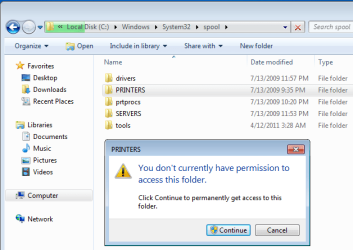
Use Windows (file) Explorer to navigate to here:
C:\Windows\System32\spool

Select* and delete the folder named PRINTERS.

*Select via single click or you might see this:
printers.PNG
If you see that, select Continue and then delete the folder named PRINTERS.

Restart the computer and the folder should automatically be recreated with the correct NTFS file permissions.

If those steps fail, there are stronger methods to delete folders.
 
Last edited:

My Computer

Computer type
Laptop
Computer Manufacturer/Model Number
Employer provided Dell Latitude
OS
W7 Pro SP1 64bit
CPU
i7
Memory
8GB
Graphics Card(s)
Intel HD Graphics
Hard Drives
crappy SSD
Antivirus
Employer mandated Symantec Endpoint Protection
Browser
Pale Moon 64bit, IE11 64bit & Chrome 64bit
Is the print job stuck at the printer or hanging in the server? What is the printer make and model? Does the printer also have a stand alone server attached? Some high end printers use devices like Fiery or ImagePass
Can you access the printer via a web browser interface and view the print queue from there? See below. You also can access Admin Mode from web interface.

View attachment 374796
 
Last edited:

My Computer

Computer type
PC/Desktop
Computer Manufacturer/Model Number
custom build
OS
Microsoft Windows 7 Ultimate 64-bit 7601 Multiprocessor Free Service Pack 1
CPU
AMD FX(tm)-6100 Six-Core Processor
Motherboard
ASUSTeK Computer INC. M5A78L-M LX PLUS
Memory
4.00 GB
Graphics Card(s)
AMD Radeon HD 6450
Sound Card
(1) AMD High Definition Audio Device (2) Realtek High Defi
Monitor(s) Displays
Toshiba 47ZV650U 47" LCD 240Hz
Screen Resolution
1920 x 1080 x 32 bits (4294967296 colors) @ 60 Hz
Hard Drives
(1) HDT722516DLA380 ATA Device (2) Hitachi HDS721025CLA382 ATA Device (3) ST4000VN000-1H4168 ATA Device (4) Generic STORAGE DEVICE USB Device (5) Generic STORAGE DEVICE USB Device (6) Generic STORAGE DEVICE USB Device (7) Generic STORAGE
PSU
Corsair CX430M
Case
WMI (Waste Management Incorporated)
Cooling
Yes, it's very cool.
Keyboard
Bluetooth KB & Mousepad
Internet Speed
Fios 15/5 and it sucks when Verizon is throttling it down
Antivirus
Avast, MSE and Malwarebytes
Browser
Firefox v.41.0.2 and IE 11
Other Info
2 years old and so far this rig still kicks butt
Good idea, cyclops.

stony41,
If you surf to the printer's web based interface, you might want to avoid IE10 or IE11. Some forum members have reported issues with those versions of IE when it comes to connecting to a local IP address.
 

My Computer

Computer type
Laptop
Computer Manufacturer/Model Number
Employer provided Dell Latitude
OS
W7 Pro SP1 64bit
CPU
i7
Memory
8GB
Graphics Card(s)
Intel HD Graphics
Hard Drives
crappy SSD
Antivirus
Employer mandated Symantec Endpoint Protection
Browser
Pale Moon 64bit, IE11 64bit & Chrome 64bit
Many thanks, UNI. Deleting the PRINTERS folder did it. I now know what to do if this sort of thing reoccurs.

Thanks also, Cyclops, but I have a simple wired network that usually works perfectly with printer sharing. This seems to have been a rare glitch. My wife sent something to one of my office printers because her printer needed some ink replacement. Usually I don't get involved in her printing.
 

My Computer

Computer type
PC/Desktop
Computer Manufacturer/Model Number
Sony and Toshiba all-in-ones, Medion and Lenovo laptops
OS
windows 7 home premium 64, windows 8.1 home premium 64
Glad that it worked out for you :-)
 

My Computer

Computer type
Laptop
Computer Manufacturer/Model Number
Employer provided Dell Latitude
OS
W7 Pro SP1 64bit
CPU
i7
Memory
8GB
Graphics Card(s)
Intel HD Graphics
Hard Drives
crappy SSD
Antivirus
Employer mandated Symantec Endpoint Protection
Browser
Pale Moon 64bit, IE11 64bit & Chrome 64bit
Hey stony41, good for you. Now I am going to beat this horse a little more. Based on the last statement about your wife sent the print job to your office printer, do you think authentication issues may have started this?
 

My Computer

Computer type
PC/Desktop
Computer Manufacturer/Model Number
custom build
OS
Microsoft Windows 7 Ultimate 64-bit 7601 Multiprocessor Free Service Pack 1
CPU
AMD FX(tm)-6100 Six-Core Processor
Motherboard
ASUSTeK Computer INC. M5A78L-M LX PLUS
Memory
4.00 GB
Graphics Card(s)
AMD Radeon HD 6450
Sound Card
(1) AMD High Definition Audio Device (2) Realtek High Defi
Monitor(s) Displays
Toshiba 47ZV650U 47" LCD 240Hz
Screen Resolution
1920 x 1080 x 32 bits (4294967296 colors) @ 60 Hz
Hard Drives
(1) HDT722516DLA380 ATA Device (2) Hitachi HDS721025CLA382 ATA Device (3) ST4000VN000-1H4168 ATA Device (4) Generic STORAGE DEVICE USB Device (5) Generic STORAGE DEVICE USB Device (6) Generic STORAGE DEVICE USB Device (7) Generic STORAGE
PSU
Corsair CX430M
Case
WMI (Waste Management Incorporated)
Cooling
Yes, it's very cool.
Keyboard
Bluetooth KB & Mousepad
Internet Speed
Fios 15/5 and it sucks when Verizon is throttling it down
Antivirus
Avast, MSE and Malwarebytes
Browser
Firefox v.41.0.2 and IE 11
Other Info
2 years old and so far this rig still kicks butt
Back
Top