Dell E5540 battery not charging

Lesadams

New member
Local time
12:41 PM
Messages
3
health is excellent, charge=1% In power command the charging / not charging indicator is constantly changing.
 

My Computer

Computer type
Laptop
Computer Manufacturer/Model Number
Dell Latitude E5540
OS
windows 7 Pro
CPU
I7
Browser
explorer11
Hello and welcome Les mate first lets take a look at the state of the batteries themselves
Using HW Info
PART A:
You can test the volts on the PSU with HW Info HWiNFO, HWiNFO32/64 - Download < download the right bit version and close the right hand window select Sensors and scroll down to the power section where you will see what the volts are doing see my pic. In my pic the section (Nuvoton) with VBATT is a dead give away you are in the section for the rail voltages. There are other section titles and one that pops up often is ITE
Now the voltage on the different rails have to be within 5% =+/- of what is required or the machine will not work properly if at all.
See this for the rail voltage info
Power Supply 101: A Reference Of Specifications - Power Supplies (Section 2.)
The original right hand window shows the machine running and is handy for that but for looking at the components in some detail close it and use the main left hand side panel
FOR OTHER COMPONENTS
PART B:
Open each small square with + in it on the section the components are in and then click on the individual component/s (it will highlight in blue) - in the right hand side will appear all sorts of details including brands speeds and other essential info that particular device. See pic for example.
Use PART A: and scroll down that particular window until you get to what you see in my pic
 

Attachments

  • LAP BATT MINE.PNG
    LAP BATT MINE.PNG
    22 KB · Views: 15

My Computer

Computer type
PC/Desktop
Computer Manufacturer/Model Number
Own build (new) Desk1 / Asus ROG Win 7 / Desk2 1st build
OS
Desk1 7 Home Prem / Desk2 10 Pro / Main lap Asus ROG 10 Pro 2 laptop Toshiba 7 Pro Asus P2520 7 & 10
CPU
Desk1 i5 3750K / Laptop i7 GTX 860M / Desk2 i5 2500
Motherboard
Desk1 Asus P877-V / Desk2 Gigabyte H67 UD3H / Laptop ?
Memory
Desk1 8GB (1866) / Desk2 16GB (1333) / Laptop 8Gb DDR3
Graphics Card(s)
Desk 1& 2NVidia GTX 650 & Laptops on board Intel
Sound Card
Desk 1 & 2 -XONAR DG Realtek High Def audio Laptop
Monitor(s) Displays
Desk 1 Benq HD 2450 / Desk2 Philips 24" / Laptop 17.5"
Screen Resolution
1920x1080 D1 & D2 & Laptop 1
Hard Drives
Desk1 Samsung 120GB 830 SSD
Asus ROG 256GB 850 Pro SSD
Desk2 Samsung 840 256 SSD
Toshiba 120GB EVO
PSU
Desk 1 Corsair HX 1050/ Laptop ? / Desk 2 Corsair HX 650
Case
Desk 1 Cooler HAF XM ? Toshiba laptop / Desk2 Coolermaster
Cooling
Fans on all Desk1 -2 Desk2 - all Coolermasters 5 Laptop ?
Keyboard
Desk 1 MS Sidewinder X6 Desk 2 MS Sidewinder X 4
Mouse
Desk 1&2 - Gigabyte MS 900 gamer - laptop - Logitec wireless
Internet Speed
ADSL2+
Other Info
One other Desktop (tester) and spare Toshba laptop both with SSD's
Running Kaspersky 2016 ISS on all machines config'd identically
Logitec audio stereo systems on each machine (x3)
Canon MG5250MFC
Router/modem TP-Link running WPA2SK
No Charge from what I see

As you can see in the picture it isnt charging Dells power manager says it is charging but it comes and goes. This Laptop doesnt have 50 hours of use on it and the battery hasnt been charged and discharged many times at all. It is a spare.
 

Attachments

  • batt.jpg
    batt.jpg
    57.3 KB · Views: 5

My Computer

Computer type
Laptop
Computer Manufacturer/Model Number
Dell Latitude E5540
OS
windows 7 Pro
CPU
I7
Browser
explorer11
Ok mate now this to me is a dead battery if the system is telling you the thing is charging .

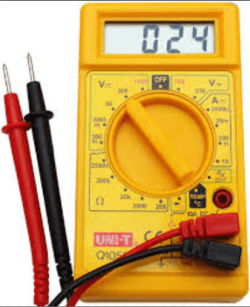
One thing you can do is test the voltage on the adaptor with a digital multimeter (see pic) to see if it is putting out the correct volts - typically 19v - it should be marked on the battery as 19v @ 4.2.AMPS or something like that.

The positive (red lead) usually is the centre hole and the negative is the outside contact "cylinder" in any case the meter will tell you if it is connected the wrong way round showing a minus sign - in front of the shown voltage - it will not hurt anything. Meters are not expensive around $5 - $10 would be suffice.

Now you say the battery has not been charged or discharged very often that means you have never run it on battery for any length of time?
As a matter of interest Lithium ion batteries do not last long if left to often completely discharge therefore one should always make sure the battery is kept charged to some realistic level. Plus they degrade from the day of manufacture meaning that they have a definite "use by date" usually between 3 - 5 years if you are careful with them. In theory you could buy a new two year old laptop witha battery that may only last 1 year.:)
 

Attachments

  • DIGITAL METER.PNG
    DIGITAL METER.PNG
    91.3 KB · Views: 14

My Computer

Computer type
PC/Desktop
Computer Manufacturer/Model Number
Own build (new) Desk1 / Asus ROG Win 7 / Desk2 1st build
OS
Desk1 7 Home Prem / Desk2 10 Pro / Main lap Asus ROG 10 Pro 2 laptop Toshiba 7 Pro Asus P2520 7 & 10
CPU
Desk1 i5 3750K / Laptop i7 GTX 860M / Desk2 i5 2500
Motherboard
Desk1 Asus P877-V / Desk2 Gigabyte H67 UD3H / Laptop ?
Memory
Desk1 8GB (1866) / Desk2 16GB (1333) / Laptop 8Gb DDR3
Graphics Card(s)
Desk 1& 2NVidia GTX 650 & Laptops on board Intel
Sound Card
Desk 1 & 2 -XONAR DG Realtek High Def audio Laptop
Monitor(s) Displays
Desk 1 Benq HD 2450 / Desk2 Philips 24" / Laptop 17.5"
Screen Resolution
1920x1080 D1 & D2 & Laptop 1
Hard Drives
Desk1 Samsung 120GB 830 SSD
Asus ROG 256GB 850 Pro SSD
Desk2 Samsung 840 256 SSD
Toshiba 120GB EVO
PSU
Desk 1 Corsair HX 1050/ Laptop ? / Desk 2 Corsair HX 650
Case
Desk 1 Cooler HAF XM ? Toshiba laptop / Desk2 Coolermaster
Cooling
Fans on all Desk1 -2 Desk2 - all Coolermasters 5 Laptop ?
Keyboard
Desk 1 MS Sidewinder X6 Desk 2 MS Sidewinder X 4
Mouse
Desk 1&2 - Gigabyte MS 900 gamer - laptop - Logitec wireless
Internet Speed
ADSL2+
Other Info
One other Desktop (tester) and spare Toshba laptop both with SSD's
Running Kaspersky 2016 ISS on all machines config'd identically
Logitec audio stereo systems on each machine (x3)
Canon MG5250MFC
Router/modem TP-Link running WPA2SK
It could be a dead battery. Dell -like many computer manufacturers - only warranties most batteries for a year. The fact that the BIOS shows excellent health means that the battery is probably good but that isn't always accurate. The other possibility would be that the connector on on the laptop is bad and it isn't really making a good contact with the battery. You would need another known good battery or another laptop that uses the same battery to test that theory.
 
Last edited:

My Computer

Computer type
PC/Desktop
OS
Windows 7 Ultimate x64
I have a new battery coming but would like to figure this out, it is very conflicting in results.
 

My Computer

Computer type
Laptop
Computer Manufacturer/Model Number
Dell Latitude E5540
OS
windows 7 Pro
CPU
I7
Browser
explorer11
Les both myself and KA have put forward what we think is wrong doesn't mean either or both of us are right - the only thing you can do is to know the power source (adaptor) is ok for what it is supposed to be supplying as I described. The volts are easy enough to confirm the current well it is a different kettle of fish as you need the meter between the source and device (battery in your case) and being a laptop that is not going to be possible.

The best way to find out what is going on is to fit that new battery. Now you also have to take into account who and where the battery is made ie is it a genuine part or a generic branded part. In my experience the genuine is the best (but also more expensive) the generics usually are good but often made from less than optimum materials and/or shoddily put together.


A good example - hand held cordless drills those rechargeable batteries in them for a genuine part will usually contain "D" size cells to make up the drill's operating voltage whereas the generic batteries often use "C" and even "AA" cells and are usually of a very poor quality. Hence they do not hold the charge for any length of time or last for any length of time. In addition they will use NiCad (nickel cadmium) battery cells instead of the preferred NiMH (metal hydride) cells, or best of all Lithium ion cells as one gets in alptop batteries and hand held devices.
It all bold down to cost of course which is why often those cheap cordless drills are so cheap :)
 

My Computer

Computer type
PC/Desktop
Computer Manufacturer/Model Number
Own build (new) Desk1 / Asus ROG Win 7 / Desk2 1st build
OS
Desk1 7 Home Prem / Desk2 10 Pro / Main lap Asus ROG 10 Pro 2 laptop Toshiba 7 Pro Asus P2520 7 & 10
CPU
Desk1 i5 3750K / Laptop i7 GTX 860M / Desk2 i5 2500
Motherboard
Desk1 Asus P877-V / Desk2 Gigabyte H67 UD3H / Laptop ?
Memory
Desk1 8GB (1866) / Desk2 16GB (1333) / Laptop 8Gb DDR3
Graphics Card(s)
Desk 1& 2NVidia GTX 650 & Laptops on board Intel
Sound Card
Desk 1 & 2 -XONAR DG Realtek High Def audio Laptop
Monitor(s) Displays
Desk 1 Benq HD 2450 / Desk2 Philips 24" / Laptop 17.5"
Screen Resolution
1920x1080 D1 & D2 & Laptop 1
Hard Drives
Desk1 Samsung 120GB 830 SSD
Asus ROG 256GB 850 Pro SSD
Desk2 Samsung 840 256 SSD
Toshiba 120GB EVO
PSU
Desk 1 Corsair HX 1050/ Laptop ? / Desk 2 Corsair HX 650
Case
Desk 1 Cooler HAF XM ? Toshiba laptop / Desk2 Coolermaster
Cooling
Fans on all Desk1 -2 Desk2 - all Coolermasters 5 Laptop ?
Keyboard
Desk 1 MS Sidewinder X6 Desk 2 MS Sidewinder X 4
Mouse
Desk 1&2 - Gigabyte MS 900 gamer - laptop - Logitec wireless
Internet Speed
ADSL2+
Other Info
One other Desktop (tester) and spare Toshba laptop both with SSD's
Running Kaspersky 2016 ISS on all machines config'd identically
Logitec audio stereo systems on each machine (x3)
Canon MG5250MFC
Router/modem TP-Link running WPA2SK
Back
Top