Desktop Background Wallpaper - Change in Windows 7 Starter

How to Change Desktop Background Wallpaper in Windows 7 Starter and Home Basic Editions

   Information
By default the Windows 7 Starter and Windows 7 Home Basic editions do not include the Personalization features such as change desktop background, Desktop Slideshow, Screen Saver, and Windows Color and Appearance.


This tutorial will show you how to add these features to the Windows 7 Starter and Windows 7 Home Basic editions.
  • For free desktop background wallpapers from Microsoft, see: Desktop backgrounds (wallpaper) - Microsoft Windows
  • By default, the Windows 7 Home Basic edition will only allow you to change the desktop background by right clicking on a image and clicking on Set as desktop background.
  • If you plan on doing a in-place upgrade to another higher level edition of Windows 7 in the future, then be sure to uninstall this Oceanis Change Background W7 or Personalization Panel program first to avoid incompatibility issues with it in the new edition of Windows 7. It was designed to only work in the Windows 7 Starter and Home Basic editions.


OPTION ONE

Using the "Oceanis Change Background W7" Program


   Note
This will show you how to download and use the program Oceanis Change Background W7 provided by Oceanis so that you can change the desktop background with a optional desktop slideshow (shuffle) in the Windows 7 Starter and Home Basic editions.


If the Oceanis program is closed, then the desktop background goes with it. You will need to leave the Oceanis program running to keep the background.
  • You must be using the Windows 7 Basic theme.
  • If the Oceanis Change Background W7 program no longer works properly after installing some Windows Updates, then uninstall and reinstall the Oceanis Change Background W7 program to have it run properly again.
  • If you get the black wallpaper in Windows 7 Starter, then:
  • Run a sfc /scannow command, and restart the computer afterwards. You may have some corrupted system files causing the background wallpaper to not display.
1. Click on the Download button below to download the Oceanis Change Background W7 ZIP file provided by Oceanis, click on Save, and save it to your Desktop.

Download


2. Open the downloaded ZIP file, extract (drag and drop) the exe file below to your desktop, and run it.
NOTE: You will be prompted to restart the computer to finish installing this program.
Oceanis_Change_Background_W7.exe
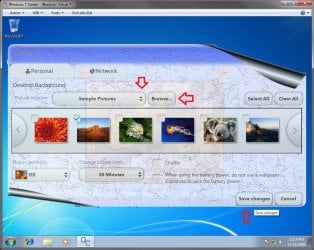
3. When your computer restarts, you will see this as your desktop background. Click on the Oceanis Change Background W7 shortcut to change your desktop background. (see screenshot below)
Program1.jpg
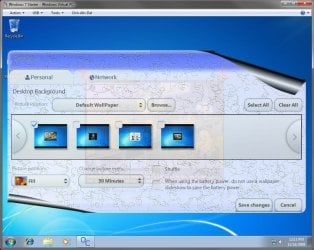
4. Browse to the images that you want to use and check (select) a image, or more than one image to have a desktop slideshow. Select the Picture position for how you want the images displayed, and any desktop slideshow settings if you selected more than one image. (see screenshot below)
NOTE: These options are just like the default ones in the other editions of Windows 7 here that are now being allowed by this program by Oceanis for the Windows 7 Starter edition.
Program.jpg

Program3.jpg
5. When done, click on Save changes. (see screenshots above)


OPTION TWO

Using the "Personalization Panel" Program


NOTE: This will show you how to download and use the Personalization Panel program to add Personalization to the desktop context menu to be able to change the desktop background, Windows Color and Appearance, Sounds, and Screen Saver in the Windows 7 Starter and Home Basic editions. This program does not add the desktop slideshow feature though.
1. Download and install the Personalization Panel program using Regular setup option at the Download link below.

Download


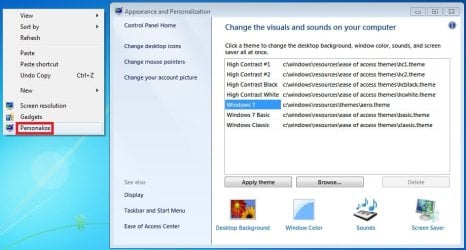
2. When finished installing, you can now right click on the desktop and click on Personalization.

3. If prompted by UAC, then click on Yes.

4. From here you can select and set the Appearance and Personalization options you like. (see screenshot below)
Personalize-1.jpg
5. Desktop Background
A) In Windows Starter
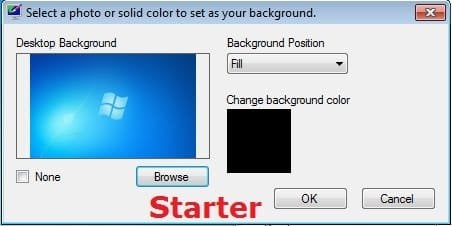
Starter-1.jpg
B) In Windows Home Basic
Basic-1.jpg
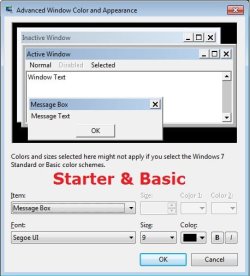
6. Windows Color
A) In Windows Starter
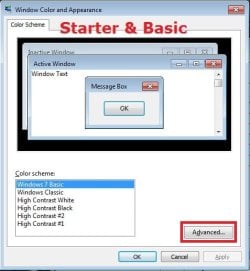
Starter-2.jpg

Starter-3.jpg
B) In Windows Home Basic, you will see this below first then the screenshots above.
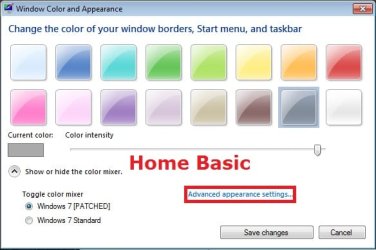
Basic-2A.jpg
7. Sounds
A) This is the same Sounds settings as in the other editions of Windows 7.
8. Screen Saver
A) This is the same Screen Saver settings as in the other editions of Windows 7.
That's it,
Shawn


Attachments

Last edited:
Hi, thanks for sharing, its just that I find it a problem that I have to open the program everytime. Is there a way you can fix this?

Thanks, GG

Oh, You don't need to keep the program running to keep the background! When you click "Save Changes" it automatically closes by itself! I must of been mistaken by "If the Oceanis program is closed, then the desktop background goes with it. You will need to leave the Oceanis program running to keep the background." meaning I must keep the program as an open window.
Anyway, this has been the BIGGEST help! I don't feel like I have a stupid computer now :)

Thank you so much for the help with the background wallpaper, but however, the Personalization Panel won't let mechange the colour of the window frame and taskbar. Is there a way to do that for Windows Starter?

Hello GG, and welcome to Seven Forums.

Sorry, but the option in 6B of Option Two is only available in Windows 7 Home Basic instead. :(
 
Last edited:

My Computer My Computer

At a glance

64-bit Windows 11 Pro for WorkstationsIntel i7-8700K OC'd to 5 GHz64 GB (4x16GB) G.SKILL TridentZ RGB DDR4 3600...ASUS ROG-STRIX-GTX1080TI-O11G-GAMING
Computer type
PC/Desktop
Computer Manufacturer/Model Number
Self built custom
OS
64-bit Windows 11 Pro for Workstations
CPU
Intel i7-8700K OC'd to 5 GHz
Motherboard
ASUS ROG Maximus XI Formula Z390
Memory
64 GB (4x16GB) G.SKILL TridentZ RGB DDR4 3600 MHz
Graphics Card(s)
ASUS ROG-STRIX-GTX1080TI-O11G-GAMING
Sound Card
Integrated
Monitor(s) Displays
2 x Samsung Odyssey G7 27"
Screen Resolution
2560x1440
Hard Drives
1TB Samsung 990 PRO M.2,
4TB Samsung 990 PRO PRO M.2,
TerraMaster F8 SSD Plus NAS
PSU
Seasonic Prime Titanium 850W
Case
Thermaltake Core P3
Cooling
Corsair Hydro H115i
Keyboard
Logitech wireless K800
Mouse
Logitech MX Master 4
Internet Speed
2 Gb/s Download and 100 Mb/s Upload
Antivirus
Malwarebyte Anti-Malware Premium
Browser
Google Chrome
Other Info
Logitech Z625 speaker system,
Logitech BRIO 4K Pro webcam,
HP Color LaserJet Pro MFP M477fdn,
APC SMART-UPS RT 1000 XL - SURT1000XLI,
Galaxy S23 Plus phone

My Computer My Computer

At a glance

64-bit Windows 11 Pro for WorkstationsIntel i7-8700K OC'd to 5 GHz64 GB (4x16GB) G.SKILL TridentZ RGB DDR4 3600...ASUS ROG-STRIX-GTX1080TI-O11G-GAMING
Computer type
PC/Desktop
Computer Manufacturer/Model Number
Self built custom
OS
64-bit Windows 11 Pro for Workstations
CPU
Intel i7-8700K OC'd to 5 GHz
Motherboard
ASUS ROG Maximus XI Formula Z390
Memory
64 GB (4x16GB) G.SKILL TridentZ RGB DDR4 3600 MHz
Graphics Card(s)
ASUS ROG-STRIX-GTX1080TI-O11G-GAMING
Sound Card
Integrated
Monitor(s) Displays
2 x Samsung Odyssey G7 27"
Screen Resolution
2560x1440
Hard Drives
1TB Samsung 990 PRO M.2,
4TB Samsung 990 PRO PRO M.2,
TerraMaster F8 SSD Plus NAS
PSU
Seasonic Prime Titanium 850W
Case
Thermaltake Core P3
Cooling
Corsair Hydro H115i
Keyboard
Logitech wireless K800
Mouse
Logitech MX Master 4
Internet Speed
2 Gb/s Download and 100 Mb/s Upload
Antivirus
Malwarebyte Anti-Malware Premium
Browser
Google Chrome
Other Info
Logitech Z625 speaker system,
Logitech BRIO 4K Pro webcam,
HP Color LaserJet Pro MFP M477fdn,
APC SMART-UPS RT 1000 XL - SURT1000XLI,
Galaxy S23 Plus phone
You're most welcome GG. :)
 

My Computer My Computer

At a glance

64-bit Windows 11 Pro for WorkstationsIntel i7-8700K OC'd to 5 GHz64 GB (4x16GB) G.SKILL TridentZ RGB DDR4 3600...ASUS ROG-STRIX-GTX1080TI-O11G-GAMING
Computer type
PC/Desktop
Computer Manufacturer/Model Number
Self built custom
OS
64-bit Windows 11 Pro for Workstations
CPU
Intel i7-8700K OC'd to 5 GHz
Motherboard
ASUS ROG Maximus XI Formula Z390
Memory
64 GB (4x16GB) G.SKILL TridentZ RGB DDR4 3600 MHz
Graphics Card(s)
ASUS ROG-STRIX-GTX1080TI-O11G-GAMING
Sound Card
Integrated
Monitor(s) Displays
2 x Samsung Odyssey G7 27"
Screen Resolution
2560x1440
Hard Drives
1TB Samsung 990 PRO M.2,
4TB Samsung 990 PRO PRO M.2,
TerraMaster F8 SSD Plus NAS
PSU
Seasonic Prime Titanium 850W
Case
Thermaltake Core P3
Cooling
Corsair Hydro H115i
Keyboard
Logitech wireless K800
Mouse
Logitech MX Master 4
Internet Speed
2 Gb/s Download and 100 Mb/s Upload
Antivirus
Malwarebyte Anti-Malware Premium
Browser
Google Chrome
Other Info
Logitech Z625 speaker system,
Logitech BRIO 4K Pro webcam,
HP Color LaserJet Pro MFP M477fdn,
APC SMART-UPS RT 1000 XL - SURT1000XLI,
Galaxy S23 Plus phone
Wow, a great tutorial. Thanks for the Forum.

I'm still having issues with my background image from the downloaded personalized software.

I followed the tutorial for windows 7 starter and downloaded the personalized software, but there no picture when I select an image, only the background color. When I boot up the computer, the image shows for a few seconds, but then goes away. I uninstalled the asus dock, checked the security settings, and admin settings. Not sure where to go from here.
 

My Computer My Computer

At a glance

Windows 7 Starter
OS
Windows 7 Starter
Hello grandinquisitor, and welcome to Seven Forums.

You might double check the items listed in the blue Note box under Option One to see if any may apply. If not, then you might try another option in the tutorial to see if it may work better for you.

Hope this helps for now, :)
Shawn
 

My Computer My Computer

At a glance

64-bit Windows 11 Pro for WorkstationsIntel i7-8700K OC'd to 5 GHz64 GB (4x16GB) G.SKILL TridentZ RGB DDR4 3600...ASUS ROG-STRIX-GTX1080TI-O11G-GAMING
Computer type
PC/Desktop
Computer Manufacturer/Model Number
Self built custom
OS
64-bit Windows 11 Pro for Workstations
CPU
Intel i7-8700K OC'd to 5 GHz
Motherboard
ASUS ROG Maximus XI Formula Z390
Memory
64 GB (4x16GB) G.SKILL TridentZ RGB DDR4 3600 MHz
Graphics Card(s)
ASUS ROG-STRIX-GTX1080TI-O11G-GAMING
Sound Card
Integrated
Monitor(s) Displays
2 x Samsung Odyssey G7 27"
Screen Resolution
2560x1440
Hard Drives
1TB Samsung 990 PRO M.2,
4TB Samsung 990 PRO PRO M.2,
TerraMaster F8 SSD Plus NAS
PSU
Seasonic Prime Titanium 850W
Case
Thermaltake Core P3
Cooling
Corsair Hydro H115i
Keyboard
Logitech wireless K800
Mouse
Logitech MX Master 4
Internet Speed
2 Gb/s Download and 100 Mb/s Upload
Antivirus
Malwarebyte Anti-Malware Premium
Browser
Google Chrome
Other Info
Logitech Z625 speaker system,
Logitech BRIO 4K Pro webcam,
HP Color LaserJet Pro MFP M477fdn,
APC SMART-UPS RT 1000 XL - SURT1000XLI,
Galaxy S23 Plus phone
Well, you see I'm trying not to do option one with oceanis (which is why I erased it); the program is just a bit clumsy in comparison to option 2. So my question is more in regards to option 2.
 

My Computer My Computer

At a glance

Windows 7 Starter
OS
Windows 7 Starter
That's fine, but still check the items in the blue Note box to see if any may be a cause. :)
 

My Computer My Computer

At a glance

64-bit Windows 11 Pro for WorkstationsIntel i7-8700K OC'd to 5 GHz64 GB (4x16GB) G.SKILL TridentZ RGB DDR4 3600...ASUS ROG-STRIX-GTX1080TI-O11G-GAMING
Computer type
PC/Desktop
Computer Manufacturer/Model Number
Self built custom
OS
64-bit Windows 11 Pro for Workstations
CPU
Intel i7-8700K OC'd to 5 GHz
Motherboard
ASUS ROG Maximus XI Formula Z390
Memory
64 GB (4x16GB) G.SKILL TridentZ RGB DDR4 3600 MHz
Graphics Card(s)
ASUS ROG-STRIX-GTX1080TI-O11G-GAMING
Sound Card
Integrated
Monitor(s) Displays
2 x Samsung Odyssey G7 27"
Screen Resolution
2560x1440
Hard Drives
1TB Samsung 990 PRO M.2,
4TB Samsung 990 PRO PRO M.2,
TerraMaster F8 SSD Plus NAS
PSU
Seasonic Prime Titanium 850W
Case
Thermaltake Core P3
Cooling
Corsair Hydro H115i
Keyboard
Logitech wireless K800
Mouse
Logitech MX Master 4
Internet Speed
2 Gb/s Download and 100 Mb/s Upload
Antivirus
Malwarebyte Anti-Malware Premium
Browser
Google Chrome
Other Info
Logitech Z625 speaker system,
Logitech BRIO 4K Pro webcam,
HP Color LaserJet Pro MFP M477fdn,
APC SMART-UPS RT 1000 XL - SURT1000XLI,
Galaxy S23 Plus phone
thank you very much..it works great..
 

My Computer My Computer

At a glance

windows 7 starter, 32 bit
OS
windows 7 starter, 32 bit
You're welcome nsuresh, and welcome to Seven Forums. :)
 

My Computer My Computer

At a glance

64-bit Windows 11 Pro for WorkstationsIntel i7-8700K OC'd to 5 GHz64 GB (4x16GB) G.SKILL TridentZ RGB DDR4 3600...ASUS ROG-STRIX-GTX1080TI-O11G-GAMING
Computer type
PC/Desktop
Computer Manufacturer/Model Number
Self built custom
OS
64-bit Windows 11 Pro for Workstations
CPU
Intel i7-8700K OC'd to 5 GHz
Motherboard
ASUS ROG Maximus XI Formula Z390
Memory
64 GB (4x16GB) G.SKILL TridentZ RGB DDR4 3600 MHz
Graphics Card(s)
ASUS ROG-STRIX-GTX1080TI-O11G-GAMING
Sound Card
Integrated
Monitor(s) Displays
2 x Samsung Odyssey G7 27"
Screen Resolution
2560x1440
Hard Drives
1TB Samsung 990 PRO M.2,
4TB Samsung 990 PRO PRO M.2,
TerraMaster F8 SSD Plus NAS
PSU
Seasonic Prime Titanium 850W
Case
Thermaltake Core P3
Cooling
Corsair Hydro H115i
Keyboard
Logitech wireless K800
Mouse
Logitech MX Master 4
Internet Speed
2 Gb/s Download and 100 Mb/s Upload
Antivirus
Malwarebyte Anti-Malware Premium
Browser
Google Chrome
Other Info
Logitech Z625 speaker system,
Logitech BRIO 4K Pro webcam,
HP Color LaserJet Pro MFP M477fdn,
APC SMART-UPS RT 1000 XL - SURT1000XLI,
Galaxy S23 Plus phone
Pictures not displaying

Hi there, I've downloaded the oceanis program and installed it, but when I browse to select a picture it does not show any - just the folders...hope you can help, I'm so tired of this blue windows desktop screen! :)
 

My Computer My Computer

At a glance

Windows 7 starter, 32 bit
OS
Windows 7 starter, 32 bit
Hello Mikajean,

When you browse in Oceanis, it's only to select a folder that the images are in first. After selecting the folder and clicking on OK, the images in that folder should then appear in the bar in Oceanis to select for your desktop background.

Hope this helps, :)
Shawn
 

My Computer My Computer

At a glance

64-bit Windows 11 Pro for WorkstationsIntel i7-8700K OC'd to 5 GHz64 GB (4x16GB) G.SKILL TridentZ RGB DDR4 3600...ASUS ROG-STRIX-GTX1080TI-O11G-GAMING
Computer type
PC/Desktop
Computer Manufacturer/Model Number
Self built custom
OS
64-bit Windows 11 Pro for Workstations
CPU
Intel i7-8700K OC'd to 5 GHz
Motherboard
ASUS ROG Maximus XI Formula Z390
Memory
64 GB (4x16GB) G.SKILL TridentZ RGB DDR4 3600 MHz
Graphics Card(s)
ASUS ROG-STRIX-GTX1080TI-O11G-GAMING
Sound Card
Integrated
Monitor(s) Displays
2 x Samsung Odyssey G7 27"
Screen Resolution
2560x1440
Hard Drives
1TB Samsung 990 PRO M.2,
4TB Samsung 990 PRO PRO M.2,
TerraMaster F8 SSD Plus NAS
PSU
Seasonic Prime Titanium 850W
Case
Thermaltake Core P3
Cooling
Corsair Hydro H115i
Keyboard
Logitech wireless K800
Mouse
Logitech MX Master 4
Internet Speed
2 Gb/s Download and 100 Mb/s Upload
Antivirus
Malwarebyte Anti-Malware Premium
Browser
Google Chrome
Other Info
Logitech Z625 speaker system,
Logitech BRIO 4K Pro webcam,
HP Color LaserJet Pro MFP M477fdn,
APC SMART-UPS RT 1000 XL - SURT1000XLI,
Galaxy S23 Plus phone
thanks for this forum, success for changed. quick and easy... :thumbsup: ;)
 

My Computer My Computer

At a glance

Windows 7 Starter 32 bit
Computer type
Laptop
Computer Manufacturer/Model Number
HP
OS
Windows 7 Starter 32 bit
Welcome to Seven Forums Wihel. Glad we could help. :)
 

My Computer My Computer

At a glance

64-bit Windows 11 Pro for WorkstationsIntel i7-8700K OC'd to 5 GHz64 GB (4x16GB) G.SKILL TridentZ RGB DDR4 3600...ASUS ROG-STRIX-GTX1080TI-O11G-GAMING
Computer type
PC/Desktop
Computer Manufacturer/Model Number
Self built custom
OS
64-bit Windows 11 Pro for Workstations
CPU
Intel i7-8700K OC'd to 5 GHz
Motherboard
ASUS ROG Maximus XI Formula Z390
Memory
64 GB (4x16GB) G.SKILL TridentZ RGB DDR4 3600 MHz
Graphics Card(s)
ASUS ROG-STRIX-GTX1080TI-O11G-GAMING
Sound Card
Integrated
Monitor(s) Displays
2 x Samsung Odyssey G7 27"
Screen Resolution
2560x1440
Hard Drives
1TB Samsung 990 PRO M.2,
4TB Samsung 990 PRO PRO M.2,
TerraMaster F8 SSD Plus NAS
PSU
Seasonic Prime Titanium 850W
Case
Thermaltake Core P3
Cooling
Corsair Hydro H115i
Keyboard
Logitech wireless K800
Mouse
Logitech MX Master 4
Internet Speed
2 Gb/s Download and 100 Mb/s Upload
Antivirus
Malwarebyte Anti-Malware Premium
Browser
Google Chrome
Other Info
Logitech Z625 speaker system,
Logitech BRIO 4K Pro webcam,
HP Color LaserJet Pro MFP M477fdn,
APC SMART-UPS RT 1000 XL - SURT1000XLI,
Galaxy S23 Plus phone
i cant use my desktop after installing oceanis

Hello
After downloading and installing the oceanis software , i can't right click on my desktop nor the usual desktop icons are coming on the screen. i can't even copy and paste any folder.Please help me as i dont know what to do now.
thanking you
 

My Computer My Computer

At a glance

windows 7 home premium 32bit
OS
windows 7 home premium 32bit
Hello Santosh,

You may have another issue at hand since I have never heard of this program causing this before. You might see if you may be able to do a system restore at boot using a restore point (if available) dated before this happened to hopefully fix this for you.

Hope this helps for now, :)
Shawn
 

My Computer My Computer

At a glance

64-bit Windows 11 Pro for WorkstationsIntel i7-8700K OC'd to 5 GHz64 GB (4x16GB) G.SKILL TridentZ RGB DDR4 3600...ASUS ROG-STRIX-GTX1080TI-O11G-GAMING
Computer type
PC/Desktop
Computer Manufacturer/Model Number
Self built custom
OS
64-bit Windows 11 Pro for Workstations
CPU
Intel i7-8700K OC'd to 5 GHz
Motherboard
ASUS ROG Maximus XI Formula Z390
Memory
64 GB (4x16GB) G.SKILL TridentZ RGB DDR4 3600 MHz
Graphics Card(s)
ASUS ROG-STRIX-GTX1080TI-O11G-GAMING
Sound Card
Integrated
Monitor(s) Displays
2 x Samsung Odyssey G7 27"
Screen Resolution
2560x1440
Hard Drives
1TB Samsung 990 PRO M.2,
4TB Samsung 990 PRO PRO M.2,
TerraMaster F8 SSD Plus NAS
PSU
Seasonic Prime Titanium 850W
Case
Thermaltake Core P3
Cooling
Corsair Hydro H115i
Keyboard
Logitech wireless K800
Mouse
Logitech MX Master 4
Internet Speed
2 Gb/s Download and 100 Mb/s Upload
Antivirus
Malwarebyte Anti-Malware Premium
Browser
Google Chrome
Other Info
Logitech Z625 speaker system,
Logitech BRIO 4K Pro webcam,
HP Color LaserJet Pro MFP M477fdn,
APC SMART-UPS RT 1000 XL - SURT1000XLI,
Galaxy S23 Plus phone
SuperAntiSpyware detection

Hi,

I'm new to this board. I installed the Oceanis software to change the desktop background on my Windows 7 Starter netbook. I love having my pictures as wallpaper again. :) Since then, however, my SuperAntispyware Free version has been showing a Malware.Trace detection in a registry key. I haven't allowed SAS to quarantine this, since it's the WinLogonShell, and I'm concerned about not being able to log in to the laptop. In checking the registry entry in question, I see that there is now a reference in the WinLogon#Shell to C://Program Files/Oceanis/SystemSetting/WallpaperAgent.exe.

I've filed a false positive report with SAS, have not heard back from them after several days. I am discussing it with them on their message board. I've scanned the Oceanis software and WallpaperAgent.exe at Virustotal.com and they're clean. I use ESET Smart Security and it isn't showing any issues. Does anyone else here use SuperAntiSpyware and are you seeing any issues with the Oceanis software?

I'm just trying to rule things out at this point. I guess my next step is to uninstall the Oceanis software and see if that registry entry disappears and what SAS then shows. (In other words, if it isn't the WallpaperAgent.exe entry that SAS is upset about, maybe there's something else in there???)
 
Last edited:

My Computer My Computer

At a glance

Windows 7 Starter 32 bit
Computer type
PC/Desktop
OS
Windows 7 Starter 32 bit
Hello MaddyMay, and welcome to Seven Forums.

Yeah, for some reason SAS gives a false positive for WallpaperAgent.exe. Hopefully that will get sorted soon.
 

My Computer My Computer

At a glance

64-bit Windows 11 Pro for WorkstationsIntel i7-8700K OC'd to 5 GHz64 GB (4x16GB) G.SKILL TridentZ RGB DDR4 3600...ASUS ROG-STRIX-GTX1080TI-O11G-GAMING
Computer type
PC/Desktop
Computer Manufacturer/Model Number
Self built custom
OS
64-bit Windows 11 Pro for Workstations
CPU
Intel i7-8700K OC'd to 5 GHz
Motherboard
ASUS ROG Maximus XI Formula Z390
Memory
64 GB (4x16GB) G.SKILL TridentZ RGB DDR4 3600 MHz
Graphics Card(s)
ASUS ROG-STRIX-GTX1080TI-O11G-GAMING
Sound Card
Integrated
Monitor(s) Displays
2 x Samsung Odyssey G7 27"
Screen Resolution
2560x1440
Hard Drives
1TB Samsung 990 PRO M.2,
4TB Samsung 990 PRO PRO M.2,
TerraMaster F8 SSD Plus NAS
PSU
Seasonic Prime Titanium 850W
Case
Thermaltake Core P3
Cooling
Corsair Hydro H115i
Keyboard
Logitech wireless K800
Mouse
Logitech MX Master 4
Internet Speed
2 Gb/s Download and 100 Mb/s Upload
Antivirus
Malwarebyte Anti-Malware Premium
Browser
Google Chrome
Other Info
Logitech Z625 speaker system,
Logitech BRIO 4K Pro webcam,
HP Color LaserJet Pro MFP M477fdn,
APC SMART-UPS RT 1000 XL - SURT1000XLI,
Galaxy S23 Plus phone
When I have SAS scan WallpaperAgent.exe, it comes up clean. It is only detecting the WinLogon#Shell in the registry, which has an entry in the right pane relating to WallpaperAgent.exe. So I'm not sure if SAS is simply complaining about there being any .exe in that location. I just wondered if anyone else using the Desktop Background Wallpaper changer was having this issue with SAS as well. I've looked at the registry and I don't see what else in there could be bothering SAS, although I don't claim to be an expert on the subject.
 

My Computer My Computer

At a glance

Windows 7 Starter 32 bit
Computer type
PC/Desktop
OS
Windows 7 Starter 32 bit
Back
Top