Desktop Background Wallpaper - Change in Windows 7 Starter

How to Change Desktop Background Wallpaper in Windows 7 Starter and Home Basic Editions

   Information
By default the Windows 7 Starter and Windows 7 Home Basic editions do not include the Personalization features such as change desktop background, Desktop Slideshow, Screen Saver, and Windows Color and Appearance.


This tutorial will show you how to add these features to the Windows 7 Starter and Windows 7 Home Basic editions.
  • For free desktop background wallpapers from Microsoft, see: Desktop backgrounds (wallpaper) - Microsoft Windows
  • By default, the Windows 7 Home Basic edition will only allow you to change the desktop background by right clicking on a image and clicking on Set as desktop background.
  • If you plan on doing a in-place upgrade to another higher level edition of Windows 7 in the future, then be sure to uninstall this Oceanis Change Background W7 or Personalization Panel program first to avoid incompatibility issues with it in the new edition of Windows 7. It was designed to only work in the Windows 7 Starter and Home Basic editions.


OPTION ONE

Using the "Oceanis Change Background W7" Program


   Note
This will show you how to download and use the program Oceanis Change Background W7 provided by Oceanis so that you can change the desktop background with a optional desktop slideshow (shuffle) in the Windows 7 Starter and Home Basic editions.


If the Oceanis program is closed, then the desktop background goes with it. You will need to leave the Oceanis program running to keep the background.
  • You must be using the Windows 7 Basic theme.
  • If the Oceanis Change Background W7 program no longer works properly after installing some Windows Updates, then uninstall and reinstall the Oceanis Change Background W7 program to have it run properly again.
  • If you get the black wallpaper in Windows 7 Starter, then:
  • Run a sfc /scannow command, and restart the computer afterwards. You may have some corrupted system files causing the background wallpaper to not display.
1. Click on the Download button below to download the Oceanis Change Background W7 ZIP file provided by Oceanis, click on Save, and save it to your Desktop.

Download


2. Open the downloaded ZIP file, extract (drag and drop) the exe file below to your desktop, and run it.
NOTE: You will be prompted to restart the computer to finish installing this program.
Oceanis_Change_Background_W7.exe
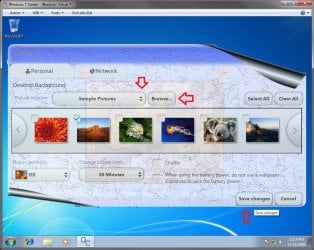
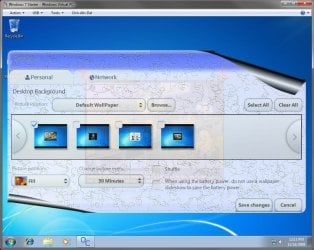
3. When your computer restarts, you will see this as your desktop background. Click on the Oceanis Change Background W7 shortcut to change your desktop background. (see screenshot below)
Program1.jpg
4. Browse to the images that you want to use and check (select) a image, or more than one image to have a desktop slideshow. Select the Picture position for how you want the images displayed, and any desktop slideshow settings if you selected more than one image. (see screenshot below)
NOTE: These options are just like the default ones in the other editions of Windows 7 here that are now being allowed by this program by Oceanis for the Windows 7 Starter edition.
Program.jpg

Program3.jpg
5. When done, click on Save changes. (see screenshots above)


OPTION TWO

Using the "Personalization Panel" Program


NOTE: This will show you how to download and use the Personalization Panel program to add Personalization to the desktop context menu to be able to change the desktop background, Windows Color and Appearance, Sounds, and Screen Saver in the Windows 7 Starter and Home Basic editions. This program does not add the desktop slideshow feature though.
1. Download and install the Personalization Panel program using Regular setup option at the Download link below.

Download


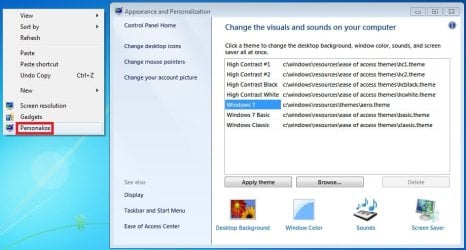
2. When finished installing, you can now right click on the desktop and click on Personalization.

3. If prompted by UAC, then click on Yes.

4. From here you can select and set the Appearance and Personalization options you like. (see screenshot below)
Personalize-1.jpg
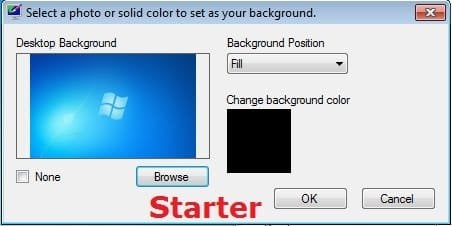
5. Desktop Background
A) In Windows Starter
Starter-1.jpg
B) In Windows Home Basic
Basic-1.jpg
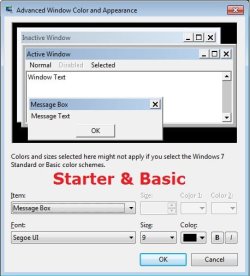
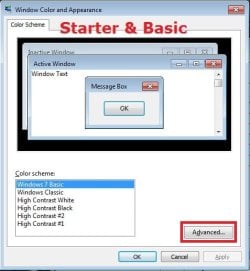
6. Windows Color
A) In Windows Starter
Starter-2.jpg

Starter-3.jpg
B) In Windows Home Basic, you will see this below first then the screenshots above.
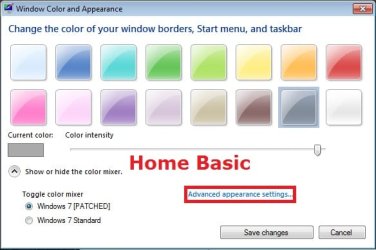
Basic-2A.jpg
7. Sounds
A) This is the same Sounds settings as in the other editions of Windows 7.
8. Screen Saver
A) This is the same Screen Saver settings as in the other editions of Windows 7.
That's it,
Shawn


Attachments

Last edited:
Oceanis wont work

I've uninstalled and reinstalled. The Funny Background shows up telling me to click on the icon to change my background, however the program wont open and keeps asking me to restart my computer and I've done that several times. PLEASE HELP!!!
 

My Computer My Computer

At a glance

Windows 7 starterIntel Atom N270
Computer Manufacturer/Model Number
Acer/Aspire One
OS
Windows 7 starter
CPU
Intel Atom N270
argh

I loaded Oceanis a couple days ago, worked fine... then a batch of windows updates came in yesterday and today (Jan 11)... that reset the background, AND Oceanis no longer does anything (functions, but click Update & close, nothing takes effect).

What's the point???
 

My Computer My Computer

At a glance

W7 Starter
OS
W7 Starter
I had those updates man, and had no problems at all lol. Try reinstalling
 

My Computer My Computer

At a glance

Windows 7 StarterIntel Atom1GB DDR2 RAMIntegrated
Computer Manufacturer/Model Number
Acer Aspire One Netbook
OS
Windows 7 Starter
CPU
Intel Atom
Memory
1GB DDR2 RAM
Graphics Card(s)
Integrated
Monitor(s) Displays
10.1" LCD Screen
Hard Drives
120GB HDD
Thanks

Thank you for the information finally i can change my background
 

My Computer My Computer

At a glance

windows 7 starter1.00Ghz1 GB
OS
windows 7 starter
CPU
1.00Ghz
Memory
1 GB
This rocks! Do you know where I can get the monkeys in 1024x600? :)
 

My Computer My Computer

At a glance

8.1 x64i7 4510U8GB DDR3GeForce 820M
Computer type
Laptop
Computer Manufacturer/Model Number
Asus R510L
OS
8.1 x64
CPU
i7 4510U
Memory
8GB DDR3
Graphics Card(s)
GeForce 820M
Sound Card
Eastern Electric Supreme; Emotiva UMC-200; Astell&Kern AK240
Monitor(s) Displays
LG 42LH5000
Screen Resolution
1920x1080
Hard Drives
1TB internal; 45TB external
PSU
Li-ion
Keyboard
Logitech K800
Mouse
Logitech G400
Internet Speed
20Mbit/s up, 200Mbit/s down
Browser
IE 11
Hello HDMI,

Sorry, but I have no idea. You might try Google. :(
 

My Computer My Computer

At a glance

64-bit Windows 11 Pro for WorkstationsIntel i7-8700K OC'd to 5 GHz64 GB (4x16GB) G.SKILL TridentZ RGB DDR4 3600...ASUS ROG-STRIX-GTX1080TI-O11G-GAMING
Computer type
PC/Desktop
Computer Manufacturer/Model Number
Self built custom
OS
64-bit Windows 11 Pro for Workstations
CPU
Intel i7-8700K OC'd to 5 GHz
Motherboard
ASUS ROG Maximus XI Formula Z390
Memory
64 GB (4x16GB) G.SKILL TridentZ RGB DDR4 3600 MHz
Graphics Card(s)
ASUS ROG-STRIX-GTX1080TI-O11G-GAMING
Sound Card
Integrated
Monitor(s) Displays
2 x Samsung Odyssey G7 27"
Screen Resolution
2560x1440
Hard Drives
1TB Samsung 990 PRO M.2,
4TB Samsung 990 PRO PRO M.2,
TerraMaster F8 SSD Plus NAS
PSU
Seasonic Prime Titanium 850W
Case
Thermaltake Core P3
Cooling
Corsair Hydro H115i
Keyboard
Logitech wireless K800
Mouse
Logitech MX Master 4
Internet Speed
2 Gb/s Download and 100 Mb/s Upload
Antivirus
Malwarebyte Anti-Malware Premium
Browser
Google Chrome
Other Info
Logitech Z625 speaker system,
Logitech BRIO 4K Pro webcam,
HP Color LaserJet Pro MFP M477fdn,
APC SMART-UPS RT 1000 XL - SURT1000XLI,
Galaxy S23 Plus phone
background all changed!!!

Thank you, thank you, finally I can personalise my netbook!

I am still chuckling to myself though at the fact that my main priority has been to seek out how to change the background and not interested in running system of Windows 7!!!:D
 

My Computer My Computer

At a glance

windows 7 starter edition
OS
windows 7 starter edition
LOL, you're welcome Charliegirl, and welcome to Seven Forums. :)
 

My Computer My Computer

At a glance

64-bit Windows 11 Pro for WorkstationsIntel i7-8700K OC'd to 5 GHz64 GB (4x16GB) G.SKILL TridentZ RGB DDR4 3600...ASUS ROG-STRIX-GTX1080TI-O11G-GAMING
Computer type
PC/Desktop
Computer Manufacturer/Model Number
Self built custom
OS
64-bit Windows 11 Pro for Workstations
CPU
Intel i7-8700K OC'd to 5 GHz
Motherboard
ASUS ROG Maximus XI Formula Z390
Memory
64 GB (4x16GB) G.SKILL TridentZ RGB DDR4 3600 MHz
Graphics Card(s)
ASUS ROG-STRIX-GTX1080TI-O11G-GAMING
Sound Card
Integrated
Monitor(s) Displays
2 x Samsung Odyssey G7 27"
Screen Resolution
2560x1440
Hard Drives
1TB Samsung 990 PRO M.2,
4TB Samsung 990 PRO PRO M.2,
TerraMaster F8 SSD Plus NAS
PSU
Seasonic Prime Titanium 850W
Case
Thermaltake Core P3
Cooling
Corsair Hydro H115i
Keyboard
Logitech wireless K800
Mouse
Logitech MX Master 4
Internet Speed
2 Gb/s Download and 100 Mb/s Upload
Antivirus
Malwarebyte Anti-Malware Premium
Browser
Google Chrome
Other Info
Logitech Z625 speaker system,
Logitech BRIO 4K Pro webcam,
HP Color LaserJet Pro MFP M477fdn,
APC SMART-UPS RT 1000 XL - SURT1000XLI,
Galaxy S23 Plus phone
Please help solve disappearing Oceanis problem

Hi Shawn. I'm very psyched about Oceanis and very close to making it work (hoping to work around my Windows 7 Starter Editions disappointing lack of personalization options), but I can't quite get there despite tryiing all the tips I've found so far in the tutorial. Please help!

As with the other people who've had a similar problem, I'm able to change the background in Oceanis, but when I click "save," it disappears and the program closes. Here's what I've done so far in an attempt to sort it out:

1) uninstalled and reinstalled Oceanis--and restarted properly.
2) confirmed that I have no 3rd party theme or skin (the netbook is brand new)
3) set my User Account Control to the lowest level
4) attempted to run the program as an administrator
5) made sure the "turn off all unnecessary animations" box was unchecked in the Ease of Acess Center.

Any suggestions? I'd hate to have to spring for an upgrade in this situation and I'm told that the netbook might have trouble running the entire Win 7 package in any case...
 

My Computer My Computer

At a glance

Windows 7 starter
OS
Windows 7 starter
How much of the system resources, or memory, will this use up? I'm on an Asus netbook and I need all the available memory I can get. ;) Is this a resource hog?
 

My Computer My Computer

At a glance

Windows 7 Home PremiumQuad Q9550 @ 2.83GHz4GB (2x2GB) PC6400 DDR2/800 (2.75 useable)GeForce 9800 GTX+ 1GB
Computer Manufacturer/Model Number
Custom Built
OS
Windows 7 Home Premium
CPU
Quad Q9550 @ 2.83GHz
Motherboard
Asus P5N-T Deluxe nForce 780i SLI
Memory
4GB (2x2GB) PC6400 DDR2/800 (2.75 useable)
Graphics Card(s)
GeForce 9800 GTX+ 1GB
Sound Card
on-board
Monitor(s) Displays
hp w2408h
Screen Resolution
1920x1200
Hard Drives
-150GB Western Digital VelociRaptor 10,000RPM SATA-II 3.0Gb/s 16MB Cache
-1TB SATA-II 3.0Gb/s 32MB Cache 7200RPM
PSU
Thermaltake ToughPower 1,000 Watts
Case
Thermaltake M9 VI1000BWS Mid-Tower
Cooling
Asetek Liquid CPU Cooling System / 1 intake & 3 exhaust fans
Keyboard
Logitech Wave
Mouse
Logitech LX8

My Computer My Computer

At a glance

8.1 x64i7 4510U8GB DDR3GeForce 820M
Computer type
Laptop
Computer Manufacturer/Model Number
Asus R510L
OS
8.1 x64
CPU
i7 4510U
Memory
8GB DDR3
Graphics Card(s)
GeForce 820M
Sound Card
Eastern Electric Supreme; Emotiva UMC-200; Astell&Kern AK240
Monitor(s) Displays
LG 42LH5000
Screen Resolution
1920x1080
Hard Drives
1TB internal; 45TB external
PSU
Li-ion
Keyboard
Logitech K800
Mouse
Logitech G400
Internet Speed
20Mbit/s up, 200Mbit/s down
Browser
IE 11
How much of the system resources, or memory, will this use up? I'm on an Asus netbook and I need all the available memory I can get. ;) Is this a resource hog?

Hello Calvin,

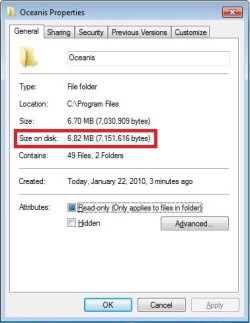
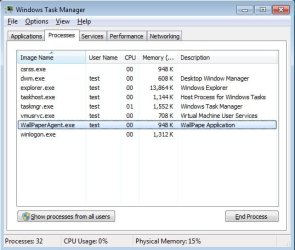
It uses very little resources. While not opened, it only uses 948K of RAM for the background process. It uses 6.82 MB of HDD space when installed.

Properties.jpgTask_Manager.jpg

Hope this helps,
Shawn
 

My Computer My Computer

At a glance

64-bit Windows 11 Pro for WorkstationsIntel i7-8700K OC'd to 5 GHz64 GB (4x16GB) G.SKILL TridentZ RGB DDR4 3600...ASUS ROG-STRIX-GTX1080TI-O11G-GAMING
Computer type
PC/Desktop
Computer Manufacturer/Model Number
Self built custom
OS
64-bit Windows 11 Pro for Workstations
CPU
Intel i7-8700K OC'd to 5 GHz
Motherboard
ASUS ROG Maximus XI Formula Z390
Memory
64 GB (4x16GB) G.SKILL TridentZ RGB DDR4 3600 MHz
Graphics Card(s)
ASUS ROG-STRIX-GTX1080TI-O11G-GAMING
Sound Card
Integrated
Monitor(s) Displays
2 x Samsung Odyssey G7 27"
Screen Resolution
2560x1440
Hard Drives
1TB Samsung 990 PRO M.2,
4TB Samsung 990 PRO PRO M.2,
TerraMaster F8 SSD Plus NAS
PSU
Seasonic Prime Titanium 850W
Case
Thermaltake Core P3
Cooling
Corsair Hydro H115i
Keyboard
Logitech wireless K800
Mouse
Logitech MX Master 4
Internet Speed
2 Gb/s Download and 100 Mb/s Upload
Antivirus
Malwarebyte Anti-Malware Premium
Browser
Google Chrome
Other Info
Logitech Z625 speaker system,
Logitech BRIO 4K Pro webcam,
HP Color LaserJet Pro MFP M477fdn,
APC SMART-UPS RT 1000 XL - SURT1000XLI,
Galaxy S23 Plus phone

My Computer My Computer

At a glance

64-bit Windows 11 Pro for WorkstationsIntel i7-8700K OC'd to 5 GHz64 GB (4x16GB) G.SKILL TridentZ RGB DDR4 3600...ASUS ROG-STRIX-GTX1080TI-O11G-GAMING
Computer type
PC/Desktop
Computer Manufacturer/Model Number
Self built custom
OS
64-bit Windows 11 Pro for Workstations
CPU
Intel i7-8700K OC'd to 5 GHz
Motherboard
ASUS ROG Maximus XI Formula Z390
Memory
64 GB (4x16GB) G.SKILL TridentZ RGB DDR4 3600 MHz
Graphics Card(s)
ASUS ROG-STRIX-GTX1080TI-O11G-GAMING
Sound Card
Integrated
Monitor(s) Displays
2 x Samsung Odyssey G7 27"
Screen Resolution
2560x1440
Hard Drives
1TB Samsung 990 PRO M.2,
4TB Samsung 990 PRO PRO M.2,
TerraMaster F8 SSD Plus NAS
PSU
Seasonic Prime Titanium 850W
Case
Thermaltake Core P3
Cooling
Corsair Hydro H115i
Keyboard
Logitech wireless K800
Mouse
Logitech MX Master 4
Internet Speed
2 Gb/s Download and 100 Mb/s Upload
Antivirus
Malwarebyte Anti-Malware Premium
Browser
Google Chrome
Other Info
Logitech Z625 speaker system,
Logitech BRIO 4K Pro webcam,
HP Color LaserJet Pro MFP M477fdn,
APC SMART-UPS RT 1000 XL - SURT1000XLI,
Galaxy S23 Plus phone
i was not able to change the wallpaper

Hi,
I bought Lenovo S10 loaded with windows 7 starter OS, i followed all the steps u have mentioned in ur post made sure UAC is off, run as administrator, restarted too, but still not able to change the wallpaper... please help me :cry:
 

My Computer My Computer

At a glance

windows 7 starter
OS
windows 7 starter
Hi Shawn. I'm very psyched about Oceanis and very close to making it work (hoping to work around my Windows 7 Starter Editions disappointing lack of personalization options), but I can't quite get there despite tryiing all the tips I've found so far in the tutorial. Please help!

As with the other people who've had a similar problem, I'm able to change the background in Oceanis, but when I click "save," it disappears and the program closes. Here's what I've done so far in an attempt to sort it out:

1) uninstalled and reinstalled Oceanis--and restarted properly.
2) confirmed that I have no 3rd party theme or skin (the netbook is brand new)
3) set my User Account Control to the lowest level
4) attempted to run the program as an administrator
5) made sure the "turn off all unnecessary animations" box was unchecked in the Ease of Acess Center.

Any suggestions? I'd hate to have to spring for an upgrade in this situation and I'm told that the netbook might have trouble running the entire Win 7 package in any case...
Finally sloved the problem making sure of step 5....
thanks a lot
 

My Computer My Computer

At a glance

windows 7 starter
OS
windows 7 starter
Hello!
Bought an ASUS loaded with Windows 7 starter. Installed the OCEANIS desktop program and it works perfectly!

Thanks so much....

WG

OOps, looks like I spoke too soon! Every time the computer boots up, I have to change the background from the original to to the background I want by clicking on the shortcut. I don't think I should have to do that if the program was working properly.....Any suggestions?
BTW: My wife and I share the netbook. We have a 2 user setup if that makes a difference....

WG


MORE FEEDBACK
If the computer you are using is being used by 2 people, both have to be administrators and both people have to download the program. This is what works for us. Now I have a different background than my wife does, even after powering off and on!! Good deal!
 
Last edited:

My Computer My Computer

At a glance

windows 7 starter
OS
windows 7 starter
I trying to install this application, but not work well, my netbook has hang for moment. ANd the i try another application star dock color , n its run very well.my be oceanis have more a lot bugs .
 

My Computer My Computer

At a glance

windows 7 starter
Computer Manufacturer/Model Number
toshiba nb 300
OS
windows 7 starter
Problems

I downloaded this program and it worked for a few days. I recently installed new windows updates and now all I have is a black screen. I have restarted multiple times and even tried uninstalling and then reinstalling this program but now I have NO desktop background. Even when the program was uninstalled on my machine, there was only a black background. Does anyone know how to fix this?

Amanda
 

My Computer My Computer

At a glance

Windows 7 Starter
OS
Windows 7 Starter
Hello Amanda, and welcome to Seven Forums.

You might see if running a sfc /scannow command may be able to fix this for you afterwards.

Hope this helps,
Shawn
 

My Computer My Computer

At a glance

64-bit Windows 11 Pro for WorkstationsIntel i7-8700K OC'd to 5 GHz64 GB (4x16GB) G.SKILL TridentZ RGB DDR4 3600...ASUS ROG-STRIX-GTX1080TI-O11G-GAMING
Computer type
PC/Desktop
Computer Manufacturer/Model Number
Self built custom
OS
64-bit Windows 11 Pro for Workstations
CPU
Intel i7-8700K OC'd to 5 GHz
Motherboard
ASUS ROG Maximus XI Formula Z390
Memory
64 GB (4x16GB) G.SKILL TridentZ RGB DDR4 3600 MHz
Graphics Card(s)
ASUS ROG-STRIX-GTX1080TI-O11G-GAMING
Sound Card
Integrated
Monitor(s) Displays
2 x Samsung Odyssey G7 27"
Screen Resolution
2560x1440
Hard Drives
1TB Samsung 990 PRO M.2,
4TB Samsung 990 PRO PRO M.2,
TerraMaster F8 SSD Plus NAS
PSU
Seasonic Prime Titanium 850W
Case
Thermaltake Core P3
Cooling
Corsair Hydro H115i
Keyboard
Logitech wireless K800
Mouse
Logitech MX Master 4
Internet Speed
2 Gb/s Download and 100 Mb/s Upload
Antivirus
Malwarebyte Anti-Malware Premium
Browser
Google Chrome
Other Info
Logitech Z625 speaker system,
Logitech BRIO 4K Pro webcam,
HP Color LaserJet Pro MFP M477fdn,
APC SMART-UPS RT 1000 XL - SURT1000XLI,
Galaxy S23 Plus phone
Still Not Working

I'm actually having the same problem as Heffabunns. The picture will show up while windows is restarting but as soon as the icons show up, it goes away and I've only got a black screen. I tried running a sfc /scannnow and it didn't find anything. I also tried the solution offered to Heffabunns and that didn't work. I am doing all this as the administrator, have checked by UAC settings, restarted the computer multiple times, and don't have any 3rd party skin programs installed.

Amanda
 

My Computer My Computer

At a glance

Windows 7 Starter
OS
Windows 7 Starter
Back
Top