Desktop Background Wallpaper - Change in Windows 7 Starter

How to Change Desktop Background Wallpaper in Windows 7 Starter and Home Basic Editions

   Information
By default the Windows 7 Starter and Windows 7 Home Basic editions do not include the Personalization features such as change desktop background, Desktop Slideshow, Screen Saver, and Windows Color and Appearance.


This tutorial will show you how to add these features to the Windows 7 Starter and Windows 7 Home Basic editions.
  • For free desktop background wallpapers from Microsoft, see: Desktop backgrounds (wallpaper) - Microsoft Windows
  • By default, the Windows 7 Home Basic edition will only allow you to change the desktop background by right clicking on a image and clicking on Set as desktop background.
  • If you plan on doing a in-place upgrade to another higher level edition of Windows 7 in the future, then be sure to uninstall this Oceanis Change Background W7 or Personalization Panel program first to avoid incompatibility issues with it in the new edition of Windows 7. It was designed to only work in the Windows 7 Starter and Home Basic editions.


OPTION ONE

Using the "Oceanis Change Background W7" Program


   Note
This will show you how to download and use the program Oceanis Change Background W7 provided by Oceanis so that you can change the desktop background with a optional desktop slideshow (shuffle) in the Windows 7 Starter and Home Basic editions.


If the Oceanis program is closed, then the desktop background goes with it. You will need to leave the Oceanis program running to keep the background.
  • You must be using the Windows 7 Basic theme.
  • If the Oceanis Change Background W7 program no longer works properly after installing some Windows Updates, then uninstall and reinstall the Oceanis Change Background W7 program to have it run properly again.
  • If you get the black wallpaper in Windows 7 Starter, then:
  • Run a sfc /scannow command, and restart the computer afterwards. You may have some corrupted system files causing the background wallpaper to not display.
1. Click on the Download button below to download the Oceanis Change Background W7 ZIP file provided by Oceanis, click on Save, and save it to your Desktop.

Download


2. Open the downloaded ZIP file, extract (drag and drop) the exe file below to your desktop, and run it.
NOTE: You will be prompted to restart the computer to finish installing this program.
Oceanis_Change_Background_W7.exe
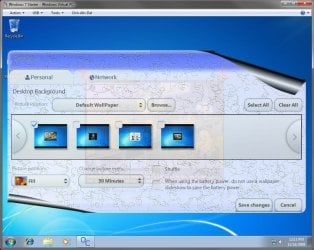
3. When your computer restarts, you will see this as your desktop background. Click on the Oceanis Change Background W7 shortcut to change your desktop background. (see screenshot below)
Program1.jpg
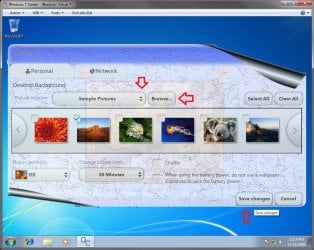
4. Browse to the images that you want to use and check (select) a image, or more than one image to have a desktop slideshow. Select the Picture position for how you want the images displayed, and any desktop slideshow settings if you selected more than one image. (see screenshot below)
NOTE: These options are just like the default ones in the other editions of Windows 7 here that are now being allowed by this program by Oceanis for the Windows 7 Starter edition.
Program.jpg

Program3.jpg
5. When done, click on Save changes. (see screenshots above)


OPTION TWO

Using the "Personalization Panel" Program


NOTE: This will show you how to download and use the Personalization Panel program to add Personalization to the desktop context menu to be able to change the desktop background, Windows Color and Appearance, Sounds, and Screen Saver in the Windows 7 Starter and Home Basic editions. This program does not add the desktop slideshow feature though.
1. Download and install the Personalization Panel program using Regular setup option at the Download link below.

Download


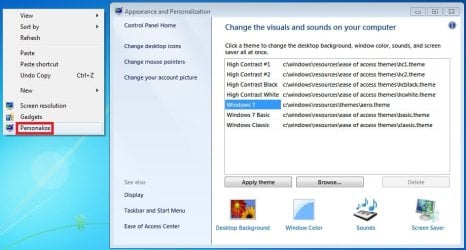
2. When finished installing, you can now right click on the desktop and click on Personalization.

3. If prompted by UAC, then click on Yes.

4. From here you can select and set the Appearance and Personalization options you like. (see screenshot below)
Personalize-1.jpg
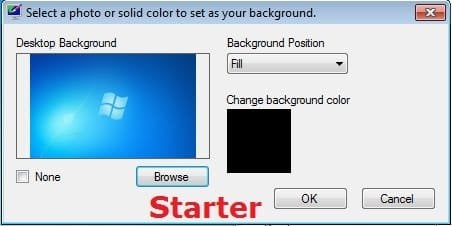
5. Desktop Background
A) In Windows Starter
Starter-1.jpg
B) In Windows Home Basic
Basic-1.jpg
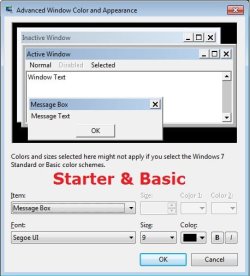
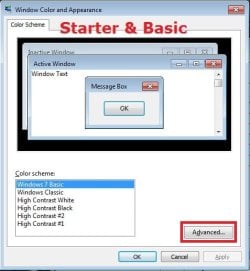
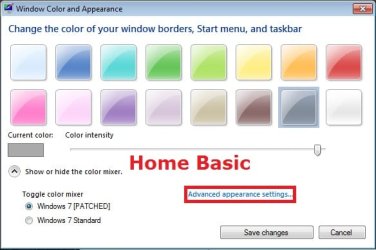
6. Windows Color
A) In Windows Starter
Starter-2.jpg

Starter-3.jpg
B) In Windows Home Basic, you will see this below first then the screenshots above.
Basic-2A.jpg
7. Sounds
A) This is the same Sounds settings as in the other editions of Windows 7.
8. Screen Saver
A) This is the same Screen Saver settings as in the other editions of Windows 7.
That's it,
Shawn


Attachments

Last edited:
You're most welcome Rachelv. :)
 

My Computer My Computer

At a glance

64-bit Windows 11 Pro for WorkstationsIntel i7-8700K OC'd to 5 GHz64 GB (4x16GB) G.SKILL TridentZ RGB DDR4 3600...ASUS ROG-STRIX-GTX1080TI-O11G-GAMING
Computer type
PC/Desktop
Computer Manufacturer/Model Number
Self built custom
OS
64-bit Windows 11 Pro for Workstations
CPU
Intel i7-8700K OC'd to 5 GHz
Motherboard
ASUS ROG Maximus XI Formula Z390
Memory
64 GB (4x16GB) G.SKILL TridentZ RGB DDR4 3600 MHz
Graphics Card(s)
ASUS ROG-STRIX-GTX1080TI-O11G-GAMING
Sound Card
Integrated
Monitor(s) Displays
2 x Samsung Odyssey G7 27"
Screen Resolution
2560x1440
Hard Drives
1TB Samsung 990 PRO M.2,
4TB Samsung 990 PRO PRO M.2,
TerraMaster F8 SSD Plus NAS
PSU
Seasonic Prime Titanium 850W
Case
Thermaltake Core P3
Cooling
Corsair Hydro H115i
Keyboard
Logitech wireless K800
Mouse
Logitech MX Master 4
Internet Speed
2 Gb/s Download and 100 Mb/s Upload
Antivirus
Malwarebyte Anti-Malware Premium
Browser
Google Chrome
Other Info
Logitech Z625 speaker system,
Logitech BRIO 4K Pro webcam,
HP Color LaserJet Pro MFP M477fdn,
APC SMART-UPS RT 1000 XL - SURT1000XLI,
Galaxy S23 Plus phone
Background Change Program

Thank you! It works wonderful! Wow!:D:party::geek:
 

My Computer My Computer

At a glance

Windows 7 Starter Edition
OS
Windows 7 Starter Edition
You're welcome Signetring, and welcome to Seven Forums. :)
 

My Computer My Computer

At a glance

64-bit Windows 11 Pro for WorkstationsIntel i7-8700K OC'd to 5 GHz64 GB (4x16GB) G.SKILL TridentZ RGB DDR4 3600...ASUS ROG-STRIX-GTX1080TI-O11G-GAMING
Computer type
PC/Desktop
Computer Manufacturer/Model Number
Self built custom
OS
64-bit Windows 11 Pro for Workstations
CPU
Intel i7-8700K OC'd to 5 GHz
Motherboard
ASUS ROG Maximus XI Formula Z390
Memory
64 GB (4x16GB) G.SKILL TridentZ RGB DDR4 3600 MHz
Graphics Card(s)
ASUS ROG-STRIX-GTX1080TI-O11G-GAMING
Sound Card
Integrated
Monitor(s) Displays
2 x Samsung Odyssey G7 27"
Screen Resolution
2560x1440
Hard Drives
1TB Samsung 990 PRO M.2,
4TB Samsung 990 PRO PRO M.2,
TerraMaster F8 SSD Plus NAS
PSU
Seasonic Prime Titanium 850W
Case
Thermaltake Core P3
Cooling
Corsair Hydro H115i
Keyboard
Logitech wireless K800
Mouse
Logitech MX Master 4
Internet Speed
2 Gb/s Download and 100 Mb/s Upload
Antivirus
Malwarebyte Anti-Malware Premium
Browser
Google Chrome
Other Info
Logitech Z625 speaker system,
Logitech BRIO 4K Pro webcam,
HP Color LaserJet Pro MFP M477fdn,
APC SMART-UPS RT 1000 XL - SURT1000XLI,
Galaxy S23 Plus phone
Multi User Screens & Oceanis

Hello again! I was able to install the program on my main screen, but when I tried to apply the settings to my wife's as a second user on a different screen the program would not respond. Program opened but I could not get it to apply the settings and keep them. Anybody else experience this?
 

My Computer My Computer

At a glance

Windows 7 Starter Edition
OS
Windows 7 Starter Edition
Hello Signetring,

Each user account (administrator or standard) should be able to run the program and set it's own background with it saved that way. You might see if uninstalling and reinstalling the program may help.
 

My Computer My Computer

At a glance

64-bit Windows 11 Pro for WorkstationsIntel i7-8700K OC'd to 5 GHz64 GB (4x16GB) G.SKILL TridentZ RGB DDR4 3600...ASUS ROG-STRIX-GTX1080TI-O11G-GAMING
Computer type
PC/Desktop
Computer Manufacturer/Model Number
Self built custom
OS
64-bit Windows 11 Pro for Workstations
CPU
Intel i7-8700K OC'd to 5 GHz
Motherboard
ASUS ROG Maximus XI Formula Z390
Memory
64 GB (4x16GB) G.SKILL TridentZ RGB DDR4 3600 MHz
Graphics Card(s)
ASUS ROG-STRIX-GTX1080TI-O11G-GAMING
Sound Card
Integrated
Monitor(s) Displays
2 x Samsung Odyssey G7 27"
Screen Resolution
2560x1440
Hard Drives
1TB Samsung 990 PRO M.2,
4TB Samsung 990 PRO PRO M.2,
TerraMaster F8 SSD Plus NAS
PSU
Seasonic Prime Titanium 850W
Case
Thermaltake Core P3
Cooling
Corsair Hydro H115i
Keyboard
Logitech wireless K800
Mouse
Logitech MX Master 4
Internet Speed
2 Gb/s Download and 100 Mb/s Upload
Antivirus
Malwarebyte Anti-Malware Premium
Browser
Google Chrome
Other Info
Logitech Z625 speaker system,
Logitech BRIO 4K Pro webcam,
HP Color LaserJet Pro MFP M477fdn,
APC SMART-UPS RT 1000 XL - SURT1000XLI,
Galaxy S23 Plus phone
Adding Background For Additional Users

Hello Brink,

Yes! I tried the uninstall and reinstall twice with the same result. Each time I uninstall, it removes the program from all user screens. When reinstalling it again works for the main screen only. I tried to run it as "open" and "as administrator" both with the same result on the second screen. I even played with the UAC setting at the lowest position. Anybody have more ideas? I am installing on HP Mini 110-1125nr, beautiful machine.

Hmmmmmmmmmmmm! :huh:
 
Last edited:

My Computer My Computer

At a glance

Windows 7 Starter Edition
OS
Windows 7 Starter Edition
Signetring,

As a test, create a new user account for your wife to see if it will work in it.

If it does, then you can copy the contents of all folders in her C:\Users\(user-name) folder into the corresponding new account's folders in the C:\Users\(user-name) folder to get most of the settings back.
 

My Computer My Computer

At a glance

64-bit Windows 11 Pro for WorkstationsIntel i7-8700K OC'd to 5 GHz64 GB (4x16GB) G.SKILL TridentZ RGB DDR4 3600...ASUS ROG-STRIX-GTX1080TI-O11G-GAMING
Computer type
PC/Desktop
Computer Manufacturer/Model Number
Self built custom
OS
64-bit Windows 11 Pro for Workstations
CPU
Intel i7-8700K OC'd to 5 GHz
Motherboard
ASUS ROG Maximus XI Formula Z390
Memory
64 GB (4x16GB) G.SKILL TridentZ RGB DDR4 3600 MHz
Graphics Card(s)
ASUS ROG-STRIX-GTX1080TI-O11G-GAMING
Sound Card
Integrated
Monitor(s) Displays
2 x Samsung Odyssey G7 27"
Screen Resolution
2560x1440
Hard Drives
1TB Samsung 990 PRO M.2,
4TB Samsung 990 PRO PRO M.2,
TerraMaster F8 SSD Plus NAS
PSU
Seasonic Prime Titanium 850W
Case
Thermaltake Core P3
Cooling
Corsair Hydro H115i
Keyboard
Logitech wireless K800
Mouse
Logitech MX Master 4
Internet Speed
2 Gb/s Download and 100 Mb/s Upload
Antivirus
Malwarebyte Anti-Malware Premium
Browser
Google Chrome
Other Info
Logitech Z625 speaker system,
Logitech BRIO 4K Pro webcam,
HP Color LaserJet Pro MFP M477fdn,
APC SMART-UPS RT 1000 XL - SURT1000XLI,
Galaxy S23 Plus phone
Great! Thanks very much this works a treat.

Whos great idea was it not to allow desktop picture change in the first place. Its certainly helped me make up my mind. Next computer will be a Mac!
 

My Computer My Computer

At a glance

7 starter
OS
7 starter
You're welcome Busdriverman, and welcome to Seven Forums.

The Windows 7 Starter edition was meant to be a slimmed down edition of Windows 7 like this so that it could be used on low powered systems like a netbook and still have good performance. That's all. :)
 

My Computer My Computer

At a glance

64-bit Windows 11 Pro for WorkstationsIntel i7-8700K OC'd to 5 GHz64 GB (4x16GB) G.SKILL TridentZ RGB DDR4 3600...ASUS ROG-STRIX-GTX1080TI-O11G-GAMING
Computer type
PC/Desktop
Computer Manufacturer/Model Number
Self built custom
OS
64-bit Windows 11 Pro for Workstations
CPU
Intel i7-8700K OC'd to 5 GHz
Motherboard
ASUS ROG Maximus XI Formula Z390
Memory
64 GB (4x16GB) G.SKILL TridentZ RGB DDR4 3600 MHz
Graphics Card(s)
ASUS ROG-STRIX-GTX1080TI-O11G-GAMING
Sound Card
Integrated
Monitor(s) Displays
2 x Samsung Odyssey G7 27"
Screen Resolution
2560x1440
Hard Drives
1TB Samsung 990 PRO M.2,
4TB Samsung 990 PRO PRO M.2,
TerraMaster F8 SSD Plus NAS
PSU
Seasonic Prime Titanium 850W
Case
Thermaltake Core P3
Cooling
Corsair Hydro H115i
Keyboard
Logitech wireless K800
Mouse
Logitech MX Master 4
Internet Speed
2 Gb/s Download and 100 Mb/s Upload
Antivirus
Malwarebyte Anti-Malware Premium
Browser
Google Chrome
Other Info
Logitech Z625 speaker system,
Logitech BRIO 4K Pro webcam,
HP Color LaserJet Pro MFP M477fdn,
APC SMART-UPS RT 1000 XL - SURT1000XLI,
Galaxy S23 Plus phone
Oceanis wallpaper slideshow

Hi, I installed this program and it worked like a charm. But I don't want to use the slideshow feature but don't see an option for just keeping the picture I choose as a permanent desktop wallpaper. It seems I have to choose between 1 minute or 1 day for the picture to change. Any way to keep it on the same picture all the time? Thanks!
 

My Computer My Computer

At a glance

Windows 7
Computer Manufacturer/Model Number
Toshiba Netbook running Windows 7 Starter
OS
Windows 7
Hello Tracy, and welcome to Seven Forums.

No problem. You can do this by only having one wallpaper checked, and by not having the "Shuffle" option checked. :)

Hope this helps,
Shawn
 

My Computer My Computer

At a glance

64-bit Windows 11 Pro for WorkstationsIntel i7-8700K OC'd to 5 GHz64 GB (4x16GB) G.SKILL TridentZ RGB DDR4 3600...ASUS ROG-STRIX-GTX1080TI-O11G-GAMING
Computer type
PC/Desktop
Computer Manufacturer/Model Number
Self built custom
OS
64-bit Windows 11 Pro for Workstations
CPU
Intel i7-8700K OC'd to 5 GHz
Motherboard
ASUS ROG Maximus XI Formula Z390
Memory
64 GB (4x16GB) G.SKILL TridentZ RGB DDR4 3600 MHz
Graphics Card(s)
ASUS ROG-STRIX-GTX1080TI-O11G-GAMING
Sound Card
Integrated
Monitor(s) Displays
2 x Samsung Odyssey G7 27"
Screen Resolution
2560x1440
Hard Drives
1TB Samsung 990 PRO M.2,
4TB Samsung 990 PRO PRO M.2,
TerraMaster F8 SSD Plus NAS
PSU
Seasonic Prime Titanium 850W
Case
Thermaltake Core P3
Cooling
Corsair Hydro H115i
Keyboard
Logitech wireless K800
Mouse
Logitech MX Master 4
Internet Speed
2 Gb/s Download and 100 Mb/s Upload
Antivirus
Malwarebyte Anti-Malware Premium
Browser
Google Chrome
Other Info
Logitech Z625 speaker system,
Logitech BRIO 4K Pro webcam,
HP Color LaserJet Pro MFP M477fdn,
APC SMART-UPS RT 1000 XL - SURT1000XLI,
Galaxy S23 Plus phone
3rd party wall paper managers and ASUS

Asus installs a tool bar on most of it's eeePC's which has the option to change the wall paper. I think this would count as a 3rd party app and also cause settings loss in some cases. ie you set it with oceanis and it is reset by the Asus program.

Quote from pdx_pla on instructables site Windows 7 Starter: Easy way to change wallpaper
"pdx_pla says:
If you have an Asus Eee Pc, complete with the Windows 7 starter, there's actually a very simple way to change the wallpaper, nothing to download, no complicated program writing and guess what? They tell you how to do it in the paper instruction booklet contained with the unit!
Page 3-9 Talks about the feature of the unit called "Eee Tools" which is contained in the Eee Docking package preloaded on the unit. Eee Docking offers thngs like connections to entertainment etc... Anyhow--- if you disabled the float of the Eee Docking you can still locate the feature by clicking on the Windows icon at the bottom of your desktop and typing in Eee Docking in the program search box. To change the wallpaper follow the instructions:
1) Click on "Eee Docking" and look on your desktop at top of screen, where you should see a small neon blue tab. If you click it, you will see all the Eee Docking offers like Eee Amuse, Eee Share, etc... You will click the "Eee Tools"
2) Next a box will appear allowing you to change your background to any picture listed among the "sample pictures" selections... If you save your personal wallpaper photos here, you only have to choose the one or more that you would like to be your wallpaper and it will appear. This feature even gives you the option to have it alternate between more than one, and you can have it do so for you, every day, every hour or even every minute if you'd like.
3) If you only want one wallpaper choice, only put a check mark in the one you want and that is the only one that will appear. "

End quote
 

My Computer My Computer

At a glance

Windows XP Home SP3
OS
Windows XP Home SP3
Well . . .

I don't really like working with programs. I like to edit the registry "myself". Is the any tutorials that I can use to fully customize Windows through registry like per page of this is how to change the orb and this is to change the toolbar??:eek::eek:
 

My Computer My Computer

At a glance

Windows 7 64-Bit PremiumAMD Phenom4 GB
Computer Manufacturer/Model Number
N/a . . . all parts bought seperatly . . .
OS
Windows 7 64-Bit Premium
CPU
AMD Phenom
Motherboard
GA-M61PME-S2P (rev. 1.0)/Gigabyte
Memory
4 GB
Monitor(s) Displays
X203H
Screen Resolution
1600x900
Hard Drives
500 GB
160 GB Western Digital
Internet Speed
It's Cable(HIGHSPEED)!!!
How do i uninstall this program?
 

My Computer My Computer

At a glance

kj
OS
kj
Hello Megi, and welcome to Seven Forums.

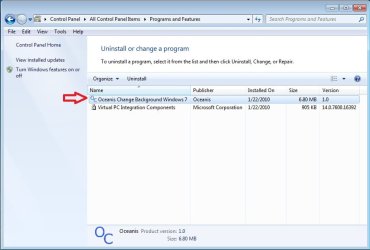
You can uninstall it by selecting the uninstall entry for it through Programs and Features below in the Control Panel.

uninstall.jpg

Hope this helps,
Shawn
 

My Computer My Computer

At a glance

64-bit Windows 11 Pro for WorkstationsIntel i7-8700K OC'd to 5 GHz64 GB (4x16GB) G.SKILL TridentZ RGB DDR4 3600...ASUS ROG-STRIX-GTX1080TI-O11G-GAMING
Computer type
PC/Desktop
Computer Manufacturer/Model Number
Self built custom
OS
64-bit Windows 11 Pro for Workstations
CPU
Intel i7-8700K OC'd to 5 GHz
Motherboard
ASUS ROG Maximus XI Formula Z390
Memory
64 GB (4x16GB) G.SKILL TridentZ RGB DDR4 3600 MHz
Graphics Card(s)
ASUS ROG-STRIX-GTX1080TI-O11G-GAMING
Sound Card
Integrated
Monitor(s) Displays
2 x Samsung Odyssey G7 27"
Screen Resolution
2560x1440
Hard Drives
1TB Samsung 990 PRO M.2,
4TB Samsung 990 PRO PRO M.2,
TerraMaster F8 SSD Plus NAS
PSU
Seasonic Prime Titanium 850W
Case
Thermaltake Core P3
Cooling
Corsair Hydro H115i
Keyboard
Logitech wireless K800
Mouse
Logitech MX Master 4
Internet Speed
2 Gb/s Download and 100 Mb/s Upload
Antivirus
Malwarebyte Anti-Malware Premium
Browser
Google Chrome
Other Info
Logitech Z625 speaker system,
Logitech BRIO 4K Pro webcam,
HP Color LaserJet Pro MFP M477fdn,
APC SMART-UPS RT 1000 XL - SURT1000XLI,
Galaxy S23 Plus phone
I would like to say thank you so much! Oceanis worked great for my Acer aspire one netbook :)
Something as little as not being able to change my desktop background is thoroughly annoying & makes me dislike microsoft so much more.

Thanks again,
from Nardz
 

My Computer My Computer

At a glance

Windows 7 StarterIntel Atom Processor N450 (1.66GHz,512KB Cache)
Computer Manufacturer/Model Number
Acer AspireOne
OS
Windows 7 Starter
CPU
Intel Atom Processor N450 (1.66GHz,512KB Cache)
You're most welcome Nardz, and welcome to Seven Forums. :)
 

My Computer My Computer

At a glance

64-bit Windows 11 Pro for WorkstationsIntel i7-8700K OC'd to 5 GHz64 GB (4x16GB) G.SKILL TridentZ RGB DDR4 3600...ASUS ROG-STRIX-GTX1080TI-O11G-GAMING
Computer type
PC/Desktop
Computer Manufacturer/Model Number
Self built custom
OS
64-bit Windows 11 Pro for Workstations
CPU
Intel i7-8700K OC'd to 5 GHz
Motherboard
ASUS ROG Maximus XI Formula Z390
Memory
64 GB (4x16GB) G.SKILL TridentZ RGB DDR4 3600 MHz
Graphics Card(s)
ASUS ROG-STRIX-GTX1080TI-O11G-GAMING
Sound Card
Integrated
Monitor(s) Displays
2 x Samsung Odyssey G7 27"
Screen Resolution
2560x1440
Hard Drives
1TB Samsung 990 PRO M.2,
4TB Samsung 990 PRO PRO M.2,
TerraMaster F8 SSD Plus NAS
PSU
Seasonic Prime Titanium 850W
Case
Thermaltake Core P3
Cooling
Corsair Hydro H115i
Keyboard
Logitech wireless K800
Mouse
Logitech MX Master 4
Internet Speed
2 Gb/s Download and 100 Mb/s Upload
Antivirus
Malwarebyte Anti-Malware Premium
Browser
Google Chrome
Other Info
Logitech Z625 speaker system,
Logitech BRIO 4K Pro webcam,
HP Color LaserJet Pro MFP M477fdn,
APC SMART-UPS RT 1000 XL - SURT1000XLI,
Galaxy S23 Plus phone
After spend a lot of time google-ing around, I found your article, and it really help me to change the wallpaper on win 7 starter. my system also works fine. thank you for the software Master Alien Brix, it is awesome :thumbsup: :thumbsup: :thumbsup:
 

My Computer My Computer

At a glance

win 7 starterIntel atom N4501GB
Computer Manufacturer/Model Number
Dell inspiron mini 10
OS
win 7 starter
CPU
Intel atom N450
Memory
1GB
While Oceanis provided the software, I'm happy that is has helped you Kepin. Welcome to Seven Forums. :)
 

My Computer My Computer

At a glance

64-bit Windows 11 Pro for WorkstationsIntel i7-8700K OC'd to 5 GHz64 GB (4x16GB) G.SKILL TridentZ RGB DDR4 3600...ASUS ROG-STRIX-GTX1080TI-O11G-GAMING
Computer type
PC/Desktop
Computer Manufacturer/Model Number
Self built custom
OS
64-bit Windows 11 Pro for Workstations
CPU
Intel i7-8700K OC'd to 5 GHz
Motherboard
ASUS ROG Maximus XI Formula Z390
Memory
64 GB (4x16GB) G.SKILL TridentZ RGB DDR4 3600 MHz
Graphics Card(s)
ASUS ROG-STRIX-GTX1080TI-O11G-GAMING
Sound Card
Integrated
Monitor(s) Displays
2 x Samsung Odyssey G7 27"
Screen Resolution
2560x1440
Hard Drives
1TB Samsung 990 PRO M.2,
4TB Samsung 990 PRO PRO M.2,
TerraMaster F8 SSD Plus NAS
PSU
Seasonic Prime Titanium 850W
Case
Thermaltake Core P3
Cooling
Corsair Hydro H115i
Keyboard
Logitech wireless K800
Mouse
Logitech MX Master 4
Internet Speed
2 Gb/s Download and 100 Mb/s Upload
Antivirus
Malwarebyte Anti-Malware Premium
Browser
Google Chrome
Other Info
Logitech Z625 speaker system,
Logitech BRIO 4K Pro webcam,
HP Color LaserJet Pro MFP M477fdn,
APC SMART-UPS RT 1000 XL - SURT1000XLI,
Galaxy S23 Plus phone
Back
Top