Desktop Background Wallpaper - Change in Windows 7 Starter

How to Change Desktop Background Wallpaper in Windows 7 Starter and Home Basic Editions

   Information
By default the Windows 7 Starter and Windows 7 Home Basic editions do not include the Personalization features such as change desktop background, Desktop Slideshow, Screen Saver, and Windows Color and Appearance.


This tutorial will show you how to add these features to the Windows 7 Starter and Windows 7 Home Basic editions.
  • For free desktop background wallpapers from Microsoft, see: Desktop backgrounds (wallpaper) - Microsoft Windows
  • By default, the Windows 7 Home Basic edition will only allow you to change the desktop background by right clicking on a image and clicking on Set as desktop background.
  • If you plan on doing a in-place upgrade to another higher level edition of Windows 7 in the future, then be sure to uninstall this Oceanis Change Background W7 or Personalization Panel program first to avoid incompatibility issues with it in the new edition of Windows 7. It was designed to only work in the Windows 7 Starter and Home Basic editions.


OPTION ONE

Using the "Oceanis Change Background W7" Program


   Note
This will show you how to download and use the program Oceanis Change Background W7 provided by Oceanis so that you can change the desktop background with a optional desktop slideshow (shuffle) in the Windows 7 Starter and Home Basic editions.


If the Oceanis program is closed, then the desktop background goes with it. You will need to leave the Oceanis program running to keep the background.
  • You must be using the Windows 7 Basic theme.
  • If the Oceanis Change Background W7 program no longer works properly after installing some Windows Updates, then uninstall and reinstall the Oceanis Change Background W7 program to have it run properly again.
  • If you get the black wallpaper in Windows 7 Starter, then:
  • Run a sfc /scannow command, and restart the computer afterwards. You may have some corrupted system files causing the background wallpaper to not display.
1. Click on the Download button below to download the Oceanis Change Background W7 ZIP file provided by Oceanis, click on Save, and save it to your Desktop.

Download


2. Open the downloaded ZIP file, extract (drag and drop) the exe file below to your desktop, and run it.
NOTE: You will be prompted to restart the computer to finish installing this program.
Oceanis_Change_Background_W7.exe
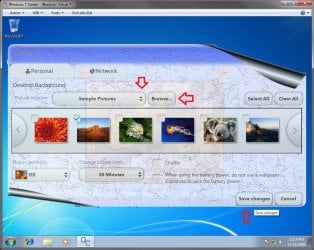
3. When your computer restarts, you will see this as your desktop background. Click on the Oceanis Change Background W7 shortcut to change your desktop background. (see screenshot below)
Program1.jpg
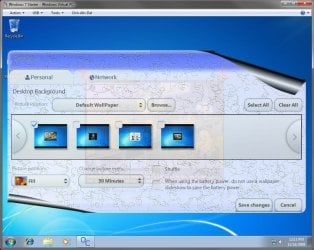
4. Browse to the images that you want to use and check (select) a image, or more than one image to have a desktop slideshow. Select the Picture position for how you want the images displayed, and any desktop slideshow settings if you selected more than one image. (see screenshot below)
NOTE: These options are just like the default ones in the other editions of Windows 7 here that are now being allowed by this program by Oceanis for the Windows 7 Starter edition.
Program.jpg

Program3.jpg
5. When done, click on Save changes. (see screenshots above)


OPTION TWO

Using the "Personalization Panel" Program


NOTE: This will show you how to download and use the Personalization Panel program to add Personalization to the desktop context menu to be able to change the desktop background, Windows Color and Appearance, Sounds, and Screen Saver in the Windows 7 Starter and Home Basic editions. This program does not add the desktop slideshow feature though.
1. Download and install the Personalization Panel program using Regular setup option at the Download link below.

Download


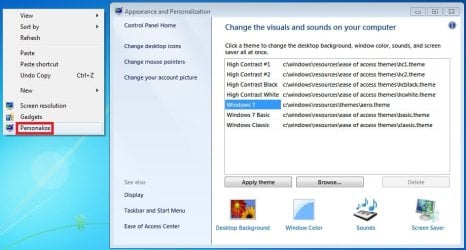
2. When finished installing, you can now right click on the desktop and click on Personalization.

3. If prompted by UAC, then click on Yes.

4. From here you can select and set the Appearance and Personalization options you like. (see screenshot below)
Personalize-1.jpg
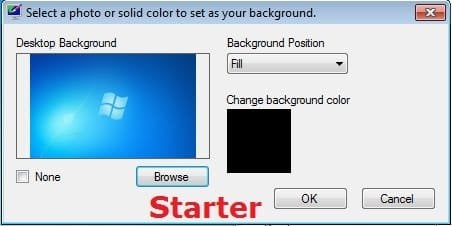
5. Desktop Background
A) In Windows Starter
Starter-1.jpg
B) In Windows Home Basic
Basic-1.jpg
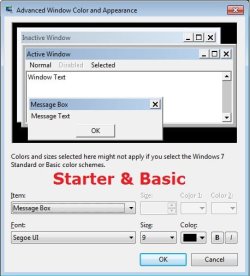
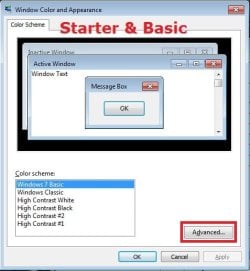
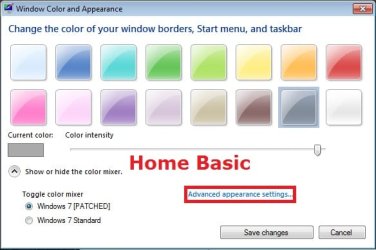
6. Windows Color
A) In Windows Starter
Starter-2.jpg

Starter-3.jpg
B) In Windows Home Basic, you will see this below first then the screenshots above.
Basic-2A.jpg
7. Sounds
A) This is the same Sounds settings as in the other editions of Windows 7.
8. Screen Saver
A) This is the same Screen Saver settings as in the other editions of Windows 7.
That's it,
Shawn


Attachments

Last edited:
nice dude the Oceanis thing wrked dude pretty good but i need to kno sumthin tt can change the themes o if i have a theme i have cre8ted n i wanna kno howta put it on ma win 7 starter pc can sum body help me.....
 

My Computer My Computer

At a glance

Windows 7 starterHP mini laptop
OS
Windows 7 starter
CPU
HP mini laptop
Hard Drives
One Hard drive 300 gigs
Cooling
nah mah shyt be heating up like f----.....----k !!!!!
Internet Speed
depends if i pay my at&t bill etc lol
Other Info
?
Hello Sunnyc, and welcome to Seven Forums.

Sorry, but the theme feature (Personalization) is not included in the Windows 7 Starter edition. You will not be able to change your theme. :(

I may be wrong, but I'm not aware of any programs out there that will allow this in this edition yet.
 

My Computer My Computer

At a glance

64-bit Windows 11 Pro for WorkstationsIntel i7-8700K OC'd to 5 GHz64 GB (4x16GB) G.SKILL TridentZ RGB DDR4 3600...ASUS ROG-STRIX-GTX1080TI-O11G-GAMING
Computer type
PC/Desktop
Computer Manufacturer/Model Number
Self built custom
OS
64-bit Windows 11 Pro for Workstations
CPU
Intel i7-8700K OC'd to 5 GHz
Motherboard
ASUS ROG Maximus XI Formula Z390
Memory
64 GB (4x16GB) G.SKILL TridentZ RGB DDR4 3600 MHz
Graphics Card(s)
ASUS ROG-STRIX-GTX1080TI-O11G-GAMING
Sound Card
Integrated
Monitor(s) Displays
2 x Samsung Odyssey G7 27"
Screen Resolution
2560x1440
Hard Drives
1TB Samsung 990 PRO M.2,
4TB Samsung 990 PRO PRO M.2,
TerraMaster F8 SSD Plus NAS
PSU
Seasonic Prime Titanium 850W
Case
Thermaltake Core P3
Cooling
Corsair Hydro H115i
Keyboard
Logitech wireless K800
Mouse
Logitech MX Master 4
Internet Speed
2 Gb/s Download and 100 Mb/s Upload
Antivirus
Malwarebyte Anti-Malware Premium
Browser
Google Chrome
Other Info
Logitech Z625 speaker system,
Logitech BRIO 4K Pro webcam,
HP Color LaserJet Pro MFP M477fdn,
APC SMART-UPS RT 1000 XL - SURT1000XLI,
Galaxy S23 Plus phone
I have downloaded this and sucessfully changed my background, but my desk top icons have vanished, help
 

My Computer My Computer

At a glance

dont know
OS
dont know

My Computer My Computer

At a glance

64-bit Windows 11 Pro for WorkstationsIntel i7-8700K OC'd to 5 GHz64 GB (4x16GB) G.SKILL TridentZ RGB DDR4 3600...ASUS ROG-STRIX-GTX1080TI-O11G-GAMING
Computer type
PC/Desktop
Computer Manufacturer/Model Number
Self built custom
OS
64-bit Windows 11 Pro for Workstations
CPU
Intel i7-8700K OC'd to 5 GHz
Motherboard
ASUS ROG Maximus XI Formula Z390
Memory
64 GB (4x16GB) G.SKILL TridentZ RGB DDR4 3600 MHz
Graphics Card(s)
ASUS ROG-STRIX-GTX1080TI-O11G-GAMING
Sound Card
Integrated
Monitor(s) Displays
2 x Samsung Odyssey G7 27"
Screen Resolution
2560x1440
Hard Drives
1TB Samsung 990 PRO M.2,
4TB Samsung 990 PRO PRO M.2,
TerraMaster F8 SSD Plus NAS
PSU
Seasonic Prime Titanium 850W
Case
Thermaltake Core P3
Cooling
Corsair Hydro H115i
Keyboard
Logitech wireless K800
Mouse
Logitech MX Master 4
Internet Speed
2 Gb/s Download and 100 Mb/s Upload
Antivirus
Malwarebyte Anti-Malware Premium
Browser
Google Chrome
Other Info
Logitech Z625 speaker system,
Logitech BRIO 4K Pro webcam,
HP Color LaserJet Pro MFP M477fdn,
APC SMART-UPS RT 1000 XL - SURT1000XLI,
Galaxy S23 Plus phone
Hello brink,

At the beginning, I have done the program and it running well. But now it was strange happen. It was stooped running when I starting again. So I should clicking to the program every I am starting My note book. Please advce.
:shock:

Yacob
 

My Computer My Computer

At a glance

windows seven starter
OS
windows seven starter
Hello Yacob,

You might see if uninstalling and reinstalling the program may help.

Hope this helps,
Shawn
 

My Computer My Computer

At a glance

64-bit Windows 11 Pro for WorkstationsIntel i7-8700K OC'd to 5 GHz64 GB (4x16GB) G.SKILL TridentZ RGB DDR4 3600...ASUS ROG-STRIX-GTX1080TI-O11G-GAMING
Computer type
PC/Desktop
Computer Manufacturer/Model Number
Self built custom
OS
64-bit Windows 11 Pro for Workstations
CPU
Intel i7-8700K OC'd to 5 GHz
Motherboard
ASUS ROG Maximus XI Formula Z390
Memory
64 GB (4x16GB) G.SKILL TridentZ RGB DDR4 3600 MHz
Graphics Card(s)
ASUS ROG-STRIX-GTX1080TI-O11G-GAMING
Sound Card
Integrated
Monitor(s) Displays
2 x Samsung Odyssey G7 27"
Screen Resolution
2560x1440
Hard Drives
1TB Samsung 990 PRO M.2,
4TB Samsung 990 PRO PRO M.2,
TerraMaster F8 SSD Plus NAS
PSU
Seasonic Prime Titanium 850W
Case
Thermaltake Core P3
Cooling
Corsair Hydro H115i
Keyboard
Logitech wireless K800
Mouse
Logitech MX Master 4
Internet Speed
2 Gb/s Download and 100 Mb/s Upload
Antivirus
Malwarebyte Anti-Malware Premium
Browser
Google Chrome
Other Info
Logitech Z625 speaker system,
Logitech BRIO 4K Pro webcam,
HP Color LaserJet Pro MFP M477fdn,
APC SMART-UPS RT 1000 XL - SURT1000XLI,
Galaxy S23 Plus phone
Hi I downloaded this program a month ago to try changing my background. It worked, but I had to reset my background every time I logged in. Then, my harddrive fried (I dont know if it was this program, but this was the only thing besides MS office, Trend Micro, and the manufacturers programs that I had on the harddrive...) I was wondering if this could honestly be from the program, or if the hard drive was just made wrong...
 

My Computer My Computer

At a glance

Windows 7 starter
OS
Windows 7 starter
Hello Willaworm,

NO it absolutely would not be this or any program that would cause your hard drive to fry, or die on you. Could you be more specifc on what you mean by fried though? If dead, then that is a HDD hardware failure instead.

Sorry for you loss. :(
 

My Computer My Computer

At a glance

64-bit Windows 11 Pro for WorkstationsIntel i7-8700K OC'd to 5 GHz64 GB (4x16GB) G.SKILL TridentZ RGB DDR4 3600...ASUS ROG-STRIX-GTX1080TI-O11G-GAMING
Computer type
PC/Desktop
Computer Manufacturer/Model Number
Self built custom
OS
64-bit Windows 11 Pro for Workstations
CPU
Intel i7-8700K OC'd to 5 GHz
Motherboard
ASUS ROG Maximus XI Formula Z390
Memory
64 GB (4x16GB) G.SKILL TridentZ RGB DDR4 3600 MHz
Graphics Card(s)
ASUS ROG-STRIX-GTX1080TI-O11G-GAMING
Sound Card
Integrated
Monitor(s) Displays
2 x Samsung Odyssey G7 27"
Screen Resolution
2560x1440
Hard Drives
1TB Samsung 990 PRO M.2,
4TB Samsung 990 PRO PRO M.2,
TerraMaster F8 SSD Plus NAS
PSU
Seasonic Prime Titanium 850W
Case
Thermaltake Core P3
Cooling
Corsair Hydro H115i
Keyboard
Logitech wireless K800
Mouse
Logitech MX Master 4
Internet Speed
2 Gb/s Download and 100 Mb/s Upload
Antivirus
Malwarebyte Anti-Malware Premium
Browser
Google Chrome
Other Info
Logitech Z625 speaker system,
Logitech BRIO 4K Pro webcam,
HP Color LaserJet Pro MFP M477fdn,
APC SMART-UPS RT 1000 XL - SURT1000XLI,
Galaxy S23 Plus phone
If was offered to us by a friend of ours Oceanis.

Hope this helps,
Shawn

please Shawn, can you ask your friend that made Oceanis, if he could change the code of it as be possible used as a folders background program? [for using in all versions of windows 7]
 

My Computer My Computer

At a glance

win 7
OS
win 7
Hello Idas,

Sorry, but I have no way of contacting Oceanis. He contacted us with this. :(
 

My Computer My Computer

At a glance

64-bit Windows 11 Pro for WorkstationsIntel i7-8700K OC'd to 5 GHz64 GB (4x16GB) G.SKILL TridentZ RGB DDR4 3600...ASUS ROG-STRIX-GTX1080TI-O11G-GAMING
Computer type
PC/Desktop
Computer Manufacturer/Model Number
Self built custom
OS
64-bit Windows 11 Pro for Workstations
CPU
Intel i7-8700K OC'd to 5 GHz
Motherboard
ASUS ROG Maximus XI Formula Z390
Memory
64 GB (4x16GB) G.SKILL TridentZ RGB DDR4 3600 MHz
Graphics Card(s)
ASUS ROG-STRIX-GTX1080TI-O11G-GAMING
Sound Card
Integrated
Monitor(s) Displays
2 x Samsung Odyssey G7 27"
Screen Resolution
2560x1440
Hard Drives
1TB Samsung 990 PRO M.2,
4TB Samsung 990 PRO PRO M.2,
TerraMaster F8 SSD Plus NAS
PSU
Seasonic Prime Titanium 850W
Case
Thermaltake Core P3
Cooling
Corsair Hydro H115i
Keyboard
Logitech wireless K800
Mouse
Logitech MX Master 4
Internet Speed
2 Gb/s Download and 100 Mb/s Upload
Antivirus
Malwarebyte Anti-Malware Premium
Browser
Google Chrome
Other Info
Logitech Z625 speaker system,
Logitech BRIO 4K Pro webcam,
HP Color LaserJet Pro MFP M477fdn,
APC SMART-UPS RT 1000 XL - SURT1000XLI,
Galaxy S23 Plus phone
I'm looking forward to trying this out once my new netbook eventually arrives!
From the look at the previous posts it'd be much better to install all available updates prior to installation, so I'll make sure to do that.

Don't see why I'd have any problems, but I'll let you know how it goes! ;)
 

My Computer My Computer

At a glance

Windows 7 Professional; Windows 7 StarterIntel Core2 Quad Q94004GbATI Radeon 4870 HD 1Gb
Computer Manufacturer/Model Number
Custom
OS
Windows 7 Professional; Windows 7 Starter
CPU
Intel Core2 Quad Q9400
Motherboard
Asus P5Q
Memory
4Gb
Graphics Card(s)
ATI Radeon 4870 HD 1Gb
Monitor(s) Displays
BenQ E2200HD
Hard Drives
2x 500Gb SATA2 HDD
1x 1Tb SATA 3.5"
Case
Antec Twelve Hundred
Hello Teganblue, and welcome to Seven Forums.

We'll be here if you need us. :)
 

My Computer My Computer

At a glance

64-bit Windows 11 Pro for WorkstationsIntel i7-8700K OC'd to 5 GHz64 GB (4x16GB) G.SKILL TridentZ RGB DDR4 3600...ASUS ROG-STRIX-GTX1080TI-O11G-GAMING
Computer type
PC/Desktop
Computer Manufacturer/Model Number
Self built custom
OS
64-bit Windows 11 Pro for Workstations
CPU
Intel i7-8700K OC'd to 5 GHz
Motherboard
ASUS ROG Maximus XI Formula Z390
Memory
64 GB (4x16GB) G.SKILL TridentZ RGB DDR4 3600 MHz
Graphics Card(s)
ASUS ROG-STRIX-GTX1080TI-O11G-GAMING
Sound Card
Integrated
Monitor(s) Displays
2 x Samsung Odyssey G7 27"
Screen Resolution
2560x1440
Hard Drives
1TB Samsung 990 PRO M.2,
4TB Samsung 990 PRO PRO M.2,
TerraMaster F8 SSD Plus NAS
PSU
Seasonic Prime Titanium 850W
Case
Thermaltake Core P3
Cooling
Corsair Hydro H115i
Keyboard
Logitech wireless K800
Mouse
Logitech MX Master 4
Internet Speed
2 Gb/s Download and 100 Mb/s Upload
Antivirus
Malwarebyte Anti-Malware Premium
Browser
Google Chrome
Other Info
Logitech Z625 speaker system,
Logitech BRIO 4K Pro webcam,
HP Color LaserJet Pro MFP M477fdn,
APC SMART-UPS RT 1000 XL - SURT1000XLI,
Galaxy S23 Plus phone
PLEASE

I downloaded this. Now my computer Wont show windows taskbar. Wont change background. Oceanis doesnt recognize i restarted. I cant uninstall Oceanis. Cant show Start menu. i need help im freaking out
 

My Computer My Computer

At a glance

Win 7 starter
OS
Win 7 starter
Hello Isik, and welcome to Seven Forums.

No worries, you can do a system restore at boot using a restore point dated before you installed this program or had these issues to undo it.

Hope this helps,
Shawn
 

My Computer My Computer

At a glance

64-bit Windows 11 Pro for WorkstationsIntel i7-8700K OC'd to 5 GHz64 GB (4x16GB) G.SKILL TridentZ RGB DDR4 3600...ASUS ROG-STRIX-GTX1080TI-O11G-GAMING
Computer type
PC/Desktop
Computer Manufacturer/Model Number
Self built custom
OS
64-bit Windows 11 Pro for Workstations
CPU
Intel i7-8700K OC'd to 5 GHz
Motherboard
ASUS ROG Maximus XI Formula Z390
Memory
64 GB (4x16GB) G.SKILL TridentZ RGB DDR4 3600 MHz
Graphics Card(s)
ASUS ROG-STRIX-GTX1080TI-O11G-GAMING
Sound Card
Integrated
Monitor(s) Displays
2 x Samsung Odyssey G7 27"
Screen Resolution
2560x1440
Hard Drives
1TB Samsung 990 PRO M.2,
4TB Samsung 990 PRO PRO M.2,
TerraMaster F8 SSD Plus NAS
PSU
Seasonic Prime Titanium 850W
Case
Thermaltake Core P3
Cooling
Corsair Hydro H115i
Keyboard
Logitech wireless K800
Mouse
Logitech MX Master 4
Internet Speed
2 Gb/s Download and 100 Mb/s Upload
Antivirus
Malwarebyte Anti-Malware Premium
Browser
Google Chrome
Other Info
Logitech Z625 speaker system,
Logitech BRIO 4K Pro webcam,
HP Color LaserJet Pro MFP M477fdn,
APC SMART-UPS RT 1000 XL - SURT1000XLI,
Galaxy S23 Plus phone
Oceanis no longer works....

I have had Oceanis on my laptop since the day I got it and it had run perfectly, up till today.
I had the security tool virus on my laptop and ran the anti-malware bytes utility to remove it. Now my computer is virus free and runs great, but Oceanis seems to be running in some kind of background (behind a completely black screen). Screen is black except when switching programs when a flash of the proper background will show, and then go back to black screen. I have uninstalled/reinstalled Oceanis twice and it still does the same thing. Does anyone have any suggestions that might solve this problem? I have run a couple of different anti-virus programs and nothing else shows up. I am thinking maybe the Security Tools attached itself to a registry program and was deleted when it was removed, but I really don't know.

Please help if possible.
 

My Computer My Computer

At a glance

windows 7 starter
OS
windows 7 starter
Windows 7 solutions not working on Dell netbook

Hello All
I downloaded the Oceanis program and followed the directions. it only flashed the selected desktop image for a second then returned to the usual blue screen.

I'm trying to use this on a DELL inspirion mini 10 with the Intel graphics accelerator card and the Z520 atom processor.

Any work around suggestions?

I've also tried the more direct route of doing the modification in the registry, also a non starter.

I can't believe how low rent Microsoft is in pulling this stunt.
Never let it be said that Microsoft gave anything more than what they thought they could get away with.
 

My Computer My Computer

At a glance

windows 7 starterAtom z5201gbintel graphics media accelerator
Computer Manufacturer/Model Number
Dell inspririon mini 10 model pp19s
OS
windows 7 starter
CPU
Atom z520
Memory
1gb
Graphics Card(s)
intel graphics media accelerator
Monitor(s) Displays
lcd
Hard Drives
160gb
Case
netbook
windows 7 starter background problem

helo!!! im new here at this forum... i installed oceanis and desktopbackground changer and i also have a theme called mycolours/color .Every time i change the background it wont appear the background is still black, but when i log off or shut down the wallpaper appears... can someone help me on how to change the background of my desktop at my netbook (NEO) in a safe way?? all i want is just to have some background so that my netbook wont look dry...could someone help me??
 

My Computer My Computer

At a glance

windwos 7 starter
OS
windwos 7 starter
Hi,
I did everything what "brink" recoment, program installed, restart my computer...


I can setup the background, after saving I´ve got still a black screen as a background.
Please post next steps or question to help me having a background.

Thanks
 

My Computer My Computer

At a glance

Win 7 Starter Editionintel
Computer Manufacturer/Model Number
Asus
OS
Win 7 Starter Edition
CPU
intel

My Computer My Computer

At a glance

64-bit Windows 11 Pro for WorkstationsIntel i7-8700K OC'd to 5 GHz64 GB (4x16GB) G.SKILL TridentZ RGB DDR4 3600...ASUS ROG-STRIX-GTX1080TI-O11G-GAMING
Computer type
PC/Desktop
Computer Manufacturer/Model Number
Self built custom
OS
64-bit Windows 11 Pro for Workstations
CPU
Intel i7-8700K OC'd to 5 GHz
Motherboard
ASUS ROG Maximus XI Formula Z390
Memory
64 GB (4x16GB) G.SKILL TridentZ RGB DDR4 3600 MHz
Graphics Card(s)
ASUS ROG-STRIX-GTX1080TI-O11G-GAMING
Sound Card
Integrated
Monitor(s) Displays
2 x Samsung Odyssey G7 27"
Screen Resolution
2560x1440
Hard Drives
1TB Samsung 990 PRO M.2,
4TB Samsung 990 PRO PRO M.2,
TerraMaster F8 SSD Plus NAS
PSU
Seasonic Prime Titanium 850W
Case
Thermaltake Core P3
Cooling
Corsair Hydro H115i
Keyboard
Logitech wireless K800
Mouse
Logitech MX Master 4
Internet Speed
2 Gb/s Download and 100 Mb/s Upload
Antivirus
Malwarebyte Anti-Malware Premium
Browser
Google Chrome
Other Info
Logitech Z625 speaker system,
Logitech BRIO 4K Pro webcam,
HP Color LaserJet Pro MFP M477fdn,
APC SMART-UPS RT 1000 XL - SURT1000XLI,
Galaxy S23 Plus phone
Hello,

I checked if my Win 7 is activated - and it is!
I also followed the link:
Remove Background Images (where available)
- but nothing changed... :(

when I boot my computer, first I can see my chosen background but when it´s ready with loading, the background is black again.
when i have some windows open an close them - for a very little time I can see my background, but then it´s all black again.
I think there is a background, but the black background overlaps it...could this be possible??

Thanks
 

My Computer My Computer

At a glance

Win 7 Starter Editionintel
Computer Manufacturer/Model Number
Asus
OS
Win 7 Starter Edition
CPU
intel
Back
Top