Desktop Background Wallpaper - Change in Windows 7 Starter

How to Change Desktop Background Wallpaper in Windows 7 Starter and Home Basic Editions

   Information
By default the Windows 7 Starter and Windows 7 Home Basic editions do not include the Personalization features such as change desktop background, Desktop Slideshow, Screen Saver, and Windows Color and Appearance.


This tutorial will show you how to add these features to the Windows 7 Starter and Windows 7 Home Basic editions.
  • For free desktop background wallpapers from Microsoft, see: Desktop backgrounds (wallpaper) - Microsoft Windows
  • By default, the Windows 7 Home Basic edition will only allow you to change the desktop background by right clicking on a image and clicking on Set as desktop background.
  • If you plan on doing a in-place upgrade to another higher level edition of Windows 7 in the future, then be sure to uninstall this Oceanis Change Background W7 or Personalization Panel program first to avoid incompatibility issues with it in the new edition of Windows 7. It was designed to only work in the Windows 7 Starter and Home Basic editions.


OPTION ONE

Using the "Oceanis Change Background W7" Program


   Note
This will show you how to download and use the program Oceanis Change Background W7 provided by Oceanis so that you can change the desktop background with a optional desktop slideshow (shuffle) in the Windows 7 Starter and Home Basic editions.


If the Oceanis program is closed, then the desktop background goes with it. You will need to leave the Oceanis program running to keep the background.
  • You must be using the Windows 7 Basic theme.
  • If the Oceanis Change Background W7 program no longer works properly after installing some Windows Updates, then uninstall and reinstall the Oceanis Change Background W7 program to have it run properly again.
  • If you get the black wallpaper in Windows 7 Starter, then:
  • Run a sfc /scannow command, and restart the computer afterwards. You may have some corrupted system files causing the background wallpaper to not display.
1. Click on the Download button below to download the Oceanis Change Background W7 ZIP file provided by Oceanis, click on Save, and save it to your Desktop.

Download


2. Open the downloaded ZIP file, extract (drag and drop) the exe file below to your desktop, and run it.
NOTE: You will be prompted to restart the computer to finish installing this program.
Oceanis_Change_Background_W7.exe
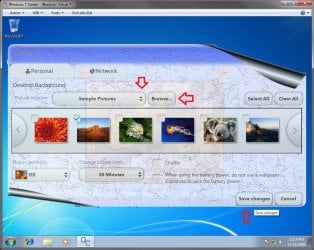
3. When your computer restarts, you will see this as your desktop background. Click on the Oceanis Change Background W7 shortcut to change your desktop background. (see screenshot below)
Program1.jpg
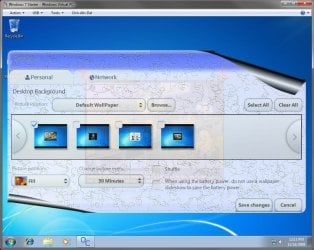
4. Browse to the images that you want to use and check (select) a image, or more than one image to have a desktop slideshow. Select the Picture position for how you want the images displayed, and any desktop slideshow settings if you selected more than one image. (see screenshot below)
NOTE: These options are just like the default ones in the other editions of Windows 7 here that are now being allowed by this program by Oceanis for the Windows 7 Starter edition.
Program.jpg

Program3.jpg
5. When done, click on Save changes. (see screenshots above)


OPTION TWO

Using the "Personalization Panel" Program


NOTE: This will show you how to download and use the Personalization Panel program to add Personalization to the desktop context menu to be able to change the desktop background, Windows Color and Appearance, Sounds, and Screen Saver in the Windows 7 Starter and Home Basic editions. This program does not add the desktop slideshow feature though.
1. Download and install the Personalization Panel program using Regular setup option at the Download link below.

Download


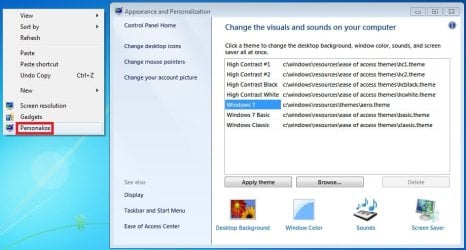
2. When finished installing, you can now right click on the desktop and click on Personalization.

3. If prompted by UAC, then click on Yes.

4. From here you can select and set the Appearance and Personalization options you like. (see screenshot below)
Personalize-1.jpg
5. Desktop Background
A) In Windows Starter
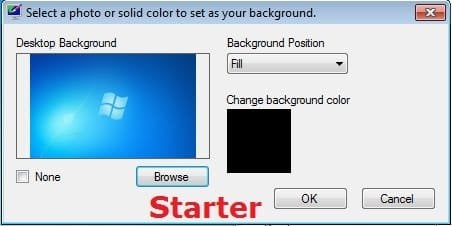
Starter-1.jpg
B) In Windows Home Basic
Basic-1.jpg
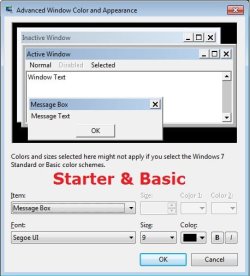
6. Windows Color
A) In Windows Starter
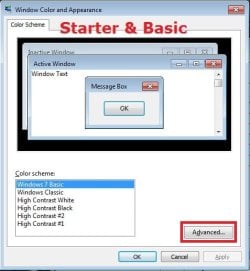
Starter-2.jpg

Starter-3.jpg
B) In Windows Home Basic, you will see this below first then the screenshots above.
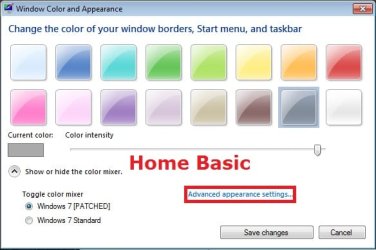
Basic-2A.jpg
7. Sounds
A) This is the same Sounds settings as in the other editions of Windows 7.
8. Screen Saver
A) This is the same Screen Saver settings as in the other editions of Windows 7.
That's it,
Shawn


Attachments

Last edited:
TY~!

Thanks Brink your a life saver :p
my freind just got a laptop for graduation and it has 7 Starter on it and when he told me you cant change the back ground i was like bull crap i tried and i couldn't change it
But thanks alot!!!
 

My Computer My Computer

At a glance

Windows 7 UltimateAMD A6 3650 2.6 GHz8 GigsRadeon HD 6870
Computer Manufacturer/Model Number
Custom Build
OS
Windows 7 Ultimate
CPU
AMD A6 3650 2.6 GHz
Motherboard
ASRock A55M-HVS
Memory
8 Gigs
Graphics Card(s)
Radeon HD 6870
Monitor(s) Displays
42" Dynex Screen
Screen Resolution
1360x768
Hard Drives
60 GB OCZ SSD - Sata III 2.5"
150 GB HDD
250 GB HDD
PSU
Raidmax RX-500AF
Case
Rosewill Blackbone Black Steel
Cooling
4 Fans
Internet Speed
6 mbs
Other Info
Freshly put together, my first build, my own hard earned cash, an im 17.
I have a brand new Asus EeePC bought for my daughters birthday next week.

I have tried installing, uninstalling & re-installing the Oceanis program but like Syren it keeps reverting to the default screen after a re-boot.

I have checked the Tips & warnings but these seem OK as its a new computer.

I tried uninstalling (and then got a Microsoft background), after re-installing I got the Asus background. It changed OK to my background after running Oceanis but then re-set to the Asus background after a re-boot.

Any help would be apreciated.

Cheers

Nick

OOPS - I have just found the same (or very similar) program already installed under "Eee Tools" - "System Setting"

Problem solved :)
 
Last edited:

My Computer My Computer

At a glance

Win 7 Starter
Computer Manufacturer/Model Number
Asus
OS
Win 7 Starter
Works for admin account but not standard

Hi everyone,

I installed the Oceanis software and got it to work for my admin account. But when I switch over to my standard account and change the background, it would change it. When I log out or reboot, the standard account revert back to the Windows 7 starter background. I've checked the admin account and it works there, the background is still my background.

I've tried starting the program as admin on the standard account too; no success there after logging out. I guessed I can always manually start the program; or maybe add it to my startup folder? I did check the process list and Oceanis is not running after I log back into the starter account.

Any suggestions?

Thanks,
Gnimble
 

My Computer My Computer

At a glance

Windows 7 starter, Vista Home Premium, XP HomeGMA 3150, Radeon 4650, Radeon 4850, Radeon 48...
OS
Windows 7 starter, Vista Home Premium, XP Home
Graphics Card(s)
GMA 3150, Radeon 4650, Radeon 4850, Radeon 4850 x2
Hello Gnimble, and welcome to Seven Forums.

Yes, go ahead and add the Oceanis program to that user's startup folder to see if it the background will stay afterwards when you restart. :)
 

My Computer My Computer

At a glance

64-bit Windows 11 Pro for WorkstationsIntel i7-8700K OC'd to 5 GHz64 GB (4x16GB) G.SKILL TridentZ RGB DDR4 3600...ASUS ROG-STRIX-GTX1080TI-O11G-GAMING
Computer type
PC/Desktop
Computer Manufacturer/Model Number
Self built custom
OS
64-bit Windows 11 Pro for Workstations
CPU
Intel i7-8700K OC'd to 5 GHz
Motherboard
ASUS ROG Maximus XI Formula Z390
Memory
64 GB (4x16GB) G.SKILL TridentZ RGB DDR4 3600 MHz
Graphics Card(s)
ASUS ROG-STRIX-GTX1080TI-O11G-GAMING
Sound Card
Integrated
Monitor(s) Displays
2 x Samsung Odyssey G7 27"
Screen Resolution
2560x1440
Hard Drives
1TB Samsung 990 PRO M.2,
4TB Samsung 990 PRO PRO M.2,
TerraMaster F8 SSD Plus NAS
PSU
Seasonic Prime Titanium 850W
Case
Thermaltake Core P3
Cooling
Corsair Hydro H115i
Keyboard
Logitech wireless K800
Mouse
Logitech MX Master 4
Internet Speed
2 Gb/s Download and 100 Mb/s Upload
Antivirus
Malwarebyte Anti-Malware Premium
Browser
Google Chrome
Other Info
Logitech Z625 speaker system,
Logitech BRIO 4K Pro webcam,
HP Color LaserJet Pro MFP M477fdn,
APC SMART-UPS RT 1000 XL - SURT1000XLI,
Galaxy S23 Plus phone
Adding it to the startup folder seems to work, except that before it starts, Windows warns me of running the link (and no options are given to remove that warning message in the future). I guessed that's better than having to find the icon and clicking on it each time.

It's strange that a brand new $350 notebook comes with Windows 7 Home Premium (and thus more customization features) and this netbook which costs the same $350 comes with Windows Starter. I guessed that's the price we have to pay for portability.

Thanks,
Gnimble
 

My Computer My Computer

At a glance

Windows 7 starter, Vista Home Premium, XP HomeGMA 3150, Radeon 4650, Radeon 4850, Radeon 48...
OS
Windows 7 starter, Vista Home Premium, XP Home
Graphics Card(s)
GMA 3150, Radeon 4650, Radeon 4850, Radeon 4850 x2
Yeah, you will have the UAC prompt at startup for a standard user. :(

I agree, the Starter edition is just bit to stripped down.
 

My Computer My Computer

At a glance

64-bit Windows 11 Pro for WorkstationsIntel i7-8700K OC'd to 5 GHz64 GB (4x16GB) G.SKILL TridentZ RGB DDR4 3600...ASUS ROG-STRIX-GTX1080TI-O11G-GAMING
Computer type
PC/Desktop
Computer Manufacturer/Model Number
Self built custom
OS
64-bit Windows 11 Pro for Workstations
CPU
Intel i7-8700K OC'd to 5 GHz
Motherboard
ASUS ROG Maximus XI Formula Z390
Memory
64 GB (4x16GB) G.SKILL TridentZ RGB DDR4 3600 MHz
Graphics Card(s)
ASUS ROG-STRIX-GTX1080TI-O11G-GAMING
Sound Card
Integrated
Monitor(s) Displays
2 x Samsung Odyssey G7 27"
Screen Resolution
2560x1440
Hard Drives
1TB Samsung 990 PRO M.2,
4TB Samsung 990 PRO PRO M.2,
TerraMaster F8 SSD Plus NAS
PSU
Seasonic Prime Titanium 850W
Case
Thermaltake Core P3
Cooling
Corsair Hydro H115i
Keyboard
Logitech wireless K800
Mouse
Logitech MX Master 4
Internet Speed
2 Gb/s Download and 100 Mb/s Upload
Antivirus
Malwarebyte Anti-Malware Premium
Browser
Google Chrome
Other Info
Logitech Z625 speaker system,
Logitech BRIO 4K Pro webcam,
HP Color LaserJet Pro MFP M477fdn,
APC SMART-UPS RT 1000 XL - SURT1000XLI,
Galaxy S23 Plus phone
Hi Brink,

As with the other people who've had a similar problem, I'm able to change the background in Oceanis, but when I click "save," it disappears and the program closes. Here's what I've done so far in an attempt to sort it out:

1) uninstalled and reinstalled Oceanis--and restarted properly.
2) confirmed that I have no 3rd party theme or skin (the netbook is brand new)
3) set my User Account Control to the lowest level
4) attempted to run the program as an administrator

Everything is done according to the steps given but till I experienced difficulty in the 5th step.

5) made sure the "turn off all unnecessary animations" box was unchecked in the Ease of Acess Center. ( I uncheck both "turn off all unnecessary animations" as well as "removed background images" but my changes could not be applied to my HP mini 210 despite trying it for countless time.

I realise I am the only one experiencing this problem so far, please help!


EDIT:
the additional information that I want to provide is that, I did check the "turn off all unnecessary animations" box earlier on however when I want to uncheck it, the changes couldn't be applied.

SO I am guessing that the problem should be something wrong with my notebook and the window itself right?

Please kindly help me!I would really greatly appreciate your assistance in this! . I am getting all vexed up with this as I have been trying to fix this for more than 8 hours but to no avail :(

thanks :)
 
Last edited by a moderator:

My Computer My Computer

At a glance

?
OS
?
Hello Ivy,

It may be something specific to your HP mini 210 netbook. We will have to see if others with the same one are having the same problem or not. :(
 

My Computer My Computer

At a glance

64-bit Windows 11 Pro for WorkstationsIntel i7-8700K OC'd to 5 GHz64 GB (4x16GB) G.SKILL TridentZ RGB DDR4 3600...ASUS ROG-STRIX-GTX1080TI-O11G-GAMING
Computer type
PC/Desktop
Computer Manufacturer/Model Number
Self built custom
OS
64-bit Windows 11 Pro for Workstations
CPU
Intel i7-8700K OC'd to 5 GHz
Motherboard
ASUS ROG Maximus XI Formula Z390
Memory
64 GB (4x16GB) G.SKILL TridentZ RGB DDR4 3600 MHz
Graphics Card(s)
ASUS ROG-STRIX-GTX1080TI-O11G-GAMING
Sound Card
Integrated
Monitor(s) Displays
2 x Samsung Odyssey G7 27"
Screen Resolution
2560x1440
Hard Drives
1TB Samsung 990 PRO M.2,
4TB Samsung 990 PRO PRO M.2,
TerraMaster F8 SSD Plus NAS
PSU
Seasonic Prime Titanium 850W
Case
Thermaltake Core P3
Cooling
Corsair Hydro H115i
Keyboard
Logitech wireless K800
Mouse
Logitech MX Master 4
Internet Speed
2 Gb/s Download and 100 Mb/s Upload
Antivirus
Malwarebyte Anti-Malware Premium
Browser
Google Chrome
Other Info
Logitech Z625 speaker system,
Logitech BRIO 4K Pro webcam,
HP Color LaserJet Pro MFP M477fdn,
APC SMART-UPS RT 1000 XL - SURT1000XLI,
Galaxy S23 Plus phone
Hi Brink,

I seriously have no idea whats wrong. :(

Because if changes are not allowed, I don't understand why am I able to check the " turn off all unnecessary animations" and " removed background images " boxes in the first place.

Yet when I try to revert it back to its original status (uncheck for both boxes), I am not able to.

Do you think by reformatting the netbook will help?
 

My Computer My Computer

At a glance

?
OS
?
No, it may not if it's an included app or some special OEM function that came with the netbook that is causing the Oceanis program to not work for you.
 

My Computer My Computer

At a glance

64-bit Windows 11 Pro for WorkstationsIntel i7-8700K OC'd to 5 GHz64 GB (4x16GB) G.SKILL TridentZ RGB DDR4 3600...ASUS ROG-STRIX-GTX1080TI-O11G-GAMING
Computer type
PC/Desktop
Computer Manufacturer/Model Number
Self built custom
OS
64-bit Windows 11 Pro for Workstations
CPU
Intel i7-8700K OC'd to 5 GHz
Motherboard
ASUS ROG Maximus XI Formula Z390
Memory
64 GB (4x16GB) G.SKILL TridentZ RGB DDR4 3600 MHz
Graphics Card(s)
ASUS ROG-STRIX-GTX1080TI-O11G-GAMING
Sound Card
Integrated
Monitor(s) Displays
2 x Samsung Odyssey G7 27"
Screen Resolution
2560x1440
Hard Drives
1TB Samsung 990 PRO M.2,
4TB Samsung 990 PRO PRO M.2,
TerraMaster F8 SSD Plus NAS
PSU
Seasonic Prime Titanium 850W
Case
Thermaltake Core P3
Cooling
Corsair Hydro H115i
Keyboard
Logitech wireless K800
Mouse
Logitech MX Master 4
Internet Speed
2 Gb/s Download and 100 Mb/s Upload
Antivirus
Malwarebyte Anti-Malware Premium
Browser
Google Chrome
Other Info
Logitech Z625 speaker system,
Logitech BRIO 4K Pro webcam,
HP Color LaserJet Pro MFP M477fdn,
APC SMART-UPS RT 1000 XL - SURT1000XLI,
Galaxy S23 Plus phone
Hi Brink,

i don't think the oceanis program is not working for me because I am able to see the wallpaper vividly when I randomly press any key on the keyboard.

I feel that there is something that is hindering the wallepaper to be shown completely and for this instance I feel it should be due to the checked " turn off all unnecessary animations" and " removed background images " boxes.

If I am able to uncheck them, I think the wallpaper would be abled to show.
 

My Computer My Computer

At a glance

?
OS
?

My Computer My Computer

At a glance

64-bit Windows 11 Pro for WorkstationsIntel i7-8700K OC'd to 5 GHz64 GB (4x16GB) G.SKILL TridentZ RGB DDR4 3600...ASUS ROG-STRIX-GTX1080TI-O11G-GAMING
Computer type
PC/Desktop
Computer Manufacturer/Model Number
Self built custom
OS
64-bit Windows 11 Pro for Workstations
CPU
Intel i7-8700K OC'd to 5 GHz
Motherboard
ASUS ROG Maximus XI Formula Z390
Memory
64 GB (4x16GB) G.SKILL TridentZ RGB DDR4 3600 MHz
Graphics Card(s)
ASUS ROG-STRIX-GTX1080TI-O11G-GAMING
Sound Card
Integrated
Monitor(s) Displays
2 x Samsung Odyssey G7 27"
Screen Resolution
2560x1440
Hard Drives
1TB Samsung 990 PRO M.2,
4TB Samsung 990 PRO PRO M.2,
TerraMaster F8 SSD Plus NAS
PSU
Seasonic Prime Titanium 850W
Case
Thermaltake Core P3
Cooling
Corsair Hydro H115i
Keyboard
Logitech wireless K800
Mouse
Logitech MX Master 4
Internet Speed
2 Gb/s Download and 100 Mb/s Upload
Antivirus
Malwarebyte Anti-Malware Premium
Browser
Google Chrome
Other Info
Logitech Z625 speaker system,
Logitech BRIO 4K Pro webcam,
HP Color LaserJet Pro MFP M477fdn,
APC SMART-UPS RT 1000 XL - SURT1000XLI,
Galaxy S23 Plus phone
I have a brand new Asus EeePC bought for my daughters birthday next week.

I have tried installing, uninstalling & re-installing the Oceanis program but like Syren it keeps reverting to the default screen after a re-boot.

I have checked the Tips & warnings but these seem OK as its a new computer.

I tried uninstalling (and then got a Microsoft background), after re-installing I got the Asus background. It changed OK to my background after running Oceanis but then re-set to the Asus background after a re-boot.

Any help would be apreciated.

Cheers

Nick

OOPS - I have just found the same (or very similar) program already installed under "Eee Tools" - "System Setting"

Problem solved :)
I have the same exact computer and i found what you are talking about in the tools. Thanks alot!
 

My Computer My Computer

At a glance

Starter :/
OS
Starter :/
Hi brink.. gotta ask something.. i haved finished downloaded oceanis.. and installed.. after i have run exe.. at the last part of installation.. it just dissapear.. i mean.. i dont know if i have succesfuly installed it.. i haved looked on my program files and take a look at oceanis folder.. but whats inside is only folders.. i tried restarting.. but nothing happened.. im really confused
 

My Computer My Computer

At a glance

windows 7 starter
OS
windows 7 starter
Hello Korill, and welcome to Seven Forums.

Is the program listed in your "Programs and Features" list?

If not, then you might see if restarting the computer and right click on the Oceanis installation EXE file and "Run as administrator" may install it for you instead.
 

My Computer My Computer

At a glance

64-bit Windows 11 Pro for WorkstationsIntel i7-8700K OC'd to 5 GHz64 GB (4x16GB) G.SKILL TridentZ RGB DDR4 3600...ASUS ROG-STRIX-GTX1080TI-O11G-GAMING
Computer type
PC/Desktop
Computer Manufacturer/Model Number
Self built custom
OS
64-bit Windows 11 Pro for Workstations
CPU
Intel i7-8700K OC'd to 5 GHz
Motherboard
ASUS ROG Maximus XI Formula Z390
Memory
64 GB (4x16GB) G.SKILL TridentZ RGB DDR4 3600 MHz
Graphics Card(s)
ASUS ROG-STRIX-GTX1080TI-O11G-GAMING
Sound Card
Integrated
Monitor(s) Displays
2 x Samsung Odyssey G7 27"
Screen Resolution
2560x1440
Hard Drives
1TB Samsung 990 PRO M.2,
4TB Samsung 990 PRO PRO M.2,
TerraMaster F8 SSD Plus NAS
PSU
Seasonic Prime Titanium 850W
Case
Thermaltake Core P3
Cooling
Corsair Hydro H115i
Keyboard
Logitech wireless K800
Mouse
Logitech MX Master 4
Internet Speed
2 Gb/s Download and 100 Mb/s Upload
Antivirus
Malwarebyte Anti-Malware Premium
Browser
Google Chrome
Other Info
Logitech Z625 speaker system,
Logitech BRIO 4K Pro webcam,
HP Color LaserJet Pro MFP M477fdn,
APC SMART-UPS RT 1000 XL - SURT1000XLI,
Galaxy S23 Plus phone
yeah.. its not listed in programs and features.. done restart.. and im done again.. with the set.up.. last thing is registering files.. and gone again.. with no traces.. have looked at oceanis folder in program files.. but only system setting folder and default wallpaper folder.. nothing much inside it.. and.. is it normal? if after extracting its zipped file.. the extracted exe file is gone after the set.up..
 

My Computer My Computer

At a glance

windows 7 starter
OS
windows 7 starter
Korill,

No, this is not normal. Did you extract the EXE file to your desktop? You might also check to see if you may have a AV or other security program that may be blocking and removing the exe.
 

My Computer My Computer

At a glance

64-bit Windows 11 Pro for WorkstationsIntel i7-8700K OC'd to 5 GHz64 GB (4x16GB) G.SKILL TridentZ RGB DDR4 3600...ASUS ROG-STRIX-GTX1080TI-O11G-GAMING
Computer type
PC/Desktop
Computer Manufacturer/Model Number
Self built custom
OS
64-bit Windows 11 Pro for Workstations
CPU
Intel i7-8700K OC'd to 5 GHz
Motherboard
ASUS ROG Maximus XI Formula Z390
Memory
64 GB (4x16GB) G.SKILL TridentZ RGB DDR4 3600 MHz
Graphics Card(s)
ASUS ROG-STRIX-GTX1080TI-O11G-GAMING
Sound Card
Integrated
Monitor(s) Displays
2 x Samsung Odyssey G7 27"
Screen Resolution
2560x1440
Hard Drives
1TB Samsung 990 PRO M.2,
4TB Samsung 990 PRO PRO M.2,
TerraMaster F8 SSD Plus NAS
PSU
Seasonic Prime Titanium 850W
Case
Thermaltake Core P3
Cooling
Corsair Hydro H115i
Keyboard
Logitech wireless K800
Mouse
Logitech MX Master 4
Internet Speed
2 Gb/s Download and 100 Mb/s Upload
Antivirus
Malwarebyte Anti-Malware Premium
Browser
Google Chrome
Other Info
Logitech Z625 speaker system,
Logitech BRIO 4K Pro webcam,
HP Color LaserJet Pro MFP M477fdn,
APC SMART-UPS RT 1000 XL - SURT1000XLI,
Galaxy S23 Plus phone
Korill,

No, this is not normal. Did you extract the EXE file to your desktop? You might also check to see if you may have a AV or other security program that may be blocking and removing the exe.

hmm.. i have a free download manager.. i used it to download it.. and made a folder.. so that all downloads in the download manager go there.. uhmm.. yeah AV after that registering file thingy.. it detects trojan then removed.. i dont know

(EDITED)i paused my AV now.. and haved run as admin.. damn right.. tnx so much brink.. u really are a god of computers.. have read since page 1 til this.. tnx so much heheheh woohooohh
 

My Computer My Computer

At a glance

windows 7 starter
OS
windows 7 starter
Not sure why it detected it as a trojan, but I can guarantee that this Oceanis program is safe. You might temporarily disable your AV program until after you installed the program, then enable it afterwards.
 

My Computer My Computer

At a glance

64-bit Windows 11 Pro for WorkstationsIntel i7-8700K OC'd to 5 GHz64 GB (4x16GB) G.SKILL TridentZ RGB DDR4 3600...ASUS ROG-STRIX-GTX1080TI-O11G-GAMING
Computer type
PC/Desktop
Computer Manufacturer/Model Number
Self built custom
OS
64-bit Windows 11 Pro for Workstations
CPU
Intel i7-8700K OC'd to 5 GHz
Motherboard
ASUS ROG Maximus XI Formula Z390
Memory
64 GB (4x16GB) G.SKILL TridentZ RGB DDR4 3600 MHz
Graphics Card(s)
ASUS ROG-STRIX-GTX1080TI-O11G-GAMING
Sound Card
Integrated
Monitor(s) Displays
2 x Samsung Odyssey G7 27"
Screen Resolution
2560x1440
Hard Drives
1TB Samsung 990 PRO M.2,
4TB Samsung 990 PRO PRO M.2,
TerraMaster F8 SSD Plus NAS
PSU
Seasonic Prime Titanium 850W
Case
Thermaltake Core P3
Cooling
Corsair Hydro H115i
Keyboard
Logitech wireless K800
Mouse
Logitech MX Master 4
Internet Speed
2 Gb/s Download and 100 Mb/s Upload
Antivirus
Malwarebyte Anti-Malware Premium
Browser
Google Chrome
Other Info
Logitech Z625 speaker system,
Logitech BRIO 4K Pro webcam,
HP Color LaserJet Pro MFP M477fdn,
APC SMART-UPS RT 1000 XL - SURT1000XLI,
Galaxy S23 Plus phone
oohh. this program is so cool.. tnx so much sir.. for the help..
 

My Computer My Computer

At a glance

windows 7 starter
OS
windows 7 starter
Back
Top