Details Pane - Turn On or Off

How to Turn the Details Pane On or Off in Windows 7

   Information
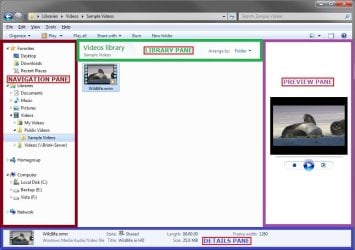
You can use the details pane in Windows Explorer to see the most common properties associated with the selected file. File properties are information about a file, such as the author, the date you last changed the file, and any descriptive tags you might have added to the file. The details pane is turned on by default in Windows 7.

The details pane only shows the size of 15 selected items by default and viewing the total size of more than 15 selected items requires clicking on the Show more details link each time the selection changes.

This will show you how to turn the Details pane on or off in all Windows Explorer windows in Windows 7.
   Tip
When the Details pane is turned on, you can drag it's top border line up and down to increase or decrease the size of the Details pane.

EXAMPLE: Windows Explorer Layout
NOTE: The details pane is the bottom pane in Windows Explorer.
Layout1.jpg

Layout2.jpg


OPTION ONE

To Turn "Details Pane" On or Off in Windows Explorer


1. Open Windows Explorer (explorer.exe).

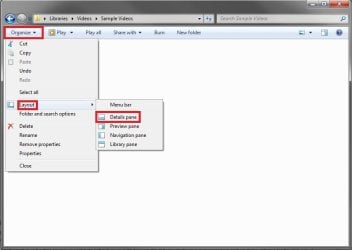
2. On the toolbar, click on Organize and Layout. (see screenshots below)
DP_on.jpg

DP_off.jpg

3. To Turn On the Details Pane in Windows Explorer
A) Select (click) Details pane to have it checked. (see screenshots above)
4. To Turn Off the Details Pane in Windows Explorer
A) Select (click) Details pane to have it unchecked with the icon now showing. (see screenshots above)
5. All Windows Explorer windows will now open as you set this.


OPTION TWO

To Turn "Details Pane" On or Off using a REG File Download


1. To Turn On the Details Pane in Windows Explorer
A) Click on the Download button below to download the file below.
Turn_Details_Pane_On.reg


Download


B) Go to step 3.
2. To Turn Off the Details Pane in Windows Explorer
A) Click on the Download button below to download the file below.
Turn_Details_Pane_Off.reg


Download


3. Save the .reg file to the desktop.

4. Right click on the downloaded .reg file, and click on Merge.

5. Click on Run, Yes, Yes, and OK when prompted.

6. Close and reopen any open Windows Explorer window to apply.

7. When done, you can delete the downloaded .reg file on the desktop if you like.
That's it,
Shawn


Attachments

Last edited:
Isn't there a keyboard shortcut to toggle the details pane, just as there is alt+P for the preview pane ???
 

My Computer My Computer

Computer type
Laptop
Computer Manufacturer/Model Number
HP
OS
Win 7 x64
Hello soewhaty, :)

Close. It would be Alt+Shift+P to toggle the details pane.

EDIT: Nope, that's only in Windows 8/10.
 
Last edited:

My Computer My Computer

Computer type
PC/Desktop
Computer Manufacturer/Model Number
Self built custom
OS
64-bit Windows 11 Pro for Workstations
CPU
Intel i7-8700K OC'd to 5 GHz
Motherboard
ASUS ROG Maximus XI Formula Z390
Memory
64 GB (4x16GB) G.SKILL TridentZ RGB DDR4 3600 MHz
Graphics Card(s)
ASUS ROG-STRIX-GTX1080TI-O11G-GAMING
Sound Card
Integrated
Monitor(s) Displays
2 x Samsung Odyssey G7 27"
Screen Resolution
2560x1440
Hard Drives
1TB Samsung 990 PRO M.2,
4TB Samsung 990 PRO PRO M.2,
TerraMaster F8 SSD Plus NAS
PSU
Seasonic Prime Titanium 850W
Case
Thermaltake Core P3
Cooling
Corsair Hydro H115i
Keyboard
Logitech wireless K800
Mouse
Logitech MX Master 4
Internet Speed
2 Gb/s Download and 100 Mb/s Upload
Antivirus
Malwarebyte Anti-Malware Premium
Browser
Google Chrome
Other Info
Logitech Z625 speaker system,
Logitech BRIO 4K Pro webcam,
HP Color LaserJet Pro MFP M477fdn,
APC SMART-UPS RT 1000 XL - SURT1000XLI,
Galaxy S23 Plus phone
Yeah .. i saw that one somewhere and tried it, but mysteriously for me that shortcut toggles the Preview pane, not the Details pane ... i don't know why ... I already have a fine shortcut for toggling the Preview pane and that is alt+P, so why Alt+Shift+P now toggles again the Preview pane and not the Details pane is a mystery to me. Any idea?
 

My Computer My Computer

Computer type
Laptop
Computer Manufacturer/Model Number
HP
OS
Win 7 x64
Very frustrating ...
 

My Computer My Computer

Computer type
Laptop
Computer Manufacturer/Model Number
HP
OS
Win 7 x64
Tab key is the only way I've ever gotten to the organize menu list :)
 

My Computer My Computer

Computer type
PC/Desktop
Computer Manufacturer/Model Number
Custom assembled by me :}
OS
Win-7-Pro64bit 7-H-Prem-64bit
CPU
i7-5930K 2nd i9-9940x both water blocked VRM's too
Motherboard
ASUS SABERTOOTH X99 2nd ASUS x299 Apex
Memory
Trident-z 3200C14 2nd Trident-z 3600C16
Graphics Card(s)
EVGA 1080ti ftw3 2nd Titan Xp both water blocked
Sound Card
Built-in Realtek
Monitor(s) Displays
1-AOC G2460PG 24"G-Sync 144Hz/ 2nd 1-ASUS VG248QE 24" 144Hz
Screen Resolution
1920 x 1080 144Hz
Hard Drives
2-Samsung M.2 Evo & Evo Plus
2-Samsung 850 EVO 500GB SSD's/ 3-2.5 W.D. Black 1tb-&3-1tb/3-3.5 WD Black 1tb hdd's
PSU
EVGA SuperNOVA 1000-P2 2nd 1200-P2
Case
2-Corsair Obsidian Series 450D Black ATX Mid Tower
Cooling
Custom water loops
Keyboard
Logitech G710+/ 2nd Logitech G910
Mouse
2-RedDragon M901 Perdition 16400 dpi Gaming mouse = wired
Internet Speed
Comcast Ping 19ms 89.31mbps download speed 6.12mbps upload
Antivirus
Malwarebytes Pro/ Superantispyware Pro
Browser
FireFox & Pale moon
Other Info
2nd ASUS X299 Apex/Intel i9-9940x with Custom water loop/7H-Prem-x64/Corsair 450D case/Ram Trident-z 3600C16 4x8gb / Samsung970Evo plus 500gb SSD/Dual ssd EZ swap evo/PSU EVGA SuperNova 1200w-P2 80+Platinum/GPU Titan Xp /8-ML-140 on push-pull on 2-280GTX rads
yeah but @Brink ... why doesn't Alt+Shift+P work .. makes no sense?????

it's too long and tiresome to do it with Tab ...
 

My Computer My Computer

Computer type
Laptop
Computer Manufacturer/Model Number
HP
OS
Win 7 x64
yeah but @Brink ... why doesn't Alt+Shift+P work .. makes no sense?????

it's too long and tiresome to do it with Tab ...

It just wasn't coded to do so. :(

I'd just leave it turned on to avoid the frustration if you're always turning it off and on.
 

My Computer My Computer

Computer type
PC/Desktop
Computer Manufacturer/Model Number
Self built custom
OS
64-bit Windows 11 Pro for Workstations
CPU
Intel i7-8700K OC'd to 5 GHz
Motherboard
ASUS ROG Maximus XI Formula Z390
Memory
64 GB (4x16GB) G.SKILL TridentZ RGB DDR4 3600 MHz
Graphics Card(s)
ASUS ROG-STRIX-GTX1080TI-O11G-GAMING
Sound Card
Integrated
Monitor(s) Displays
2 x Samsung Odyssey G7 27"
Screen Resolution
2560x1440
Hard Drives
1TB Samsung 990 PRO M.2,
4TB Samsung 990 PRO PRO M.2,
TerraMaster F8 SSD Plus NAS
PSU
Seasonic Prime Titanium 850W
Case
Thermaltake Core P3
Cooling
Corsair Hydro H115i
Keyboard
Logitech wireless K800
Mouse
Logitech MX Master 4
Internet Speed
2 Gb/s Download and 100 Mb/s Upload
Antivirus
Malwarebyte Anti-Malware Premium
Browser
Google Chrome
Other Info
Logitech Z625 speaker system,
Logitech BRIO 4K Pro webcam,
HP Color LaserJet Pro MFP M477fdn,
APC SMART-UPS RT 1000 XL - SURT1000XLI,
Galaxy S23 Plus phone
Ermmm ... alright .. not really sure i followed u there ... isn't Alt+Shift+P by default supposed to toggle the Details pane (at least that's what i though you suggest by your 1st reply to my question) ... or do I have to code it to do that?

So that's it ... no other way? Strange ...

Well yeah ... it's annoying but ok... if no keyboard shortcut exists then it has to be done with the mouse ...
 

My Computer My Computer

Computer type
Laptop
Computer Manufacturer/Model Number
HP
OS
Win 7 x64
No, Alt+Shift+P is only in Windows 8/10 from the edited post.

There is not a keyboard shortcut to toggle the Details pane in Windows 7. :(
 

My Computer My Computer

Computer type
PC/Desktop
Computer Manufacturer/Model Number
Self built custom
OS
64-bit Windows 11 Pro for Workstations
CPU
Intel i7-8700K OC'd to 5 GHz
Motherboard
ASUS ROG Maximus XI Formula Z390
Memory
64 GB (4x16GB) G.SKILL TridentZ RGB DDR4 3600 MHz
Graphics Card(s)
ASUS ROG-STRIX-GTX1080TI-O11G-GAMING
Sound Card
Integrated
Monitor(s) Displays
2 x Samsung Odyssey G7 27"
Screen Resolution
2560x1440
Hard Drives
1TB Samsung 990 PRO M.2,
4TB Samsung 990 PRO PRO M.2,
TerraMaster F8 SSD Plus NAS
PSU
Seasonic Prime Titanium 850W
Case
Thermaltake Core P3
Cooling
Corsair Hydro H115i
Keyboard
Logitech wireless K800
Mouse
Logitech MX Master 4
Internet Speed
2 Gb/s Download and 100 Mb/s Upload
Antivirus
Malwarebyte Anti-Malware Premium
Browser
Google Chrome
Other Info
Logitech Z625 speaker system,
Logitech BRIO 4K Pro webcam,
HP Color LaserJet Pro MFP M477fdn,
APC SMART-UPS RT 1000 XL - SURT1000XLI,
Galaxy S23 Plus phone
the sadness .... and the horror :((( but still ... thank you so much for your input! :)

edit: sorry ... didn't see u edited your post :)
 

My Computer My Computer

Computer type
Laptop
Computer Manufacturer/Model Number
HP
OS
Win 7 x64
No problem.
 

My Computer My Computer

Computer type
PC/Desktop
Computer Manufacturer/Model Number
Self built custom
OS
64-bit Windows 11 Pro for Workstations
CPU
Intel i7-8700K OC'd to 5 GHz
Motherboard
ASUS ROG Maximus XI Formula Z390
Memory
64 GB (4x16GB) G.SKILL TridentZ RGB DDR4 3600 MHz
Graphics Card(s)
ASUS ROG-STRIX-GTX1080TI-O11G-GAMING
Sound Card
Integrated
Monitor(s) Displays
2 x Samsung Odyssey G7 27"
Screen Resolution
2560x1440
Hard Drives
1TB Samsung 990 PRO M.2,
4TB Samsung 990 PRO PRO M.2,
TerraMaster F8 SSD Plus NAS
PSU
Seasonic Prime Titanium 850W
Case
Thermaltake Core P3
Cooling
Corsair Hydro H115i
Keyboard
Logitech wireless K800
Mouse
Logitech MX Master 4
Internet Speed
2 Gb/s Download and 100 Mb/s Upload
Antivirus
Malwarebyte Anti-Malware Premium
Browser
Google Chrome
Other Info
Logitech Z625 speaker system,
Logitech BRIO 4K Pro webcam,
HP Color LaserJet Pro MFP M477fdn,
APC SMART-UPS RT 1000 XL - SURT1000XLI,
Galaxy S23 Plus phone
Back
Top