
Device manager ~ other devices ~ unknown.

sezan1

New member
Member
VIP
Local time
11:27 PM
Messages
111
Screenshot by Lightshot

They've been there for months upon months. I don't see any difference to my computer but I feel like it's the time to address it. I can't update them and I don't see any information relating to what they are.

Is there any steps I could take to find out?


Processor AMD Ryzen 5 1600 Six-Core Processor
Manufacturer AMD
Speed 3.6 GHz
Number of Cores 12

Memory
RAM 16 GB
Video Card
Video Card Radeon (TM) RX 480 Graphics
Manufacturer
Chipset Radeon (TM) RX 480 Graphics
Dedicated Memory 8.0 GB
Total Memory 12 GB
Pixel Shader Version
Vertex Shader Version
Hardware T & L Yes
Vendor ID 1002
Device 67DF
Driver Version 25.20.15017.1010

Operating System
Operating System Windows 7
Service Pack 1
Size 64-bit
Edition
Version 6.1.7601
Locale 0809
BIOS
BIOS BIOS Date: 12/04/17 18:16:25 Ver: 05.0000C
Version
Manufacturer American Megatrends Inc.
Date 12/04/17

Sound
Audio 1
Sound Device AMD High Definition Audio Device
Driver 7.12.0.7728
Audio 2
Sound Device Realtek High Definition Audio
Driver 6.0.1.7982
Audio 3
Sound Device Turtle Beach Z22 Chat
Driver 6.1.7601.18208
 

My Computer

Computer type
PC/Desktop
Computer Manufacturer/Model Number
AuthenticAMD
OS
Microsoft Windows 7 Professional 64-bit
CPU
AMD Ryzen 5 1600 Six-Core Processor
Motherboard
PRIME B350-PLUS
Memory
16.00 GB
Graphics Card(s)
Radeon (TM) RX 480 Graphics
The System Management Controller (aka SM Bus controller) is not running. This is a part of your motherboard chipset that manages voltage and temperature sensors. Try running HWINFO64 and it will probably not be reporting temps and voltages correctly right now. Then go here:

ASRock > FM2A55M-HD+

and download and run the AMD all-in-one driver for your motherboard (Win7, not Win10), then reboot, then run hwinfo64 again and it should be working correctly and your device manager should look clean
 

My Computer

Computer type
PC/Desktop
Computer Manufacturer/Model Number
diy
OS
Win7 pro x64
CPU
stock i7 7700k
Motherboard
Gigabyte Z270N-WIFI mini-ITX
Memory
Corsair Vengeance LPX 16GB (2x8GB) DDR4 @ 3200MHz
Graphics Card(s)
integrated Intel HD 630
Sound Card
onboard Realtek ALC1220
Monitor(s) Displays
two vertically mounted samsung 55" 4k un55mu8000
Screen Resolution
1920x1280
Hard Drives
256GB Samsung EVO 960 M.2 pci-e NVMe SSD
PSU
SilverStone Nightjar ST45NF 450Watt Fanless
Case
No case. Motherboard is mounted directly onto power supply
Cooling
Evercool low profile 815EP with Panaflow 12L fan at 7v
Keyboard
Ortek MCK-86 mini
Mouse
Belkin 5-button USB
Internet Speed
spectrum 400mbps
ASRock > FM2A55M-HD+
Isn't my motherboard though?
Asus prime b350-plus, socket am4 is WHat I have just no
So basically I should just try redoWnload th mb drivers
 

My Computer

Computer type
PC/Desktop
Computer Manufacturer/Model Number
AuthenticAMD
OS
Microsoft Windows 7 Professional 64-bit
CPU
AMD Ryzen 5 1600 Six-Core Processor
Motherboard
PRIME B350-PLUS
Memory
16.00 GB
Graphics Card(s)
Radeon (TM) RX 480 Graphics

My Computers

System One System Two

  • Computer type
    PC/Desktop
    Computer Manufacturer/Model Number
    custom build
    OS
    Windows 7 HP 64
    CPU
    i5 6600K - 800MHz to 4200MHz
    Motherboard
    GA-Z170-HD3P
    Memory
    4+4G GSkill DDR4 3000
    Graphics Card(s)
    IG - Intel 530
    Monitor(s) Displays
    Samsung 226BW
    Screen Resolution
    1680x1050
    Hard Drives
    (1) -1 SM951 – 128GB M.2 AHCI PCIe SSD drive for Windows 7 and Lubuntu
    (2) -1 WD SATA 3 - 1T for Data
    (3) -1 WD SATA 3 - 1T for backup
    PSU
    Thermaltake 450W TR2 gold
    Keyboard
    Old and good Chicony mechanical keyboard
    Mouse
    Logitech mX performance - 9 buttons (had to disable some)
    Internet Speed
    500Mb/s
    Browser
    Firefox 64
    Other Info
    TinyWall firewall
  • Computer type
    Laptop
    System Manufacturer/Model Number
    Asus Q550LF
    OS
    Windows 7 Pro
    CPU
    i7-4500U 800MHz to 3.0GHz
    Motherboard
    Asus Q550LF
    Memory
    (4+4)G DDR3 1600
    Graphics Card(s)
    IG intel 4400 + NVIDIA GeForce GT 745M
    Sound Card
    Realtek
    Monitor(s) Displays
    LG Display LP156WF4-SPH1
    Screen Resolution
    1920 x 1080
    Hard Drives
    BX500 120G SSD for Windows and programs +
    1T HDD for data
    Internet Speed
    500 Mb/s
    Browser
    Firefox
    Other Info
    TinyWall firewall
ASRock > FM2A55M-HD+
Isn't my motherboard though?
got that from your specs. But yes, you just need the chipset driver for your motherboard.
 
Last edited:

My Computer

Computer type
PC/Desktop
Computer Manufacturer/Model Number
diy
OS
Win7 pro x64
CPU
stock i7 7700k
Motherboard
Gigabyte Z270N-WIFI mini-ITX
Memory
Corsair Vengeance LPX 16GB (2x8GB) DDR4 @ 3200MHz
Graphics Card(s)
integrated Intel HD 630
Sound Card
onboard Realtek ALC1220
Monitor(s) Displays
two vertically mounted samsung 55" 4k un55mu8000
Screen Resolution
1920x1280
Hard Drives
256GB Samsung EVO 960 M.2 pci-e NVMe SSD
PSU
SilverStone Nightjar ST45NF 450Watt Fanless
Case
No case. Motherboard is mounted directly onto power supply
Cooling
Evercool low profile 815EP with Panaflow 12L fan at 7v
Keyboard
Ortek MCK-86 mini
Mouse
Belkin 5-button USB
Internet Speed
spectrum 400mbps
got that from your specs. But yes, you just need the chipset driver for your motherboard.

On new MB and CPU, M$ is blocking the updates.
Unofficial Patch Unblocks Windows 7 and 8.1 Updates for Kaby Lake, Ryzen - ExtremeTech

My suggestion is to use the offline and security ONLY updates
MS releases SP2 for Windows 7

So I need the updates to get rid of the errors in devices?
Or do I just reinstall the motherboard drivers? if so can you point me in the right direction?

PRIME B350-PLUS Driver & Tools | Motherboards | ASUS USA

Chipset
Version 5.12.0.0031
2018/04/18428.89 MBytes
AMD Chipset driver
AMD Chipset Driver V5.12.0.0031 for Windows Win7 64bit. (AMD package version is 17.40.2815.1010, VGA driver version is V23.20.808.2816)

Is this it? because it looks like it's for my graphics card which is upto date
 

My Computer

Computer type
PC/Desktop
Computer Manufacturer/Model Number
AuthenticAMD
OS
Microsoft Windows 7 Professional 64-bit
CPU
AMD Ryzen 5 1600 Six-Core Processor
Motherboard
PRIME B350-PLUS
Memory
16.00 GB
Graphics Card(s)
Radeon (TM) RX 480 Graphics
based on your SMBus error, you need to re-install your chipset driver

https://dlcdnets.asus.com/pub/ASUS/mb/SocketAM4/PRIME_X470-PRO/AM4Chipset_Win7_17.40.2815.1010.zip

but before resorting to that I would suggest you use asus EZ update which is more all encompassing. The program may be on your PC already, or it may be on the DVD that came with the motherboard, or you can get it here as a part of AI suite...

https://dlcdnets.asus.com/pub/ASUS/mb/Utility/ASUS_AISuite3_Win10_V10174_20170602.zip

description of AI suite and EZ update

[Motherboard] AI Suite 3 - Introduction | Official Support | ASUS Global

How to use EZ Update? | Official Support | ASUS Global
 

My Computer

Computer type
PC/Desktop
Computer Manufacturer/Model Number
diy
OS
Win7 pro x64
CPU
stock i7 7700k
Motherboard
Gigabyte Z270N-WIFI mini-ITX
Memory
Corsair Vengeance LPX 16GB (2x8GB) DDR4 @ 3200MHz
Graphics Card(s)
integrated Intel HD 630
Sound Card
onboard Realtek ALC1220
Monitor(s) Displays
two vertically mounted samsung 55" 4k un55mu8000
Screen Resolution
1920x1280
Hard Drives
256GB Samsung EVO 960 M.2 pci-e NVMe SSD
PSU
SilverStone Nightjar ST45NF 450Watt Fanless
Case
No case. Motherboard is mounted directly onto power supply
Cooling
Evercool low profile 815EP with Panaflow 12L fan at 7v
Keyboard
Ortek MCK-86 mini
Mouse
Belkin 5-button USB
Internet Speed
spectrum 400mbps
based on your SMBus error, you need to re-install your chipset driver

https://dlcdnets.asus.com/pub/ASUS/mb/SocketAM4/PRIME_X470-PRO/AM4Chipset_Win7_17.40.2815.1010.zip

but before resorting to that I would suggest you use asus EZ update which is more all encompassing. The program may be on your PC already, or it may be on the DVD that came with the motherboard, or you can get it here as a part of AI suite...

https://dlcdnets.asus.com/pub/ASUS/mb/Utility/ASUS_AISuite3_Win10_V10174_20170602.zip

description of AI suite and EZ update

[Motherboard] AI Suite 3 - Introduction | Official Support | ASUS Global

How to use EZ Update? | Official Support | ASUS Global


I installed AI suite, I click update in ez update and 'there is no need to update the environ'
 

My Computer

Computer type
PC/Desktop
Computer Manufacturer/Model Number
AuthenticAMD
OS
Microsoft Windows 7 Professional 64-bit
CPU
AMD Ryzen 5 1600 Six-Core Processor
Motherboard
PRIME B350-PLUS
Memory
16.00 GB
Graphics Card(s)
Radeon (TM) RX 480 Graphics
if there is no need to update then they are saying your drivers are fine. But the way to know is to post a screenshot of what you get when you do start > run > msinfo32 > components > problem devices. You may have to adjust the column widths (using your mouse near the top top where the column headers are) to make it fully readable.
 

My Computer

Computer type
PC/Desktop
Computer Manufacturer/Model Number
diy
OS
Win7 pro x64
CPU
stock i7 7700k
Motherboard
Gigabyte Z270N-WIFI mini-ITX
Memory
Corsair Vengeance LPX 16GB (2x8GB) DDR4 @ 3200MHz
Graphics Card(s)
integrated Intel HD 630
Sound Card
onboard Realtek ALC1220
Monitor(s) Displays
two vertically mounted samsung 55" 4k un55mu8000
Screen Resolution
1920x1280
Hard Drives
256GB Samsung EVO 960 M.2 pci-e NVMe SSD
PSU
SilverStone Nightjar ST45NF 450Watt Fanless
Case
No case. Motherboard is mounted directly onto power supply
Cooling
Evercool low profile 815EP with Panaflow 12L fan at 7v
Keyboard
Ortek MCK-86 mini
Mouse
Belkin 5-button USB
Internet Speed
spectrum 400mbps
if there is no need to update then they are saying your drivers are fine. But the way to know is to post a screenshot of what you get when you do start > run > msinfo32 > components > problem devices. You may have to adjust the column widths (using your mouse near the top top where the column headers are) to make it fully readable.

PCI Device PCI\VEN_1022&DEV_1455&SUBSYS_14551022&REV_00\4&2B9CC193&0&0041 The drivers for this device are not installed.
PCI Device PCI\VEN_1022&DEV_145A&SUBSYS_145A1022&REV_00\4&C93BEE2&0&0039 The drivers for this device are not installed.
PCI Device PCI\VEN_1022&DEV_1451&SUBSYS_87471043&REV_00\3&11583659&0&02 The drivers for this device are not installed.
SM Bus Controller PCI\VEN_1022&DEV_790B&SUBSYS_87471043&REV_59\3&11583659&0&A0 The drivers for this device are not installed.

is whats there dude ;3.
 

My Computer

Computer type
PC/Desktop
Computer Manufacturer/Model Number
AuthenticAMD
OS
Microsoft Windows 7 Professional 64-bit
CPU
AMD Ryzen 5 1600 Six-Core Processor
Motherboard
PRIME B350-PLUS
Memory
16.00 GB
Graphics Card(s)
Radeon (TM) RX 480 Graphics
those are all part of the AMD chipset, so installing the first link in post #7 should do the trick. The fact that EZ Update said everything was fine is kind of weird, but the next step is to do that install from post #7, then reboot, then re-run start > cmd > msinfo32 > components > problem devices and see what it says
 
Last edited:

My Computer

Computer type
PC/Desktop
Computer Manufacturer/Model Number
diy
OS
Win7 pro x64
CPU
stock i7 7700k
Motherboard
Gigabyte Z270N-WIFI mini-ITX
Memory
Corsair Vengeance LPX 16GB (2x8GB) DDR4 @ 3200MHz
Graphics Card(s)
integrated Intel HD 630
Sound Card
onboard Realtek ALC1220
Monitor(s) Displays
two vertically mounted samsung 55" 4k un55mu8000
Screen Resolution
1920x1280
Hard Drives
256GB Samsung EVO 960 M.2 pci-e NVMe SSD
PSU
SilverStone Nightjar ST45NF 450Watt Fanless
Case
No case. Motherboard is mounted directly onto power supply
Cooling
Evercool low profile 815EP with Panaflow 12L fan at 7v
Keyboard
Ortek MCK-86 mini
Mouse
Belkin 5-button USB
Internet Speed
spectrum 400mbps
PCI Device PCI\VEN_1022&DEV_1455&SUBSYS_14551022&REV_00\4&2B9CC193&0&0041 The drivers for this device are not installed.
PCI Device PCI\VEN_1022&DEV_145A&SUBSYS_145A1022&REV_00\4&C93BEE2&0&0039 The drivers for this device are not installed.
PCI Device PCI\VEN_1022&DEV_1451&SUBSYS_87471043&REV_00\3&11583659&0&02 The drivers for this device are not installed.
SM Bus Controller PCI\VEN_1022&DEV_790B&SUBSYS_87471043&REV_59\3&11583659&0&A0 The drivers for this device are not installed.


after reinstall, really don't think they're gonna go away
 

My Computer

Computer type
PC/Desktop
Computer Manufacturer/Model Number
AuthenticAMD
OS
Microsoft Windows 7 Professional 64-bit
CPU
AMD Ryzen 5 1600 Six-Core Processor
Motherboard
PRIME B350-PLUS
Memory
16.00 GB
Graphics Card(s)
Radeon (TM) RX 480 Graphics
digging into this a little more, it looks like you have the same issue facing intel users - your hardware is too new (B350 socket AM4) so AMD does not officially support windows7 on it. But by searching on "AMD 300-series chipset windows 7" I found that the below amd chipset driver was released just prior to amd pulling support, so it may work on your board.

Download AMD Chipset Driver 17.2.1 for Windows 7, Windows 8.1, Windows 10

you will also want the ability to get windows update working by using the zeffy wufuc patch

GitHub - zeffy/wufuc: Disables the "Unsupported Hardware" message in Windows Update, and allows you to continue installing updates on Windows 7 and 8.1 systems with Intel Kaby Lake, AMD Ryzen, or other unsupported processors.

if this does not work for you try doing the search in quotes above and you'll see what others have tried..
 

My Computer

Computer type
PC/Desktop
Computer Manufacturer/Model Number
diy
OS
Win7 pro x64
CPU
stock i7 7700k
Motherboard
Gigabyte Z270N-WIFI mini-ITX
Memory
Corsair Vengeance LPX 16GB (2x8GB) DDR4 @ 3200MHz
Graphics Card(s)
integrated Intel HD 630
Sound Card
onboard Realtek ALC1220
Monitor(s) Displays
two vertically mounted samsung 55" 4k un55mu8000
Screen Resolution
1920x1280
Hard Drives
256GB Samsung EVO 960 M.2 pci-e NVMe SSD
PSU
SilverStone Nightjar ST45NF 450Watt Fanless
Case
No case. Motherboard is mounted directly onto power supply
Cooling
Evercool low profile 815EP with Panaflow 12L fan at 7v
Keyboard
Ortek MCK-86 mini
Mouse
Belkin 5-button USB
Internet Speed
spectrum 400mbps
digging into this a little more, it looks like you have the same issue facing intel users - your hardware is too new (B350 socket AM4) so AMD does not officially support windows7 on it. But by searching on "AMD 300-series chipset windows 7" I found that the below amd chipset driver was released just prior to amd pulling support, so it may work on your board.

Download AMD Chipset Driver 17.2.1 for Windows 7, Windows 8.1, Windows 10

you will also want the ability to get windows update working by using the zeffy wufuc patch

GitHub - zeffy/wufuc: Disables the "Unsupported Hardware" message in Windows Update, and allows you to continue installing updates on Windows 7 and 8.1 systems with Intel Kaby Lake, AMD Ryzen, or other unsupported processors.

if this does not work for you try doing the search in quotes above and you'll see what others have tried..


Ohh yeah didn't even think of that and it was mentioned earlier, if I don't get these fixed will it affect me much?
 

My Computer

Computer type
PC/Desktop
Computer Manufacturer/Model Number
AuthenticAMD
OS
Microsoft Windows 7 Professional 64-bit
CPU
AMD Ryzen 5 1600 Six-Core Processor
Motherboard
PRIME B350-PLUS
Memory
16.00 GB
Graphics Card(s)
Radeon (TM) RX 480 Graphics
I'm assuming the impact of this is that your USB3 ports are not working. Sounds like you are not using them, so probably not a big deal. I think on your board you have two black USB2 ports and two blue blue USB3 ports.


The zeffy wufuc patch will work, so definitely load that up so you can get critical windows updates.
 

My Computer

Computer type
PC/Desktop
Computer Manufacturer/Model Number
diy
OS
Win7 pro x64
CPU
stock i7 7700k
Motherboard
Gigabyte Z270N-WIFI mini-ITX
Memory
Corsair Vengeance LPX 16GB (2x8GB) DDR4 @ 3200MHz
Graphics Card(s)
integrated Intel HD 630
Sound Card
onboard Realtek ALC1220
Monitor(s) Displays
two vertically mounted samsung 55" 4k un55mu8000
Screen Resolution
1920x1280
Hard Drives
256GB Samsung EVO 960 M.2 pci-e NVMe SSD
PSU
SilverStone Nightjar ST45NF 450Watt Fanless
Case
No case. Motherboard is mounted directly onto power supply
Cooling
Evercool low profile 815EP with Panaflow 12L fan at 7v
Keyboard
Ortek MCK-86 mini
Mouse
Belkin 5-button USB
Internet Speed
spectrum 400mbps
I'm assuming the impact of this is that your USB3 ports are not working. Sounds like you are not using them, so probably not a big deal. I think on your board you have two black USB2 ports and two blue blue USB3 ports.


The zeffy wufuc patch will work, so definitely load that up so you can get critical windows updates.

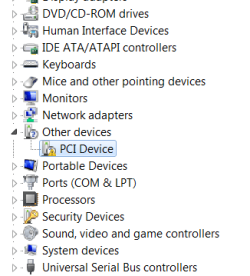
thank you buddy, we fixed 3 outta 4 lol :) I'm thinking that last optional one might fix it? should I get all these optional ones?
 

Attachments

  • PCI.png
    PCI.png
    9.7 KB · Views: 11
  • optional.png
    optional.png
    26.4 KB · Views: 1

My Computer

Computer type
PC/Desktop
Computer Manufacturer/Model Number
AuthenticAMD
OS
Microsoft Windows 7 Professional 64-bit
CPU
AMD Ryzen 5 1600 Six-Core Processor
Motherboard
PRIME B350-PLUS
Memory
16.00 GB
Graphics Card(s)
Radeon (TM) RX 480 Graphics
I would load anything driver related from windows update for sure. If you still have an unrecognized device post the problem devices output again so we know its PCI/VEN number
 

My Computer

Computer type
PC/Desktop
Computer Manufacturer/Model Number
diy
OS
Win7 pro x64
CPU
stock i7 7700k
Motherboard
Gigabyte Z270N-WIFI mini-ITX
Memory
Corsair Vengeance LPX 16GB (2x8GB) DDR4 @ 3200MHz
Graphics Card(s)
integrated Intel HD 630
Sound Card
onboard Realtek ALC1220
Monitor(s) Displays
two vertically mounted samsung 55" 4k un55mu8000
Screen Resolution
1920x1280
Hard Drives
256GB Samsung EVO 960 M.2 pci-e NVMe SSD
PSU
SilverStone Nightjar ST45NF 450Watt Fanless
Case
No case. Motherboard is mounted directly onto power supply
Cooling
Evercool low profile 815EP with Panaflow 12L fan at 7v
Keyboard
Ortek MCK-86 mini
Mouse
Belkin 5-button USB
Internet Speed
spectrum 400mbps
Back
Top