Differences between IE 32-bit and 64-bit

Dark Nova Gamer

Resident OS X Expert
Guru
Local time
9:00 AM
Messages
3,639
Location
Pembroke
A lot of people seemed to be confused on why IE8 has two versions in the 64-bit version of Windows Vista/7, and which one they should be using. I'm here to make this simple for those users.


How to tell which you are running

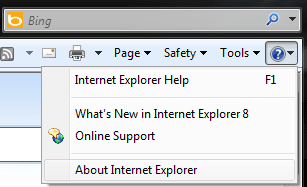
To tell which version of IE you are running, you just need to go here and click About Internet Explorer.
Which version.png

The 32-bit version will say something along the lines of Version: 8.0.7xxx.xxxxx.
The 64-bit version will say something along the lines of Version: 8.0.7xxx.xxxxx 64-bit Edition.


Why two versions? We only need one!

A lot of users are confused as to why Microsoft put both a 32-bit and 64-bit copy of Internet Explorer in 64-bit Windows Vista/7.

The reason is quite simple really. While the move from 32-bit to 64-bit is speeding up, there are still addons/plugins for programs such as Internet Explorer that do not currently work in their 64-bit counterparts. A good example for a plugin that doesn't work in 64-bit Internet Explorer is Microsoft's Silverlight Plugin.


Which should I run?

   Warning
This is my person opinion, if you disagree with it, that is fine and dandy. Try not to wage a war about it.


If you need to use Silverlight, or any other plugin that does not have a 64-bit compatible counterpart, I suggest using 32-bit Internet Explorer.

If you do not need Silverlight, or any other plugins that do not support 64-bit Internet Explorer, I suggest using 64-bit Internet Explorer.
 
Last edited:

My Computer

Computer Manufacturer/Model Number
Custom | Whitebox
OS
Windows 7 Ultimate, OS X 10.7, Ubuntu 11.04
CPU
Intel E6750 @ 3.80GHz
Motherboard
Gigabyte GA-EP45-UD3L (Revision 1.1)
Memory
2x2GB & 2x1GB (6GB) OCZ Reaper 1066MHz @ 1080MHz
Graphics Card(s)
EVGA nVidia GTX 260 896mb (216 Core) FTW Edition
Sound Card
Realtek ALC888
Monitor(s) Displays
21" VIZIO TV
Screen Resolution
1680x1050 @ 60Hz
Hard Drives
Western Digital WD6401AALS - 640GB
Hitachi HDP725016GLA380 - 160GB
PSU
Corsair 750W
Case
NZXT Nemesis Elite
Cooling
Thermaltake SpinQ
Keyboard
Logitech Wireless S520
Mouse
Logitech Wireless S520 - Microsoft Wireless Arc Mouse
Internet Speed
Download: 20mbps, Upload: 3mbps
I don't recommend going 64 bit IE at all, even if you don't care about 32 bit plug ins.

There are big reasons to go 64bit for the OS, mainly to open up the address space, but for applications that don't need multiple Gigabytes of RAM, it really isn't going to matter.

In theory You might benefit from a wider registers, but in reality with most computationally intensive apps being coded in using the FPU or some extension (MMX/SSE/3d Now), so computation benefits of 64 bit registers will be mitigated.

Interesting bit:
I ran Peacemaker benchmark and scored ~20% lower with the 64 bit IE than the 32 bit version(~1000 in IE 32 bit, ~800 in IE 64 bit) . This kind of surprised me. I expected them to be essentially identical. Anyone else want to give it a shot?
 

My Computer

OS
Windows 7 x64 Home Premium
CPU
Intel Q9400 @ 3.2 GHz
Motherboard
Gigabyte DS3L
Memory
6GB PC 6400
Graphics Card(s)
Nvidia 8800GT
Screen Resolution
1920x1200
Hard Drives
Dual WD Green 1TB
Internet Speed
10 Mb/s
Interesting bit:
I ran Peacemaker benchmark and scored ~20% lower with the 64 bit IE than the 32 bit version(~1000 in IE 32 bit, ~800 in IE 64 bit) . This kind of surprised me. I expected them to be essentially identical. Anyone else want to give it a shot?
That IS interesting and surprising.
 

My Computer

Computer Manufacturer/Model Number
Home built
OS
Windows 7 Ultimate 32 bit
CPU
Intel(R) Pentium(R) 4 CPU 3.00GHz
Motherboard
ASUS P4P800-VM Motherboard Chipset: Intel 865G + ICH5
Memory
2.50 GB RAM
Graphics Card(s)
NVIDIA GeForce 7600 GS
Sound Card
SoundMax Integrated Digital Audio (Chip)
Monitor(s) Displays
ViewSonic VX 1962 wm
Screen Resolution
1680 X 1050
Hard Drives
Seagate Barracuda 7200.10 80 GB
ST380215A ATA Device 18.6 GB
Western Digital "My Book" external hard drive 750 GB
Cooling
Fan based
Keyboard
Microsoft Comfort Curve Keyboard 2000 v10 USB
Mouse
Logitec optic USB
Internet Speed
3.01 Mb/s download 0.64 Mb/s upload
I don't recommend going 64 bit IE at all, even if you don't care about 32 bit plug ins.

There are big reasons to go 64bit for the OS, mainly to open up the address space, but for applications that don't need multiple Gigabytes of RAM, it really isn't going to matter.

In theory You might benefit from a wider registers, but in reality with most computationally intensive apps being coded in using the FPU or some extension (MMX/SSE/3d Now), so computation benefits of 64 bit registers will be mitigated.

Interesting bit:
I ran Peacemaker benchmark and scored ~20% lower with the 64 bit IE than the 32 bit version(~1000 in IE 32 bit, ~800 in IE 64 bit) . This kind of surprised me. I expected them to be essentially identical. Anyone else want to give it a shot?

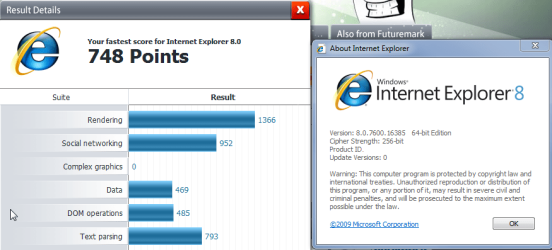
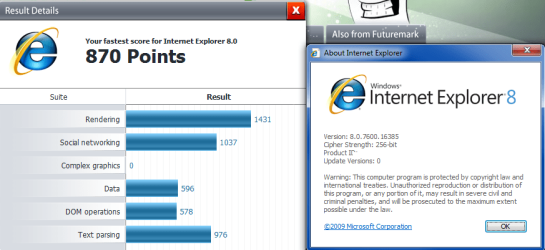
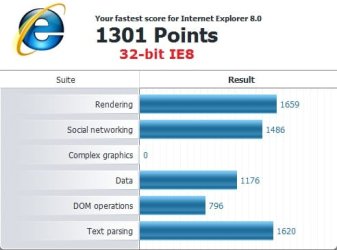
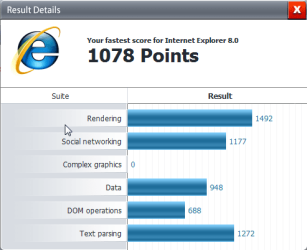
Well now, I just ran Peacekeeper myself and while there isn't much improvement with the 64-bit, there is SOME improvement. (I added 64-bit to the one that was 64-bit)


32-bit.PNG64-bit.png
 

My Computer

Computer Manufacturer/Model Number
Custom | Whitebox
OS
Windows 7 Ultimate, OS X 10.7, Ubuntu 11.04
CPU
Intel E6750 @ 3.80GHz
Motherboard
Gigabyte GA-EP45-UD3L (Revision 1.1)
Memory
2x2GB & 2x1GB (6GB) OCZ Reaper 1066MHz @ 1080MHz
Graphics Card(s)
EVGA nVidia GTX 260 896mb (216 Core) FTW Edition
Sound Card
Realtek ALC888
Monitor(s) Displays
21" VIZIO TV
Screen Resolution
1680x1050 @ 60Hz
Hard Drives
Western Digital WD6401AALS - 640GB
Hitachi HDP725016GLA380 - 160GB
PSU
Corsair 750W
Case
NZXT Nemesis Elite
Cooling
Thermaltake SpinQ
Keyboard
Logitech Wireless S520
Mouse
Logitech Wireless S520 - Microsoft Wireless Arc Mouse
Internet Speed
Download: 20mbps, Upload: 3mbps
Is that the system you ran on in your specs?

Doubly strange I would think my Intel 3.2GHz Quad core would turn in a better result than your 2.8GHz X2. Maybe the integrated memory controller helps a lot? Maybe Intel Core2 is faster with 32 bit. Need more data.

I did an "about" with each run to make it clear which was which, my 32 bit is a fair bit faster.
 

Attachments

  • IE64.png
    IE64.png
    34.6 KB · Views: 65
  • IE32.png
    IE32.png
    36.5 KB · Views: 56

My Computer

OS
Windows 7 x64 Home Premium
CPU
Intel Q9400 @ 3.2 GHz
Motherboard
Gigabyte DS3L
Memory
6GB PC 6400
Graphics Card(s)
Nvidia 8800GT
Screen Resolution
1920x1200
Hard Drives
Dual WD Green 1TB
Internet Speed
10 Mb/s
Is that the system you ran on in your specs?

Doubly strange I would think my Intel 3.2GHz Quad core would turn in a better result than your 2.8GHz X2. Maybe the integrated memory controller helps a lot? Maybe Intel Core2 is faster with 32 bit. Need more data.

I did an "about" with each run to make it clear which was which, my 32 bit is a fair bit faster.

Does seem odd that I get better results then you. :p
 

My Computer

Computer Manufacturer/Model Number
Custom | Whitebox
OS
Windows 7 Ultimate, OS X 10.7, Ubuntu 11.04
CPU
Intel E6750 @ 3.80GHz
Motherboard
Gigabyte GA-EP45-UD3L (Revision 1.1)
Memory
2x2GB & 2x1GB (6GB) OCZ Reaper 1066MHz @ 1080MHz
Graphics Card(s)
EVGA nVidia GTX 260 896mb (216 Core) FTW Edition
Sound Card
Realtek ALC888
Monitor(s) Displays
21" VIZIO TV
Screen Resolution
1680x1050 @ 60Hz
Hard Drives
Western Digital WD6401AALS - 640GB
Hitachi HDP725016GLA380 - 160GB
PSU
Corsair 750W
Case
NZXT Nemesis Elite
Cooling
Thermaltake SpinQ
Keyboard
Logitech Wireless S520
Mouse
Logitech Wireless S520 - Microsoft Wireless Arc Mouse
Internet Speed
Download: 20mbps, Upload: 3mbps
Does seem odd that I get better results then you. :p


It doesn't look like this is multiprocessing benchmark. I never see CPU > 25%.

I notice that if you look at the list of results to compare with, down at the IE8 bench, that AMD architecture might have a small advantage.

That and I scored a fair bit better last week:
http://www.sevenforums.com/681788-post130.html

It might be because I have Speedstep active and it isn't predictable on a low CPU benchmark like this one. My CPU regularly drops back to 2.4GHz under light load.
 

My Computer

OS
Windows 7 x64 Home Premium
CPU
Intel Q9400 @ 3.2 GHz
Motherboard
Gigabyte DS3L
Memory
6GB PC 6400
Graphics Card(s)
Nvidia 8800GT
Screen Resolution
1920x1200
Hard Drives
Dual WD Green 1TB
Internet Speed
10 Mb/s
Does seem odd that I get better results then you. :p


It doesn't look like this is multiprocessing benchmark. I never see CPU > 25%.

I notice that if you look at the list of results to compare with, down at the IE8 bench, that AMD architecture might have a small advantage.

That and I scored a fair bit better last week:
http://www.sevenforums.com/681788-post130.html

It might be because I have Speedstep active and it isn't predictable on a low CPU benchmark like this one. My CPU regularly drops back to 2.4GHz under light load.

AMD Cool n' Quiet (Speedstep equivalent) is disabled for me. I guess results will be different for everyone based on their hardware, configuration and setup. Though, I stand by my choice to suggest 64-bit to those who do not need the addons/plugins.
 

My Computer

Computer Manufacturer/Model Number
Custom | Whitebox
OS
Windows 7 Ultimate, OS X 10.7, Ubuntu 11.04
CPU
Intel E6750 @ 3.80GHz
Motherboard
Gigabyte GA-EP45-UD3L (Revision 1.1)
Memory
2x2GB & 2x1GB (6GB) OCZ Reaper 1066MHz @ 1080MHz
Graphics Card(s)
EVGA nVidia GTX 260 896mb (216 Core) FTW Edition
Sound Card
Realtek ALC888
Monitor(s) Displays
21" VIZIO TV
Screen Resolution
1680x1050 @ 60Hz
Hard Drives
Western Digital WD6401AALS - 640GB
Hitachi HDP725016GLA380 - 160GB
PSU
Corsair 750W
Case
NZXT Nemesis Elite
Cooling
Thermaltake SpinQ
Keyboard
Logitech Wireless S520
Mouse
Logitech Wireless S520 - Microsoft Wireless Arc Mouse
Internet Speed
Download: 20mbps, Upload: 3mbps
Though, I stand by my choice to suggest 64-bit to those who do not need the addons/plugins.

Why? It isn't really faster (slower for me). People need a reason beyond: "It's 64bit". That isn't a reason, that is just an implementation detail that doesn't actually seem to provide tangible benefit. 64 bit isn't always better and is only necessary in a few cases.

I now note that Peacekeeper benchmark is somewhat broken. I scored over a 1000 last week and I was going through my system trying to figure out where I lost performance.

I gave up and I was running it a couple of times without changes when Boom > 1000 again and 200 point jump(~20%) on both 32bit/64bit without me doing anything. It appears like part of the benchmark is dependent on access speed to the peacekeeper network. It is a very inconsistent benchmark (I noticed some connection issues when I got the lower numbers).

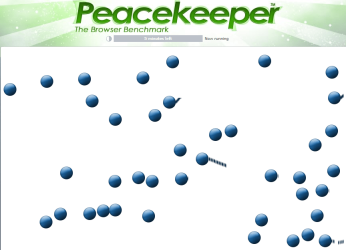
One other thing. I noticed that 64bit version is glitching on the Ball render scene, leaving trails behind.

So 64bit provides no tangible benefit, runs marginally faster/slower on some configurations and has glitches in rendering.

No way would I recommend 64bit IE. I recommend avoiding it.
 

Attachments

  • glitch64.png
    glitch64.png
    51 KB · Views: 14
  • IE64b.png
    IE64b.png
    11.1 KB · Views: 7
  • IE32b.png
    IE32b.png
    10.6 KB · Views: 10

My Computer

OS
Windows 7 x64 Home Premium
CPU
Intel Q9400 @ 3.2 GHz
Motherboard
Gigabyte DS3L
Memory
6GB PC 6400
Graphics Card(s)
Nvidia 8800GT
Screen Resolution
1920x1200
Hard Drives
Dual WD Green 1TB
Internet Speed
10 Mb/s
Though, I stand by my choice to suggest 64-bit to those who do not need the addons/plugins.

Why? It isn't really faster (slower for me). People need a reason beyond: "It's 64bit". That isn't a reason, that is just an implementation detail that doesn't actually seem to provide tangible benefit.

I now note that Peacekeeper benchmark is somewhat broken. I scored over a 1000 last week and I was going through my system trying to figure out where I lost performance.

I gave up and I was running it a couple of times without changes when Boom > 1000 again and 200 point jump(~20%) on both 32bit/64bit without me doing anything. It appears like part of the benchmark is dependent on access speed to the peacekeeper network. It is a very inconsistent benchmark (I noticed some connection issues when I got the lower numbers).

One other thing. I noticed that 64bit version is glitching on the Ball render scene, leaving trails behind.

So 64bit provides no tangible benefit, runs marginally faster/slower on some configurations and has glitches in rendering.

No way would I recommend 64bit IE. I recommend avoiding it.

That is your opinion. Which is welcome. I recommend 64-bit only for those who do not need the plugins/addons that are only 32-bit. Whether you agree with that or not isn't my concern.

Regardless of your opinion, 64-bit software will inevitably phase out 32-bit just as 32-bit phased out 16-bit. May as well be use to it as soon as you can. No valid reason NOT to use 64-bit IE. If your running 64-bit on your system, you likely have the resources to spare.
 

My Computer

Computer Manufacturer/Model Number
Custom | Whitebox
OS
Windows 7 Ultimate, OS X 10.7, Ubuntu 11.04
CPU
Intel E6750 @ 3.80GHz
Motherboard
Gigabyte GA-EP45-UD3L (Revision 1.1)
Memory
2x2GB & 2x1GB (6GB) OCZ Reaper 1066MHz @ 1080MHz
Graphics Card(s)
EVGA nVidia GTX 260 896mb (216 Core) FTW Edition
Sound Card
Realtek ALC888
Monitor(s) Displays
21" VIZIO TV
Screen Resolution
1680x1050 @ 60Hz
Hard Drives
Western Digital WD6401AALS - 640GB
Hitachi HDP725016GLA380 - 160GB
PSU
Corsair 750W
Case
NZXT Nemesis Elite
Cooling
Thermaltake SpinQ
Keyboard
Logitech Wireless S520
Mouse
Logitech Wireless S520 - Microsoft Wireless Arc Mouse
Internet Speed
Download: 20mbps, Upload: 3mbps
I recommend 64-bit only for those who do not need the plugins/addons that are only 32-bit.
That is a very theoretical recommendation. Who does NOT need the flash player. Maybe it gets fixed with IE9.
 

My Computer

Computer Manufacturer/Model Number
HP, Dell, Gateway, Toshiba - 4 laptops and 2 desktops
OS
Vista, Windows7, Mint Mate, Zorin, Windows 8
CPU
from 1.6GHz Duo to i7
Monitor(s) Displays
2x HP w2207
Hard Drives
5x HDD, 7x SSD, 12x Externals
Keyboard
with trackball - no mices
Mouse
Trackball mice
Internet Speed
DSL 6000
I recommend 64-bit only for those who do not need the plugins/addons that are only 32-bit.
That is a very theoretical recommendation. Who does NOT need the flash player.

Oh I'm sure there are some people out there that do not use it. Who they are or why I have no clue. ;)
 

My Computer

Computer Manufacturer/Model Number
Custom | Whitebox
OS
Windows 7 Ultimate, OS X 10.7, Ubuntu 11.04
CPU
Intel E6750 @ 3.80GHz
Motherboard
Gigabyte GA-EP45-UD3L (Revision 1.1)
Memory
2x2GB & 2x1GB (6GB) OCZ Reaper 1066MHz @ 1080MHz
Graphics Card(s)
EVGA nVidia GTX 260 896mb (216 Core) FTW Edition
Sound Card
Realtek ALC888
Monitor(s) Displays
21" VIZIO TV
Screen Resolution
1680x1050 @ 60Hz
Hard Drives
Western Digital WD6401AALS - 640GB
Hitachi HDP725016GLA380 - 160GB
PSU
Corsair 750W
Case
NZXT Nemesis Elite
Cooling
Thermaltake SpinQ
Keyboard
Logitech Wireless S520
Mouse
Logitech Wireless S520 - Microsoft Wireless Arc Mouse
Internet Speed
Download: 20mbps, Upload: 3mbps
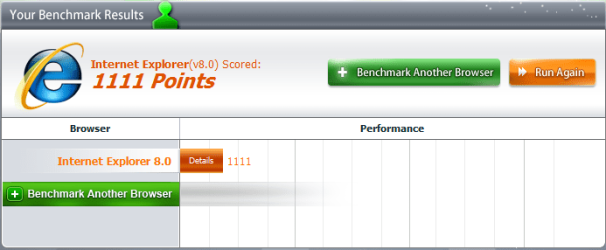
I got better results on IE 64 bit

64.PNG
IE 64bit
32.PNG
IE 32bit
 

My Computer

OS
Windows 7 Home Premium SP1 64-bit
CPU
Intel™ Core™ i7 920 2.66 ghz
Motherboard
Asus P6T Deluxe V2
Memory
OCZ 6gb (triple 2gb) ddr3-1333 (Gold Edition)
Graphics Card(s)
Nvidia 9800 GT 1GB - x2 SLI
Sound Card
On board
Monitor(s) Displays
19" LCD Wide Screen / Built-in TV Tuner
Screen Resolution
1440x900
Hard Drives
250 GB Maxtor
+
1 TB Seagate
PSU
Corsair GX 800 (800watts)
Case
Thermaltake Level 10 GT
Cooling
Antec Kuhler 920
Mouse
CM Storm Sentinel Advanced
Internet Speed
1MBps
That is your opinion. Which is welcome. I recommend 64-bit only for those who do not need the plugins/addons that are only 32-bit. Whether you agree with that or not isn't my concern.

Regardless of your opinion, 64-bit software will inevitably phase out 32-bit just as 32-bit phased out 16-bit. May as well be use to it as soon as you can. No valid reason NOT to use 64-bit IE. If your running 64-bit on your system, you likely have the resources to spare.

You still haven't presented one single reason to use the 64 bit version today. The graphic glitches are solid reason to not use it.

It's an opinion based on there being no real benefit. On it being slower in some systems and on the rendering leaving glitches behind as I showed in my screen shots.

Again you seem to be going back to: It's 64 so it's better rhetoric,when in reality is appears worse. 64bit isn't always better. Use 64bit when it provides an advantage, not because it will be there someday.

There was massive incentive to move from 16 to 32 bit apps because all applications were impacted by the 16 bit barrier. This is not the case with 32 bit apps, where only a handful of professional applications will hit that limit. Web browsing isn't one of them.

64bit IE is providing no advantage today.

Just out of curiosity, anyone else with a Intel Core2 family chip care to give it a benchmark (32 vs 64) to clear up my odd results.
 
Last edited:

My Computer

OS
Windows 7 x64 Home Premium
CPU
Intel Q9400 @ 3.2 GHz
Motherboard
Gigabyte DS3L
Memory
6GB PC 6400
Graphics Card(s)
Nvidia 8800GT
Screen Resolution
1920x1200
Hard Drives
Dual WD Green 1TB
Internet Speed
10 Mb/s
That is your opinion. Which is welcome. I recommend 64-bit only for those who do not need the plugins/addons that are only 32-bit. Whether you agree with that or not isn't my concern.

Regardless of your opinion, 64-bit software will inevitably phase out 32-bit just as 32-bit phased out 16-bit. May as well be use to it as soon as you can. No valid reason NOT to use 64-bit IE. If your running 64-bit on your system, you likely have the resources to spare.

You still haven't presented one single reason to use the 64 bit version today. The graphic glitches are solid reason to not use it.

It's an opinion based on there being no real benefit. On it being slower in some systems and on the rendering leaving glitches behind as I showed in my screen shots.

Again you seem to be going back to: It's 64 so it's better rhetoric,when in reality is appears worse. 64bit isn't always better. Use 64bit when it provides an advantage, not because it will be there someday.

There was massive incentive to move from 16 to 32 bit apps because all applications were impacted by the 16 bit barrier. This is not the case with 32 bit apps, where only a handful of professional applications will hit that limit. Web browsing isn't one of them.

64bit IE is providing no advantage today.

Just out of curiosity, anyone else with a Intel Core2 family chip care to give it a benchmark (32 vs 64) to clear up my odd results.

These are the same ideologies that said "no more than 640KB of RAM would be all anyone ever needed" :rolleyes:... the fact is technology always changes... 16bit was superseded by 32bit... 64bit will do the same and one day 64bit will be superseded by another. Saying that "Web Browsing (amongst other things) will NEVER need that memory is foolhardily and a mistake many have made in the IT industry in the past.
 

My Computer

Computer Manufacturer/Model Number
Custom | Whitebox
OS
Windows 7 Ultimate, OS X 10.7, Ubuntu 11.04
CPU
Intel E6750 @ 3.80GHz
Motherboard
Gigabyte GA-EP45-UD3L (Revision 1.1)
Memory
2x2GB & 2x1GB (6GB) OCZ Reaper 1066MHz @ 1080MHz
Graphics Card(s)
EVGA nVidia GTX 260 896mb (216 Core) FTW Edition
Sound Card
Realtek ALC888
Monitor(s) Displays
21" VIZIO TV
Screen Resolution
1680x1050 @ 60Hz
Hard Drives
Western Digital WD6401AALS - 640GB
Hitachi HDP725016GLA380 - 160GB
PSU
Corsair 750W
Case
NZXT Nemesis Elite
Cooling
Thermaltake SpinQ
Keyboard
Logitech Wireless S520
Mouse
Logitech Wireless S520 - Microsoft Wireless Arc Mouse
Internet Speed
Download: 20mbps, Upload: 3mbps
Snowdog has a good point. Although I am a technology freak too, I would not use products and features that are counterproductive or keep me from operating my usual way. We must recognize that 64bit is not ready for prime time in some areas - and I stress in some areas. We just have to patient until everybody had a chance to provide proper support. Same as for quad (or even more) cores.
 

My Computer

Computer Manufacturer/Model Number
HP, Dell, Gateway, Toshiba - 4 laptops and 2 desktops
OS
Vista, Windows7, Mint Mate, Zorin, Windows 8
CPU
from 1.6GHz Duo to i7
Monitor(s) Displays
2x HP w2207
Hard Drives
5x HDD, 7x SSD, 12x Externals
Keyboard
with trackball - no mices
Mouse
Trackball mice
Internet Speed
DSL 6000
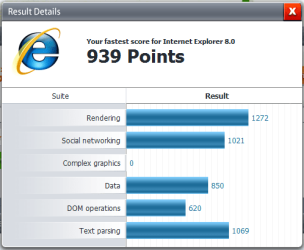
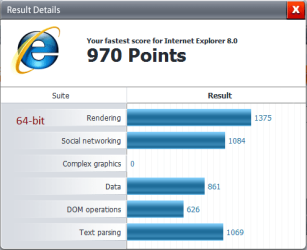
Here are my PeaceKeeper results with 32-bit IE8 vs 64-bit IE8

32-bit.jpg64-bit.jpg
 

My Computer

Computer type
PC/Desktop
Computer Manufacturer/Model Number
Self built custom
OS
64-bit Windows 11 Pro for Workstations
CPU
Intel i7-8700K OC'd to 5 GHz
Motherboard
ASUS ROG Maximus XI Formula Z390
Memory
64 GB (4x16GB) G.SKILL TridentZ RGB DDR4 3600 MHz
Graphics Card(s)
ASUS ROG-STRIX-GTX1080TI-O11G-GAMING
Sound Card
Integrated
Monitor(s) Displays
2 x Samsung Odyssey G7 27"
Screen Resolution
2560x1440
Hard Drives
1TB Samsung 990 PRO M.2,
4TB Samsung 990 PRO PRO M.2,
TerraMaster F8 SSD Plus NAS
PSU
Seasonic Prime Titanium 850W
Case
Thermaltake Core P3
Cooling
Corsair Hydro H115i
Keyboard
Logitech wireless K800
Mouse
Logitech MX Master 4
Internet Speed
2 Gb/s Download and 100 Mb/s Upload
Antivirus
Malwarebyte Anti-Malware Premium
Browser
Google Chrome
Other Info
Logitech Z625 speaker system,
Logitech BRIO 4K Pro webcam,
HP Color LaserJet Pro MFP M477fdn,
APC SMART-UPS RT 1000 XL - SURT1000XLI,
Galaxy S23 Plus phone
My thought now is that PeaceKeeper is a bit.. skewed. At any rate, I edited the first post of this thread to match the way certain people feel about my opinion.
 

My Computer

Computer Manufacturer/Model Number
Custom | Whitebox
OS
Windows 7 Ultimate, OS X 10.7, Ubuntu 11.04
CPU
Intel E6750 @ 3.80GHz
Motherboard
Gigabyte GA-EP45-UD3L (Revision 1.1)
Memory
2x2GB & 2x1GB (6GB) OCZ Reaper 1066MHz @ 1080MHz
Graphics Card(s)
EVGA nVidia GTX 260 896mb (216 Core) FTW Edition
Sound Card
Realtek ALC888
Monitor(s) Displays
21" VIZIO TV
Screen Resolution
1680x1050 @ 60Hz
Hard Drives
Western Digital WD6401AALS - 640GB
Hitachi HDP725016GLA380 - 160GB
PSU
Corsair 750W
Case
NZXT Nemesis Elite
Cooling
Thermaltake SpinQ
Keyboard
Logitech Wireless S520
Mouse
Logitech Wireless S520 - Microsoft Wireless Arc Mouse
Internet Speed
Download: 20mbps, Upload: 3mbps
My thought now is that PeaceKeeper is a bit.. skewed. At any rate, I edited the first post of this thread to match the way certain people feel about my opinion.
There was no need to change your post. You are certainly entitled to your own opinion. It just difficult to get warmed up for X64 if there are still so many drawbacks - but I am sure that will change over time.
 

My Computer

Computer Manufacturer/Model Number
HP, Dell, Gateway, Toshiba - 4 laptops and 2 desktops
OS
Vista, Windows7, Mint Mate, Zorin, Windows 8
CPU
from 1.6GHz Duo to i7
Monitor(s) Displays
2x HP w2207
Hard Drives
5x HDD, 7x SSD, 12x Externals
Keyboard
with trackball - no mices
Mouse
Trackball mice
Internet Speed
DSL 6000
Here are my PeaceKeeper results with 32-bit IE8 vs 64-bit IE8

Thanks. Kind of similar proportion to mine. So IE8 seems a bit slower in 64 bit on Intel (but neither the leading result in AMD chips, nor the trailing in Intel is significant).

Did you see the glitches on the rendering of the balls as in my photo above. I only saw them on the 64bit IE.

To DarkNova. I am not saying 64 bit isn't the future, I am just saying there is no point switching all apps today where there is no advantage whatsoever for certain apps, in doing so (and some issues).
 
Last edited:

My Computer

OS
Windows 7 x64 Home Premium
CPU
Intel Q9400 @ 3.2 GHz
Motherboard
Gigabyte DS3L
Memory
6GB PC 6400
Graphics Card(s)
Nvidia 8800GT
Screen Resolution
1920x1200
Hard Drives
Dual WD Green 1TB
Internet Speed
10 Mb/s
Back
Top