Differences between IE 32-bit and 64-bit

Did you see the glitches on the rendering of the balls as in my photo above. I only saw them on the 64bit IE.

Sorry, but I wasn't watching it while it was running.
 

My Computer My Computer

At a glance

64-bit Windows 11 Pro for WorkstationsIntel i7-8700K OC'd to 5 GHz64 GB (4x16GB) G.SKILL TridentZ RGB DDR4 3600...ASUS ROG-STRIX-GTX1080TI-O11G-GAMING
Computer type
PC/Desktop
Computer Manufacturer/Model Number
Self built custom
OS
64-bit Windows 11 Pro for Workstations
CPU
Intel i7-8700K OC'd to 5 GHz
Motherboard
ASUS ROG Maximus XI Formula Z390
Memory
64 GB (4x16GB) G.SKILL TridentZ RGB DDR4 3600 MHz
Graphics Card(s)
ASUS ROG-STRIX-GTX1080TI-O11G-GAMING
Sound Card
Integrated
Monitor(s) Displays
2 x Samsung Odyssey G7 27"
Screen Resolution
2560x1440
Hard Drives
1TB Samsung 990 PRO M.2,
4TB Samsung 990 PRO PRO M.2,
TerraMaster F8 SSD Plus NAS
PSU
Seasonic Prime Titanium 850W
Case
Thermaltake Core P3
Cooling
Corsair Hydro H115i
Keyboard
Logitech wireless K800
Mouse
Logitech MX Master 4
Internet Speed
2 Gb/s Download and 100 Mb/s Upload
Antivirus
Malwarebyte Anti-Malware Premium
Browser
Google Chrome
Other Info
Logitech Z625 speaker system,
Logitech BRIO 4K Pro webcam,
HP Color LaserJet Pro MFP M477fdn,
APC SMART-UPS RT 1000 XL - SURT1000XLI,
Galaxy S23 Plus phone
Thank You!

DarkNovaGamer for the explanation. I would add that certain products, most notably Roboform, can apparently detect these versions and attach itself to the "right" version thus explaining why there is no Roboform toolbar on the 64 bit version but there is on the 32 bit version (unless there is some really tricky stuff about two copies!!). Truth be told, I didn't even notice the two versions until I missed Robbie so I came here to learn more...and I did.

I will also use the 64 bit version whenever possible even though Robbie puts an obvious constraint on this. It works very well on my aged dfi MBO and wish Robbie would attach to it...

Thanks again for the informative post.:D
 

My Computer My Computer

At a glance

Windows 7 64 Bit UltimateAMD2 GBNvidia Quadro FX 580
OS
Windows 7 64 Bit Ultimate
CPU
AMD
Motherboard
dfi Lan Party nf4 Ultra-d
Memory
2 GB
Graphics Card(s)
Nvidia Quadro FX 580

My Computer My Computer

At a glance

Windows 8 Pro w/MC 32-bitIntel Atom 1.86 GHz2 GBIntel GMA 500
Computer type
PC/Desktop
Computer Manufacturer/Model Number
OQO 2+
OS
Windows 8 Pro w/MC 32-bit
CPU
Intel Atom 1.86 GHz
Motherboard
OQO 2+
Memory
2 GB
Graphics Card(s)
Intel GMA 500
Sound Card
IDT
Monitor(s) Displays
LCD
Screen Resolution
800 x 480 (portable) 1280 x 1024 (docked)
Hard Drives
64 GB SSD
PSU
9 Ah Battery (portable) or OQO Brick (docked)
Case
Shirt Pocket Sized
Cooling
Tiny Fan
Keyboard
Slide out (portable) DiNovo Edge (docked)
Mouse
Eraser head (portable) Logitech Bluetooth (docked)
Internet Speed
WWAN or 802.11G (portable) T1 (docked)
Browser
IE 10
Other Info
DVD-RW OQO Docking Station
X86 or X64

To my eye X64 seems a tad faster. Never the less I noticed you can't make it the default browser. So If you are going to click a link with no browser open You are going to get the default which in my case is IE8 (32 bit).
 

My Computer My Computer

At a glance

win 7 X64 Ultimate SP1I3770KG Skill F3-14900CL9-4GBXL x 4NVIDIA GeForce GTX670 + Intel 4000
Computer Manufacturer/Model Number
BGC (Bob's Garage Crew)
OS
win 7 X64 Ultimate SP1
CPU
I3770K
Motherboard
Asus P8Z77-V Deluxe
Memory
G Skill F3-14900CL9-4GBXL x 4
Graphics Card(s)
NVIDIA GeForce GTX670 + Intel 4000
Sound Card
Realtek HD 5.1 (MOB)
Monitor(s) Displays
Asus VW224T (1)
Screen Resolution
1920 x 1080
Hard Drives
SATA Corsair Force GT 2.5" 180GB (System) Sata 3
OCZ Vertex3 120GB
OCZ Vertex 2 120GB 2.5" SATA II
ST31000524AS 1000.2GB
WD15EARS (External)
PSU
CoolerMaster 1000 Watt
Case
CoolerMaster HAF X
Cooling
CPU -- CoolerMaster 520N
Keyboard
MS Wireless 3000 V2
Mouse
MS Wireless 3000 V2
Internet Speed
Cable
Antivirus
Norton Internet Security
Browser
IE9
Other Info
AMI Bios 1805
OC'd 3%
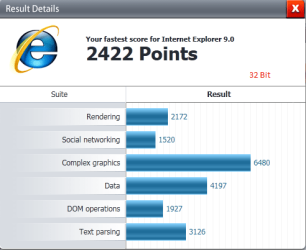
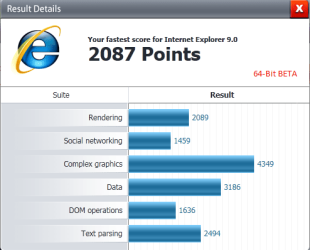
Just tried today with the IE9 Beta - marked 32 & 64 bits on each image - 32 scored higher for me as well
 

Attachments

  • IE932Bit.png
    IE932Bit.png
    10.9 KB · Views: 3
  • IE964Bit.png
    IE964Bit.png
    11.3 KB · Views: 3

My Computer My Computer

At a glance

Windows 8.1 Professional x64Intel Core i7-3930K 3.2 gHz Hex-Core (Turbo B...8GB Corsair Vengeance DDR3-1600MHz 8-8-8-24EVGA Superclocked GeForce GTX-580 1536MB
Computer type
PC/Desktop
Computer Manufacturer/Model Number
CyberPower PC / Custom Intel X79 PC
OS
Windows 8.1 Professional x64
CPU
Intel Core i7-3930K 3.2 gHz Hex-Core (Turbo Boost 3.8 gHz)
Motherboard
ASUS P9X79 Pro (BIOS rev 4801)
Memory
8GB Corsair Vengeance DDR3-1600MHz 8-8-8-24
Graphics Card(s)
EVGA Superclocked GeForce GTX-580 1536MB
Sound Card
On-board 7.1 Realtek ALC898 HD Audio
Monitor(s) Displays
ASUS 27" 1080p MT276E
Screen Resolution
1920 x 1080
Hard Drives
Intel Cherryville 520 SSD 120GB (Main drive for OS)
WD Caviar Black 1TB 7200RPM 64MB Cache SATA 6
WD Caviar Blue 1TB 7200RPM 64MB Cache SATA 6
PSU
Corsair Professional Series AX850 80+ Gold
Case
Corsair Carbide 400R
Cooling
Corsair Hydro Series H60 / 9 x 120mm Thunderblade case fans
Keyboard
Microsoft Wireless Keyboard 3000 v2
Mouse
Microsoft Wireless Mouse 5000 - BlueTrack
Internet Speed
TWC Road Runner 30 Mbps
Antivirus
MS Security Essentials / Malwarebytes
Browser
IE 11
Other Info
LG Black 12X SATA BD-RW
Sony Optiarc Black 24X SATA DVD Burner
Logitech Web Cam Pro 9000
Panasonic 5.1 Surround System
Epson XP-310 Color Printer
Xbox One Controller
Xbox 360 PC Controller
Now, I am not running any benchmarks since any browser on my machine is lightning fast, I see no substantial difference between them, although Firefox x64 (Namoroka) does feel the fastest of the bunch.

The question I have is the following. We have two copies of IE8 - x64 and x86. The same goes for WMP. But, when I want to set the default browser, I can only set IE8. I can't choose IE8 x64. Why is that now? Here I am, wanting to run the 64-bit version by default, and apparently there is no way to do that. Even in Add or Remove Windows components there is an entry - Internet Explorer. So if I choose to uninstall the IE, will it uninstall both versions, x64 and x86?

In other words, is there any way to set the 64-bit version of IE and WMP as defaults, or simply uninstall the 32-bit versions keeping the 64-bit one?

I expect that with the new IE9 I will be able to download only the x64 version, but until then, am I really stuck with the 32-bit version as a default?
 

My Computer My Computer

At a glance

Windows 7 Ultimate (x64)Q66008 GBATI Radeon HD 2600 XT
Computer Manufacturer/Model Number
Dell Inspiron 530
OS
Windows 7 Ultimate (x64)
CPU
Q6600
Memory
8 GB
Graphics Card(s)
ATI Radeon HD 2600 XT
Monitor(s) Displays
Samsung Syncmaster P2450
Screen Resolution
1920x1080
Hard Drives
Samsung HD103UJ
Samsung HD501LJ
Internet Speed
25 Mb/s
Now, I am not running any benchmarks since any browser on my machine is lightning fast, I see no substantial difference between them, although Firefox x64 (Namoroka) does feel the fastest of the bunch.

The question I have is the following. We have two copies of IE8 - x64 and x86. The same goes for WMP. But, when I want to set the default browser, I can only set IE8. I can't choose IE8 x64. Why is that now? Here I am, wanting to run the 64-bit version by default, and apparently there is no way to do that. Even in Add or Remove Windows components there is an entry - Internet Explorer. So if I choose to uninstall the IE, will it uninstall both versions, x64 and x86?

In other words, is there any way to set the 64-bit version of IE and WMP as defaults, or simply uninstall the 32-bit versions keeping the 64-bit one?

I expect that with the new IE9 I will be able to download only the x64 version, but until then, am I really stuck with the 32-bit version as a default?

I know that it can not be done natively, but I think some folks have a registry tweak figured out - you may check through the pages here for something: http://www.sevenforums.com/news/111222-internet-explorer-9-beta-beauty-web.html

What I have done is run IE9 x64 and then pin it to my task bar, then when I click it, it is 64 every time - Also, by opening the browser first, any links I click in my Live Mail 2011 open in the x64 browser that is already open

Good Luck
 

My Computer My Computer

At a glance

Windows 8.1 Professional x64Intel Core i7-3930K 3.2 gHz Hex-Core (Turbo B...8GB Corsair Vengeance DDR3-1600MHz 8-8-8-24EVGA Superclocked GeForce GTX-580 1536MB
Computer type
PC/Desktop
Computer Manufacturer/Model Number
CyberPower PC / Custom Intel X79 PC
OS
Windows 8.1 Professional x64
CPU
Intel Core i7-3930K 3.2 gHz Hex-Core (Turbo Boost 3.8 gHz)
Motherboard
ASUS P9X79 Pro (BIOS rev 4801)
Memory
8GB Corsair Vengeance DDR3-1600MHz 8-8-8-24
Graphics Card(s)
EVGA Superclocked GeForce GTX-580 1536MB
Sound Card
On-board 7.1 Realtek ALC898 HD Audio
Monitor(s) Displays
ASUS 27" 1080p MT276E
Screen Resolution
1920 x 1080
Hard Drives
Intel Cherryville 520 SSD 120GB (Main drive for OS)
WD Caviar Black 1TB 7200RPM 64MB Cache SATA 6
WD Caviar Blue 1TB 7200RPM 64MB Cache SATA 6
PSU
Corsair Professional Series AX850 80+ Gold
Case
Corsair Carbide 400R
Cooling
Corsair Hydro Series H60 / 9 x 120mm Thunderblade case fans
Keyboard
Microsoft Wireless Keyboard 3000 v2
Mouse
Microsoft Wireless Mouse 5000 - BlueTrack
Internet Speed
TWC Road Runner 30 Mbps
Antivirus
MS Security Essentials / Malwarebytes
Browser
IE 11
Other Info
LG Black 12X SATA BD-RW
Sony Optiarc Black 24X SATA DVD Burner
Logitech Web Cam Pro 9000
Panasonic 5.1 Surround System
Epson XP-310 Color Printer
Xbox One Controller
Xbox 360 PC Controller
I just use the 32 honestly i see no big differnce I dont use fire fox i do use chrome once in a while but im so used to IE and how it looks i dont like useing other browsers to covienent for me :geek:
 

My Computer My Computer

At a glance

Windows 10 Home Premium 64bit sp1Intel I7-6700K @ 4.6 Ghz 1.344 volts everyday OC32GB G-Skill TridentZ 3200mhz 16-18-18-38 DDR4Sli Gigabyte Windforce GTX 980 G1
Computer type
PC/Desktop
Computer Manufacturer/Model Number
CoreI7-6700K MrFingerIII Special Builds
OS
Windows 10 Home Premium 64bit sp1
CPU
Intel I7-6700K @ 4.6 Ghz 1.344 volts everyday OC
Motherboard
Asrock Fatality K6 Z170 Socket 1151
Memory
32GB G-Skill TridentZ 3200mhz 16-18-18-38 DDR4
Graphics Card(s)
Sli Gigabyte Windforce GTX 980 G1
Sound Card
AC97 Creative Rage Tactic 3D Headphones Bluetooth
Monitor(s) Displays
27" Asus ROG Swift PG278Q G-Sync 48" Vizio Smart HD TV
Screen Resolution
2560x1440p 27"- 48" Currently Gaming at 2560x1440p Res 2K
Hard Drives
250GB Samsung Evo840SSD Seagate baracuda 500 GB WD Mybook 500Gb 1TB Seagate Barracuda
PSU
HX1050w Corsair Silver 80plus certified crosfire/sli
Case
Enthod Pro Full Tower
Cooling
Corsair H110i GT 280 mm High Performance WaterBlock
Keyboard
Logitech wireless keyboard
Mouse
Logitech wireless mouse
Internet Speed
Cox Cable 100+ mb
Antivirus
WebRoot Spysweeper with Antivirus
Browser
IE-10, Chrome, Opera
Other Info
My Other Rig is a AMD FX8320E @4.6Ghz 16GB Ballistic Sport Ram
Mobo Asrock Fatality 990FX 120GB OCZ SSD 1TB Seagate Barracuda Corsair H75 Cooling PSU Corsair CX750
GPU GTX Gigabyte 970G1
Back
Top