
Disable Touchpad

Greg S

New member
Guru
Local time
5:52 PM
Messages
824
Location
A l a b a m a
I'm looking to disable the touchpad from within windows. I can disable in BIOS but would rather do it from within windows. Most drivers have an option in device manager to disable but the touchpad doesn't. Presently, Microsoft has installed it's official Windows 95 driver with it's updated version number, date and digital signature. Another option would be Synaptics driver but I'm not really into downloading and installing 14 mb's just to disable the touchpad. On the other hand, if I could get just the synaptics driver without the extra bloat, it might would work. Any ideas or suggestions?
 

My Computer

Computer Manufacturer/Model Number
Averatec 6130HS-20
OS
Windows 7 Professional 32-bit (6.1, Build 7600)
CPU
Intel(R) Pentium(R) 4 3.00 GHz HT
Memory
2.0 GB
Graphics Card(s)
ATI Mobility Radeon 9600 64MB
Sound Card
Realtek AC'97 Audio
Screen Resolution
1280 x 800
Hard Drives
Seagate 96023A 60GB 7200RPM -
Seagate FreeAgentDesktop 250GB
Cooling
20 Inch Box Fan
Mouse
Targus PAWM10 Wireless Optical Laptop Mouse
What OS are you running
 

My Computer

Computer Manufacturer/Model Number
Microsoft
OS
Windows 7 and MAC
Graphics Card(s)
NVIDIA 9200 GT
Sound Card
NvIdiA
I don't see why you don't want to have this driver. You could just click this button and disable it, maybe I don't understand your question. Here's a screenshot. I hope it helps, sorry if not.

touchpaddisable.PNG

Size of this driver is 34.7 MB
 

My Computer

Computer Manufacturer/Model Number
Keeps changing - (Custom)
OS
Windows 7 Professional x64
CPU
Intel Core i7 860
Motherboard
Gigabyte GA-P55-UD4P
Memory
4GB DDR3 Mushkin 1600Mhz @ 7-8-7-20
Graphics Card(s)
MSI GTS250 1GB DDR3 Twin Frozr
Sound Card
Onboard realtek
Monitor(s) Displays
Samsung SyncMaster 24" P2450 + Samsung 20" 2033
Screen Resolution
1920 X 1080 and 1600 X 900 (#2 system 1440 X 900)
Hard Drives
Patriot Inferno 120GB SSD + 3 WD Blue 640GB drives
PSU
Corsair 750 HX Modular
Case
Lancool PC-K62
Cooling
Cooler Master TX3 CPU cooler and 4-140mm and 1-120mm case
Keyboard
Gigabyte USB keyboard
Mouse
Microsoft wireless laser mouse 5000
Internet Speed
7 Mb down 1.5 up
Other Info
System #2: AMD Phenom II X6 1055T (Freezer 7 Pro cooler) - Gigabyte 880GMA-UD2H - WD 500GB Black - 9500GT (1GB) 500W OCZ modular PSU - Antec 200 case. System #3 (LapTop) Core 2 Duo T6670 - 320GB 7200RPM HD - 4GB DDR3 RAM.
I don't see why you don't want to have this driver. You could just click this button and disable it, maybe I don't understand your question. Here's a screenshot. I hope it helps, sorry if not.

View attachment 51731

Size of this driver is 34.7 MB
You answered my question for me. 34.7 MB
I really don't won't to install that in addition to everything else it adds to the registry just to disable the touchpad. I use a wireless mouse and have never been able to get used to the touchpad. The touchpad is so sensitive, that when typing as I am right now, the page jumps, the cursor jumps etc... I guess I'll just un-install the driver and have Malware Defender permanently block Windows from re-installing it.
 

My Computer

Computer Manufacturer/Model Number
Averatec 6130HS-20
OS
Windows 7 Professional 32-bit (6.1, Build 7600)
CPU
Intel(R) Pentium(R) 4 3.00 GHz HT
Memory
2.0 GB
Graphics Card(s)
ATI Mobility Radeon 9600 64MB
Sound Card
Realtek AC'97 Audio
Screen Resolution
1280 x 800
Hard Drives
Seagate 96023A 60GB 7200RPM -
Seagate FreeAgentDesktop 250GB
Cooling
20 Inch Box Fan
Mouse
Targus PAWM10 Wireless Optical Laptop Mouse
I don't see why you don't want to have this driver. You could just click this button and disable it, maybe I don't understand your question. Here's a screenshot. I hope it helps, sorry if not.

View attachment 51731

Size of this driver is 34.7 MB
You answered my question for me. 34.7 MB
I really don't won't to install that in addition to everything else it adds to the registry just to disable the touchpad. I use a wireless mouse and have never been able to get used to the touchpad. The touchpad is so sensitive, that when typing as I am right now, the page jumps, the cursor jumps etc... I guess I'll just un-install the driver and have Malware Defender permanently block Windows from re-installing it.

Well, glad I could help. My laptop has a button just above the touchpad you press and it disables it. I guess yours does not have one like it. All the best.
 

My Computer

Computer Manufacturer/Model Number
Keeps changing - (Custom)
OS
Windows 7 Professional x64
CPU
Intel Core i7 860
Motherboard
Gigabyte GA-P55-UD4P
Memory
4GB DDR3 Mushkin 1600Mhz @ 7-8-7-20
Graphics Card(s)
MSI GTS250 1GB DDR3 Twin Frozr
Sound Card
Onboard realtek
Monitor(s) Displays
Samsung SyncMaster 24" P2450 + Samsung 20" 2033
Screen Resolution
1920 X 1080 and 1600 X 900 (#2 system 1440 X 900)
Hard Drives
Patriot Inferno 120GB SSD + 3 WD Blue 640GB drives
PSU
Corsair 750 HX Modular
Case
Lancool PC-K62
Cooling
Cooler Master TX3 CPU cooler and 4-140mm and 1-120mm case
Keyboard
Gigabyte USB keyboard
Mouse
Microsoft wireless laser mouse 5000
Internet Speed
7 Mb down 1.5 up
Other Info
System #2: AMD Phenom II X6 1055T (Freezer 7 Pro cooler) - Gigabyte 880GMA-UD2H - WD 500GB Black - 9500GT (1GB) 500W OCZ modular PSU - Antec 200 case. System #3 (LapTop) Core 2 Duo T6670 - 320GB 7200RPM HD - 4GB DDR3 RAM.
Well, glad I could help. My laptop has a button just above the touchpad you press and it disables it. I guess yours does not have one like it. All the best.
I wish it did. I've tried various Fn + keys but no joy.
 

My Computer

Computer Manufacturer/Model Number
Averatec 6130HS-20
OS
Windows 7 Professional 32-bit (6.1, Build 7600)
CPU
Intel(R) Pentium(R) 4 3.00 GHz HT
Memory
2.0 GB
Graphics Card(s)
ATI Mobility Radeon 9600 64MB
Sound Card
Realtek AC'97 Audio
Screen Resolution
1280 x 800
Hard Drives
Seagate 96023A 60GB 7200RPM -
Seagate FreeAgentDesktop 250GB
Cooling
20 Inch Box Fan
Mouse
Targus PAWM10 Wireless Optical Laptop Mouse
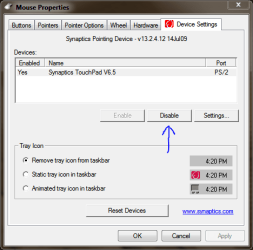
[/QUOTE] You answered my question for me. 34.7 MB
I really don't won't to install that in addition to everything else it adds to the registry just to disable the touchpad. I use a wireless mouse and have never been able to get used to the touchpad. The touchpad is so sensitive, that when typing as I am right now, the page jumps, the cursor jumps etc... I guess I'll just un-install the driver and have Malware Defender permanently block Windows from re-installing it.[/QUOTE]


have this same problem where I like to use and external mouse but cant disable the touchpad. I'd prefer not to download 34.7 MB just to turn off the touchpad, nor do i want to uninstall the driver. My laptop has an FN key with the f9 key corresponding to turning the mouse on and off. However, I hold FN and hit F9 to no success. all other FN options work (such as contrast control). is there a trick to turning it off via FN?
 

My Computer

OS
windows 7
If you use the driver and addon control panel in your mouse properties you can disable that like the preview above.
also, you can set it to automatically disable if you plug an usb mouse...
 

My Computer

Computer Manufacturer/Model Number
HP G62-340US Notebook
OS
Win7 Pro SP1 x64
CPU
AMD K10 Athlon(tm) II P340 Dual-Core Processor ~2.2GHz
Motherboard
Hewlett-Packard 1444 69.37/AMD 785GX/BIOS F29
Memory
DDR3 4.0GB (3.74 Usable)
Graphics Card(s)
AMD M880G with ATI Mobility Radeon HD 4250 256MB Video
Sound Card
ATI RS785/RS880 - High Definition Audio Controller
Monitor(s) Displays
SAMSUNG 156AT09-H04
Screen Resolution
1366x768 - 344 x 194 mm, Pixel Clock 69.30 MHz
Hard Drives
WDC WD3200BEVT-60A23T0 320GB
Other Info
Bought on July 03, 2011
(What happened to my posts?) As I said originally, I tried that first of all.
 

My Computer

OS
windows 7 64bit
If you use the driver and addon control panel in your mouse properties you can disable that like the preview above.
also, you can set it to automatically disable if you plug an usb mouse...
Tried that in the past. The touchpad and keyboard use the same driver so it won't work for me.
 

My Computer

Computer Manufacturer/Model Number
Averatec 6130HS-20
OS
Windows 7 Professional 32-bit (6.1, Build 7600)
CPU
Intel(R) Pentium(R) 4 3.00 GHz HT
Memory
2.0 GB
Graphics Card(s)
ATI Mobility Radeon 9600 64MB
Sound Card
Realtek AC'97 Audio
Screen Resolution
1280 x 800
Hard Drives
Seagate 96023A 60GB 7200RPM -
Seagate FreeAgentDesktop 250GB
Cooling
20 Inch Box Fan
Mouse
Targus PAWM10 Wireless Optical Laptop Mouse
Back
Top