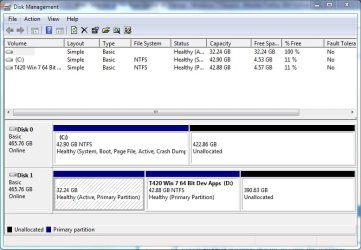
I copied my Windows 7 OS partition on Disk 1 to a second drive Disk 2. When I boot my computer and select Disk 2 from the BIOS boot menu (F12), Disk 2 will not boot. How do I get this to work?
Side Notes:
Not having any success with BIOS booting (via F12), I did install EasyBCD on Disk 1. With EasyBCD I can boot into Disk 1 or Disk 2, but I want to be able to do it from the BIOS boot menu. I then installed EasyBCD on Disk 2. At this point I expected to have 2 EasyBCD boot menus one for Disk 1 and one on Disk 2. This is not what happened. When I use Easy BCD to boot into Disk 2 and proceed to make changes to the boot menu for Easy BCD, these changes are reflected in Disk 1. I guess I just have 1 Boot Record on Disk 1 and no Boot Record on Disk 2?
Side Notes:
Not having any success with BIOS booting (via F12), I did install EasyBCD on Disk 1. With EasyBCD I can boot into Disk 1 or Disk 2, but I want to be able to do it from the BIOS boot menu. I then installed EasyBCD on Disk 2. At this point I expected to have 2 EasyBCD boot menus one for Disk 1 and one on Disk 2. This is not what happened. When I use Easy BCD to boot into Disk 2 and proceed to make changes to the boot menu for Easy BCD, these changes are reflected in Disk 1. I guess I just have 1 Boot Record on Disk 1 and no Boot Record on Disk 2?
Last edited:
My Computer
- Computer Manufacturer/Model Number
- Lenovo T420
- OS
- Windows 7 Pro SP1 x64
- CPU
- i5-2540M
- Memory
- 4 Gig
- Hard Drives
- 1 Western Digital 500 Gig
1 Seagate 500 Gig