Disk - Clean and Clean All with Diskpart Command

How to "Clean" or "Clean All" a Disk with the Diskpart Command


   Information
This will show you how to use the clean or clean all command on a selected disk to delete all of it's MBR or GPT partitions, volumes, and any hidden sector information on MBR disks is overwritten.

The data on the HDD is not written over using the clean command like it does with the clean all command below. With the clean command, the data on the HDD is only marked as being deleted instead and is only written over when new data is written/saved to the same location on the HDD next.

OR

You could use the clean all command (secure erase) to do the above and also have each and every disk sector on the HDD written over and zeroed out completely to securely delete all data on the disk to help prevent the data from being able to be recovered. "Clean All" takes about an hour per 320 GB to finish running.

   Note

  • You cannot use the clean or clean all diskpart commands on a boot disk (ex: disk Windows is installed on) unless you do it from a command prompt at boot.
  • Be sure to backup anything that you do not want to lose on the disk that you use clean or clean all on first. It will be to late afterwards. All data will be permanently lost on the disk.
   Warning
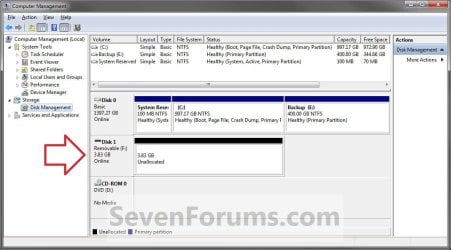
You do not want to use clean all on a SSD disk often. Having every sector written over to 0 on a SSD can reduce it's life span faster.


Here's How:

1. In Windows 7, open an elevated command prompt, or a command prompt at boot.

OR

2. In Windows 8 and 8.1, open an elevated command prompt, or a command prompt at boot.

   Note
Be sure that you have the correct Disk #. You would not want to wipe clean the wrong disk.

A) Press the Windows + R keys to open the Run dialog, type compmgmt.msc, and press Enter.

B) If prompted by UAC, click/tap on Yes.

C) Click/tap on Disk Management in the left pane, and make note of the disk # in the middle pane of the disk that you want to clean or clean all. (see screenshot below)
NOTE: For example, I would use Disk 1 if I wanted to use clean or clean all on my USB key drive.
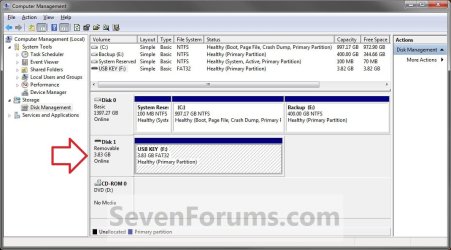
Computer_Management-1.jpg


3. In the elevated command prompt, type diskpart and press Enter. (see screenshot below)
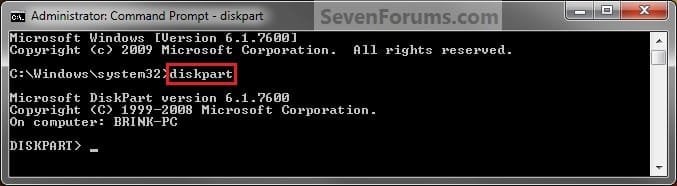
Step1.jpg
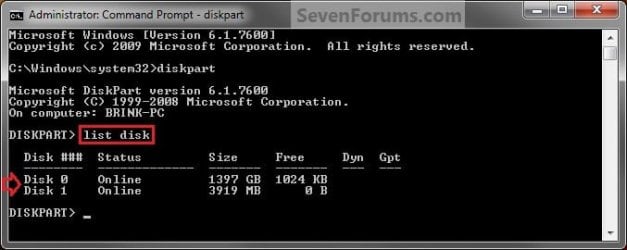
4. In the elevated command prompt, type list disk and press Enter. (see screenshot below)
NOTE: This will give you a list of disk numbers to select from.
Step2.jpg
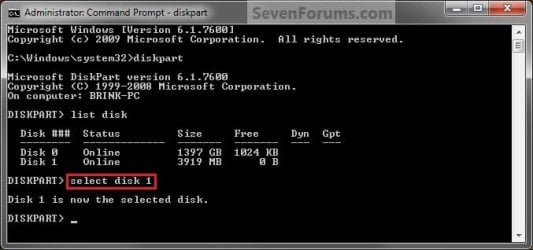
5. In the elevated command prompt, type select disk # and press Enter. (see screenshot below)
NOTE: You would substitute # for the disk number listed that you want to use clean or clean all on. For example, I want to use one of them on Disk 1 (from step 1) for my USB key drive, so I would type select disk 1 and press Enter.
Step3.jpg
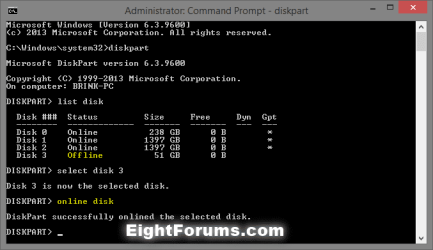
6. If the status of the selected disk # (ex: Disk 3) shows as Offline, type online disk, and press Enter to make it online. (see screenshot below)
diskpart_online_disk.png
7. Do either step 8 or 9 below for which command you would like to use.


8. To Use the Clean Diskpart Command
NOTE: (Recommended) See the green INFO box at the top of the tutorial for more information about this command. This command will wipe the HDD quickly.
A) In the elevated command prompt, type clean, press Enter, and go to step 10 below. (see screenshot below)
NOTE: This will not take long to finish. Think of it as being like a quick format.
Step4_Clean.jpg
9. To Use the Clean All Diskpart Command
NOTE: See the green INFO box at the top of the tutorial for more information about this command. This command will wipe the HDD, and perform a secure erase. "Clean All" takes about an hour per 320 GB to finish running. It's best to only use this command if you wanted to help make sure that the data on the HDD cannot be recovered say when giving or selling the HDD to another person.
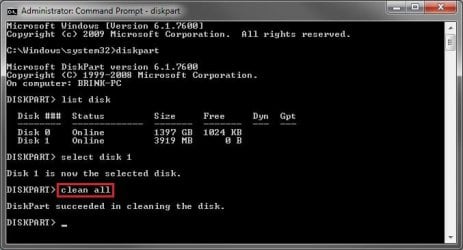
A) In the elevated command prompt, type clean all, and press Enter, and go to step 10 below. You will see the command prompt below as is until the "clean all" command is finished. (see screenshot below)

NOTE: This will take quite some time (several hours or more) to finish depending on how large the disk is since it is writing over each and every sector on it to zero. Think of it as being like a full or low level format.
Step4_Clean_All.jpg
10. When finished, in the elevated command prompt, type exit and press Enter. Close the elevated command prompt.

11. The disk will be left as unallocated space. (see screenshot below)
Computer_Management-2.jpg
12. You will now need to create a new partition or volume on the disk to be able to use it again.


That's it,
Shawn


Last edited:

My Computer

Computer type
PC/Desktop
Computer Manufacturer/Model Number
Self built custom
OS
64-bit Windows 11 Pro for Workstations
CPU
Intel i7-8700K OC'd to 5 GHz
Motherboard
ASUS ROG Maximus XI Formula Z390
Memory
64 GB (4x16GB) G.SKILL TridentZ RGB DDR4 3600 MHz
Graphics Card(s)
ASUS ROG-STRIX-GTX1080TI-O11G-GAMING
Sound Card
Integrated
Monitor(s) Displays
2 x Samsung Odyssey G7 27"
Screen Resolution
2560x1440
Hard Drives
1TB Samsung 990 PRO M.2,
4TB Samsung 990 PRO PRO M.2,
TerraMaster F8 SSD Plus NAS
PSU
Seasonic Prime Titanium 850W
Case
Thermaltake Core P3
Cooling
Corsair Hydro H115i
Keyboard
Logitech wireless K800
Mouse
Logitech MX Master 4
Internet Speed
2 Gb/s Download and 100 Mb/s Upload
Antivirus
Malwarebyte Anti-Malware Premium
Browser
Google Chrome
Other Info
Logitech Z625 speaker system,
Logitech BRIO 4K Pro webcam,
HP Color LaserJet Pro MFP M477fdn,
APC SMART-UPS RT 1000 XL - SURT1000XLI,
Galaxy S23 Plus phone
I had downloaded a while back one of those software hack things and didn't like it showing up in my scans. i.e. PUP flag. So I deleted all of those files. But running a scan on an external hard drive, those PUP files had been sitting in the recycle bin or whatever $Recycle on the hard drive.

So I wanted to do a wipe on the drive to clean all of the data off and reload my data. I ended up just doing a "Clean", then I set it to MBR, then I did the LONG format. Well that thing took an entire day to do the LONG format as it is a 750GB drive. So I think I'll skip the DOD 3 pass wipe as that will be like 3 days.

I got real low GB hard drives to keep as spares to use to download files that may be questionable. That way doing a DOD 3 pass wipe to clean it up and reinstall the cloned image wouldn't take too long.

But hopefully doing a "Clean", resetting it to MBR, and doing a long format will erase any and all viruses or malware that may be hanging around somewhere on the drive.
 

My Computer

Computer type
PC/Desktop
OS
.
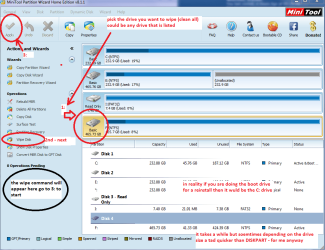
Jason not to take anything away from what Brink has told you already - there is an alternative you can use for wiping the drive - well two really.
The one I use is the Partition Wizard wipe function MiniTool Free Partition Manager for Window 8/7/vista/xp | Partition Wizard Free Edition see my pic on how it runs. It does take some time but in my experience not quite as long as the DISKPART way.
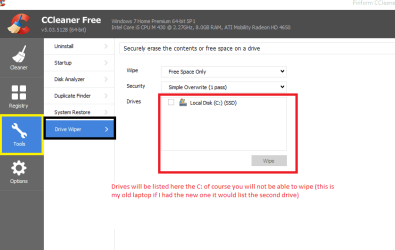
The other is CCleaner's wipe but I have never tried it so cannot comment https://www.piriform.com/ccleaner/download < use the free version and it is under "Tools" and CC is also good for uninstalling stuff:)
 

Attachments

  • MINI TOOL WIPE.PNG
    MINI TOOL WIPE.PNG
    152.8 KB · Views: 673
  • CCWIPE.PNG
    CCWIPE.PNG
    36.5 KB · Views: 427

My Computer

Computer type
PC/Desktop
Computer Manufacturer/Model Number
Own build (new) Desk1 / Asus ROG Win 7 / Desk2 1st build
OS
Desk1 7 Home Prem / Desk2 10 Pro / Main lap Asus ROG 10 Pro 2 laptop Toshiba 7 Pro Asus P2520 7 & 10
CPU
Desk1 i5 3750K / Laptop i7 GTX 860M / Desk2 i5 2500
Motherboard
Desk1 Asus P877-V / Desk2 Gigabyte H67 UD3H / Laptop ?
Memory
Desk1 8GB (1866) / Desk2 16GB (1333) / Laptop 8Gb DDR3
Graphics Card(s)
Desk 1& 2NVidia GTX 650 & Laptops on board Intel
Sound Card
Desk 1 & 2 -XONAR DG Realtek High Def audio Laptop
Monitor(s) Displays
Desk 1 Benq HD 2450 / Desk2 Philips 24" / Laptop 17.5"
Screen Resolution
1920x1080 D1 & D2 & Laptop 1
Hard Drives
Desk1 Samsung 120GB 830 SSD
Asus ROG 256GB 850 Pro SSD
Desk2 Samsung 840 256 SSD
Toshiba 120GB EVO
PSU
Desk 1 Corsair HX 1050/ Laptop ? / Desk 2 Corsair HX 650
Case
Desk 1 Cooler HAF XM ? Toshiba laptop / Desk2 Coolermaster
Cooling
Fans on all Desk1 -2 Desk2 - all Coolermasters 5 Laptop ?
Keyboard
Desk 1 MS Sidewinder X6 Desk 2 MS Sidewinder X 4
Mouse
Desk 1&2 - Gigabyte MS 900 gamer - laptop - Logitec wireless
Internet Speed
ADSL2+
Other Info
One other Desktop (tester) and spare Toshba laptop both with SSD's
Running Kaspersky 2016 ISS on all machines config'd identically
Logitec audio stereo systems on each machine (x3)
Canon MG5250MFC
Router/modem TP-Link running WPA2SK
I've got Acronis True Image I've used to wipe drives. They have different options. Like the DOD 3 pass wipe. And also a single pass that I think writes all zeros. Only thing is I'm thinking that doesn't touch the MBR section. So I guess do the "clean" first before doing a wipe.

If doing a single "wipe" is that the same thing as just doing a "long" format?
 

My Computer

Computer type
PC/Desktop
OS
.
Yes I suppose it doesn't matter what you use as long as it gets the job done. Those I mentioned are free and good and generally I stick to the DISKPART one.:)
 

My Computer

Computer type
PC/Desktop
Computer Manufacturer/Model Number
Own build (new) Desk1 / Asus ROG Win 7 / Desk2 1st build
OS
Desk1 7 Home Prem / Desk2 10 Pro / Main lap Asus ROG 10 Pro 2 laptop Toshiba 7 Pro Asus P2520 7 & 10
CPU
Desk1 i5 3750K / Laptop i7 GTX 860M / Desk2 i5 2500
Motherboard
Desk1 Asus P877-V / Desk2 Gigabyte H67 UD3H / Laptop ?
Memory
Desk1 8GB (1866) / Desk2 16GB (1333) / Laptop 8Gb DDR3
Graphics Card(s)
Desk 1& 2NVidia GTX 650 & Laptops on board Intel
Sound Card
Desk 1 & 2 -XONAR DG Realtek High Def audio Laptop
Monitor(s) Displays
Desk 1 Benq HD 2450 / Desk2 Philips 24" / Laptop 17.5"
Screen Resolution
1920x1080 D1 & D2 & Laptop 1
Hard Drives
Desk1 Samsung 120GB 830 SSD
Asus ROG 256GB 850 Pro SSD
Desk2 Samsung 840 256 SSD
Toshiba 120GB EVO
PSU
Desk 1 Corsair HX 1050/ Laptop ? / Desk 2 Corsair HX 650
Case
Desk 1 Cooler HAF XM ? Toshiba laptop / Desk2 Coolermaster
Cooling
Fans on all Desk1 -2 Desk2 - all Coolermasters 5 Laptop ?
Keyboard
Desk 1 MS Sidewinder X6 Desk 2 MS Sidewinder X 4
Mouse
Desk 1&2 - Gigabyte MS 900 gamer - laptop - Logitec wireless
Internet Speed
ADSL2+
Other Info
One other Desktop (tester) and spare Toshba laptop both with SSD's
Running Kaspersky 2016 ISS on all machines config'd identically
Logitec audio stereo systems on each machine (x3)
Canon MG5250MFC
Router/modem TP-Link running WPA2SK
hi! You have a great tutorial! I would like to know what is the difference between the command "clean", "clean all" from the "quick format" and "format". And is it possible to run these commands (clean, clean all, format) without using diskpart and using the GUI. The command "delete volume in disk management is that the same? Sorry for my English (I hardly know him)
 

My Computer

Computer type
PC/Desktop
OS
windows 7 64 professionals
Hello Bobson, and welcome to Seven Forums.

Basically, "Clean" is like doing a quick format without a secure erase, and "Clean all" is like doing a full format with a secure erase. If you are keeping the hard drive, then "Clean" will be fine and quicker to use.

You can only run "Clean" or "Clean all" in a command prompt with diskpart. There's not a GUI for it. :(
 

My Computer

Computer type
PC/Desktop
Computer Manufacturer/Model Number
Self built custom
OS
64-bit Windows 11 Pro for Workstations
CPU
Intel i7-8700K OC'd to 5 GHz
Motherboard
ASUS ROG Maximus XI Formula Z390
Memory
64 GB (4x16GB) G.SKILL TridentZ RGB DDR4 3600 MHz
Graphics Card(s)
ASUS ROG-STRIX-GTX1080TI-O11G-GAMING
Sound Card
Integrated
Monitor(s) Displays
2 x Samsung Odyssey G7 27"
Screen Resolution
2560x1440
Hard Drives
1TB Samsung 990 PRO M.2,
4TB Samsung 990 PRO PRO M.2,
TerraMaster F8 SSD Plus NAS
PSU
Seasonic Prime Titanium 850W
Case
Thermaltake Core P3
Cooling
Corsair Hydro H115i
Keyboard
Logitech wireless K800
Mouse
Logitech MX Master 4
Internet Speed
2 Gb/s Download and 100 Mb/s Upload
Antivirus
Malwarebyte Anti-Malware Premium
Browser
Google Chrome
Other Info
Logitech Z625 speaker system,
Logitech BRIO 4K Pro webcam,
HP Color LaserJet Pro MFP M477fdn,
APC SMART-UPS RT 1000 XL - SURT1000XLI,
Galaxy S23 Plus phone
Hi guys.

I need to perform clean all on my only HDD so i can clean install Win7 before i sell my PC. I understand and have tried running a command prompt at boot in safe mode but two things happened. One, i still had to enter my windows password to log on before i got to the command prompt. Second, despite the procedure i got the message;

Virtual Disk Service error:
Clean is not allowed on the disk containing the current boot,
system, pagefile, crashdump or hibernation volume.

Any ideas?

Many thanks.
 

My Computer

Computer type
PC/Desktop
Computer Manufacturer/Model Number
Custom Build
OS
Windows 7 Home Premium 64bit
CPU
Quad i5 3450 @ 3.10GHz
Motherboard
Gigabyte Technology Co. H61MA-D2V
Memory
DDR3 8Gb
Graphics Card(s)
NVIDIA GeForce EVGA GTX 650 Ti
Hard Drives
500 Gb HDD
Antivirus
AVG Free
Browser
Firefox
Hello MetaBicks, and welcome to Seven Forums.

You can boot from your retail installation media or system repair disc to delete/format and then perform a clean all on the drive at boot.
 

My Computer

Computer type
PC/Desktop
Computer Manufacturer/Model Number
Self built custom
OS
64-bit Windows 11 Pro for Workstations
CPU
Intel i7-8700K OC'd to 5 GHz
Motherboard
ASUS ROG Maximus XI Formula Z390
Memory
64 GB (4x16GB) G.SKILL TridentZ RGB DDR4 3600 MHz
Graphics Card(s)
ASUS ROG-STRIX-GTX1080TI-O11G-GAMING
Sound Card
Integrated
Monitor(s) Displays
2 x Samsung Odyssey G7 27"
Screen Resolution
2560x1440
Hard Drives
1TB Samsung 990 PRO M.2,
4TB Samsung 990 PRO PRO M.2,
TerraMaster F8 SSD Plus NAS
PSU
Seasonic Prime Titanium 850W
Case
Thermaltake Core P3
Cooling
Corsair Hydro H115i
Keyboard
Logitech wireless K800
Mouse
Logitech MX Master 4
Internet Speed
2 Gb/s Download and 100 Mb/s Upload
Antivirus
Malwarebyte Anti-Malware Premium
Browser
Google Chrome
Other Info
Logitech Z625 speaker system,
Logitech BRIO 4K Pro webcam,
HP Color LaserJet Pro MFP M477fdn,
APC SMART-UPS RT 1000 XL - SURT1000XLI,
Galaxy S23 Plus phone
Thanks for the welcome Brink and thanks for the tips.

Il see if it works.
 

My Computer

Computer type
PC/Desktop
Computer Manufacturer/Model Number
Custom Build
OS
Windows 7 Home Premium 64bit
CPU
Quad i5 3450 @ 3.10GHz
Motherboard
Gigabyte Technology Co. H61MA-D2V
Memory
DDR3 8Gb
Graphics Card(s)
NVIDIA GeForce EVGA GTX 650 Ti
Hard Drives
500 Gb HDD
Antivirus
AVG Free
Browser
Firefox
Clean, Clean All, DBAN and C-Cleaner

Hi Brink,

Here is what I understood from the thread, adding some assumptions of my own. Can you tell me if this is correct ?

If you only want to get rid of confirmed or suspected viruses : just use Clean. It is much quicker. Possible viruses will remain on your disk, since Clean does not erase files, but they won't be able to be activated afterwards, ever, even after you've repartitioned the disk and reinstalled Windows, since Clean destroys the data the system needs to find and use those files. (I'm especially unsure of this statement.)

If you want, on top of that or exclusively, to prevent any third party to recover your confidential data by using forensic software or other techniques, in case you give away your PC, discard the disk or it is stolen : use Clean all. It will overwrite the whole disk, defeating (ordinary) recovery techniques. Viruses, obviously, would be physically wiped as well.

If you want an even better level of defense against snooping on your data : use DBAN. It does a 3-pass overwrite (or even more).

All three methods may be used to erase all your disks, including your system disk, provided you boot from an external source (Windows DVD or flash drive, DBAN CD).

C-Cleaner's wipe function can be adjusted to multiple overwrites, but it's only good for erasing data drives or partitions, since it works from within Windows.
 

My Computer

Computer type
PC/Desktop
Computer Manufacturer/Model Number
Custom build
OS
Windows 7 Home Premium 64-bit (OEM)
CPU
AMD Athlon II X4 640 (3 GHz, 4 cores)
Motherboard
Asus M4A 89 GTD Pro/USB3
Memory
Patriot 16Gb DDR3 1600 (2 kits of 2)
Graphics Card(s)
ATI Radeon HD 4290 (integrated)
Sound Card
AMD + Realtek HD Audio (integrated)
Monitor(s) Displays
Hewlett-Packard ZR2440w (24")
Screen Resolution
1920 x 1200
Hard Drives
Internal : Samsung SSD 860 EVO 250 Gb (system), Seagate Barrcuda 1 Tb (data), Western Digital Caviar Blue 500 Gb (archives).
External (USB) : 2 x 1 Tb 2,5" Seagate Barracuda (backups).
PSU
Corsair VX 450 W
Case
Antec Solo
Cooling
Cooler Master Hyper 212 Plus, 2 Nexus Real Silent Case fans
Keyboard
Cherry KC 1000
Mouse
Logitech M 90
Internet Speed
Fiber, 300 Mbit/s down, 200 Mbit/s up
Antivirus
Microsoft Security Essentials
Browser
Vivaldi, Tor
Other Info
BIOS Date: 07/18/11 Ver: 08.00.15.
Modem-router : provided by ISP
Hello Clairvaux, :)

If you have a virus, then usually wiping the disk completely by overriding it with a few passes should clean it.

However, there are some viruses out there are pretty stubborn.
 

My Computer

Computer type
PC/Desktop
Computer Manufacturer/Model Number
Self built custom
OS
64-bit Windows 11 Pro for Workstations
CPU
Intel i7-8700K OC'd to 5 GHz
Motherboard
ASUS ROG Maximus XI Formula Z390
Memory
64 GB (4x16GB) G.SKILL TridentZ RGB DDR4 3600 MHz
Graphics Card(s)
ASUS ROG-STRIX-GTX1080TI-O11G-GAMING
Sound Card
Integrated
Monitor(s) Displays
2 x Samsung Odyssey G7 27"
Screen Resolution
2560x1440
Hard Drives
1TB Samsung 990 PRO M.2,
4TB Samsung 990 PRO PRO M.2,
TerraMaster F8 SSD Plus NAS
PSU
Seasonic Prime Titanium 850W
Case
Thermaltake Core P3
Cooling
Corsair Hydro H115i
Keyboard
Logitech wireless K800
Mouse
Logitech MX Master 4
Internet Speed
2 Gb/s Download and 100 Mb/s Upload
Antivirus
Malwarebyte Anti-Malware Premium
Browser
Google Chrome
Other Info
Logitech Z625 speaker system,
Logitech BRIO 4K Pro webcam,
HP Color LaserJet Pro MFP M477fdn,
APC SMART-UPS RT 1000 XL - SURT1000XLI,
Galaxy S23 Plus phone
Thank you, Brink.

So, despite the vast difference in the time required, it might be a sound strategy to do a Clean all, or even to apply DBAN, when reinstalling from scratch, just in case one has a virus undetected by one's antivirus ?

However, there are some viruses out there are pretty stubborn.

Are you implying that some viruses could escape even a Clean all, or multiple-pass overwrite ?
 

My Computer

Computer type
PC/Desktop
Computer Manufacturer/Model Number
Custom build
OS
Windows 7 Home Premium 64-bit (OEM)
CPU
AMD Athlon II X4 640 (3 GHz, 4 cores)
Motherboard
Asus M4A 89 GTD Pro/USB3
Memory
Patriot 16Gb DDR3 1600 (2 kits of 2)
Graphics Card(s)
ATI Radeon HD 4290 (integrated)
Sound Card
AMD + Realtek HD Audio (integrated)
Monitor(s) Displays
Hewlett-Packard ZR2440w (24")
Screen Resolution
1920 x 1200
Hard Drives
Internal : Samsung SSD 860 EVO 250 Gb (system), Seagate Barrcuda 1 Tb (data), Western Digital Caviar Blue 500 Gb (archives).
External (USB) : 2 x 1 Tb 2,5" Seagate Barracuda (backups).
PSU
Corsair VX 450 W
Case
Antec Solo
Cooling
Cooler Master Hyper 212 Plus, 2 Nexus Real Silent Case fans
Keyboard
Cherry KC 1000
Mouse
Logitech M 90
Internet Speed
Fiber, 300 Mbit/s down, 200 Mbit/s up
Antivirus
Microsoft Security Essentials
Browser
Vivaldi, Tor
Other Info
BIOS Date: 07/18/11 Ver: 08.00.15.
Modem-router : provided by ISP
"Clean" is fine since it marks the whole disk as deleted, and the data gets overridden as you use the drive.

One that get into your BIOS would be one type, but those are rare. You mostly have to worry about reinfecting the PC with say an infected USB that you didn't know about.

Just always use a good AV program (ex: Malwarebytes) to scan with to help be safe.
 

My Computer

Computer type
PC/Desktop
Computer Manufacturer/Model Number
Self built custom
OS
64-bit Windows 11 Pro for Workstations
CPU
Intel i7-8700K OC'd to 5 GHz
Motherboard
ASUS ROG Maximus XI Formula Z390
Memory
64 GB (4x16GB) G.SKILL TridentZ RGB DDR4 3600 MHz
Graphics Card(s)
ASUS ROG-STRIX-GTX1080TI-O11G-GAMING
Sound Card
Integrated
Monitor(s) Displays
2 x Samsung Odyssey G7 27"
Screen Resolution
2560x1440
Hard Drives
1TB Samsung 990 PRO M.2,
4TB Samsung 990 PRO PRO M.2,
TerraMaster F8 SSD Plus NAS
PSU
Seasonic Prime Titanium 850W
Case
Thermaltake Core P3
Cooling
Corsair Hydro H115i
Keyboard
Logitech wireless K800
Mouse
Logitech MX Master 4
Internet Speed
2 Gb/s Download and 100 Mb/s Upload
Antivirus
Malwarebyte Anti-Malware Premium
Browser
Google Chrome
Other Info
Logitech Z625 speaker system,
Logitech BRIO 4K Pro webcam,
HP Color LaserJet Pro MFP M477fdn,
APC SMART-UPS RT 1000 XL - SURT1000XLI,
Galaxy S23 Plus phone
Thanks.
 

My Computer

Computer type
PC/Desktop
Computer Manufacturer/Model Number
Custom build
OS
Windows 7 Home Premium 64-bit (OEM)
CPU
AMD Athlon II X4 640 (3 GHz, 4 cores)
Motherboard
Asus M4A 89 GTD Pro/USB3
Memory
Patriot 16Gb DDR3 1600 (2 kits of 2)
Graphics Card(s)
ATI Radeon HD 4290 (integrated)
Sound Card
AMD + Realtek HD Audio (integrated)
Monitor(s) Displays
Hewlett-Packard ZR2440w (24")
Screen Resolution
1920 x 1200
Hard Drives
Internal : Samsung SSD 860 EVO 250 Gb (system), Seagate Barrcuda 1 Tb (data), Western Digital Caviar Blue 500 Gb (archives).
External (USB) : 2 x 1 Tb 2,5" Seagate Barracuda (backups).
PSU
Corsair VX 450 W
Case
Antec Solo
Cooling
Cooler Master Hyper 212 Plus, 2 Nexus Real Silent Case fans
Keyboard
Cherry KC 1000
Mouse
Logitech M 90
Internet Speed
Fiber, 300 Mbit/s down, 200 Mbit/s up
Antivirus
Microsoft Security Essentials
Browser
Vivaldi, Tor
Other Info
BIOS Date: 07/18/11 Ver: 08.00.15.
Modem-router : provided by ISP
Hello Shawn I shall try again but I have tried to clean all a 250GB Samsung twice now and I come up with the message in the pic. In the Disk Management the disk is shown as unallocated as I just deleted the volume after seeing this was one way to get the disk cleaned.
Now does this mean I have trashed to disk or made it impossible for the disk to be cleaned (all) using this tutorial.?

I am just heading of to bed now as it is getting real late but shall check in the morning to see what has happened.
 

Attachments

  • CHKDSK 1.PNG
    CHKDSK 1.PNG
    37.5 KB · Views: 1,930

My Computer

Computer type
PC/Desktop
Computer Manufacturer/Model Number
Own build (new) Desk1 / Asus ROG Win 7 / Desk2 1st build
OS
Desk1 7 Home Prem / Desk2 10 Pro / Main lap Asus ROG 10 Pro 2 laptop Toshiba 7 Pro Asus P2520 7 & 10
CPU
Desk1 i5 3750K / Laptop i7 GTX 860M / Desk2 i5 2500
Motherboard
Desk1 Asus P877-V / Desk2 Gigabyte H67 UD3H / Laptop ?
Memory
Desk1 8GB (1866) / Desk2 16GB (1333) / Laptop 8Gb DDR3
Graphics Card(s)
Desk 1& 2NVidia GTX 650 & Laptops on board Intel
Sound Card
Desk 1 & 2 -XONAR DG Realtek High Def audio Laptop
Monitor(s) Displays
Desk 1 Benq HD 2450 / Desk2 Philips 24" / Laptop 17.5"
Screen Resolution
1920x1080 D1 & D2 & Laptop 1
Hard Drives
Desk1 Samsung 120GB 830 SSD
Asus ROG 256GB 850 Pro SSD
Desk2 Samsung 840 256 SSD
Toshiba 120GB EVO
PSU
Desk 1 Corsair HX 1050/ Laptop ? / Desk 2 Corsair HX 650
Case
Desk 1 Cooler HAF XM ? Toshiba laptop / Desk2 Coolermaster
Cooling
Fans on all Desk1 -2 Desk2 - all Coolermasters 5 Laptop ?
Keyboard
Desk 1 MS Sidewinder X6 Desk 2 MS Sidewinder X 4
Mouse
Desk 1&2 - Gigabyte MS 900 gamer - laptop - Logitec wireless
Internet Speed
ADSL2+
Other Info
One other Desktop (tester) and spare Toshba laptop both with SSD's
Running Kaspersky 2016 ISS on all machines config'd identically
Logitec audio stereo systems on each machine (x3)
Canon MG5250MFC
Router/modem TP-Link running WPA2SK
Hello John, :)

Odd, a semaphore timeout error is for when there is a problem with the network or network adapter.

Is this a network drive?

Are you able to run the "Clean" command instead?
 

My Computer

Computer type
PC/Desktop
Computer Manufacturer/Model Number
Self built custom
OS
64-bit Windows 11 Pro for Workstations
CPU
Intel i7-8700K OC'd to 5 GHz
Motherboard
ASUS ROG Maximus XI Formula Z390
Memory
64 GB (4x16GB) G.SKILL TridentZ RGB DDR4 3600 MHz
Graphics Card(s)
ASUS ROG-STRIX-GTX1080TI-O11G-GAMING
Sound Card
Integrated
Monitor(s) Displays
2 x Samsung Odyssey G7 27"
Screen Resolution
2560x1440
Hard Drives
1TB Samsung 990 PRO M.2,
4TB Samsung 990 PRO PRO M.2,
TerraMaster F8 SSD Plus NAS
PSU
Seasonic Prime Titanium 850W
Case
Thermaltake Core P3
Cooling
Corsair Hydro H115i
Keyboard
Logitech wireless K800
Mouse
Logitech MX Master 4
Internet Speed
2 Gb/s Download and 100 Mb/s Upload
Antivirus
Malwarebyte Anti-Malware Premium
Browser
Google Chrome
Other Info
Logitech Z625 speaker system,
Logitech BRIO 4K Pro webcam,
HP Color LaserJet Pro MFP M477fdn,
APC SMART-UPS RT 1000 XL - SURT1000XLI,
Galaxy S23 Plus phone
Hello Shawn as far as I know the two drives are not connected to any network.

What I have done so far I saw that deleting a volume would leave an unallocated space so did that but then it isn't recognized in the machine.

Currently I have had a 250GB being wiped via Partition Wizard but it ha only got to 19% and it seems to be stuck at that . Would it be because the drive is showing unallocated space??

Anyway I shall try a straight clean on the smaller drive on my laptop I just want to give these drives to a young fellow and be sure there is none of my personal data left on it - not that I don't trust him more I don't want any scraps left over mucking up his system.
 

My Computer

Computer type
PC/Desktop
Computer Manufacturer/Model Number
Own build (new) Desk1 / Asus ROG Win 7 / Desk2 1st build
OS
Desk1 7 Home Prem / Desk2 10 Pro / Main lap Asus ROG 10 Pro 2 laptop Toshiba 7 Pro Asus P2520 7 & 10
CPU
Desk1 i5 3750K / Laptop i7 GTX 860M / Desk2 i5 2500
Motherboard
Desk1 Asus P877-V / Desk2 Gigabyte H67 UD3H / Laptop ?
Memory
Desk1 8GB (1866) / Desk2 16GB (1333) / Laptop 8Gb DDR3
Graphics Card(s)
Desk 1& 2NVidia GTX 650 & Laptops on board Intel
Sound Card
Desk 1 & 2 -XONAR DG Realtek High Def audio Laptop
Monitor(s) Displays
Desk 1 Benq HD 2450 / Desk2 Philips 24" / Laptop 17.5"
Screen Resolution
1920x1080 D1 & D2 & Laptop 1
Hard Drives
Desk1 Samsung 120GB 830 SSD
Asus ROG 256GB 850 Pro SSD
Desk2 Samsung 840 256 SSD
Toshiba 120GB EVO
PSU
Desk 1 Corsair HX 1050/ Laptop ? / Desk 2 Corsair HX 650
Case
Desk 1 Cooler HAF XM ? Toshiba laptop / Desk2 Coolermaster
Cooling
Fans on all Desk1 -2 Desk2 - all Coolermasters 5 Laptop ?
Keyboard
Desk 1 MS Sidewinder X6 Desk 2 MS Sidewinder X 4
Mouse
Desk 1&2 - Gigabyte MS 900 gamer - laptop - Logitec wireless
Internet Speed
ADSL2+
Other Info
One other Desktop (tester) and spare Toshba laptop both with SSD's
Running Kaspersky 2016 ISS on all machines config'd identically
Logitec audio stereo systems on each machine (x3)
Canon MG5250MFC
Router/modem TP-Link running WPA2SK
...All three methods may be used to erase all your disks, including your system disk, provided you boot from an external source (Windows DVD or flash drive, DBAN CD).

This is what I was wondering.... How to wipe a "system" drive.
 

My Computer

Computer type
Laptop
Computer Manufacturer/Model Number
Fujitsu LifeBook AH550
OS
Windows 7 Home Premium x64 SP1
...All three methods may be used to erase all your disks, including your system disk, provided you boot from an external source (Windows DVD or flash drive, DBAN CD).

This is what I was wondering.... How to wipe a "system" drive.

Hello Benteke, :)

Yep, you could boot to a command prompt at boot, then run the "clean" command to wipe the system disk. :)
 

My Computer

Computer type
PC/Desktop
Computer Manufacturer/Model Number
Self built custom
OS
64-bit Windows 11 Pro for Workstations
CPU
Intel i7-8700K OC'd to 5 GHz
Motherboard
ASUS ROG Maximus XI Formula Z390
Memory
64 GB (4x16GB) G.SKILL TridentZ RGB DDR4 3600 MHz
Graphics Card(s)
ASUS ROG-STRIX-GTX1080TI-O11G-GAMING
Sound Card
Integrated
Monitor(s) Displays
2 x Samsung Odyssey G7 27"
Screen Resolution
2560x1440
Hard Drives
1TB Samsung 990 PRO M.2,
4TB Samsung 990 PRO PRO M.2,
TerraMaster F8 SSD Plus NAS
PSU
Seasonic Prime Titanium 850W
Case
Thermaltake Core P3
Cooling
Corsair Hydro H115i
Keyboard
Logitech wireless K800
Mouse
Logitech MX Master 4
Internet Speed
2 Gb/s Download and 100 Mb/s Upload
Antivirus
Malwarebyte Anti-Malware Premium
Browser
Google Chrome
Other Info
Logitech Z625 speaker system,
Logitech BRIO 4K Pro webcam,
HP Color LaserJet Pro MFP M477fdn,
APC SMART-UPS RT 1000 XL - SURT1000XLI,
Galaxy S23 Plus phone
Back
Top