
Disk - Clean and Clean All with Diskpart Command

How to "Clean" or "Clean All" a Disk with the Diskpart Command


   Information
This will show you how to use the clean or clean all command on a selected disk to delete all of it's MBR or GPT partitions, volumes, and any hidden sector information on MBR disks is overwritten.

The data on the HDD is not written over using the clean command like it does with the clean all command below. With the clean command, the data on the HDD is only marked as being deleted instead and is only written over when new data is written/saved to the same location on the HDD next.

OR

You could use the clean all command (secure erase) to do the above and also have each and every disk sector on the HDD written over and zeroed out completely to securely delete all data on the disk to help prevent the data from being able to be recovered. "Clean All" takes about an hour per 320 GB to finish running.

   Note

  • You cannot use the clean or clean all diskpart commands on a boot disk (ex: disk Windows is installed on) unless you do it from a command prompt at boot.
  • Be sure to backup anything that you do not want to lose on the disk that you use clean or clean all on first. It will be to late afterwards. All data will be permanently lost on the disk.
   Warning
You do not want to use clean all on a SSD disk often. Having every sector written over to 0 on a SSD can reduce it's life span faster.


Here's How:

1. In Windows 7, open an elevated command prompt, or a command prompt at boot.

OR

2. In Windows 8 and 8.1, open an elevated command prompt, or a command prompt at boot.

   Note
Be sure that you have the correct Disk #. You would not want to wipe clean the wrong disk.

A) Press the Windows + R keys to open the Run dialog, type compmgmt.msc, and press Enter.

B) If prompted by UAC, click/tap on Yes.

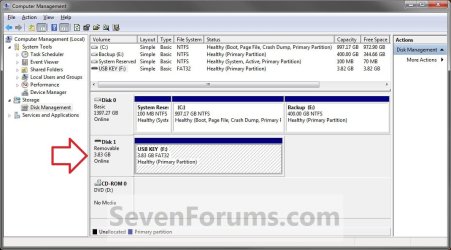
C) Click/tap on Disk Management in the left pane, and make note of the disk # in the middle pane of the disk that you want to clean or clean all. (see screenshot below)
NOTE: For example, I would use Disk 1 if I wanted to use clean or clean all on my USB key drive.
Computer_Management-1.jpg


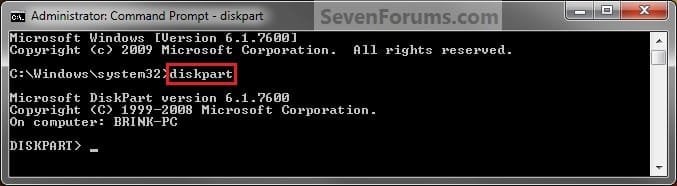
3. In the elevated command prompt, type diskpart and press Enter. (see screenshot below)
Step1.jpg
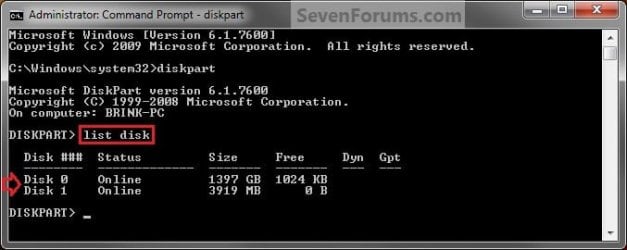
4. In the elevated command prompt, type list disk and press Enter. (see screenshot below)
NOTE: This will give you a list of disk numbers to select from.
Step2.jpg
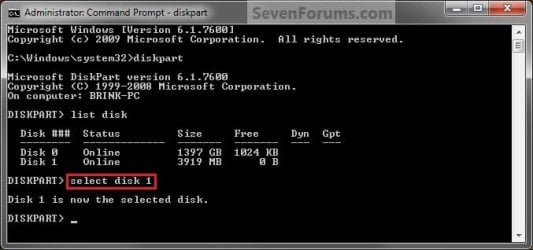
5. In the elevated command prompt, type select disk # and press Enter. (see screenshot below)
NOTE: You would substitute # for the disk number listed that you want to use clean or clean all on. For example, I want to use one of them on Disk 1 (from step 1) for my USB key drive, so I would type select disk 1 and press Enter.
Step3.jpg
6. If the status of the selected disk # (ex: Disk 3) shows as Offline, type online disk, and press Enter to make it online. (see screenshot below)
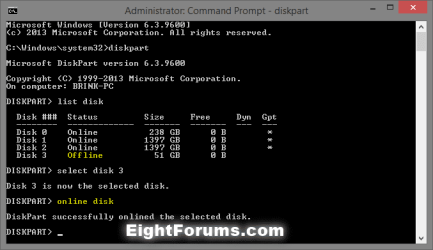
diskpart_online_disk.png
7. Do either step 8 or 9 below for which command you would like to use.


8. To Use the Clean Diskpart Command
NOTE: (Recommended) See the green INFO box at the top of the tutorial for more information about this command. This command will wipe the HDD quickly.
A) In the elevated command prompt, type clean, press Enter, and go to step 10 below. (see screenshot below)
NOTE: This will not take long to finish. Think of it as being like a quick format.
Step4_Clean.jpg
9. To Use the Clean All Diskpart Command
NOTE: See the green INFO box at the top of the tutorial for more information about this command. This command will wipe the HDD, and perform a secure erase. "Clean All" takes about an hour per 320 GB to finish running. It's best to only use this command if you wanted to help make sure that the data on the HDD cannot be recovered say when giving or selling the HDD to another person.
A) In the elevated command prompt, type clean all, and press Enter, and go to step 10 below. You will see the command prompt below as is until the "clean all" command is finished. (see screenshot below)

NOTE: This will take quite some time (several hours or more) to finish depending on how large the disk is since it is writing over each and every sector on it to zero. Think of it as being like a full or low level format.
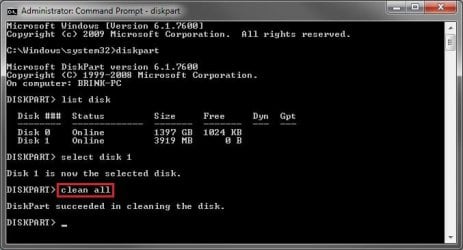
Step4_Clean_All.jpg
10. When finished, in the elevated command prompt, type exit and press Enter. Close the elevated command prompt.

11. The disk will be left as unallocated space. (see screenshot below)
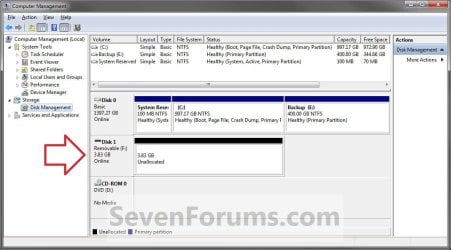
Computer_Management-2.jpg
12. You will now need to create a new partition or volume on the disk to be able to use it again.


That's it,
Shawn


Last edited:
The green information box at the top of the tutorial can give you more details on this to help better understand. :)
 

My Computer

Computer type
PC/Desktop
Computer Manufacturer/Model Number
Self built custom
OS
64-bit Windows 11 Pro for Workstations
CPU
Intel i7-8700K OC'd to 5 GHz
Motherboard
ASUS ROG Maximus XI Formula Z390
Memory
64 GB (4x16GB) G.SKILL TridentZ RGB DDR4 3600 MHz
Graphics Card(s)
ASUS ROG-STRIX-GTX1080TI-O11G-GAMING
Sound Card
Integrated
Monitor(s) Displays
2 x Samsung Odyssey G7 27"
Screen Resolution
2560x1440
Hard Drives
1TB Samsung 990 PRO M.2,
4TB Samsung 990 PRO PRO M.2,
TerraMaster F8 SSD Plus NAS
PSU
Seasonic Prime Titanium 850W
Case
Thermaltake Core P3
Cooling
Corsair Hydro H115i
Keyboard
Logitech wireless K800
Mouse
Logitech MX Master 4
Internet Speed
2 Gb/s Download and 100 Mb/s Upload
Antivirus
Malwarebyte Anti-Malware Premium
Browser
Google Chrome
Other Info
Logitech Z625 speaker system,
Logitech BRIO 4K Pro webcam,
HP Color LaserJet Pro MFP M477fdn,
APC SMART-UPS RT 1000 XL - SURT1000XLI,
Galaxy S23 Plus phone
Hello, and thank you for a very useful and comprehensible tutorial!

I have recently installed a new SSD and now have it up and running with Windows 7. I am now planning to reinstall the old HDD in a secondary slot on my laptop to keep for storage.

Brink said:
You cannot use the clean or clean all diskpart commands on a boot disk (ex: disk Windows 7 is installed on) unless you do it from a command prompt at boot.

This is probably an ignorant question, but am I required to perform the "clean" or "clean all" on the HDD (which has Windows 7 installed) from a command prompt at boot, when I'm booting from the SSD?

I am not sure if I completely understood the difference between "clean" and "clean all". The drive is only about 6 months old, but I just want to wipe it and make a partition for bulk files that won't fit on the SSD. Will a "clean" be sufficient or would "clean all" be a better alternative? The required time isn't really an issue.

Warm regards.
 

My Computer

Computer Manufacturer/Model Number
Dell XPS 17 L702X
OS
Windows 7 Home Premium 64bit
Hello Oysarl,

You will be able to run either of them from within the SSD Windows 7 on the HDD. No need to do it at boot.

A "Clean" command deletes (marks as deleted) all partitions and files on a HDD and leaves the HDD as "unallocated space" when finished. It doesn't take long to finish.

A "Clean All" command does the same thing as "Clean", but will secure erase all partitions and files on the HDD to make sure that they are permanently deleted instead of just marking them as deleted as the "Clean" does. A "Clean All" can take a long time to finish running.

For what you described, I would recommend running the "Clean" command. "Clean All" is usually for when you are selling or giving the HDD to another person, and/or you wanted to make sure that nothing can be recovered from the HDD. :)

Hope this helps,
Shawn
 

My Computer

Computer type
PC/Desktop
Computer Manufacturer/Model Number
Self built custom
OS
64-bit Windows 11 Pro for Workstations
CPU
Intel i7-8700K OC'd to 5 GHz
Motherboard
ASUS ROG Maximus XI Formula Z390
Memory
64 GB (4x16GB) G.SKILL TridentZ RGB DDR4 3600 MHz
Graphics Card(s)
ASUS ROG-STRIX-GTX1080TI-O11G-GAMING
Sound Card
Integrated
Monitor(s) Displays
2 x Samsung Odyssey G7 27"
Screen Resolution
2560x1440
Hard Drives
1TB Samsung 990 PRO M.2,
4TB Samsung 990 PRO PRO M.2,
TerraMaster F8 SSD Plus NAS
PSU
Seasonic Prime Titanium 850W
Case
Thermaltake Core P3
Cooling
Corsair Hydro H115i
Keyboard
Logitech wireless K800
Mouse
Logitech MX Master 4
Internet Speed
2 Gb/s Download and 100 Mb/s Upload
Antivirus
Malwarebyte Anti-Malware Premium
Browser
Google Chrome
Other Info
Logitech Z625 speaker system,
Logitech BRIO 4K Pro webcam,
HP Color LaserJet Pro MFP M477fdn,
APC SMART-UPS RT 1000 XL - SURT1000XLI,
Galaxy S23 Plus phone
Thank you, Brink. That is exactly what I needed to know. :)
 

My Computer

Computer Manufacturer/Model Number
Dell XPS 17 L702X
OS
Windows 7 Home Premium 64bit
You're most welcome Oysarl. :)
 

My Computer

Computer type
PC/Desktop
Computer Manufacturer/Model Number
Self built custom
OS
64-bit Windows 11 Pro for Workstations
CPU
Intel i7-8700K OC'd to 5 GHz
Motherboard
ASUS ROG Maximus XI Formula Z390
Memory
64 GB (4x16GB) G.SKILL TridentZ RGB DDR4 3600 MHz
Graphics Card(s)
ASUS ROG-STRIX-GTX1080TI-O11G-GAMING
Sound Card
Integrated
Monitor(s) Displays
2 x Samsung Odyssey G7 27"
Screen Resolution
2560x1440
Hard Drives
1TB Samsung 990 PRO M.2,
4TB Samsung 990 PRO PRO M.2,
TerraMaster F8 SSD Plus NAS
PSU
Seasonic Prime Titanium 850W
Case
Thermaltake Core P3
Cooling
Corsair Hydro H115i
Keyboard
Logitech wireless K800
Mouse
Logitech MX Master 4
Internet Speed
2 Gb/s Download and 100 Mb/s Upload
Antivirus
Malwarebyte Anti-Malware Premium
Browser
Google Chrome
Other Info
Logitech Z625 speaker system,
Logitech BRIO 4K Pro webcam,
HP Color LaserJet Pro MFP M477fdn,
APC SMART-UPS RT 1000 XL - SURT1000XLI,
Galaxy S23 Plus phone
Hiyya Shawn hav been doing this for sometime now and up to now have not had anything but minor problems but just the last two drives I am trying "make new" have come back as "Bad disk" with that black line.

Mate am I doing something wrong or is the machine telling me it is a dud disk please?

Mt next step was to follow Wolfgangs tut on SSD's before using it even if it is an HDD should I be doing that on HDD's or is that really not necessary?

John
 

My Computer

Computer type
PC/Desktop
Computer Manufacturer/Model Number
Own build (new) Desk1 / Asus ROG Win 7 / Desk2 1st build
OS
Desk1 7 Home Prem / Desk2 10 Pro / Main lap Asus ROG 10 Pro 2 laptop Toshiba 7 Pro Asus P2520 7 & 10
CPU
Desk1 i5 3750K / Laptop i7 GTX 860M / Desk2 i5 2500
Motherboard
Desk1 Asus P877-V / Desk2 Gigabyte H67 UD3H / Laptop ?
Memory
Desk1 8GB (1866) / Desk2 16GB (1333) / Laptop 8Gb DDR3
Graphics Card(s)
Desk 1& 2NVidia GTX 650 & Laptops on board Intel
Sound Card
Desk 1 & 2 -XONAR DG Realtek High Def audio Laptop
Monitor(s) Displays
Desk 1 Benq HD 2450 / Desk2 Philips 24" / Laptop 17.5"
Screen Resolution
1920x1080 D1 & D2 & Laptop 1
Hard Drives
Desk1 Samsung 120GB 830 SSD
Asus ROG 256GB 850 Pro SSD
Desk2 Samsung 840 256 SSD
Toshiba 120GB EVO
PSU
Desk 1 Corsair HX 1050/ Laptop ? / Desk 2 Corsair HX 650
Case
Desk 1 Cooler HAF XM ? Toshiba laptop / Desk2 Coolermaster
Cooling
Fans on all Desk1 -2 Desk2 - all Coolermasters 5 Laptop ?
Keyboard
Desk 1 MS Sidewinder X6 Desk 2 MS Sidewinder X 4
Mouse
Desk 1&2 - Gigabyte MS 900 gamer - laptop - Logitec wireless
Internet Speed
ADSL2+
Other Info
One other Desktop (tester) and spare Toshba laptop both with SSD's
Running Kaspersky 2016 ISS on all machines config'd identically
Logitec audio stereo systems on each machine (x3)
Canon MG5250MFC
Router/modem TP-Link running WPA2SK
Hey John,

That doesn't sound good for the HDDs. You might try running Seagate SeaTools on them to test to see if they may be bad (dead/dying) or not.

For in Windows 7: How to use SeaTools for Windows

For in DOS at Boot: Seatools for DOS tutorial

Good luck. I hope they are not bad. :(
 

My Computer

Computer type
PC/Desktop
Computer Manufacturer/Model Number
Self built custom
OS
64-bit Windows 11 Pro for Workstations
CPU
Intel i7-8700K OC'd to 5 GHz
Motherboard
ASUS ROG Maximus XI Formula Z390
Memory
64 GB (4x16GB) G.SKILL TridentZ RGB DDR4 3600 MHz
Graphics Card(s)
ASUS ROG-STRIX-GTX1080TI-O11G-GAMING
Sound Card
Integrated
Monitor(s) Displays
2 x Samsung Odyssey G7 27"
Screen Resolution
2560x1440
Hard Drives
1TB Samsung 990 PRO M.2,
4TB Samsung 990 PRO PRO M.2,
TerraMaster F8 SSD Plus NAS
PSU
Seasonic Prime Titanium 850W
Case
Thermaltake Core P3
Cooling
Corsair Hydro H115i
Keyboard
Logitech wireless K800
Mouse
Logitech MX Master 4
Internet Speed
2 Gb/s Download and 100 Mb/s Upload
Antivirus
Malwarebyte Anti-Malware Premium
Browser
Google Chrome
Other Info
Logitech Z625 speaker system,
Logitech BRIO 4K Pro webcam,
HP Color LaserJet Pro MFP M477fdn,
APC SMART-UPS RT 1000 XL - SURT1000XLI,
Galaxy S23 Plus phone
Hey John,

That doesn't sound good for the HDDs. You might try running Seagate SeaTools on them to test to see if they may be bad (dead/dying) or not.

For in Windows 7: How to use SeaTools for Windows

For in DOS at Boot: Seatools for DOS tutorial

Good luck. I hope they are not bad. :(
Thanks Shawn for quick reply I'll run that over them as I have dudded two now and on my third which I want to install Ubuntu as the XP disks (old) just will not work, and it's only for the kids of a friend to stop them wrecking (again) her laptop.

John
 

My Computer

Computer type
PC/Desktop
Computer Manufacturer/Model Number
Own build (new) Desk1 / Asus ROG Win 7 / Desk2 1st build
OS
Desk1 7 Home Prem / Desk2 10 Pro / Main lap Asus ROG 10 Pro 2 laptop Toshiba 7 Pro Asus P2520 7 & 10
CPU
Desk1 i5 3750K / Laptop i7 GTX 860M / Desk2 i5 2500
Motherboard
Desk1 Asus P877-V / Desk2 Gigabyte H67 UD3H / Laptop ?
Memory
Desk1 8GB (1866) / Desk2 16GB (1333) / Laptop 8Gb DDR3
Graphics Card(s)
Desk 1& 2NVidia GTX 650 & Laptops on board Intel
Sound Card
Desk 1 & 2 -XONAR DG Realtek High Def audio Laptop
Monitor(s) Displays
Desk 1 Benq HD 2450 / Desk2 Philips 24" / Laptop 17.5"
Screen Resolution
1920x1080 D1 & D2 & Laptop 1
Hard Drives
Desk1 Samsung 120GB 830 SSD
Asus ROG 256GB 850 Pro SSD
Desk2 Samsung 840 256 SSD
Toshiba 120GB EVO
PSU
Desk 1 Corsair HX 1050/ Laptop ? / Desk 2 Corsair HX 650
Case
Desk 1 Cooler HAF XM ? Toshiba laptop / Desk2 Coolermaster
Cooling
Fans on all Desk1 -2 Desk2 - all Coolermasters 5 Laptop ?
Keyboard
Desk 1 MS Sidewinder X6 Desk 2 MS Sidewinder X 4
Mouse
Desk 1&2 - Gigabyte MS 900 gamer - laptop - Logitec wireless
Internet Speed
ADSL2+
Other Info
One other Desktop (tester) and spare Toshba laptop both with SSD's
Running Kaspersky 2016 ISS on all machines config'd identically
Logitec audio stereo systems on each machine (x3)
Canon MG5250MFC
Router/modem TP-Link running WPA2SK
Each time I try to open an Elevated Command Prompt from Accessories/Command and run as administrator, typing Diskpart no disc info.appears. I am running W7 Version.6.1.7601. Any ideas?
Thanks
Ton
 

My Computer

Computer Manufacturer/Model Number
Advent 9004 PC
OS
Windows 7 64bitMicrosoft Windows 7 Home Premium 64-bit 7601 Multiprocessor Free Service Pack 1
CPU
tium(R) Dual-Core CPU E5300 @ 2.60GHz
Motherboard
Foxconn G31S
Memory
2.00 GB
Graphics Card(s)
Intel(R) G33/G31 Express Chipset Family
Sound Card
(1) High Definition Audio Device (2) Pro 9000
Hard Drives
(1) ST3500418AS ATA Device (2) Generic- Compact Flash USB Device (3) Generic- MS/MS-Pro USB Device (4) Generic- SD/MMC USB Device (5) Generic- SM/xD-Picture USB Device
Hello.


Have a look at the tutorial linked below to make sure you are getting into the command window the right way, then ...
DISKPART : At PC Startup


diskpart <enter>

list disk

select disk # = your disk number
 

My Computer

Computer Manufacturer/Model Number
* BFK Customs *
OS
W 7 64-bit Ultimate
CPU
Intel Q9550 Yorkfield
Motherboard
ASUS P5Q Pro
Memory
8GB Dominator 8500C5D
Graphics Card(s)
ATI : XFX 5870
Sound Card
Realtek HD Audio 7-1
Monitor(s) Displays
1x 47" LCD HDMI & 3x 26" LCD HDMI
Screen Resolution
1920x1080P & 1920x1200
Hard Drives
1x 80GB Intel X25-M G2 SSD : 1x 500GB & 1x 640GB WD Caviar Black(s)
PSU
Corsair 620HX
Case
Cooler Master RC-690
Cooling
Tuniq Tower 120, 2x 140mm and 3x 120mm case fans
Keyboard
Microsoft 500
Mouse
Razer Diamondback 3G
Internet Speed
14 Mb/s
Other Info
1x Koutech 3Gb/s SATA HDD Hot Swap Rack
Each time I try to open an Elevated Command Prompt from Accessories/Command and run as administrator, typing Diskpart no disc info.appears. I am running W7 Version.6.1.7601. Any ideas?
Thanks
Ton

Hello Ton,

As Ted posted above, it sounds like you may not have typed list disk and pressed Enter at step 4 after typing Diskpart and pressed Enter. :)

Hope this helps,
Shawn
 

My Computer

Computer type
PC/Desktop
Computer Manufacturer/Model Number
Self built custom
OS
64-bit Windows 11 Pro for Workstations
CPU
Intel i7-8700K OC'd to 5 GHz
Motherboard
ASUS ROG Maximus XI Formula Z390
Memory
64 GB (4x16GB) G.SKILL TridentZ RGB DDR4 3600 MHz
Graphics Card(s)
ASUS ROG-STRIX-GTX1080TI-O11G-GAMING
Sound Card
Integrated
Monitor(s) Displays
2 x Samsung Odyssey G7 27"
Screen Resolution
2560x1440
Hard Drives
1TB Samsung 990 PRO M.2,
4TB Samsung 990 PRO PRO M.2,
TerraMaster F8 SSD Plus NAS
PSU
Seasonic Prime Titanium 850W
Case
Thermaltake Core P3
Cooling
Corsair Hydro H115i
Keyboard
Logitech wireless K800
Mouse
Logitech MX Master 4
Internet Speed
2 Gb/s Download and 100 Mb/s Upload
Antivirus
Malwarebyte Anti-Malware Premium
Browser
Google Chrome
Other Info
Logitech Z625 speaker system,
Logitech BRIO 4K Pro webcam,
HP Color LaserJet Pro MFP M477fdn,
APC SMART-UPS RT 1000 XL - SURT1000XLI,
Galaxy S23 Plus phone
Each time I try to open an Elevated Command Prompt from Accessories/Command and run as administrator, typing Diskpart no disc info.appears. I am running W7 Version.6.1.7601. Any ideas?
Thanks
Ton

Hello Ton,

As Ted posted above, it sounds like you may not have typed list disk and pressed Enter at step 4 after typing Diskpart and pressed Enter. :)

Hope this helps,
Shawn

You are right Shawn, I somehow did not read the article properly and missed
"typing "list disk". Quite simple simple really and I am much obliged for prompting
me.
Many thanks
Tony
 

My Computer

Computer Manufacturer/Model Number
Advent 9004 PC
OS
Windows 7 64bitMicrosoft Windows 7 Home Premium 64-bit 7601 Multiprocessor Free Service Pack 1
CPU
tium(R) Dual-Core CPU E5300 @ 2.60GHz
Motherboard
Foxconn G31S
Memory
2.00 GB
Graphics Card(s)
Intel(R) G33/G31 Express Chipset Family
Sound Card
(1) High Definition Audio Device (2) Pro 9000
Hard Drives
(1) ST3500418AS ATA Device (2) Generic- Compact Flash USB Device (3) Generic- MS/MS-Pro USB Device (4) Generic- SD/MMC USB Device (5) Generic- SM/xD-Picture USB Device
You're most welcome Tony. I'm glad that Ted and I could help. :)
 

My Computer

Computer type
PC/Desktop
Computer Manufacturer/Model Number
Self built custom
OS
64-bit Windows 11 Pro for Workstations
CPU
Intel i7-8700K OC'd to 5 GHz
Motherboard
ASUS ROG Maximus XI Formula Z390
Memory
64 GB (4x16GB) G.SKILL TridentZ RGB DDR4 3600 MHz
Graphics Card(s)
ASUS ROG-STRIX-GTX1080TI-O11G-GAMING
Sound Card
Integrated
Monitor(s) Displays
2 x Samsung Odyssey G7 27"
Screen Resolution
2560x1440
Hard Drives
1TB Samsung 990 PRO M.2,
4TB Samsung 990 PRO PRO M.2,
TerraMaster F8 SSD Plus NAS
PSU
Seasonic Prime Titanium 850W
Case
Thermaltake Core P3
Cooling
Corsair Hydro H115i
Keyboard
Logitech wireless K800
Mouse
Logitech MX Master 4
Internet Speed
2 Gb/s Download and 100 Mb/s Upload
Antivirus
Malwarebyte Anti-Malware Premium
Browser
Google Chrome
Other Info
Logitech Z625 speaker system,
Logitech BRIO 4K Pro webcam,
HP Color LaserJet Pro MFP M477fdn,
APC SMART-UPS RT 1000 XL - SURT1000XLI,
Galaxy S23 Plus phone
Hi, I need to do this for my main HDD because it has a rootkit on it, but it won't allow me because it says that you can't perform a clean all on a disk containing the current boot, system, pagefile, crashdump or hibernation volume. That makes sense, but how can I wipe this HDD clean so I can do a clean win7 install?
 

My Computer

OS
Windows 7 Home Premium x64
CPU
Intel i7-2600K
Motherboard
ASUS Sabertooth Z77
Memory
G.SKILL Ripjaws (16 GB Total)
Graphics Card(s)
EVGA GeForce GTX 560 Ti
Monitor(s) Displays
ASUS
Screen Resolution
1920x1080 (2 Monitors)
Hard Drives
Hitachi GST Deskstar 2 TB (HDD)
Samsung 840 Pro 256 GB (SSD)
PSU
SeaSonic X Series X650 Gold
Case
Antec DF 85
Keyboard
Microsoft SideWinder X4
Mouse
MadCatz M.M.O. 7 & Logitech G35
Internet Speed
50 down
Antivirus
Avast Free, SuperAntiSpyware Free, Malwarebytes Free
Browser
Mozilla Firefox

My Computer

Computer Manufacturer/Model Number
Customized build from CyberPower
OS
Windows 7 Home Premium 64bit SP 1
CPU
Intel i5 2500k
Motherboard
Asus P8P67 Deluxe
Memory
8 gigabytes Corsair PC3-12800 DDR3
Graphics Card(s)
EVGA GeForce GTX 460 superclocked
Sound Card
Integrated
Monitor(s) Displays
ViewSonic 23" LCD
Screen Resolution
1980 x 1080
Hard Drives
120 Gb Samsung 840 Pro SSD
120 Gb Kingston Hyper X SSD
1 Tb WD Caviar Black HDD
PSU
Coolermaster 1000 watt modular
Case
Coolermaster HAF X full tower
Cooling
Coolermaster Hyper 212 plus
Keyboard
Logitech USB
Mouse
Microsoft 3 button
Internet Speed
download 1.5 Mb/sec upload 300Kb/sec
Thanks.
 

My Computer

OS
Windows 7 Home Premium x64
CPU
Intel i7-2600K
Motherboard
ASUS Sabertooth Z77
Memory
G.SKILL Ripjaws (16 GB Total)
Graphics Card(s)
EVGA GeForce GTX 560 Ti
Monitor(s) Displays
ASUS
Screen Resolution
1920x1080 (2 Monitors)
Hard Drives
Hitachi GST Deskstar 2 TB (HDD)
Samsung 840 Pro 256 GB (SSD)
PSU
SeaSonic X Series X650 Gold
Case
Antec DF 85
Keyboard
Microsoft SideWinder X4
Mouse
MadCatz M.M.O. 7 & Logitech G35
Internet Speed
50 down
Antivirus
Avast Free, SuperAntiSpyware Free, Malwarebytes Free
Browser
Mozilla Firefox
Looks like I'll be using this once again. Can I clean all on my HDD while using my SSD?
 

My Computer

OS
Windows 7 Home Premium x64
CPU
Intel i7-2600K
Motherboard
ASUS Sabertooth Z77
Memory
G.SKILL Ripjaws (16 GB Total)
Graphics Card(s)
EVGA GeForce GTX 560 Ti
Monitor(s) Displays
ASUS
Screen Resolution
1920x1080 (2 Monitors)
Hard Drives
Hitachi GST Deskstar 2 TB (HDD)
Samsung 840 Pro 256 GB (SSD)
PSU
SeaSonic X Series X650 Gold
Case
Antec DF 85
Keyboard
Microsoft SideWinder X4
Mouse
MadCatz M.M.O. 7 & Logitech G35
Internet Speed
50 down
Antivirus
Avast Free, SuperAntiSpyware Free, Malwarebytes Free
Browser
Mozilla Firefox
Hello Robo,

Yes, you sure can. It will not affect the SSD. :)
 

My Computer

Computer type
PC/Desktop
Computer Manufacturer/Model Number
Self built custom
OS
64-bit Windows 11 Pro for Workstations
CPU
Intel i7-8700K OC'd to 5 GHz
Motherboard
ASUS ROG Maximus XI Formula Z390
Memory
64 GB (4x16GB) G.SKILL TridentZ RGB DDR4 3600 MHz
Graphics Card(s)
ASUS ROG-STRIX-GTX1080TI-O11G-GAMING
Sound Card
Integrated
Monitor(s) Displays
2 x Samsung Odyssey G7 27"
Screen Resolution
2560x1440
Hard Drives
1TB Samsung 990 PRO M.2,
4TB Samsung 990 PRO PRO M.2,
TerraMaster F8 SSD Plus NAS
PSU
Seasonic Prime Titanium 850W
Case
Thermaltake Core P3
Cooling
Corsair Hydro H115i
Keyboard
Logitech wireless K800
Mouse
Logitech MX Master 4
Internet Speed
2 Gb/s Download and 100 Mb/s Upload
Antivirus
Malwarebyte Anti-Malware Premium
Browser
Google Chrome
Other Info
Logitech Z625 speaker system,
Logitech BRIO 4K Pro webcam,
HP Color LaserJet Pro MFP M477fdn,
APC SMART-UPS RT 1000 XL - SURT1000XLI,
Galaxy S23 Plus phone
Thanks, I shortly after remembered that I would have to do it by booting into diskpart since there is a windows 7 install on it. Oh well, thanks anyway and merry Christmas!
 

My Computer

OS
Windows 7 Home Premium x64
CPU
Intel i7-2600K
Motherboard
ASUS Sabertooth Z77
Memory
G.SKILL Ripjaws (16 GB Total)
Graphics Card(s)
EVGA GeForce GTX 560 Ti
Monitor(s) Displays
ASUS
Screen Resolution
1920x1080 (2 Monitors)
Hard Drives
Hitachi GST Deskstar 2 TB (HDD)
Samsung 840 Pro 256 GB (SSD)
PSU
SeaSonic X Series X650 Gold
Case
Antec DF 85
Keyboard
Microsoft SideWinder X4
Mouse
MadCatz M.M.O. 7 & Logitech G35
Internet Speed
50 down
Antivirus
Avast Free, SuperAntiSpyware Free, Malwarebytes Free
Browser
Mozilla Firefox
You're welcome. Merry Christmas. :)
 

My Computer

Computer type
PC/Desktop
Computer Manufacturer/Model Number
Self built custom
OS
64-bit Windows 11 Pro for Workstations
CPU
Intel i7-8700K OC'd to 5 GHz
Motherboard
ASUS ROG Maximus XI Formula Z390
Memory
64 GB (4x16GB) G.SKILL TridentZ RGB DDR4 3600 MHz
Graphics Card(s)
ASUS ROG-STRIX-GTX1080TI-O11G-GAMING
Sound Card
Integrated
Monitor(s) Displays
2 x Samsung Odyssey G7 27"
Screen Resolution
2560x1440
Hard Drives
1TB Samsung 990 PRO M.2,
4TB Samsung 990 PRO PRO M.2,
TerraMaster F8 SSD Plus NAS
PSU
Seasonic Prime Titanium 850W
Case
Thermaltake Core P3
Cooling
Corsair Hydro H115i
Keyboard
Logitech wireless K800
Mouse
Logitech MX Master 4
Internet Speed
2 Gb/s Download and 100 Mb/s Upload
Antivirus
Malwarebyte Anti-Malware Premium
Browser
Google Chrome
Other Info
Logitech Z625 speaker system,
Logitech BRIO 4K Pro webcam,
HP Color LaserJet Pro MFP M477fdn,
APC SMART-UPS RT 1000 XL - SURT1000XLI,
Galaxy S23 Plus phone
Back
Top