Disk D is full, can I clean it?

XPguy01

New member
Local time
10:37 AM
Messages
5
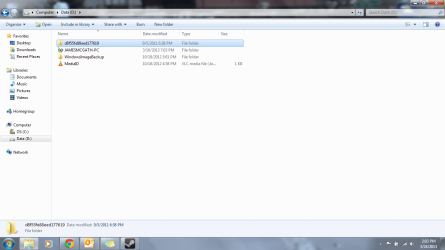
Hey guys, I have a Asus K53E laptop. 2 weeks ago I got a notifications about disk D being full. So I found your forum and got an external drive for the backups. Well I keep getting the notifications for it being full. So I was wondering if you could help me on if I could do to clean it out the drive. Just don't want to delete anything that I need.


Thanks.
 

Attachments

  • screenshot.png
    screenshot.png
    55.5 KB · Views: 13

My Computer My Computer

At a glance

Windows 7 Home 64 BitIntel Pentium B940@ 2.00GHz
Computer type
Laptop
Computer Manufacturer/Model Number
Asus
OS
Windows 7 Home 64 Bit
CPU
Intel Pentium B940@ 2.00GHz
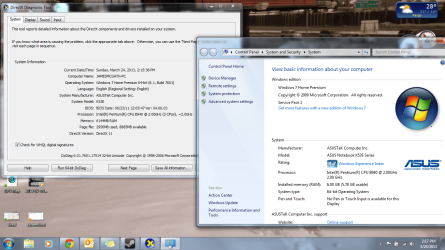
Second screen shot on system
 

Attachments

  • screenshot2.png
    screenshot2.png
    189.6 KB · Views: 12

My Computer My Computer

At a glance

Windows 7 Home 64 BitIntel Pentium B940@ 2.00GHz
Computer type
Laptop
Computer Manufacturer/Model Number
Asus
OS
Windows 7 Home 64 Bit
CPU
Intel Pentium B940@ 2.00GHz
Your info is a little vague for me at least.
Storing backups (images or otherwise) on your main OS HDD is not recommended. What happens when your HDD fails?
Here is what I recommend. With Windows "Backup and Restore" always select "Let me choose". Deselect create a system image. "Change Settings" will enable you to point to the default file/folder backup drive. For System imaging use the manual "Create system image" button over on the left of the screen and browse to your external HDD. Note that Windows imaging is limited in its capabilities but you can work around some of these
http://www.sevenforums.com/tutorials/663-backup-complete-computer-create-image-backup.html
An excellent third party imaging tool (free)
Macrium Reflect FREE Edition - Information and download
pay a little for more features.
 

My Computer My Computer

At a glance

Windows 7x64 Home Premium SP1Intel i7 2600kG.Skill Ripjaws (DDR3-1600) 2x4GBNvidia GeForce GTS 450; Intel HD Graphics 300...
Computer type
PC/Desktop
Computer Manufacturer/Model Number
Own build
OS
Windows 7x64 Home Premium SP1
CPU
Intel i7 2600k
Motherboard
ASUS P8Z68 Deluxe
Memory
G.Skill Ripjaws (DDR3-1600) 2x4GB
Graphics Card(s)
Nvidia GeForce GTS 450; Intel HD Graphics 3000(GT2+)
Monitor(s) Displays
Dell Ultrasharp IPS panel U2311H, Samsung SyncMaster P2350
Screen Resolution
1920x1080
Hard Drives
Samsung 850 Pro SSD 256GB, Samsung SSD 840 120GB, Seagates 1TB Barracuda ST31000528AS x2
PSU
Seasonic M12II 520W
Case
Lian Li Lancool PC-K60
Cooling
Case: 1x120mm, 3x140mm CPU: Hyper 212+
Keyboard
Logitech MK520 (wireless)
Mouse
Logitech MK520
Internet Speed
6-7 Mbps
Antivirus
Norton Security Premium, Malwarebytes on 2 (MSE on 3rd PC)
Browser
FireFox
Other Info
Audio: Logitech Z523 2.1
What do I do with the d drive? How can I empty it?
 

My Computer My Computer

At a glance

Windows 7 Home 64 BitIntel Pentium B940@ 2.00GHz
Computer type
Laptop
Computer Manufacturer/Model Number
Asus
OS
Windows 7 Home 64 Bit
CPU
Intel Pentium B940@ 2.00GHz
Did you change your backup settings to go to the Ext HD ?

Can you give us a snip of your Disk Management ?

:orb: Start :ar: Computer Management :ar: Disk Management
Maximize to full screen
Take a Snip of it with the Snipping Tool, Save snip, then upload the snip here in your post.
 

My Computer My Computer

At a glance

Win7 Enterprise, Win7 x86 (Ult 7600), Win7 x6...AMD fx8350 4ghz, AMD-32 2400mhz, AMD-64 3200m...2gb, 4gb on the Ult 7600, 4gb on Technet RTM,...Draw my own Graphics, several nVidia cards
Computer type
PC/Desktop
Computer Manufacturer/Model Number
Built them myself, Science Experiments !
OS
Win7 Enterprise, Win7 x86 (Ult 7600), Win7 x64 Ult 7600, TechNet RTM on AMD x64 (2.8Ghz)
CPU
AMD fx8350 4ghz, AMD-32 2400mhz, AMD-64 3200mhz, AMDx64 2.8G
Motherboard
SIS 755, ECS-K8M890M-M (Ult 7600), GigaByte & others
Memory
2gb, 4gb on the Ult 7600, 4gb on Technet RTM, 32gb on FX8350
Graphics Card(s)
Draw my own Graphics, several nVidia cards
Sound Card
on motherboard
Monitor(s) Displays
19" flat scr, 28" I-Inc widescr,22" Emprex Widescr, 23" Acer
Screen Resolution
1280 x 1024, 1440 x 900, 1920 x 1080
Hard Drives
6 pata Ide HD's & 2 Sata HD's
added 80gb external on Ult 7600 computer,
numerous extra 1tb, 2TB, 3Tb SATA HD's
A collection of ext HD Docks w/ HDs
PSU
430w, 550w, 600w, 700, 800, etc
Case
All Generic Full Towers
Cooling
Open Air & a few fans, some w/ colored LEDs
Keyboard
Compaq & Dell recycled from GoodWill
Mouse
Made in China Optical Wired Mouse
Internet Speed
Fast Cable InterNet
Antivirus
AVG Free on 24 different Desktops, NO Problems!
Browser
IE 8 is preferred, but use FireFox sometimes
Other Info
Linksys Routers, switches, & Hubs
Too Many USB Flash Drives to count, Biggest is 64GB !
Eight computers in my home network.
Sixteen computers at my business network.
Linked via TeamViewer !
Lots of old used spare computer parts everywhere!
I guess i dont see a Snip option.
 

Attachments

  • screenshot3.png
    screenshot3.png
    48.3 KB · Views: 7

My Computer My Computer

At a glance

Windows 7 Home 64 BitIntel Pentium B940@ 2.00GHz
Computer type
Laptop
Computer Manufacturer/Model Number
Asus
OS
Windows 7 Home 64 Bit
CPU
Intel Pentium B940@ 2.00GHz
Snip is what I call a screen shot. Yes your D: is full. From your first post screen shot, it looks like you only have your backup on D:, I don't see any other type of files, pics, data. If you want to get rid of all this, you could right click on D: drive & format it to wipe it all out. Did you set your backup to go to the Ext HD ?
 

My Computer My Computer

At a glance

Win7 Enterprise, Win7 x86 (Ult 7600), Win7 x6...AMD fx8350 4ghz, AMD-32 2400mhz, AMD-64 3200m...2gb, 4gb on the Ult 7600, 4gb on Technet RTM,...Draw my own Graphics, several nVidia cards
Computer type
PC/Desktop
Computer Manufacturer/Model Number
Built them myself, Science Experiments !
OS
Win7 Enterprise, Win7 x86 (Ult 7600), Win7 x64 Ult 7600, TechNet RTM on AMD x64 (2.8Ghz)
CPU
AMD fx8350 4ghz, AMD-32 2400mhz, AMD-64 3200mhz, AMDx64 2.8G
Motherboard
SIS 755, ECS-K8M890M-M (Ult 7600), GigaByte & others
Memory
2gb, 4gb on the Ult 7600, 4gb on Technet RTM, 32gb on FX8350
Graphics Card(s)
Draw my own Graphics, several nVidia cards
Sound Card
on motherboard
Monitor(s) Displays
19" flat scr, 28" I-Inc widescr,22" Emprex Widescr, 23" Acer
Screen Resolution
1280 x 1024, 1440 x 900, 1920 x 1080
Hard Drives
6 pata Ide HD's & 2 Sata HD's
added 80gb external on Ult 7600 computer,
numerous extra 1tb, 2TB, 3Tb SATA HD's
A collection of ext HD Docks w/ HDs
PSU
430w, 550w, 600w, 700, 800, etc
Case
All Generic Full Towers
Cooling
Open Air & a few fans, some w/ colored LEDs
Keyboard
Compaq & Dell recycled from GoodWill
Mouse
Made in China Optical Wired Mouse
Internet Speed
Fast Cable InterNet
Antivirus
AVG Free on 24 different Desktops, NO Problems!
Browser
IE 8 is preferred, but use FireFox sometimes
Other Info
Linksys Routers, switches, & Hubs
Too Many USB Flash Drives to count, Biggest is 64GB !
Eight computers in my home network.
Sixteen computers at my business network.
Linked via TeamViewer !
Lots of old used spare computer parts everywhere!
ok will do. I dont always carry my external HD with me on the road, since alot of my work is road based. So I might have to just back it up manually, when i get time? But I do have it set to not backup on D.
 

My Computer My Computer

At a glance

Windows 7 Home 64 BitIntel Pentium B940@ 2.00GHz
Computer type
Laptop
Computer Manufacturer/Model Number
Asus
OS
Windows 7 Home 64 Bit
CPU
Intel Pentium B940@ 2.00GHz
A little portable external HDD (eg WD 750GB Essentials) is the size of a pack of cards. Go for a USB 3 if your laptop supports usb 3.
 

My Computer My Computer

At a glance

Windows 7x64 Home Premium SP1Intel i7 2600kG.Skill Ripjaws (DDR3-1600) 2x4GBNvidia GeForce GTS 450; Intel HD Graphics 300...
Computer type
PC/Desktop
Computer Manufacturer/Model Number
Own build
OS
Windows 7x64 Home Premium SP1
CPU
Intel i7 2600k
Motherboard
ASUS P8Z68 Deluxe
Memory
G.Skill Ripjaws (DDR3-1600) 2x4GB
Graphics Card(s)
Nvidia GeForce GTS 450; Intel HD Graphics 3000(GT2+)
Monitor(s) Displays
Dell Ultrasharp IPS panel U2311H, Samsung SyncMaster P2350
Screen Resolution
1920x1080
Hard Drives
Samsung 850 Pro SSD 256GB, Samsung SSD 840 120GB, Seagates 1TB Barracuda ST31000528AS x2
PSU
Seasonic M12II 520W
Case
Lian Li Lancool PC-K60
Cooling
Case: 1x120mm, 3x140mm CPU: Hyper 212+
Keyboard
Logitech MK520 (wireless)
Mouse
Logitech MK520
Internet Speed
6-7 Mbps
Antivirus
Norton Security Premium, Malwarebytes on 2 (MSE on 3rd PC)
Browser
FireFox
Other Info
Audio: Logitech Z523 2.1
Back
Top