
Disk partition

Dhahn

New member
Member
Local time
12:42 AM
Messages
27
Location
Benson, AZ
Hello,
Please excuse my jumping in this thread. I have a question(s). I purchased this Samsung Chronos used a few weeks ago. I don’t understand all of the research I have been reading on Disk partition. I have read in the Samsung user guide that the Disk partition can only be performed one time after the 1st startup. If I get a snip of the Windows 7 disk management screen, can I post it here and get advice on its status... if so, how do I take the snip?
“Windows 7 home premium SP1 64bit”
Thanks in advance,
Dennis
 

My Computer

Computer Manufacturer/Model Number
Samsung series 7 Chronos - NP700Z5A - S04US Laptop S/N00125
OS
Windows 7 Home Premium 64 bit SP 1
CPU
Intel i7-2675QM @2.20GHz Sandy Bridge 32nm / Cache 6MB L3
Motherboard
?
Memory
RAM 8GB DDR3 / Crucial 4GB in slot 1 _ 4GB on motherboard
Graphics Card(s)
AMD Radeon HD 650M / Graphics memory 1GB DDR5
Sound Card
Realtek HD
Monitor(s) Displays
15.6" Matt screen & small width bezel... love this screen!
Screen Resolution
1600x900
Hard Drives
Hitachi HTS 727575A9E364 750GB 7200RPM /
SanDisk issd P4 8GB
PSU
Samsung 90W Power Brick / Battery 8 Cell Li-Po / 5420 mAh
Case
Aluminum / exception, plastic bottom but overall very sturdy
Cooling
Internal fan's
Keyboard
102 Backlit, love this keyboard, keys have nice soft texture
Mouse
Wireless Logitech
Internet Speed
DSL up to 12Mbps
Other Info
Up graded RAM from 6GB to 8GB using Crucial 4GB card.
Up graded network card from Broadcom to intel 6230. Full HDMI port, mini VGA port, (2) 3.0 USB (1) 2.0 USB, Slot-Load DVD, Multi 4 in1 card slot. Coolmaster Notepal. Hate the touchpad & "Easy Software Manager" This is the best laptop machine I have ever owned, super fast performance at 1/2 the cost for a compatable Mac.
Hello Dhahn, welcome to Seven Forums!


I'm going to get a site Administrator to create this as a new thread, you will be shown where it's been moved to.


The tutorial at the link below will show you how to post a snip of Windows 7 disk management.


My Computer

Computer Manufacturer/Model Number
* BFK Customs *
OS
W 7 64-bit Ultimate
CPU
Intel Q9550 Yorkfield
Motherboard
ASUS P5Q Pro
Memory
8GB Dominator 8500C5D
Graphics Card(s)
ATI : XFX 5870
Sound Card
Realtek HD Audio 7-1
Monitor(s) Displays
1x 47" LCD HDMI & 3x 26" LCD HDMI
Screen Resolution
1920x1080P & 1920x1200
Hard Drives
1x 80GB Intel X25-M G2 SSD : 1x 500GB & 1x 640GB WD Caviar Black(s)
PSU
Corsair 620HX
Case
Cooler Master RC-690
Cooling
Tuniq Tower 120, 2x 140mm and 3x 120mm case fans
Keyboard
Microsoft 500
Mouse
Razer Diamondback 3G
Internet Speed
14 Mb/s
Other Info
1x Koutech 3Gb/s SATA HDD Hot Swap Rack

My Computer

Computer type
PC/Desktop
Computer Manufacturer/Model Number
Ignatz Special; 4 speed manual gearbox; factory air conditioning; one of one
OS
Windows 7 Home Premium SP1, 64-bit
CPU
Intel Skylake i5-6600K, not overclocked
Motherboard
AsRock Z170M Extreme 4, micro ATX
Memory
8 GB HyperX DDR4-2666 (2 x 4 GB)
Graphics Card(s)
none; graphics are integrated on CPU
Sound Card
onboard: Realtek ALC1150; external: USB Behringer UF0-202
Monitor(s) Displays
Dell S2340M 23 inch IPS
Screen Resolution
1600 x 900
Hard Drives
System: Crucial MX100 series SSD, 128 GB;
Data: Samsung Spinpoint 103SJ, 1 TB;
Backup: WD Caviar Green WD30EZRX-00D8PB0, 3 TB
PSU
Rosewill SilentNight 500 watt fanless, semi-modular
Case
Antec Solo II
Cooling
Noctua NH-U12S; Noctua F12 intake, Noctua S12A exhaust
Keyboard
Microsoft 200 6JH-00001 USB
Mouse
Dell or Microsoft optical wired; USB
Antivirus
Microsoft Security Essentials and Malwarebytes Premium
Browser
Pale Moon
Other Info
All fans PWM; speeds at idle: CPU circa 500 rpm; intake circa 600 rpm; exhaust circa 600 rpm; CPU temps 27 idle and 47 C load in a warm room (27 C/81 F) when running Intel Extreme Tuning Utility stress test.
Sorry for posting in the incorrect thread.
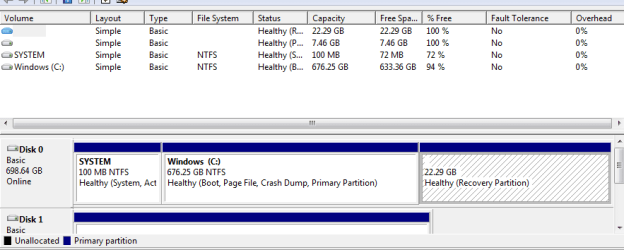
I have taken a snip of the Disk's... as I mentioned I don’t know what I'm looking at. Need an opinion if the disk's need to be partitioned.
Thanks!
Dennis
Capture.PNG
 

My Computer

Computer Manufacturer/Model Number
Samsung series 7 Chronos - NP700Z5A - S04US Laptop S/N00125
OS
Windows 7 Home Premium 64 bit SP 1
CPU
Intel i7-2675QM @2.20GHz Sandy Bridge 32nm / Cache 6MB L3
Motherboard
?
Memory
RAM 8GB DDR3 / Crucial 4GB in slot 1 _ 4GB on motherboard
Graphics Card(s)
AMD Radeon HD 650M / Graphics memory 1GB DDR5
Sound Card
Realtek HD
Monitor(s) Displays
15.6" Matt screen & small width bezel... love this screen!
Screen Resolution
1600x900
Hard Drives
Hitachi HTS 727575A9E364 750GB 7200RPM /
SanDisk issd P4 8GB
PSU
Samsung 90W Power Brick / Battery 8 Cell Li-Po / 5420 mAh
Case
Aluminum / exception, plastic bottom but overall very sturdy
Cooling
Internal fan's
Keyboard
102 Backlit, love this keyboard, keys have nice soft texture
Mouse
Wireless Logitech
Internet Speed
DSL up to 12Mbps
Other Info
Up graded RAM from 6GB to 8GB using Crucial 4GB card.
Up graded network card from Broadcom to intel 6230. Full HDMI port, mini VGA port, (2) 3.0 USB (1) 2.0 USB, Slot-Load DVD, Multi 4 in1 card slot. Coolmaster Notepal. Hate the touchpad & "Easy Software Manager" This is the best laptop machine I have ever owned, super fast performance at 1/2 the cost for a compatable Mac.
Need an opinion if the disk's need to be partitioned.

The disk is already partitioned.

I see 3 of them.

You don't have to do anything.

You COULD make a D partition, but it wouldn't improve your performance.
 

My Computer

Computer type
PC/Desktop
Computer Manufacturer/Model Number
Ignatz Special; 4 speed manual gearbox; factory air conditioning; one of one
OS
Windows 7 Home Premium SP1, 64-bit
CPU
Intel Skylake i5-6600K, not overclocked
Motherboard
AsRock Z170M Extreme 4, micro ATX
Memory
8 GB HyperX DDR4-2666 (2 x 4 GB)
Graphics Card(s)
none; graphics are integrated on CPU
Sound Card
onboard: Realtek ALC1150; external: USB Behringer UF0-202
Monitor(s) Displays
Dell S2340M 23 inch IPS
Screen Resolution
1600 x 900
Hard Drives
System: Crucial MX100 series SSD, 128 GB;
Data: Samsung Spinpoint 103SJ, 1 TB;
Backup: WD Caviar Green WD30EZRX-00D8PB0, 3 TB
PSU
Rosewill SilentNight 500 watt fanless, semi-modular
Case
Antec Solo II
Cooling
Noctua NH-U12S; Noctua F12 intake, Noctua S12A exhaust
Keyboard
Microsoft 200 6JH-00001 USB
Mouse
Dell or Microsoft optical wired; USB
Antivirus
Microsoft Security Essentials and Malwarebytes Premium
Browser
Pale Moon
Other Info
All fans PWM; speeds at idle: CPU circa 500 rpm; intake circa 600 rpm; exhaust circa 600 rpm; CPU temps 27 idle and 47 C load in a warm room (27 C/81 F) when running Intel Extreme Tuning Utility stress test.
Much appreciated, I will let it ride as it is... I was curious if it had been done and correctly. The performance is good. I went to this laptop from an old Gateway tower w/win 2nd addition.
Just so I don’t screw up again on posting in a wrong thread... I'm experiencing the text size changing from 100% to 125%.
Thanks for your input!
Dennis
 
Last edited by a moderator:

My Computer

Computer Manufacturer/Model Number
Samsung series 7 Chronos - NP700Z5A - S04US Laptop S/N00125
OS
Windows 7 Home Premium 64 bit SP 1
CPU
Intel i7-2675QM @2.20GHz Sandy Bridge 32nm / Cache 6MB L3
Motherboard
?
Memory
RAM 8GB DDR3 / Crucial 4GB in slot 1 _ 4GB on motherboard
Graphics Card(s)
AMD Radeon HD 650M / Graphics memory 1GB DDR5
Sound Card
Realtek HD
Monitor(s) Displays
15.6" Matt screen & small width bezel... love this screen!
Screen Resolution
1600x900
Hard Drives
Hitachi HTS 727575A9E364 750GB 7200RPM /
SanDisk issd P4 8GB
PSU
Samsung 90W Power Brick / Battery 8 Cell Li-Po / 5420 mAh
Case
Aluminum / exception, plastic bottom but overall very sturdy
Cooling
Internal fan's
Keyboard
102 Backlit, love this keyboard, keys have nice soft texture
Mouse
Wireless Logitech
Internet Speed
DSL up to 12Mbps
Other Info
Up graded RAM from 6GB to 8GB using Crucial 4GB card.
Up graded network card from Broadcom to intel 6230. Full HDMI port, mini VGA port, (2) 3.0 USB (1) 2.0 USB, Slot-Load DVD, Multi 4 in1 card slot. Coolmaster Notepal. Hate the touchpad & "Easy Software Manager" This is the best laptop machine I have ever owned, super fast performance at 1/2 the cost for a compatable Mac.
Back
Top