
holytoutant
New member
- Local time
- 3:41 PM
- Messages
- 1
Hi everyone!
This is my first post on this forum
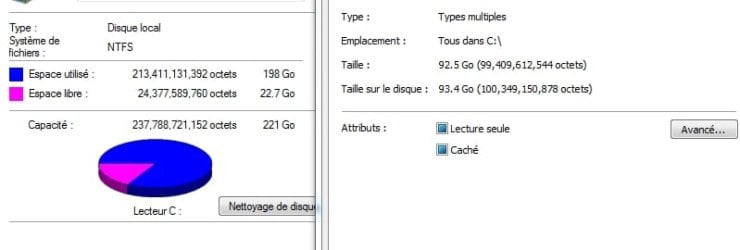
My Hard Drive is almost full but I don't understand why. I've check how many space was left on my C:\ with its property windows and it says "22GB left" but when I enter the C:\ drive and I select all the files and then toggle the property windows, it says that only 92.5 GB is used...Is there any "invisible" files that I don't see?
Check the attachement (in french sorry ) for more informations
Regards,
This is my first post on this forum
My Hard Drive is almost full but I don't understand why. I've check how many space was left on my C:\ with its property windows and it says "22GB left" but when I enter the C:\ drive and I select all the files and then toggle the property windows, it says that only 92.5 GB is used...Is there any "invisible" files that I don't see?
Check the attachement (in french sorry
) for more informationsRegards,
Attachments
My Computer
- OS
- Windows 7 Professional x32


